⏱ 17 min read
Most enterprise architects don’t have a UML problem. They have a modeling discipline problem. UML modeling best practices
That sounds harsh, but it’s true. Teams blame UML for being too abstract, too academic, too old, too heavy. Then they turn around and produce architecture diagrams with random icons, inconsistent meanings, and boxes labeled “API Layer” connected to clouds labeled “Platform” with arrows that could mean literally anything. That is not agility. That is just ambiguity with nice colors.
This is exactly where UML Profiles become useful. UML for microservices
Not because profiles make UML “more powerful” in some theoretical standards-body sense. And not because every architecture team should suddenly become modeling purists. They matter because they let you adapt UML to the language of your enterprise without throwing away rigor. You keep the structure, but you make it speak your domain: banking products, Kafka streams, IAM controls, cloud deployment patterns, internal platform conventions.
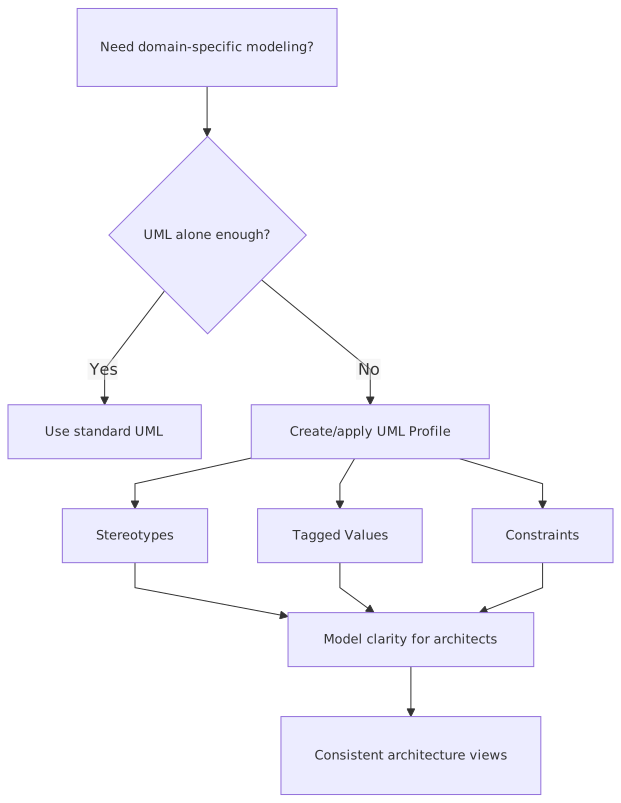
If you want the simple version early: a UML Profile is a way to customize UML for a specific domain by adding stereotypes, tagged values, and constraints to standard UML elements. In practice, that means you can take a plain UML component, class, deployment node, or interface and mark it as things your organization actually cares about, like <, <, <, or <.
That’s the SEO answer. It’s accurate. But it’s not enough.
Because the real question is not “what is a UML profile?” The real question is: when does using one improve architecture work, and when does it become another governance hobby that nobody respects?
That distinction matters. A lot.
First, what a UML Profile really is
A UML Profile is not a new modeling language. It’s an extension mechanism for UML.
At a practical level, you use three things:
- Stereotypes: labels that specialize UML elements, like
<or> <> - Tagged values: extra properties attached to those elements, like
retention=7d,classification=Confidential, orrto=15m - Constraints: rules that say what is allowed or required, such as “a
<must not connect directly to a public subnet”>
That’s it. Not magic. Not philosophy. Just controlled extension.
If you’ve ever looked at a generic UML deployment diagram and thought, “This tells me nothing about whether the workload is internet-facing, regulated, event-driven, or identity-dependent,” a profile is the missing layer.
Without a profile, UML says: “this is a node” or “this is a component.”
With a profile, your enterprise says: “this is an AWS EKS cluster hosting a regulated payment service that consumes Kafka events and relies on workforce IAM federation.”
That difference is why profiles matter.
Why architects should care
Here’s my opinion: UML Profiles are worth using only when they reduce interpretation gaps across teams. Not because the repository looks sophisticated. Not because a tool vendor supports them. Not because the architecture board wants “standardization.”
Interpretation gaps are the real tax in enterprise architecture.
A security architect sees an application diagram and asks where trust boundaries are.
A platform architect wants to know if the workload is containerized or VM-based.
A data architect wants to know whether “event stream” means Kafka, MQ, CDC, or batch.
An IAM architect wants to know whether “auth service” means OAuth authorization server, SAML broker, workforce directory sync, or just a login page someone drew.
Generic UML doesn’t answer those questions well enough. And ad hoc notation answers them inconsistently.
Profiles help when you need precision without inventing a whole notation from scratch.
That’s the sweet spot.
When to use UML Profiles
Let’s make this practical. You should seriously consider a UML Profile when at least one of these conditions is true:
1. Your domain has repeated architectural concepts that basic UML doesn’t express well
If every program in your bank uses Kafka topics, consumer groups, schema registries, IAM trust relationships, cloud landing zones, and data classification labels, then drawing all of that as generic components is lazy. You are hiding important meaning.
2. Multiple teams produce diagrams that need to be comparable
In enterprise work, consistency matters more than artistic freedom. If one team uses a cylinder for Kafka and another uses a lightning bolt and a third writes “stream bus” in a rectangle, architecture review becomes archaeology.
3. You need metadata on diagrams, not just shapes
This is where tagged values become valuable. Things like:
- data sensitivity
- availability tier
- deployment region
- ownership
- RPO/RTO
- IAM trust domain
- public/private exposure
- encryption requirement
These aren’t decoration. They are architecture decisions.
4. You want model validation
This is underused. A good profile can enforce useful rules:
- internet-facing apps must use approved identity patterns
- regulated workloads must deploy only in approved cloud zones
- Kafka producers of customer events must reference registered schemas
- systems consuming privileged IAM events must not bypass audit logging
That’s real architecture value.
5. You have enough maturity to maintain the profile
This is the contrarian part: most organizations are not ready.
If your architecture team can’t maintain a glossary, don’t build a profile with 70 stereotypes and pretend you’re doing enterprise modeling. You’re just creating shelfware.
When not to use UML Profiles
Let me be even more direct. There are plenty of cases where UML Profiles are the wrong answer.
Don’t use them if your architecture practice is mostly lightweight communication
If your teams live in whiteboards, Miro, and fast-moving product delivery, a formal profile may be too heavy. That doesn’t make them unserious. It just means the overhead may exceed the benefit.
Don’t use them to compensate for bad architecture thinking
A messy architecture described with precise stereotypes is still messy architecture.
Don’t use them if nobody will consume the semantics
This happens all the time. Architects create a profile, publish a metamodel poster, and then every project team exports diagrams to PowerPoint. At that point the semantics are dead.
Don’t use them because “we need an enterprise standard”
That sentence has killed more useful architecture work than almost anything else. Standardization is not a goal. It is a cost you accept when it creates enough downstream value.
The real payoff in enterprise architecture work
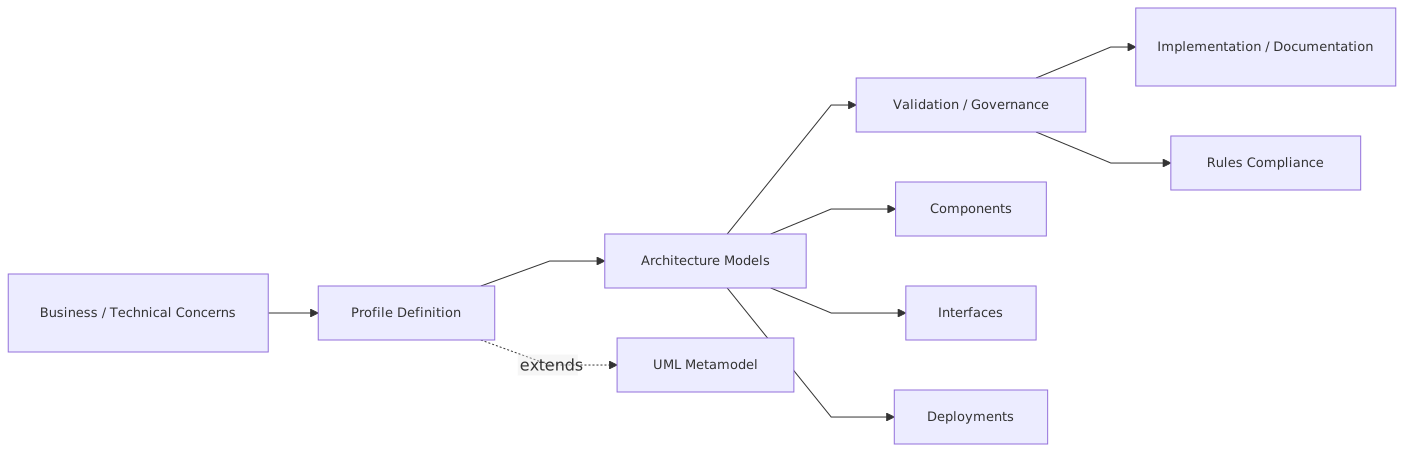
In real architecture work, UML Profiles are most valuable in four places:
That last one is often overlooked.
If your models use a shared profile, you can ask useful enterprise questions:
- Which applications publish customer master events to Kafka?
- Which systems still depend on legacy IAM directories?
- Which workloads in cloud process PCI data?
- Which internet-facing services lack centralized identity federation?
- Which systems consume topics with no schema governance?
You cannot answer those questions from random Visio diagrams.
This is where profiles move from diagramming to architecture intelligence.
A concrete enterprise example: retail banking modernization
Let’s take a real-world style example. A bank is modernizing its retail banking platform.
It has:
- a legacy core banking system
- digital channels on cloud
- Kafka for event streaming
- a centralized IAM platform supporting customer and workforce identity
- multiple domain services for accounts, payments, cards, and notifications
- strict regulatory controls around customer data and auditability
Now imagine the architecture team is trying to model the target state.
Without a profile, the diagrams might show:
- boxes for services
- arrows for APIs
- some cylinders for databases
- maybe a Kafka icon if someone remembers
- a cloud shape around “AWS”
- a padlock icon for security
Looks decent. Tells you almost nothing.
Now apply a lightweight enterprise UML Profile.
Example stereotypes
<> <> <> <> <> <> <> <> <> <> <>
Example tagged values
dataClassificationcriticalitydeploymentRegionrtoownerschemaRegisteredauthProtocolinternetFacingauditRetentionresidency
Example constraints
- A
<carrying customer events must have> schemaRegistered=true - A
<cannot directly depend on a> <over an unmanaged interface> - Any
<with> internetFacing=truemust integrate with<using approved protocols> - A
<must have encryption and retention tags defined>
Now the model becomes useful.
The “Account Events” topic is not just a cylinder. It is a < with classification, retention, schema status, and ownership.
The mobile banking API is not just a component. It is a < and maybe also a <, marked as internet-facing, region-specific, and dependent on customer IAM.
The branch operations portal uses <, not customer IAM, which sounds obvious until a project team accidentally conflates the two.
The payment fraud service is tagged criticality=high, rto=5m, and consumes customer transaction events from Kafka, making resilience and replay discussions much more concrete.
This is not bureaucracy. This is architecture becoming explicit.
Kafka is a good reason to use profiles
Kafka is one of the best examples because generic UML is weak at event-stream semantics.
Architects often draw Kafka as:
- a queue
- a database
- a bus
- a magic black rectangle labeled “events”
None of those are quite right. And the differences matter.
In enterprise systems, you often need to distinguish:
- topic vs event schema vs producer vs consumer
- operational event vs business event
- CDC stream vs domain event
- internal topic vs external integration topic
- durable retention vs transient processing
- exactly-once aspirations vs real-world at-least-once behavior
A profile helps you model this consistently.
For example:
<> <> <> <> <> <>
Then add tags:
retentionpartitionCountkeyStrategyschemaCompatibilitycontainsPII
Now your architecture review can ask sane questions:
- Why is a customer-profile topic carrying PII with 30-day retention?
- Why is a payment service consuming a CDC stream as if it were a business event?
- Why is this integration topic missing schema governance?
- Why do three teams publish to the same topic with different event contracts?
Without profile semantics, these become vague conversations. With them, they become visible design issues.
IAM is another place where profiles pay for themselves
Identity and access management diagrams are often terrible. Sorry, but they are.
Architects draw a box called “SSO” and then arrows to applications. That is not IAM architecture. That is wishful sketching.
Real enterprise IAM has distinctions that matter:
- customer identity vs workforce identity
- authentication vs authorization
- identity provider vs relying party
- federation broker vs directory
- role model vs policy engine
- privileged access vs standard access
- token issuance vs token validation
These concepts are exactly the kind of thing a UML Profile can express cleanly.
You might define:
<> <> <> <> <> <> <>
Then tagged values:
protocolmfaRequiredsessionRiskBasedtokenLifetimeidentityProofingLeveladminAccessRestricted
In a bank, this matters immediately. A customer-facing mortgage portal and an internal underwriter workbench should not just both connect to “IAM.” They have different trust models, different assurance levels, and different audit expectations.
A profile forces that distinction into the model.
And that’s healthy.
Cloud architecture: where profiles can stop hand-wavy nonsense
Cloud diagrams are now the biggest source of architectural theater in many organizations.
Everything is a managed service. Everything is “serverless.” Everything is “zero trust.” Half the time nobody can tell whether the workload is public, private, shared, isolated, stateful, ephemeral, or regulated.
A UML Profile can add discipline without requiring every diagram to become a cloud certification exam.
Typical cloud-related stereotypes:
<> <> <> <> <> <> <> <>
Useful tags:
cloudProvideraccountTyperegionavailabilityTierbackupPolicydrPatternexposurecostCenter
Now architecture discussions can move beyond “it runs in AWS.”
Good. What account boundary?
What region?
Shared cluster or dedicated?
Private networking?
Approved secret management?
Resilience tier?
Cross-region failover?
Again, not academic. These are operating model decisions.
Common mistakes architects make with UML Profiles
This is where most efforts fail.
1. Creating too many stereotypes
This is the classic error. Architects get excited and define a stereotype for everything. Soon there are 120 of them and nobody remembers the difference between <, <, <, and <.
A profile should clarify the model, not become its own ontology puzzle.
My rule: if two stereotypes don’t change a decision, a validation rule, or a reporting outcome, one of them probably shouldn’t exist.
2. Modeling tool-first instead of architecture-first
If your profile is shaped around what Sparx, MagicDraw, or another tool can easily render, you’re doing it backwards. The profile should represent enterprise meaning first. Tool support matters, but it is secondary. Sparx EA best practices
3. Using profiles only for decoration
A lot of teams apply stereotypes like visual stickers and never define tagged values or constraints. That’s weak. The real value is not just naming things differently. It’s attaching decision-relevant semantics.
4. Ignoring governance lifecycle
Profiles need ownership. Someone has to version them, retire outdated stereotypes, review additions, and keep definitions aligned with platform and security standards. Otherwise the profile becomes a fossil.
5. Making the profile architecture-team-only
If solution architects, security architects, and platform teams don’t all recognize the profile language, it won’t stick. Profiles work best when they encode shared concerns.
6. Trying to model everything formally
This is another contrarian point: not every architecture artifact should use the profile.
Some diagrams are for executive storytelling.
Some are for workshop exploration.
Some are for engineering deep dives.
Use the profile where precision matters. Don’t force it everywhere.
How to introduce UML Profiles without causing revolt
If you roll this out as a grand enterprise modeling transformation, people will resist. And honestly, they should.
Start smaller.
Step 1: Pick one high-friction domain
Kafka, IAM, or cloud security are good candidates because ambiguity is expensive there.
Step 2: Define a very small profile
Maybe 8–12 stereotypes. Not 40.
A handful of tagged values.
Two or three constraints that solve real pain.
Step 3: Tie it to real review outcomes
For example:
- architecture review requires data classification tags
- event topics must indicate schema governance
- internet-facing services must identify IAM integration type
Now the profile is connected to delivery decisions, not just documentation.
Step 4: Provide examples, not theory
People learn by seeing:
- before/after diagrams
- approved modeling patterns
- common anti-patterns
Step 5: Make it easy to use
Templates, prebuilt shapes, default values, and lightweight guidance matter more than a perfect metamodel document.
Step 6: Evolve based on usage
If teams never use a stereotype, remove it.
If they keep inventing the same workaround, your profile is missing something.
Treat it like a product.
That last part is important. A UML Profile is an architecture product, not a standards artifact.
A practical lightweight profile structure
Here’s a sane starting point for many enterprises:
That’s enough to materially improve many architecture models.
Notice what’s missing: dozens of abstract enterprise buzzwords. Good. Keep them out.
What good looks like
A good UML Profile in enterprise architecture has a few visible characteristics:
- Teams can explain it in plain English
- It reflects actual enterprise concerns
- It improves architecture review quality
- It supports some kind of validation or analysis
- It stays small enough to remember
- It evolves with platform and security reality
- It doesn’t force every diagram into a rigid template
If your profile doesn’t do these things, it’s probably just architecture cosplay.
Yes, that’s blunt. But we’ve all seen it.
The uncomfortable truth: many teams don’t need UML Profiles
Let’s say the quiet part clearly.
A lot of teams would get more benefit from simply using consistent labels, legends, and review checklists than from implementing a formal UML Profile. That’s fine. Maturity is not measured by notation complexity.
But large enterprises with repeated patterns, regulatory controls, and cross-team dependencies do eventually hit a wall. At that point, ad hoc diagrams stop scaling. Kafka means five different things. IAM means ten. “Cloud-native” means whatever the presenter wants it to mean that week.
That is when a profile becomes worth the effort.
Not before.
My recommendation
If you’re an enterprise architect, don’t start by asking, “Should we adopt UML Profiles?”
Ask this instead:
Where are architecture decisions repeatedly misunderstood because our diagrams lack shared semantics?
If the answer includes event streaming, IAM, cloud deployment, regulated data handling, or transition states between legacy and modern platforms, then yes, a UML Profile can help. A lot.
But keep it lean. Keep it opinionated. Keep it tied to review and governance outcomes. And for the love of architecture, don’t let it turn into a taxonomy competition. ArchiMate for governance
Profiles are useful when they make architecture more explicit, more comparable, and more governable.
They are useless when they become documentation theater.
That’s the line.
FAQ
1. Are UML Profiles only useful if we use a formal modeling tool?
No. Tooling helps, especially for validation and reuse, but you can apply profile concepts in lightweight ways too. Even standard diagram templates with agreed stereotypes and metadata can deliver value. Formal tools become more important when you want consistency at scale or model queries across the portfolio.
2. What’s the difference between a UML Profile and just using custom icons on diagrams?
Custom icons are visual shorthand. A UML Profile adds semantics. That means defined meanings, properties, and potentially rules. If your Kafka icon always means the same thing and carries metadata like retention and schema governance, you’re moving toward profile thinking. If it’s just a nice logo, you’re not. EA governance checklist
3. How many stereotypes should an enterprise profile have?
Fewer than most architects want. Start with 8–12 in one domain. Expand only when a new stereotype changes decisions, validation, or reporting. If people need a glossary page just to read a basic diagram, you’ve gone too far.
4. Can UML Profiles work in agile teams, or are they too heavyweight?
They can work, but only if they stay lightweight and useful. Agile teams will reject modeling overhead that doesn’t help delivery. Focus on high-value semantics like IAM type, data classification, Kafka topic type, and cloud exposure. Don’t try to formalize every box and arrow.
5. What is the best first use case for UML Profiles in an enterprise?
Usually one of these: event-driven architecture with Kafka, IAM integration patterns, or regulated cloud workloads. These areas have repeated concepts, real risk, and lots of ambiguity in standard diagrams. That makes the payoff obvious and easier to defend.
Frequently Asked Questions
What is enterprise architecture?
Enterprise architecture is a discipline that aligns an organisation's strategy, business processes, information systems, and technology. Using frameworks like TOGAF and modeling languages like ArchiMate, it provides a structured view of how the enterprise operates and how it needs to change.
How does ArchiMate support enterprise architecture practice?
ArchiMate provides a standard modeling language that connects strategy, business operations, applications, data, and technology in one coherent model. It enables traceability from strategic goals through business capabilities and application services to the technology platforms that support them.
What tools are used for enterprise architecture modeling?
The main tools are Sparx Enterprise Architect (ArchiMate, UML, BPMN, SysML), Archi (free, ArchiMate-only), and BiZZdesign Enterprise Studio. Sparx EA is the most feature-rich option, supporting concurrent repositories, automation, scripting, and integration with delivery tools like Jira and Azure DevOps.