⏱ 18 min read
Most UML profiles are either ignored, abused, or introduced far too late—usually by someone trying to rescue a modeling effort that already collapsed under its own weight.
That’s the blunt version. And in enterprise architecture, it’s usually true.
Teams either stay with plain UML and then complain the diagrams are too generic to be useful, or they go the other way and invent a baroque profile with 70 stereotypes, six tagged values nobody fills in, and governance rules that make everyone quietly switch back to PowerPoint. Neither approach helps. Both are common. UML modeling best practices
Here’s the practical truth: UML profiles are useful when you need standard UML diagrams to speak the language of your enterprise domain without replacing UML itself. That’s it. Not magic. Not “model-driven transformation” theater. Just a structured way to add domain meaning.
If you want the simple explanation early, here it is:
> A UML profile is a lightweight extension mechanism for UML.
> It lets you customize UML using stereotypes, tagged values, and constraints so your diagrams can represent things like Kafka topics, IAM roles, cloud services, banking capabilities, security zones, or compliance-critical data flows. UML for microservices
That’s the SEO-friendly version. It’s also the practical version.
But whether you should use a UML profile is a different question. And that’s where most architecture teams get it wrong.
First, what a UML profile actually is
Let’s strip away the formalism.
A UML profile is not a new modeling language. It’s not a replacement for UML. It’s not an excuse to create your own notation because you don’t like boxes and arrows.
A profile lets you take existing UML elements—like components, classes, deployments, interfaces, activities—and annotate them with domain-specific meaning.
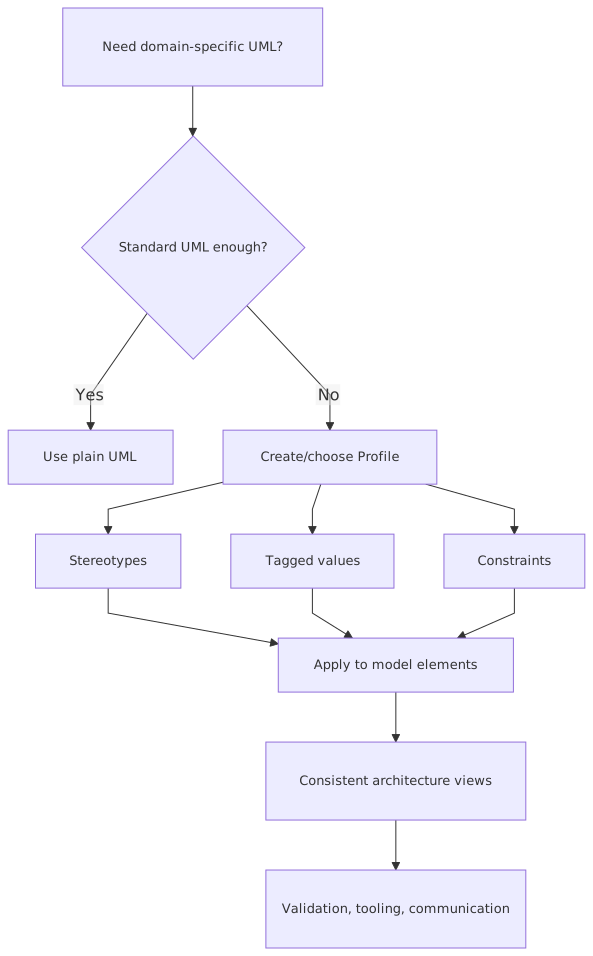
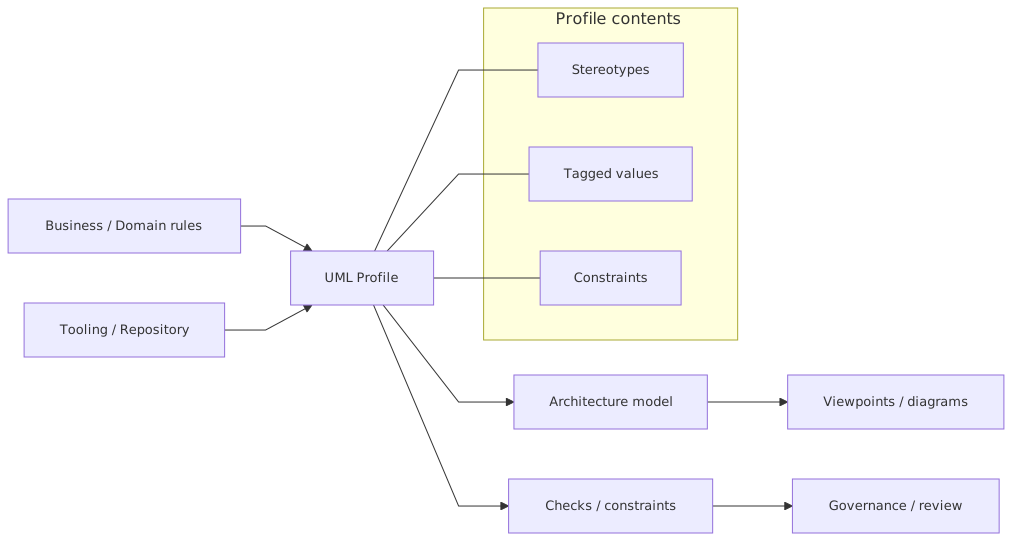
It does this mainly through three mechanisms:
- Stereotypes — labels that extend UML elements, like
<,> <,> <> - Tagged values — structured properties attached to those stereotypes, like retention period, owner, encryption standard, cloud region
- Constraints — rules, formal or informal, that define what is valid, like “all
<elements must have a data classification value”>
That’s the mechanics. Pretty simple.
In enterprise work, profiles become useful when plain UML stops carrying enough business or technical meaning. A component diagram with boxes named “Payments Service” and “Identity Platform” is fine for conversation. But if you need to communicate which services are customer-facing, which ones are regulated, which ones publish Kafka events, which ones require privileged IAM policies, and which ones are cloud-managed versus self-hosted, basic UML gets thin fast.
That’s where profiles help. They let the model say more without changing diagram type every five minutes.
Why architects reach for profiles—and why they often shouldn’t
Here’s my contrarian take: most architecture teams do not need a broad UML profile program.
They need better modeling discipline.
That’s an important distinction.
A profile will not fix:
- vague architecture thinking
- inconsistent terminology
- missing ownership
- poor repository hygiene
- diagrams created only for steering committees and never used again
I’ve seen teams introduce profiles because “we need more rigor,” when the real problem was that nobody agreed on what an application, platform service, integration, or capability actually meant. A profile built on top of conceptual confusion just gives you structured confusion.
So when should you not use a UML profile?
Don’t use a UML profile when:
- your diagrams are mostly one-off communication artifacts
- your architecture maturity is low and vocabulary is unstable
- your modeling tool barely supports profiles
- your team won’t maintain the profile
- you’re trying to force every architecture concern into one notation
A lot of enterprise architecture work is social alignment, not notation engineering. If your stakeholders don’t understand the diagrams now, adding stereotypes won’t save you. It may make things worse.
Profiles start paying off when the same kinds of concepts show up repeatedly across many systems and many diagrams. Then standardization matters.
The practical case for UML profiles in enterprise architecture
In real architecture work, you usually care about recurring enterprise concerns such as:
- security classification
- IAM boundaries
- event-driven integration patterns
- cloud deployment semantics
- regulated data handling
- resiliency and availability expectations
- ownership and lifecycle
These concerns cross domains. They repeat. They matter in reviews, standards, and implementation decisions.
That’s exactly the kind of environment where UML profiles are useful.
Example domains where profiles work well
Notice something important: these are not random technical details. They are architecture concerns with decision impact.
That’s the threshold. If the information affects design choices, governance, controls, risk, or operational behavior, it deserves structured representation.
If it’s just decorative metadata, don’t bother.
When to use UML profiles
Let me make this sharper.
Use a UML profile when all of the following are true:
- The domain concepts recur frequently
- The concepts influence architecture decisions
- The concepts are currently represented inconsistently
- You need reuse across teams or portfolios
- Your tooling and governance can support it
That fifth point matters more than people admit. EA governance checklist
A UML profile that exists only in a PDF standard is dead on arrival. If architects can’t easily apply stereotypes in the tool they actually use, they won’t. If repositories can’t validate required tagged values, those values become optional fiction. If no one curates the profile, it becomes a junk drawer.
Good use cases
- Standardizing how event-driven systems are modeled across banking platforms
- Capturing IAM boundaries and privileged access patterns in solution designs
- Making cloud deployment and trust-zone semantics visible in architecture reviews
- Identifying regulated data paths and control points across integration landscapes
Bad use cases
- Making diagrams look “more official”
- Encoding every implementation detail
- Replacing architecture thinking with notation
- Creating a profile because another enterprise architecture team has one
That last one happens a lot, by the way. Architects love importing methods from larger organizations without importing the maturity, governance, or patience required to sustain them.
How to use UML profiles without making a mess
This is where the practical discipline comes in.
1. Start with decisions, not notation
Don’t begin with “what stereotypes do we need?”
Begin with:
- what architecture decisions do we repeatedly make?
- what information do we repeatedly need in reviews?
- what concepts are misunderstood across teams?
- what model elements need consistent semantics?
If your cloud review board always asks:
- Is this workload internet-facing?
- What trust zone is it in?
- Is it using managed identity?
- Is the data encrypted at rest?
- Which region hosts the primary deployment?
Then your profile should support those questions.
Profiles should emerge from architecture governance pain points, not from UML enthusiasm.
2. Keep the first version painfully small
This is one of the biggest mistakes architects make. They design the profile as if they’re writing a language specification for the next decade.
Don’t.
Start with maybe:
- 8–12 stereotypes
- a handful of tagged values
- a few non-negotiable constraints
That’s enough.
A profile should clarify the model, not dominate it.
3. Model enterprise concepts, not vendor trivia
This is another strong opinion: don’t build your profile around AWS service names, Kafka configuration minutiae, or IAM implementation quirks unless that level is genuinely architectural for your organization.
The profile should represent stable concepts.
Good:
<> <> <> <>
Less good:
<> <> <>
Vendor-specific stereotypes can be useful in some contexts, but they age fast. Enterprise profiles should usually sit one level above cloud product catalogs.
4. Make every stereotype earn its existence
A stereotype should answer one of these:
- Does it add meaning not present in UML?
- Does it affect governance or design decisions?
- Does it drive required metadata?
- Does it improve consistency across diagrams?
If the answer is no, kill it.
I’ve seen profiles with stereotypes like <, <, and < where plain UML elements already did the job. That’s not extension. That’s relabeling.
5. Use tagged values sparingly
Tagged values are seductive. Architects love metadata. They want every element to carry owner, SLA, RTO, RPO, data classification, cloud account, support team, criticality, cost center, deployment pattern, compliance scope, and maybe moon phase.
Don’t do that.
Tagged values only work when:
- they are actually maintained
- they are visible in usage
- they drive review or reporting
- they have clear ownership
If nobody updates the values, your model becomes a polished lie.
A real enterprise example: retail banking modernization with Kafka, IAM, and cloud
Let’s make this concrete.
A retail bank is modernizing its customer onboarding and payments ecosystem. Legacy systems still run core account management on-prem. New digital services are deployed in the cloud. Integration is moving from point-to-point APIs and batch jobs toward Kafka-based event streaming. Identity is split across workforce IAM, customer IAM, and machine-to-machine service identities.
Classic enterprise mess. Also very normal.
The architecture team has a recurring problem: solution diagrams look clean, but they hide the things that matter most in design review:
- Which systems handle regulated customer data?
- Which services publish events versus consume them?
- Which Kafka topics contain PII?
- Which components require privileged IAM permissions?
- Which workloads run in restricted cloud zones?
- Which interfaces cross trust boundaries?
- Which data flows are subject to retention and audit requirements?
Plain UML component and deployment diagrams are not enough. Teams keep adding free-text notes. Reviewers keep asking the same questions. Decisions are made inconsistently.
So the architecture function introduces a lightweight UML profile for regulated event-driven systems.
Example profile elements used by the bank
Stereotypes
<> <> <> <> <> <> <> <> <> <>
Tagged values
dataClassificationretentionPeriodowningDomainauthenticationModecloudRegioncomplianceScopeencryptionRequiredauditLevel
Constraints
- All
<elements must declare> retentionPeriodandowningDomain - Any element tagged
dataClassification=PIImust specifycomplianceScope - Any interface crossing a
<must specify> authenticationMode - Any
<must be associated with a named owning workload>
Now the diagrams become reviewable in a meaningful way.
The onboarding service is shown as a < and <. It publishes CustomerOnboarded to a < tagged with dataClassification=PII, retentionPeriod=30d, owningDomain=Customer. The fraud screening service consumes it as an <. A machine identity used by the risk engine is marked < because it can access a sanctions screening API and customer records. The legacy CIF platform is marked < and connected across a <.
That changes the conversation in architecture review.
Instead of:
- “What is this box?”
- “Can someone explain this integration?”
You get:
- “Why is this topic retaining PII for 30 days?”
- “Why does this service identity need privileged access?”
- “Should this consumer be in the restricted cloud zone?”
- “Is this event crossing a compliance boundary without masking?”
That is exactly what a profile should do: make the important architecture questions visible early.
Common mistakes architects make with UML profiles
This part is painful because most of these mistakes are self-inflicted.
Mistake 1: Treating the profile as the architecture deliverable
The profile is not the point. The architecture is the point.
Some teams become so obsessed with profile purity that they forget diagrams exist to support decisions. They spend weeks debating stereotype inheritance while project teams still don’t know where IAM enforcement should happen.
Profiles are support structures. If the model doesn’t help people decide, govern, or build, it’s dead weight.
Mistake 2: Creating too many stereotypes
This is probably the number one failure mode.
If every element has a custom stereotype, none of them stand out. You end up with visual noise and semantic inflation.
A profile with 12 useful stereotypes beats a profile with 90 “complete” ones every time.
Mistake 3: Mixing logical, physical, and governance semantics carelessly
Architects often jam different abstraction levels into one stereotype set.
For example:
<— logical/structural> <— physical/vendor-specific> <— governance/compliance>
All can be valid, but not if the profile has no clear viewpoint structure. Then diagrams become incoherent. One box is telling you design style, deployment model, and regulatory scope at the same time with no discipline.
You need to be clear about viewpoint:
- logical architecture
- deployment architecture
- security architecture
- governance classification
Profiles can support multiple viewpoints, but don’t blur them casually.
Mistake 4: Making metadata mandatory without operational ownership
If your profile requires fields like owner, criticality, retentionPeriod, rto, supportModel, and dataSteward, who keeps them current?
If the answer is “the architect, probably,” then the profile is already failing.
Metadata without ownership becomes stale faster than diagrams.
Mistake 5: Assuming every stakeholder should see the full profile
No. Absolutely not.
A security architect may care about <, authenticationMode, and trust boundaries. A domain architect may care more about owningDomain, event semantics, and system responsibility. A program manager may need a simplified view with only critical classifications.
One profile can support multiple stakeholder views. Don’t dump the full semantic load on everyone.
Mistake 6: Using profiles to compensate for bad naming
If your systems are ambiguously named, your service boundaries are unclear, and your event names are terrible, a profile won’t fix that.
A box called “Integration Service Layer v2” with a stereotype < is still a bad model element.
Profiles add meaning. They do not rescue muddled architecture.
Where UML profiles help most in actual enterprise work
Let’s get very practical. Here are the areas where I’ve seen profiles deliver real value.
1. Architecture governance and review boards
This is the strongest use case.
If review boards repeatedly ask for the same architecture attributes—security posture, data classification, integration style, cloud hosting model—a profile can make those attributes visible and consistent.
For example:
- identify all components with
<> - flag all interfaces crossing
<> - require
authenticationModeon external integrations - standardize Kafka topic ownership and retention declarations
That reduces review friction and improves decision quality.
2. Cross-team consistency in large transformation programs
In enterprise programs, ten teams can model the same concept ten different ways. One team shows Kafka as infrastructure, another as application integration, another not at all. One team models IAM only in text. Another draws every role as a separate node.
Profiles create a shared semantic baseline.
Not perfect consistency. That’s fantasy. But enough consistency that portfolio-level analysis becomes possible.
3. Security and compliance visibility
This is where profiles often justify themselves.
In banking, insurance, healthcare, and government, architecture diagrams are often too functionally focused. They show flow, but not control. They show systems, but not regulatory posture.
A profile can force visibility of:
- regulated data stores
- privileged identities
- trust boundaries
- audit-relevant interfaces
- encryption obligations
- regional deployment constraints
That’s valuable. Especially when auditors, risk teams, and security architects are part of the process.
4. Event-driven architecture clarity
Kafka-heavy environments are notorious for under-modeled semantics. Teams talk about “events everywhere,” but diagrams rarely make event ownership, topic boundaries, retention, replay behavior, or dead-letter handling visible.
A focused profile can improve this dramatically.
You don’t need to model every partition count. But you probably do need to represent:
- producer and consumer responsibility
- topic ownership
- classification of data in topics
- retention and compliance implications
- whether an event is business-significant or technical noise
That’s architecture, not plumbing.
A simple decision guide
Here’s a practical rule-of-thumb table.
You don’t need a philosophical framework for this. You need judgment.
My opinionated guidance on implementation
If I were setting this up in a real enterprise architecture practice, I’d do it like this:
Phase 1: Identify 5–8 high-value concepts
For example:
- regulated data store
- event topic
- producer/consumer
- trust boundary
- privileged IAM role
- managed cloud workload
- externally exposed interface
Phase 2: Define minimal metadata
Only include values that are:
- review-relevant
- realistically maintainable
- owned by someone
Phase 3: Pilot in one architecture domain
A good pilot would be:
- digital banking onboarding
- event-driven payments processing
- IAM modernization for cloud workloads
Not the whole enterprise. Start where the pain is real.
Phase 4: Validate with reviewers, not just modelers
If the profile helps architecture boards ask better questions, keep it.
If only model enthusiasts like it, be suspicious.
Phase 5: Version and prune
Profiles should evolve. Some stereotypes will prove useless. Remove them. That’s healthy.
Architects are often bad at deleting standards. They treat every addition as permanent. That’s how profile catalogs turn into museums.
One more contrarian point: sometimes ArchiMate is a better answer
Since we’re being honest, there are cases where teams use UML profiles because they’re trying to make UML do enterprise architecture work that another notation handles more naturally.
If your goal is capability mapping, value stream alignment, application portfolio relationships, technology layering, or motivation modeling, UML profiles may be the wrong tool. You may be better off with ArchiMate, or a simpler internal metamodel, or even a disciplined C4-style approach plus metadata.
Not every architecture standardization problem should be solved with UML extension.
Use UML profiles when UML is already the right base language and you just need domain semantics layered on top.
That distinction matters.
Final thought
UML profiles are one of those enterprise architecture techniques that are genuinely useful and routinely overcomplicated.
Used well, they bring precision to recurring architecture concerns. They help teams model what actually matters: trust boundaries, event ownership, regulated data, IAM risk, cloud constraints. They improve reviews. They reduce ambiguity. They make architecture artifacts more than pretty pictures.
Used badly, they become a bureaucratic side quest.
So the test is simple: does the profile help architects and engineers make better decisions in real projects?
If yes, keep it lean and use it.
If no, stop pretending the notation is the problem.
Because most of the time, it isn’t.
FAQ
1. What is the main benefit of using a UML profile in enterprise architecture?
The main benefit is adding domain-specific meaning to standard UML without inventing a new language. In practice, that means your diagrams can show things like Kafka topics, IAM roles, regulated data stores, or cloud trust zones in a consistent way that supports real review and design decisions.
2. When should I avoid using a UML profile?
Avoid it when your diagrams are mostly ad hoc communication artifacts, your architecture vocabulary is still unstable, or your tooling and governance can’t support profile maintenance. If the organization lacks modeling discipline, a profile usually adds overhead before it adds value.
3. How many stereotypes should a good UML profile have?
Fewer than most architects think. A small, high-value set—often 8 to 15 stereotypes—is usually enough to start. If your first release has 40 or 50, you are probably modeling ambition rather than practical need.
4. Can UML profiles help with Kafka and event-driven architecture?
Yes, very effectively. They can standardize how you represent producers, consumers, topics, dead-letter handling, ownership, retention, and data classification. That’s especially useful in enterprises where event-driven systems are growing faster than the architecture documentation around them.
5. Are UML profiles better than ArchiMate for enterprise architecture?
Not inherently. They solve different problems. UML profiles are useful when UML is already your modeling base and you need more domain semantics. ArchiMate is often better for broader enterprise architecture concerns like capabilities, application portfolios, and motivation. A lot of teams confuse those use cases. They shouldn’t. ArchiMate modeling guide
Frequently Asked Questions
What is enterprise architecture?
Enterprise architecture is a discipline that aligns an organisation's strategy, business processes, information systems, and technology. Using frameworks like TOGAF and modeling languages like ArchiMate, it provides a structured view of how the enterprise operates and how it needs to change.
How does ArchiMate support enterprise architecture practice?
ArchiMate provides a standard modeling language that connects strategy, business operations, applications, data, and technology in one coherent model. It enables traceability from strategic goals through business capabilities and application services to the technology platforms that support them.
What tools are used for enterprise architecture modeling?
The main tools are Sparx Enterprise Architect (ArchiMate, UML, BPMN, SysML), Archi (free, ArchiMate-only), and BiZZdesign Enterprise Studio. Sparx EA is the most feature-rich option, supporting concurrent repositories, automation, scripting, and integration with delivery tools like Jira and Azure DevOps.