⏱ 20 min read
Most architecture teams don’t have a modeling problem. They have a clarity problem.
They use UML when they need a business conversation. They use ArchiMate when they need implementation detail. They produce beautiful diagrams that nobody trusts, nobody updates, and nobody uses in decisions that actually matter.
That’s the uncomfortable truth.
If you ask me for the short version early: use ArchiMate to explain the enterprise and the relationships across business, application, technology, and change; use UML to explain how software behaves and how engineers should build it. If you try to make one do the job of the other, you’ll waste time and annoy both executives and delivery teams.
This sounds obvious. In real projects, it rarely is.
The confusion usually starts because both ArchiMate and UML are “modeling languages,” both can produce boxes and arrows, and both are often pushed into architecture governance as if they are interchangeable. They are not. They solve different problems, for different audiences, at different levels of abstraction. ArchiMate modeling guide
And if you’re working in a real enterprise—say a bank modernizing core platforms, exposing events through Kafka, introducing cloud landing zones, and trying to fix IAM before the auditors come back—this distinction matters a lot.
The simple answer first: what each one is for
Let’s not overcomplicate it.
ArchiMate
ArchiMate is for enterprise architecture. It helps you describe:
- business capabilities
- processes
- applications
- data concepts
- technology platforms
- relationships between all of them
- target states and transformation roadmaps
It is good when the question is:
- What supports this business capability?
- Which applications depend on this IAM platform?
- What changes when we move this workload to cloud?
- How does Kafka fit into the enterprise integration landscape?
- What do we need to transition from current state to target state?
UML
UML is for software/system design. It helps you describe:
- classes and objects
- component interactions
- sequence flows
- state transitions
- deployments
- use cases
It is good when the question is:
- How does the payment service call the fraud service?
- What events are published and consumed, and in what sequence?
- What does the domain model look like?
- How is this microservice deployed?
- What states can this IAM approval workflow move through?
That’s the clean answer.
But architecture work is never clean. Teams overlap. Tools overlap. Audiences overlap. And a lot of bad modeling comes from pretending that “high level” and “low level” are enough to choose the language. They’re not.
The better question is this:
What decision are we trying to support, and who needs to trust the diagram?
That’s where the real answer starts.
Why architects keep getting this wrong
I’ve seen three recurring mistakes.
1. Treating the notation as the goal
Some architects become diagram purists. They care more about whether the notation is technically correct than whether the model helps anyone make a decision.
That’s backwards.
A perfectly compliant ArchiMate model that no product owner can read is not useful. A UML sequence diagram with 90 lifelines trying to explain enterprise integration strategy is also not useful. In both cases, the notation won, and the architecture lost. ArchiMate tutorial
2. Using UML to fake enterprise architecture
This happens a lot in engineering-led organizations. The team is familiar with UML, so they use component diagrams for everything. Soon enough, a component diagram is trying to represent: UML modeling best practices
- customer onboarding
- regulatory controls
- IAM dependencies
- cloud environments
- Kafka topics
- target operating model
That’s not design anymore. That’s a hostage situation.
UML can show structure, yes. But it is not naturally built to express enterprise concerns across business, application, and technology layers in a way that remains coherent over time.
3. Using ArchiMate to avoid technical precision
This is the opposite problem, often found in architecture teams that sit too far from delivery. They create elegant capability maps and application landscapes, then stop right before anything technical becomes concrete.
You’ll hear things like:
- “The event backbone enables decoupled integration.”
- “The IAM service provides identity federation.”
- “The cloud platform hosts digital channels.”
Fine. But how? Which systems? Which trust boundaries? Which event ownership model? Which deployment constraints? Which sequence matters? Which failure mode matters?
At some point, a real system has to be built. ArchiMate alone won’t carry you there.
My opinionated rule: ArchiMate for alignment, UML for precision
If I had to make this brutally simple for a real architecture team:
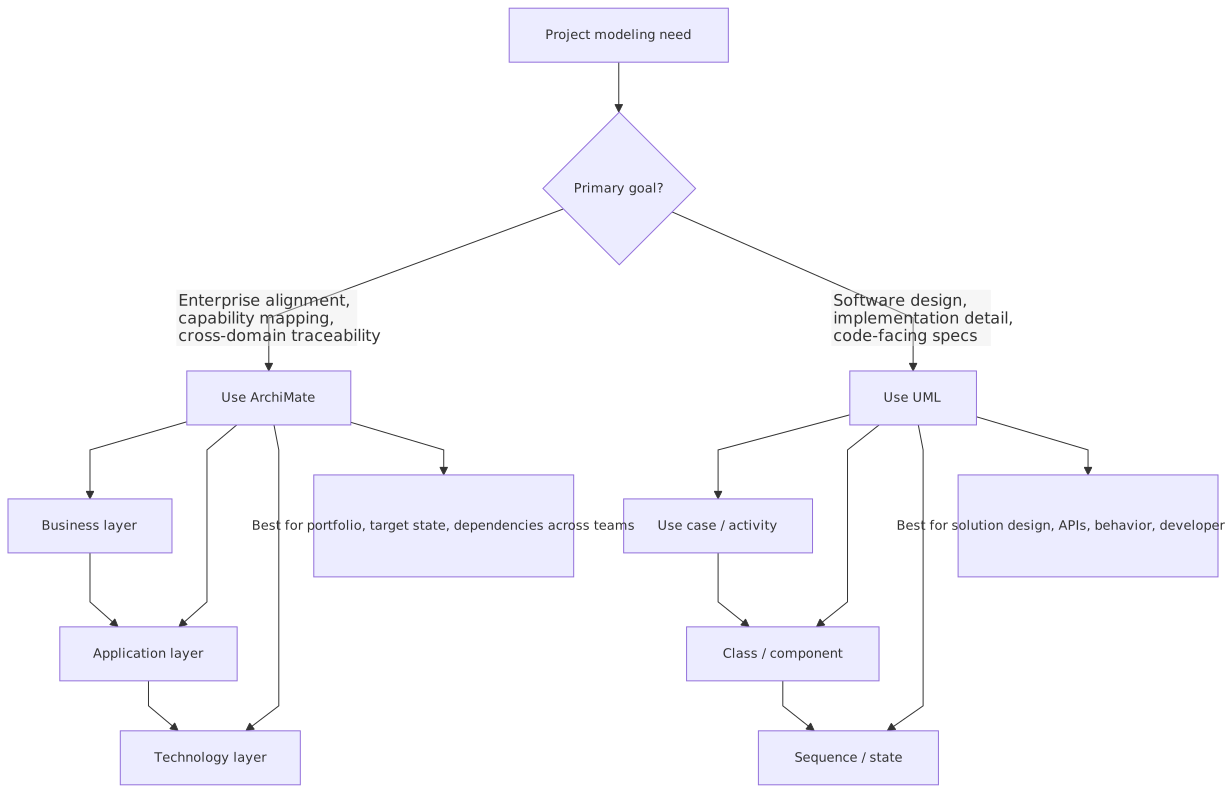
- Use ArchiMate when you need alignment across domains
- Use UML when you need precision inside a domain
That’s the practical split.
ArchiMate is how you connect business capability to application portfolio to technology platform to migration planning.
UML is how you explain service behavior, interaction patterns, object lifecycles, and implementation structure.
Another way to say it:
- ArchiMate answers “what exists, why it matters, and how it fits.”
- UML answers “how it works.”
Not always. But usually.
And yes, there are overlaps. A UML deployment diagram can show infrastructure. An ArchiMate application cooperation view can show interactions. But overlap does not mean equivalence. A screwdriver can open a paint can too. Still not the right tool.
A practical comparison
Here’s the table most teams should have pinned somewhere visible.
This is the distinction that matters in real work.
Real architecture work is not one diagram, it’s a stack of decisions
This is where many architecture articles go soft. They compare the notations in theory and leave out the mess of actual projects.
In real projects, you rarely choose ArchiMate or UML.
You choose where each belongs in the architecture story.
A good architecture practice usually has at least three layers of communication:
- Enterprise context
- Why we are changing
- Which capabilities are affected
- Which systems are in scope
- Which platforms and constraints matter
- What target state we are aiming for
- Solution architecture
- Which building blocks we use
- Which interfaces and patterns apply
- What security and integration principles are enforced
- How major services collaborate
- Design detail
- Message sequence
- Domain structure
- State logic
- Deployment topology
- Operational behavior
ArchiMate dominates layer 1 and parts of layer 2.
UML dominates layer 3 and parts of layer 2.
That overlap in the middle is where mature architects earn their money. They know when to switch language. They know when a view should stay abstract and when it needs engineering precision.
A weak architect keeps drawing in the notation they personally like best.
A good architect draws in the notation that fits the decision.
A real enterprise example: retail banking modernization
Let’s make this concrete.

Imagine a mid-sized bank. It has:
- legacy core banking systems
- separate internet and mobile banking channels
- fragmented IAM across workforce and customer identity
- point-to-point integration that is now being replaced with Kafka
- a cloud strategy that moves digital services first, but keeps core systems on-prem for now
The bank launches a transformation program with three goals:
- improve customer onboarding speed
- reduce integration complexity
- strengthen identity and access controls for both staff and customers
This is exactly the kind of environment where teams misuse diagrams.
What the enterprise architect needs to show
At enterprise level, the key questions are:
- Which business capabilities are being improved?
- Which applications support onboarding today?
- Which systems will publish or consume events through Kafka?
- Which IAM services are shared and which are duplicated?
- What moves to cloud now, later, or never?
- What are the transition states?
This is classic ArchiMate territory.
You want views that show:
- customer onboarding capability supported by CRM, onboarding portal, document verification service, core banking, and IAM
- Kafka as part of the technology/application integration landscape
- IAM services supporting authentication, authorization, federation, and provisioning
- cloud platform services hosting onboarding APIs and digital channel workloads
- transition architectures from current fragmented identity to centralized IAM
If you try to express all of that in UML, you’ll end up with a giant component diagram that looks technical but fails to answer enterprise questions. It won’t support portfolio decisions. It won’t help governance. It won’t show transformation in a way leadership can understand.
What the solution architect needs to show
Now zoom in on the onboarding solution.
The solution team needs to explain:
- how the onboarding portal calls identity verification
- when a customer profile event is published to Kafka
- how fraud screening is invoked
- how IAM issues tokens for internal and external actors
- what happens if document verification fails
- how cloud-hosted services interact with on-prem core banking APIs
That’s where UML becomes useful.
A UML sequence diagram can show:
- customer submits onboarding application
- portal invokes IAM for authentication/session
- onboarding service validates data
- service calls document verification
- service calls fraud engine
- approved application triggers
CustomerOnboardingCompletedevent to Kafka - downstream CRM and notification services consume event
- core banking account creation is triggered asynchronously
That sequence matters. It’s operationally important. It’s not something ArchiMate expresses with enough precision.
What happens if you only use one
If you only use ArchiMate:
- you get enterprise coherence but weak implementation guidance
- delivery teams fill in the gaps inconsistently
- your Kafka architecture becomes a slogan, not a design
- IAM remains “a shared service” without clear flow ownership
If you only use UML:
- you get detailed interactions but poor traceability to enterprise goals
- every team optimizes locally
- cloud migration decisions become disconnected from portfolio strategy
- nobody can explain why three different onboarding systems still exist
That’s why this is not an either/or choice in serious architecture work.
ArchiMate is better when the architecture problem is organizational
This is the point many engineers resist.
Not every architecture problem is technical.
Some are about:
- ownership
- duplication
- dependency
- business support
- transformation sequencing
- investment choices
- governance impact
That is where ArchiMate shines.
For example, in IAM programs, the hardest issue is often not token format or SAML vs OIDC. It’s:
- which applications authenticate where
- which business processes depend on which identity services
- where role models overlap
- where customer identity and workforce identity are entangled
- how target-state IAM capabilities map to existing tools and future investments
ArchiMate is excellent for showing these relationships without collapsing into software design detail.
The same with Kafka.
A lot of teams treat Kafka as an implementation decision. In enterprises, it is often also an operating model decision and a platform governance decision. Questions include:
- Which domains own which events?
- Which applications are system-of-record publishers?
- Which consumers are tightly coupled despite pretending to be event-driven?
- Which cloud and on-prem boundaries affect the event platform?
- Which transformation initiatives depend on Kafka adoption?
That’s architecture, not just design.
A UML sequence diagram won’t answer those questions well. It can show interactions, yes. It cannot easily express the broader dependency landscape and transition roadmap in the way ArchiMate can. ArchiMate in TOGAF ADM
UML is better when ambiguity becomes dangerous
Now the contrarian bit.
Some enterprise architects cling to abstraction for too long because detail is messy and politically risky. Once you get specific, people can challenge you. Once you draw the real sequence, the real ownership, the real failure path, the architecture becomes testable. Some architects don’t like that.
But ambiguity is dangerous.
If you are defining:
- customer authentication flows
- privileged access approval logic
- event publication order
- compensation handling for failed onboarding
- cloud failover interactions
- provisioning states for IAM lifecycle
then UML is often the better language because it forces precision.
That precision matters especially in regulated sectors like banking.
A bank can’t just say, “IAM provides secure access to digital channels.” Nice sentence. Worth nothing.
You need to know:
- where MFA is enforced
- how tokens are exchanged
- what trust boundary exists between API gateway and backend services
- how service accounts authenticate to Kafka
- what happens when a customer identity is partially verified
- how access revocation propagates to downstream systems
Those are not ArchiMate conversations. They are design conversations. UML helps because it narrows interpretation.
And in architecture, reducing interpretation is often the whole point.
Common mistakes architects make with ArchiMate
Let’s be blunt.
Making everything a metamodel exercise
Teams get lost debating whether an element should be a business service, application service, capability, or process. Sometimes that matters. Often it doesn’t.
If your stakeholders can’t understand the view, your metamodel purity is irrelevant.
Creating “wallpaper architecture”
Huge enterprise maps with every system in the bank. These impress people for five minutes and become obsolete in two months.
A useful ArchiMate view is scoped to a question:
- what supports onboarding?
- what changes in IAM target state?
- what applications depend on the event platform?
- what is impacted by moving this service to cloud?
Not everything. Just enough.
Ignoring transition architecture
Architects love target state diagrams because they look clean. Real enterprises live in transition states for years.
If your ArchiMate models don’t show current, transition, and target, they are incomplete.
This is especially true in banking, where cloud adoption, IAM consolidation, and Kafka rollout happen in phases under regulatory constraint.
Not connecting to delivery artifacts
If ArchiMate models never reference epics, projects, solution building blocks, or implementation milestones, they become detached from reality.
Enterprise architecture is not poster design.
Common mistakes architects make with UML
UML has its own graveyard.
Overmodeling
If you produce class diagrams for systems that are already implemented and stable, with no active design decision attached, you’re just making diagrams for comfort.
Model less. Decide more.
Using sequence diagrams as architecture by themselves
A sequence diagram is not an architecture. It is one behavioral slice. Useful, yes. Complete, no.
I’ve seen solution decks where the whole system is “explained” by three sequence diagrams and a deployment sketch. No capability impact, no platform context, no lifecycle view, no transition plan.
That’s not enough for enterprise work.
Drawing components with fake certainty
UML component diagrams often become a polite fiction. Boxes called “Customer Service,” “Event Service,” “IAM Service,” “Notification Service,” with arrows between them. Looks fine. Means little.
If you use UML components, be explicit about interfaces, responsibilities, and boundaries. Otherwise you’ve just recreated a generic architecture cartoon.
Forgetting runtime and operational concerns
Engineers sometimes use UML as if production doesn’t exist. But in cloud and Kafka-heavy systems, runtime matters:
- retries
- idempotency
- consumer lag
- token expiry
- network segmentation
- active/active or active/passive deployment
A sequence diagram without operational assumptions is half a design.
How I would use both in a real project
Let’s say I’m the lead architect on that banking modernization program.
Here’s the practical approach I would use.
1. Start in ArchiMate
First, I would create a small set of enterprise views:
- capability map focused on onboarding, customer servicing, identity, and integration
- current-state application cooperation view for onboarding-related systems
- target-state view showing centralized IAM, Kafka platform, and cloud-hosted digital services
- migration view showing phased transition over 12–24 months
Why first? Because if you don’t align on scope and target, detailed design will optimize the wrong thing.
2. Move to solution views
Then I would define solution-level views, possibly still in ArchiMate or mixed notation:
- which solution building blocks are reused vs new
- where Kafka topics belong by domain
- which IAM services are enterprise-standard
- which workloads run in cloud vs remain on-prem
- which integration patterns are allowed
This is where architecture principles become concrete.
3. Use UML for critical behaviors
For risky or non-obvious parts, I’d move into UML:
- authentication and authorization sequence for digital onboarding
- event publication and consumption sequence around customer creation
- state diagram for onboarding application lifecycle
- deployment diagram for cloud services, API gateway, Kafka connectivity, and on-prem integration points
These are the diagrams delivery teams and security reviewers actually need.
4. Keep traceability light but real
I would not try to create a giant repository of every possible relationship. That usually collapses under its own weight.
But I would maintain traceability between:
- business capability
- application/service
- technology platform
- key risks
- key decisions
- implementation work packages
That’s enough to stay credible.
The cloud angle: where people often choose badly
Cloud architecture is where notation misuse becomes expensive.
A cloud migration is not just a deployment design. It is also:
- a portfolio decision
- a platform standardization effort
- a security and IAM redesign
- an operating model change
So if your cloud program is being represented only with UML deployment diagrams, you’re missing half the story.
You need ArchiMate to show:
- which applications move and why
- what business capabilities are affected
- what dependencies block migration
- which shared platforms are introduced
- how target-state technology supports application rationalization
But once you decide that a customer onboarding API runs in cloud while core account creation stays on-prem, you need UML or equivalent design modeling to show:
- call flows
- trust boundaries
- token handling
- asynchronous event patterns through Kafka
- resilience and failure behavior
Cloud architecture is one of the clearest examples of why both languages matter.
The uncomfortable truth about stakeholders
Here’s another contrarian thought: most stakeholders do not care what notation you use. They care whether the diagram helps them decide.
Architects care about notation. Stakeholders care about outcomes.
That doesn’t mean notation is irrelevant. It means notation should serve communication, not the other way around.
For executives and portfolio governance:
- ArchiMate is often more useful because it tells a broader story
For engineering and security design:
- UML is often more useful because it removes ambiguity
For mixed audiences:
- sometimes neither is ideal in raw form
- you may need simplified views inspired by the notation, not fully expressed in it
Some architects hate hearing that. But it’s true. Real architecture work includes translation.
You are not being paid to defend a standard. You are being paid to make complexity understandable and change executable.
So when should you use each?
Here’s the plain recommendation.
Use ArchiMate when:
- you are doing enterprise architecture or domain architecture
- you need business-to-technology traceability
- you are mapping capability support
- you are analyzing application portfolio dependencies
- you are defining current, transition, and target states
- you are planning cloud migration at enterprise scope
- you are positioning Kafka, IAM, API platforms, or shared services in the wider landscape
- you need a governance-friendly view of change
Use UML when:
- you are designing a solution or service
- you need to show runtime interaction
- you need to explain behavior precisely
- you are defining auth flows, event flows, or state changes
- you are working with engineers on implementation structure
- you need to review security-sensitive sequences
- you need to model deployment detail beyond enterprise platform context
Use both when:
- the initiative crosses business and technical boundaries
- the program is transformational, not just local
- there are multiple teams and dependencies
- governance and delivery both matter
- ambiguity at either enterprise level or design level would create risk
That “use both” answer may sound unsatisfying, but in serious enterprises, it’s usually the honest one.
Final view: the right tool is the one that survives contact with the project
If you remember one thing, remember this:
ArchiMate and UML are not rivals. They fail when forced into the wrong conversation.
ArchiMate is better for enterprise coherence.
UML is better for design precision.
In a bank modernizing onboarding, introducing Kafka, cleaning up IAM, and moving digital services to cloud, you need both perspectives or you will either:
- design beautifully and transform badly, or
- plan beautifully and implement badly
And frankly, both are common.
My strongest opinion here is simple: architects should stop asking which notation is “better” in the abstract. That’s a lazy debate. The real question is:
Which model helps this team make the next important decision with less confusion and less risk?
That’s the standard.
Everything else is diagram theater.
FAQ
1. Can ArchiMate replace UML completely in enterprise projects?
No. It can cover some solution-level structure, but it does not replace UML well for detailed behavior, state logic, or interaction design. If engineers need exact sequence or state detail, UML is usually the better choice.
2. Can UML be used for enterprise architecture if the team already knows it?
It can be used for some views, but it usually scales poorly for business-to-technology traceability and transformation planning. Teams often end up with overly technical diagrams that fail to support enterprise decisions.
3. Which is better for Kafka architecture?
Depends on the question. Use ArchiMate to show Kafka’s role in the enterprise integration landscape, domain ownership, and platform dependencies. Use UML to show producer-consumer interactions, event timing, orchestration, and failure scenarios.
4. Which is better for IAM architecture?
Again, both. Use ArchiMate to map IAM capabilities, application dependencies, identity domains, and target-state consolidation. Use UML for authentication flows, provisioning workflows, token exchange, and access lifecycle behavior.
5. What should a real architecture repository contain?
A small set of maintained ArchiMate views for enterprise context and target state, plus UML or equivalent design models for critical solution behavior. Not every diagram needs to live forever. Keep the ones that support decisions, governance, delivery, and auditability.
1) Decision guide: ArchiMate vs UML
2) How they work together in real projects
Frequently Asked Questions
What is the difference between UML and ArchiMate?
UML is a general-purpose modeling language primarily used for software design — class structures, sequences, components, states, deployments. ArchiMate is an enterprise architecture language covering business, application, and technology layers. They are complementary: ArchiMate for cross-domain EA views, UML for detailed software design.
When should you use ArchiMate instead of UML?
Use ArchiMate when you need to model cross-domain architecture (business capabilities linked to applications linked to infrastructure), traceability from strategy to implementation, or portfolio views for stakeholders. Use UML when you need detailed software design — class models, sequence interactions, state machines, component interfaces.
Can ArchiMate and UML be used together?
Yes. In Sparx EA, both exist in the same repository. ArchiMate models the enterprise landscape; UML models the internal design of specific application components. An ArchiMate Application Component can link to the UML class diagram that defines its internal structure, maintaining traceability across abstraction levels.