⏱ 25 min read
ArchiMate Tutorial for Enterprise Architects | Modeling Strategy, Business, Application & Technology Layers
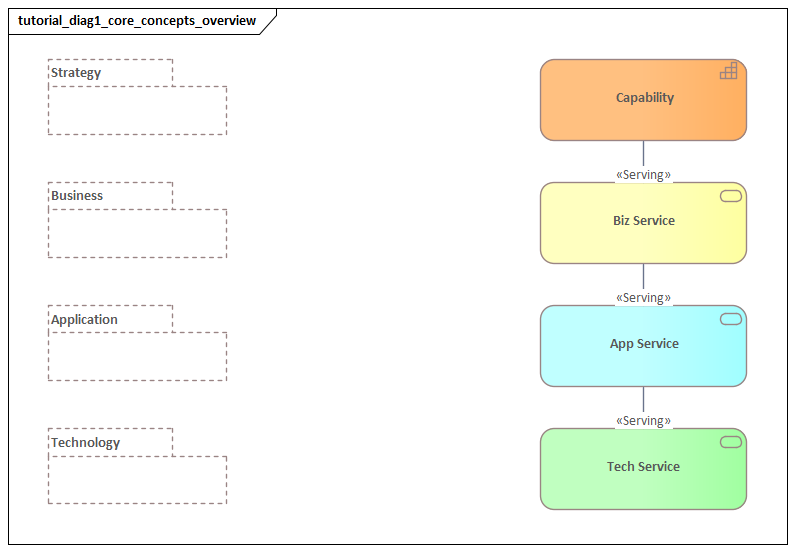
Learn ArchiMate with this practical tutorial for enterprise architects. Explore core concepts, layers, relationships, viewpoints, and best practices for modeling enterprise architecture effectively. ArchiMate layers explained
ArchiMate tutorial, enterprise architects, ArchiMate framework, enterprise architecture modeling, ArchiMate viewpoints, ArchiMate relationships, business layer, application layer, technology layer, strategy layer, motivation layer, implementation and migration, TOGAF, architecture modeling language, enterprise architecture tutorial ArchiMate relationship types
Introduction
ArchiMate is an open modeling language for enterprise architecture. It gives architects a consistent way to describe how strategy, business operations, applications, data, and technology fit together. Its purpose is not to produce diagrams for their own sake. The real value is a shared language that helps people understand change across domains. ArchiMate modeling best practices
That matters because architecture problems rarely stay in one layer. A goal such as faster customer onboarding, lower operating cost, stronger compliance, or a better digital experience usually requires coordinated change. Processes may need redesign. Applications may need replacement or integration. Data controls may need tightening. Infrastructure may need modernization. ArchiMate helps connect those concerns so architects can trace a strategic objective through operating impact and into implementation. ArchiMate viewpoints
One of its strongest practical advantages is the ability to create different viewpoints from the same underlying model. Executives need to see outcomes, dependencies, and investment implications. Delivery teams need clarity on service interactions, application boundaries, and transition impacts. Governance forums need a view of standards, risks, and alignment. Instead of maintaining disconnected diagrams for each audience, architects can build one coherent model and derive targeted views from it.
This is especially useful in transformation programs such as cloud migration, ERP replacement, platform modernization, regulatory change, or digital product expansion. In these settings, a change in one area often affects many others. A process redesign may require new application services. A compliance requirement may reshape roles, controls, and data access. A platform decision may affect resilience, cost, and operational support across multiple capabilities. When those relationships are modeled explicitly, impact analysis becomes more reliable and hidden dependencies are easier to spot.
ArchiMate is also well suited to planning change over time. It can describe the current state, the target state, and the transition states in between. That allows architects to show which capabilities need improvement, which applications should be retained or retired, which technologies enable or constrain the target, and which work packages move the organization forward.
This tutorial treats ArchiMate as a practical tool for enterprise architecture. The emphasis is not only on notation, but on using the language to build useful models, communicate with stakeholders, and support decisions across strategy, business, application, and technology domains.
1. What Is ArchiMate and Why It Matters in Enterprise Architecture
ArchiMate is an enterprise architecture modeling standard maintained by The Open Group. At its core, it provides a structured way to represent an enterprise as a connected system rather than a collection of unrelated diagrams. Instead of treating strategy, operations, applications, and infrastructure as separate conversations, it gives architects a formal language for showing how those concerns relate.
A practical way to think about ArchiMate is as a language of architectural meaning. Most organizations already have process maps, application inventories, integration diagrams, capability maps, and infrastructure views. The problem is that these artifacts are often created independently, using inconsistent terms and offering limited traceability between them. ArchiMate introduces coherence by defining a standard set of concepts and relationships. An application service, business process, capability, or technology service is not just a label on a box. Each has a specific meaning and a defined relationship to other elements.
That consistency matters because enterprise architecture crosses organizational boundaries. A solution architect may focus on a specific system. An enterprise architect has to explain how that system supports business capabilities, depends on shared platforms, enables value delivery, and creates risk or opportunity elsewhere. ArchiMate makes those cross-domain links visible.
That visibility becomes valuable when stakeholders ask familiar questions:
- Which business capabilities depend on this platform?
- What processes are affected if this application is retired?
- Which applications support a critical customer service?
- What infrastructure constraints could delay a transformation initiative?
- Which work packages are required to move from baseline to target?
ArchiMate helps answer those questions through traceable relationships rather than informal assumptions.
It also supports abstraction without losing rigor. Senior leaders may want a high-level view centered on goals, capabilities, and major initiatives. Delivery teams may need a more operational view showing application interactions, data usage, and platform dependencies. If both views come from the same model, they stay aligned. That avoids a common failure mode in architecture: executive slides telling one story while technical diagrams tell another.
The language also improves governance. Architecture reviews often depend too heavily on presentations and loose terminology. That makes proposals difficult to compare and impact difficult to assess. A shared modeling language allows architects to expose duplication, unsupported assumptions, unnecessary complexity, and divergence from target standards more clearly. In an IAM modernization program, for example, a review board might use an ArchiMate model to show that workforce SSO, customer authentication, and API access control are spread across separate tools. The board can then make a clearer decision about consolidation, ownership, and migration sequencing.
Most importantly, ArchiMate should support decisions, not simply document the landscape. In a legacy modernization effort, the key question is not just what systems exist. The more useful questions are which capabilities are underperforming, which business services need improvement, what information is critical, and what technology changes are actually required. ArchiMate helps structure that reasoning from motivation through implementation.
Its practical value rests on three strengths: semantic clarity, traceability across layers, and the ability to present different viewpoints from one coherent model.
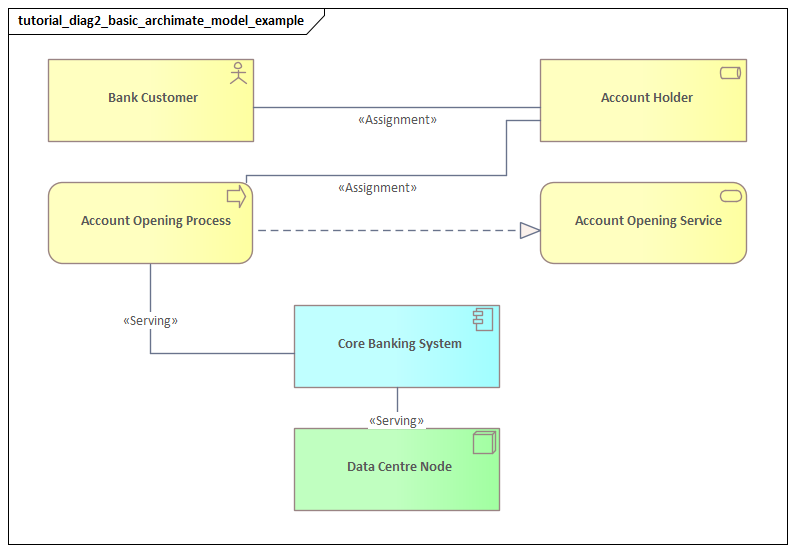
2. Understanding the ArchiMate Core Framework: Business, Application, and Technology Layers
The ArchiMate core framework is organized around three foundational layers: Business, Application, and Technology. The structure is simple, but powerful. The enterprise delivers value through business behavior, that behavior is enabled by applications, and those applications run on technology infrastructure. ArchiMate becomes useful when architects can trace concerns across these layers instead of treating each as a separate domain.
Business Layer
The Business layer represents how the organization operates from a stakeholder and operating model perspective. It includes concepts such as business actors, roles, processes, functions, services, and business objects.
This is where architects describe how value is created and delivered. It helps answer questions such as:
- Which business service is being improved?
- Which process delivers that service?
- Which roles perform or own the process?
- Which business objects are created or used?
For enterprise architects, this layer is often where strategy becomes operationally meaningful. A strategic objective such as improving customer onboarding becomes concrete only when it is tied to services, process changes, and accountable roles.
A simple example is claims handling in an insurer. The business service may be Claims Resolution. That service is realized by processes such as claim intake, fraud review, and settlement approval. Roles include claims assessor, fraud analyst, and payment approver. Without that structure, discussions about “improving claims performance” stay vague.
Application Layer
The Application layer describes the software behavior and structure that support the business. It includes application components, application services, data objects, and interactions between systems.
This layer forms the bridge between business need and implementation reality. A business process may require identity verification, case management, order orchestration, or notification handling. Those outcomes are usually enabled by one or more application services exposed by specific systems. Modeling this layer well helps architects distinguish between what the business needs and how the application landscape fulfills that need.
It also reveals issues that are often hidden in simple application inventories, such as:
- duplicated functionality across systems
- tight coupling between applications
- unclear service ownership
- integration complexity
- data fragmentation
Consider a retail bank onboarding process. The business may see one onboarding journey, but the application model may reveal separate services for KYC screening, document capture, credit assessment, and customer record creation, each owned by different teams and integrated in inconsistent ways. That often explains why turnaround time and compliance quality vary.
Technology Layer
The Technology layer represents the infrastructure and platform services on which applications depend. It includes nodes, devices, system software, technology services, networks, and artifacts.
This layer matters when architecture decisions have implications for hosting, resilience, performance, security, scalability, or cost. Two applications may appear equally suitable from a functional perspective, but one may depend on unsupported middleware, a fragile operating environment, or a constrained on-premises platform. Without the Technology layer, those implementation risks can be missed until late in delivery.
A realistic example is a customer portal that appears ready for expansion into new markets. The application view may look sound, but the technology model may show reliance on a single regional data center, an aging load balancer, and manual certificate renewal. That shifts the conversation from feature delivery to operational readiness.
Why the Layers Matter Together
The real strength of the core framework lies not in the layers individually, but in the relationships between them. A business process may use an application service. That service may be realized by an application component. That component may depend on technology services provided by infrastructure platforms.
This layered traceability supports practical impact analysis. For example:
- A business capability needs faster service delivery.
- The architect identifies the business processes involved.
- Those processes use specific application services.
- Those services are provided by applications with integration constraints.
- The applications depend on infrastructure that may limit scalability.
That chain of reasoning is what allows architecture to influence decisions with confidence.
Applying the Layers Pragmatically
Architects do not need to model every process step, every application function, or every infrastructure detail. ArchiMate works best when used selectively to support a decision.
Different scenarios call for different emphasis:
- In a merger, the focus may fall on duplicated business services and overlapping applications.
- In a cloud migration, the Technology layer may need deeper treatment because hosting dependencies and platform services are central.
- In a customer experience transformation, Business and Application layers may dominate because process redesign and service interactions matter most.
- In an event architecture initiative, the Application and Technology layers may highlight event brokers, producers, consumers, and the platform services that support reliable event delivery.
The layers should not be treated as silos. Business teams, application teams, and infrastructure teams often maintain separate views of reality. The enterprise architect’s role is to bring those views together into one coherent architectural narrative. The core framework provides the structure for doing that.
The next step is to extend this core view so the model captures not only how the enterprise operates, but also why change is needed, what strategic direction is being pursued, and how transformation will be delivered.
3. Exploring the Motivation, Strategy, Physical, and Implementation & Migration Extensions
The core layers describe how the enterprise operates and what enables it. The ArchiMate extensions make the language much more useful in real transformation work. They allow architects to model why change is needed, what strategic direction is being pursued, where physical assets matter, and how change will be delivered over time.
Motivation Extension
The Motivation extension captures the reasons behind architecture decisions. It includes concepts such as stakeholders, drivers, assessments, goals, outcomes, principles, and requirements.
This extension is useful when architects need to show that a proposed change responds to a genuine business concern rather than standing alone as a technology initiative. For example:
- A driver may be a new regulatory obligation.
- An assessment may identify inconsistent customer data handling.
- A goal may be improved auditability.
- A requirement may specify retention, access, or reporting controls.
By linking these elements, architects can show the rationale behind architecture choices. This is particularly important in governance and investment discussions, where stakeholders need to understand why a change matters.
A practical micro-example is privacy remediation after a new data protection regulation. The driver is the regulation itself. The assessment identifies fragmented consent capture across channels. The goal is demonstrable consent management. The requirement specifies centralized consent records and auditable access history. That chain gives later business and application changes clear justification.
Strategy Extension
The Strategy extension connects motivation to enterprise direction. It introduces concepts such as capability, resource, course of action, and value stream.
This extension becomes important when architects need to frame change in terms executives understand. Rather than jumping directly from goals to systems, they can show how strategic ambition translates into capability improvement and value delivery.
For example:
- A capability such as customer onboarding may be identified as strategically important.
- A value stream may show where delays reduce customer value.
- A course of action may define a response such as automation, channel simplification, or platform standardization.
- A resource may represent the assets needed to support the change.
A key discipline here is modeling capabilities correctly. A capability represents what the organization is able to do, independent of the current process or system implementation. That distinction matters because capabilities provide a stable planning anchor even when processes, teams, or technologies change.
Physical Extension
The Physical extension is often overlooked, but it becomes essential where digital and physical operations are tightly linked. It includes concepts such as equipment, facility, distribution network, and material.
This matters in sectors such as manufacturing, logistics, retail, healthcare, energy, and telecommunications. In these environments, architecture cannot be understood fully through business, application, and technology elements alone.
Take a warehouse automation initiative. The model may include:
- fulfillment and replenishment processes in the Business layer
- warehouse management and control applications in the Application layer
- IoT platforms and monitoring services in the Technology layer
- conveyors, handheld scanners, and sortation equipment in the Physical extension
- facility constraints such as loading-bay layout or network coverage
Without the Physical extension, the model can miss the operational dependencies that determine whether the change is feasible.
Implementation & Migration Extension
The Implementation & Migration extension addresses a different need: how to model change as a managed journey rather than a single target-state picture. It includes work packages, deliverables, plateaus, gaps, and implementation events.
This is where architecture becomes directly useful for roadmap planning. Architects can model:
- a baseline plateau representing the current state
- one or more transition plateaus
- a target plateau
- the gaps between them
- the work packages needed to close those gaps
That is far more useful than presenting a target architecture without showing how it will be reached. It also supports sequencing and dependency analysis across programs.
For example, a technology lifecycle roadmap might show a baseline of Java 8 workloads on unsupported middleware, a transition plateau where customer-facing services move first to an approved runtime, and a target plateau aligned to enterprise hosting and security standards. The work packages then become visible as upgrade factories, regression testing, and platform migration waves.
Why the Extensions Matter Together
The extensions are most effective when tied back to the core framework:
- Motivation explains why change is needed.
- Strategy defines the direction of change.
- Core layers show where that change affects operations, applications, and technology.
- Implementation & Migration shows how the change will be delivered.
- Physical adds operational reality where digital and physical environments intersect.
Taken together, these extensions turn ArchiMate into a change-oriented language. They allow architects to build a line of reasoning from driver to roadmap, which is often what stakeholders need in order to prioritize investment and govern delivery.
To use these concepts well, however, architects need to understand not only the elements but also the relationships and viewpoints that give the model meaning.
4. Mastering Relationships, Viewpoints, and Modeling Concepts
If ArchiMate elements are the vocabulary of enterprise architecture, relationships are the grammar. A box on its own says very little. What matters is what it serves, realizes, depends on, accesses, or changes.
Why Relationships Matter
Weak models often fail not because the wrong elements were chosen, but because the relationships between them are vague or inconsistent. A business process, application component, or technology node becomes useful only when the model explains how it connects to the rest of the enterprise.
ArchiMate relationships express different kinds of architectural truth:
- Structural relationships describe composition or assignment.
- Dependency relationships such as serving and used-by show enablement.
- Dynamic relationships such as triggering show sequence or causality.
- Other relationships such as realization and access show implementation and information usage.
Used carefully, these relationships turn a static inventory into an enterprise model.
High-Value Relationships in Practice
Some relationships are especially important in day-to-day architecture work.
Serving
Serving shows a provider-consumer relationship. It is one of the most useful ways to connect layers without forcing unnecessary implementation detail.
Examples:
- a business process uses an application service
- an application component serves an application service
- a technology service supports an application component
Realization
Realization shows that one element makes another concrete.
Examples:
- a business process realizes a business service
- an application component realizes an application service
- an artifact realizes a deployed software element
This relationship is particularly useful when architects need to distinguish between externally visible services and the structures that implement them.
Access
Access shows how behavior interacts with information or data objects.
Examples:
- a process reads or updates a business object
- an application function creates a data object
- a service accesses sensitive information under specific controls
This becomes especially valuable in data-sensitive environments, where information handling sits at the center of compliance, risk, or operational quality.
Model Selectively, Not Exhaustively
Not every valid relationship belongs in every view. Good ArchiMate modeling is selective. The architect should choose the relationships that answer the question at hand.
For example:
- In application rationalization, emphasis may fall on serving, realization, and flow.
- In resilience analysis, focus may shift to deployment, technology dependencies, and concentration risk.
- In data governance, access relationships may become central.
- In event-driven architecture, triggering and flow may be used to show how an order-created event triggers downstream fulfillment, billing, and notification services.
This is why ArchiMate works best when used to support a decision, not to display everything known.
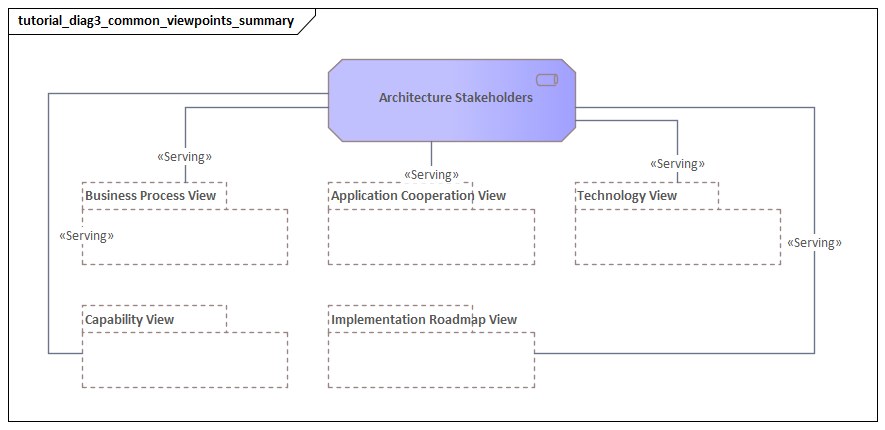
Viewpoints: Different Audiences, One Model
A viewpoint is a deliberate framing of architecture for a specific stakeholder concern. It is more than a different diagram style.
Typical viewpoints include:
- Executive viewpoints focused on capabilities, outcomes, dependencies, and major work packages
- Delivery viewpoints showing service interactions, application collaboration, and transition constraints
- Governance viewpoints connecting standards, risks, principles, and target-state alignment
- Operational viewpoints highlighting infrastructure dependencies, resilience, and support implications
The strength of ArchiMate is that these views can all be derived from the same underlying model. That means the executive summary, delivery view, and governance picture are different expressions of one architectural truth rather than competing narratives.
Completeness vs. Usefulness
A common modeling mistake is to pursue completeness at the expense of usefulness. ArchiMate can represent a great deal, but overmodeled diagrams quickly become unreadable and difficult to maintain.
A better approach is to model around:
- a decision
- a risk
- a change scenario
- a stakeholder concern
Start with the issue, then select only the elements and relationships needed to explain it clearly. When relationships are precise, viewpoints are intentional, and models remain decision-focused, ArchiMate becomes a practical tool for analysis, communication, and governance.
5. Building an ArchiMate Model Step by Step: From Scope to Stakeholder Views
A useful ArchiMate model begins before any diagram is drawn. The first task is to define why the model exists. If that purpose is unclear, the result is usually a generic landscape view with little practical value.
1. Define the Decision Context
Start with a simple question: What decision is this model meant to support?
Examples include:
- Which applications should be consolidated?
- What capabilities are affected by a cloud migration?
- How will a regulatory change affect processes and systems?
- What work packages are required to move from baseline to target?
A model built around a real question is easier to scope, validate, and explain.
2. Set Scope and Abstraction
Next, define the boundaries:
- business scope: which domain, capability, or value stream is included
- time horizon: current state, transition state, target state, or all three
- depth: high-level services, major applications, or detailed components
A well-bounded model prevents overreach. A customer onboarding model, for example, might cover two business units over the next eighteen months and go only as deep as major application services and hosting dependencies.
Controlling abstraction is essential. A view that mixes strategic goals, application APIs, and server-level deployment typically becomes hard to interpret.
3. Identify the Anchor Elements
Once scope is clear, identify the small set of elements that anchor the story. These often include:
- capabilities
- business services
- business processes
- application services
- application components
- key data objects
- technology services or platforms
It is usually better to begin with a narrow value path than with a full enterprise inventory. If the concern is delayed onboarding, start with the onboarding service or value stream, then trace the supporting processes, applications, and infrastructure.
This step creates the backbone of the model.
4. Build in Layers
A practical technique is to build the model in layers of evidence:
- Start with the business behavior stakeholders recognize.
- Add the application services and components that enable it.
- Add technology dependencies where they explain risk, cost, or feasibility.
- Add motivation or strategy elements where they clarify purpose.
- Add implementation and migration elements where roadmap planning is required.
This staged approach helps prevent premature detail and keeps the model readable.
5. Validate Relationships
As the model develops, validate the important relationships with evidence. This may include:
- process documentation
- application ownership records
- integration maps
- deployment information
- stakeholder confirmation
In enterprise environments, informal understanding often differs from operational reality. A model becomes far more credible when its relationships are traceable to known sources rather than assumption.
A good example is payment processing. Teams may assume the billing platform directly invokes the payment gateway. Validation may show an intermediate fraud screening service, a tokenization component, and a settlement batch job. That difference matters for resilience analysis, PCI scope, and change planning.
6. Derive Stakeholder-Specific Views
Once the core model is stable, derive views for different stakeholders.
Examples:
- An executive view may highlight capability impact, major dependencies, and work packages.
- A delivery view may emphasize application collaboration, service usage, and transition constraints.
- A governance view may focus on standards alignment, duplication, and risk concentration.
- An operations view may show infrastructure dependencies and resilience concerns.
These views should not be created independently. They should be curated from the same underlying model.
7. Iterate and Refine
ArchiMate modeling should be iterative. Early models expose ambiguity, challenge assumptions, and create alignment across teams. As transformation choices become clearer, the model can be refined and reused for impact analysis, roadmap planning, and governance.
A Simple Example Flow
Consider a customer onboarding transformation:
- Motivation: reduce onboarding time and improve compliance
- Strategy: strengthen onboarding capability and streamline the value stream
- Business layer: redesign onboarding process and clarify roles
- Application layer: replace duplicate verification services and improve orchestration
- Technology layer: move key services to a scalable platform
- Implementation & Migration: define transition plateaus and work packages
That sequence shows how the concepts introduced earlier can be assembled into a practical architecture narrative.
The next section looks at the habits that make this kind of modeling effective in enterprise practice.
6. Best Practices, Common Pitfalls, and Practical Use in Enterprise Architecture
Using ArchiMate effectively is less about mastering notation in isolation and more about applying the language with discipline. The difference between a model that influences decisions and one that is ignored usually comes down to modeling habits.
Best Practices
Model for a specific concern
The strongest practice is to model for a real enterprise question. Application consolidation, capability uplift, platform retirement, regulatory change, post-merger integration—these are the kinds of concerns that give a model purpose. When the purpose is clear, scope and abstraction are easier to control.
Separate the repository from the view
The underlying model may contain many elements and relationships, but each view should show only what its audience needs. A rich repository combined with concise stakeholder views preserves rigor without creating clutter.
Use ArchiMate alongside other architecture assets
ArchiMate does not replace capability assessments, process metrics, application inventories, standards catalogs, or roadmaps. Its value increases when it connects these assets into a coherent narrative. A capability heatmap may show weakness; the ArchiMate model explains which processes, applications, and platforms contribute to that weakness.
Maintain semantic consistency
Use concepts carefully and consistently. If one team models capabilities as business abilities while another uses the same term for departments or systems, the model quickly loses value. Shared conventions are essential.
Keep models decision-oriented
A model should help someone decide, prioritize, approve, sequence, or challenge something. If it cannot support one of those actions, it is probably too broad or too abstract.
Common Pitfalls
Overmodeling
One of the most common mistakes is trying to capture everything too early. Teams model every process step, interface, and infrastructure component before validating the business issue. The result is maintenance overhead and weak communication.
Mixing abstraction levels
A single view that combines strategic goals, detailed APIs, and server deployment usually becomes hard to read. Different levels of abstraction should be separated into different views, even if they come from the same model.
Weak relationship quality
A model with accurate elements but poorly validated relationships is unreliable. Relationship quality should be grounded in evidence wherever possible.
Treating ArchiMate as documentation only
When models are produced only to satisfy governance templates or repository completeness targets, they quickly lose relevance. ArchiMate creates value when it is used actively in analysis, planning, and decision-making.
Practical Enterprise Use Cases
ArchiMate is especially effective in several recurring scenarios.
Application rationalization
It helps architects connect business support, functional overlap, integration complexity, and technology dependency so rationalization decisions are based on enterprise impact rather than inventory reduction alone.
Transformation planning
It supports baseline, transition, and target-state modeling across multiple teams. This is where the Implementation & Migration extension becomes especially valuable.
Governance and assurance
It helps explain why a proposed solution aligns, or does not align, with enterprise principles, shared services, target platforms, and strategic direction. For example, an architecture board can use an ArchiMate view to show that a proposed local workflow tool duplicates an enterprise platform and increases integration and support burden.
Impact analysis
It allows architects to trace the consequences of a proposed change across capabilities, processes, applications, data, and infrastructure.
Cross-domain communication
It provides a shared language for business, delivery, and technology stakeholders, reducing the fragmentation that often slows transformation.
Technology lifecycle governance
It helps connect technology standards to business impact. An architect can show which customer-facing services still depend on end-of-support databases or middleware, making upgrade and retirement decisions easier to prioritize.
What Good Practice Looks Like
A mature ArchiMate practice does not aim to produce the most diagrams. It aims to create shared enterprise understanding that improves decisions. Good practice usually has these characteristics:
- clear modeling conventions
- selective, purpose-driven scope
- one coherent model with multiple tailored views
- traceable relationships
- regular use in planning and governance discussions
- ongoing maintenance as change progresses
When used this way, ArchiMate helps enterprise architecture move beyond description and into measurable influence on strategy execution, delivery alignment, and governance quality.
Conclusion
ArchiMate is most valuable when treated as a tool for architectural thinking rather than notation alone. Its strength lies in the disciplined visibility it creates across change: why change is needed, which capabilities and services are affected, which applications and technologies enable them, and how the organization will move from current state to target state.
For enterprise architects, that visibility is what makes architecture useful in complex environments. It supports impact analysis, roadmap planning, governance, and cross-stakeholder communication from one coherent model. The key is not to model everything, but to model what matters: the concepts, relationships, and viewpoints that help the organization make better decisions.
A practical ArchiMate discipline also depends on organizational habits. Shared conventions, clear ownership, lightweight governance, and regular model review are all necessary if the model is to remain useful over time. When those conditions are in place, ArchiMate becomes more than a documentation standard. It becomes a reusable enterprise knowledge asset.
Used pragmatically, ArchiMate helps architecture teams move from isolated diagrams toward an integrated model that supports transformation, alignment, and informed change.
Frequently Asked Questions
What is ArchiMate used for?
ArchiMate is used to describe, analyse, and communicate enterprise architectures. It provides a standard visual notation for modeling business processes, applications, data, and technology infrastructure in a single connected model that different stakeholders can understand.
How does ArchiMate support enterprise architecture?
ArchiMate supports enterprise architecture by providing a common language that connects strategy, business operations, application systems, and technology infrastructure. It enables architects to trace how strategic goals are realised through business capabilities, applications, and technical platforms.
What is the difference between ArchiMate and UML?
ArchiMate focuses on enterprise architecture — showing how strategy, business, applications, and technology connect across domains. UML focuses on software design — modelling classes, components, sequences, and state machines. ArchiMate is used by enterprise architects; UML is used by software architects and developers.