⏱ 20 min read
A working curriculum for ArchiMate team training: start from real architecture work, not notation, and build sessions around the judgment calls teams face.
That sounds harsh, but it’s true. Teams get put through a two-day course, they memorize business layer, application layer, technology layer, maybe they pass a certification exam, and then… nothing improves. Diagrams get prettier. Repositories get bigger. Meetings get longer. Delivery teams still ignore architecture. Executives still ask for “one page that explains what’s going on,” and architects still send a 47-box diagram no sane person wants to read.
If you’re training a team on ArchiMate, the goal is not to create expert modelers. The goal is to create architects who can explain reality, make trade-offs visible, and support decisions. ArchiMate is useful precisely because it gives structure to complex enterprise conversations. It is not useful when it becomes a hobby.
So let’s start simple.
What ArchiMate training for teams actually means
ArchiMate is a modeling language for enterprise architecture. It helps teams describe how business capabilities, processes, applications, data, technology, and change initiatives fit together.
That’s the plain-English version. If you’re here for SEO and practical clarity, that’s the core of it.
A good ArchiMate training program teaches teams how to answer questions like:
- What business capability depends on which systems?
- What breaks if we replace this platform?
- Where does customer identity flow across applications?
- Which services run in cloud, and which still depend on on-prem infrastructure?
- How do strategic initiatives connect to actual implementation?
That’s the real value. Not symbols. Not compliance. Not “model completeness.”
And yes, notation matters. But notation is only useful if it sharpens thinking. I’ve seen architects produce flawless ArchiMate views that were strategically useless. I’ve also seen rough, imperfect views that changed investment decisions in a week. ArchiMate modeling guide
If I had to summarize the practical purpose of ArchiMate training in one line, it would be this: ArchiMate tutorial
Teach architects to model only what supports a decision.
That principle alone would eliminate half the garbage in most architecture repositories.
Why teams struggle with ArchiMate
There are a few recurring patterns.
First, many teams are trained as individuals, not as a working architecture function. One architect goes on a course, comes back excited, opens the tool, and starts modeling in a vacuum. The rest of the team either doesn’t understand it or quietly resists it. The result is predictable: isolated diagrams, inconsistent usage, and eventually, abandonment.
Second, training often starts too abstract. Teams are taught the full metamodel before they’ve modeled a single thing from their own enterprise. That’s backwards. People learn ArchiMate faster when they can anchor it in familiar realities: “This is our IAM platform,” “This is our Kafka event backbone,” “This business process is our mortgage onboarding flow.”
Third, architects over-model. This is probably the biggest sin in enterprise architecture. ArchiMate gives you expressive power, and architects love expressive power. So they use all of it. Every relationship. Every layer. Every viewpoint. Every implementation element. They confuse completeness with quality.
They also forget the audience.
A head of operations doesn’t need a pure ArchiMate lesson. A cloud platform lead doesn’t care whether your view is academically elegant if it doesn’t show runtime dependencies. A CISO wants to see trust boundaries, identity stores, access services, and risk concentration—not a modeling showcase.
Training has to reflect that reality.
What good ArchiMate training should do
A practical team training program should create five capabilities:

- Shared vocabulary
- Shared modeling conventions
- Use-case-driven views
- Confidence in real workshops
- Discipline to stop modeling when enough is enough
That last one is underrated.
A mature architecture team knows when a whiteboard sketch is enough, when a formal ArchiMate view is needed, and when a repository update is worth the effort. Training should help teams make that call. Otherwise, you train modelers, not architects.
The minimum learning path
For most architecture teams, the learning path should look something like this:
If your training skips stages 2 and 3, it won’t stick.
Start with real architecture work, not theory
Here’s my strong opinion: the first serious ArchiMate exercise for a team should not be “model the metamodel” or some generic case study. It should be one of these:
- our customer identity journey
- our event-driven integration landscape
- our cloud migration dependencies
- our critical business service map
- our regulatory control traceability
Why? Because architecture work is contextual. Teams need to feel the friction of reality.
Take IAM, for example. Identity and access management is one of the best early training domains because it cuts across business, application, and technology layers. It also exposes ambiguity fast.
In a practical workshop, you can ask:
- What business actors use the system? Customers, employees, brokers, support staff?
- What application services exist? Authentication, authorization, consent, profile management?
- What core applications consume those services?
- Where are the identity stores?
- What technology nodes host the IAM platform?
- Which cloud services are involved?
- What changes are underway? MFA rollout? Legacy directory retirement? Zero trust initiative?
Suddenly ArchiMate stops being abstract. It becomes a way to discuss a real operating model.
The same is true with Kafka. If your enterprise uses Kafka as an event streaming platform, it’s a fantastic training subject because it forces teams to think clearly about application collaboration, interfaces, data objects, technology services, and operational dependencies.
And in banking, where dependencies are messy and accountability matters, this kind of modeling is not academic. It’s survival.
A practical training structure that actually works
If I were setting up ArchiMate training for an enterprise architecture team, I would run it in four parts over several weeks, not as one compressed event.
Part 1: Core concepts, but only enough to get moving
Teach:
- business, application, technology layers
- active structure vs behavior vs passive structure
- core relationships like serving, assignment, access, triggering, realization
- viewpoints and why they matter
- abstraction discipline
Do not teach every corner of the language on day one. That’s where energy goes to die.
The team does not need encyclopedic coverage to begin useful work. They need confidence with the 20% of the language that handles 80% of the real problems.
Part 2: Team modeling rules
This is where many organizations fail. They assume ArchiMate itself creates consistency. It doesn’t.
You need explicit team rules, such as:
- when to use application component vs application service
- whether “capabilities” are mandatory in business views
- how to name interfaces
- whether data entities are modeled as business objects or data objects in specific contexts
- how much technology detail is allowed in executive views
- how cloud services are represented
- when to create separate views vs overloaded diagrams
Without these conventions, every architect models the same reality differently. That destroys trust in the repository.
Part 3: Model live enterprise scenarios
This is the heart of training.
Pick 3–4 actual architecture scenarios. Not sanitized ones. Real ones with confusion, politics, ambiguity, and partial information.
Examples:
- “Show the end-to-end architecture for digital customer onboarding.”
- “Map the dependency of payment fraud controls on IAM, Kafka, and cloud services.”
- “Explain what happens if we retire the legacy customer master.”
- “Model the target state for API access control across channels.”
This is where the team learns to ask better questions, not just draw better boxes.
Part 4: Review and critique
A real architecture team needs critique. Not performative politeness. Honest critique.
Ask:
- Is this view answering a real stakeholder question?
- Is the abstraction level consistent?
- Is the diagram too busy?
- Are relationships explicit enough?
- Does this hide risk?
- Could an engineering lead use this to make a decision?
If the answer is no, revise it.
Architecture training without critique is just diagram production.
How this applies in real architecture work
Let’s get concrete.
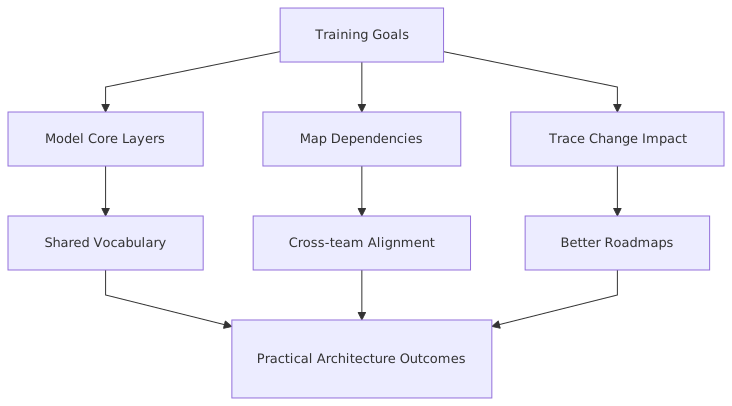
In real enterprise architecture work, ArchiMate is useful in at least six recurring situations:
1. Impact analysis
A platform owner wants to retire a legacy authentication service. Fine. Which applications depend on it? Which business processes are affected? Which security controls are tied to it? Which cloud migration plans assume it disappears next quarter?
A decent ArchiMate model lets you answer that in hours instead of weeks.
2. Investment decisions
Leaders ask whether to fund a new IAM platform, upgrade a Kafka cluster strategy, or accelerate cloud landing zone improvements. If your architecture team can show how these investments support critical capabilities and reduce operational fragility, you’re in the conversation. If not, you’re decoration.
3. Cloud migration planning
Cloud migration is where weak architecture practices get exposed. A team says, “We’re moving application X to AWS.” Fine. What about its identity dependencies? What event streams does it publish to Kafka? What on-prem data services does it still rely on? What regulatory controls stay tied to existing infrastructure?
ArchiMate helps make hidden dependencies visible.
4. Operating model clarification
Many enterprises have multiple architecture teams, overlapping platform services, and blurry ownership. Modeling business services, application services, and technology services can clarify who provides what to whom. That matters more than people admit. ArchiMate in TOGAF ADM
5. Change portfolio alignment
Architecture often sits awkwardly between strategy and delivery. ArchiMate can bridge that if used properly. You can connect strategic goals and work packages to capabilities, systems, and platforms. That traceability is useful when priorities shift.
6. Risk concentration
In banking especially, concentration risk is a real concern. If ten customer-facing journeys depend on one IAM service, one Kafka cluster pattern, or one cloud-native gateway, that’s architecturally significant. Modeling helps show where resilience needs work.
This is why practical training matters. Teams don’t need ArchiMate because TOGAF says so. They need it because modern enterprises are tangled systems, and someone has to make the tangles understandable. TOGAF roadmap template
Common mistakes architects make with ArchiMate
Let’s be honest about this. Architects make some very predictable mistakes.
Mistake 1: Modeling the world instead of the question
This is the classic error.
Someone asks, “What systems are involved in customer onboarding?” and the architect responds with a complete enterprise landscape showing 126 applications, six domains, two transformation programs, and three color legends.
That’s not helpful. It’s vanity.
Model the question, not the universe.
Mistake 2: Mixing abstraction levels
One of the ugliest things in architecture diagrams is when strategy, process steps, software components, Kubernetes clusters, and project milestones all sit on one page with equal visual weight.
That’s not rich. It’s confused.
A view can cross layers, yes. But it needs internal logic. If you’re showing a capability-to-application trace, don’t dump low-level infrastructure into the same view unless it matters to the decision.
Mistake 3: Treating ArchiMate as neutral
This may be slightly contrarian, but architecture modeling is not neutral. The moment you choose what to include and exclude, you are framing the conversation.
That’s fine. In fact, that’s your job.
The mistake is pretending the model is objective truth rather than a decision-support artifact. Good architects are explicit about viewpoint and intent.
Mistake 4: Overusing relationships
Just because ArchiMate allows many relationship types does not mean your audience benefits from all of them. If a simpler relation communicates what matters, use it. Clarity beats purity more often than some modelers want to admit.
Mistake 5: Building a repository nobody trusts
This usually happens when teams model too much, update too little, and assign ownership to nobody in particular.
Then six months later, someone asks, “Is this still current?” and the answer is silence.
A stale repository is worse than no repository because it creates false confidence.
Mistake 6: Confusing tools with practice
Buying a fancy EA tool does not create architecture discipline. It just gives people a more expensive place to be inconsistent.
Training has to include operating practices: review cycles, ownership, quality checks, and integration with portfolio and engineering workflows.
A real enterprise example: retail banking modernization
Let’s walk through a realistic example.
Imagine a mid-sized retail bank. It has:
- a digital banking channel in cloud
- core banking systems still largely on-prem
- an enterprise IAM platform handling workforce and customer identity with some ugly legacy components
- Kafka used as the event backbone for customer activity, fraud signals, and operational integration
- multiple transformation programs running at once: cloud migration, zero trust, customer onboarding redesign, API modernization
This is not exotic. This is Tuesday.
The problem
The bank wants to improve digital customer onboarding. Current onboarding takes too long, has too many manual checks, and creates inconsistent customer identity records. Fraud and compliance teams are also unhappy because event visibility is fragmented.
Leadership asks enterprise architecture a deceptively simple question:
What architecture changes are required to support faster onboarding while reducing control risk?
If the architecture team has no practical modeling capability, they’ll answer with a slide deck full of bullets and a few disconnected diagrams.
If they’ve been trained properly in ArchiMate, they can produce a coherent set of views.
What the team models
First, a business view:
- business actors: customer, onboarding analyst, fraud analyst
- business process: digital customer onboarding
- business services: customer onboarding service, identity verification service, fraud review service
- business capabilities: customer management, identity assurance, compliance control
Then an application cooperation view:
- mobile banking app
- onboarding orchestration service
- IAM platform
- KYC/AML service
- customer master
- fraud detection platform
- Kafka event streaming platform
- notification service
Then a technology/infrastructure view:
- cloud-hosted onboarding services
- managed Kafka in cloud
- on-prem customer master database
- identity directory services
- API gateway
- network trust boundaries
- observability platform
Then a transition view:
- implement customer identity federation
- publish onboarding events consistently to Kafka
- decouple fraud screening from synchronous onboarding path
- retire legacy duplicate identity check service
- move notification service fully to cloud-native platform
What the model reveals
This is where ArchiMate earns its keep.
The team discovers that:
- onboarding is blocked by synchronous calls into a legacy identity matching service
- fraud signals are partially event-driven, but some critical checks still rely on batch extracts
- IAM is split between customer identity and workforce controls in a way that creates ownership confusion
- Kafka is already central, but event contracts are inconsistent across onboarding and fraud domains
- a planned cloud migration assumes the customer master can stay untouched, but onboarding latency depends heavily on it
- multiple business services depend on one fragile identity resolution component nobody had recognized as a concentration risk
That’s architecture value. Not notation value.
How training made the difference
A trained team can model this quickly and coherently because they know:
- how to separate stakeholder concerns into useful views
- how to show cross-layer dependency without making spaghetti
- how to represent transition states
- how to challenge assumptions while modeling
- how to use a common language across business, security, integration, and cloud teams
And importantly, they know what not to model.
They don’t waste time drawing every Kafka topic, every IAM policy object, or every cloud subnet unless the decision requires it. That discipline is maturity.
Banking, Kafka, IAM, and cloud: where teams get tripped up
Since these examples come up constantly, let’s talk about them directly.
Banking architecture
Banking teams often have a bad habit of modeling around organizational silos instead of customer or control flows. You end up with neat domain diagrams that hide the actual operational dependencies.
Good training pushes teams to model end-to-end value and risk paths:
- customer onboarding
- payments authorization
- fraud investigation
- account servicing
- regulatory reporting
That’s where the truth is.
Kafka architecture
Kafka is often modeled poorly because architects either oversimplify it into a generic “integration platform” box or overcomplicate it with engineering-level detail.
Both are mistakes.
At enterprise level, what matters is:
- which application services publish and consume events
- what business objects or data objects flow
- what platform services Kafka provides
- where operational dependence is concentrated
- how event-driven patterns affect process timing and resilience
You do not need to model every topic to make architecture decisions. Sometimes you do. Usually you don’t.
IAM architecture
IAM is another domain where abstraction goes wrong fast. Teams mix user directories, policy engines, authentication services, provisioning processes, and access governance in one blurry picture.
Training should help architects separate:
- business services like access request or customer authentication
- application services like token issuance or authorization decisioning
- application components such as identity provider, directory, consent service
- technology services and hosting dependencies
- change initiatives like MFA rollout, federation, privileged access redesign
That separation makes conversations with security teams much cleaner.
Cloud architecture
Cloud diagrams are often flashy but shallow. Icons everywhere, little clarity.
ArchiMate is useful here because it forces some discipline. What service is actually provided? What application depends on it? What technology node hosts it? What business capability does it support?
And here’s a contrarian view: not everything in cloud architecture needs a cloud-native representation in your enterprise models. Sometimes “managed messaging service” is enough. Architects can become too eager to mirror provider catalogs instead of expressing enterprise meaning.
How to train teams by role, not just by notation
Another practical point: not everyone on the architecture team needs the same depth.
A useful training design distinguishes roles.
Trying to force identical training depth on everyone is inefficient. The team needs a common language, yes. But not everyone needs to become a metamodel enthusiast.
What a good training exercise looks like
Here’s a simple but effective workshop exercise I’ve used variations of before.
Scenario:
A bank wants to enable real-time fraud intervention during digital onboarding using Kafka events, centralized IAM, and cloud-native screening services.
Team task:
Create three views.
- Executive view
Show business capabilities, major application services, and target-state change initiatives.
- Architecture working view
Show onboarding process support, IAM dependencies, Kafka event flow, fraud screening integration, and customer master interaction.
- Migration view
Show what changes in phase 1, phase 2, and what remains legacy.
Success criteria:
- each view answers a distinct stakeholder need
- notation is consistent
- nothing irrelevant is included
- dependencies are explicit
- assumptions are documented
Then do the most important step: review the views critically.
Ask the team:
- Which view would a CIO understand in 90 seconds?
- Which view would a platform lead challenge?
- Which dependency is still ambiguous?
- What risk is visible now that wasn’t visible before?
That is proper learning. People remember modeling when it exposes something real.
Repository governance: the boring bit that matters
No one gets excited about repository governance, but this is where training either turns into practice or dies.
You need clear answers to these questions:
- Who owns each model or domain?
- What triggers an update?
- What is the minimum standard for publication?
- How are obsolete views archived?
- How do architects link models to roadmaps, standards, and decisions?
- How often are critical views reviewed?
A practical rule I like: if a view has no identified audience and no update trigger, it should probably not exist.
That sounds severe, but enterprise repositories are graveyards of diagrams created for workshops nobody remembers.
Training should therefore include lightweight governance:
- naming standards
- review checkpoints
- versioning approach
- audience tagging
- lifecycle status
This is not bureaucracy. It is the minimum needed to keep architecture useful.
My blunt advice for architecture leaders
If you lead an architecture team and want ArchiMate to actually help, do these things:
- Train the team together, not one person at a time
- Use your own enterprise scenarios from week one
- Set modeling conventions early
- Review diagrams ruthlessly for clarity
- Tie modeling to live decisions and change initiatives
- Keep the repository smaller than your instincts want
- Measure usefulness, not volume
And don’t fall for certification vanity. Certifications are fine, but a certified architect who cannot explain the IAM dependency of a cloud migration in a simple view is not helping the enterprise.
The best architecture teams I’ve seen use ArchiMate with confidence but not reverence. They know the language well enough to be precise, but they don’t worship it. They use it to reduce confusion, reveal dependencies, and support change.
That’s the standard.
Final thought
ArchiMate training for teams should not feel like learning a formal language for its own sake. It should feel like learning how to think together under complexity.
In banking, in cloud transformation, in Kafka-heavy integration landscapes, in IAM redesigns—that shared way of thinking matters. Modern enterprises are too interconnected for architecture to live in disconnected PowerPoint fragments.
But the answer is not more diagrams. It’s better diagrams, created by teams who know why they are modeling, who they are helping, and when to stop.
That’s the practical guide, really. Start with real problems. Use ArchiMate to expose structure. Train for judgment. Be strict about clarity. And resist the very architect temptation to model everything just because you can.
Because in real enterprise architecture work, the best diagram is rarely the most elaborate one.
FAQ
1. How long does it take to train an architecture team in ArchiMate effectively?
For basic working competence, usually 4–8 weeks of structured learning plus practical workshops. Not full-time. The key is spaced learning with real scenarios, not a one-off crash course.
2. Should every architect on the team get ArchiMate certified?
No. Certification can help establish a baseline, but it is not the goal. What matters more is whether the team can produce consistent, decision-useful views in real architecture work.
3. Is ArchiMate too theoretical for agile or cloud-native teams?
Not if used properly. In fact, it’s often more useful in fast-moving environments because dependencies change quickly. The trick is to keep models scoped and relevant, not heavyweight.
4. How do you use ArchiMate for Kafka and event-driven architecture without over-modeling?
Focus on producer/consumer relationships, application services, key business or data objects, platform dependencies, and major operational risks. Don’t model every topic unless the decision specifically depends on topic-level detail.
5. What’s the biggest mistake teams make after training?
They stop at notation knowledge and never establish team conventions or real usage patterns. Then ArchiMate becomes a course they attended, not a practice they use.
ArchiMate Training for Teams: Practical View
Frequently Asked Questions
What is enterprise architecture?
Enterprise architecture is a discipline that aligns an organisation's strategy, business processes, information systems, and technology. Using frameworks like TOGAF and modeling languages like ArchiMate, it provides a structured view of how the enterprise operates and how it needs to change.
How does ArchiMate support enterprise architecture practice?
ArchiMate provides a standard modeling language that connects strategy, business operations, applications, data, and technology in one coherent model. It enables traceability from strategic goals through business capabilities and application services to the technology platforms that support them.
What tools are used for enterprise architecture modeling?
The main tools are Sparx Enterprise Architect (ArchiMate, UML, BPMN, SysML), Archi (free, ArchiMate-only), and BiZZdesign Enterprise Studio. Sparx EA is the most feature-rich option, supporting concurrent repositories, automation, scripting, and integration with delivery tools like Jira and Azure DevOps.