⏱ 20 min read
Most ArchiMate diagrams fail for one simple reason: people use them like wallpaper.
They produce neat boxes, polite relationships, a few color codes, maybe a layered view with Business, Application, and Technology stacked like a wedding cake. Everyone nods. Nobody changes a decision. Six weeks later, the architecture is still confused, delivery teams are still arguing in Slack, and the “enterprise model” is already stale.
That’s the uncomfortable truth.
ArchiMate is not the problem. The way architects use it is the problem.
If you apply ArchiMate as a documentation standard, you’ll get documentation. If you apply it as a decision-making tool, you’ll get architecture. Those are not the same thing. Real projects need the second one.
So let’s make this practical.
What ArchiMate actually is, in plain English
ArchiMate is a modeling language for enterprise architecture. It gives you a consistent way to describe how business processes, applications, data, technology, and change initiatives fit together. That’s the simple version, and frankly, it’s the only version most teams need at the start.
In real architecture work, ArchiMate helps you answer questions like:
- What business capability are we changing?
- Which applications support that capability?
- Where does the data move?
- Which systems depend on IAM?
- What breaks if Kafka is unavailable?
- Which cloud services are strategic, temporary, or duplicated?
- What transition state are we actually funding?
That’s where it becomes useful. Not as a perfect metamodel. As a way to stop architecture conversations from becoming vague hand-waving.
And yes, you can absolutely use ArchiMate in a banking environment, with Kafka event streams, IAM controls, and cloud migration. In fact, those are exactly the kinds of messy, cross-domain situations where it earns its keep. ArchiMate modeling guide
The biggest misconception: “We need to model the enterprise”
No, you don’t.
This is the first strong opinion in the article, and I’ll stand by it: trying to model the whole enterprise upfront is one of the fastest ways to make ArchiMate irrelevant. ArchiMate tutorial
Real projects don’t need “the enterprise.” They need clarity on a bounded problem.
If your retail bank is modernizing customer onboarding, nobody needs 400 objects covering every branch operation, treasury process, and batch scheduler in the company. They need to understand:
- customer onboarding journey
- identity verification
- IAM integration
- event propagation via Kafka
- compliance checkpoints
- channel applications
- cloud deployment constraints
- target transition from legacy to modern stack
That’s enough. More than enough, actually.
Start with the decision in front of you. Model only what helps make that decision.
That sounds obvious. But architects still over-model constantly because deep down, many of us are afraid of being accused of missing something. So we create giant diagrams to look complete. The result is usually the opposite of useful.
Step 1: Start with the architecture question, not the notation
Before you open any modeling tool, ask one thing:

What decision is this model supposed to support?
If you can’t answer that in one sentence, stop.
Examples of good architecture questions:
- How do we redesign customer onboarding so IAM is centralized and reusable across channels?
- What is the impact of introducing Kafka between core banking and digital channels?
- Which applications can move to cloud-native services without violating data residency or identity controls?
- What transition architecture gets us off the legacy identity store in 12 months?
Examples of bad architecture questions:
- Can we model the current estate?
- Can we create a Level 2 ArchiMate repository?
- Can we document all interfaces?
- Can we align with the standard metamodel?
That last group sounds architect-ish. It also sounds like delay.
In real projects, your first artifact is not a diagram. It’s a problem statement. ArchiMate comes after that.
Step 2: Pick one slice of reality
ArchiMate has a lot of concepts. That’s fine. You do not need to use all of them.
For a real project, choose the slice that matters most:
- Business-first slice if the issue is capability, process, ownership, compliance, or customer journey.
- Application/data slice if the issue is integration, service design, API ownership, eventing, duplication, or system dependency.
- Technology/operations slice if the issue is cloud landing zones, platform constraints, resilience, hosting, observability, or infrastructure risk.
- Change slice if the issue is roadmap, work packages, transition states, and investment sequencing.
Most useful project models combine two or three slices, not all of them equally.
Example
Let’s say a bank wants to improve fraud detection during digital payments onboarding. They already have:
- a mobile banking app
- a web onboarding portal
- a legacy IAM platform
- a new cloud-based identity service
- Kafka for event streaming
- a core customer platform on-prem
- multiple fraud engines, because of course they do
The mistake would be to model every domain equally.
The better move is to focus on:
- business process for onboarding and risk assessment
- application collaboration across channel, IAM, fraud, and customer systems
- technology deployment for Kafka and cloud identity services
- transition architecture from legacy IAM to target IAM
That gives you a model people can actually use.
Step 3: Build the minimum viable current-state model
Here’s another contrarian thought: current-state architecture is usually overvalued.
Yes, you need some baseline. No, you do not need every server, every interface, every process variant, and every exception path. If you wait for a perfect current-state model, the project will move on without you.
What you need is a decision-grade current state.
That means enough truth to support the next decision.
In practice, a current-state model should show:
- the business service or process in scope
- the main actors or roles
- the key applications involved
- the critical data objects or information flows
- the major technology dependencies
- the obvious pain points, risks, and bottlenecks
For the banking example, that could look like this:
- Business process: Customer onboarding
- Business roles: Customer, Operations Analyst, Fraud Analyst
- Applications: Mobile App, Web Portal, Legacy IAM, Fraud Engine A, Customer Master, Core Banking Adapter
- Integration: Synchronous API calls plus Kafka events for onboarding milestones
- Technology: On-prem identity store, cloud event platform, hybrid network connectivity
- Pain points: duplicate identity checks, delayed fraud scoring, inconsistent authorization rules across channels
That’s enough to have a serious architecture conversation.
Step 4: Use ArchiMate relationships to tell a story, not just connect boxes
This is where many architects get lazy. They know the notation, but they don’t use it to explain causality.
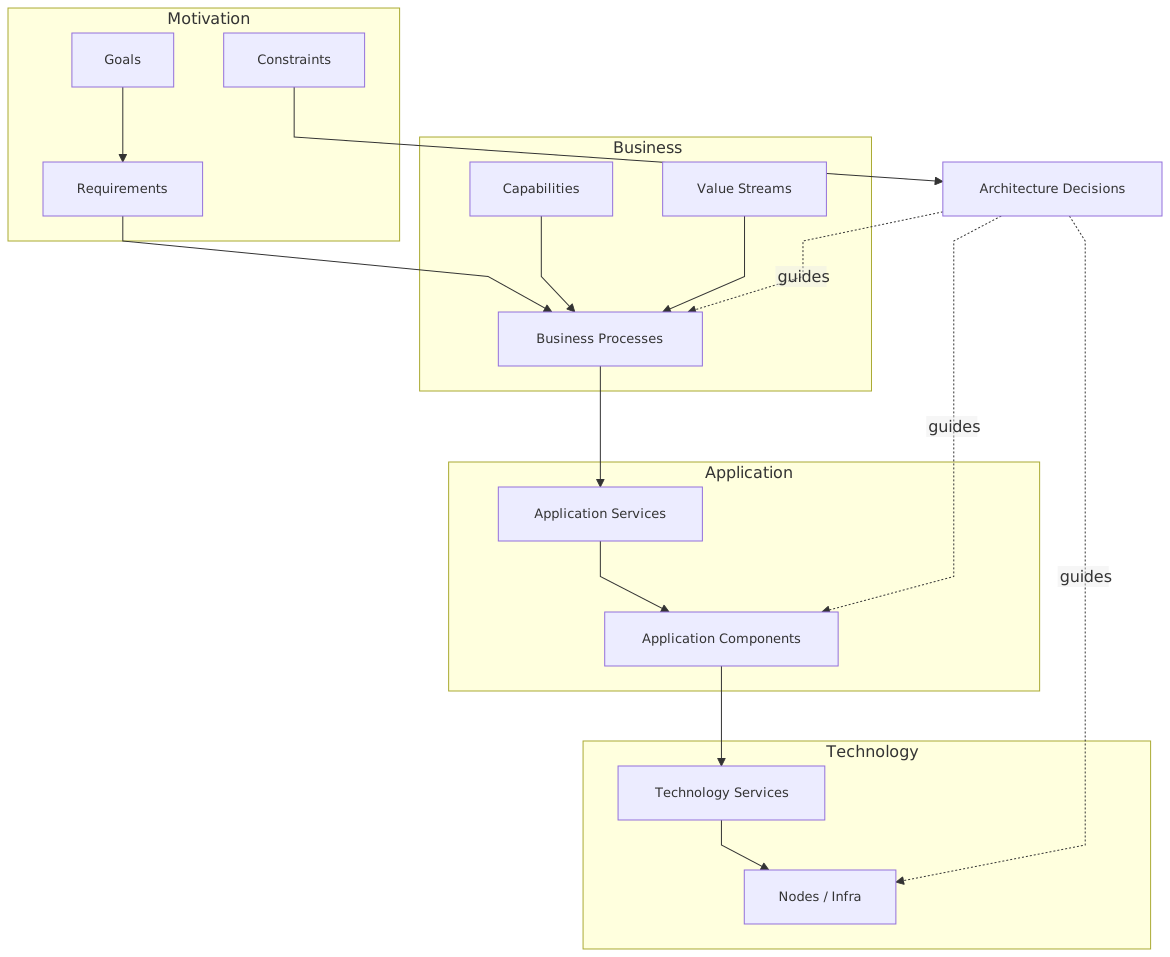
A good ArchiMate model tells a story like this:
- This business process uses this application service
- That service is realized by these application components
- Those components access this data object
- Events are delivered through this technology service
- Identity enforcement depends on this IAM capability
- The target state replaces these dependencies and reduces these risks
That is architecture. It links intent to implementation.
A bad model says only: “These things are related.”
Well, yes. Everything is related to everything if you zoom out enough.
In real work, relationships should help answer:
- who uses what
- what realizes what
- what depends on what
- where the control points are
- what changes in the target state
- which dependencies are toxic
If your model doesn’t help with dependency reasoning, it’s decorative.
Step 5: Create 3 views, not 13
Another common failure mode: too many views too early.
A practical project usually needs just three core views at the beginning.
That’s it. Three views.
Can you create more later? Sure. But if you start with ten views, nobody remembers any of them. Architects often confuse coverage with effectiveness. Different thing.
Step 6: Model IAM explicitly, because everyone underestimates it
In modern architecture, identity and access management is never “just a shared service.” It is usually one of the central structural constraints in the whole design.
Still, I see architects treat IAM like plumbing. They draw a single box called “SSO” and move on. That is a mistake, especially in banking.
If your project touches onboarding, payments, employee access, customer channels, fraud workflows, or cloud migration, IAM needs to be modeled explicitly.
In ArchiMate terms, that often means showing:
- business roles and actors
- application services for authentication, authorization, identity proofing, token issuance, federation
- application components such as IAM platform, policy engine, directory, MFA service
- data objects like customer identity profile, consent record, access token, role assignment
- technology services where relevant, especially cloud identity hosting or secrets management
Real project example
A bank had web and mobile onboarding channels, each doing slightly different identity checks. The legacy IAM platform handled employee access well enough but was weak for customer identity federation. A new cloud identity service was introduced, but teams treated it as a channel concern instead of an enterprise concern.
Result? The mobile app integrated directly with the new IAM service. The web portal stayed on legacy flows. Fraud systems consumed customer events from Kafka, but identity status was inconsistent depending on the channel. Operations teams had no single view of onboarding status, and authorization rules diverged.
An ArchiMate dependency view made the problem obvious:
- customer onboarding process was supported by two different identity service patterns
- fraud scoring depended on identity verification events that were not consistently produced
- customer profile creation in core systems happened before identity state was fully harmonized
- authorization decisions were split across portal logic, IAM logic, and backend service logic
Without the model, people argued in circles. With the model, the target architecture became clear: one customer identity service, standardized event publication to Kafka, centralized policy enforcement, and a transition plan for channel migration.
That is how ArchiMate applies in real work. It exposes structural incoherence.
Step 7: Model Kafka as part of the architecture, not as a magic black box
Kafka is another place where architects get sloppy.
They say “we’re event-driven now,” draw a Kafka box in the technology layer, and declare victory. But event streaming changes application responsibilities, data ownership, operational dependencies, and failure modes. If you don’t model that, you’re not doing architecture. You’re name-dropping middleware.
In ArchiMate, Kafka can be represented in several useful ways depending on the audience:
- as a technology service providing event transport
- as a system software or technology component in platform views
- as part of the realization path for application interaction
- with application events and data objects showing what actually flows
What matters is not the purity of the notation. What matters is making key decisions visible:
- who publishes events
- who owns the event schema
- which consumers depend on which topics
- whether events are commands in disguise
- where replay or ordering matters
- what happens when consumer processing lags
- which identity or audit attributes must travel with the event
Banking example with Kafka
In our onboarding case, the bank used Kafka to publish events such as:
- CustomerOnboardingStarted
- IdentityVerified
- FraudScreeningCompleted
- AccountProvisioned
That looked modern. But the actual design had issues:
- some teams published business events
- some published technical status messages
- event ownership was unclear
- identity verification data was duplicated in multiple payload formats
- fraud systems relied on fields that channels populated differently
- downstream services treated Kafka as a request bus
The ArchiMate model helped by showing not just “Kafka exists,” but:
- which application components publish and consume
- which application services depend on event availability
- which data objects are canonical versus copied
- where IAM attributes are generated and consumed
- what target-state standardization is required
Again, this is the difference between architecture and diagramming.
Step 8: Bring cloud into the model only where it changes decisions
Cloud architecture is another area full of diagram theater.
You do not need to put every managed service in the enterprise model. In fact, please don’t.
Model cloud where it affects one of these:
- responsibility split
- resilience and availability
- data residency
- security control location
- IAM integration
- operational ownership
- migration sequencing
- cost or lock-in risk
For example, if the bank’s new identity platform runs in the cloud while core customer systems remain on-prem, then cloud is not just hosting. It changes:
- trust boundaries
- network dependency
- latency assumptions
- secrets and key management
- operational escalation paths
- audit responsibilities
Those deserve to be modeled.
But if you dump every VPC, subnet, managed database, and container cluster into a strategic architecture view, you’re just mixing abstraction levels. That’s one of the most common mistakes architects make. ArchiMate is not an excuse to cram infrastructure diagrams into everything.
Step 9: Define the target state with hard choices
A target architecture should be opinionated.
It should not say, “We will improve integration and leverage cloud-native capabilities while aligning identity services strategically.” That sentence means almost nothing.
A real target state says things like:
- customer identity verification will be centralized in the cloud IAM service
- legacy IAM remains only for workforce identity until phase 3
- all onboarding milestones will be published as standardized Kafka business events
- fraud scoring will consume canonical onboarding events, not channel-specific payloads
- authorization policy moves out of channel applications into a shared policy service
- customer master creation happens only after identity verification and fraud decision are complete
- duplicate onboarding orchestration in web and mobile is retired
That’s architecture with consequences.
In ArchiMate, your target model should make the intended operating model visible. Not just component placement. Show what is being retired, what is being introduced, and what is being centralized or decentralized.
If your target model avoids conflict, it’s probably not specific enough.
Step 10: Add transition architectures, because nobody gets to target in one jump
This is where enterprise architecture either becomes useful or becomes fantasy.
Most real organizations, especially banks, cannot move from current to target in one clean program. Regulatory constraints, release cycles, vendor contracts, and operational risk all get in the way. So if your model has only current and target, you’re missing the most important part: the messy middle.
Transition architectures matter because they answer:
- what changes first
- what temporary duplication is acceptable
- which risks are reduced early
- what dependencies block later phases
- what can be retired when
- where teams need coexistence patterns
Example transition path
For the onboarding modernization:
Transition 1
- introduce standardized Kafka topics for onboarding events
- keep legacy IAM as primary identity provider
- create event consumers for fraud and operations monitoring
Transition 2
- deploy cloud customer IAM for new mobile onboarding flows
- maintain web portal on legacy IAM
- standardize identity verification payloads and policy rules
Transition 3
- migrate web onboarding to cloud IAM
- centralize authorization policy service
- retire channel-specific identity logic
Transition 4
- decouple downstream provisioning from legacy identity store
- retire legacy customer identity functions
- retain workforce IAM separately
That’s realistic. Imperfect, but real.
ArchiMate is especially good here because it lets you connect plateau, gap, work package, deliverable, and target-state elements in a way that shows why the roadmap exists, not just when. EA governance checklist
Common mistakes architects make with ArchiMate
Let’s be blunt. These are the mistakes I see over and over.
1. Modeling everything
This is the classic trap. Massive repository, tiny value. If everything is in scope, nothing is understandable.
2. Treating the metamodel like law
Standards matter. Dogmatism doesn’t. If the model is technically pure but unreadable, it failed.
3. Mixing abstraction levels
A business capability map next to subnet routing and Kafka broker partitions? No. Choose the level that matches the decision.
4. Ignoring ownership
Applications don’t just “exist.” Someone owns them. Someone funds them. Someone accepts the risk. If ownership is absent, the model is weak.
5. Hiding temporary architecture
Architects love clean target states and hate ugly transition realities. But the ugly middle is where most delivery pain lives.
6. Under-modeling IAM
Identity is often the real architecture. Ignore it and your diagrams lie.
7. Over-simplifying Kafka
An event platform is not a neutral box. It changes coupling patterns, data contracts, and operations.
8. Producing models nobody in delivery can use
If product, engineering, security, and operations can’t use your model to make choices, it’s not enterprise architecture. It’s self-soothing.
9. Confusing application inventory with architecture
A list of systems is not a design. It’s a spreadsheet with ambition.
10. Never updating the model
A stale model is worse than no model, because people trust it for the wrong reasons.
What this looks like in real architecture work
Here’s the practical rhythm I’ve seen work.
Week 1: Frame the problem
Meet business, security, platform, and delivery leads. Define the decision. Clarify scope. Identify pain points and constraints.
Week 2: Build a rough current-state view
Do not aim for perfection. Capture the main process, applications, IAM touchpoints, event flows, and cloud dependencies.
Week 3: Validate with engineers and operators
This matters. A model that hasn’t survived contact with engineers is usually fiction. Get challenged early.
Week 4: Define target principles and hard choices
Centralize or federate? Event-first or API-first? Legacy coexistence or accelerated retirement? Shared IAM or channel-owned identity? Decide.
Week 5: Build target and transition views
Show what changes, what stays, what gets retired, and what dependencies matter.
Week 6: Use the model in governance
This is the part most architects miss. The model should be used in design authority, investment review, risk discussions, and delivery planning. If it stays in the repository, it dies.
That’s the real application of ArchiMate. Not creating a polished artifact for architecture archives. Using a shared model to drive decisions across business and technology.
A realistic banking example end-to-end
Let’s tie it together.
A mid-sized bank wants to modernize customer onboarding for digital channels. Goals include faster onboarding, better fraud detection, unified identity controls, and reduced dependence on legacy systems. Current state is messy:
- mobile and web channels have different onboarding logic
- legacy IAM handles customer login inconsistently
- fraud checks are partly synchronous, partly batch
- Kafka exists but is used inconsistently across teams
- customer master data is created too early in the process
- some new services run in cloud, but core systems remain on-prem
The architecture team starts with a scope view:
- business capability: Customer Onboarding
- business process: Digital Account Opening
- actors: Customer, Operations Analyst, Fraud Analyst
- constraints: regulatory auditability, data residency, channel consistency
Then a dependency view:
- Web Portal and Mobile App consume onboarding services
- Legacy IAM and Cloud IAM both provide identity-related services
- Fraud Engine consumes onboarding and identity events through Kafka
- Customer Master and Core Banking Adapter depend on verified identity and fraud outcome
- Operations Dashboard consumes status events for manual review
Then a target view:
- Cloud IAM becomes the single customer identity platform
- Kafka topics for onboarding lifecycle are standardized
- Fraud engine consumes canonical events only
- Authorization policy is centralized
- Legacy IAM remains for workforce identity only
- Customer master creation is moved later in the flow
Then a transition roadmap: ArchiMate in TOGAF ADM
- standardize events first
- harmonize identity data next
- migrate channels in phases
- retire duplicate logic at the end
That’s not hypothetical architecture fluff. That’s the kind of thing an enterprise architect actually does when trying to align security, integration, cloud, and delivery teams around a real change.
And this is why ArchiMate works well in real projects: it gives structure to complexity without forcing everyone into one technical language.
Final thought: ArchiMate is useful when you stop worshipping it
I like ArchiMate. I’ve used it enough to know both its strengths and its annoying tendencies.
Its strength is that it forces architects to be explicit about relationships across business, application, technology, and change. That’s incredibly valuable in large enterprises, especially where banking processes, Kafka-based integration, IAM constraints, and cloud migration all collide.
Its weakness is that it invites over-modeling and pseudo-rigor. Some architects hide behind notation because notation feels safer than judgment. But architecture is judgment. Always has been.
So if you want to apply ArchiMate in real projects, do this:
- start with a decision
- model only what helps that decision
- make dependencies visible
- model IAM and Kafka seriously
- keep cloud at the right abstraction level
- show transition states honestly
- use the model in real governance, not just documentation
Do that, and ArchiMate becomes a practical architecture tool.
Don’t do that, and it becomes enterprise clip art.
FAQ
1. Is ArchiMate too complicated for agile or product teams?
Not if you use it selectively. Product and engineering teams do not need the full language. They need a few clear views that explain scope, dependencies, and target-state decisions. The problem is usually not ArchiMate itself. It’s architects overcomplicating it.
2. How detailed should an ArchiMate model be in a real project?
Detailed enough to support the decision at hand, no more. If you’re deciding IAM consolidation, model identity flows, consuming applications, policies, and transition states. You do not need every server or every API endpoint.
3. How do you model Kafka in ArchiMate without making it messy?
Focus on event ownership, producer-consumer relationships, application services affected, and the key data objects flowing through topics. Don’t turn the enterprise model into a broker configuration diagram. Keep the abstraction aligned to the architecture question.
4. Should IAM be modeled in the business layer or application layer?
Both, when it matters. Business roles, access responsibilities, and compliance concerns belong in the business layer. Authentication, authorization, federation, MFA, tokens, and policy engines usually belong in the application layer. In real projects, IAM crosses layers whether people like it or not.
5. What’s the biggest mistake when using ArchiMate for cloud transformation?
Treating cloud as just a hosting destination. Cloud changes control boundaries, operational ownership, security patterns, and migration sequencing. If your model only shows “app moved to cloud,” it’s too shallow to be useful.
Frequently Asked Questions
What is enterprise architecture?
Enterprise architecture is a discipline that aligns an organisation's strategy, business processes, information systems, and technology. Using frameworks like TOGAF and modeling languages like ArchiMate, it provides a structured view of how the enterprise operates and how it needs to change.
How does ArchiMate support enterprise architecture practice?
ArchiMate provides a standard modeling language that connects strategy, business operations, applications, data, and technology in one coherent model. It enables traceability from strategic goals through business capabilities and application services to the technology platforms that support them.
What tools are used for enterprise architecture modeling?
The main tools are Sparx Enterprise Architect (ArchiMate, UML, BPMN, SysML), Archi (free, ArchiMate-only), and BiZZdesign Enterprise Studio. Sparx EA is the most feature-rich option, supporting concurrent repositories, automation, scripting, and integration with delivery tools like Jira and Azure DevOps.