⏱ 21 min read
Most enterprise architecture diagrams are either too vague to be useful or so overloaded that nobody wants to look at them twice. That’s the uncomfortable truth.
You’ve probably seen both extremes. The “strategy” slide with six colored boxes and arrows that mean nothing. Or the monster Visio drawing with every server, every app, every integration, every acronym, and somehow still no answer to the actual question: What is changing, why does it matter, and what breaks if we do it badly?
That is exactly the gap ArchiMate tries to fill.
And yes, I’ll say it plainly: when used well, ArchiMate is one of the most practical tools enterprise architects have. When used badly, it becomes yet another modeling religion—precise, elegant, and completely ignored by delivery teams. ArchiMate modeling guide
So let’s not do the ceremonial version. Let’s do the real one.
What is ArchiMate? Simple explanation first
ArchiMate is a visual modeling language for enterprise architecture. It helps you describe how business, applications, data, technology, and change relate to each other.
That’s the simplest useful definition.
If BPMN is mainly for process modeling, and UML is mainly for software design, ArchiMate is for the bigger picture: the structure of the enterprise and how the parts connect. ArchiMate tutorial
It was created to give architects a shared language. Not a perfect language. Just a consistent one.
In practical terms, ArchiMate lets you model things like:
- a customer onboarding process in the business layer
- the applications supporting that process
- the APIs and Kafka topics moving the data
- the IAM platform controlling access
- the cloud infrastructure hosting the services
- the projects and migrations changing the current state into the future state
That’s why it matters. It links strategy to implementation without dropping into code or infrastructure scripts.
Why architects use ArchiMate
Because PowerPoint lies.
Not always intentionally, but it does. It smooths over ambiguity. It hides missing dependencies. It makes disconnected things look coherent. A good executive slide has a place, but architecture work needs more discipline than “box on left, arrow to box on right.”
ArchiMate gives that discipline.
It helps answer questions like:
- Which business capabilities depend on this application?
- What services does this platform expose?
- What data moves through Kafka, and which systems publish or consume it?
- Where does IAM sit in the flow, and what happens if it fails?
- Which cloud components are technology choices versus business-relevant services?
- What changes between current state and target state?
Those are real architecture questions. Not academic ones.
The basic idea behind ArchiMate
ArchiMate is built around layers and relationships.
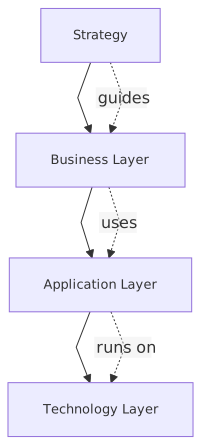
At a high level, you can think of it like this:
That sounds neat and orderly. Real enterprises are not neat and orderly. But the layers help stop you from mixing everything into one unreadable drawing.
There’s also a second idea: active structure, behavior, and passive structure.
In plain English:
- Active structure = the thing doing something
- Behavior = what it does
- Passive structure = what is used or produced
Example: a customer service team, an application component, a Kafka consumer service
Example: validate identity, publish event, authorize access
Example: customer record, loan application, access token, event payload
This is where ArchiMate starts to become useful rather than just “another notation.”
What ArchiMate is not
Let’s clear up a few misconceptions early.
ArchiMate is not:
- a replacement for every other modeling technique
- a process notation as detailed as BPMN
- a data modeling notation like ERD
- a cloud architecture diagram standard
- a project plan
- a guarantee of good architecture
This matters because beginners often try to force ArchiMate to do everything. That’s a mistake.
Use it to show enterprise structure and relationships. Use other notations when you need operational detail, solution design precision, or implementation-level specification.
Good architects know where ArchiMate stops.
The core concepts without the textbook pain
You do not need to memorize the entire specification to start using ArchiMate well. Honestly, many people who quote the specification the most produce the least useful models.
Here are the concepts that actually matter at the beginning.
1. Elements
Elements are the building blocks. They represent things in the enterprise.
Examples:
- Business Actor: Retail Banking Customer, Fraud Analyst
- Business Process: Open Account, Approve Loan
- Application Component: Mobile Banking App, IAM Platform, Payments API
- Application Service: Authentication Service, Account Summary API
- Data Object: Customer Profile, Transaction Event
- Node / Device / System Software: Kubernetes Cluster, Kafka Broker, Cloud Database
- Capability: Customer Identity Management
- Work Package: IAM Modernization Phase 1
You don’t need all of them on day one. In fact, if you use too many too early, your model gets precious and unreadable.
2. Relationships
Relationships are where the value is. The element list alone is not architecture. The relationships are.
Common ones:
- Serving: one thing provides value to another
- Assignment: a structure element performs behavior
- Realization: one thing implements or realizes another
- Access: behavior uses or updates data
- Flow: something moves from one element to another
- Triggering: one behavior starts another
Example: IAM Authentication Service serves Mobile Banking App
Example: Fraud Team assigned to Fraud Review Process
Example: Identity Platform realizes Authentication Service
Example: Onboarding Process accesses Customer Profile
Example: Transaction Event flows from Core Banking to Kafka Topic to Fraud Engine
Example: Identity Verification triggers Account Creation
If you understand elements and relationships, you already understand more than many teams who claim to “do ArchiMate.”
3. Views
A model is the full architecture repository. A view is a selected slice for a purpose.
This is one of the most important ideas.
A CIO does not need the same view as a platform engineer.
A security architect does not need the same view as a business process owner.
A program board definitely does not need the same view as the architecture review committee.
ArchiMate is powerful because you can maintain one underlying model and create different views for different audiences.
That’s the theory anyway. In practice, many teams skip the model discipline and draw one-off views. Sometimes that’s fine. I’m not doctrinaire about it. But if your estate is large, reusable views become essential.
How ArchiMate applies in real architecture work
This is where the beginner guides usually get weak. They explain the notation and never explain the job.

Architects are not paid to draw. They are paid to reduce ambiguity and improve decisions.
ArchiMate helps in real work in five very practical ways.
1. It helps connect business change to technology change
Suppose a bank wants to improve digital onboarding.
The business statement sounds harmless:
“We want customers to open an account in under five minutes from mobile.”
Fine. But that business goal hits multiple architecture domains:
- mobile app UX
- identity verification
- IAM and authentication
- customer master data
- KYC workflow
- event-driven integration
- cloud hosting and scaling
- fraud controls
- audit and compliance
Without a modeling language, each team describes its own piece and assumes someone else is connecting the dots.
ArchiMate gives you a way to show:
- the business process: customer onboarding
- the business service: digital account opening
- the application services: authentication, document verification, customer profile creation
- the data objects: identity document, customer record, KYC result
- the technology services: Kafka event streaming, cloud database, container platform
- the implementation work packages: IAM integration, event backbone rollout, onboarding redesign
That traceability is not paperwork. It’s how you stop change programs from becoming disconnected investments.
2. It exposes dependencies early
This is one of the biggest wins.
A lot of architecture failure is dependency blindness.
Teams say:
“We’re replacing the IAM platform.”
What they mean is:
“We’re replacing the login screen.”
In reality, the IAM platform may support:
- workforce SSO
- customer authentication
- API access tokens
- privileged admin access
- consent management
- MFA journeys
- identity federation with partners
And now suddenly your “simple platform upgrade” is a bank-wide operational risk.
ArchiMate is useful because it forces you to model what depends on what. Not perfectly, but visibly.
Even a basic dependency view can change the conversation from:
“When can we install the new product?”
to:
“Which business services are exposed, which applications consume identity services, and what transition architecture reduces risk?”
That is architecture doing its job.
3. It improves target state conversations
Target state diagrams are often fantasy art.
They show the world after transformation, but not the ugly middle. No transition states. No coexistence. No legacy constraints. No migration sequencing. Just a clean cloud-native dream.
Real architects know transformation happens in layers and compromises.
ArchiMate supports implementation and migration concepts, which means you can show:
- current state
- transition architecture
- target state
- work packages
- plateaus
- deliverables
This is not glamorous, but it’s where credibility comes from.
If you’re moving from point-to-point integrations to Kafka, for example, the target state is easy to draw:
“All systems publish and consume domain events.”
Great. That’s not the hard part.
The hard part is showing:
- which systems still need synchronous APIs
- where event ownership sits
- how canonical events are governed
- how IAM secures producers and consumers
- which cloud landing zones host the brokers
- what happens during hybrid coexistence
That’s what a serious ArchiMate view can capture.
4. It helps architects talk to different stakeholders without changing the story
This is underrated.
A lot of architects change the message depending on the room. Not because they’re dishonest, but because each audience wants a different level of detail. The risk is that the architecture itself becomes inconsistent.
ArchiMate gives you a structured way to present different abstractions while preserving the same underlying logic.
For example:
- Executives see capabilities, value streams, business services, major platforms
- Domain architects see application services, integrations, ownership boundaries
- Security architects see IAM services, trust relationships, access paths
- Platform teams see nodes, system software, cloud services, deployment dependencies
Same architecture. Different views.
That’s a lot better than maintaining five contradictory slide decks.
5. It creates a reusable architecture knowledge base
This is the long-term value, and many organizations never get there.
If your ArchiMate models are maintained with decent discipline, they become a living map of the enterprise:
- what capabilities exist
- what applications support them
- where data lives
- how integrations work
- what technologies underpin critical services
- what projects are changing what
That repository becomes extremely valuable in mergers, audits, cloud migrations, platform rationalization, and resilience reviews.
Of course, if nobody maintains it, it turns into architecture archaeology. Which is common. More on that later.
A real enterprise example: retail banking onboarding with Kafka, IAM, and cloud
Let’s make this concrete.
Imagine a retail bank trying to modernize customer onboarding. Today, onboarding is fragmented:
- mobile app starts the journey
- identity verification is handled by a third-party service
- core banking creates the customer record
- CRM stores sales data
- fraud engine runs separate checks
- notifications are sent by another platform
- IAM handles login after account creation
- several integrations are still point-to-point
The bank wants to reduce onboarding time, improve fraud detection, and move toward an event-driven architecture using Kafka on cloud infrastructure.
What ArchiMate can model here
At the business layer:
- Business Process: Digital Customer Onboarding
- Business Role: Customer, Operations Analyst, Fraud Analyst
- Business Service: Account Opening Service
- Capability: Customer Identity Management, Fraud Management
At the application layer:
- Mobile Banking App
- Onboarding Orchestration Service
- IAM Platform
- Identity Verification Service
- Core Banking System
- CRM Platform
- Fraud Engine
- Notification Service
- Kafka Event Streaming Platform
At the data/application behavior level:
- Application Service: Authentication Service
- Application Service: Customer Profile Service
- Application Service: Fraud Assessment Service
- Data Object: Customer Application
- Data Object: KYC Result
- Data Object: Customer Created Event
- Data Object: Fraud Alert Event
At the technology layer:
- Cloud Kubernetes Cluster
- Managed Kafka Service
- Cloud Database
- API Gateway
- Secrets Manager
- IAM Runtime Nodes
At the implementation layer:
- Work Package: Introduce Kafka for onboarding events
- Work Package: Integrate IAM with onboarding journey
- Work Package: Decommission point-to-point CRM integration
- Plateau: Hybrid onboarding architecture
- Plateau: Target event-driven onboarding architecture
What the architecture story looks like
The customer initiates onboarding in the mobile app. The app consumes authentication and registration services from the IAM platform. Once identity is verified, the onboarding orchestration service coordinates the rest of the flow.
Instead of directly calling every downstream system in sequence, the orchestration service publishes a CustomerApplicationSubmitted event to Kafka. Core banking, CRM, fraud, and notification services subscribe according to their responsibilities.
That sounds modern—and it is—but the details matter:
- IAM must issue and validate tokens consistently across mobile app, APIs, and internal services
- Kafka topics need ownership, schema governance, and access control
- Fraud may still require synchronous decisioning for some high-risk cases
- Core banking may not be event-native and may need an adapter
- Audit requirements may force durable event retention and traceability
- Cloud network segmentation and secret handling become part of the architecture, not implementation trivia
ArchiMate lets you show those relationships without collapsing into infrastructure-only or business-only views.
Why this matters in practice
Because in the real bank, the onboarding problem is not “draw a modern architecture.” The problem is balancing:
- customer experience
- security
- compliance
- delivery sequencing
- legacy constraints
- operational resilience
A decent ArchiMate model helps the bank see that IAM is not just a login component, Kafka is not just a transport mechanism, and cloud is not just a hosting decision. They are architectural building blocks tied to business outcomes.
That’s the point.
Common mistakes architects make with ArchiMate
Now for the part most guides avoid.
ArchiMate is useful, but architects misuse it constantly.
Mistake 1: Modeling everything
This is the classic beginner trap.
They discover a formal language and decide every element in the metamodel must appear somewhere. The result is a dense, joyless diagram that no stakeholder can read.
You do not get points for completeness if nobody understands the model.
Architecture is selective abstraction. If your diagram cannot answer a stakeholder question quickly, it’s probably over-modeled.
My rule: model only what supports a decision, explains a dependency, or clarifies a change.
Everything else is decorative architecture.
Mistake 2: Confusing notation quality with architecture quality
A clean ArchiMate diagram can still represent a terrible architecture.
I’ve seen beautifully modeled estates with duplicated capabilities, brittle integrations, unresolved ownership, and impossible migration plans. The notation looked professional. The thinking was weak.
ArchiMate helps express architecture. It does not replace judgment.
That may sound obvious, but many architecture teams hide behind notation precision. It feels safer than taking a position.
A real architect has to say things like:
- this integration pattern is wrong for the business need
- Kafka is overkill here
- IAM cannot remain a shared bottleneck
- this cloud decomposition creates governance debt
- the target state is unrealistic within the program timeline
That’s architecture. Not just drawing.
Mistake 3: Mixing viewpoints carelessly
Another common problem: one diagram tries to satisfy executives, delivery teams, security, operations, and auditors all at once.
It becomes unreadable because those audiences care about different things.
Use views properly.
Make an executive capability map.
Make an application cooperation view.
Make a technology deployment view.
Make a migration view.
Do not put every truth into one picture.
Mistake 4: Ignoring time and transition
A lot of ArchiMate use stops at current state or target state. That’s lazy architecture.
Transformation lives in the transition.
In the banking example, moving to Kafka is not a single event. Some systems remain synchronous. Some publish events but cannot consume them yet. IAM may need to support old and new token patterns during migration. Cloud landing zones may be provisioned in phases.
If you don’t model transition states, your architecture will be admired and then ignored by delivery teams, because it doesn’t help them sequence reality. ArchiMate in TOGAF ADM
Mistake 5: Treating ArchiMate like a compliance artifact
This one is fatal.
If ArchiMate becomes something architects produce only for governance boards, it dies. Slowly, but definitely.
The models must be useful for actual teams:
- product teams understanding dependencies
- security teams reviewing trust boundaries
- platform teams planning shared services
- program teams sequencing releases
- operations teams understanding impact
If the only consumer is architecture governance, you’re producing theater.
Mistake 6: Not showing ownership
A model without ownership is politically convenient and operationally useless.
Who owns the IAM service?
Who owns the Kafka topic schema?
Who owns the customer profile?
Who owns the onboarding orchestration logic?
These are not side questions. They are often the real blockers.
ArchiMate can represent structure and relationships, but architects often avoid ownership because it triggers organizational discomfort. Still, if your architecture ignores ownership, it ignores how enterprises actually work.
A practical way to start using ArchiMate
If you’re a beginner, do not start by reading the full spec cover to cover. That’s a good way to become enthusiastic about the notation and bad at architecture.
Start with a business problem.
For example:
“Reduce failed digital onboarding by 30% while meeting stronger identity assurance rules.”
Then build your model in this order:
Step 1: Identify the business context
Model:
- business process
- business roles
- business services
- capabilities
Keep it simple.
Step 2: Map the supporting applications
Add:
- key application components
- major application services
- critical data objects
- high-value integrations
This is where Kafka, IAM, APIs, and core systems start appearing.
Step 3: Add technology only where it matters
Do not model every subnet and runtime unless the question requires it.
Model technology when it affects:
- resilience
- security
- cost
- migration
- deployment constraints
Cloud hosting, Kafka platform topology, API gateway placement, and IAM runtime architecture often do matter.
Step 4: Show the relationships that answer real questions
Examples:
- which applications support onboarding
- which services depend on IAM
- which systems publish and consume events
- where customer data is created and updated
- which work packages change which components
Step 5: Create separate views for separate conversations
This is where many teams improve dramatically.
You might create:
That table alone can save a lot of pointless diagram debates.
Strong opinion: ArchiMate is most useful when used lightly
Here’s the contrarian take.
Many architecture teams think maturity means more model detail. I think the opposite is often true.
The best ArchiMate practitioners I’ve seen use it lightly but deliberately. They model enough to create alignment and expose risk. They do not attempt to model the universe.
Why? Because enterprises change too fast, and architecture repositories decay faster than people admit.
A 70% accurate, maintained model is far more valuable than a 95% accurate model that collapses under its own maintenance burden.
That may offend purists. Fine. Purity does not survive contact with portfolio reality.
Another contrarian thought: not every problem needs ArchiMate
Sometimes a whiteboard sketch is enough.
Sometimes BPMN is better.
Sometimes a sequence diagram is better.
Sometimes a cloud reference diagram is better.
Do not force ArchiMate into every conversation just because the enterprise architecture function invested in a modeling tool.
Use the right level of abstraction for the problem at hand.
That said, if you’re working across business, application, technology, and change domains—especially in a large enterprise—ArchiMate is hard to beat.
How ArchiMate helps with Kafka, IAM, and cloud specifically
These three areas are where architecture diagrams often become misleading.
Kafka
Teams often draw Kafka as a magic central bus. One icon, many arrows, done.
But the real architecture questions are:
- who owns each event
- what business event is represented
- which systems publish or consume
- where schema governance sits
- what security controls apply
- what remains synchronous
- what happens on failure or replay
ArchiMate helps by modeling Kafka not just as technology, but as part of application cooperation and service enablement.
IAM
IAM is routinely under-modeled. It gets shown as a single security box somewhere near the edge.
That’s not enough.
IAM influences:
- customer login journeys
- workforce access
- API authorization
- partner federation
- privileged access
- token issuance
- consent and identity proofing
ArchiMate allows IAM to be represented as application services, supporting components, and technology/runtime dependencies. That gives it the architectural visibility it deserves.
Cloud
Cloud diagrams often become deployment art with no business meaning.
ArchiMate helps avoid that by linking cloud infrastructure back to:
- application services
- business capabilities
- migration work packages
- resilience requirements
- shared platform services
Cloud should not be modeled as a shopping list of vendor services. It should be modeled as architecture in support of enterprise outcomes.
Final advice for beginners
If you’re just starting with ArchiMate, remember this:
- Learn the basics of layers and relationships
- Use it to answer real stakeholder questions
- Keep views focused
- Model dependencies, not everything
- Show transition, not just destination
- Be opinionated about the architecture, not just precise about the notation
That last point matters most.
The enterprise does not need another diagram factory. It needs architects who can make complexity understandable and change survivable.
ArchiMate is a very good language for that. But like any language, it’s only as useful as the person using it.
A weak architect with ArchiMate produces tidy confusion.
A good architect with ArchiMate produces clarity, challenge, and better decisions.
That’s the real beginner lesson.
FAQ
1. Is ArchiMate hard to learn for beginners?
Not really. The basics are quite learnable: layers, core element types, and a handful of relationships. The hard part is not the notation. The hard part is knowing what to model and what to leave out.
2. What is the difference between ArchiMate and TOGAF?
TOGAF is a broader enterprise architecture framework. It includes methods, governance ideas, and process guidance. ArchiMate is a modeling language. In simple terms: TOGAF tells you how to approach architecture work; ArchiMate helps you describe the architecture. EA governance checklist
3. Can ArchiMate be used for cloud architecture?
Yes, but carefully. It’s useful for showing how cloud platforms support applications, services, and business capabilities. It is not a replacement for detailed cloud engineering diagrams. Use it for architecture relationships and decisions, not every technical configuration.
4. How does ArchiMate help with event-driven architecture like Kafka?
It helps you model producers, consumers, application services, event flows, and supporting technology. More importantly, it lets you connect those technical patterns back to business processes and migration plans. That’s often what’s missing in event-driven transformation programs.
5. Is ArchiMate worth using in agile or product-led organizations?
Yes, if used pragmatically. No, if used as heavy governance overhead. Product teams usually don’t need giant enterprise models. But they absolutely benefit from clear views of dependencies, shared services, IAM integration, event flows, and transition architecture. So the answer is: use less of it, but use it well.
ArchiMate at a glance
How architects use it
- ArchiMate is a modeling language for describing enterprise architecture.
- It helps architects connect strategy, business, applications, and technology in one view.
- Best use: show dependencies, impact, traceability, and change flow across layers.
Frequently Asked Questions
What is ArchiMate used for?
ArchiMate is used to model enterprise architecture across business, application, and technology domains. It helps architects describe how strategy translates into business operations, which applications support those operations, and how technology infrastructure enables the applications — all in one connected, traceable model.
Is ArchiMate difficult to learn?
ArchiMate has a steeper initial learning curve than informal diagramming because it has precise semantics. However, the core framework (three layers, key relationship types, main element categories) can be learned in a few days. Professional certification is available at Foundation and Practitioner levels through The Open Group.
What tools support ArchiMate?
The main tools for ArchiMate modeling are Sparx Enterprise Architect (most feature-rich, supports ArchiMate 3.x natively), Archi (free, open-source, ArchiMate-only), and BiZZdesign Enterprise Studio. Sparx EA also supports UML, BPMN, SysML and TOGAF alongside ArchiMate in one repository.