⏱ 20 min read
Most enterprise architecture diagrams are bad. Not because the architects are bad, but because the diagrams try to impress instead of explain. Boxes everywhere, arrows in all directions, five colors too many, and not a single person outside the architecture team can tell what the thing means.
That’s where ArchiMate is useful. And also where it gets abused.
If you’ve ever opened an ArchiMate tool and felt like someone handed you a notation designed by a committee of very serious people with very strong feelings about rectangles — yes, fair reaction. But underneath the notation overload, ArchiMate is actually one of the most practical tools we have for modeling an enterprise in a way that connects business, applications, technology, and change.
Here’s the simple version early, because people should not need to suffer for SEO:
ArchiMate is a visual modeling language for enterprise architecture.
It helps you describe:
- what the business does,
- which applications support it,
- what technology runs those applications,
- how data moves,
- who owns what,
- and what changes are planned.
That’s the clean definition. In real life, ArchiMate is valuable because it lets you answer uncomfortable questions with structure instead of opinion: ArchiMate modeling guide
- What breaks if we retire this system?
- Why are we paying for three IAM platforms?
- Which business capability depends on Kafka?
- What cloud services are actually critical?
- Which teams are creating risk by bypassing architecture?
Those are real architecture questions. Not “can we make the diagram prettier.”
This tutorial walks through ArchiMate step by step, but from the perspective of actual enterprise architecture work. Not notation trivia for its own sake. We’ll use examples from banking, Kafka-based event streaming, IAM, and cloud platforms, because those are places where architecture either becomes useful or gets exposed as theater. ArchiMate tutorial
What ArchiMate Is, Really
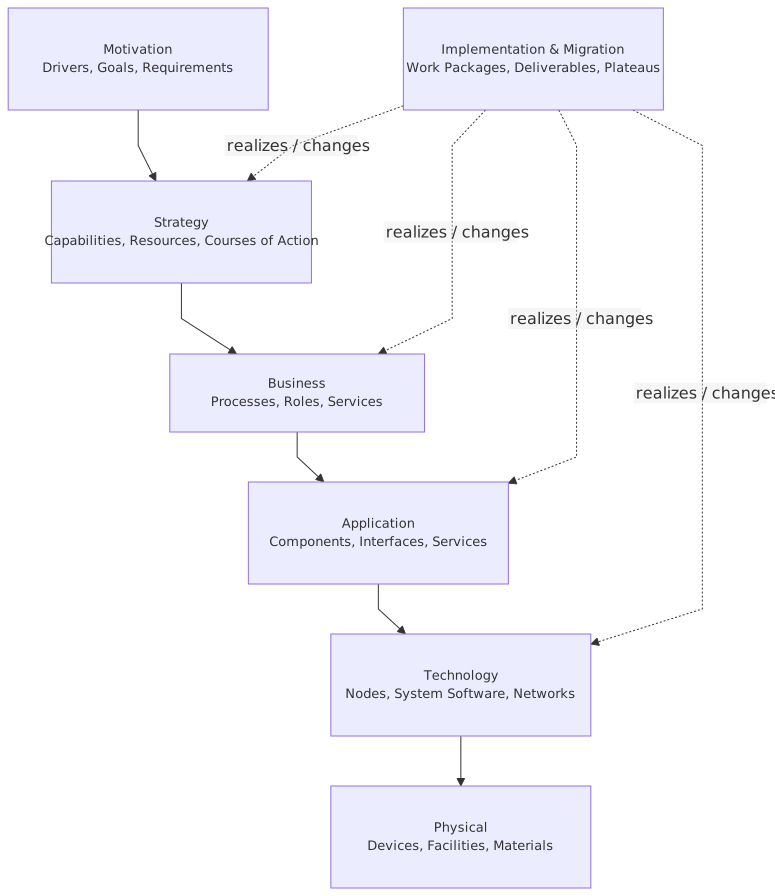
ArchiMate is a standard modeling language from The Open Group. It’s meant to model enterprise architecture across layers.
The core idea is straightforward:
- Business layer: products, services, processes, actors, capabilities
- Application layer: applications, services, data objects, components
- Technology layer: infrastructure, nodes, system software, networks
- Strategy / Motivation / Implementation layers: why things exist, where you’re going, and how change happens
That sounds neat in theory. In practice, ArchiMate gives you a common vocabulary for architecture conversations that usually get muddled.
For example:
A business stakeholder says:
“We need faster onboarding for retail customers.”
A solution architect says:
“We’ll integrate the onboarding app with IAM and expose an API.”
An infrastructure engineer says:
“We need Kafka, Kubernetes, and managed secrets.”
A risk person says:
“What about access certification and audit trails?”
Without a common model, these are four separate conversations. With ArchiMate, you can map them together.
And that matters. Because architecture work is mostly dependency work. If you cannot model dependencies clearly, you’re not doing architecture. You’re doing diagram decoration.
Why Architects Struggle with ArchiMate
Let me be blunt: many architects overcomplicate ArchiMate on day one.
They try to learn every element, every relationship, every viewpoint. That is the wrong approach.
You do not need to memorize the full language to get value. In fact, trying to use all of it too early usually produces unreadable models and annoyed stakeholders.
The better approach is this:
- Start with a small subset of elements
- Model one real problem
- Use relationships conservatively
- Add detail only when it helps a decision
That’s how real architecture work happens anyway. Nobody in a bank says, “Before we discuss IAM modernization, can we first align on all 60 ArchiMate concepts?”
They say, “Why do we have three identity stores and two provisioning flows?”
That’s the starting point.
Step 1: Pick a Real Enterprise Problem
Do not start with “let’s model the enterprise.” That way lies madness.
Start with one scenario. Something concrete. Something painful.
Good starting examples:
- customer onboarding in a retail bank
- event-driven fraud detection using Kafka
- IAM consolidation after a merger
- cloud migration for a payments platform
- legacy core banking integration
Let’s use a realistic banking example throughout:
Scenario:
A retail bank wants to improve digital customer onboarding. Today onboarding is slow, identity verification is fragmented, customer data is copied across systems, and downstream fraud checks are inconsistent. The bank also wants to move supporting services to cloud-native platforms and use Kafka for event distribution.
That’s a proper architecture problem. It involves business outcomes, application flows, technology choices, security concerns, and transformation planning.
Perfect for ArchiMate.
Step 2: Start with the Business Layer
This is where many technical architects get impatient. Big mistake.
If you don’t start with the business layer, you’ll end up modeling systems without explaining why they exist. Then your architecture becomes a technical asset inventory. Useful sometimes, but not enough.
For our banking example, start with a few core business concepts:
- Business Actor: Retail Customer
- Business Role: Onboarding Operations Team
- Business Process: Customer Onboarding
- Business Service: Account Opening Service
- Business Object: Customer Application
- Capability: Customer Lifecycle Management
- Outcome: Faster onboarding, lower fraud risk
You do not need 25 business elements. Just enough to show the value chain.
A very simple ArchiMate thought process would be:
- The bank offers an Account Opening Service
- That service is realized by the Customer Onboarding Process
- The process uses the Customer Application
- The process supports the capability Customer Lifecycle Management
- The desired outcomes are reduced onboarding time and improved compliance
Already useful.
This is the part many architects skip because they want to jump to APIs and cloud services. But if you can’t link Kafka or IAM to a business service, you probably don’t have architecture justification. You have technology enthusiasm.
Contrarian thought:
A lot of “modernization” programs should have been business capability models with smaller technical changes, not giant platform overhauls. ArchiMate helps expose that. If your business model is weak, your target architecture is often fantasy.
Step 3: Add the Application Layer
Now we model the systems that support the business process.
In our banking onboarding example, likely application elements include:
- Onboarding Portal
- CRM
- IAM Platform
- KYC/AML Screening Service
- Customer Master Data Service
- Notification Service
- Kafka Event Streaming Platform
In ArchiMate terms, these might be modeled as:
- Application Component: Onboarding Portal
- Application Component: IAM Platform
- Application Service: Identity Verification Service
- Application Service: Customer Profile Service
- Data Object: Customer Profile
- Application Event: Customer Onboarding Submitted
Now connect them carefully.
Example logic:
- The Onboarding Portal supports the Customer Onboarding Process
- The portal uses the Identity Verification Service
- The IAM Platform realizes the Identity Verification Service
- The Customer Master Data Service serves the Customer Profile
- The Kafka Platform carries the Customer Onboarding Submitted event
- The Fraud Monitoring Application consumes that event
This is where ArchiMate starts becoming powerful. You’re not just listing systems. You’re showing support, realization, access, and flow.
And yes, this is where many diagrams become unreadable. So be disciplined.
Use just enough detail to answer the question at hand.
If the question is “what supports onboarding,” don’t add Kubernetes clusters yet. If the question is “what breaks if Kafka fails,” then yes, bring in the deeper technology dependencies.
Step 4: Add the Technology Layer Only When It Matters
A classic mistake is dragging infrastructure into every model. That usually makes the audience’s eyes glaze over.

The technology layer matters when:
- resilience is under discussion
- cloud migration is under discussion
- hosting cost matters
- security controls depend on infrastructure
- runtime dependencies are relevant
For our example, maybe the bank runs:
- IAM on managed cloud infrastructure
- onboarding microservices on Kubernetes
- Kafka on a managed streaming platform
- customer master data on a managed database
- fraud systems in a hybrid environment due to regulation
Technology elements could include:
- Node: Kubernetes Cluster
- System Software: Kafka Broker Platform
- Technology Service: Container Hosting Service
- Technology Service: Managed Database Service
- Artifact: Onboarding Microservice Container Image
- Communication Network: Secure API Network
Now the architecture gets more real:
- The Onboarding Portal is deployed on the Kubernetes Cluster
- The Kafka Platform provides an Event Streaming Service
- The IAM Platform runs on cloud infrastructure
- The Fraud Monitoring Application remains on-prem and connects through a secure network
That hybrid detail matters in banking. Not because hybrid is fashionable. Because real banks rarely move everything at once, and regulatory boundaries often force ugly but necessary coexistence.
A lot of architecture diagrams pretend target state means clean state. It doesn’t. It usually means “less messy than now.”
Step 5: Use Relationships Like an Adult
This is where ArchiMate either becomes precise or becomes nonsense.
The relationships matter more than the boxes.
The ones you’ll use most often in practical architecture work are:
- Serving
- Realization
- Assignment
- Access
- Flow
- Composition / Aggregation
- Triggering
Here’s a practical cheat sheet.
The common mistake? Architects use generic arrows because they’re not sure which relationship is right. That weakens the model immediately.
Second common mistake? They use the “correct” relationship in a way nobody can understand. Also bad.
My rule:
Semantic precision matters, but stakeholder comprehension matters more.
If your model is technically perfect and practically unreadable, you failed.
Step 6: Build One Viewpoint at a Time
An enterprise model is not one giant picture. It’s a set of views for different purposes.
This is one of the most important things to understand about ArchiMate.
You do not create one master diagram and expect everyone to love it. You create viewpoints.
For our banking scenario, I would typically create at least these views:
1. Business support view
Shows:
- Customer Onboarding Process
- Account Opening Service
- supporting applications
- key business outcomes
Audience:
- business architects
- product owners
- operations leads
2. Application cooperation view
Shows:
- Onboarding Portal
- IAM Platform
- CRM
- KYC/AML Service
- Kafka
- Fraud Monitoring
- Customer Master Data
Audience:
- solution architects
- integration architects
- engineering leads
3. Technology deployment view
Shows:
- cloud environment
- Kubernetes
- managed Kafka
- IAM hosting
- on-prem fraud application
- network boundaries
Audience:
- infrastructure architects
- cloud platform teams
- security architects
4. Transformation roadmap view
Shows:
- current state
- transition architectures
- target state
- work packages
- dependencies
Audience:
- portfolio governance
- program leadership
- CIO office
This is how ArchiMate applies in real work. Not as one giant “enterprise map” nobody updates. But as a model repository that supports multiple decision-oriented views.
That distinction matters a lot.
Step 7: Model Current State Before You Draw the Future
Architects love target state. It’s cleaner, more elegant, and less embarrassing than current reality.
Unfortunately, current reality pays the bills.
If you skip current state modeling, your target architecture will be disconnected from migration reality. Then your roadmap becomes fiction. EA governance checklist
In our banking example, current state might be:
- onboarding portal calls CRM directly
- identity verification handled by two different IAM-related solutions
- KYC checks done through a batch interface
- fraud system receives nightly files
- customer profile data duplicated in multiple systems
- some onboarding services in cloud, others on-prem
That current state is ugly. Good. Most real enterprises are ugly in the middle.
Now model a target state:
- onboarding events published to Kafka in real time
- IAM consolidated into one platform for customer identity lifecycle
- customer master data exposed as a shared application service
- fraud checks triggered by events
- onboarding microservices containerized in cloud
- legacy batch interfaces reduced but not fully removed
This comparison is where architecture earns trust. Because now you can discuss:
- what changes first
- what risks remain
- what dependencies block progress
- which legacy systems must stay longer than people hoped
Contrarian thought:
A lot of target architectures are just wishful thinking with icons. If there is no transition path and no constraint model, it’s not architecture. It’s corporate optimism.
Step 8: Add Motivation and Strategy Sparingly
ArchiMate has motivation elements like goals, drivers, principles, and requirements. These are useful. They are also easy to overuse.
Use them when they clarify why the architecture matters.
For the banking onboarding example:
- Driver: Regulatory pressure for stronger KYC and auditability
- Driver: Customer expectation for faster digital onboarding
- Goal: Reduce onboarding time from 2 days to 15 minutes
- Goal: Improve traceability of identity and access decisions
- Requirement: Event publication must support audit retention
- Principle: Customer identity must have a single authoritative source
- Principle: Integration should be event-first where latency matters
This is enough.
Do not turn your model into a graveyard of vague goals like “increase agility” and “enable innovation.” Those phrases are not architecture. They are management wallpaper.
A strong model links motivation to actual implementation choices.
For example:
- because auditability matters, Kafka topics need retention and lineage controls
- because customer identity must be authoritative, IAM cannot remain fragmented
- because onboarding speed matters, batch KYC integration is no longer acceptable
That’s architecture logic.
Step 9: Use Implementation and Migration to Make It Real
This is one of the most underused parts of ArchiMate, and it’s where real enterprise value often sits.
You can model:
- Work Packages
- Deliverables
- Plateaus
- Gaps
That means you can connect architecture to delivery.
For our banking case, a reasonable migration structure might be:
Plateau 1: Stabilize current onboarding
- document existing application dependencies
- identify duplicate customer identity stores
- improve monitoring on current onboarding flow
Plateau 2: Introduce event backbone
- publish onboarding submitted events to Kafka
- integrate fraud monitoring as event consumer
- reduce nightly file transfers
Plateau 3: IAM consolidation
- move customer authentication and identity proofing to single platform
- decommission redundant identity store
- align authorization model
Plateau 4: Cloud-native onboarding services
- replatform onboarding APIs to Kubernetes
- move customer profile service to managed database-backed service
- implement zero-trust access patterns
Now architecture is not just a picture. It’s a transformation structure.
This is how architecture applies in real work:
- informing investment decisions
- sequencing dependencies
- exposing hidden constraints
- helping governance distinguish “must do now” from “nice idea later”
If your ArchiMate model cannot support roadmap conversations, you’re leaving value on the table. ArchiMate in TOGAF ADM
Common Mistakes Architects Make with ArchiMate
Let’s be honest. Most ArchiMate problems are not notation problems. They are architecture behavior problems.
1. Modeling everything
They open the tool and start dumping the universe into it.
Result: unusable model.
Better: model only what supports a decision, communication need, or analysis question.
2. Ignoring the business layer
They produce application and infrastructure views with no business context.
Result: architecture becomes IT self-reference.
Better: always connect systems to business services, processes, capabilities, or outcomes.
3. Mixing abstraction levels
One diagram shows “Customer Onboarding Capability,” “Kafka Cluster,” “API Gateway,” “Retail Banking,” “Fraud Team,” and “OAuth Token” all together.
Result: conceptual soup.
Better: keep each view coherent in scope and abstraction.
4. Treating ArchiMate like UML
They model implementation design details instead of enterprise relationships.
Result: wrong tool for the job.
Better: stay focused on architecture-level structure and meaning.
5. Using every relationship available
Because the notation allows it.
Result: no one can read the model.
Better: use a stable, small subset of relationships unless there is a compelling reason.
6. Building target state with no migration logic
This is incredibly common.
Result: impressive diagram, impossible program.
Better: model gaps, plateaus, and work packages.
7. Forgetting ownership and accountability
Systems appear, but teams and roles don’t.
Result: governance blind spot.
Better: assign processes, services, and applications to real actors or roles where relevant.
8. Confusing repositories with architecture
They think having a tool full of objects means they have architecture maturity.
No. A repository full of stale objects is just expensive clutter.
Architecture maturity is when models help people make better decisions repeatedly.
A Real Enterprise Example: Banking Onboarding with Kafka and IAM
Let’s pull the pieces together in one realistic example.
A mid-sized bank has grown through acquisition. It now has:
- two customer IAM platforms
- three onboarding channels
- separate KYC and AML integrations
- a CRM that stores duplicate customer identity data
- nightly fraud feeds
- a cloud strategy that is more slogan than architecture
The business wants faster onboarding and better customer experience. Risk wants stronger traceability. Operations wants fewer manual exceptions. Technology wants to standardize integration and move to cloud-native services.
Current state, modeled in ArchiMate terms
Business:
- Account Opening Service
- Customer Onboarding Process
- Fraud Review Process
Application:
- Web Onboarding App
- Branch Onboarding App
- CRM
- Legacy IAM
- Acquired IAM
- KYC Service
- Fraud Engine
- Customer Data Store
Technology:
- on-prem app servers
- managed cloud environment for newer apps
- file transfer network
- limited API gateway
Problems exposed by the model
- One business service is realized by fragmented applications
- Customer identity is not authoritative in one place
- Fraud checks are triggered late due to batch flow
- Customer data duplication creates compliance and reconciliation risk
- Cloud and on-prem dependencies create operational complexity
Target state
Business:
- same Account Opening Service, but redesigned support model
- improved Customer Lifecycle Management capability
Application:
- unified Onboarding Service
- consolidated IAM Platform
- Customer Profile Service
- Kafka Event Streaming Platform
- Fraud Monitoring Consumer
- Notification Service
Technology:
- Kubernetes for onboarding workloads
- managed Kafka service
- managed database for customer profile
- secure integration with remaining on-prem fraud components
What changes in real work
- Customer submits onboarding request through digital channel
- IAM performs identity proofing and authentication orchestration
- Onboarding application writes customer profile through a shared service
- Event is published to Kafka
- Fraud monitoring consumes event immediately
- Notification service updates customer status
- CRM consumes customer lifecycle events instead of acting as system of record
This matters because now:
- onboarding time drops dramatically
- fraud checks happen earlier
- identity architecture is cleaner
- cloud deployment is aligned to business need
- the CRM stops pretending to be the master of everything
That last one is common, by the way. In too many enterprises, CRM becomes the accidental center of the universe because nobody designed proper domain ownership.
ArchiMate helps surface that kind of architectural drift.
How This Helps in Real Architecture Work
This is the part people often skip. They learn notation but not usage.
Here’s where ArchiMate genuinely helps architects doing actual enterprise work.
Impact analysis
If the bank wants to replace IAM, the model shows:
- which business processes depend on it
- which applications consume identity services
- what technology environments host it
- what migration packages are affected
Without that, replacement planning becomes a political debate.
Rationalization
If there are three onboarding applications, ArchiMate can show overlap in services and capabilities.
That helps justify consolidation.
Cloud decision-making
Cloud discussions are often too vague. “Move to cloud” is not architecture.
A model can show:
- which application services benefit from elasticity
- which technology services can be managed
- which regulatory boundaries force hybrid design
- where Kafka introduces new operational dependencies
Security and IAM planning
IAM is not just a security topic. It is an enterprise architecture topic because identity touches business processes, applications, data, and compliance.
An ArchiMate model can expose:
- duplicate identity stores
- inconsistent authorization points
- missing ownership of identity lifecycle
- over-coupling between apps and authentication logic
Roadmap governance
Architecture review boards love arguing over standards. Less useful.
Better to use models to ask:
- does this work package advance the target plateau?
- are we reducing duplication or creating more?
- are we improving capability support or just changing vendors?
That’s much healthier governance.
A Practical Way to Learn ArchiMate Fast
If you want to learn ArchiMate step by step without drowning in notation, do this:
Week 1: Learn the core layers
Understand:
- business
- application
- technology
Ignore the rest for now.
Week 2: Learn 7–8 key element types
Use only:
- business process
- business service
- application component
- application service
- data object
- node
- technology service
- capability
That’s enough to start.
Week 3: Learn the main relationships
Focus on:
- serving
- realization
- access
- triggering
- flow
- assignment
Week 4: Model one real scenario
Pick something from your enterprise:
- IAM onboarding
- Kafka event flow
- cloud migration
- payments processing
- employee joiner-mover-leaver process
Week 5: Create 3 viewpoints
- business support view
- application cooperation view
- migration view
Week 6: Review with stakeholders
If they can’t understand it, simplify it.
That last point is important. Real architects model for shared understanding, not self-validation.
Final Thought
ArchiMate is not magic. It won’t fix weak architecture thinking. In fact, it tends to expose weak thinking faster, which is one reason some people dislike it.
But used properly, it gives you a structured way to connect business intent, application design, technology dependencies, and transformation planning. That is exactly what enterprise architecture is supposed to do.
My strong opinion: ArchiMate is at its best when used narrowly, deliberately, and in service of real decisions. Not as a giant encyclopedia. Not as a compliance ritual. Not as a wall of boxes no one updates.
Model less. Mean more.
If you do that, ArchiMate becomes practical surprisingly fast.
FAQ
1. Is ArchiMate too complicated for beginners?
It can look that way, yes. But beginners usually overestimate how much they need to learn upfront. Start with the business, application, and technology layers plus a small set of relationships. That covers a lot of real architecture work.
2. What’s the difference between ArchiMate and UML?
UML is mainly for software design and detailed system modeling. ArchiMate is for enterprise architecture across business, applications, technology, and change. If you’re modeling enterprise dependencies and roadmaps, ArchiMate is usually the better fit.
3. How does ArchiMate help with Kafka architecture?
It helps you show Kafka in context: which business events matter, which application services publish and consume events, what data objects are involved, and what technology services support the platform. That is much better than drawing Kafka as an isolated technical box.
4. How should I model IAM in ArchiMate?
Usually by linking IAM to business processes like onboarding or access approval, then showing the application services it provides such as authentication, authorization, identity proofing, or provisioning. Add technology detail only when deployment, resilience, or cloud hosting matters.
5. Do I need to model the whole enterprise before ArchiMate becomes useful?
No, and honestly that idea causes a lot of failure. Start with one problem domain or transformation area. A good model of customer onboarding, payments, or IAM modernization is far more useful than a half-finished “model of everything.”
Frequently Asked Questions
What is enterprise architecture?
Enterprise architecture is a discipline that aligns an organisation's strategy, business processes, information systems, and technology. Using frameworks like TOGAF and modeling languages like ArchiMate, it provides a structured view of how the enterprise operates and how it needs to change.
How does ArchiMate support enterprise architecture practice?
ArchiMate provides a standard modeling language that connects strategy, business operations, applications, data, and technology in one coherent model. It enables traceability from strategic goals through business capabilities and application services to the technology platforms that support them.
What tools are used for enterprise architecture modeling?
The main tools are Sparx Enterprise Architect (ArchiMate, UML, BPMN, SysML), Archi (free, ArchiMate-only), and BiZZdesign Enterprise Studio. Sparx EA is the most feature-rich option, supporting concurrent repositories, automation, scripting, and integration with delivery tools like Jira and Azure DevOps.