⏱ 19 min read
Most UML models in enterprises are not wrong because the notation is hard. They are wrong because people treat modeling like decoration.
That’s the uncomfortable truth.
A lot of architecture teams still produce diagrams that look polished in PowerPoint or Sparx or whatever tool they use, but the models are structurally weak, inconsistent with reality, and impossible to validate. They impress steering committees for fifteen minutes and then quietly rot in Confluence. The result is predictable: delivery teams ignore the models, governance becomes theater, and architecture loses credibility. architecture decision records
If that sounds harsh, good. It should.
Because UML, used properly, is still one of the best ways to reason about system structure, behavior, responsibility boundaries, and integration dependencies. But only if the model is validated. Not admired. Not archived. Validated. ArchiMate in TOGAF ADM
What UML model validation actually means
Let’s make this simple early.
UML model validation is the practice of checking whether a UML model is:
- syntactically correct
- semantically meaningful
- internally consistent
- aligned with architecture standards and reality
The notation is used properly.
The model says something coherent about the system.
Different diagrams do not contradict each other.
The model reflects how the enterprise actually builds and operates systems.
That’s it. At least at the core.
In real architecture work, validation means asking questions like:
- Does this sequence diagram match the interfaces defined in the component model?
- Does the deployment diagram reflect the actual cloud landing zone and network boundaries?
- Are IAM responsibilities shown consistently across application, platform, and identity services?
- Does the event flow in Kafka match the ownership and lifecycle shown elsewhere?
- Have we modeled states and exceptions, or only the happy path fantasy version?
If the answer is “sort of,” the model is not validated.
And if the model is not validated, it is not architecture. It is illustration.
Why architects should care more than they usually do
Here is the part many architects resist: validation is not a tooling concern. It is an architectural discipline.
Too many people think model validation means clicking “check model” in a UML tool and fixing a few broken references. That’s barely step zero. Actual validation is about ensuring the model is trustworthy enough that teams can make decisions from it. UML modeling best practices
In enterprise settings, bad models create expensive consequences:
- integration contracts are misunderstood
- IAM boundaries are vague, causing audit findings later
- Kafka topics become accidental shared databases
- cloud deployments violate segmentation or resilience rules
- service ownership gets muddled across teams
- target-state roadmaps are built on assumptions nobody tested
You can survive with incomplete documentation. Enterprises do it every day. What you cannot safely survive with is confidently wrong architecture models.
That’s the danger. False certainty.
The first mistake: using UML as a presentation artifact
This is probably the most common architecture sin.
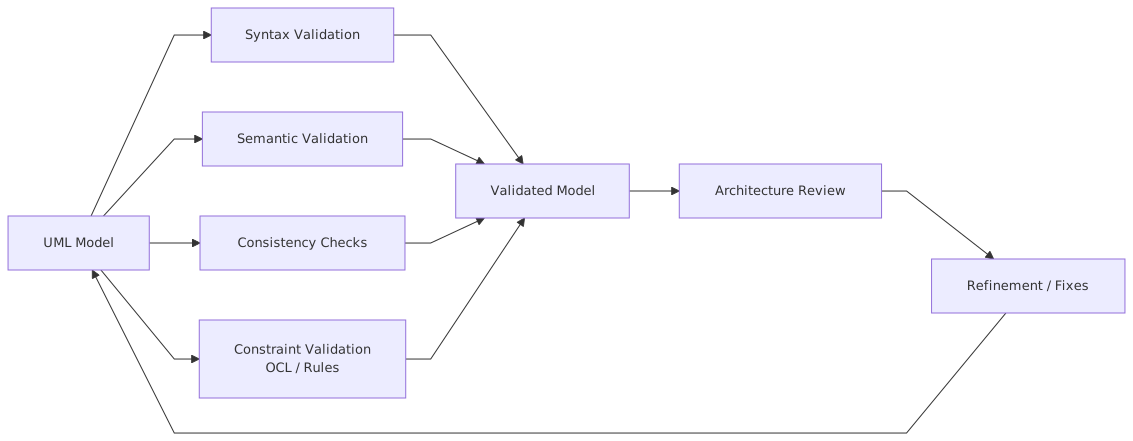
Architects create a class diagram, component diagram, sequence diagram, or deployment diagram because a gate requires it. So the diagram is produced to satisfy the review, not to support system reasoning. The model becomes a compliance deliverable. It stops being a working artifact.
Then validation is impossible, because nobody asks whether the model can withstand operational scrutiny.
A real architect uses UML models to answer questions such as: UML for microservices
- Where exactly is trust established?
- Which component owns customer consent?
- What happens if the event broker is unavailable?
- Which service can publish to this Kafka topic?
- Is the authorization decision local, delegated, or centralized?
- Does this microservice really need synchronous dependency on IAM at runtime?
Those are architecture questions. If the UML model cannot support them, it is too shallow.
A practical framework for UML model validation
In enterprise work, I’ve found it useful to validate UML models at five levels. Not because frameworks are magical, but because teams need something operational.
This is where architecture becomes real.
If you only validate syntax, you are checking spelling. Useful, yes. Sufficient, absolutely not.
Technique 1: Validate notation, but don’t stop there
Let’s start with the obvious one.
A UML model should use the notation correctly:
- components should not be random rectangles with labels
- interfaces should be explicit where they matter
- dependencies should not be used when an association or realization is intended
- deployment nodes should represent actual runtime environments, not vague concepts
- sequence lifelines should correspond to real participants, not hand-wavy abstractions
This matters because sloppy notation creates ambiguity. And ambiguity in architecture is expensive.
But here’s the contrarian bit: perfect notation is overrated if the architecture thinking is weak.
I have seen pristine UML models that were useless. Every line correct, every stereotype elegant, every package beautifully organized—and the model still avoided the hard questions. No failure paths. No security boundaries. No ownership conflicts. Just polished emptiness.
So yes, validate syntax. But do not confuse syntactic validity with architectural quality.
Technique 2: Cross-check diagrams against each other
This is where many UML efforts collapse.
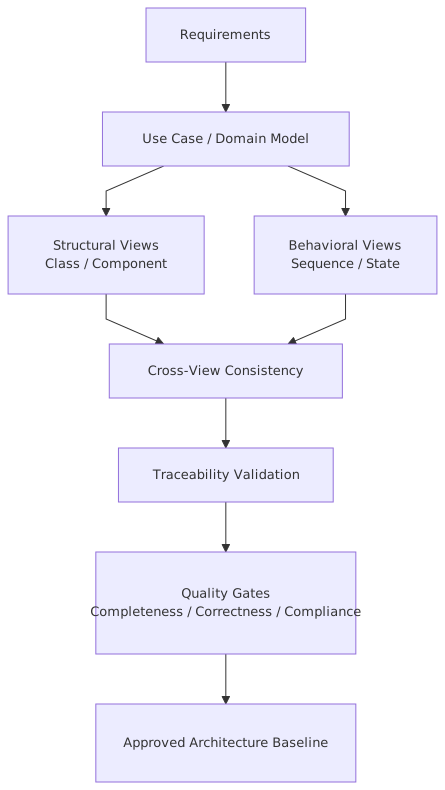
A component diagram says Service A exposes CustomerProfileAPI. Fine. But the sequence diagram shows another service calling UpdateCustomerRecord directly on a database adapter. The deployment diagram places the IAM policy engine in a private subnet, but the runtime sequence implies direct public API validation. The state diagram says an account can move from PendingKYC to Active, but the business process diagram has three approval states in between.
These are not minor issues. These are contradictions.
Real validation means comparing diagrams across views:
- Component vs sequence
- Component vs deployment
- State vs activity
- Logical vs security view
- Application vs event model
Are the interactions in the sequence actually supported by defined interfaces?
Are the components deployed where the model says they can run?
Do the process steps honor the state transitions?
Are trust zones and IAM enforcement represented consistently?
Are Kafka topics and producers/consumers aligned with service ownership?
A good architect does not ask, “Is each diagram understandable?”
They ask, “Do these diagrams agree with each other?”
That is a much better question.
Technique 3: Validate against enterprise standards, not just UML rules
This is the point many architecture teams miss entirely.
In enterprises, a model is not valid just because UML accepts it. It must also conform to organizational standards. For example:
- all externally exposed APIs must terminate through an approved gateway
- IAM decisions for privileged operations must be centralized
- customer data services must publish domain events through Kafka using approved topic naming and retention patterns
- production workloads in cloud must be deployed into specific landing zones
- regulated banking workloads must separate operational and customer identity contexts
- encryption, audit logging, and DR constraints must be represented somehow in the architecture
A UML model that ignores these standards is not “creative.” It is invalid in the context that matters.
This is why mature architecture teams define validation rules such as:
- every internet-facing component must map to a managed ingress or API gateway
- every service handling PII must show data classification stereotype or tagged value
- every Kafka topic must have a clear owning bounded context
- every privileged admin flow must involve IAM policy evaluation and audit trail
- every cloud deployment must indicate environment boundary and resilience pattern
These rules can be manual, semi-automated, or tool-enforced. The method matters less than the discipline.
Technique 4: Validate behavioral realism, especially failure paths
Architects are strangely optimistic in diagrams.
We model login success, payment success, event delivery success, token validation success, cloud failover success. We model the world as if systems are obedient. Real systems are not obedient. They are messy, delayed, partially available, and occasionally malicious.
So one of the best UML validation techniques is brutally simple:
Ask what happens when things go wrong.
On sequence diagrams:
- what if Kafka is unavailable?
- what if token introspection times out?
- what if IAM returns “permit” but the user profile service is stale?
- what if the bank core system responds after the client timeout?
- what if duplicate events arrive?
On state diagrams:
- what state represents partial onboarding?
- what state captures fraud review?
- can an account revert from
ActivetoRestricted? - is there a terminal failure state or only success?
On activity diagrams:
- where are retries?
- where is manual intervention?
- where is compensating action?
- where is dead-letter handling?
This is not nitpicking. In real architecture work, the failure path often defines the architecture more than the success path does.
Especially in banking.
A real enterprise example: digital onboarding in a bank
Let’s make this concrete.
Imagine a retail bank modernizing its digital customer onboarding platform. The target architecture includes:
- a mobile onboarding application
- API gateway in the cloud
- onboarding orchestration service
- IAM platform for authentication and authorization
- KYC/AML screening service
- customer master service
- Kafka for event-driven propagation
- audit service
- deployment across multiple cloud zones with regulated data controls
The architecture team produces several UML diagrams:
- component diagram
- sequence diagram for onboarding
- deployment diagram
- state diagram for customer application lifecycle
At first glance, everything looks clean. Then validation starts.
What the initial UML model showed
The component diagram said:
- mobile app calls onboarding API
- onboarding service calls IAM, KYC, customer master
- onboarding service publishes
CustomerCreatedevent to Kafka - audit service subscribes
The sequence diagram showed:
- customer submits onboarding request
- onboarding service authenticates via IAM
- KYC check passes
- customer record created
- Kafka event published
- confirmation returned
The deployment diagram showed:
- API gateway in public subnet
- onboarding service in application subnet
- IAM in shared identity zone
- Kafka managed cluster in integration zone
- customer master in regulated data zone
The state diagram showed:
Draft -> Submitted -> Verified -> Active
Looks fine, right? Not really.
What validation exposed
1. IAM was modeled as authentication only
The sequence treated IAM as a login dependency, but the enterprise security standard required authorization checks for high-risk onboarding actions, especially when staff-assisted flows were used.
The model had no explicit authorization decision point for:
- manual override
- sanction screening exception approval
- account activation under review
That is a serious gap in banking.
2. Kafka ownership was unclear
The component diagram showed the onboarding service publishing CustomerCreated, but the domain ownership standard said only the customer master service could emit customer lifecycle events. Otherwise downstream systems would consume pre-authoritative data.
Common mistake. Teams publish events from the process service because it is convenient. Then six months later nobody knows which event stream is truth.
3. Deployment and sequence diagrams contradicted each other
The deployment diagram placed IAM in a shared identity zone with controlled access, but the sequence diagram implied direct token introspection from the mobile-facing service on every request. In reality, the approved pattern was gateway validation plus signed claims propagation, with selective policy checks deeper inside.
The model was technically possible, architecturally non-compliant, and operationally inefficient.
4. State model was too simple
The state diagram skipped:
PendingDocumentsRejectedUnderManualReviewRestrictedAwaitingFraudDecision
That simplification looked harmless until operations asked how they would manage incomplete onboarding cases and regulatory holds.
5. Failure handling was absent
No dead-letter topic. No retry policy. No audit event for failed KYC calls. No compensating action if customer creation succeeded but Kafka publication failed.
Again, classic happy-path architecture.
How the validated model improved
After validation, the architecture changed materially:
- onboarding service became an orchestrator, not the source of truth for customer creation
- customer master became the authoritative publisher of
CustomerCreated - IAM authorization checks were modeled explicitly for exception and staff-assisted paths
- Kafka topic ownership and consumer contracts were clarified
- state diagram was expanded to reflect operational and regulatory realities
- deployment model aligned with cloud and identity standards
- failure handling was modeled with retry, DLQ, and audit events
That is what good validation does. It does not just “improve documentation.” It improves architecture decisions.
Common mistakes architects make with UML validation
Let’s be blunt. These happen all the time.
1. Modeling only the ideal flow
Architects love elegance. Operations live in exceptions. If your model only shows the ideal path, it is incomplete by default.
2. Treating Kafka like a line on a diagram
Kafka is not “some asynchronous thing in the middle.” Topic ownership, schema evolution, retention, replay, and consumer isolation matter. If the UML model does not capture at least the ownership and interaction intent, it is too vague.
3. Ignoring IAM depth
A lot of diagrams show IAM as a login box. That’s naive. In enterprises, IAM affects:
- authentication
- authorization
- token propagation
- privileged access
- service identity
- policy enforcement
- auditability
If your UML model reduces IAM to “user logs in,” you are under-architecting security.
4. Confusing logical architecture with runtime architecture
A component model may be fine logically, but once deployed in cloud, latency, trust boundaries, routing, resilience, and tenancy matter. Validation has to bridge those views.
5. No traceability to decisions
Architects often produce diagrams with no link to ADRs, standards, controls, or requirements. Then when the model is challenged, there is no reasoning behind it. Just shapes.
6. Over-modeling trivial detail, under-modeling risk
I’ve seen class diagrams with 60 entities and precise inheritance trees, while the same architecture had no clear model of authorization boundaries or event ownership. That’s upside-down architecture.
7. Assuming tool validation equals model validation
It doesn’t. A tool can tell you a connector is broken. It cannot tell you your customer event should not originate from the onboarding service. That requires architectural judgment.
How this applies in real architecture work
This is where people usually ask, “Fine, but how do I actually use this on the job?”
Here’s how.
During solution design
When a new initiative starts, UML validation helps test whether the proposed architecture is coherent before delivery teams commit to it.
Example:
- component diagram defines services and interfaces
- sequence diagrams test operational scenarios
- deployment diagram checks cloud alignment
- security review validates IAM trust and policy flow
- integration review validates Kafka event ownership
This catches bad assumptions early, when changing them is still politically and financially possible.
During architecture governance
Validation gives review boards something better than opinion.
Instead of:
- “I don’t like this design”
You can say:
- “The sequence diagram bypasses the approved API gateway pattern”
- “The event publisher contradicts domain ownership rules”
- “The deployment view does not show the required regulated zone boundary”
- “The state model omits mandatory compliance hold states”
That is a much stronger governance posture. EA governance checklist
During implementation oversight
As teams build, validated UML models become a reference for checking drift.
Not all drift is bad, by the way. Sometimes implementation reveals a better design. Fine. Then update the model. The point is to keep architecture and delivery in conversation, not let them diverge silently.
During operational readiness
Before go-live, UML validation can support:
- failover scenario reviews
- IAM authorization path checks
- event recovery walkthroughs
- resilience and observability design verification
- support model alignment
This is especially useful in cloud-native and event-driven systems where runtime behavior is not obvious from static views alone.
Practical validation techniques that actually work
Let’s keep this grounded. These are techniques I’ve seen work in enterprise teams.
1. Scenario-based walkthroughs
Take a real business scenario and walk it across diagrams.
Examples:
- customer opens a bank account with incomplete KYC
- privileged operations analyst manually approves a case
- Kafka event is published twice
- cloud region fails during onboarding
- IAM policy denies access after token is issued
If the UML model cannot support the walkthrough coherently, it needs work.
2. Rule-based review checklists
Not glamorous, but effective.
For example:
- every externally consumed interface has an owner
- every Kafka topic has an authoritative publisher
- every privileged action has an authorization control
- every deployment node maps to an approved cloud environment
- every critical flow has an exception path
- every regulated data store has classification and access boundary represented
People mock checklists until they prevent a disaster.
3. Peer review by domain architects
Have security, integration, cloud, and data architects review the same UML model from their lens.
This matters because enterprise architecture is multidisciplinary. One architect will spot IAM flaws, another will catch Kafka anti-patterns, another will see cloud segmentation issues.
The contrarian thought here: single-author architecture is often overrated. It can be fast, yes. It can also be blind.
4. Traceability to decisions and standards
Link model elements to:
- architecture decision records
- enterprise standards
- control objectives
- platform constraints
- domain ownership definitions
That creates accountability. It also makes future change easier because teams understand why the model looks the way it does.
5. Validation against production reality
This one is uncomfortable but necessary.
Compare the UML model to:
- deployed cloud resources
- actual API gateway routes
- IAM policy configurations
- Kafka topic inventory
- service mesh or network paths
- observability dashboards
If the model says one thing and production does another, the model loses authority.
And yes, this happens constantly.
Manual versus automated validation
People always want to know if this can be automated.
Partly.
You can automate certain checks:
- naming conventions
- stereotype usage
- required metadata presence
- relationship completeness
- repository consistency
- traceability rules
- deployment-to-environment mapping in integrated tooling
That’s useful. Do it.
But automation has limits. It struggles with:
- semantic correctness
- domain ownership logic
- whether a sequence reflects a sensible trust pattern
- whether a Kafka event should exist at all
- whether a state model is operationally complete
- whether the architecture makes good trade-offs
So the answer is not manual or automated. It is both.
Automate what is mechanical. Review what is architectural.
That should be obvious, but somehow it still isn’t.
A lightweight validation cadence for enterprise teams
You do not need a giant modeling bureaucracy. In fact, please don’t create one.
A practical cadence might look like this:
This is enough for most enterprise programs. The goal is not to worship UML. The goal is to maintain a trustworthy architecture model.
What “good” looks like
A validated UML model in enterprise architecture usually has these characteristics:
- clear ownership of components, interfaces, and events
- explicit trust boundaries and IAM interactions
- alignment between logical and deployment views
- realistic handling of exceptions and partial failures
- traceability to standards and decisions
- enough detail to support delivery and operations, but not so much that it collapses under its own weight
That last point matters.
Some architects react to poor-quality UML by producing more UML. More detail, more diagrams, more notation, more repository structure. Usually the result is just a larger mess.
Quality does not come from quantity. It comes from disciplined validation.
Final thought
UML is not dead. Bad modeling habits should be.
If you work in banking, insurance, government, telecom, or any other serious enterprise environment, architecture models still matter. They matter because complexity is real, regulation is real, platform constraints are real, and integration failure is very real. But the model only has value if people trust it. And people only trust it when it survives validation.
So be less impressed by elegant diagrams.
Ask harder questions.
Does the model match the cloud reality?
Does it show the IAM truth, not the security slideware version?
Does the Kafka design reflect domain ownership?
Does the state model include the ugly operational states?
Do the diagrams agree with each other?
Can this model survive a real architecture review with engineers, security, and operations in the room?
If not, fix the model. Or better, fix the architecture.
Because in enterprise work, consistency is not cosmetic. It is control. And quality is not how the diagram looks. It is whether the model can be trusted when the stakes are high.
FAQ
1. What is the most important UML validation technique for enterprise architecture?
Cross-diagram consistency, easily. A sequence diagram that contradicts the component or deployment view is a red flag. Syntax issues are minor compared to architectural contradictions.
2. How do UML validation techniques help in event-driven architectures using Kafka?
They clarify event ownership, producer and consumer responsibilities, failure handling, and alignment with domain boundaries. Without validation, Kafka often becomes a shared integration mess instead of a disciplined event backbone.
3. How should IAM be represented and validated in UML models?
Not just as authentication. You should model where identity is established, where authorization decisions are made, how tokens or claims propagate, what service identities exist, and where audit controls apply. Then validate those flows against enterprise security standards.
4. Can UML model validation be automated?
Partially. Tools can validate syntax, metadata, naming, and some repository rules. But semantic quality, architectural trade-offs, and business correctness still require human review by experienced architects.
5. What is a common mistake architects make when validating UML models?
They validate the diagram in isolation. Real validation checks whether the model aligns with operational reality, cloud deployment patterns, IAM controls, Kafka ownership rules, and the actual way the enterprise builds systems.
Frequently Asked Questions
What is enterprise architecture?
Enterprise architecture is a discipline that aligns an organisation's strategy, business processes, information systems, and technology. Using frameworks like TOGAF and modeling languages like ArchiMate, it provides a structured view of how the enterprise operates and how it needs to change.
How does ArchiMate support enterprise architecture practice?
ArchiMate provides a standard modeling language that connects strategy, business operations, applications, data, and technology in one coherent model. It enables traceability from strategic goals through business capabilities and application services to the technology platforms that support them.
What tools are used for enterprise architecture modeling?
The main tools are Sparx Enterprise Architect (ArchiMate, UML, BPMN, SysML), Archi (free, ArchiMate-only), and BiZZdesign Enterprise Studio. Sparx EA is the most feature-rich option, supporting concurrent repositories, automation, scripting, and integration with delivery tools like Jira and Azure DevOps.