⏱ 19 min read
Most enterprise modeling fails for a very boring reason: people pick one diagramming language and try to force every problem through it.
That is usually where the mess starts.
Teams use BPMN for everything because “the business understands it.” Or they use UML for everything because “it’s more technical and complete.” Both approaches are wrong often enough to be dangerous. BPMN is not a substitute for system design. UML is not a substitute for process thinking. If you use either one as a universal hammer, you get architecture that looks polished in PowerPoint and collapses the second real delivery starts. UML modeling best practices
My strong opinion: in enterprise architecture, UML and BPMN are not competitors. They are different lenses. The trick is knowing exactly where one should stop and the other should begin. UML for microservices
That sounds obvious. In practice, it’s not. I’ve seen banking programs spend months modeling loan origination in BPMN, only to discover nobody had a clear picture of service boundaries, event contracts, IAM flows, or cloud deployment assumptions. I’ve also seen architecture teams produce immaculate UML component diagrams for a customer onboarding platform while completely ignoring the actual business workflow, exception paths, and human approvals that drive the system.
So let’s say it simply up front.
The simple answer
Use BPMN to describe how work flows across people, decisions, and business steps.
Use UML to describe how systems are structured and how software elements interact.
Use them together when the business process and the system design both matter—which, in real enterprise work, is most of the time.
That’s the SEO-friendly version. It’s also true.
But the real value is not in repeating “BPMN for process, UML for design.” That’s entry-level advice. The real value is in understanding where architects get confused, where handoffs fail, and how to combine both notations without creating a modeling bureaucracy nobody reads.
Why this matters more than people admit
Architecture is not just about “describing the future state.” It’s about reducing ambiguity between business intent and technical implementation.
That gap is where programs burn money.
A process owner says, “We need fraud checks before account opening.”
A solution architect hears, “There will be a fraud service.”
A delivery team builds synchronous API calls into the onboarding journey.
Security adds step-up authentication.
Operations later introduces Kafka events for risk scoring.
Compliance requires manual review for some thresholds.
Suddenly the original “fraud check” is not one thing. It’s a process branch, a policy decision, three services, two IAM rules, one asynchronous event stream, and a queue of human work.
If you only used BPMN, you probably captured the approval and exception steps but missed the system contracts and deployment implications.
If you only used UML, you probably captured services and interfaces but missed the operational business reality.
This is why mature enterprise architecture uses multiple views. Not because architects love diagrams. Because reality has layers.
What BPMN is actually good at
BPMN is best when you need to answer questions like:
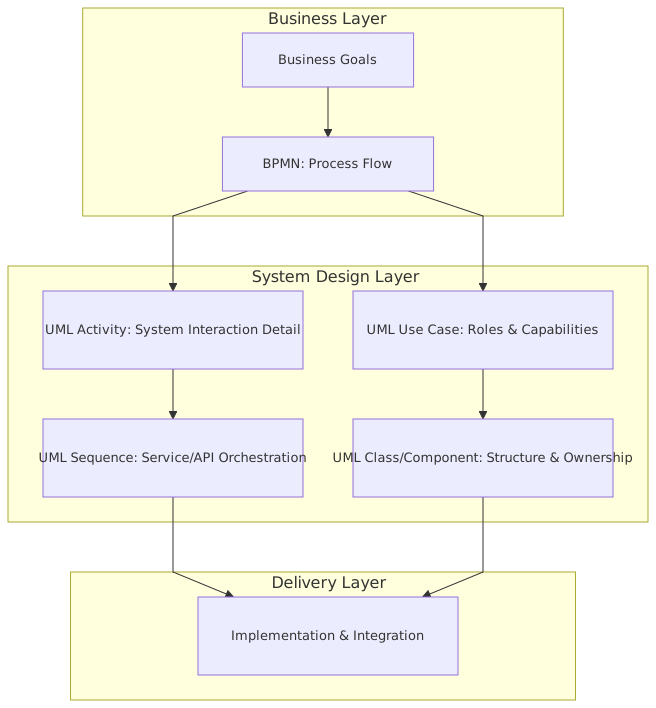
- What triggers the process?
- What business steps happen, and in what order?
- Where are the decisions?
- Which tasks are automated and which are manual?
- Where do handoffs happen between teams or systems?
- What exceptions and compensations exist?
- What events interrupt or redirect the flow?
That matters a lot in enterprises with messy real-world operations: banks, insurers, governments, healthcare, logistics. Anywhere policy, compliance, and human intervention matter. EA governance checklist
A good BPMN diagram makes business behavior visible.
For example, in a retail bank onboarding process, BPMN can clearly show:
- customer application received
- identity verification initiated
- sanctions screening performed
- fraud scoring requested
- manual compliance review triggered if score exceeds threshold
- account created if approved
- welcome communication sent
- failure path if KYC documents are incomplete
That’s useful. More than useful, actually. It’s often the first time stakeholders realize the process is much more complex than the slide deck said.
But BPMN becomes weak the moment people expect it to explain software design with precision. Yes, you can show service tasks, message flows, events, and pools. No, that does not mean you have adequately modeled your architecture.
A BPMN box labeled “Publish event to Kafka” is not architecture. It’s a hint.
What UML is actually good at
UML is better when you need to answer questions like:
- What are the main components or services?
- What interfaces exist between them?
- What data objects matter?
- How do interactions happen over time?
- What are the dependencies?
- What deployment or runtime relationships exist?
- What classes or domain structures are central to the design?
In enterprise architecture, the most useful UML diagrams are usually not the full textbook set. Let’s be honest: most teams do not need all fourteen diagram types. The practical ones are:
- Component diagrams for service boundaries and dependencies
- Sequence diagrams for interaction timing and integration flows
- Deployment diagrams for runtime topology, cloud placement, network zones
- Class or domain model diagrams when the information model is important
- Sometimes use case diagrams, though often they are too shallow to be worth much
UML gives technical precision where BPMN gives business flow.
For example, if your banking onboarding platform includes:
- a channel app
- an IAM platform
- a KYC service
- a customer profile service
- a sanctions screening provider
- Kafka for event distribution
- a case management tool for manual review
- cloud-native microservices running across multiple accounts or subscriptions
then UML can show how those pieces are separated, how they communicate, what is synchronous versus asynchronous, and where trust boundaries sit.
That’s architecture work. Not just process mapping.
The real rule: combine them at the seam between business behavior and system realization
This is the point many architects miss.
You do not combine UML and BPMN because it looks sophisticated. You combine them because enterprise systems sit at the seam between business behavior and technical realization.
Here’s the practical division:
That’s the practical answer I’d give any architecture team.
BPMN should tell me what the enterprise needs to happen.
UML should tell me what the technology does to make it happen.
If your diagrams don’t work together that way, you’re probably creating artifacts instead of architecture.
A useful way to layer them in real projects
In real architecture work, I usually see four useful layers.
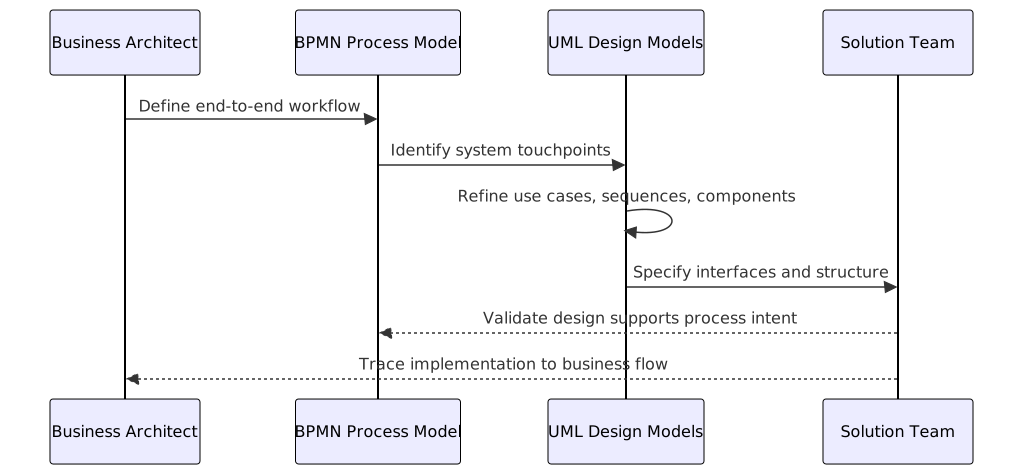
1. Business process view — BPMN
Start with the operating flow. Not because business process is always “first” in some philosophical sense, but because it exposes scope, actors, exceptions, and policy-driven branches.
Questions answered:
- What is the process?
- Who participates?
- What are the major decisions?
- Where are the manual interventions?
2. Capability/service realization view — UML Component
Translate the process steps into system responsibilities.
Questions answered:
- Which application or service owns each responsibility?
- Where are the service boundaries?
- Which systems are legacy versus target-state?
- What integrations are required?
3. Interaction view — UML Sequence
Take the risky or critical scenarios and model the actual interactions.
Questions answered:
- What happens first?
- Which calls are synchronous?
- Which messages are asynchronous?
- What retries, failures, or callbacks exist?
- How does IAM actually work in the flow?
4. Runtime/deployment view — UML Deployment
Finally, place the solution in the real estate of the enterprise.
Questions answered:
- What runs in which cloud account/subscription/VPC/VNet?
- What crosses trust zones?
- What sits behind private endpoints?
- Where does Kafka live?
- How is resilience achieved?
This layered approach is not theoretical. It prevents a lot of bad design decisions early.
Real enterprise example: digital account opening in a bank
Let’s make this concrete.
A mid-sized bank wants to modernize digital account opening. The current process is fragmented:
- web and mobile channels submit applications
- identity verification is partly outsourced
- sanctions screening is performed through a third-party API
- fraud scoring uses an internal model
- manual review happens in a legacy case management tool
- account creation is done in a core banking platform
- notifications are handled by a customer communications platform
- IAM is being centralized on a cloud-based identity provider
- new integrations are event-driven using Kafka
This is exactly the kind of problem where using only BPMN or only UML creates blind spots.
Step 1: Model the end-to-end process in BPMN
The BPMN model shows:
- customer submits application
- IAM authenticates or registers customer
- application enters validation stage
- KYC verification starts
- sanctions screening runs
- fraud score is requested
- if low risk and complete, proceed automatically
- if medium risk, send to manual review
- if high risk or sanctions hit, reject or escalate
- if approved, create account in core banking
- publish account-opened event
- send customer notification
This BPMN view is gold for alignment. Compliance, operations, product, and delivery can all react to it. They can see where manual review happens. They can discuss SLA expectations. They can identify policy exceptions. architecture decision record template
But it still does not answer critical architecture questions.
Step 2: Use UML component diagrams to map the systems
Now we define the participating components:
- Digital Channel App
- IAM Platform
- Onboarding Orchestrator
- KYC Integration Service
- Sanctions Screening Adapter
- Fraud Decision Service
- Case Management System
- Core Banking Adapter
- Kafka Event Backbone
- Notification Service
- Customer Profile Service
This component view reveals some hard truths quickly:
- The “onboarding process” is not one application
- The orchestrator is becoming too central and risks becoming a god-service
- Core banking should not be directly called by every upstream service
- Kafka is not just plumbing; it is part of the architecture contract
- IAM is a first-class dependency, not a side concern
And this is where a lot of architects make a mistake: they stop here and think they’re done.
They are not.
Step 3: Use UML sequence diagrams for critical scenarios
Take one scenario: low-risk straight-through account opening.
The sequence might show:
- Customer authenticates with IAM
- Channel obtains access token
- Channel submits application to Onboarding API
- Onboarding Orchestrator stores application
- Orchestrator calls KYC service
- Orchestrator calls sanctions adapter
- Orchestrator publishes
fraud-check-requestedevent to Kafka - Fraud service consumes event, calculates score, publishes
fraud-check-completed - Orchestrator consumes result
- Orchestrator calls Core Banking Adapter
- Core Banking account is created
- Orchestrator publishes
account-opened - Notification service consumes event and sends email/SMS
That sequence matters because it surfaces issues BPMN hides:
- where asynchronous processing changes user experience
- which step requires idempotency
- whether Kafka topics are command-like or event-like
- what correlation IDs are needed
- how long the channel waits before timing out
- where compensation is needed if core banking succeeds but notification fails
Now take another scenario: manual review due to medium fraud score.
Different sequence. Different system interactions. Different IAM concerns for the reviewer role. Different audit needs.
This is where architecture becomes real.
Step 4: Model IAM and trust explicitly
One of the most common failures in enterprise diagrams is pretending IAM is “just login.”
It isn’t.
In our banking example, IAM affects:
- customer authentication and registration
- MFA for risky onboarding steps
- token issuance to the channel
- token validation by APIs
- service-to-service trust
- role-based access for compliance reviewers
- auditability for approvals and overrides
- federation with enterprise workforce identity for back-office staff
A BPMN process can say “Reviewer approves application.” Fine. But it cannot adequately show:
- how the reviewer is authenticated
- whether approval requires step-up authentication
- what claims are passed to the case management system
- how delegated authorization works
- what machine identities are used between services
You need UML sequence diagrams, plus often a security-specific view, to make this credible.
If your architecture deck has one box called “IAM” floating on the side, you have not done the work.
Step 5: Add deployment reality in cloud
Then we place the system in cloud.
Maybe the bank runs:
- channel services in a public cloud landing zone
- Kafka as a managed service in a shared integration platform
- IAM in SaaS
- core banking adapter in a restricted connectivity zone
- case management in a private subnet
- sanctions provider over private connectivity or controlled egress
- audit logs centralized into a security platform
A deployment view shows:
- network segmentation
- trust boundaries
- private versus public endpoints
- resilience zones
- data residency constraints
- shared platform dependencies
This matters because the architecture is not just “what calls what.” It is “what can reach what, under which controls, with which latency and failure modes.”
That is enterprise architecture. Not coloring boxes.
Common mistakes architects make when combining UML and BPMN
Let’s be blunt here.
1. Modeling the same thing twice with different words
This is the classic waste pattern.
A BPMN process has “Perform fraud check.”
A UML component diagram has “Fraud Service.”
Fine.
But then the architect redraws the exact same flow in UML activity diagrams, sequence diagrams, and BPMN with no added insight. That is not traceability. That is duplication.
Each diagram should answer a different question.
2. Making BPMN too technical
I’ve seen BPMN diagrams with every API call, topic publish, token exchange, and database update shown as tasks. Terrible idea.
The result is unreadable to business stakeholders and still too imprecise for engineers. You get the worst of both worlds.
BPMN should stay at the level of business-significant flow and automation steps, not implementation chatter.
3. Making UML too abstract
The opposite mistake is also common.
Architects draw five boxes:
- Channel
- Middleware
- Core
- IAM
- Analytics
Then they call it architecture.
No. That is a poster.
If Kafka is central, show producers, consumers, and topic relationships. If IAM is critical, show trust and token flow. If cloud boundaries matter, show them.
4. Ignoring exception paths
Happy-path architecture is fantasy.
In banking especially, the architecture lives in the exceptions:
- KYC provider timeout
- sanctions API unavailable
- duplicate application
- fraud score delayed
- manual review backlog
- customer abandons process mid-way
- token expires during approval
- core banking account creation partially completes
BPMN is excellent for surfacing exception branches. UML sequence diagrams are excellent for showing what systems do in those branches. Use both.
5. Treating Kafka like a magic box
Architects often write “Event Bus” and move on. That is lazy.
When Kafka is involved, you need to be explicit about:
- event ownership
- topic design
- ordering assumptions
- replay behavior
- consumer independence
- schema evolution
- exactly-once myths
- dead-letter strategy
- observability and correlation
BPMN can show that an event triggers downstream work. UML should show how that actually happens.
6. Forgetting operating model realities
A process is not just software. A system is not just code.
Who owns manual review?
Who handles failed sanctions responses?
Who reprocesses dead-lettered Kafka messages?
Who approves IAM role changes?
Which cloud platform team manages the landing zone controls?
If your diagrams don’t connect to the operating model, they won’t survive implementation.
A contrarian view: not every project needs both
Here’s the part many architecture articles won’t say clearly enough.
You do not always need both UML and BPMN.
Sometimes using both is overkill.
If you are designing a deeply technical platform capability with minimal business workflow variation—say, a shared Kafka event ingestion platform or a cloud IAM federation service—BPMN may add almost nothing. UML and security/deployment views may be enough.
Likewise, if you are doing high-level process redesign before selecting systems, BPMN may be the only notation worth using at that stage.
The mistake is not choosing one. The mistake is choosing one by habit.
Use both when:
- the business process is operationally significant
- multiple systems realize the process
- human and automated steps mix
- compliance and audit matter
- asynchronous/event-driven patterns matter
- IAM affects user and service behavior
- cloud deployment constraints shape design
That is why in many enterprise transformation programs, both are justified. Not in every diagram pack, but in the overall architecture story.
How to combine them without creating diagram sprawl
This is the practical part people actually need.
Rule 1: Start with decisions, not notation
Ask:
- What are the critical business decisions?
- What are the risky technical decisions?
- What misunderstandings are likely?
Then choose the minimum diagrams needed to make those decisions visible.
Rule 2: One diagram, one job
A BPMN diagram should explain process behavior.
A UML component diagram should explain structure.
A sequence diagram should explain interactions.
A deployment diagram should explain runtime placement.
Do not make one diagram do three jobs badly.
Rule 3: Trace process steps to system responsibilities
You don’t need a giant repository tool to do this. A simple mapping table often works better.
This kind of table is underrated. It forces clarity. It also exposes ownership gaps very quickly.
Rule 4: Sequence only the risky scenarios
Do not create sequence diagrams for every possible flow. Nobody will maintain them.
Pick:
- straight-through success
- manual review path
- major failure path
- security-sensitive path
- asynchronous event path
That’s usually enough.
Rule 5: Keep BPMN readable by business people
If product, operations, compliance, and architecture cannot all discuss the BPMN model in one room, you went too low-level.
Rule 6: Keep UML honest enough for engineers
If an engineer cannot derive integration responsibilities, trust assumptions, and deployment implications from your UML views, you stayed too abstract.
What this looks like in real architecture governance
In enterprise architecture review boards, combining UML and BPMN is useful because different governance concerns need different evidence. ArchiMate for governance
For example:
- Business architecture / operations want to see BPMN for process impact, exception handling, and control points.
- Solution architecture wants UML component and sequence views for implementation shape.
- Security architecture wants IAM flows, trust boundaries, and privilege separation.
- Integration architecture wants Kafka/event patterns, interface ownership, and contract boundaries.
- Cloud/platform architecture wants deployment views and platform dependencies.
- Risk and compliance want evidence that process controls are realized in the solution.
One notation won’t satisfy all of those.
And frankly, it shouldn’t. Enterprise architecture is plural by nature. The problem is not having multiple views. The problem is having disconnected views.
My practical recommendation
If you’re leading a serious enterprise initiative—especially in banking, insurance, or any regulated environment—this is the lightweight but effective combination I’d recommend:
- One BPMN diagram for the end-to-end process
- One UML component diagram for system/service realization
- Two to four UML sequence diagrams for critical scenarios
- One deployment diagram if cloud/network/runtime matters
- One responsibility mapping table between process steps and systems
- One security/IAM interaction view if authentication or authorization is material
That’s enough to create real alignment without drowning people.
Anything less and you’ll miss important seams.
Anything much more and you risk modeling theater.
Final thought
UML and BPMN together work best when you stop treating diagrams as deliverables and start treating them as instruments.
BPMN tells you how the business actually behaves.
UML tells you how the technology is supposed to realize that behavior.
The value is in the tension between the two.
When the BPMN says a manual review can happen at any time, but the UML assumes a fully synchronous API chain, you’ve found a design problem.
When the BPMN shows customer onboarding in minutes, but the UML reveals three asynchronous Kafka hops and a legacy core dependency, you’ve found a delivery risk.
When the BPMN shows “approve account,” but the UML exposes weak IAM boundaries for back-office reviewers, you’ve found a control failure waiting to happen.
That is why combining them matters.
Not because architecture needs more notation.
Because enterprises need fewer illusions.
FAQ
1. Should BPMN come before UML in every architecture project?
No. Usually BPMN is a good starting point when the business workflow is central, but not always. If you’re designing a platform capability like Kafka infrastructure or IAM federation, UML and deployment/security views may come first. Start with the uncertainty that matters most.
2. Can BPMN replace UML for modern microservices architecture?
Not really. BPMN can show where automated tasks and events exist in a process, but it does not give enough precision for service boundaries, event contracts, trust relationships, or cloud deployment. It helps, but it does not replace system design.
3. Which UML diagrams are most useful alongside BPMN?
In enterprise work, usually component diagrams, sequence diagrams, and deployment diagrams. Sometimes domain/class diagrams too. Use case diagrams are often too shallow to add much unless you’re at a very early stage.
4. How do Kafka-based event flows fit into BPMN?
Use BPMN to show that an event triggers or advances business work. Use UML sequence/component views to show producers, consumers, topics, asynchronous behavior, retries, and ownership. Don’t try to explain Kafka deeply inside BPMN alone.
5. How should IAM be represented when combining BPMN and UML?
BPMN can show where authentication or approval steps happen in the business flow. UML—especially sequence diagrams—should show token issuance, validation, trust boundaries, service identities, reviewer roles, and step-up authentication. IAM is too important to leave as a side note.
Frequently Asked Questions
What is the difference between UML and ArchiMate?
UML is a general-purpose modeling language primarily used for software design — class structures, sequences, components, states, deployments. ArchiMate is an enterprise architecture language covering business, application, and technology layers. They are complementary: ArchiMate for cross-domain EA views, UML for detailed software design.
When should you use ArchiMate instead of UML?
Use ArchiMate when you need to model cross-domain architecture (business capabilities linked to applications linked to infrastructure), traceability from strategy to implementation, or portfolio views for stakeholders. Use UML when you need detailed software design — class models, sequence interactions, state machines, component interfaces.
Can ArchiMate and UML be used together?
Yes. In Sparx EA, both exist in the same repository. ArchiMate models the enterprise landscape; UML models the internal design of specific application components. An ArchiMate Application Component can link to the UML class diagram that defines its internal structure, maintaining traceability across abstraction levels.