⏱ 21 min read
Most UML tooling still has the same problem it had ten years ago: it helps people draw diagrams, but it does not automatically help them think better.
That sounds harsh. It is harsh. And if you’ve spent time in enterprise architecture, you already know it’s true.
Teams buy a shiny modeling platform, migrate a few Visio diagrams, run one architecture review, and then the whole thing quietly turns into a graveyard of stale sequence diagrams and “target state” fantasies nobody trusts. The issue usually isn’t UML itself. It’s not even the tool, at least not entirely. It’s that architects confuse modeling with architecture work.
So let’s say this simply, early, for the search engines and the humans:
The best UML tools in 2026 are the ones that let enterprise architects model systems clearly, collaborate with delivery teams, connect diagrams to real implementation concerns, and avoid becoming shelfware.
That means features matter, yes. But not in the way vendor comparison pages pretend. What matters is whether the tool helps an architect answer real questions:
- Where does the IAM boundary actually sit?
- Which Kafka topics are cross-domain and who owns them?
- What cloud services are in scope and what’s managed outside the team?
- Where are the trust zones?
- What changes when the payment platform moves from sync APIs to event-driven integration?
- Which diagrams stay useful after the workshop ends?
This article is a practical, opinionated comparison of the best UML tools in 2026 from an enterprise architecture perspective. Not from a student perspective. Not from a “can it draw a class diagram?” checklist. From the reality of architecture boards, transformation programs, cloud migrations, regulated environments, and teams that need diagrams to survive contact with delivery.
What UML tools actually do, in plain English
A UML tool helps you create structured system diagrams using the Unified Modeling Language. In practice, architects mostly use these tools for:
- Component diagrams to show systems and interfaces
- Sequence diagrams to explain runtime interactions
- Deployment diagrams to show environments, nodes, and infrastructure placement
- Use case diagrams sometimes, though honestly less than vendors suggest
- State/activity diagrams for workflows and process-heavy domains
- Class diagrams mainly when architecture overlaps heavily with domain or platform design
In enterprise work, UML tools are rarely used alone. They sit alongside: UML modeling best practices
- BPMN tools
- C4-style diagramming
- ArchiMate repositories
- whiteboards
- ADRs
- wiki pages
- cloud architecture diagrams
- backlog tooling
That’s why a UML tool in 2026 must do more than draw boxes and arrows. It needs collaboration, versioning, export quality, integration with repositories, and enough flexibility to model cloud-native and event-driven systems without feeling like it was designed for 2009 Java middleware.
My strong opinion: most architects do not need the “most powerful” UML tool
This is the first contrarian point.
A lot of enterprise architects still assume the best UML tool is the most feature-rich one. Usually that means a heavyweight platform with massive metamodel support, deep repository capabilities, governance workflows, and a setup process that feels like onboarding to a regional bank core platform.
That is often the wrong choice.
If your diagrams are not being used weekly by architects, lead engineers, and product teams, then enterprise-grade depth becomes enterprise-grade drag.
The best UML tool is the one your architecture practice will actually sustain.
That may be a heavyweight repository tool in a regulated bank. It may also be a lighter collaborative modeling platform in a cloud-first company. Context matters more than prestige.
Still, some tools clearly stand out in 2026.
Best UML tools in 2026: the shortlist
Here’s the practical shortlist I’d consider for serious enterprise architecture work in 2026:
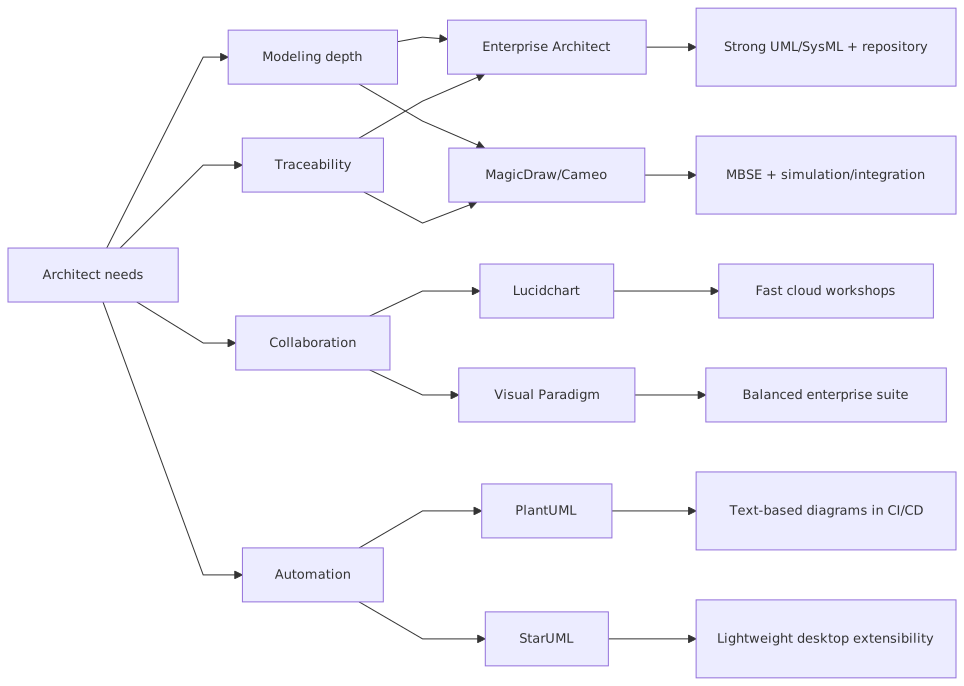
- Sparx Systems Enterprise Architect
- Visual Paradigm
- Cameo Systems Modeler / MagicDraw
- PlantUML
- Lucidchart
- diagrams.net (draw.io)
- Modelio
- Microsoft Visio (still around, still overused, still limited for modern architecture)
Not all of these are “pure” UML platforms in the same way. Good. That’s the point. Real architecture work is messy. A useful comparison should reflect that.
Quick comparison table
1. Sparx Systems Enterprise Architect: still ugly, still powerful, still relevant
Let’s be honest. Sparx Enterprise Architect is not winning design awards. It feels like software built by people who care more about metamodel integrity than joy. In a weird way, that’s also why it survives. Sparx EA performance optimization
For enterprise architecture teams in banking, insurance, government, and other governance-heavy environments, Sparx is still one of the strongest UML tools in 2026. Sparx EA guide
What it does well
- Full UML support and then some
- Large shared repositories
- Traceability across requirements, applications, interfaces, and deployments
- Strong document generation
- Governance-friendly structure
- Ability to tie architecture artifacts together instead of leaving them as disconnected pictures
Where it hurts
- User experience is dated
- Casual users struggle
- Teams often over-model because the tool makes it possible
- Without strong standards, the repository turns into architecture compost
Real architecture use
Suppose you’re in a bank modernizing payment processing. You have:
- legacy payment hub
- Kafka-based event backbone
- cloud-hosted fraud services
- IAM integration with workforce and customer identity systems
- multiple regional deployment variants
Sparx is useful here because you can model:
- component boundaries
- topic ownership
- IAM trust relationships
- deployment views across cloud and on-prem
- traceability from capability to application to interface to control requirement
That matters in regulated architecture work. Auditors do not care that your Miro board looked energetic during the workshop.
My opinion
If your architecture function is mature enough to maintain a repository and has people who understand modeling discipline, Sparx remains a serious option. If not, it becomes a museum of obsolete abstractions. free Sparx EA maturity assessment
2. Visual Paradigm: probably the best all-round UML tool for most teams
If I had to recommend one UML tool to the average enterprise architecture team in 2026, without knowing too much else, Visual Paradigm would probably be the safest answer.
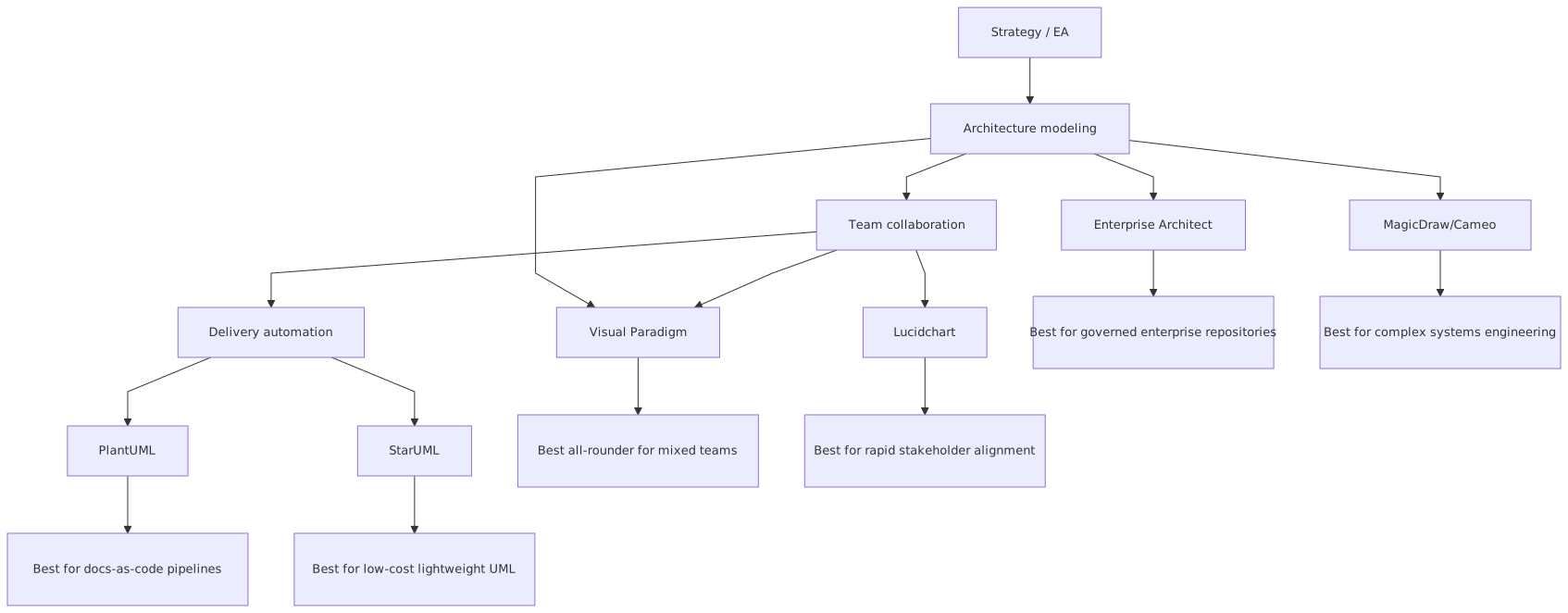
That’s not because it is the most powerful. It isn’t. It’s because it generally hits the sweet spot between formal UML capability and practical usability.
What it does well
- Strong UML coverage
- Better usability than old-school heavyweight tools
- Good diagramming speed
- Team collaboration features
- Support for adjacent methods and notations
- Works for both architects and technically minded analysts
Where it falls short
- Not as deep in repository governance as some heavyweight tools
- Can still become cluttered
- Sometimes tries to be too many things
Real architecture use
For a cloud migration program, Visual Paradigm works well when you need to model:
- current-state integration from core banking to CRM
- target-state event flows over Kafka
- IAM federation to cloud services
- sequence diagrams for customer onboarding
- deployment diagrams showing managed cloud services vs bank-controlled zones
It’s approachable enough that solution architects and lead engineers may actually use it, which is a bigger deal than some enterprise teams admit. EA governance checklist
My opinion
Visual Paradigm is often the best compromise. Not glamorous. Just useful. In architecture, useful beats glamorous almost every time.
3. Cameo Systems Modeler / MagicDraw: superb, expensive, often too much
Cameo, built on the MagicDraw lineage, is a serious modeling environment. If you’re in systems engineering, defense, telecom, aerospace, or deeply formalized architecture programs, it can be brilliant.
For mainstream enterprise architecture? Sometimes yes. Often no.
What it does well
- Rich standards support
- Deep model analysis
- Strong consistency and formal modeling capabilities
- Excellent for environments that treat models as engineering assets, not just communication devices
Where it struggles
- High complexity
- Cost
- Can be too heavyweight for business-facing architecture teams
- Harder to get broad adoption outside specialists
Real architecture use
Imagine a bank running a highly regulated digital identity program involving:
- customer IAM
- workforce IAM
- privileged access workflows
- event-driven identity propagation over Kafka
- hybrid cloud deployment
- formal control mapping
Cameo can model this rigorously, especially if architecture and systems engineering overlap heavily. But if your main challenge is cross-team communication and delivery alignment, this may be overkill.
My opinion
Great tool. Wrong tool for a lot of teams. Buying it because it looks “enterprise-grade” is classic architecture vanity.
4. PlantUML: the best tool many enterprise architects still ignore
This is my second contrarian point.
PlantUML is not just a developer toy. In 2026, it is one of the best architecture tools available if you care about living diagrams, version control, repeatability, and collaboration with engineering teams.
A lot of enterprise architects dismiss it because it does not feel “official” enough. That’s a mistake.
What it does well
- Diagrams as code
- Easy versioning in Git
- Fast updates
- Great for sequence diagrams, component views, and deployment sketches
- Fits naturally into documentation pipelines
- Encourages diagrams to evolve with implementation
Where it falls down
- Not ideal for polished executive decks
- Formal repository management is limited
- Some UML constructs are less comfortable than in full modeling suites
- Requires text-based comfort
Real architecture use
Take a Kafka modernization initiative in banking. You want sequence diagrams showing:
- payment initiation
- IAM token validation
- fraud scoring
- event publication to Kafka
- downstream ledger update
- cloud-based notification service invocation
PlantUML is excellent here because these flows change often. You want diagrams in the same repo as the service contracts and ADRs, not hidden in a desktop file no one updates.
My opinion
If your architecture team wants relevance with engineering, use PlantUML more. If your team wants to keep producing static diagrams for governance packs and then wonder why nobody reads them, keep avoiding it.
5. Lucidchart: excellent for collaboration, weak for architectural memory
Lucidchart is one of the best tools for fast collaboration. It is easy to use, easy to share, and useful in workshops. That matters. A lot.
But collaboration is not the same as architecture integrity.
What it does well
- Great workshop experience
- Fast diagram creation
- Easy stakeholder participation
- Good visual communication
- Low barrier to entry
Where it fails architects
- UML rigor is inconsistent
- Repository and traceability depth are limited
- Diagrams can proliferate without structure
- Easy to create “presentation architecture” that has weak analytical value
Real architecture use
Lucidchart is good for discovery workshops around:
- IAM integration between cloud SaaS apps and internal identity providers
- initial Kafka domain event mapping
- rough target-state application interactions
- stakeholder-friendly overviews
But if that’s where the architecture stays, you have a problem.
My opinion
Use Lucidchart for exploration and communication. Do not mistake it for a durable architecture platform unless your practice is intentionally lightweight.
6. diagrams.net (draw.io): cheap, flexible, better than its reputation
There is a certain kind of enterprise architect who gets offended by draw.io. Usually the same person who hasn’t updated the official repository model in nine months.
diagrams.net is not a full UML platform. Let’s not pretend otherwise. But in real-world architecture teams, it is often more useful than heavyweight tools because people actually use it.
What it does well
- Very accessible
- Flexible
- Low cost
- Good enough for many UML-ish needs
- Works well for cloud and integration diagrams
- Easy sharing
What it does badly
- No serious modeling governance
- UML consistency depends entirely on the user
- Hard to maintain semantic discipline at scale
Real architecture use
For architecture teams documenting cloud landing zones, Kafka integrations, IAM trust boundaries, or deployment topologies, diagrams.net can be perfectly effective if paired with:
- naming standards
- review practices
- repository storage
- ADR links
- template libraries
My opinion
If your team lacks modeling discipline, a big formal tool will not save you. diagrams.net with standards may outperform an expensive platform with no adoption.
7. Modelio: the quiet alternative
Modelio does not dominate architecture conversations, but it remains relevant for teams wanting standards-based modeling without defaulting to the biggest commercial platforms.
Strengths
- Serious UML support
- Extensible
- Useful for teams that want formal modeling with more openness
Weaknesses
- Smaller ecosystem
- Less common in large enterprise architecture functions
- Harder to find experienced practitioners
My opinion
Not my first recommendation for a broad enterprise rollout, but absolutely worth considering for organizations that care about open ecosystems and don’t want to be dragged into large-vendor gravity.
8. Visio: still everywhere, still not enough
Visio remains common because enterprises are full of inertia. It is familiar. It is available. It can draw boxes. That’s the whole story.
Why architects keep using it
- It’s already licensed
- Stakeholders know it
- Basic diagrams are easy enough
Why it’s not a leading UML tool in 2026
- Weak model structure
- Poor architecture traceability
- Static artifacts
- Collaboration is mediocre compared to modern tools
- Too easy to create diagrams with no semantic discipline
My opinion
Visio is acceptable for incidental diagrams. It is not a strong foundation for a modern enterprise architecture practice. We should stop pretending otherwise.
What matters most in a UML tool for real enterprise architecture work
Now the deeper part, because tool comparisons without architecture context are mostly noise.
When choosing a UML tool in 2026, I would evaluate six things.
1. Can it model runtime reality, not just static structure?
This is huge.
A lot of architecture teams overproduce component diagrams and underproduce sequence and deployment diagrams. That is backwards. In cloud-native, event-driven architecture, runtime interaction matters more than static decomposition.
If your tool makes it painful to model:
- asynchronous Kafka interactions
- IAM token exchange
- retries and failure paths
- cloud-managed service boundaries
- trust zones and data movement
then it will fail you where architecture is hardest.
2. Can engineers work with it?
If the UML tool is used only by central architecture, your models will drift away from implementation. Fast.
Tools like PlantUML score well here. Visual Paradigm can too. Heavyweight repository tools often struggle unless your organization has a mature modeling culture.
3. Can the models survive governance?
In banking and regulated sectors, architecture artifacts must often support:
- design authority review
- risk and control mapping
- auditability
- operational ownership
- change impact analysis
This is where repository-driven tools still have real value.
4. Can it support cloud and event-driven architecture without feeling forced?
A lot of UML usage still reflects old synchronous service thinking. But modern enterprise architecture includes:
- Kafka topics and event contracts
- cloud IAM roles and policies
- managed services
- ephemeral workloads
- API gateways
- zero-trust boundaries
The tool does not need a perfect native icon set for every cloud service. But it must let architects express these patterns clearly and repeatably.
5. Can it produce artifacts for different audiences?
You need:
- rigorous internal diagrams
- delivery-facing diagrams
- governance pack visuals
- executive-friendly simplifications
One tool rarely does all of this perfectly. That’s normal. The trick is knowing which diagrams belong where.
6. Will your team maintain it after the enthusiasm dies down?
This is the most important question and the least asked.
Common mistakes architects make when choosing and using UML tools
I’ve seen these repeatedly.
Mistake 1: Choosing for standards compliance instead of team behavior
Architects love saying things like “we need full UML 2.x support.” Maybe. But if your team only uses component, sequence, and deployment views, then full standards coverage is not your bottleneck.
Your bottleneck is whether diagrams stay current.
Mistake 2: Treating the repository as the architecture
A repository is not architecture. It is storage plus structure. The architecture is the set of decisions, constraints, relationships, and explanations that help teams build coherent systems.
Some teams hide behind the tool and stop doing actual architecture thinking.
Mistake 3: Drawing abstract diagrams with no operational value
If your component diagram does not clarify ownership, trust boundary, failure behavior, or integration style, it’s decoration.
This is common in cloud programs. Architects draw “Kafka” in the middle of a diagram as if that explains anything. It doesn’t. Show:
- producer ownership
- topic boundaries
- consumer groups
- replay concerns
- IAM/authn/authz interaction
- data classification
Now it becomes architecture.
Mistake 4: Ignoring sequence diagrams
Enterprise architects often think sequence diagrams are too low-level. Wrong. They are one of the best tools for exposing hidden coupling, token propagation issues, timeout chains, and event choreography confusion.
In event-driven programs, they are essential.
Mistake 5: Mixing notation styles with no discipline
A little C4, a little UML, some cloud icons, random arrows, three colors that mean nothing. Very common. Very messy.
You do not need purity. But you do need standards. Decide:
- what arrows mean
- what boxes represent
- how trust boundaries are shown
- how managed services are marked
- how Kafka topics are represented
- how IAM dependencies are labeled
Then stick to it.
Mistake 6: Optimizing for the architecture team, not the organization
If nobody outside architecture can consume or contribute to the models, you are building internal theater.
A real enterprise example: banking payments modernization
Let me make this concrete.
A retail bank is modernizing its payment initiation and fraud-processing architecture. Current state:
- online banking channel calls a legacy payment API
- fraud checks are synchronous and tightly coupled
- identity validation is inconsistent across channels
- downstream ledger and notification systems are integrated point-to-point
- deployment spans on-prem core systems and cloud-based customer services
Target state:
- channel apps authenticate through centralized IAM with token-based access
- payment initiation service publishes events to Kafka
- fraud engine consumes payment events and emits risk decisions
- payment orchestration service updates state based on event outcomes
- customer notifications run in cloud infrastructure
- core ledger remains on-prem for now
- architecture must satisfy audit, traceability, and resilience requirements
How UML tooling helps here
A good UML tool supports at least four views:
1. Component diagram
Show:
- channel apps
- API gateway
- IAM platform
- payment initiation service
- Kafka cluster
- fraud engine
- orchestration service
- ledger adapter
- notification service
- observability platform
This view should clarify ownership and boundaries, not just connectivity.
2. Sequence diagram
Show the runtime path:
- User authenticates via IAM
- Channel sends token to payment API
- Payment service validates token and business permissions
- Payment event is published to Kafka
- Fraud engine consumes event
- Fraud decision event is emitted
- Orchestrator updates payment state
- Ledger adapter posts to core banking
- Notification service sends customer update
This is where hidden issues emerge:
- Is the fraud decision blocking or eventual?
- What happens if Kafka is available but ledger posting fails?
- Where is idempotency enforced?
- Is token context propagated in events or translated to claims metadata?
- Who owns retry semantics?
3. Deployment diagram
Show:
- cloud-hosted services
- on-prem core banking nodes
- network segmentation
- IAM trust zone
- Kafka platform placement
- secure connectivity path
- managed vs self-managed infrastructure
This matters because architecture failures often live in deployment assumptions, not in logical diagrams.
4. Activity/state view
Show payment lifecycle:
- initiated
- pending fraud
- approved
- rejected
- posted
- notified
- failed reconciliation
This is critical in banking because state ambiguity becomes operational pain.
Which tool works best here?
- Sparx if you need traceability, audit support, and repository governance
- Visual Paradigm if you need strong UML with broader team usability
- PlantUML if you want living sequence/component diagrams embedded with engineering docs
- Lucidchart only for early workshop exploration, not as the long-term source of truth
That’s how tool choice should be made. Against architecture work. Not generic features.
My recommended picks by scenario
Best for regulated enterprise architecture
Sparx Enterprise Architect
Because traceability, governance, and model depth still matter in regulated environments.
Best overall for most architecture teams
Visual Paradigm
Because it balances rigor and usability better than most.
Best for engineering-aligned architecture
PlantUML
Because architecture that lives in version control tends to stay alive.
Best for systems engineering-heavy environments
Cameo/MagicDraw
Because formal depth matters there.
Best for collaborative discovery
Lucidchart
Because speed and shared editing matter in workshops.
Best low-cost practical option
diagrams.net
Because affordability and accessibility are real architecture concerns too.
Final verdict
If you want the blunt version:
- Sparx is still the serious enterprise workhorse, despite its age and awkwardness.
- Visual Paradigm is probably the most sensible recommendation for most teams.
- PlantUML is the most underrated option and often the best fit for modern architecture practices that work closely with engineering.
- Cameo is excellent but frequently overbought.
- Lucidchart and diagrams.net are useful, but they are not substitutes for architecture discipline.
- Visio should no longer be your default answer in 2026.
And one more opinion, because it matters:
The best UML tool will not fix weak architects.
If your team cannot define boundaries clearly, explain runtime behavior, model IAM trust properly, or distinguish a Kafka topic from a business capability, no tool is going to rescue you.
But a good tool, used well, absolutely sharpens architecture work. It makes trade-offs visible. It exposes ambiguity. It helps teams align. It gives governance something real to review. It creates memory in organizations that otherwise forget every decision by the next quarter.
That is what UML tooling should do. Not just draw. Clarify.
FAQ
1. What is the best UML tool for enterprise architects in 2026?
For most enterprise architecture teams, Visual Paradigm is the best all-round choice. For highly regulated environments needing repository governance and traceability, Sparx Enterprise Architect is often stronger. For architecture tightly aligned with engineering workflows, PlantUML is a top option.
2. Is UML still relevant in 2026, especially with cloud and microservices?
Yes, but selectively. UML is still very useful for component, sequence, deployment, and state modeling. The mistake is trying to use all of UML all the time. In cloud, Kafka, and IAM-heavy architecture, a few UML views remain extremely valuable.
3. Should architects use PlantUML instead of traditional modeling tools?
Sometimes, yes. If the goal is living documentation, Git-based collaboration, and close alignment with engineering teams, PlantUML can be better than heavier tools. But if you need formal repository management, audit traceability, or broad governance workflows, a traditional modeling platform may still be necessary.
4. What is the biggest mistake when choosing a UML tool?
Choosing based on feature lists instead of actual architecture practice. The right question is not “Which tool supports the most notation?” It is “Which tool will our architects and engineers actually maintain and trust?”
5. Can Lucidchart or diagrams.net replace enterprise UML tools?
They can replace them in lightweight architecture practices, early design discovery, or organizations that value speed over formal governance. They cannot fully replace repository-based UML tools where traceability, compliance, and structured model management are mandatory.
UML tools landscape for architects (2026)
Frequently Asked Questions
What is enterprise architecture?
Enterprise architecture is a discipline that aligns an organisation's strategy, business processes, information systems, and technology. Using frameworks like TOGAF and modeling languages like ArchiMate, it provides a structured view of how the enterprise operates and how it needs to change.
How does ArchiMate support enterprise architecture practice?
ArchiMate provides a standard modeling language that connects strategy, business operations, applications, data, and technology in one coherent model. It enables traceability from strategic goals through business capabilities and application services to the technology platforms that support them.
What tools are used for enterprise architecture modeling?
The main tools are Sparx Enterprise Architect (ArchiMate, UML, BPMN, SysML), Archi (free, ArchiMate-only), and BiZZdesign Enterprise Studio. Sparx EA is the most feature-rich option, supporting concurrent repositories, automation, scripting, and integration with delivery tools like Jira and Azure DevOps.