⏱ 22 min read
Fixing Performance Problems in Large Sparx EA Repositories | Architecture Optimization Guide Sparx EA training
Learn how to diagnose and fix performance problems in large Sparx Enterprise Architect repositories. Improve model loading, search speed, diagram rendering, and multi-user scalability with practical optimization strategies. Sparx EA best practices
Sparx EA performance, large Sparx EA repositories, Enterprise Architect optimization, Sparx EA slow repository, EA repository tuning, Sparx Enterprise Architect performance issues, diagram loading performance, model search optimization, DBMS repository performance, multi-user EA repository, Sparx EA scalability, Enterprise Architect best practices Sparx EA guide
Introduction
As Sparx Enterprise Architect repositories grow, performance problems rarely come from a single defect. They usually emerge from the interaction of repository size, model structure, infrastructure design, customization, and day-to-day user behavior. A repository that works well for a small architecture team can become noticeably slower once it supports a larger user base and a broader body of architecture content. how architecture review boards use Sparx EA
That change matters because an EA repository is not just a diagram store. In many enterprises, it becomes the working system of record for applications, capabilities, processes, interfaces, technologies, controls, standards, roadmaps, and traceability. As that content expands, so does the amount of querying, relationship traversal, rendering, synchronization, and reporting required to support ordinary work. The effect is not limited to inconvenience. Slow performance delays governance reviews, discourages reuse, increases duplicate content, and pushes teams toward offline workarounds that weaken repository integrity. EA governance checklist
A common misstep is to treat poor performance as a database issue in isolation. The database certainly matters, but it is only one part of the service path. In practice, responsiveness is shaped by repository topology, DBMS health, network latency, Pro Cloud Server configuration, model security, baselines and auditing, add-ins, scripts, MDG technologies, and the structure of the model itself. A technically sound database can still sit behind a repository that feels sluggish because diagrams are overloaded, package structures are unbalanced, or custom extensions add delay to routine actions.
For that reason, repository performance should be managed as a system quality attribute. Like availability or security, it needs explicit expectations and active governance. Teams should define acceptable response times for common user journeys such as opening diagrams, expanding packages, running searches, generating documents, and executing imports or integrations. Those expectations should then influence repository architecture, package organization, deployment topology, retention policies, and workload scheduling.
This article takes a structured approach to fixing performance problems in large EA repositories. It starts with the reasons large repositories slow down, then looks at how to diagnose bottlenecks across repository, infrastructure, and usage layers. From there, it examines repository and database design improvements, model governance practices, client and network optimization, and finally a practical remediation roadmap. The core message is simple: performance improves most reliably when EA is managed as an enterprise platform rather than just a modeling tool.
Why Large Sparx EA Repositories Slow Down
Large repositories slow down because growth changes platform behavior. The problem is not just “more data.” It is more data combined with more relationships, more users, more queries, more rendering, and more automation. In a small repository, these costs are often barely visible. In a large one, they show up in routine tasks such as opening packages, loading diagrams, running searches, generating documents, or synchronizing integrations.
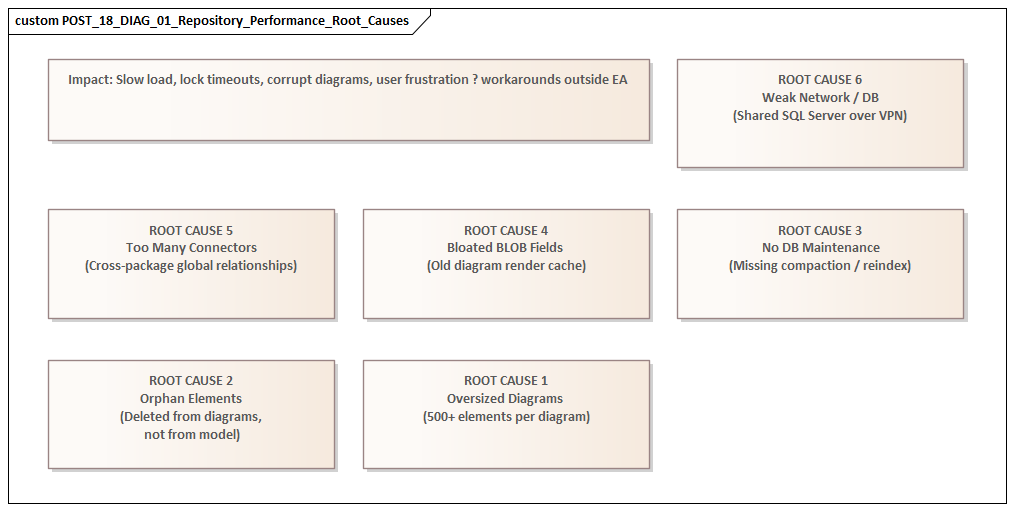
One of the strongest drivers is relationship density. Enterprise repositories do not simply contain many elements; they contain many connections between those elements. Applications link to capabilities, capabilities to processes, processes to data objects, data objects to interfaces, and technologies to standards and controls. Each of those elements may also carry tagged values, constraints, responsibilities, linked documents, and stereotype metadata. As traceability deepens, the cost of resolving and rendering model content rises. Performance degradation is therefore often non-linear: doubling repository content can create far more than double the processing overhead.
A second factor is uneven model structure. Large repositories usually evolve over several years, and they rarely do so evenly. Some domains remain well organized, while others become catch-all areas. Very large packages, deep nesting, and mixed-content folders create hotspots. Users repeatedly return to the same overloaded branches, while administrative tasks such as baselines, version control, package transfer, and security checks become heavier in those areas. The pattern is familiar from application architecture: weak boundaries increase the cost of navigation, ownership, and change. A practical example is a standards team that keeps all technology standards, waivers, review notes, and exception records in one package because it is convenient initially; after a few release cycles, every monthly governance review hits the same branch and response times deteriorate.
Diagram design is another frequent source of visible slowness. A repository can be technically healthy and still feel slow because users depend on oversized diagrams with dense notation, many cross-package references, legends, compartments, and custom rendering logic. Diagrams intended to show “everything in one place” are especially expensive. They combine high object counts with broad relationship resolution and often trigger the strongest user complaints even when the database is not the main bottleneck.
Then there is customization. Add-ins, scripts, event handlers, model searches, and MDG technologies can all introduce latency, particularly when they run during common actions such as opening diagrams, saving elements, or synchronizing properties. Any one extension may seem harmless in isolation. In combination, they can impose a substantial tax on normal use. For instance, in an IAM modernization program, each application object may trigger approval status checks, control mappings, and lifecycle validation scripts on save. Each rule is defensible; together they can turn a simple edit into a slow transaction.
Finally, concurrency and mixed workloads amplify everything else. As more users work in the repository, they compete for shared resources such as database connections, application server threads, package locks, caches, and audit tables. Scheduled jobs such as imports, exports, document generation, or integration syncs may run at the same time as interactive modeling. Average performance may still look acceptable, but peak-time responsiveness drops sharply. This is common in integration domains, where Kafka topic catalogs, producer-consumer mappings, and interface inventories are updated by both architects and automated synchronization jobs.
The important point is that slowdown in a large repository usually signals a change in operating mode. The repository has become a shared enterprise platform without being redesigned for that role. The remedy is not tuning alone. It requires diagnosis, structural correction, and governance.
Diagnosing the Real Sources of Performance Bottlenecks
Effective improvement starts with diagnosis, not tuning. “EA is slow” is a symptom, not a root cause. Poor responsiveness can originate in several layers: model structure, database behavior, network latency, Pro Cloud Server configuration, client-side rendering, or custom extensions. The first task is to separate where delay is experienced from where it is introduced.
A practical starting point is to classify issues by transaction type. Opening the project browser, loading a package, opening a diagram, editing an element, running a search, generating a document, executing an integration sync, and importing XMI are all different workloads. If all of them are slow, the issue is more likely environmental or infrastructural. If only certain actions are affected, the bottleneck is more likely localized in model structure, customization, or a specific query path. That distinction helps teams avoid broad infrastructure changes when the real problem is narrow and local.
Diagnosis should then examine the full service path:
- Repository layer: table growth, index health, query execution time, blocking, maintenance routines
- Access layer: Pro Cloud Server logs, connection pooling, timeouts, protocol overhead
- Client layer: workstation capability, EA version, local configuration, user location
- Extension layer: add-ins, scripts, broadcasts, event handlers, MDG behavior
In large environments, the bottleneck often sits at the boundary between layers rather than inside a single component.
Measurement also needs to be scenario-based, not anecdotal. Define a small set of repeatable tests, such as:
- Open a known large diagram
- Expand a high-volume package
- Run a standard model search
- Save an element with many tagged values
- Generate a representative document
Capture timings under controlled conditions, then repeat them from different locations, user profiles, and times of day. This creates a baseline. Without one, teams are forced to rely on impressions and cannot tell whether a change improved the repository or merely shifted the delay elsewhere.
It is equally important to distinguish between steady-state behavior and peak-load behavior. A repository may perform well during isolated testing but degrade during business hours because interactive use overlaps with imports, reporting, synchronization jobs, or audit-heavy operations. In that case, the issue is workload interference rather than simple under-capacity.
Another useful technique is hotspot analysis. Instead of asking whether the whole repository is slow, identify which packages, diagrams, searches, or integrations generate most complaints. In large repositories, a small number of heavily used domains often account for a disproportionate share of latency. These hotspots usually reveal deeper structural problems such as overloaded diagrams, excessive cross-domain dependencies, duplicated metadata, or governance processes that force repeated expensive operations. In one environment, for example, the technology lifecycle package used for standards reviews became slow near month-end because bulk status updates, reporting, and approval workflows all ran against the same content within a short window.
Good diagnosis produces a bottleneck map rather than a list of grievances. That map should show:
- which user journeys are affected
- which layers contribute to delay
- which model areas are hotspots
- which workloads compete for shared resources
Once that picture is clear, teams can decide whether to focus on repository architecture, database maintenance, model refactoring, customization control, or infrastructure redesign.
Repository Architecture and Database Design Fixes
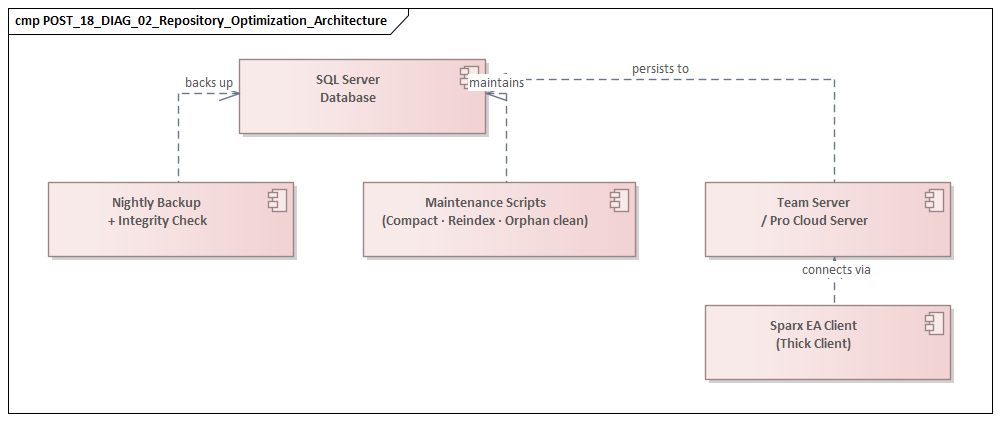
Once the main bottlenecks are understood, the next step is to address the repository as an architectural platform rather than as a single database. Performance problems usually arise from a combination of structure, workload, and infrastructure. The most durable improvements come from design choices that reduce unnecessary load and isolate competing usage patterns.
Review repository topology
A common anti-pattern is to keep active architecture work, solution designs, standards, historical content, and reporting workloads in one continuously expanding repository because it seems simpler to administer. Over time, that creates an oversized operational unit with conflicting access patterns. Interactive modeling, bulk imports, governance reporting, and long-term retention all compete in the same environment.
A better approach is often to separate concerns deliberately, for example:
- an active working repository for current modeling
- a read-optimized environment for broader consumption
- one or more archive repositories for retired content
This does not eliminate integration effort, but it reduces contention and keeps the live environment focused on active use. A financial services organization, for instance, may keep current-state and target-state architecture in the active repository while moving completed transformation waves and closed standards decisions into an archive repository that remains searchable but no longer absorbs daily authoring traffic.
Improve package architecture
Within a repository, package structure matters as much as overall topology. Large repositories benefit from clear domain partitioning, ownership boundaries, and controlled reference patterns. If every domain can connect freely to every other domain, the repository becomes progressively more expensive to navigate, validate, and report on.
Good package architecture typically includes:
- clear domain ownership
- separation of reference data from working content
- isolation of imported or generated material
- controls on uncontrolled cross-package dependencies
This is the repository equivalent of bounded contexts in application architecture: stronger cohesion leads to better behavior. Keeping Kafka event catalogs and consumer mappings in a managed integration domain is usually more efficient than scattering them across multiple solution folders, each with its own local conventions and duplicate references.
Treat the DBMS as a production service
At the database level, the biggest gains are usually straightforward but disciplined. Repository databases should run on a supported enterprise platform with appropriate sizing, memory allocation, storage performance, and maintenance routines. Common issues include:
- stale statistics
- index fragmentation
- slow storage
- poor transaction log management
- blocking from long-running operations
In a large environment, these are not optional housekeeping tasks. They require explicit operational ownership and regular review. It is not unusual to find that a repository blamed for “EA slowness” is actually suffering from neglected index maintenance and an overloaded storage tier.
Govern secondary data growth
Repository size is not just a matter of core model content. Features such as auditing, baselines, discussions, maintenance items, test records, and extensive tagged values can expand supporting tables rapidly. Those features may be valuable, but they need lifecycle rules.
Questions to ask include:
- Does every audit record need indefinite retention in the live repository?
- Do all baselines need to remain immediately accessible?
- Can older discussion or maintenance data be archived?
- Are there generated records that should be purged after use?
Retention and archival policies for secondary data often produce substantial gains without reducing the value of the core model. This is particularly relevant in technology lifecycle governance, where standards reviews can generate large volumes of dated status changes, comments, and snapshots.
Align deployment with access patterns
Repository architecture also includes how users reach the data. If Pro Cloud Server is used, its placement relative to the database and the user base matters. A well-positioned access layer can reduce round trips and improve connection management. A poorly positioned one simply becomes another source of latency.
Likewise, high-latency WAN access to a centralized repository may be acceptable for light browsing but problematic for heavy interactive modeling. In such cases, the right fix may be access-path redesign rather than more hardware. For example, if a regional architecture team accesses EA through multiple proxy hops and a distant Pro Cloud Server instance, moving the access layer closer to the database can deliver more benefit than increasing database CPU.
The broader lesson is that repository performance is strongly influenced by structural decisions made long before users start complaining. A well-performing large EA repository is usually one that has been intentionally partitioned, operationally maintained, and governed as a shared service.
Model Structure, Governance, and Usage Patterns That Improve Performance
Even after infrastructure and database issues are addressed, sustained performance depends heavily on how the repository is used. Large repositories slow down not only because of technical scale but because of the complexity they accumulate. Two repositories of similar size can behave very differently if one is governed with disciplined modeling practices and the other is allowed to grow without structure.
Control model granularity
More detail does not always create more value. Excessive decomposition produces large volumes of low-value objects and relationships that are expensive to navigate, search, validate, and maintain. A repository performs better when the level of abstraction is intentional.
A useful governance distinction is between:
- working material
- authoritative architecture content
- transient analysis
Not every workshop artifact or delivery-specific note belongs in the enterprise repository as a permanent first-class element. Keeping only content with ongoing enterprise value in the core model improves both performance and governance.
Standardize structure
Consistency reduces both user friction and system overhead. Standard package templates, naming conventions, and stereotype usage help users find content without traversing large areas of unrelated material. They also reduce the tendency for teams to create duplicate structures or local shadow models when the repository is unclear.
This directly supports the package architecture principles described earlier. Predictable structure improves usability and runtime behavior at the same time. Architecture board decisions, for example, are easier to review and report on when every decision record follows the same template, status values, and ownership pattern.
Govern diagrams intentionally
Diagram governance is one of the fastest ways to improve perceived performance. Oversized diagrams often create more user dissatisfaction than many back-end issues because they are highly visible and repeatedly used.
A better pattern is to separate:
- analytical diagrams for focused working use
- presentation views for communication and reporting
Analytical diagrams should have a manageable scope and a clear purpose. Presentation views can be simplified, generated, or maintained separately as needed. This reduces the number of “universal diagrams” that attempt to show everything at once. A common improvement is to replace one enterprise application landscape diagram containing 250 objects with a set of domain views: customer channels, core platforms, integration services, and shared controls. Users get faster loading and clearer meaning.
Curate traceability
Traceability is valuable, but indiscriminate connector creation adds clutter and cost. Enterprises should define which relationships are mandatory, which are optional, and which should be derived indirectly rather than modeled explicitly everywhere.
For example, if a capability-to-application relationship is already governed centrally, individual teams may not need to recreate equivalent links in multiple solution areas. Curated traceability reduces redundant connector density and improves repository clarity. The same applies in IAM modernization: if identity providers, authoritative sources, and target applications are already linked in a central pattern, project teams should not create duplicate variants for every migration wave.
Manage heavy operations as workloads
Repositories perform better when heavy activities such as bulk updates, mass imports, synchronization scripts, and large document generation are treated as managed operational workloads rather than ad hoc user actions.
Useful controls include:
- scheduled execution windows
- service ownership for automation
- limits on business-hour bulk processing
- approval for major imports or mass updates
Training also matters. Users should understand performance-aware practices such as using narrower searches, avoiding unnecessary refreshes, and favoring focused views over broad navigation habits.
The larger point is that performance improves when the operating model reinforces good modeling behavior. Technical tuning helps, but it cannot compensate indefinitely for unmanaged complexity.
Client, Network, and Infrastructure Optimizations for Sparx EA
Even with sound repository design and governance, users may still experience poor responsiveness because the delivery path is inefficient. Performance depends on the full service chain, not just the database. In distributed enterprises, the client environment, network path, and access infrastructure can have a greater effect on user experience than teams initially expect.
Standardize the client environment
Sparx EA is not a thin browser client. Diagram rendering, local caching, add-ins, document generation, and some automation tasks all consume local CPU, memory, and disk resources. Older laptops, constrained virtual desktops, or heavily restricted endpoints can make EA appear slow even when the repository itself is healthy.
Organizations should define a minimum EA client standard covering:
- processor and memory expectations
- supported EA version
- virtual desktop requirements, if relevant
- approved add-in footprint
- local profile and storage considerations
This reduces unexplained variation and makes diagnosis easier.
Design for latency, not just bandwidth
EA interactions often involve many small requests rather than one large transfer, so latency is often more damaging than raw bandwidth. A high-bandwidth but high-latency route can perform worse than a lower-bandwidth local connection.
Access design should therefore focus on proximity and round-trip efficiency. If Pro Cloud Server is used, its placement should minimize:
- server-to-database delay
- unnecessary user-network hops
- avoidable proxy traversal
- cumulative security inspection overhead
Review security controls with performance in mind
Security controls such as TLS inspection, endpoint scanning of temporary files, deep packet inspection, and restrictive proxies can affect EA operations, particularly document generation, file handling, and repeated service calls. These controls should not be removed casually, but they should be reviewed so that security intent is preserved without unnecessary friction.
In mature environments, this typically leads to explicit service definitions for EA traffic, including approved routes, exceptions, and monitoring.
Size infrastructure for workload shape
Capacity planning should reflect workload shape, not just repository size. A repository with moderate data volume but high concurrency, frequent API calls, and scheduled reporting may need more robust infrastructure than a larger but lightly used one.
Pro Cloud Server and related infrastructure should therefore be assessed against:
- user concurrency
- automation demand
- document generation frequency
- integration traffic
- peak-hour behavior
CPU saturation, insufficient memory, thread exhaustion, or poorly tuned connection pools can all create intermittent slowness that users experience as randomness.
Keep high availability simple
Redundancy is valuable, but overly complex load balancing, session handling, or failover designs can introduce instability and latency. The aim should be resilient simplicity: enough redundancy for continuity, but not so many layers that every user action passes through unnecessary infrastructure.
The practical point is that EA performance depends on delivery architecture as much as repository content. When client standards, network paths, Pro Cloud Server placement, security controls, and runtime capacity are engineered together, performance becomes more predictable and support becomes more evidence-based.
A Practical Remediation Roadmap for Restoring Repository Performance
Once the main causes of slowdown are understood, remediation should be organized as a staged recovery plan rather than a collection of isolated fixes. Sustainable improvement requires both technical and governance changes.
1. Stabilize
The first goal is to reduce immediate user pain and establish a controlled baseline. Typical actions include:
- temporarily limiting large imports during business hours
- pausing expensive scheduled reports
- disabling or restricting non-essential add-ins
- reducing unnecessary automation triggers
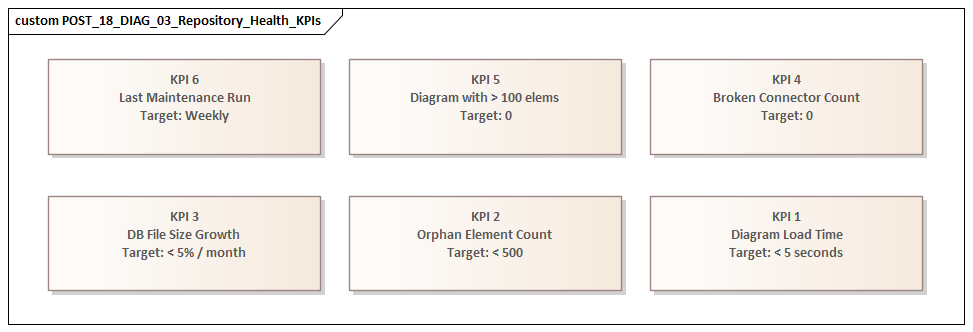
At the same time, define a small set of service indicators, such as:
- diagram open time
- package expansion time
- search duration
- document generation time
These metrics become the baseline for all later changes.
2. Simplify active load
Next, remove avoidable pressure from the live environment without waiting for major redesign. This often includes:
- archiving obsolete content
- reducing baseline or audit retention in the active repository
- separating generated material from curated architecture content
- retiring rarely used but expensive diagrams
This step often delivers faster results than teams expect because it reduces demand directly rather than trying to out-scale it.
3. Optimize targeted bottlenecks
Once the repository is more stable, focus on the highest-value bottlenecks identified during diagnosis. Depending on the environment, this may mean:
- database maintenance and indexing improvements
- query-path tuning
- restructuring overloaded package areas
- redesigning very large diagrams
- changing Pro Cloud Server placement or capacity settings
Prioritize by business impact. If a few model domains support most governance or solution design activity, improving those hotspots will usually deliver more value than broad but shallow tuning.
4. Separate workloads
Many large repositories remain slow because interactive modeling, reporting, integration, and historical retention all share the same runtime context. A more mature operating model separates service modes, for example:
- active authoring in one environment
- read-heavy consumption in another
- archive access in a third
Where full separation is not feasible, logical separation through scheduling, dedicated service windows, and controlled automation channels can still improve responsiveness significantly.
5. Harden governance
Performance improvements do not last if the repository returns to uncontrolled growth. Governance therefore needs explicit controls on:
- model size and retention
- package ownership
- automation onboarding
- diagram design
- integration behavior
- secondary data lifecycle
New add-ins, scripts, MDGs, and imports should be reviewed not only for functional value but also for runtime impact. A lightweight architecture review checkpoint can help here. For example, before onboarding a new Kafka sync, IAM import, or lifecycle reporting job into the live repository, teams should assess expected transaction volume, execution timing, and rollback options.
6. Monitor continuously
The final step is to make performance management routine. Repositories that stay healthy usually have:
- agreed service expectations
- regular hotspot review
- trend monitoring
- operational ownership across architecture, platform, database, and support teams
This is the shift from reactive troubleshooting to managed service operation.
Conclusion
Performance problems in large Sparx EA repositories often indicate that the repository has become strategically important. Once EA serves as a shared enterprise knowledge platform, users expect predictable responsiveness, reliable access, and manageable model complexity. The challenge is not simply to make EA faster, but to operate it with greater maturity. free Sparx EA maturity assessment
The central argument of this article is that performance must be treated as an architectural quality attribute. Slowdown rarely comes from one source, and lasting improvement rarely comes from one fix. Effective remediation starts with diagnosis and then moves through repository architecture, database operations, model governance, and delivery-path optimization.
The most successful organizations define service expectations for key user journeys, establish measurable baselines, identify hotspots, and control the growth patterns that create wasteful complexity. They also recognize that not every artifact belongs in the same live environment and that authoring, consumption, automation, and archival often require different operating models.
From an enterprise architecture perspective, the goal is not merely to repair a slow repository. It is to run EA as an evolving platform with clear boundaries, ownership, lifecycle controls, and evidence-based decision-making. That approach improves speed, but more importantly, it preserves trust in the repository and keeps it usable as enterprise dependence on architecture knowledge continues to grow.
Frequently Asked Questions
Why does a large Sparx EA repository get slow?
Large Sparx EA repositories slow down due to a combination of relationship density, unbalanced package structures, oversized diagrams, customisation overhead (add-ins, scripts, event handlers), and infrastructure limits. The problem is rarely the database alone — it is the interaction of model size, topology, and workload.
How do you fix Sparx EA performance problems?
Start with diagnosis: classify which user journeys are slow, measure response times as a baseline, and identify hotspot packages and diagrams. Then address root causes: split large packages, refactor oversized diagrams, audit and prune add-ins, tune database indexes, and review Pro Cloud Server configuration.
What is the ideal Sparx EA repository architecture for large enterprises?
For large enterprises, the recommended setup is a centralised SQL Server or PostgreSQL database, deployed behind a Sparx Pro Cloud Server instance, with a domain-driven package hierarchy, explicit ownership per domain, defined package-level security, and a scheduled maintenance routine for index optimisation and archive management.