Introduction: Beyond Diagrams — Sparx EA as an Insight Engine
While most people use Sparx Enterprise Architect (EA) for modeling and documentation, its true potential lies in its ability to act as a knowledge graph — a network of concepts and relationships that enable insight, not just representation.
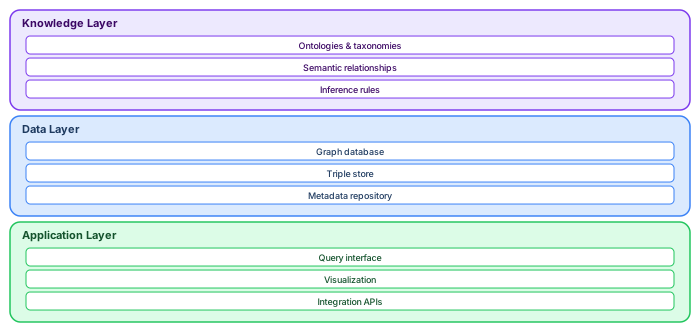
In this article, we explain how to turn your EA repository into a semantic graph that reveals dependencies, patterns, gaps, and opportunities across business, application, data, and technology domains. free Sparx EA maturity assessment
What Is a Knowledge Graph?
A knowledge graph is a connected data structure where:
- Nodes = Concepts or entities (e.g., Applications, Capabilities, Risks)
- Edges = Relationships (e.g., Realizes, Supports, Uses, Mitigates)
Each node can have attributes (metadata), and the structure is queryable to discover new knowledge — not just what was explicitly documented.
Why Use EA as a Knowledge Graph?
- EA stores structured entities and relationships — not just images
- Supports cross-domain modeling: Business, Data, Application, Infra
- Rich metadata via tags and custom stereotypes
- Supports SQL queries, model searches, matrices, and graphs
- Traceability across full architecture lifecycle
Core Features Enabling Knowledge Graph Thinking
1. Repository Relationships
- Dependency, Realization, Association, Trace, Access, Control
- Directionality and semantics help answer “how and why” questions
2. Element Metadata
- Tagged values (Status, Owner, Sensitivity, Compliance)
- Element types, stereotypes, packages, and notes
3. Queries and Scripts
- Model Search (custom SQL or LINQ-like expressions)
- EA Scripts to traverse, output, or analyze the graph
Example Queries as Knowledge Graph Insights
1. Capabilities Not Supported by Any Application
SELECT c.Name FROM t_object c
WHERE c.Stereotype = 'Capability'
AND NOT EXISTS (
    SELECT * FROM t_connector co
    JOIN t_object app ON app.Object_ID = co.End_Object_ID
    WHERE co.Start_Object_ID = c.Object_ID
    AND app.Stereotype = 'ApplicationComponent'
)
2. Applications That Process Sensitive Data Without Encryption
SELECT a.Name FROM t_object a
JOIN t_object d ON d.ParentID = a.Object_ID
WHERE a.Stereotype = 'ApplicationComponent'
AND d.Tag = 'DataSensitivity' AND d.Value = 'High'
AND d.Tag NOT IN ('Encrypted=true')
3. Business Processes Affected by a Specific Regulation
- Trace Regulation → Risk → Control → Process
- Each hop is a connector, potentially different types
Visualization: Making the Graph Visible
Use EA diagrams not just to design but to analyze:
- Heatmaps: Color-code elements by tag values (RiskLevel, Compliance)
- Relationship Matrix: Visualize many-to-many mappings
- Traceability Diagram: Automatic backtracking of impacts
- Prolaborate Dashboards: Graphs, charts, and filters for stakeholders
Client Use Case: Government Architecture Inventory
We supported a national agency in using EA as a knowledge graph to:
- Scan thousands of models to identify capabilities without owners
- Analyze redundant applications across departments
- Trace personal data exposure through workflows and systems
- Report on regulatory gaps with visual dependency paths
Extending the Graph with External Data
- Link EA elements to external IDs (e.g., Jira, Azure, CMDB)
- Enrich EA elements with scripts pulling metrics or status from other systems
- Use the Pro Cloud Server API to build interactive data pipelines
Limitations and Considerations
- EA doesn’t use RDF or SPARQL (not a formal semantic graph)
- Metadata quality matters — missing tags = broken insights
- Modeler discipline needed for reusable elements and consistent links
Conclusion: From Repository to Insight Engine
Sparx EA is more than a modeling tool. With the right meta-model, discipline, and queries, it becomes a knowledge graph — powering insight, impact analysis, and strategic alignment. Sparx EA training
If your models are connected, clean, and well-tagged, you don’t just “see” architecture — you interrogate it. You ask it questions. And that’s when architecture becomes intelligence.
If you’d like hands-on training tailored to your team — Sparx Enterprise Architect, BPMN, SysML or the Archi tool — or modelling coaching in ArchiMate and TOGAF-aligned governance, you can reach us via our contact page.
Getting more from your Sparx EA investment
Most organizations use less than 20% of Sparx Enterprise Architect's capabilities. Three underutilized features deliver disproportionate value when activated: model validation, document generation, and the automation API. Sparx EA best practices
Model validation checks every element and relationship against metamodel rules, catching errors that human reviewers miss. Enable ArchiMate validation under Specialize → Technologies to prevent invalid relationships (for example, a Composition between elements in different layers). Add custom validation scripts that enforce your organization's naming conventions, required tagged values, and maximum elements per diagram.
Document generation produces Word or PDF reports directly from the model. Configure templates that pull element properties, tagged values, relationships, and diagrams into formatted documents. When the model changes, regenerate the document — it is always synchronized. This eliminates the manual document maintenance that typically consumes 30-40% of architect time.
The automation API (JavaScript, VBScript, or .NET) enables bulk operations that would take hours manually: updating tagged values across hundreds of elements, generating traceability matrices, exporting element catalogs to Excel, or validating naming conventions. A single validation script that runs nightly catches more errors than a monthly manual review.
Frequently Asked Questions
What is Sparx Enterprise Architect used for?
Sparx Enterprise Architect (Sparx EA) is a comprehensive UML, ArchiMate, BPMN, and SysML modeling tool used for enterprise architecture, software design, requirements management, and system modeling. It supports the full architecture lifecycle from strategy through implementation.
How does Sparx EA support ArchiMate modeling?
Sparx EA natively supports ArchiMate 3.x notation through built-in MDG Technology. Architects can model all three ArchiMate layers, create viewpoints, add tagged values, trace relationships across elements, and publish HTML reports — making it one of the most popular tools for enterprise ArchiMate modeling.
What are the benefits of a centralised Sparx EA repository?
A centralised SQL Server or PostgreSQL repository enables concurrent multi-user access, package-level security, version baselines, and governance controls. It transforms Sparx EA from an individual diagramming tool into an organisation-wide architecture knowledge base.