⏱ 19 min read
Most enterprise architecture teams do not fail because they picked the wrong notation. They fail because they turned the model into a religion.
That’s the uncomfortable truth.
I’ve seen architecture repositories collapse under the weight of “perfectly customized” metamodels that nobody understood except the person who designed them. I’ve also seen teams stay so rigidly “standards compliant” that they couldn’t represent the actual reality of their enterprise: Kafka topics, cloud landing zones, IAM trust boundaries, API products, zero-trust policies, event contracts, data residency constraints. Real systems. Real decisions. Real risk.
So when people ask, “Should we use UML Profiles or native extensions for model customization?” my answer is usually: neither is inherently better; one is safer, the other is freer, and both are easy to abuse.
If you want the short SEO-friendly version early:
UML Profiles let you customize UML in a standards-based way using stereotypes, tagged values, and constraints.
Native extensions let you extend a modeling tool or repository using its own proprietary metamodel or extension mechanism.
The trade-off is simple: profiles give you portability and discipline; native extensions give you power and fit-to-purpose flexibility.
That’s the simple version. The real version is messier, and that’s where enterprise architecture actually lives.
First, what are UML Profiles and native extensions?
Let’s keep this plain.
A UML Profile is a way to adapt UML without changing UML itself. You create:
- Stereotypes: special labels applied to UML elements
- Tagged values: extra properties attached to those elements
- Constraints: rules about how they should be used
Example: you take a normal UML Component and stereotype it as < or <, then add tags like retentionPeriod, encryptionRequired, or trustBoundary.
You are still inside UML. You’re decorating it, not replacing it. UML modeling best practices
A native extension is when you use the modeling platform’s own extension mechanism to create custom element types, relationships, attributes, validations, forms, scripts, or repository structures that are not just “UML plus labels.” In some tools, that means extending the metamodel. In others, it means custom object types, MDG technologies, plugins, schema changes, scripts, or proprietary APIs.
Example: instead of stereotyping a UML Class as <, you create a first-class object type called Kafka Topic with built-in properties, validation rules, lifecycle states, ownership fields, retention controls, schema compatibility settings, and links to producers, consumers, and data classifications.
That’s a huge difference.
One says: “Let’s stay close to the standard.”
The other says: “Let’s model the business we actually have.”
Both instincts are valid. Both can go badly wrong.
Why this matters in real enterprise architecture work
This is not an academic modeling argument. It affects whether your architecture practice becomes useful or ornamental.
In real architecture work, models are supposed to help with things like:
- system decomposition
- integration design
- cloud migration planning
- IAM boundary definition
- data lineage and control mapping
- technology risk analysis
- platform governance
- change impact assessment
Now think about a modern enterprise. You’re not just modeling applications and databases anymore. You’re modeling:
- Kafka clusters, topics, consumer groups, and event contracts
- cloud subscriptions, accounts, VPCs/VNets, landing zones, shared services
- IAM roles, policies, entitlements, federation paths, service principals
- managed services, serverless components, secrets stores, API gateways
- regulatory constraints like PCI, SOX, GDPR, MAS, APRA, or internal control frameworks
Plain UML can represent some of this at a structural level. But often not in a way that is governable, queryable, or meaningful to the people who need the model.
That’s why customization matters.
The question is not whether to customize. You will.
The real question is how far you should go before you break interoperability, usability, and team sanity.
The case for UML Profiles: disciplined customization without going off the rails
Let me say something nice about UML Profiles before I criticize them. UML for microservices
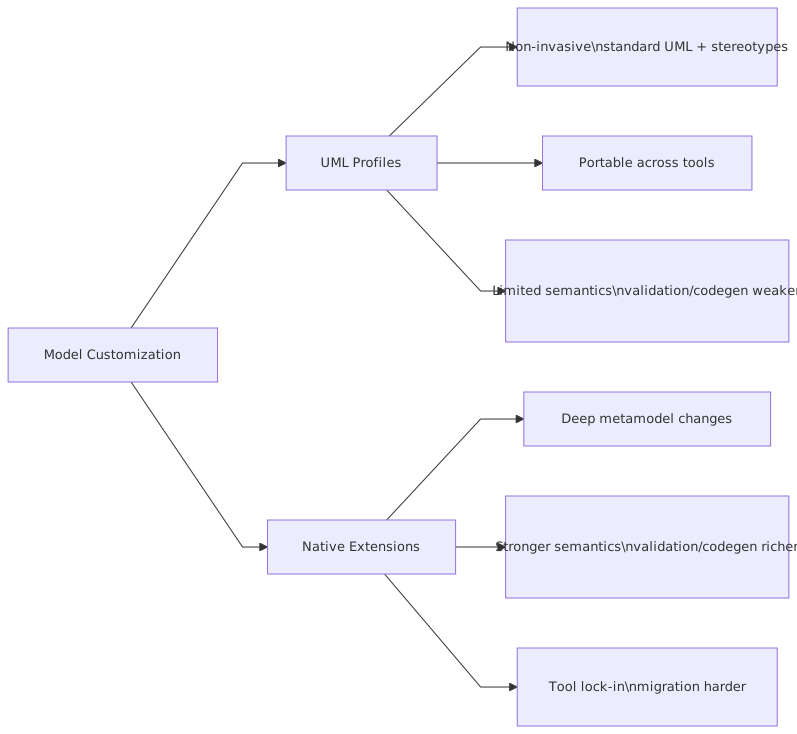
Profiles are the best option when your architecture team needs controlled customization and still wants to stay anchored to a recognized standard. They are especially useful when:
- multiple teams already understand UML
- interchange with other tools matters
- you want lightweight semantic extensions
- governance matters more than tool cleverness
- your model consumers don’t need a deeply customized repository
Profiles force a certain humility. That’s a good thing.
They make architects ask:
“Can this concept be represented as a specialization of an existing UML element?”
That question often prevents unnecessary complexity.
For example, in a bank’s event-driven architecture, you may define stereotypes like:
<on InformationItem or Component> <and> <on Component> <on DataType or Class> <on Actor or Node> <on Deployment target or execution environment>
Then you add tagged values such as:
classification = ConfidentialretentionDays = 14schemaRegistryRequired = trueauthMechanism = mTLSregion = eu-west-1owner = Payments Platform
This is usually enough to get useful architecture views and governance reports started. ARB governance with Sparx EA
Why profiles work well in practice
Profiles are good when you need architecture semantics, not a whole new modeling universe.
They help with:
- consistency: teams use the same vocabulary
- lightweight governance: mandatory tags can be checked
- training: easier to explain than a bespoke metamodel
- portability: at least better than pure proprietary extensions
- integration: many modeling tools understand stereotypes and tagged values
And there’s another benefit people don’t talk about enough: profiles expose weak thinking.
If you can’t explain your custom concept as a specialization of a known modeling element, maybe the concept isn’t stable yet. Maybe it’s just a temporary implementation detail dressed up as architecture.
That’s a contrarian point, but I stand by it. A lot of customization demand is just impatience.
The limits of UML Profiles: where standards become a cage
Now the harder part.
UML Profiles are often praised as the “right” way to customize because they preserve standards compliance. Fine. But standards compliance is not the same thing as enterprise usefulness.
Profiles start to struggle when your domain concepts are not merely variations of UML elements, but first-class architecture objects with their own behavior, lifecycle, governance, and reporting needs.
Take Kafka.
A Kafka topic in a large bank is not just “a component with a stereotype.” It may have:
- topic naming standard
- retention policy
- partition count
- replication factor
- schema compatibility mode
- producer ownership
- consumer criticality
- data classification
- disaster recovery posture
- cross-region replication constraints
- encryption policy
- message key semantics
- lineage to upstream source systems
- downstream impact map
- control mappings for audit
Can you cram all of that into stereotypes and tagged values? Sure. People do it all the time.
Should you? Often no.
Because at some point the model stops behaving like a model and starts behaving like a spreadsheet trapped inside UML.
That’s the dirty secret of many profile-heavy repositories. They look elegant in governance presentations, but users hate them. Search is poor, validation is weak, forms are clumsy, and the semantics are too implicit. The architecture team thinks it built a metamodel. Everyone else sees a bureaucratic tax. EA governance checklist
Same problem with IAM.
An enterprise IAM landscape includes:
- workforce identities
- customer identities
- service identities
- federated trust relationships
- role hierarchies
- policy scopes
- break-glass access
- privileged access workflows
- cloud-native permissions
- segregation-of-duties constraints
A stereotyped UML Actor can represent an IAM role at a superficial level. But if you need to govern toxic combinations, entitlement inheritance, policy evaluation boundaries, and integration with cloud IAM constructs, the profile approach can become thin very fast.
Not useless. Just thin.
The case for native extensions: model the enterprise you actually have
Native extensions are what serious architecture teams eventually drift toward when the repository has to support real decision-making, not just diagramming.
I know that sounds biased. It is. I’ve spent enough years watching “pure UML” approaches buckle under enterprise complexity.
Native extensions let you create first-class concepts such as:
- Kafka Topic
- Event Schema
- IAM Role
- Cloud Account
- Landing Zone
- API Product
- Data Domain
- Control Objective
- Shared Platform Service
- Trust Boundary
- Integration Contract
That matters because first-class concepts can carry first-class behavior:
- custom forms
- validation rules
- derived attributes
- relationship restrictions
- report templates
- lifecycle workflows
- ownership controls
- impact analysis logic
- API integrations
- dashboards
That’s where architecture repositories stop being passive inventories and start becoming operating tools.
Why native extensions work well in practice
When done properly, native extensions are better for:
- domain fidelity: model what the enterprise actually manages
- governance automation: enforce rules at object level
- reporting: query by meaningful architecture concepts
- usability: forms and views fit the domain
- integration: sync with CMDB, cloud inventory, IAM systems, schema registries
- scalability: better for architecture at enterprise scale
If your target state architecture includes hundreds of cloud workloads across AWS and Azure, dozens of Kafka event streams, and layered IAM controls, you will eventually want richer objects than UML stereotypes can comfortably provide.
This is especially true when architecture is tied to controls and operational risk. Banks live here.
In a regulated environment, you often need to answer questions like:
- Which Kafka topics carry customer PII?
- Which consumer services read those topics?
- Which IAM roles can deploy those services?
- Which cloud accounts host them?
- Which controls enforce encryption and key rotation?
- Which systems break if this schema changes?
- Which applications violate data residency policy?
That’s not just diagramming. That’s architecture intelligence.
Native extensions are often the only way to make those questions answerable without heroic manual effort.
The downside of native extensions: freedom turns into tool prison
Now the warning.
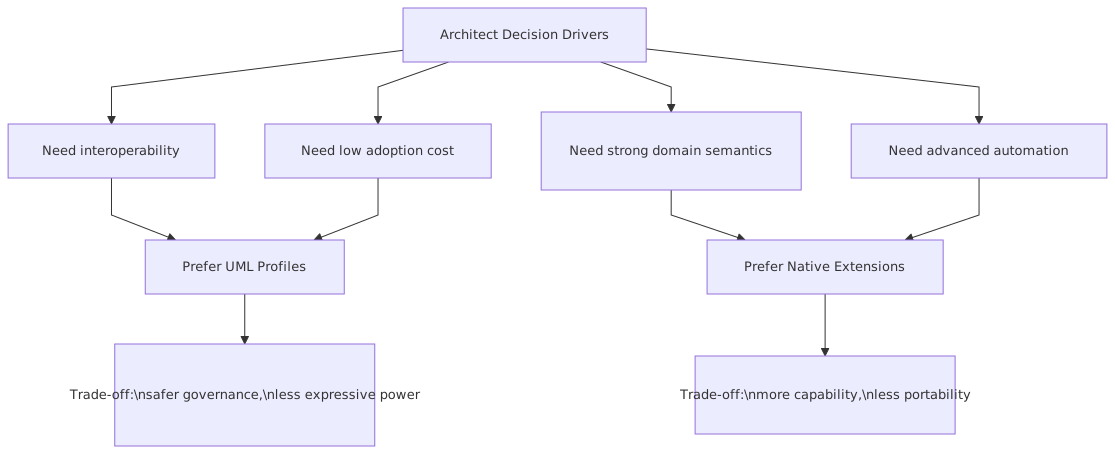
Native extensions are seductive because they let you model exactly what you want. That’s also the danger.
The moment you go deep into proprietary extensions, you are making a trade:
- less portability
- more vendor lock-in
- more maintenance burden
- higher skill dependency
- greater risk of overengineering
And overengineering is not a theoretical risk. It is the default outcome.
Architects love designing metamodels. It feels strategic. It feels intellectually clean. It also produces some of the most unusable artifacts in enterprise IT.
I’ve seen teams create 80 custom object types before they had 20 active users. That’s not architecture maturity. That’s premature formalization.
A native extension strategy becomes bad when:
- every concept gets its own object type
- naming rules become too rigid
- users need training just to create a simple model
- repository admins become a bottleneck
- the architecture team confuses completeness with value
- migrations to another tool become nearly impossible
This is where contrarian thinking helps:
If your custom metamodel can only be understood by the architecture office, it is already failing.
Tool sophistication is not the same thing as architectural clarity.
A practical comparison
Here’s the trade-off in a more usable format.
That table is still too polite, honestly.
A blunter version would be:
- Profiles are good when you want discipline without building your own mini-platform.
- Native extensions are good when your architecture repository needs to behave like a real enterprise knowledge system.
How this plays out in a real bank
Let’s make this concrete.
Imagine a retail bank modernizing its payments and customer servicing platforms. It runs a hybrid estate:
- core banking on legacy platforms
- new digital channels in cloud
- Kafka for event streaming
- centralized IAM with federation into cloud providers
- API gateway for partner and mobile access
- strict controls around PCI and customer data
The architecture team wants a repository that supports:
- system context views
- integration maps
- event lineage
- IAM trust relationships
- cloud deployment boundaries
- data classification and control overlays
Option 1: UML Profile approach
The team creates stereotypes such as:
<> <> <> <> <> <> <>
They apply tags for:
- data classification
- owner
- region
- criticality
- retention
- authentication type
- control status
At first, this works well. Diagrams are understandable. Architects can still use familiar UML elements. Governance reports can be built from tags. Teams don’t feel overwhelmed. architecture decision record template
But then reality arrives.
Now they need to answer:
- Which topics contain PAN-adjacent payment metadata?
- Which consumer groups are in non-production but fed with masked production-derived data?
- Which service principals in Azure can deploy payment consumers?
- Which AWS roles can read secrets used by those consumers?
- Which event schemas changed in the last quarter without downstream sign-off?
- Which cloud landing zones host systems in PCI scope?
Suddenly, stereotypes and tags are not enough. Or rather, they are enough in theory, but painful in operation. Query logic becomes brittle. Validation becomes inconsistent. Teams misuse stereotypes. Different architects model the same thing differently. Reports become dependent on cleanup campaigns.
Option 2: Native extension approach
The bank then creates first-class repository objects for:
- Application Service
- Kafka Topic
- Event Schema
- Consumer Group
- IAM Role
- Service Principal
- Cloud Account
- Landing Zone
- Data Classification Policy
- Control Requirement
Each object has mandatory fields, relationship rules, and lifecycle states.
Examples:
Kafka Topic
- owner domain
- classification
- retention period
- schema registry binding
- encryption requirement
- resilience tier
- upstream source
- downstream consumers
IAM Role
- trust source
- privilege level
- federation type
- cloud scope
- break-glass indicator
- SoD risk class
Cloud Account
- environment
- regulatory scope
- landing zone
- key management policy
- connectivity pattern
- monitoring baseline
This approach makes impact analysis and control reporting much stronger. The bank can now produce dashboards for architecture governance and audit with less manual stitching.
But it also introduces problems:
- more administration
- stronger dependency on the tool
- need for repository stewardship
- harder onboarding for casual users
- painful future migration risk
That’s the trade. There is no magic answer.
Common mistakes architects make
This is where most teams get into trouble.
1. Treating customization as a design exercise instead of a usage problem
Architects often ask, “What’s the correct metamodel?”
Wrong starting point.
The better question is:
What decisions, reports, and governance actions must this model support?
If you can’t answer that, don’t customize anything yet.
2. Overestimating how much standard UML stakeholders care about
Almost nobody outside architecture cares that your approach is elegantly standards-based. They care whether the model helps them understand cloud blast radius, IAM risk, Kafka dependencies, or migration impact.
Standards matter. Utility matters more.
3. Creating too many stereotypes too early
A profile with 60 stereotypes is usually a sign of metamodel vanity. Start with a small set of high-value concepts and earn the right to add more.
4. Using tagged values as a dumping ground
This is probably the most common mistake. Teams add dozens of tags because it feels easy. Then no one governs them, values drift, reports break, and the repository becomes metadata compost.
If a property is essential, it needs ownership, validation, and lifecycle discipline.
5. Building native extensions without a product mindset
A custom repository is not a one-time architecture artifact. It is a product. It needs:
- roadmap
- stewardship
- user support
- quality checks
- integration maintenance
- versioning
Most architecture teams are not staffed to run that product well.
6. Modeling implementation trivia as architecture truth
Not every cloud resource deserves first-class architectural representation. Not every IAM permission is architecture. Not every Kafka topic is strategic.
Good architects know what to abstract. Great architects know what to ignore.
7. Forgetting that diagrams are only one output
A lot of teams customize only for diagram appearance. That’s shallow. Enterprise architecture value increasingly comes from query, traceability, impact analysis, and governance automation—not prettier boxes.
So which should you choose?
Here’s my opinionated answer.
Choose UML Profiles if:
- your architecture practice is still maturing
- you need a shared vocabulary more than a custom repository
- multiple tools or exports matter
- your users are mostly architects, not broad enterprise stakeholders
- your governance needs are moderate
- you want to move fast without building tool complexity
Choose native extensions if:
- your repository supports operational governance and audit
- architecture data must integrate with cloud, IAM, CMDB, or delivery tooling
- your domain concepts are genuinely first-class and stable
- reporting and policy enforcement matter more than notation purity
- you have capacity to run the repository like a product
Choose a hybrid approach if:
- you are sensible
Honestly, hybrid is where many successful teams land.
Use UML Profiles for broadly understandable architecture semantics.
Use native extensions only for the concepts that truly need stronger behavior and governance.
That means you might keep:
- applications
- interfaces
- data objects
- deployment nodes
- business capabilities
…within a UML-profiled world, while introducing native extensions for:
- Kafka topics and schemas
- IAM roles and trust relationships
- cloud accounts and landing zones
- control objects and policy mappings
That gives you enough standardization to stay sane and enough specificity to stay useful.
This is not ideological purity. It’s architecture pragmatism.
A decision framework that actually works
If I were advising an architecture board, I’d use five tests before introducing any custom concept.
A concept should pass at least three of those tests before you elevate it significantly.
That sounds conservative. Good. Most architecture repositories need more restraint, not more creativity.
My strong view: start standard, extend surgically
If you force me into a single opinion, here it is:
Start with UML Profiles. Move to native extensions only where enterprise reality clearly demands first-class semantics.
That sequence matters.
Why? Because native extensions are easy to invent and hard to unwind. Profiles are imperfect, but they create useful friction. They slow you down just enough to validate whether a concept deserves formalization.
And this is the part many architects don’t like hearing:
Your first metamodel is probably wrong.
Not because you’re bad at architecture. Because enterprises are messy, political, and constantly changing. The right customization strategy is one that can absorb learning without turning the repository into a museum of abandoned abstractions.
In banking especially, the pressure to formalize everything is high. Regulators, auditors, control functions, platform teams—they all want structured truth. Fair enough. But if your model becomes too rigid, teams route around it. Then you have a compliant repository and a noncompliant reality. That’s worse than having a lighter model.
The best architecture customization strategy is not the most elegant one.
It’s the one people will actually use, maintain, and trust.
That’s the bar.
Final thought
UML Profiles and native extensions are not enemies. They are different levels of commitment.
Profiles say:
“We need shared meaning.”
Native extensions say:
“We need the repository to act like part of the enterprise control system.”
Know which problem you are solving.
If you just want architectural consistency, don’t build a proprietary monster.
If you need architecture to support Kafka governance, IAM traceability, cloud control mapping, and audit-grade reporting, don’t pretend a few stereotypes will carry the load forever.
Be practical. Be selective. Be suspicious of modeling purity.
And for the love of architecture, don’t customize for the thrill of customization.
That habit has buried more repositories than bad notation ever did.
FAQ
1. Are UML Profiles enough for modeling cloud architecture in a large enterprise?
Sometimes, but usually only at a moderate level of detail. If you just need to represent cloud workloads, regions, deployment patterns, and high-level dependencies, profiles are often enough. If you need governance over landing zones, account structures, policy inheritance, and control mappings, native extensions usually become more effective.
2. When should Kafka topics become first-class model elements instead of stereotypes?
When they drive recurring governance and impact analysis. If you need to track schema evolution, ownership, retention, classification, downstream consumers, and resilience requirements, topics should probably be first-class elements. If they are just shown on a few integration diagrams, stereotypes are fine.
3. Do native extensions always create vendor lock-in?
Practically, yes to some degree. The question is whether the value you gain outweighs that lock-in. In many enterprises, especially regulated ones, the answer can be yes. But you should go into it with open eyes and a migration strategy, not with wishful thinking.
4. What’s the biggest mistake architecture teams make with UML Profiles?
Using tagged values as an uncontrolled metadata dumping ground. Once that happens, the model becomes inconsistent, reporting becomes unreliable, and trust drops fast. If a field matters, govern it properly or don’t pretend it’s architecture data.
5. What approach is best for IAM modeling?
For high-level trust boundaries and role concepts, UML Profiles can work. For enterprise IAM with federated identity, privileged access, cloud policy scopes, and segregation-of-duties concerns, native extensions are usually the better long-term choice. IAM is one of those domains where “just stereotype it” often becomes naïve very quickly.
Frequently Asked Questions
What is the difference between UML and ArchiMate?
UML is a general-purpose modeling language primarily used for software design — class structures, sequences, components, states, deployments. ArchiMate is an enterprise architecture language covering business, application, and technology layers. They are complementary: ArchiMate for cross-domain EA views, UML for detailed software design.
When should you use ArchiMate instead of UML?
Use ArchiMate when you need to model cross-domain architecture (business capabilities linked to applications linked to infrastructure), traceability from strategy to implementation, or portfolio views for stakeholders. Use UML when you need detailed software design — class models, sequence interactions, state machines, component interfaces.
Can ArchiMate and UML be used together?
Yes. In Sparx EA, both exist in the same repository. ArchiMate models the enterprise landscape; UML models the internal design of specific application components. An ArchiMate Application Component can link to the UML class diagram that defines its internal structure, maintaining traceability across abstraction levels.