⏱ 22 min read
Most UML diagrams in enterprise architecture are wrong in ways that matter.
Not “a little bit imprecise.” Not “good enough for a workshop.” I mean structurally wrong. They say things the author did not intend, they hide critical design assumptions, and they create fake certainty in architecture reviews. And the really frustrating part is this: the mistakes usually happen because people treat UML as drawing software, not as a modeling language. UML modeling best practices
That sounds pedantic. It isn’t.
If you use UML in real architecture work—banking platforms, IAM modernization, Kafka event flows, cloud migration, integration landscapes—the difference between a picture and a model is the difference between a useful decision tool and expensive wall art.
So here’s the simple version up front.
The simple explanation
UML is not just a set of shapes. It has a metamodel, which is the formal definition of what elements mean and how they relate. If you ignore the metamodel, you can draw almost anything. That’s exactly the problem. You end up with diagrams that look convincing but are semantically broken.
Common examples:
- drawing components when you really mean deployments
- using associations where dependencies are intended
- mixing runtime message flow with static structure
- modeling Kafka topics as services
- treating IAM roles, users, and systems as if they were the same kind of thing
- putting cloud infrastructure, application logic, and business ownership into one unreadable diagram
The metamodel matters because it tells you what kind of thing an element is. A Component is not a Node. An Actor is not a Role. An Artifact is not a running service. A Class is not a database table, even though people keep pretending it is.
That’s the short version. If you only take one thing from this article, take this:
> The biggest UML mistake in enterprise architecture is using notation to decorate assumptions instead of using the metamodel to make meaning explicit.
Now let’s go deeper.
Why architects keep making the same UML mistakes
A lot of architects say they “know UML,” but what they really know is maybe six diagram types and a rough memory of what the icons look like. Which is understandable. Most enterprise architecture work is not done in pristine modeling environments with methodologists hovering nearby. It happens in Miro, PowerPoint, Visio, draw.io, Lucidchart, and increasingly in whatever collaborative whiteboard survived procurement.
That reality creates a bad habit: we optimize for speed of drawing, not precision of meaning.
I’m not against rough diagrams. Quite the opposite. Early architecture should be rough. But rough is not the same as careless. And once a diagram enters a decision pack, architecture board review, security assessment, or implementation handoff, ambiguity starts costing money. EA governance checklist
The metamodel is useful because it forces discipline. It asks:
- What kind of element is this?
- What level of abstraction are we at?
- Is this relationship structural, behavioral, or deployment-related?
- Is this thing a logical unit, a physical runtime unit, or a responsibility?
Those questions are not academic. They are the difference between “this service publishes events” and “this EC2-hosted container writes to Kafka over a private endpoint using a service principal with scoped topic ACLs.” In enterprise work, that distinction matters.
What the UML metamodel actually gives you
Let’s not overcomplicate it.
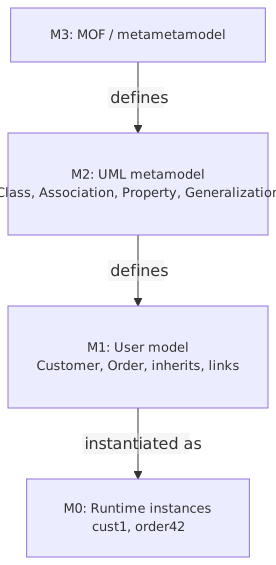
The UML metamodel is basically the schema of UML itself. It defines concepts like: UML for microservices
- Classifiers: things that describe instances, such as Class, Component, Node, Actor
- Relationships: Association, Dependency, Generalization, Realization, etc.
- Behaviors: Activity, State Machine, Interaction
- Deployment concepts: Node, Device, Execution Environment, Artifact
- Use-case concepts: Actor, Use Case, Subject
Why should an enterprise architect care?
Because enterprise architecture constantly mixes viewpoints:
- business capability
- application structure
- integration behavior
- deployment topology
- security responsibility
- operational ownership
UML gives you multiple ways to model these, but only if you respect what each element means. If you don’t, you produce diagrams that collapse viewpoints into one muddy layer. That’s where most mistakes come from.
Here’s the contrarian bit: many architecture teams would be better off using fewer UML elements, more rigorously, than trying to use the whole language badly. You do not need every diagram type. You do need semantic discipline.
Mistake #1: Confusing logical architecture with physical deployment
This is probably the most common enterprise modeling error.
Someone draws boxes labeled:
- Customer Service
- Payment Service
- Kafka
- AWS
- Kubernetes
- IAM
- Oracle DB
Then they connect everything with arrows and call it “the architecture.”
No. That’s not architecture. That’s a mixed inventory.
The metamodel problem here is that people are mixing Components, Nodes, Artifacts, and external systems in one flat visual layer as if they were peers.
A Component is a modular unit of system functionality.
A Node is a computational resource where things are deployed.
An Artifact is a deployable physical piece, like a jar, container image, or package.
If you draw a Kubernetes cluster and a fraud scoring service as the same kind of box, you’ve already lost precision.
Real architecture impact
In cloud programs, this mistake causes terrible conversations:
- application teams think a component diagram is enough for production readiness
- infrastructure teams assume deployment topology has been approved
- security teams cannot tell where trust boundaries actually are
- operations teams don’t know what is running where
I’ve seen this in banking modernization repeatedly. A team says they have “decoupled services on Kafka in AWS.” Fine. But are those services logical components? Containers? Lambda functions? ECS tasks? EKS deployments? Separate bounded contexts? Shared runtimes? Different accounts? Different VPCs? The diagram often doesn’t say.
That’s not a cosmetic issue. It affects:
- network controls
- IAM policies
- resilience design
- failover strategy
- audit boundaries
- cost attribution
Better approach
Use at least two views:
- Logical component view
Shows services, responsibilities, interfaces, dependencies.
- Deployment view
Shows nodes, execution environments, artifacts, network zones, cloud accounts, clusters, databases, brokers.
These are related views, not one giant picture.
Example
In a retail banking platform:
- Account Service and Transaction Service are Components.
- Kafka Cluster in Confluent Cloud or MSK is infrastructure/platform, represented in deployment terms.
- A Spring Boot container image is an Artifact.
- An EKS worker node or managed Kubernetes cluster is a Node / Execution Environment context.
If you flatten all of that into one notation style, teams start making completely false assumptions, like “Kafka is just another service” or “the service boundary equals the deployment boundary.” Often it doesn’t.
Mistake #2: Using associations for everything
This one is a classic UML abuse.
Architects love lines. If two things are related, draw a line. If one thing calls another, draw a line. If data moves, line. If ownership exists, line. If someone once mentioned another system in a meeting, probably line.
But in UML, not all relationships mean the same thing.
A few basics:
- Association: a structural relationship, often implying linked instances
- Dependency: one element depends on another for its specification or implementation
- Realization: one element fulfills a contract
- Generalization: inheritance/specialization
- Information flow / message / connector, depending on diagram context: movement or interaction
In enterprise architecture, the right default is often dependency, not association.
Why? Because most architecture relationships are not persistent structural links between instances. They are usage relationships:
- Service A calls Service B
- Portal depends on IAM for authentication
- Fraud Engine consumes events from Kafka
- Reporting solution uses Customer Master data
That is dependency territory in many cases, not association.
Why this matters in practice
If you misuse associations, you imply stronger coupling than intended. That changes how people read the architecture.
For example:
- A dependency suggests replaceability and directed reliance.
- An association may suggest a stable structural relationship.
- A bidirectional association often accidentally implies mutual knowledge that the systems do not actually have.
In architecture reviews, that confusion shows up as:
- “Why are these services tightly bound?”
- “Is there synchronous coupling here?”
- “Does this system store direct references?”
- “Who owns the lifecycle of this relationship?”
The diagram created the wrong debate.
A banking example
Suppose:
- Customer Onboarding Service publishes
CustomerCreated - KYC Service consumes it
- CRM Sync Service also consumes it
A lot of people draw direct lines between Onboarding and KYC, and Onboarding and CRM Sync.
That may be technically wrong. If Kafka mediates the interaction, Onboarding may not depend on KYC at all. It depends on the event contract and the broker infrastructure. KYC depends on the topic and event schema. CRM Sync too. The services are intentionally decoupled.
If your diagram shows direct structural relationships between producer and consumers, you erase the architectural value of event-driven design.
That’s not a minor notation issue. It distorts the architecture.
Mistake #3: Modeling Kafka topics as if they were services
This one deserves a strong opinion: a Kafka topic is not a microservice. Stop drawing it like one.
I keep seeing architecture diagrams where topics sit beside services in identical boxes:
- Payments Service
- Limits Service
- Customer Events Topic
- IAM Service
- Fraud Service
That visual equivalence is misleading.
From a metamodel perspective, a topic is not a component providing business behavior in the same sense as a service. It is closer to an infrastructure-mediated communication channel or data distribution mechanism, depending on the level of abstraction.
When you model a topic as a peer service, three bad things happen:
- Ownership gets blurred
Who owns the schema? The producing domain? The platform team? Shared ownership is usually fake ownership.
- Contracts become vague
Teams stop distinguishing between a business capability and a transport construct.
- Runtime assumptions get hidden
Retention, replay, ordering, partitioning, and ACLs vanish from the conversation.
Better modeling move
Model:
- business/application Components that produce or consume events
- explicit dependencies on event contracts or broker interfaces
- deployment/runtime view showing Kafka platform placement
- optionally, information flows or stereotyped artifacts for event schemas/topics if your method supports it
You do not need to force every concept into a core UML element without adaptation. Stereotypes exist for a reason. Use them carefully.
For example:
<> customer.created <> CustomerCreated v2 <> Onboarding Service <> AML Screening Service
That is far more useful than pretending the topic is just another application box.
Real enterprise example
In a bank’s event-driven customer domain, the onboarding team published events to Kafka. Their architecture diagram showed direct arrows from Onboarding to seven downstream systems. Security, resilience, and ownership all became confusing.
When we remodeled it properly:
- Onboarding depended on Kafka and the
CustomerCreatedschema contract - downstream consumers depended on the topic/schema, not on Onboarding directly
- IAM policy ownership for produce/consume ACLs became visible
- replay behavior and retention became explicit platform concerns
- onboarding’s team boundary became clearer
That one cleanup changed implementation conversations immediately. Teams stopped asking for synchronized release coordination where it wasn’t needed.
That’s what good modeling does. It reduces fake coupling.
Mistake #4: Treating IAM actors, roles, and systems as the same thing
Identity architecture is where UML sloppiness becomes dangerous.
In IAM-related diagrams, people constantly mix:
- human users
- business roles
- application identities
- service accounts
- authentication providers
- authorization policies
- systems that enforce access
And then they connect them with arrows labeled “accesses,” “auth,” or “role.”
This is exactly where metamodel discipline helps.
An Actor in UML use-case modeling represents a role played by an external entity interacting with the subject. It is not automatically:
- an LDAP group
- an Azure AD role
- a service principal
- a privileged admin persona
- an application account
Those are different things.
Common IAM modeling mistakes
- Drawing “Bank Teller” as both a human actor and a technical role
- Modeling “OAuth” as if it were a component
- Treating “Admin” as a user, role, and organization unit simultaneously
- Showing an API gateway as the thing that authenticates, authorizes, and provisions identities all at once
- Ignoring the difference between identity provider, policy decision point, and policy enforcement point
Why this matters in real architecture work
In cloud and zero-trust programs, these distinctions drive actual controls:
- who authenticates whom
- where tokens are issued
- where claims are transformed
- where authorization is evaluated
- what machine identities are allowed to publish to Kafka
- which workloads can assume which cloud roles
If your UML collapses all identity concepts into generic actors and boxes, your architecture review will miss serious gaps.
Better pattern
Use separate views for:
- Use-case / interaction view for human interactions
- Component/security architecture view for IAM systems and enforcement points
- Deployment/runtime view for where trust boundaries and identity runtimes exist
Example in banking:
- Customer and Fraud Analyst are Actors in use-case terms
- IAM Platform, OIDC Provider, API Gateway, Entitlement Service are Components
- Service Principal or workload identity is not a human actor; treat it as a technical identity concept, often via stereotype or note
- Kafka ACL policy is not the same as a business role
This sounds obvious until you review actual diagrams. Then suddenly nothing is obvious.
Mistake #5: One diagram trying to answer every question
This is maybe the most destructive habit in enterprise architecture.
Someone says, “Can you put business process, applications, interfaces, cloud hosting, security zones, and data classification all on one slide for the steering committee?”
And because architects are helpful people with weak boundaries, they try.
The result is a diagram with:
- 40 boxes
- 90 arrows
- 6 colors
- 4 line styles
- tiny icons for cloud services
- a legend nobody reads
- no coherent viewpoint
The metamodel issue here is not just wrong notation. It’s uncontrolled mixing of abstraction layers and concerns.
A model should answer a question. If it answers ten, it usually answers none well.
A practical rule
For each diagram, be able to finish this sentence:
“This view is for [audience] to decide/understand [specific concern].”
Examples:
- “This view is for the security architecture board to validate trust boundaries and identity enforcement.”
- “This view is for solution delivery teams to understand service dependencies and integration contracts.”
- “This view is for cloud engineering to assess deployment topology and resilience.”
If you cannot say that, the diagram is probably trying to do too much.
Contrarian thought
A lot of enterprise architecture repositories are full of diagrams that exist because governance demanded an artifact, not because anyone needed a model. Those diagrams are often technically denser and practically less useful than a clean whiteboard sketch made by a good lead engineer. ArchiMate for governance
The answer is not “less modeling.” It’s better-scoped modeling.
Mistake #6: Using class diagrams as database diagrams in disguise
This one never dies.
Class diagrams are often abused to represent:
- relational schemas
- canonical data models
- JSON payloads
- API request/response examples
- master data entities
- Kafka event payloads
Sometimes that’s acceptable. Often it isn’t.
A Class in UML is a classifier with attributes, operations, and relationships. It is not automatically:
- a table
- a document
- a topic payload
- a business concept in a data governance glossary
Can class diagrams help with domain modeling? Absolutely.
Can they be useful for conceptual data modeling? Yes.
Should they be used as lazy ERDs? Usually no.
Why this matters
In enterprise architecture, especially in banking, data semantics matter:
- legal entity vs customer vs party
- account vs product arrangement
- transaction vs posting
- event payload vs persistent record
If you use one class diagram to imply all of those at once, teams start making invalid mappings between conceptual, logical, and physical data structures.
That leads to bad integration design. I’ve seen teams assume a Kafka event schema should mirror a source database table because both were shown as “classes” with similar fields. That’s how you get brittle event contracts and accidental coupling to internal persistence models.
Better move
Be explicit about the level:
- conceptual domain model
- logical information model
- physical schema model
- API contract model
- event schema model
They can relate. They should not be conflated.
Mistake #7: Ignoring multiplicity, direction, and ownership because “it’s obvious”
No, it usually isn’t obvious.
Architects often skip:
- multiplicity
- navigability
- direction of dependency
- ownership of interfaces
- source vs target semantics
Because they assume the audience “gets it.”
This is where enterprise models become dangerous. In large organizations, different teams read the same diagram through completely different assumptions.
Example
A cloud integration diagram shows:
- Customer Profile Service connected to Consent Service
- Consent Service connected to Kafka
- Mobile App connected to API Gateway
Without direction or ownership, basic questions remain unanswered:
- Does Customer Profile call Consent synchronously?
- Does Consent push updates or is it queried?
- Does Mobile App authenticate at Gateway only, or also against an external IdP?
- Who owns the topic contract?
- Can multiple consent records exist per customer?
These are not implementation trivia. They affect architecture decisions.
Real-world consequence
I once saw a program where a single unlabeled line between an IAM platform and a Kafka cluster was interpreted three different ways by three teams:
- network team thought it meant private connectivity
- security team thought it meant authentication integration
- application team thought it meant event publication for audit logs
All three were wrong. The line just meant “something exists here.” Which is another way of saying the model failed.
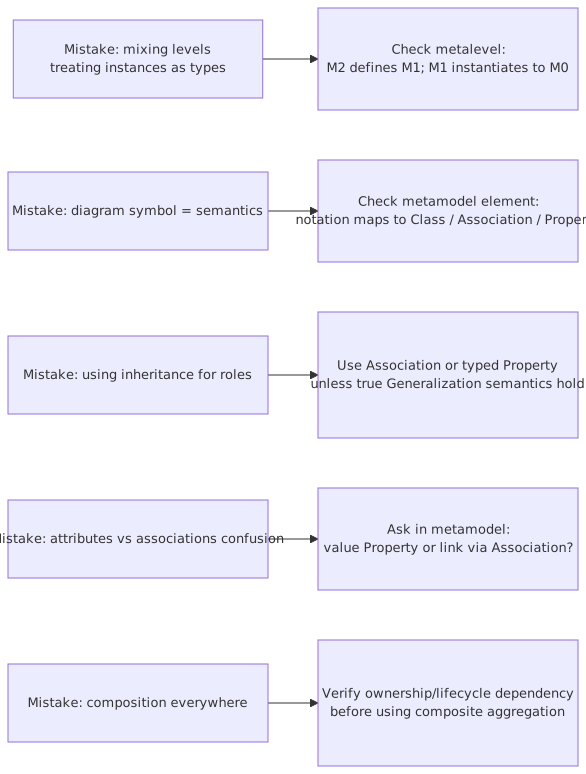
A practical table: common UML mistakes and what to do instead
How this applies in real architecture work
Let’s make this concrete.
Scenario: bank modernizing customer onboarding in the cloud
A retail bank is moving from a monolithic onboarding system to a cloud-based, event-driven architecture.
Key elements:
- Customer Onboarding Service
- KYC/AML Screening Service
- Consent Service
- IAM platform using OIDC
- Kafka for event distribution
- API Gateway
- EKS in AWS
- downstream CRM and analytics consumers
This is the kind of architecture every enterprise says they want. And it’s exactly where bad UML causes trouble.
What a bad model looks like
One slide:
- all systems as boxes
- arrows everywhere
- Kafka shown as a box equal to services
- IAM shown as “Auth”
- EKS shown next to business apps
- direct lines from Onboarding to all consumers
- no distinction between customer actor and workload identity
- no trust boundaries
- no deployment separation by account or VPC
Looks modern. Means almost nothing.
What a better model set looks like
1. Use-case/context view
Audience: business, product, security
Shows:
- Customer
- Operations Analyst
- Customer Onboarding capability
- external KYC provider
- IAM interaction for authentication
2. Logical component view
Audience: architects, engineering leads
Shows:
- Onboarding Service
- Consent Service
- Screening Service
- CRM Sync
- Entitlement Service
- dependencies and interfaces
- event publication/consumption semantics
- ownership of contracts
3. Event interaction view
Audience: integration and platform teams
Shows:
CustomerCreatedConsentCaptured- producer/consumer relationships
- schema ownership
- replay-sensitive consumers
- dead-letter handling notes if needed
4. Deployment/security view
Audience: cloud, ops, security
Shows:
- AWS accounts
- EKS cluster / namespaces
- managed Kafka or Confluent connectivity
- API Gateway
- OIDC provider
- trust boundaries
- private networking
- workload identities and topic ACL enforcement
Now the architecture can actually be reviewed.
What mistakes architects commonly make here
- They model the target architecture before clarifying the viewpoint.
So the diagram becomes a dumping ground.
- They use one notation style for everything.
Nice visually. Semantically empty.
- They imply direct service coupling where events are intended to decouple.
- They hide identity mechanics under a single “IAM” box.
Which means no one challenges token propagation, authorization boundaries, or machine identity design.
- They conflate a service boundary with a team boundary and a deployment boundary.
In real enterprises those often differ.
- They skip ownership.
Particularly for schemas, topics, APIs, and entitlements.
That last one is huge. Enterprise architecture fails less from notation mistakes alone than from ownership ambiguity hidden by notation mistakes.
A few strong rules I’d actually enforce
If I were setting modeling standards for an architecture practice, I’d be fairly opinionated:
Rule 1: Every diagram must declare its viewpoint
At the top, in plain language.
Rule 2: Never mix logical components and deployment nodes without explicit visual distinction
Prefer separate views.
Rule 3: Default to dependency, not association
Only use association when you really mean a structural relationship.
Rule 4: Event brokers and topics are not “just services”
Model event contracts explicitly.
Rule 5: IAM diagrams must distinguish human actors, technical identities, and enforcing components
No exceptions.
Rule 6: If a line has no clear meaning, remove it
Ambiguous lines are architecture debt.
Rule 7: If the model cannot help make a decision, it’s probably just decoration
Harsh, but true.
The uncomfortable truth about UML in enterprise architecture
Here’s the part some people won’t like.
The problem is usually not UML. The problem is that many architects want the credibility of formal modeling without accepting the discipline that formal modeling requires.
So they use UML-looking shapes, ignore the metamodel, and then complain UML is too rigid or too academic. That’s backwards. UML only becomes painful when you try to make one symbol mean five different things.
Used well, UML is still valuable. Not because it is fashionable—it isn’t—but because it gives enterprise teams a way to be precise across complex systems and long-lived decisions.
And no, I’m not saying every architecture artifact needs full UML purity. That would be absurd. Real work needs pragmatism. But pragmatism is not the same as semantic laziness.
A useful architecture practice usually lands in the middle:
- lightweight where possible
- precise where necessary
- metamodel-aware even when diagramming informally
- explicit about viewpoint and abstraction level
That’s enough to avoid most of the common mistakes.
Final thought
If your UML diagrams regularly lead to debates like:
- “What exactly is this box?”
- “Is this runtime or logical?”
- “Does this line mean call, data flow, or ownership?”
- “Is Kafka a service in this model?”
- “Is that actor a user or a role?”
then the issue is not that stakeholders are confused. The issue is that the model is weak.
The metamodel won’t make your architecture good by itself. But it will stop you from saying accidental nonsense with professional-looking boxes.
And honestly, that’s already a major improvement.
FAQ
1. Do enterprise architects really need to understand the UML metamodel?
Yes, at least at a practical level. You don’t need to memorize the full UML specification. But you do need to understand the core distinctions between components, nodes, artifacts, actors, and relationship types. Otherwise your diagrams will look fine and communicate the wrong architecture.
2. Is it okay to adapt UML for cloud and Kafka architectures?
Absolutely. In fact you probably should. Use stereotypes, notes, and conventions to represent cloud services, event topics, schemas, workload identities, and managed platforms. Just don’t destroy the underlying semantics. Adaptation is good; random symbol reuse is not.
3. Why not just use ArchiMate instead of UML?
Valid question. ArchiMate is often better for enterprise-level viewpoints, especially across business, application, and technology layers. But many teams still use UML because engineers understand parts of it, tools support it, and it works well for software-centric architecture. The real issue is not UML versus ArchiMate. It’s whether your models are semantically disciplined. enterprise architecture guide
4. What is the most common UML mistake in banking architecture?
Mixing business services, application services, deployment infrastructure, integration channels, and IAM concerns into one diagram. Banking environments are full of controls, shared platforms, and regulatory boundaries. If you flatten those into a single picture, the important risks disappear.
5. How many UML diagram types should an architecture team standardize on?
Usually fewer than they think. In most enterprise settings, a disciplined subset is enough: use-case/context views, component views, sequence or interaction views where needed, and deployment views. Add class diagrams only when doing real domain or information modeling. Depth beats breadth.
Frequently Asked Questions
What is a UML metamodel?
A UML metamodel is a model that defines UML itself — it specifies what element types exist (Class, Interface, Association, etc.), what relationships are valid between them, and what constraints apply. It uses the Meta Object Facility (MOF) standard, meaning UML is defined using the same modeling concepts it uses to define other systems.
Why does the UML metamodel matter for enterprise architects?
The UML metamodel determines what is and isn't expressible in UML models. Understanding it helps architects choose the right diagram types, apply constraints correctly, use UML profiles to extend the language for specific domains, and validate that models are internally consistent.
How does the UML metamodel relate to Sparx EA?
Sparx EA implements the UML metamodel — every element type, relationship type, and constraint in Sparx EA corresponds to a metamodel definition. Architects can extend it through UML profiles and MDG Technologies, adding domain-specific stereotypes and tagged values while staying within the formal metamodel structure.