⏱ 19 min read
Let’s start with the uncomfortable truth: most teams don’t have a UML problem, and they don’t have an Agile problem either. They have a thinking problem.
They either drown in diagrams nobody reads, or they swing to the other extreme and brag that “we don’t do documentation” right before they build a distributed mess nobody can safely change. I’ve seen both. Neither is mature. Neither is fast in the long run.
Here’s my opinion, and it’s not especially fashionable: UML still matters in enterprise architecture, and Agile absolutely needs it—just not in the bloated, ceremonial way many architects were taught. If you’re integrating banking systems, event platforms like Kafka, IAM controls, cloud services, and compliance-heavy processes, then visual modeling is not optional. The trick is using UML as a delivery tool, not as an academic artifact.
That’s the whole game.
The simple version: what it means to integrate UML with Agile
If you want the SEO-friendly answer early, here it is.
Integrating UML with Agile delivery means using lightweight, purposeful visual models to support fast iterative delivery, shared understanding, and architectural decision-making—without turning modeling into a heavyweight phase gate.
In practice, that means:
- create only the diagrams that help teams build the right thing
- keep them close to the backlog, architecture decisions, and delivery milestones
- update them when architecture changes, not because a governance template says so
- use UML to clarify risk, boundaries, dependencies, identity flows, event interactions, and deployment decisions
- stop pretending every class deserves a class diagram
That’s it. It’s not “UML versus Agile.” That framing is lazy. The real question is: how much model is enough to improve delivery without slowing it down?
A good architect knows the answer changes by context.
Why this topic still gets messed up
A lot of architects came from one of two backgrounds.
The first group was trained in classic enterprise architecture where modeling was the job. They learned to produce polished UML packages, comprehensive system landscapes, and pristine design documents. The output looked impressive. It also often aged badly the moment delivery started. UML modeling best practices
The second group came up through Agile and product engineering and developed a reflexive suspicion of anything that looked like “big design up front.” They’re not wrong to be suspicious. The industry earned that suspicion. But many teams took the wrong lesson and replaced architecture with whiteboard improvisation and tribal memory.
Both camps miss something important.
Enterprise delivery is messy. Real systems involve:
- regulated data
- multiple teams
- external vendors
- IAM integration
- event contracts
- cloud networking
- resilience requirements
- audit expectations
- legacy systems that were already old when you joined
You do not manage that complexity with vibes.
You also do not manage it with a 140-page UML document written six months before sprint one. UML for microservices
So yes, I’m taking a strong position: UML belongs in Agile, but only if architects learn restraint. Most don’t. That’s the problem.
Agile does not mean architecture-lite
There’s a shallow interpretation of Agile that still causes damage in large organizations: “We’ll discover the architecture as we go.”
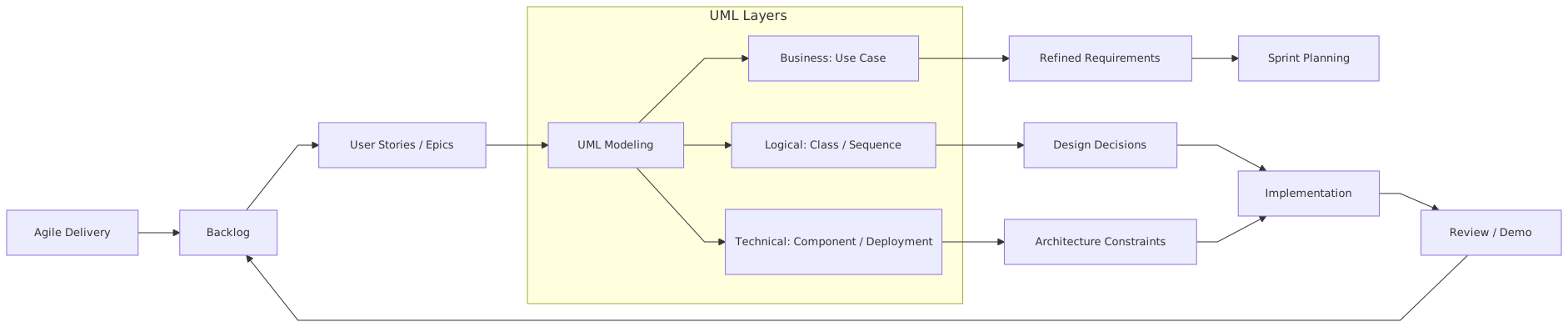
Sometimes that works. Usually only when the domain is small, the team is senior, and the blast radius is low. But in enterprise environments—especially banking, insurance, public sector, telecom, healthcare—that idea can become expensive nonsense.
If you are rolling out a cloud-native payment platform with Kafka-based eventing and centralized IAM, you cannot simply backlog your way into a coherent architecture. You need enough upfront modeling to answer real questions:
- What are the core bounded contexts?
- Which systems publish events versus consume them?
- Where does identity get asserted and propagated?
- What is synchronous, what is asynchronous, and why?
- What trust boundaries exist?
- Which services can be deployed independently?
- What data is system-of-record, and what is derived?
- What are the failure modes?
Those are architecture questions. UML is one of the cleanest ways to make them visible.
The mistake is not doing architecture. The mistake is doing architecture as if delivery starts after architecture ends.
Where UML actually helps in Agile delivery
Let’s get practical.
Not all UML is equally useful. In enterprise work, a few diagram types pull most of the weight. The rest are either niche or overused.
Here’s a blunt summary.
If I’m working with Agile teams, I usually lean hardest on:
- component diagrams
- sequence diagrams
- deployment diagrams
- state diagrams when the domain is workflow-heavy
That combination covers a lot of enterprise ground.
Component diagrams
These are underrated when done properly. They help teams agree on service boundaries, ownership, APIs, Kafka topics, IAM dependencies, and external integrations. In Agile, this matters because backlog items often cut awkwardly across systems. A good component view keeps everyone honest about where capability belongs.
Sequence diagrams
These are probably the most immediately useful diagrams in modern delivery. They’re excellent for showing a login flow, token exchange, service-to-service authorization, event publication, retry behavior, and human-facing transaction journeys.
And unlike giant architecture decks, sequence diagrams expose hidden complexity fast. They force the right questions:
- who initiates this call?
- where is authorization checked?
- what happens on timeout?
- what gets published to Kafka?
- what happens if the consumer is down?
Deployment diagrams
A lot of architects still avoid deployment diagrams because they’re “infrastructure.” That’s a mistake. In cloud delivery, runtime topology is architecture. Whether a service runs in one region or multiple, whether Kafka is managed or self-hosted, whether IAM is centralized, whether workloads sit in separate VPCs or subscriptions—those decisions shape latency, resilience, cost, and security.
State diagrams
In banking especially, state matters. Payment initiated, authorized, posted, reversed, settled, disputed, failed. Customer onboarding pending, verified, approved, suspended. If you skip state modeling, teams will invent behavior in code and then spend months reconciling inconsistent interpretations.
That’s not agility. That’s rework with daily stand-ups.
The right integration pattern: model just enough, just in time
The best architects I know don’t ask, “Should we model this?” They ask, “What uncertainty are we trying to remove?”
That changes how UML gets used.
In Agile delivery, UML should appear at three levels:
1. Before implementation starts
Not to freeze every detail. To reduce structural risk.
This is where you model:
- system context
- major components
- identity boundaries
- key integration sequences
- deployment assumptions
- critical domain states
You are not trying to predict every class and endpoint. You are trying to avoid building on sand.
2. During feature delivery
This is where UML becomes conversational.
A sequence diagram might be produced during backlog refinement for a payment initiation story. A state diagram might be updated when fraud review introduces a new branch. A component diagram may shift when a team realizes an orchestration service is becoming a god service.
This is healthy. Architecture should move when the truth changes.
3. After key changes
This is the part many teams skip. If the architecture changed materially, update the model. Not because documentation is sacred, but because stale diagrams are worse than no diagrams. They create false confidence.
I’d rather see three current diagrams than thirty obsolete ones.
What this looks like in real architecture work
Let’s get out of theory.
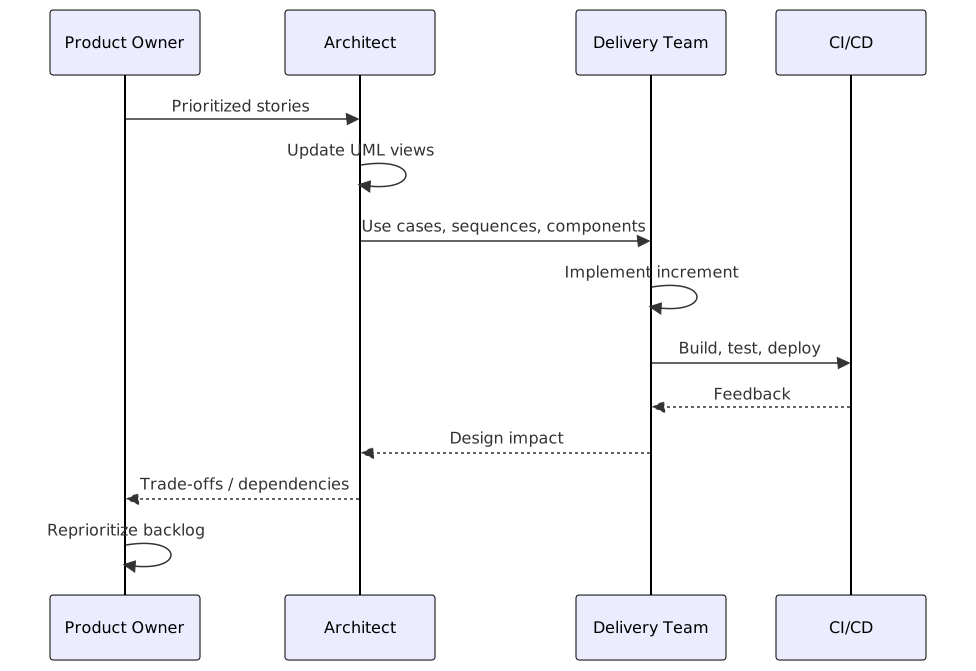
In real enterprise architecture work, integrating UML with Agile means the architect is actively involved in delivery mechanics, not sitting above them. You’re not just approving target-state slides. You’re helping teams make decisions sprint by sprint.
A typical pattern looks like this:
- During inception or early planning, the architect creates a small architecture pack: context, component, deployment, major sequences, and maybe a few principles.
- These models are reviewed with engineering leads, product, security, and platform teams.
- Epics are shaped using those models. Dependencies become visible early.
- During sprint refinement, sequence diagrams are used to break down complex interactions.
- During implementation, architects review whether design still aligns with the intended service boundaries and operational model.
- During release planning, deployment diagrams and IAM sequences are revisited to validate runtime assumptions.
- After major changes, diagrams are updated as part of the definition of done for architecture-significant work.
That’s the rhythm. Not glamorous. Very effective.
An architect in an Agile environment should be judged partly on whether their models help teams ship safer, not on whether their repository looks sophisticated.
A real enterprise example: banking modernization with Kafka, IAM, and cloud
Let me give you a realistic example. Not fantasy architecture. Something close to what many banks are actually dealing with.
A regional bank is modernizing its customer servicing platform. The old world has:
- a core banking platform on-prem
- a CRM
- a call center application
- a customer web portal
- fragmented identity stores
- nightly batch integrations
- a reporting warehouse
- too many point-to-point interfaces
The target state is more modern:
- customer-facing services in cloud
- Kafka for event streaming
- centralized IAM using OIDC and OAuth2
- API gateway for external and internal APIs
- domain-aligned services for customer profile, account servicing, notifications, and case management
- coexistence with legacy core banking for several years
The delivery model is Agile. Multiple squads. Two-week sprints. Product owners everywhere. Pressure from leadership to “move fast.”
This is exactly where bad architecture habits show up.
If you go too heavyweight
The architecture team spends three months building:
- enterprise capability maps
- canonical data models no team will adopt
- a full UML repository
- target-state diagrams with no migration reality
- governance checkpoints that teams learn to route around
Delivery slows. Teams lose trust. The models become decorative.
If you go too lightweight
The squads start shipping independently:
- one team uses Kafka events as facts
- another uses them as commands
- IAM scopes are inconsistent
- customer identity is resolved differently in each service
- cloud network assumptions differ by team
- retry behavior is invented locally
- audit requirements are discovered late
Six months later, everyone says integration is “surprisingly hard.”
It wasn’t surprising. It was neglected.
What good looks like
A pragmatic architect uses UML selectively.
1. Component diagram
The architect models:
- Customer Portal
- API Gateway
- IAM platform
- Customer Profile Service
- Account Servicing Service
- Notification Service
- Case Management Service
- Kafka cluster
- Legacy Core Banking Adapter
- CRM Adapter
- Audit/Event Archive
This diagram also shows:
- which services own which APIs
- which publish domain events
- which consume them
- where legacy adapters sit
- where IAM integration happens
Now squads can see boundaries. Product can see dependencies. Security can see trust zones. Platform can see runtime implications.
2. Sequence diagrams for key journeys
For example: customer updates contact details.
The sequence might show:
- customer authenticates through IAM
- portal gets access token
- request goes through API gateway
- Customer Profile Service validates token and business rules
- service updates customer profile store
- service publishes
CustomerContactUpdatedevent to Kafka - Notification Service consumes event and sends confirmation
- CRM Adapter consumes event and updates CRM
- Audit service stores immutable audit trail
That one sequence diagram surfaces a lot:
- where authorization is enforced
- which event is authoritative
- whether CRM is synchronous or asynchronous
- whether notification is coupled to transaction success
- where audit is captured
Without that diagram, teams will make assumptions. Assumptions become defects.
3. Deployment diagram
This matters more than many teams admit.
The architect models:
- cloud region layout
- Kubernetes clusters or container runtime
- managed Kafka service
- IAM tenancy
- API gateway placement
- private connectivity to on-prem core banking
- network segmentation
- observability stack
- DR topology
This is where operational architecture stops being hand-wavy. You can talk concretely about:
- latency to legacy core
- failure isolation
- blast radius
- compliance boundaries
- secrets management
- multi-AZ strategy
4. State diagrams
For account servicing requests, the architect models states like:
- Requested
- Validated
- Pending Core Update
- Completed
- Failed
- Reversed
- Under Review
Now everyone understands what “done” means in a distributed workflow. More importantly, they understand what happens when part of the process fails after an event has already been emitted.
That’s real architecture. Not slogans.
Common mistakes architects make
Let’s be honest. A lot of the friction between architecture and Agile comes from architects themselves. Here are the recurring mistakes.
1. Modeling for self-protection
Some architects produce UML so they can say, later, “well, it was in the design.” That is not architecture. That is liability management.
If a diagram is not helping delivery, kill it.
2. Confusing completeness with usefulness
A complete model is not necessarily a useful model. Enterprise architects love coverage. Delivery teams need clarity.
I’d take a rough but accurate sequence diagram over a perfect six-layer meta-model any day.
3. Using class diagrams where service boundaries matter more
This one is almost a reflex. Architects start drawing domain classes because that’s what UML taught them first. But in distributed systems, the bigger risks are usually:
- wrong service decomposition
- unclear ownership
- brittle integration patterns
- identity and trust gaps
- deployment assumptions
Class diagrams can matter, but they are rarely the first thing that matters.
4. Treating Agile teams as consumers of architecture instead of participants
If architects create diagrams in isolation, teams won’t trust them. The best UML in Agile is co-created or at least actively reviewed with engineers, product, and platform people.
Architecture should feel like a working agreement, not a decree.
5. Failing to model IAM explicitly
This is a huge enterprise mistake.
Identity and access flows are often left as a footnote: “secured via SSO.” That’s not enough. In modern cloud and API-heavy systems, IAM is structural. You need to model:
- authentication path
- token issuance
- scope/role propagation
- service-to-service auth
- trust boundaries
- privileged operations
- audit and revocation implications
If your sequence diagrams don’t show identity, they are incomplete.
6. Ignoring event semantics in Kafka-based designs
A box labeled “Kafka” is not architecture.
Architects need to clarify:
- event ownership
- topic naming
- schema evolution
- idempotency expectations
- replay behavior
- ordering assumptions
- DLQ strategy
- command vs event misuse
Too many enterprise diagrams show Kafka as magical integration glue. It isn’t. It amplifies clarity when used well and amplifies confusion when used badly.
7. Never updating diagrams after sprint reality hits
This is probably the biggest operational failure. Teams discover constraints. Service boundaries shift. Security requirements change. Runtime topology evolves. But the architecture diagrams stay frozen in inception mode.
Then governance reviews use outdated diagrams to judge current systems. Everyone wastes time.
Contrarian view: sometimes less UML is actually irresponsible
Here’s the contrarian thought that annoys some Agile purists: in enterprise delivery, refusing to model can be a form of negligence.
Yes, negligence.
If you know a solution has cross-team dependencies, regulatory controls, event-driven workflows, and cloud security implications, and you still choose not to model key interactions because “we value working software,” you are not being Agile. You are externalizing design cost onto future teams.
That future cost shows up as:
- production incidents
- inconsistent controls
- duplicate capabilities
- impossible onboarding
- audit pain
- expensive redesign
Agile is about feedback and adaptation. UML can accelerate both when used properly. A diagram is not anti-Agile. A stale or excessive diagram is.
That distinction matters.
How to make UML work without slowing delivery
Here’s the practical approach I recommend in enterprise environments.
Keep the core set small
For most initiatives, start with:
- one context/component diagram
- two to four key sequence diagrams
- one deployment diagram
- one or two state diagrams if the domain needs them
That’s enough to create shared understanding.
Tie diagrams to decisions
Every important diagram should answer a decision or risk:
- where is identity validated?
- who owns customer profile?
- what happens if Kafka is unavailable?
- how do we isolate cloud workloads?
- what is the source of truth?
If a diagram answers nothing, it’s decoration.
Put models near delivery artifacts
Do not hide UML in an architecture repository nobody visits. Link it to:
- epics
- ADRs
- backlog items
- API specs
- threat models
- runbooks
Architecture should sit in the delivery flow, not above it.
Use imperfect diagrams
This is one of the hardest lessons for architects trained in formal modeling. A useful diagram can be a little rough. It can evolve. It can be redrawn. It can be versioned lightly.
Perfection is the enemy here. Teams need clarity more than polish.
Review architecture continuously, not ceremonially
A 30-minute architecture review in backlog refinement is often more valuable than a formal monthly governance board. The point is to catch drift while work is still movable. architecture decision records
Make ownership explicit
Every box, interface, topic, and trust boundary should imply ownership. If ownership is unclear, delivery will drift. UML is excellent for exposing that ambiguity.
When not to use UML
Let’s not turn this into evangelism.
There are cases where UML is unnecessary or the wrong tool.
- A small team building an isolated internal utility may not need more than a whiteboard sketch.
- Infrastructure automation details may be better expressed in cloud diagrams, IaC, or platform documentation.
- Business process-heavy scenarios may be clearer in BPMN than activity diagrams.
- API payload design belongs more naturally in OpenAPI or AsyncAPI than in UML object detail.
That’s fine. Good architects are not tool loyalists.
Still, in enterprise settings, UML remains valuable because it gives a shared visual language across business, engineering, security, and operations. That cross-functional readability matters more than people admit. TOGAF roadmap template
A practical operating model for architects
If I were setting a standard for architecture teams integrating UML with Agile, it would be this:
During discovery/inception
Produce:
- context/component view
- high-risk sequence diagrams
- IAM trust flow
- deployment hypothesis
- initial ADRs
During epic shaping
Refine:
- service boundaries
- event flows
- ownership model
- migration dependencies
During sprint delivery
Create/update:
- journey-specific sequences
- state diagrams for workflow changes
- deployment impacts for platform changes
During release/readiness
Validate:
- runtime topology
- failure handling
- IAM controls
- observability and audit alignment
After major changes
Update only the diagrams that materially changed.
No giant refresh program. No architecture museum.
The bottom line
UML and Agile are not opposing forces. That whole debate is outdated.
The real tension is between useful architectural thinking and ceremonial output.
In enterprise architecture, especially in banking and other regulated industries, visual models are still one of the fastest ways to create shared understanding across complexity. They help teams reason about Kafka event flows, IAM trust boundaries, cloud deployment, service ownership, and operational behavior. That is not academic. That is delivery-critical.
But architects need to get over themselves a bit.
You do not need to model everything.
You do not need to be perfectly formal.
You do not need architecture to happen before Agile starts.
What you do need is enough UML, at the right moments, tied to real delivery decisions.
If your diagrams help teams ship safely, evolve coherently, and avoid rework, keep them.
If they exist only to satisfy governance, delete them.
That’s the standard.
And frankly, a lot of enterprise architecture would improve overnight if more teams were brave enough to follow it.
FAQ
1. Is UML still relevant in modern cloud-native architecture?
Yes. Not all of it, and not in a heavyweight way. But component, sequence, deployment, and state diagrams are still very useful for cloud-native systems, especially when you have IAM, eventing, and cross-team dependencies.
2. How much UML should an Agile team produce?
Less than traditional architecture teams think, and more than anti-documentation teams usually produce. Start with a minimal set that removes uncertainty: component view, key sequences, deployment view, and state models where workflow is complex.
3. Should UML diagrams be part of the definition of done?
For architecture-significant changes, yes. Not every story needs a diagram update. But if service boundaries, IAM flows, event contracts, or deployment assumptions changed, then keeping the relevant diagram current is absolutely reasonable.
4. What UML diagrams are best for Kafka-based enterprise systems?
Sequence diagrams for producer/consumer interactions, component diagrams for ownership and topic relationships, and deployment diagrams for runtime topology. State diagrams can also help when event-driven workflows have important business states.
5. How do architects avoid making UML too heavy in Agile delivery?
Tie every diagram to a decision, risk, or delivery question. Keep the set small. Co-create with teams. Update selectively. And don’t confuse polish with value. If a diagram doesn’t help someone build, secure, or operate the system, it’s probably unnecessary.
Frequently Asked Questions
What is enterprise architecture?
Enterprise architecture is a discipline that aligns an organisation's strategy, business processes, information systems, and technology. Using frameworks like TOGAF and modeling languages like ArchiMate, it provides a structured view of how the enterprise operates and how it needs to change.
How does ArchiMate support enterprise architecture practice?
ArchiMate provides a standard modeling language that connects strategy, business operations, applications, data, and technology in one coherent model. It enables traceability from strategic goals through business capabilities and application services to the technology platforms that support them.
What tools are used for enterprise architecture modeling?
The main tools are Sparx Enterprise Architect (ArchiMate, UML, BPMN, SysML), Archi (free, ArchiMate-only), and BiZZdesign Enterprise Studio. Sparx EA is the most feature-rich option, supporting concurrent repositories, automation, scripting, and integration with delivery tools like Jira and Azure DevOps.