⏱ 24 min read
There is an awkward truth about architecture in large programs, especially in government: most meaningful architecture decisions are not actually made in architecture boards.
They usually take shape somewhere messier.
A funding gate asks whether the platform can really be reused. A procurement clarification forces a supplier to say plainly what sits inside its boundary and what does not. A delivery stand-up exposes that “real-time” actually means “inside four seconds unless the fraud service is busy.” An incident review reveals that a supposedly non-critical notification call is, in fact, on the critical path for case creation. Then, a week later, the architecture board reviews a paper presenting the decision as though it emerged from a calm, orderly design process.
Usually, that is fiction.
In my experience, architecture boards do matter, but mostly as ratifiers, challengers, and constraints on decisions that are already forming elsewhere. The real work happens where delivery friction shows up. That is exactly where UML earns its keep. UML modeling best practices
Not because it is formal. Not because it is complete. And certainly not because a program needs a modeling repository full of pristine diagrams that nobody trusts six months later.
UML is useful because it helps people make contested decisions visible early, while there is still time to change them.
This is not a defense of “doing lots of UML.” I have seen too much architecture wallpaper to argue for that. Nor is this a recap of every diagram type in the standard. Most enterprise programs do not need a tour of notation. What they need is a practical way to reduce ambiguity in environments full of legacy estates, procurement boundaries, security classifications, policy volatility, audit pressure, and public accountability.
That is the setting here: large government programs, often multi-vendor, rarely greenfield, and usually under pressure to commit too early and explain too much before the design has had a chance to mature.
So the real question is not whether UML is good in principle. It is simpler than that.
Where does UML actually help architecture decisions in large programs? Where does it waste everyone’s time? And how do you use just enough of it to improve outcomes without drowning delivery?
The architecture problem is rarely technical only
Take a representative modernization program. A citizen-facing service is being redesigned. Multiple agencies are involved, each with its own policies, data responsibilities, and operational concerns. One department owns the digital front door. Another owns eligibility policy. A third owns payment execution. Identity is federated through external providers. There is a legacy case management platform that nobody really wants to touch, but nobody can replace in one go either. Data sharing is constrained by legislation, not just by integration effort. Midway through delivery, policy changes. It always does.
On paper, this sounds like a technology transformation.
In reality, it is a decision environment loaded with non-technical pressure: compliance, auditability, resilience, procurement lock-ins, hosting constraints, phased migration, supplier handoffs, and executives asking for certainty long before the unknowns have properly surfaced.
That creates a very specific problem. Narrative alone starts to fail.
A sponsor says “shared citizen profile” and means a common identity reference. A service design lead hears “shared citizen profile” and imagines a reusable customer data service. A vendor hears the same phrase and assumes a master data platform with APIs and synchronization responsibilities. For a while, everyone thinks they agree because the words sound familiar.
Then integration starts, and the disagreement becomes expensive.
Words are slippery in large programs. They carry too much assumed meaning. They let hidden differences survive for too long. They are especially dangerous across agency boundaries, contract boundaries, and mixed business-technical forums where everyone is trying to move quickly and avoid sounding difficult.
This is where UML helps—not as a heavyweight formal modeling discipline, but as a decision support mechanism. It introduces enough visual precision to expose assumptions without requiring everyone in the room to become a notation purist.
That middle ground matters. Most large programs do not need exhaustive models. They need a way to say, “show me what talks to what, who owns state, what happens when this call fails, where the trust boundary really sits, and what changes during migration.”
A half-page sequence diagram can do more for design clarity than six pages of carefully written prose. Not always. But often enough that experienced architects learn to reach for it early.
Use UML first to expose disagreement, not to document agreement
This is the first field lesson, and I feel strongly about it: the best diagrams are not the ones everyone nods at. They are the ones that make the room slightly uncomfortable.
If a model does not expose tension, it probably is not close enough to a real decision.
In government programs, the disagreements are often predictable:
- what is in scope for the platform team versus the product team
- whether identity, workflow, policy rules, and reporting belong in one stack or several
- where trust boundaries actually are, as opposed to where people wish they were
- what “real-time” means in terms of latency, dependency, and user expectation
- which system is system-of-record during migration, not after migration
A few years ago, on an inter-agency benefits platform effort, there was broad verbal agreement that the program needed a “shared citizen profile.” It sounded settled. It was in the slides. It appeared in funding language. Nobody wanted to reopen it.
Then we put up a simple context diagram and a component view.
Within twenty minutes, it was obvious that three different designs were hiding inside the same phrase:
- a master data hub holding the authoritative citizen profile for multiple services
- a set of service-specific cached copies synchronized from upstream systems
- an identity-only reference record, with all meaningful citizen data staying in domain systems
Those are not minor variations. They imply different funding models, different data ownership arrangements, different integration patterns, different privacy controls, different IAM implications, and different operational responsibilities. They also imply different procurement scope.
The useful part was not that the UML diagram documented the answer. It did not. The useful part was that it forced the disagreement into the open before procurement assumptions hardened around the wrong model.
That is what good architecture diagrams do in large programs. They make ambiguity expensive early, while it is still cheap enough to fix.
The UML views that consistently earn their keep
I am not a fan of treating UML as a catalog where every diagram type deserves equal ceremony. In enterprise work, only a handful reliably justify the effort.
Use case diagrams
These are more useful than many architects admit, especially in government environments with messy actor boundaries. Citizens, internal case workers, fraud teams, contact center staff, partner agencies, external identity providers, payment processors, and legacy back-office systems all interact differently. A use case diagram can clarify who is actually using a service and where the responsibility edges sit.
That said, use case diagrams are weak on their own. They are helpful for framing scope and actor interaction, but they do not make architectural choices concrete enough. If they are the only model in the deck, something is missing.
Sequence diagrams
These are probably the highest-value UML artifact in large delivery programs. They force teams to confront time, order, dependencies, alternate paths, exception handling, retries, and operational reality.
A lot of architecture optimism dies in sequence diagrams. Honestly, that is healthy.
Cross-vendor integration discussions become more honest when someone has to draw what happens if the IAM token exchange is slow, or Kafka publication fails, or the rules engine times out, or a manual review step delays completion for three days. Sequence diagrams are where the happy-path fiction starts to crack.
Component diagrams
These are the workhorse for responsibility allocation. They help with product, platform, and service boundaries, dependencies, ownership lines, and structural decomposition without dragging the conversation down into deployment detail too early.
In multi-vendor programs, this matters a great deal. A component diagram can reveal whether a “shared service” is actually a coherent capability or just a politically convenient bucket. It can also expose when a platform team is quietly becoming a bottleneck by taking ownership of everything reusable.
Deployment diagrams
Underrated. Often badly needed.
Government programs usually have hosting constraints that teams underestimate at the start: network zoning, accreditation boundaries, restricted environments, region-specific hosting rules, private connectivity to legacy estates, managed service limitations, and controls around administrative access. A deployment diagram turns hand-wavy cloud optimism into something more concrete. TOGAF roadmap template
I have seen teams talk confidently about cloud-native integration, only to discover that one core system can be reached only through a tightly controlled gateway in a separate zone with limited protocol options and narrow change windows. A deployment view would have saved a lot of false confidence.
State machine diagrams
These are overlooked, and they should not be. In case management, licensing, benefits, approvals, enforcement, and appeals processes, state is the architecture. If you do not model the lifecycle of a case, application, claim, or investigation, you are often missing the decision that matters most.
State machines force clarity on transitions, long-running waits, resumption logic, appeal states, suspension, override, closure, and reactivation. They expose whether the architecture understands the business reality or is merely automating a simplified story.
Activity diagrams
Useful when business process complexity is driving technical design. They can help unpack branching logic, manual intervention, policy checkpoints, and process decomposition. They are often a better fit than pretending every process problem is really a service decomposition problem.
One opinionated note. Class diagrams absolutely have value, especially in domain-heavy work, complex semantics, and package design. But in enterprise programs they are often over-produced. I have sat through too many reviews where the class model was polished and detailed while the migration path, failure handling, and deployment constraints were still vague. That is upside down.
Most architecture decisions in large programs do not get unstuck because someone added inheritance correctly.
When UML arrives late, it becomes wallpaper
There is a familiar anti-pattern here.
The real decisions get made informally. A vendor workshop lands an integration approach. A deadline forces a hosting decision. A security concern creates a trust boundary. Teams move on. Then governance asks for architecture documentation, and someone produces immaculate diagrams after the fact. architecture decision records
The deck looks great.
The models are clean, color-coded, and stale on the day they are approved.
This is architecture wallpaper: diagrams created to decorate governance packs rather than shape decisions. Nobody updates them because they were never part of the real working process. Delivery teams stop trusting the artifacts. Names drift. The sequence diagram says one thing, the interface spec says another, the backlog implies a third. Integration defects appear anyway, despite “complete” documentation.
Government programs are especially vulnerable to this because approval confidence can become disconnected from design reality. Procurement assumptions get frozen around old diagrams. Audit trails exist, but actual shared understanding does not.
The fix is not complicated, but it does require discipline. Attach UML artifacts to live decisions, not static document sets. Version them with ADRs, epics, design issues, or review records. Retire them aggressively when they stop informing choices.
A diagram that no longer helps anyone decide anything is not an asset. It is clutter.
A real decision: centralized orchestration or domain-owned workflow?
This is one of those dilemmas that turns up repeatedly in government modernization.
Imagine a grants or benefits processing service with these broad steps: intake, validation, eligibility checks, fraud screening, manual review, payment authorization, and notifications. Some steps are automatic. Some are long-running. Some require human intervention. Policy changes affect the path. Appeals and rework exist. The process spans multiple systems and often multiple suppliers.
The decision is usually framed like this:
Option A: use a centralized BPM or workflow engine to control the whole process
Option B: let domain services own their own state and interact through events, with looser orchestration
People often arrive with ideological preferences. The BPM camp values traceability, explicit control, and process visibility. The domain-event camp values autonomy, resilience, and avoiding a central dependency. Both have a point.
UML is useful here because it makes the trade-offs harder to hide.
An activity diagram is a good starting point. It shows the actual process shape, including branching, manual intervention, escalation, and appeal paths. If the process has lots of explicit policy checkpoints and operational intervention, a central workflow capability may make sense. If the process is really a set of loosely coupled domain transitions with occasional coordination, then centralizing everything may be overkill.
A sequence diagram then exposes runtime behavior. Where are the synchronous dependencies? Which calls are on the user path? What retries exist? What happens if the fraud service is down? Does payment authorization have to complete before the case enters an approved state, or can it happen afterward? Can notifications be decoupled through Kafka or another event backbone, or are they part of a regulatory obligation that must be confirmed before proceeding?
Then a state machine diagram earns its keep. Benefits and grants are rarely just linear workflows. Cases sit in pending states, await evidence, move to manual review, suspend, resume, expire, appeal, and reopen. If the architecture does not make that long-running state model explicit, the workflow engine often becomes a hidden monolith that knows too much about everything.
Finally, a component diagram helps answer the ownership question. Which team owns policy rules? Who owns case state? Is the workflow engine merely coordinating steps, or is it quietly becoming the source of truth for business progression? Where does audit history live? What happens when suppliers change?
A lot of programs discover, through this kind of modeling, that the real answer is a hybrid.
Centralize only where policy traceability, operational control, or regulatory sequencing genuinely require it. Keep domain state close to the services that understand it. Use events for decoupling where possible. Avoid making the BPM engine the place where all business meaning accumulates, because that becomes the hidden monolith no one admits they are building. ArchiMate in TOGAF
I have seen this go wrong more than once. The workflow platform starts life as a coordination tool and ends up containing business rules, integration logic, notification timing, exception handling, SLA measurement, and reporting assumptions. After two years, every change request queues behind one team and one product. The program calls it standardization. Delivery teams call it a bottleneck.
A rough sketch of the hybrid idea looks something like this:

That is not a full design. It is enough to make the choice discussable.
Matching UML views to architecture decisions
Here is the practical mapping I keep coming back to:
The key point is that the diagram should match the decision. Too many programs do the reverse: they generate a standard set of diagrams regardless of what is actually being decided.
That is governance theater, not architecture.
Sequence diagrams are where architectural optimism goes to die
I said earlier that sequence diagrams are often the most valuable. I will be blunter here: if a design only works when nobody draws the sequence properly, it probably does not work.
Sequence diagrams force honesty about time and dependency. They also expose the gap between business intent and system behavior.
Take a citizen application submission flow. The user signs in via federated IAM. Identity proofing is checked. Rules are evaluated. Documents are uploaded and scanned. A case is created. A confirmation notification is sent.
On a slide, this looks straightforward.
When you sequence it, reality appears. Does identity proofing happen inline, or is the result cached from a prior session? Are document scans synchronous? They should not be, if they involve malware scanning or OCR. Is case creation blocked on document completion? If yes, your user experience is hostage to downstream processing. If no, what is the state of the case while evidence validation is pending? If notification fails, is the submission still accepted? What audit event is recorded first: citizen submission, technical receipt, case creation, or completion of downstream checks?
Those are architecture decisions, not just implementation details.
A simple sequence model can reveal that what was assumed to be a synchronous transaction really needs a split: immediate acknowledgement to the citizen, asynchronous document processing via queue or Kafka topic, compensating action if case creation fails after evidence is received, and explicit operator visibility for stuck messages or retries.
Something like this:
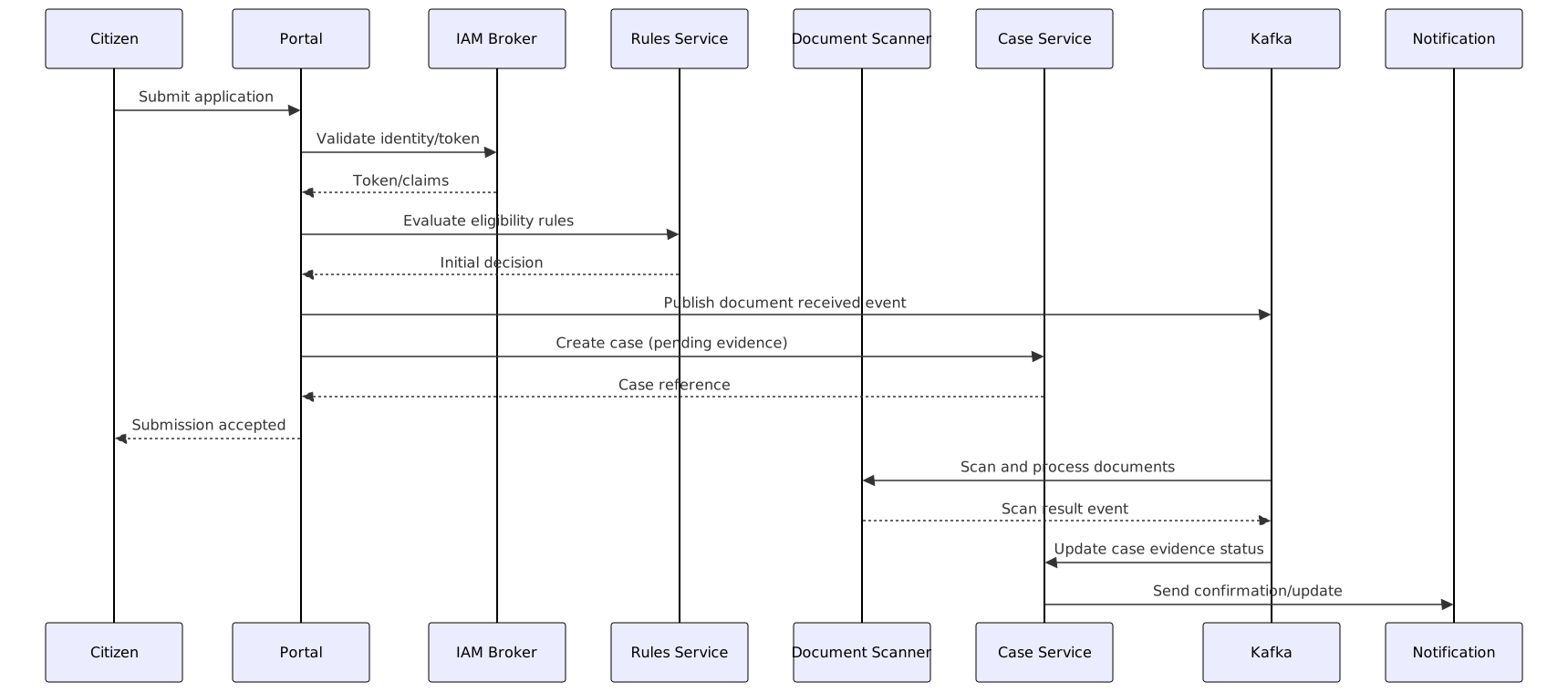
The point is not notation purity. The point is that the design becomes less naive once time, failure, and asynchrony are visible.
My advice here is simple. Never stop at the happy path. Always ask for timeouts, retries, dead-letter handling, idempotency, and operator visibility. If a sequence diagram ignores failure, it is decorative.
Governance can benefit from UML. It can also abuse it.
Large programs usually have plenty of governance: review boards, design authorities, security forums, operational readiness checkpoints, service transition reviews, architecture assurance functions. None of that is inherently bad. In public-sector delivery, some of it is necessary. EA governance checklist
Used well, UML improves those conversations. It gives reviewers something concrete to challenge. It reduces ambiguity in assurance discussions. It helps security teams point to missing trust boundaries or token flows. It lets operations teams ask sensible questions about failure handling, support ownership, and environment dependencies. It gives non-authors a fair chance to see the design, not just hear it described.
Used badly, governance turns UML into a compliance ritual.
You see this when diagram count becomes a proxy for rigor. Or when every review requires the same mandatory diagram set regardless of whether the decision is about migration, IAM federation, workflow state, or cloud zoning. Or when meetings devolve into notation debates that have no bearing on delivery risk.
My view is blunt: governance should ask, “what decision did this model help make?” If nobody can answer, the model is probably decorative.
A practical pattern works better: require a small set of decision-linked diagrams, each with an owner, a review date, and retirement criteria. That sounds almost too simple, but in practice it changes behavior. Models stop being immortal artifacts and become working tools.
Mistakes architects keep making with UML in large programs
Some mistakes are so common they are practically structural.
1. Modeling the target state and ignoring transition architecture.
This is the classic failure in legacy-heavy estates. The target diagram is elegant. The actual migration path is where the risk sits, and it is absent. It happens because target state is easier to sell and easier to draw. Recovery is usually possible without restarting design: add explicit transitional component, sequence, and deployment views showing coexistence, data ownership by phase, cutover dependencies, and rollback assumptions.
2. Pretending organizational boundaries do not shape architecture.
A component model may show beautifully separated responsibilities while the real delivery organization has three suppliers, two internal platform teams, and one operations contract creating hard seams in very different places. This happens because architects want the design to reflect ideal capability boundaries, not contractual reality. The recovery is to model both: the logical architecture and the supplier or team ownership overlay. If the seams clash badly, call it out early.
3. Mixing conceptual, logical, and physical views in one picture.
This is a quiet killer. A single diagram tries to show business capabilities, services, products, environments, and network zones all at once. It creates false agreement because different people read different layers into it. Recovery is straightforward: split the views and label them mercilessly. Current, transitional, target. Logical, physical, operational. Pick one.
4. Producing notation-correct diagrams nobody in delivery can use.
I have seen immaculate UML that met every formal expectation and was useless in a live design discussion. It happens when the model serves the author more than the audience. Recover by simplifying. Keep the rigor where it matters, but optimize for comprehension in the room.
5. Skipping operational scenarios.
Too many architecture models describe how the system works when everything is available and volumes are normal. Government services do not get judged on that day. They get judged during backlogs, failover events, degraded modes, reprocessing, manual override, and supplier outages. Recovery means modeling those states explicitly, often with sequence and deployment views plus a state model for backlog handling.
6. Treating UML as a substitute for decisions.
This one is subtle. Teams keep drawing because drawing feels like progress. But the hard trade-off remains unresolved. The model becomes a delaying tactic. The fix is to anchor every diagram to a decision statement: what choice is being sharpened here?
A lightweight way to use UML without drowning the program
The operating model I recommend is deliberately small.
Start with one decision statement. Not a broad ambition. A decision. For example: “Should document scanning be synchronous in the submission journey?” Or: “Should case state be owned centrally or by domain services?” Or: “What is the trust boundary between the agency portal and the external identity broker?”
Then choose the minimum UML view that exposes the issue. Usually one primary diagram, maybe one supporting view. State whether you are modeling current, transitional, or target state. Do not blend them. Review the model live with delivery, security, operations, and business representation in the room. Capture the decision, assumptions, unresolved risks, and consequences. Then either update the model as the program evolves or retire it.
That is enough.
A good decision pack is often just:
- a short issue statement
- one primary UML diagram
- one supporting diagram if needed
- trade-offs
- assumptions
- consequence summary
If a diagram cannot be explained in a few minutes, it may be doing too much. If the names in the model do not match real services, products, teams, APIs, environments, or queues, it will drift out of usefulness quickly.
This sounds obvious, but it is rarely practiced consistently.
Government scenarios where UML adds disproportionate value
A few areas come up again and again.
Identity and access in federated environments.
Deployment and sequence diagrams are invaluable here. They show the identity broker, token exchange, trust boundaries, session handling, claims propagation, and where administrative control really sits. In cloud-heavy environments with external IdPs, API gateways, and internal IAM, this is one of the fastest ways to expose accreditation and trust assumptions.
Case management and policy-driven decisions.
State machine diagrams help far more than people expect. Appeals, suspensions, evidence requests, rework, expiry, and overrides are easier to reason about when state is visible. You quickly discover whether the architecture supports the operating model or only the idealized happy path.
Inter-agency data sharing.
Component and sequence diagrams clarify ownership, consent, publication, consumption, and timing. They help answer awkward questions such as whether data is replicated, referenced, cached, or republished; who is accountable for correction; and how policy restrictions affect access patterns.
Legacy replacement by tranche.
This is where target-only diagrams do real damage. Transitional component, deployment, and sequence views show coexistence, cutover sequencing, dual-running risk, and where Kafka topics, batch interfaces, or API facades sit during migration. Programs that model transition explicitly usually make better investment decisions.
Operational resilience and continuity planning.
Deployment and sequence views are useful for showing failover paths, queueing behavior, degraded-mode operation, replay, and manual fallback. This is not abstract. Public services are judged on continuity, and architecture that cannot explain degraded mode is unfinished.
These examples recur because government programs tend to combine policy complexity, old platforms, and public scrutiny. The architecture has to survive all three.
UML and ADRs are better together
Architecture decision records and UML solve different problems.
An ADR captures the decision, context, options, and consequences. UML gives visual precision to the structure or behavior under discussion. In large programs, that pairing matters because teams change, suppliers rotate, and institutional memory decays much faster than anyone likes to admit.
The practical guidance is simple: link each high-value UML model to an ADR or equivalent decision log. Avoid orphan diagrams in repositories. If the decision changes, update both or archive both.
Not every ADR needs a diagram. Not every diagram deserves an ADR. The point is traceability where architecture risk is real.
UML is most valuable in the messy middle
Experienced architects eventually learn this the hard way.
At the very start of a program, modeling can be premature because stakeholders do not yet know what matters. At the very end, it is too late because the design is politically fixed, procurement is committed, or delivery momentum is too strong to interrupt.
The leverage point is the messy middle.
Scope is still moving, but not wildly. Delivery constraints are becoming real. Integration details are emerging. Governance pressure is rising. Enough information exists to model meaningful choices, and enough uncertainty remains to influence the outcome.
That is where UML has real force. Not as documentation. As intervention.
To me, that is the difference that matters. Architecture that merely records what happened is administrative. Architecture that changes a decision while it can still be changed is the real job.
Conclusion
UML supports architecture decision-making in large programs when it is used selectively, visually, and close to live trade-offs.
That is the whole argument.
Large government programs do not need endless diagrams. They need clarity on boundaries, realism on interactions, visibility of state and failure, and enough structure to support governance without smothering delivery. The useful diagrams are rarely the prettiest ones. They are the ones that surfaced a hidden assumption, exposed a bad dependency, clarified ownership, or changed a decision before the program paid for the wrong one.
If I had to reduce this to one practical lesson, it would be this:
Use fewer diagrams. Make them sharper. Tie them to actual choices.
That is where UML stops being architecture paperwork and starts being architecture work.
FAQ
Do large programs need a full UML modeling repository to get value?
Usually not. Some programs do benefit from a repository, especially if they have sustained in-house architecture capability and disciplined maintenance. But most get more value from a small set of living, decision-linked diagrams than from a vast model estate that nobody updates.
Which UML diagrams are most useful for enterprise architects versus solution architects?
Enterprise architects tend to get the most value from component, deployment, use case, and selected sequence views tied to boundaries, ownership, hosting, and migration. Solution architects usually go deeper on sequence, state machine, and activity diagrams because runtime behavior and failure handling matter more directly to implementation.
How detailed should UML be before a governance review?
Detailed enough to expose the decision and the risk. Not detailed enough to simulate implementation unless that is what is under review. If governance cannot understand the trade-off from the diagram, it is too abstract. If delivery cannot keep it current, it is probably too detailed.
Can UML work in agile government delivery, or is it too heavyweight?
It absolutely can work, if used lightly. Agile delivery does not remove the need for architectural clarity; if anything, it increases it. The trick is to keep diagrams close to real decisions, review them in working sessions, and retire them when they stop helping.
What should be modeled during transition from legacy to target state?
More than teams usually think: coexistence patterns, interim system-of-record decisions, data synchronization, queueing or event backbone use, IAM bridging, hosting constraints, cutover sequencing, rollback assumptions, and operational ownership by phase. Transition is where many large programs actually fail.
Frequently Asked Questions
Can UML be used in Agile development?
Yes — UML and Agile are compatible when used proportionately. Component diagrams suit sprint planning, sequence diagrams clarify integration scenarios, and class diagrams align domain models. Use diagrams to resolve specific ambiguities, not to document everything upfront.
Which UML diagrams are most useful in enterprise architecture?
Component diagrams for application structure, Deployment diagrams for infrastructure topology, Sequence diagrams for runtime interactions, Class diagrams for domain models, and State Machine diagrams for lifecycle modelling.
How does UML relate to ArchiMate?
UML models internal software design. ArchiMate models enterprise-level architecture across business, application, and technology layers. Both coexist in Sparx EA with full traceability from EA views down to UML design models.