⏱ 19 min read
Let me start with the unpopular opinion.
Most UML diagrams in enterprise companies are useless.
Not because UML itself is bad. It isn’t. UML can be incredibly useful. The problem is that architects often turn it into ceremony. They produce giant, lifeless diagrams nobody reads, nobody updates, and nobody trusts. Then they wonder why engineering teams ignore architecture documents. UML modeling best practices
So if you’re here asking, what is UML? Here’s the simple answer first:
UML (Unified Modeling Language) is a standard visual language used to describe how a system is structured and how it behaves.
It gives teams a shared way to draw software architecture, business processes, data relationships, and interactions between systems.
That’s the beginner version. And for SEO, yes, that’s the direct answer.
But in real architecture work, UML is not about drawing pretty boxes. It’s about thinking clearly. It’s about reducing ambiguity before expensive mistakes happen. It’s about getting developers, security teams, cloud engineers, product owners, and operations people to agree on what the system actually is. UML for microservices
That’s where UML earns its keep.
UML in plain English
If you strip away the formal language, UML is just a set of diagram types.
Some diagrams show:
- what parts a system has
- how those parts talk to each other
- how data flows
- who uses the system
- what happens over time
- where responsibilities sit
Think of it like this:
- A map helps you navigate a city
- An architectural blueprint helps you understand a building
- A UML diagram helps you understand a software system
Not perfectly. Not completely. But enough to make good decisions.
And that matters because enterprise systems are messy. A banking platform is not one application. It’s IAM, APIs, event streams, cloud services, core systems, fraud engines, audit trails, mobile channels, and usually a few embarrassing legacy systems nobody wants to admit still run the business. TOGAF roadmap template
Without some visual modeling, complexity wins.
Why UML exists in the first place
Before UML, teams used different modeling methods. Everyone had their own notation. One architect drew circles, another drew boxes, another used custom symbols that made sense only to them and maybe their cat.
UML was created to standardize software modeling. It merged several earlier approaches into one common language.
That sounds boring. It is a bit boring. But the outcome was important: teams could communicate architecture in a more consistent way.
Now, let’s be honest. UML is not the only way to model software. In fact, many modern teams use C4 diagrams, whiteboard sketches, BPMN, ArchiMate, data flow diagrams, or just plain text and code. That’s fine. I’m not here to pretend UML is sacred. ArchiMate relationship types
But UML still matters because:
- it’s widely understood
- it’s structured enough for enterprise work
- it gives beginners a disciplined way to think
- many architecture tools still support it well
- it works across application, integration, and process views
Used well, UML is practical. Used badly, it becomes architecture theater.
The basic idea: structure and behavior
At a high level, UML diagrams usually fall into two camps:
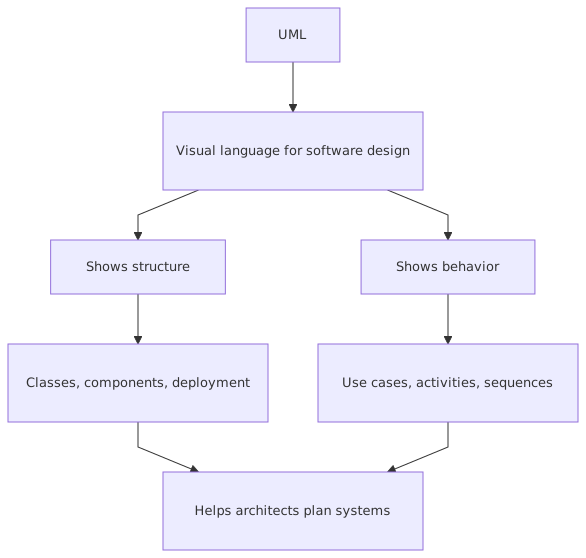
That distinction alone helps beginners.
If you want to show components and dependencies, use a structural view.
If you want to show steps, interactions, or workflows, use a behavioral view.
Simple enough.
The UML diagrams beginners should actually care about
Here’s another strong opinion: beginners do not need to learn all UML diagram types at once.
That’s how people get overwhelmed and conclude UML is academic nonsense. For most enterprise work, a small subset gets you most of the value.
These are the ones that matter most.
1. Use case diagrams
A use case diagram shows who interacts with the system and what they want to do.
It’s a high-level business view. Not technical detail. Not sequence timing. Just actors and goals.
Examples:
- Customer logs into mobile banking
- Operations analyst reviews suspicious transactions
- IAM platform authenticates employee access
- Payment service publishes transaction events
This diagram is useful early, especially when defining scope.
But architects often misuse it. They turn use cases into giant process maps or stuff every feature into one unreadable drawing. Don’t do that.
Use case diagrams are for answering: who uses this thing, and for what purpose?
2. Class diagrams
This is the diagram many people associate with UML first.
A class diagram shows entities, attributes, relationships, and sometimes methods. In object-oriented design, that’s useful. In enterprise architecture, class diagrams are often more useful as domain models than as literal code design.
For example, in a banking domain model you might show:
- Customer
- Account
- Transaction
- Card
- Loan
- Beneficiary
And relationships between them.
This matters because architecture often fails when teams don’t agree on core concepts. One system thinks “customer” means legal person. Another thinks it means active account holder. Another uses it to mean CRM contact. That’s how integration projects go off the rails.
A simple class diagram can expose that confusion early.
3. Sequence diagrams
This one is gold.
A sequence diagram shows how systems or components interact over time. It’s one of the most practical UML diagrams in real architecture work.
If you want to explain:
- how a user logs in via IAM
- how an API triggers a Kafka event
- how a fraud check happens before payment approval
- how a cloud service calls downstream systems
…a sequence diagram is often the best tool.
It answers questions like:
- who calls whom?
- in what order?
- synchronous or asynchronous?
- where does authentication happen?
- what happens on failure?
- where does the event get published?
This is where architecture starts becoming real.
4. Activity diagrams
Activity diagrams show workflows and decision paths.
They’re useful for:
- customer onboarding
- incident response
- loan approval
- account closure
- security access provisioning
They’re especially good when you need to show branching logic and parallel steps.
Some architects avoid them because they look too process-heavy. That’s a mistake. In enterprises, architecture is not just systems. It’s systems plus operations plus controls plus business flow. Activity diagrams can connect those worlds.
5. Component diagrams
Component diagrams show the major building blocks of a system and their relationships.
This is often the best way to communicate a solution at a medium level of detail.
For example, for a cloud-native banking capability, a component diagram might show:
- Mobile App
- API Gateway
- IAM / Identity Provider
- Customer Service
- Account Service
- Payment Service
- Kafka Cluster
- Fraud Engine
- Audit Service
- Data Lake
- Core Banking Adapter
That’s architecture language. It helps teams understand boundaries and dependencies without drowning in implementation detail.
6. Deployment diagrams
These diagrams show where software runs.
That means infrastructure, environments, nodes, networks, cloud resources, containers, virtual machines, managed services, and communication paths.
In modern cloud architecture, deployment diagrams are underrated. People assume cloud makes infrastructure “abstract,” so they skip deployment views. Then six months later nobody understands where controls live, what runs in which VPC, or how traffic crosses trust zones.
That’s not abstraction. That’s negligence.
A deployment diagram can show:
- Kubernetes cluster in AWS
- managed Kafka service
- IAM integration with Azure AD or Okta
- API gateway in DMZ or edge layer
- private subnets
- database services
- observability stack
- network boundaries
For security and compliance discussions, this matters a lot.
UML is not just for software developers
Another mistake people make: they think UML is only for low-level design.
No.
Good architects use UML to bridge different audiences.
A business stakeholder may understand a use case or activity diagram.
A security architect may care about trust boundaries in a deployment view.
A platform engineer may care about component interactions.
A developer may need sequence detail.
An integration architect may focus on asynchronous event flow.
The same problem can require multiple views.
That’s the point. A single diagram rarely tells the whole story.
How UML applies in real architecture work
This is where theory usually falls apart. So let’s make it concrete.

In real enterprise architecture, UML helps with five things.
1. Clarifying scope
Before building anything, you need to answer:
- what is in scope?
- what is outside?
- who interacts with the solution?
- what core capabilities exist?
A use case or component diagram is often enough to stop weeks of confusion.
2. Designing interactions
Enterprise systems fail at the seams. Not inside a clean little service. At the seams.
Authentication handoffs. Event timing. API contracts. Retry behavior. Data ownership. Error handling. Human approvals. Those are architecture issues.
Sequence diagrams and activity diagrams are excellent for exposing those seams.
3. Supporting security and compliance design
If your architecture involves IAM, banking controls, audit, or regulated cloud environments, UML can help show:
- where authentication occurs
- where authorization decisions are made
- which systems handle sensitive data
- where audit events are produced
- how segregation of duties is enforced
Security teams often respond better to clear diagrams than to vague prose.
4. Enabling better conversations with engineers
Architects love saying “the system should be event-driven.” Fine. What does that actually mean?
Does the API publish directly to Kafka?
Does a service write to a database first?
Are events domain events or integration events?
What happens if Kafka is unavailable?
Who owns the schema?
What is the idempotency strategy?
A sequence or component diagram makes these questions unavoidable. Good.
5. Documenting decisions without writing a novel
Not every architecture artifact needs a 40-page document. Frankly, most shouldn’t exist.
A small set of UML diagrams, paired with brief decision notes, can communicate the architecture far more effectively than giant template-driven documents nobody reads.
A real enterprise example: digital banking payment flow
Let’s walk through a realistic example.
Imagine a bank is modernizing its payment architecture. Customers initiate payments through a mobile banking app. The bank wants to use cloud-native services, Kafka for event streaming, and centralized IAM for authentication and authorization.
Sounds modern. Also sounds like a place where teams can make expensive mistakes very quickly.
The business need
Customers should be able to:
- log in securely
- create a payment
- receive confirmation quickly
- trigger fraud checks
- produce auditable payment events
- support downstream reconciliation and analytics
The architecture context
The target architecture includes:
- mobile banking app
- API gateway
- IAM platform
- payment service
- fraud service
- Kafka
- audit service
- core banking integration layer
- cloud deployment on Kubernetes
Now, how does UML help?
Step 1: Use case view
At the start, a simple use case diagram might show:
Actors
- Customer
- Fraud Analyst
- Core Banking System
- IAM Platform
Use cases
- Authenticate User
- Initiate Payment
- Validate Payment
- Perform Fraud Screening
- Post Payment to Core Banking
- Publish Payment Event
- Review Suspicious Payment
This is not fancy. But it aligns stakeholders on what the solution actually does.
Step 2: Component view
A component diagram then shows the major parts:
Already, this tells an engineering team much more than a paragraph of buzzwords.
Step 3: Sequence view
Now the interesting part. A sequence diagram might show this flow:
- Customer logs into mobile app
- Mobile app redirects or authenticates via IAM
- IAM returns access token
- Mobile app sends payment request to API gateway
- API gateway forwards request to Payment Service
- Payment Service validates token and business rules
- Payment Service calls Fraud Service
- If fraud passes, Payment Service stores payment
- Payment Service sends command to Core Banking Adapter
- Core Banking Adapter posts transaction to core banking
- Payment Service publishes
PaymentCreatedevent to Kafka - Audit Service consumes event and stores audit record
- Analytics and notification services also consume event
- Mobile app receives confirmation
That sequence diagram does real work. It reveals:
- where IAM is involved
- where synchronous calls happen
- where asynchronous events happen
- where audit is generated
- whether core banking is before or after event publication
- what can fail and when
This is where architecture becomes concrete enough to challenge.
Important architecture decision hidden in the diagram
Here’s a contrarian thought.
A lot of architects draw Kafka into diagrams because it looks modern. Then they still design everything synchronously. Kafka becomes decorative.
That’s not event-driven architecture. That’s PowerPoint-driven architecture.
In the payment example, you need to decide what Kafka is actually for:
- system integration?
- audit fan-out?
- analytics?
- eventual consistency?
- notifications?
- decoupling downstream services?
If you can’t answer that, don’t put Kafka in the architecture yet.
UML helps force that honesty.
Common mistakes architects make with UML
This section matters more than the definitions.
Because most UML failure is not notation failure. It’s judgment failure.
Mistake 1: Drawing everything
Some architects think more diagrams means better architecture.
No. More diagrams usually means more confusion.
If you produce 14 diagram types for a small solution, you are probably modeling for yourself, not for the team. Start with the minimum set that answers real questions.
Mistake 2: Going too low-level too early
Beginners often jump straight into class diagrams or detailed sequence flows before they’ve agreed on system boundaries.
That’s backwards.
Start with:
- use cases
- context
- components
- major interactions
Then go deeper only where risk or ambiguity exists.
Mistake 3: Treating UML like a compliance artifact
This is common in large enterprises. A diagram is created because governance requires one. It gets attached to a document and never used again.
That is dead architecture.
A useful UML diagram should help someone make a decision, understand a dependency, or identify a risk. If it does none of those things, it’s just wallpaper.
Mistake 4: Ignoring runtime behavior
Architects love static diagrams. Boxes are safe. Arrows are satisfying.
But many enterprise problems are behavioral:
- retries
- race conditions
- asynchronous processing
- timeout handling
- token expiry
- event ordering
- failure recovery
If your architecture only has static structure and no behavioral view, it is probably incomplete.
Mistake 5: Mixing abstraction levels
This one drives teams crazy.
A single diagram shows:
- business actors
- Kubernetes pods
- Java classes
- Kafka topics
- IAM roles
- network zones
- user stories
All in one place.
That’s not rich architecture. That’s conceptual collapse.
Keep each diagram focused on one level and one purpose.
Mistake 6: Not updating diagrams after decisions change
An outdated diagram is worse than no diagram.
People trust diagrams because they look authoritative. If the architecture has changed but the diagram hasn’t, teams make bad assumptions.
This is especially dangerous in cloud and security architecture, where deployment, IAM flows, and trust boundaries evolve quickly.
Mistake 7: Confusing notation correctness with usefulness
Yes, UML has formal notation rules. They matter to a point.
But some architects obsess over whether an arrowhead is technically perfect while the diagram itself is incomprehensible. That’s missing the point.
A slightly imperfect diagram that creates alignment is more valuable than a perfectly compliant diagram nobody understands.
When UML is the wrong tool
Let’s not be religious about this.
UML is useful. It is not always the best choice.
Sometimes a C4 model is better for software architecture communication.
Sometimes BPMN is better for business process modeling.
Sometimes ArchiMate is better for enterprise capability and portfolio views.
Sometimes a simple whiteboard sketch is enough.
Sometimes code and tests are the real source of truth.
Good architects don’t force UML everywhere. They choose the right modeling tool for the problem.
Still, UML remains a strong foundational skill because it teaches disciplined visual thinking. Even when you don’t use strict UML notation, you often borrow its logic.
UML in cloud architecture
A lot of beginners assume UML is old-school and doesn’t fit modern cloud systems.
That’s nonsense.
Cloud architecture needs good modeling badly.
Consider a cloud-native service with:
- API gateway
- IAM federation
- Kubernetes workloads
- managed Kafka
- service mesh
- cloud database
- event consumers
- observability platform
Without clear diagrams, teams quickly lose sight of:
- trust boundaries
- data flow
- ownership
- dependency chains
- failure domains
- deployment placement
A deployment diagram can show where workloads run.
A component diagram can show service responsibilities.
A sequence diagram can show request and event flow.
An activity diagram can show provisioning or incident handling steps.
In cloud architecture, UML is not outdated. Bad architecture habits are outdated.
UML and IAM: where beginners often get confused
IAM is one of the best examples of why diagrams matter.
People say “the app uses SSO” as if that explains anything. It doesn’t.
An architect needs to know:
- who authenticates the user?
- where is the token issued?
- what token type is used?
- who validates the token?
- where are roles or claims mapped?
- where is authorization enforced?
- what happens for service-to-service calls?
- where are audit logs written?
A sequence diagram is perfect here.
For example:
- User accesses banking app
- App redirects to IAM provider
- IAM authenticates via MFA
- IAM issues JWT access token
- App calls API gateway with token
- API gateway validates token signature and expiry
- Payment Service checks claims for payment entitlement
- Service publishes audit event
- Downstream service uses service account credentials for Kafka publish
That flow tells a security team something real. A vague statement like “we use centralized IAM” tells them almost nothing.
A practical way for beginners to start using UML
If you’re new to UML, don’t try to master the full specification. You don’t need that to be effective.
Start with this practical sequence:
First, ask what question the diagram should answer
Examples:
- Who uses this system?
- What are the major components?
- How does login work?
- What happens when a payment fails?
- Where does Kafka fit?
- What runs in cloud vs on-prem?
If you can’t answer that, don’t start drawing yet.
Second, choose the simplest useful diagram
Use case for scope.
Component for structure.
Sequence for interactions.
Activity for workflow.
Deployment for runtime placement.
Simple.
Third, keep the audience in mind
A diagram for engineers should not look the same as a diagram for executives or risk teams.
That doesn’t mean dumbing it down. It means being intentional.
Fourth, annotate the important parts
A few notes go a long way:
- sync vs async
- token validation point
- data classification
- ownership boundary
- failure path
- compliance control
Fifth, revise after architecture reviews
The first diagram is rarely right. That’s normal. The value often comes from the conversation it triggers.
My blunt advice on UML
Here it is.
Learn UML, but don’t worship it.
Use it to think, not to impress.
Use it to clarify architecture, not to decorate documents.
Use only the diagrams that solve the problem in front of you.
And if a hand-drawn sketch explains the issue better than a “proper” UML artifact, use the sketch.
Real architects care about shared understanding and sound decisions. Not notation purity.
At its best, UML gives you a disciplined way to model systems before they become expensive reality. At its worst, it becomes bureaucratic noise.
The difference is not the language. It’s the architect.
Final thought
If you’re a beginner, the simplest way to understand UML is this:
UML is a visual language for explaining systems clearly.
That’s it.
It helps you show:
- what exists
- how it connects
- how it behaves
- where risk sits
- what teams need to agree on
In enterprise architecture, that is not optional. Especially in banking, cloud, Kafka-based integration, and IAM-heavy environments, complexity is too high to rely on vague prose and tribal memory.
So yes, UML still matters.
Just don’t turn it into a religion.
FAQ
1. Is UML still relevant in modern cloud and microservices architecture?
Yes. Very much. The diagrams may be lighter and more selective than in old enterprise programs, but UML is still useful for showing service boundaries, IAM flows, event interactions, and cloud deployment structure.
2. Which UML diagram should a beginner learn first?
Start with use case, component, and sequence diagrams. Those three cover a lot of real architecture work and are easier to apply than trying to learn every UML diagram type.
3. Is UML the same as enterprise architecture?
No. UML is a modeling language, not the whole discipline. Enterprise architecture includes business capabilities, strategy, governance, technology standards, operating models, and roadmaps. UML is just one tool inside that bigger practice. ArchiMate for governance
4. Can UML be used for Kafka and event-driven architecture?
Absolutely. Sequence diagrams and component diagrams are especially helpful for showing producers, consumers, topics, asynchronous flows, retries, and integration boundaries. Just don’t add Kafka to a diagram unless it has a real architectural purpose.
5. What is the biggest UML mistake architects make?
Creating diagrams no one uses. Close second: mixing too many abstraction levels into one diagram. If the diagram does not help a real audience understand a real problem, it has failed regardless of how correct the notation is.
Frequently Asked Questions
What is UML?
UML (Unified Modeling Language) is a standardised visual modeling language for describing software systems. It defines diagram types for structure (class, component, deployment) and behaviour (sequence, activity, state machine, use case). UML is maintained by the Object Management Group (OMG) and is the most widely used modeling standard in software engineering.
What are the most useful UML diagram types?
For enterprise architects: Component diagrams (application structure and interfaces), Deployment diagrams (infrastructure topology), and Sequence diagrams (runtime interactions). For software architects and developers: Class diagrams (domain models), State Machine diagrams (lifecycle), and Activity diagrams (process flows).
How does UML relate to ArchiMate in enterprise architecture?
UML and ArchiMate are complementary. ArchiMate is used for enterprise-wide architecture views across business, application, and technology layers. UML is used for detailed software design within specific application components. Both are natively supported in Sparx EA, allowing architects to maintain full traceability from EA views down to UML design models.