⏱ 18 min read
Most architecture teams do not have a modeling problem. They have a thinking problem disguised as a notation problem.
That sounds harsh, but it’s true.
I’ve seen enterprise architects spend weeks arguing whether a diagram should be “in UML” or “in ArchiMate” while the actual business issue—broken onboarding, duplicate IAM controls, Kafka topics nobody owns, cloud platforms with no accountability—just sits there getting worse. The notation becomes the decoy. Everybody feels productive. Nobody gets clarity.
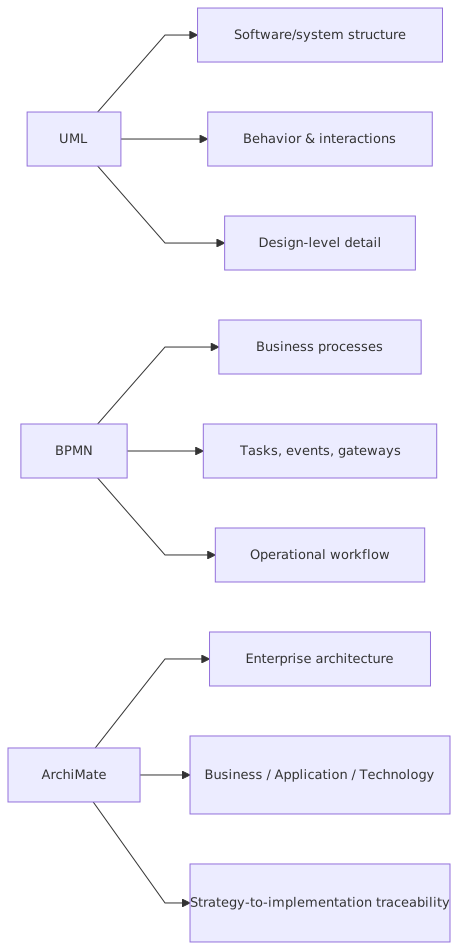
So let’s say the unpopular thing early: UML, BPMN, and ArchiMate are not competing religions. They are tools for different levels of abstraction. If you use them interchangeably, you get confusion. If you force one of them to do everything, you get ugly diagrams and worse decisions.
Here’s the simple version first, because this is where most people get lost:
- UML is mainly for describing software structure and behavior
- BPMN is for modeling business processes and workflow
- ArchiMate is for describing enterprise architecture across business, application, data, and technology layers
That’s the short answer. SEO answer done.
Now the real answer: the reason architects struggle with these three is not because the notations are hard. It’s because enterprise work happens across different altitudes. A process owner wants to know how account opening flows. A solution architect wants to know which services publish to Kafka. A platform architect wants to know where IAM sits in the cloud landing zone. A chief architect wants to know how all of that connects to capability, risk, cost, and operating model.
One notation won’t carry all that well. And it shouldn’t.
The big misunderstanding: people compare unlike things
A lot of “UML vs BPMN vs ArchiMate” debates are nonsense from the start. ArchiMate modeling guide
It’s a bit like asking whether a spreadsheet is better than a slide deck or a network diagram. Better for what?
- If you want to show the steps for handling a mortgage application exception, BPMN is usually the better fit.
- If you want to show the classes, interfaces, or sequence interactions in a customer identity microservice, UML is usually the better fit.
- If you want to show how the mortgage capability is supported by applications, exposed through APIs, secured by IAM, integrated through Kafka, and deployed on cloud platforms, ArchiMate is usually the better fit.
The problem is that many architecture teams inherit one notation from a tool or a training course and then start using it as a hammer. Suddenly every problem looks like a nail. You end up with:
- UML activity diagrams pretending to be business process maps
- BPMN diagrams trying to describe application landscapes
- ArchiMate models used to drill down into software design detail they were never meant to hold
That’s where architecture gets performative.
What UML actually is, and where it helps
UML stands for Unified Modeling Language. It came from software engineering. It gives you a family of diagram types to describe systems from different angles: structure, interactions, states, deployment, and so on.
The most useful thing to understand is this: UML is strongest when the audience is close to system design.
Typical UML diagrams include:
- Class diagrams for structure and relationships
- Sequence diagrams for interactions over time
- Component diagrams for software building blocks
- State machine diagrams for lifecycle behavior
- Deployment diagrams for runtime placement
That does not mean every architect should run around drawing class diagrams. In enterprise work, UML is often most valuable at the solution architecture level, not the portfolio level. UML modeling best practices
Where UML shines in real work
Let’s take a banking example.
You’re designing a new customer onboarding service. It integrates with:
- an IAM platform for authentication and authorization
- a KYC/AML service
- a customer master platform
- Kafka for event publication
- cloud-native services in AWS or Azure
If you need to explain how the onboarding API calls the identity service, waits for risk screening, writes the customer profile, and publishes a CustomerCreated event to Kafka, a UML sequence diagram can be excellent. It shows behavior clearly, especially for technical teams.
If you need to show the internal service structure—API layer, orchestration, policy engine, event publisher, persistence adapter—a UML component diagram can help.
That’s useful architecture. It helps engineers build the thing.
Where UML is overused
Now the contrarian bit.
A lot of enterprise architects use UML because it makes them feel technical. Not because it helps.
I’ve seen class diagrams with 70 boxes presented to business stakeholders. Nobody in the room understood them. Nobody should have. It was the wrong notation, wrong audience, wrong level.
And UML activity diagrams? They are often used as poor-man’s BPMN. Yes, you can model flows with them. No, that does not mean you should use them for operational business processes involving handoffs, exceptions, SLAs, and human tasks. BPMN does that better.
So yes, UML matters. But mostly when you’re close enough to software behavior that implementation shape matters.
What BPMN actually is, and where it helps
BPMN stands for Business Process Model and Notation. It exists to model processes. Not applications. Not enterprise landscapes. Processes.
If your question is, “What are the steps, decisions, events, handoffs, and participants in this workflow?” BPMN is often the right answer.
Its strengths are:
- clear representation of flow
- explicit treatment of decisions and events
- support for roles, lanes, and participants
- ability to describe manual and automated steps
- usefulness for process improvement and automation discussions
In plain English: BPMN is how you map work moving through the business.
Where BPMN shines in real work
Back to banking.
Imagine a loan origination process:
- Customer submits application
- Identity is verified via IAM-linked login and profile validation
- Credit check runs
- Fraud screening runs
- Decision engine approves, rejects, or routes to manual review
- Approved applications trigger account creation
- Notification is sent
- Downstream systems receive events over Kafka
This is a process. BPMN is a strong fit.
You can show:
- customer interactions
- automated service tasks
- manual review steps
- exception handling
- timeouts
- escalation paths
That matters in real architecture because process problems are usually where enterprise pain becomes visible. Customers don’t complain that your domain boundaries are weak. They complain that onboarding takes three days and fails at step six.
BPMN helps surface that.
Where BPMN is misused
Here’s another strong opinion: BPMN is frequently abused by architecture teams who want to look business-friendly but can’t stop thinking in systems.
So what happens? They produce giant BPMN diagrams loaded with technical implementation detail:
- topic names
- microservice internals
- API payload logic
- cloud deployment specifics
That’s not process modeling. That’s architecture leakage.
BPMN should answer:
- who does what
- in what order
- under which conditions
- with which outcomes
It should not become a dumping ground for every technical detail in the estate.
Also, many BPMN diagrams are unreadable because architects model every exception branch. Just because BPMN can express complexity doesn’t mean the diagram should. Sometimes you need one top-level process and a few decomposed subprocesses. Not a spaghetti monster.
What ArchiMate actually is, and where it helps
ArchiMate is the one that many people pretend to understand and then quietly misuse.
ArchiMate is an enterprise architecture modeling language. Its job is to describe relationships across business, application, data, and technology domains. It gives you a way to connect strategy to implementation without collapsing into either vague PowerPoint fluff or software design detail.
If UML lives mostly near software design and BPMN lives mostly in process flow, ArchiMate lives in the connective tissue of the enterprise.
It helps answer questions like:
- Which business capabilities are supported by which applications?
- Which applications consume or produce which data?
- Which integration mechanisms connect systems?
- Which technology services host or support applications?
- What changes when we move this workload to cloud?
- Which IAM service secures which channels and APIs?
That’s serious architecture work.
Where ArchiMate shines in real work
Take a bank modernizing its customer identity and access management estate.
The bank has:
- retail and business banking channels
- a legacy LDAP and custom SSO setup
- a new cloud IAM platform
- Kafka-based event streaming
- dozens of applications across private and public cloud
- regulatory controls around access, consent, and audit
A chief architect or domain architect needs to understand:
- which business services depend on identity
- which applications authenticate users directly vs through federation
- where authorization decisions are made
- how identity events flow into Kafka
- which cloud platforms host the IAM components
- what downstream systems consume identity-related data
- what risks exist if the old IAM stack is retired
This is where ArchiMate is useful. It can show the relationships across:
- business layer: customer onboarding, account access, fraud review
- application layer: IAM platform, customer profile service, consent service, event gateway
- technology layer: cloud landing zone, Kubernetes cluster, managed Kafka, network controls
- motivation/strategy elements: compliance objective, risk reduction, target operating model
This is the language of enterprise impact.
Where ArchiMate is overused
Now the part ArchiMate fans don’t always like hearing.
A lot of ArchiMate diagrams are terrible because architects try to model the whole universe. Every actor, every service, every node, every flow, every principle, every capability, every requirement. The result is a wall of boxes that no executive will read and no engineer will trust.
Worse, some teams use ArchiMate as a substitute for thinking. They believe that if every relationship is formally modeled, the architecture is somehow “complete.” It isn’t. A bad idea in ArchiMate is still a bad idea. ArchiMate tutorial
ArchiMate is powerful when used selectively to answer enterprise questions. It is not a virtue signal.
The practical difference in one table
Here’s the simplest useful comparison.
If you remember nothing else, remember this table.
How this applies in real architecture work
In real life, architecture is not done in clean layers with neat handoffs. You’re moving between strategy, process, systems, controls, and delivery all the time. That means you often need more than one notation for the same initiative.
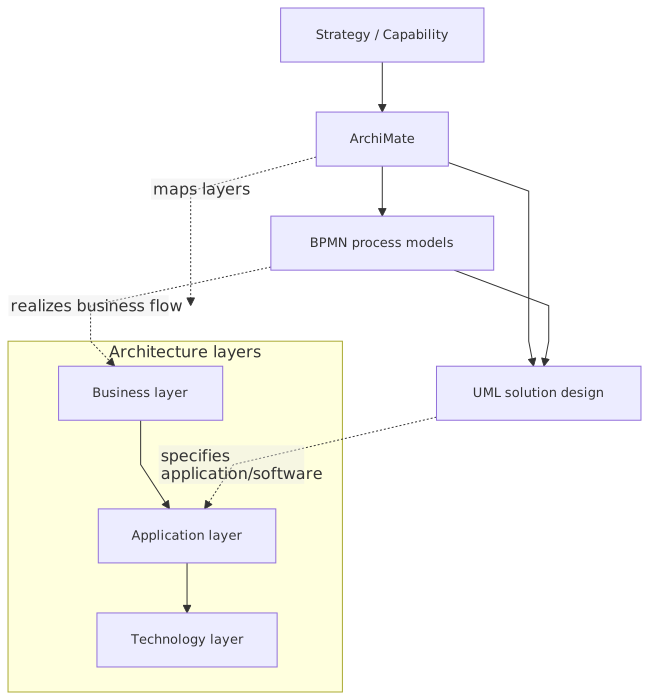
That’s normal. In fact, it’s healthy.
Example: digital onboarding in a bank
Let’s say a bank wants to reduce onboarding time from 2 days to 15 minutes for retail customers. This initiative touches:
- customer journey and process redesign
- IAM modernization
- event-driven integration with Kafka
- cloud deployment patterns
- compliance and audit controls
- application and data dependencies
Here’s how the notations should work together:
Use BPMN for the process
Model:
- customer starts application
- identity verification
- KYC checks
- fraud checks
- manual review conditions
- account creation
- notifications
- failure and retry paths
This helps business and operations teams agree on the actual workflow.
Use UML for solution interaction detail
Model:
- onboarding service calling identity verification API
- fraud service response handling
- account service write operation
- Kafka event publication
- notification service consumption
This helps technical teams understand behavior and sequencing.
Use ArchiMate for enterprise impact
Model:
- onboarding capability supported by onboarding application services
- dependencies on IAM, customer master, fraud platform
- deployment to cloud application platforms
- relation to data objects, integration services, and technology services
- transition from legacy onboarding stack to target-state architecture
This helps architects make change decisions, dependency analysis, and roadmap planning. EA governance checklist
That’s the point. These are complementary views, not rivals.
Common mistakes architects make
Let’s get specific, because this is where most teams waste time.
1. Choosing notation based on preference, not purpose
Some architects love UML because they came from engineering. Others love BPMN because they came from process transformation. Others love ArchiMate because they work in EA tools all day.
None of that matters.
The right question is: what decision does this model need to support?
If the answer is unclear, don’t start drawing.
2. Modeling at the wrong level of detail
This is probably the most common failure.
- Executives get sequence diagrams
- Engineers get capability maps
- Process teams get application topology
- Security teams get vague conceptual boxes
Every audience gets the wrong thing.
A good architect adjusts abstraction deliberately. Not every model should be “complete.” It should be fit for purpose.
3. Confusing process with system behavior
This happens constantly.
A business process is not the same as an application interaction flow.
For example:
- “Customer submits application, risk review occurs, manual approval happens” = process
- “Onboarding API invokes risk engine, receives score, publishes event” = system behavior
BPMN is usually better for the first. UML sequence is usually better for the second.
When teams mix them, diagrams become muddy and arguments start for no reason.
4. Using ArchiMate as a repository dump
Enterprise tools encourage this. You can model everything, so people do.
Then nobody can find the actual story:
- what is changing
- why it matters
- what depends on it
- what risk is introduced or removed
ArchiMate should support insight, not just inventory.
5. Ignoring runtime reality
This is especially common with cloud and Kafka-based environments.
Architects draw beautiful static models and completely ignore:
- asynchronous failure modes
- retries and dead-letter topics
- IAM token propagation
- service mesh behavior
- cloud networking constraints
- operational ownership
If your diagrams don’t reflect runtime behavior, they may be neat, but they’re not architecture. They’re decoration.
6. Treating notation knowledge as architecture skill
This one is worth saying plainly.
Knowing BPMN syntax does not make you good at process architecture.
Knowing UML does not make you good at solution design.
Knowing ArchiMate does not make you good at enterprise architecture.
A notation is a language. Architecture is judgment.
A real enterprise example: bank IAM modernization with Kafka and cloud
Let’s make this concrete.
A regional bank wanted to modernize customer and workforce identity. It had:
- separate IAM stacks for retail banking, internal staff, and partner access
- legacy authentication tied to on-prem directories
- inconsistent authorization logic across applications
- event integration done through brittle point-to-point interfaces
- a cloud migration underway, but identity architecture lagging behind
The bank’s objective sounded simple: create a unified IAM architecture that supports cloud-native applications, centralizes core identity controls, and publishes identity lifecycle events through Kafka.
Simple on the slide. Messy in reality.
What went wrong first
The architecture team initially tried to describe the whole thing in one notation. They used ArchiMate for everything:
- login journeys
- provisioning flows
- event publication sequences
- cloud deployment topology
- role approval processes
The result was technically valid and practically useless.
Business stakeholders couldn’t follow the access request process.
Engineers couldn’t see token exchange behavior.
Security teams couldn’t trace control points clearly.
Program leadership couldn’t understand transition states.
Classic over-modeling.
What worked better
The team reset and used three views.
BPMN view: access request and approval process
They modeled:
- employee requests privileged access
- manager approval
- segregation-of-duties check
- IAM provisioning
- audit event generation
- exception handling for failed policy checks
This exposed a major issue: the longest delay in access fulfillment was not technical. It was manual approval routing between business units. Without BPMN, the team would have kept blaming the IAM platform.
UML view: identity event flow
They used sequence diagrams to show:
- HR system change triggers identity update
- IAM platform reconciles account
- event is published to Kafka
- downstream systems consume entitlement changes
- audit service stores immutable event record
This clarified ordering, retries, and failure handling. It also revealed that two downstream applications assumed synchronous updates and would break under event-driven timing.
That mattered a lot.
ArchiMate view: enterprise dependency and target state
They used ArchiMate to show:
- business services depending on IAM
- application services for authentication, authorization, provisioning, and audit
- technology services in cloud and on-prem environments
- transition architecture from legacy directories to federated IAM
- relationships to compliance objectives and operational ownership
This gave leadership what they actually needed: visibility into impact, migration waves, and risk concentration.
The lesson
No single notation solved the problem. The architecture became useful only when each notation was used for the decision it was best at supporting.
That is how real enterprise architecture works.
My opinionated rule of thumb
If I had to give a blunt rule set to architecture teams, it would be this:
- Use BPMN when the pain is in the workflow
- Use UML when the pain is in the solution behavior
- Use ArchiMate when the pain is in the enterprise dependency picture
And if you’re trying to use one of them for all three, stop.
Another contrarian thought: many architecture teams would improve overnight if they drew fewer diagrams and wrote better captions. A good model with a sharp explanation beats a massive standards-compliant mess every time.
Which one should an enterprise architect actually learn first?
This depends on the kind of architect you are.
- If you work close to software delivery, learn UML first
- If you work in transformation, operations, or business change, learn BPMN first
- If you work in portfolio, target-state, capability, operating model, or cross-domain planning, learn ArchiMate first
But eventually, a serious enterprise architect should understand all three at least at a practical level.
Not expert certification level. Practical level.
You should know:
- when to use each
- when not to use each
- how to connect them conceptually
- how to avoid drowning people in notation
That last one is the real skill.
The uncomfortable truth about architecture modeling
Most stakeholders do not care what notation you used. They care whether the model helped them make a decision.
That’s worth repeating.
A CIO does not wake up hoping for a perfect ArchiMate relationship matrix.
An engineering lead does not want BPMN lane purity.
A process owner does not want UML elegance.
They want clarity:
- what is happening
- what is broken
- what is changing
- what depends on it
- what the risks are
- what they need to do next
If your model delivers that, nobody complains.
If it doesn’t, the notation debate starts because there’s no value to focus on.
Final view: stop asking which one is better
So, UML vs BPMN vs ArchiMate explained?
Here’s the real answer.
**UML is better for software design questions.
BPMN is better for process questions.
ArchiMate is better for enterprise relationship questions.**
That’s the clean version.
The more honest version is this: architecture work is messy, and good architects move between these views without becoming dogmatic about any of them. They know that a bank modernizing IAM on cloud with Kafka in the middle needs process clarity, interaction clarity, and enterprise dependency clarity. Different views for different decisions.
And they know something else too: notation is useful, but only after the thinking gets serious.
If the problem is unclear, no diagram will save you.
FAQ
1. Should enterprise architects use ArchiMate instead of UML?
No. They do different jobs. ArchiMate is better for enterprise-level relationships and impact analysis. UML is better when you need to explain software structure or interaction behavior in more technical detail.
2. Is BPMN only for business analysts?
Not at all. Architects should use BPMN when process flow is central to the problem. In banking especially, many architecture issues show up first as broken onboarding, approval, servicing, or exception processes.
3. Can I model Kafka-based event flows in BPMN?
You can show process-level events and message interactions in BPMN, but if you need technical sequencing, consumer behavior, retries, or service interaction detail, UML is often better. ArchiMate can then show where Kafka fits in the broader architecture landscape.
4. Where does IAM fit best: UML, BPMN, or ArchiMate?
Usually all three, depending on the question. BPMN for access request or onboarding flows. UML for authentication and authorization interactions between systems. ArchiMate for showing IAM as an enterprise service connected to applications, business services, cloud platforms, and control objectives.
5. What is the biggest mistake teams make with these notations?
Trying to standardize on one notation for everything. It sounds efficient, but it usually creates models that are either too technical, too abstract, or too process-heavy for the decision at hand. Fit-for-purpose beats purity every time.
Frequently Asked Questions
What is the difference between UML and ArchiMate?
UML is a general-purpose modeling language primarily used for software design — class structures, sequences, components, states, deployments. ArchiMate is an enterprise architecture language covering business, application, and technology layers. They are complementary: ArchiMate for cross-domain EA views, UML for detailed software design.
When should you use ArchiMate instead of UML?
Use ArchiMate when you need to model cross-domain architecture (business capabilities linked to applications linked to infrastructure), traceability from strategy to implementation, or portfolio views for stakeholders. Use UML when you need detailed software design — class models, sequence interactions, state machines, component interfaces.
Can ArchiMate and UML be used together?
Yes. In Sparx EA, both exist in the same repository. ArchiMate models the enterprise landscape; UML models the internal design of specific application components. An ArchiMate Application Component can link to the UML class diagram that defines its internal structure, maintaining traceability across abstraction levels.