⏱ 21 min read
Most UML diagrams in enterprise environments are either overproduced, outdated, or ignored.
That’s the uncomfortable truth.
Teams spend days polishing boxes and arrows nobody will use, then wonder why delivery still drifts, dependencies still explode, and security still gets bolted on at the end. UML is not the problem. Bad architecture behavior is. UML, used properly, is one of the fastest ways to make complexity visible before it becomes expensive. UML modeling best practices
So let’s say it simply, early: UML (Unified Modeling Language) is a standard visual language for describing systems, software structure, behavior, interactions, and deployment. It gives architects and engineers a shared way to show how a system is built, how it behaves, and where responsibilities sit.
That’s the SEO sentence. Fine. But the real point is this: UML is not about drawing. It is about thinking clearly enough that other people can build, operate, secure, and change the thing.
And yes, all UML diagram types still matter. Not equally. Not always formally. But if you work in enterprise architecture—especially around banking platforms, Kafka-based event flows, IAM integration, and cloud deployments—you will run into the same questions again and again:
- What are the core entities and relationships?
- Which component owns which responsibility?
- What sequence of events actually happens?
- Where are the boundaries?
- What gets deployed where?
- What breaks when a dependency changes?
- Who authenticates whom, and when?
UML gives you a toolkit for those questions. Not a religion. A toolkit.
This article explains all major UML diagram types, what they are for, where they help in real architecture work, where they get misused, and how to use them without turning your architecture practice into a diagram factory. UML for microservices
What UML actually is
UML stands for Unified Modeling Language. It is a standardized way to model software-intensive systems. In practice, UML helps architects, engineers, analysts, and sometimes security teams communicate system design through diagrams.
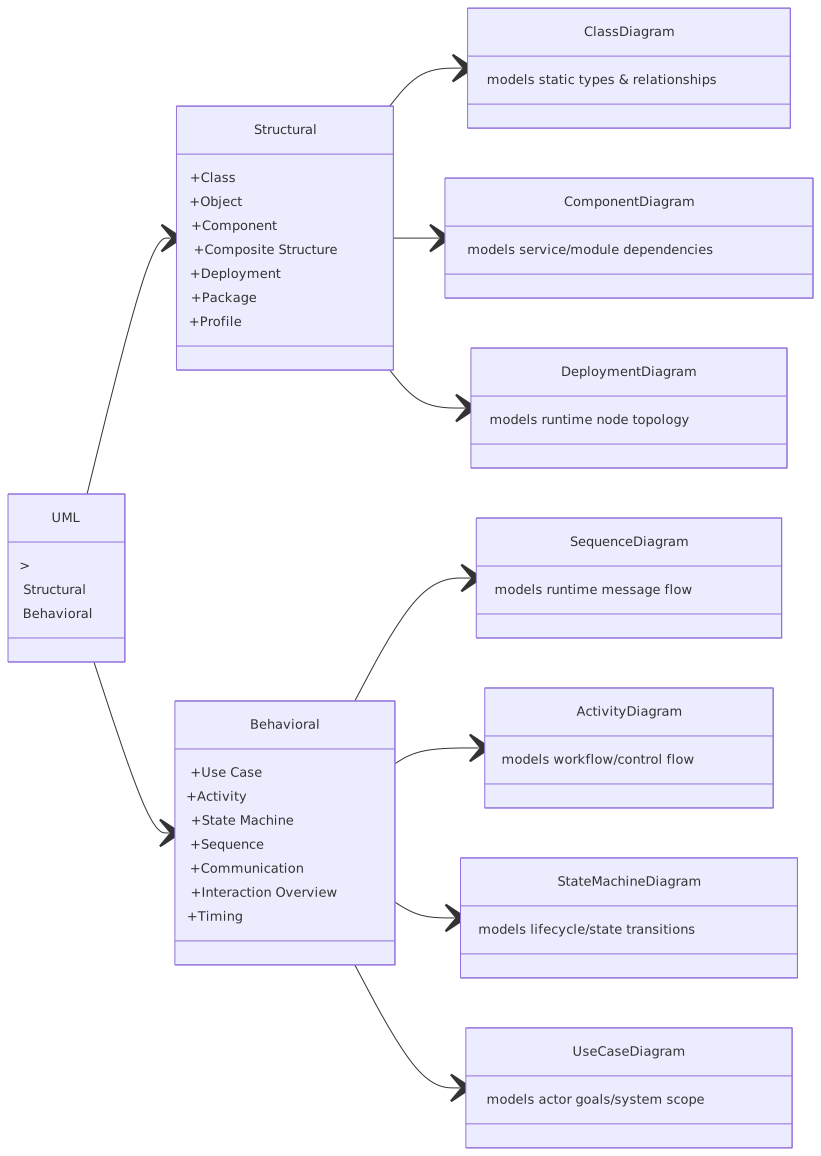
Broadly, UML diagrams fall into two groups:
That distinction matters more than most people admit. Many architecture problems happen because teams use structural diagrams to answer behavioral questions. A component diagram cannot explain a race condition in an event-driven workflow. A sequence diagram cannot replace a deployment view for cloud networking. Different diagrams expose different risks.
Also, one contrarian thought: you do not need to use every UML diagram type on every project. In fact, if you do, I’d worry. Good architects choose the minimum set of views needed to reduce ambiguity.
Still, you should know all the major types, because enterprise systems are ugly in different ways.
1. Class Diagram
What it is
A class diagram shows the static structure of a system: classes, attributes, operations, and relationships like association, inheritance, aggregation, and composition.
Why it matters
This is the most recognized UML diagram, and also the most abused. It is useful when you need to model a domain carefully—customer, account, payment, entitlement, transaction, policy, and so on.
In enterprise architecture, class diagrams are often most valuable during:
- domain modeling
- API/data contract design
- IAM object modeling
- canonical event design
- legacy modernization
Simple example
In banking, a class diagram might include:
- Customer
- Account
- Transaction
- Card
- Loan
- Consent
Relationships:
- A Customer owns one or more Accounts
- An Account has many Transactions
- A Customer may grant Consent for data sharing
- A Card is linked to an Account
Real architecture use
Suppose you are modernizing a retail banking platform and introducing Kafka event streams. Before publishing events like AccountOpened, CustomerUpdated, or TransactionPosted, you need a stable shared understanding of core entities. A class diagram can expose ugly truths quickly:
- Is “Customer” the legal party, the digital profile, or both?
- Is “Account” a product container or a ledger object?
- Does “Consent” belong to IAM, CRM, or Open Banking services?
These are not academic questions. They drive event schemas, ownership boundaries, and compliance controls. EA governance checklist
Common mistake
Architects often turn class diagrams into pseudo-database schemas. That’s lazy. A class diagram is not just a prettier ERD. It should represent conceptual structure, not every nullable column in an Oracle table from 2009.
Strong opinion
If your class diagram has 70 classes and nobody can explain the business meaning of the relationships in five minutes, it’s not architecture. It’s diagram-shaped anxiety.
2. Object Diagram
What it is
An object diagram shows instances of classes at a specific point in time.
Why it matters
People ignore object diagrams because they look too simple. Big mistake. They are excellent for making abstract class models concrete.
Example
If a class diagram says a Customer owns Accounts, an object diagram might show:
Customer: Sarah AhmedCheckingAccount: 12345SavingsAccount: 67890
This helps validate whether the model actually works with real scenarios.
Real architecture use
In IAM architecture, object diagrams are useful when discussing:
- users
- roles
- groups
- service principals
- policies
- entitlements
For example:
- User
jane.doe - Role
BranchManager - Group
RetailOperations - Policy
ApproveLoanUnder50k
That can quickly clarify whether your authorization design is role-based, attribute-based, or a messy hybrid pretending to be one thing while acting like another.
Common mistake
Treating object diagrams as too low-level to matter. They often help business and security stakeholders more than class diagrams do.
3. Package Diagram
What it is
A package diagram groups related model elements into packages and shows dependencies between them.
Why it matters
This is one of the most underrated diagrams in enterprise architecture. It gives you a clean way to show modular boundaries without drowning people in implementation detail.
Example
A digital banking platform might be split into packages like:
- Customer Management
- Account Services
- Payments
- IAM
- Notifications
- Reporting
Dependencies show which areas rely on which others.
Real architecture use
Package diagrams are useful in large transformation programs where you need to explain domain decomposition before service decomposition. They are especially good for:
- bounded context discussions
- platform capability maps
- ownership boundaries
- reducing accidental coupling
Common mistake
Making package diagrams too generic. If every package is just “core,” “shared,” “integration,” and “services,” you have explained nothing.
Contrarian thought
Sometimes a package diagram is more useful than a microservice diagram. Why? Because many organizations claim they have service boundaries, but what they really have is a distributed monolith with emotional support APIs.
4. Component Diagram
What it is
A component diagram shows the high-level components of a system and their dependencies or provided/required interfaces.
Why it matters
This is one of the most practical UML diagrams for architects. It is the workhorse diagram for solution design. If you only use a few UML diagrams regularly, this should be one of them.
Example
For a cloud-native banking payments platform:
Components:
- Mobile App
- API Gateway
- Payment Orchestration Service
- Fraud Service
- IAM Provider
- Kafka Cluster
- Notification Service
- Ledger Service
Interfaces:
- REST APIs
- Kafka topics
- OAuth/OIDC integration
- webhook callbacks
Real architecture use
A component diagram helps show:
- service boundaries
- integration points
- external systems
- major dependencies
- where IAM is involved
- where Kafka is used asynchronously
For example, in a payment initiation flow:
- Mobile App calls API Gateway
- API Gateway delegates token validation to IAM
- Payment Orchestration Service validates payment rules
- Payment request is published to Kafka
- Fraud Service consumes event
- Ledger Service posts transaction
- Notification Service sends customer alert
That’s architecture people can discuss.
Common mistakes architects make
- Too much detail
If your component diagram includes every helper library and utility, you’ve gone too far.
- No interfaces shown
Boxes alone are not architecture. How do they interact? REST? gRPC? Kafka? batch file? direct DB call? This matters.
- No trust boundaries
Especially in IAM and cloud systems, not showing security zones or trust transitions is irresponsible.
Strong opinion
A component diagram without interfaces is corporate wall art.
5. Composite Structure Diagram
What it is
A composite structure diagram shows the internal structure of a class or component, including its parts, ports, and connectors.
Why it matters
This is more specialized, but useful when you need to explain internal collaboration inside a complex component.
Example
Inside a Payment Orchestration Service, you may show:
- Validation Module
- Routing Engine
- Policy Evaluator
- Kafka Producer
- Audit Logger
Real architecture use
This is helpful when a “single service” is becoming too clever. You can use a composite structure diagram to expose that the service is really acting like a mini-platform internally. That often triggers a useful architecture conversation: should this stay one deployable unit or be split?
Common mistake
Using this when a simple component diagram would do. Not every internal detail deserves a formal UML treatment.
6. Deployment Diagram
What it is
A deployment diagram shows the physical or runtime deployment of software artifacts onto infrastructure nodes.
Why it matters
In cloud architecture, this is essential. And still underused. Teams love drawing logical services and then act surprised by networking, latency, IAM trust relationships, and failover behavior later.
Example
A cloud deployment for a banking application might show:
- Mobile clients
- Cloud load balancer
- Kubernetes cluster
- API gateway
- microservices pods
- managed Kafka cluster
- IAM provider
- managed database
- HSM or key management service
- monitoring stack
- DR region
Real architecture use
This is where architecture becomes operationally honest.
For example, in AWS or Azure, a deployment diagram can show:
- public vs private subnets
- ingress path
- service mesh
- Kafka brokers in private network
- IAM federation with enterprise identity provider
- audit logging to centralized security account
- cross-region replication for resilience
This matters in regulated industries like banking because non-functional requirements are not optional decoration. They are architecture.
Common mistakes
- Ignoring network boundaries
- Not showing managed services
- No indication of high availability or failover zones
- Mixing logical and physical views into one unreadable monster
Strong opinion
If your architecture review board approves designs without a deployment view for production-critical systems, it is not doing architecture governance. It is doing theater. architecture decision records
7. Use Case Diagram
What it is
A use case diagram shows actors and the major interactions they have with the system.
Why it matters
Technologists often dismiss use case diagrams as too business-friendly. That’s a mistake. They are useful for framing scope and external behavior.
Example
Actors for a banking onboarding platform:
- Customer
- Branch Agent
- KYC Provider
- IAM Platform
- Core Banking System
Use cases:
- Open Account
- Verify Identity
- Authenticate User
- Issue Debit Card
- Send Welcome Notification
Real architecture use
Use case diagrams are especially useful early in a program:
- identifying actors
- clarifying scope
- exposing external dependencies
- aligning business and technical stakeholders
Common mistake
Trying to capture every exception and workflow branch in the use case diagram. Don’t. That belongs elsewhere.
Contrarian thought
A use case diagram is often more useful than a 40-page requirements document nobody reads.
8. Activity Diagram
What it is
An activity diagram shows workflow, decisions, parallel activities, and process flow.
Why it matters
This is one of the best UML diagrams for business-process-heavy systems and integration-heavy enterprise flows.
Example
For a loan approval process:
- Receive application
- Validate identity
- Check credit score
- Evaluate risk
- Approve or reject
- Notify applicant
- Publish decision event to Kafka
Real architecture use
Activity diagrams are excellent for:
- onboarding flows
- claims processing
- payment workflows
- exception handling
- IAM provisioning
- human + system interaction processes
In IAM, an activity diagram can show:
- user requests access
- manager approves
- policy engine evaluates SoD rules
- IAM platform provisions account
- target SaaS platform confirms access
- audit event is logged
That’s a real architecture process, not just a business flow.
Common mistakes
- Not showing parallelism where it exists
- Ignoring exception paths
- Mixing business activities with technical implementation details in confusing ways
Strong opinion
If a process contains manual approval, automated policy evaluation, and asynchronous event publishing, and you try to explain it with a component diagram alone, you’re hiding complexity instead of managing it.
9. State Machine Diagram
What it is
A state machine diagram shows the states of an object and the transitions between them based on events.
Why it matters
This is incredibly useful in systems where lifecycle matters. Banking is full of those.
Example
An account might move through states:
- Pending
- Active
- Frozen
- Dormant
- Closed
Triggers:
- KYC approved
- Fraud alert raised
- inactivity threshold met
- customer closure request
Real architecture use
State machine diagrams are useful for:
- account lifecycle
- card lifecycle
- customer verification status
- payment status
- IAM access request states
- incident ticket states
In Kafka-based systems, state modeling becomes even more important because events drive transitions. If you don’t define valid states and transitions, consumers will invent their own interpretation. That’s how enterprise integration becomes chaos with Avro schemas.
Common mistake
Treating status fields in databases as enough. They are not. A status column is not a lifecycle model.
10. Sequence Diagram
What it is
A sequence diagram shows interactions between participants over time, in message order.
Why it matters
This is probably the most useful behavioral UML diagram for solution architecture. It reveals timing, dependencies, orchestration, synchronous versus asynchronous calls, and failure points.
Example
Payment processing sequence:
- Customer initiates payment in mobile app
- App calls API Gateway
- API Gateway validates token with IAM
- Gateway forwards request to Payment Service
- Payment Service publishes
PaymentInitiatedevent to Kafka - Fraud Service consumes event and returns risk decision
- Ledger Service posts transaction
- Notification Service sends confirmation
Real architecture use
This is where architects can show:
- request/response paths
- async event publication
- retries
- token propagation
- idempotency checks
- timeout risks
- compensation behavior
For example, if Fraud Service is asynchronous over Kafka and Ledger posting waits for a fraud outcome, the sequence diagram can show whether the orchestration is:
- blocking
- event-driven
- stateful
- eventually consistent
That distinction changes everything from customer experience to operational support.
Common mistakes
- Pretending asynchronous messaging is the same as a direct call
- Omitting alternate flows
- Drawing happy-path fiction only
- Not showing security interactions with IAM
Strong opinion
A sequence diagram that only shows the happy path is basically a sales slide.
11. Communication Diagram
What it is
A communication diagram focuses on how objects or components are linked and exchange messages, emphasizing relationships more than time sequence.
Why it matters
Less popular than sequence diagrams, but useful when interaction structure matters more than exact timing.
Example
In a fraud detection context, a communication diagram could show links between:
- Payment Service
- Fraud Engine
- Customer Profile Service
- Transaction History Service
- Alerting Service
Real architecture use
This can help when discussing collaboration patterns inside a domain, especially with many interacting services.
Common mistake
Using it where sequence is what really matters. In distributed systems, timing often matters a lot.
12. Interaction Overview Diagram
What it is
An interaction overview diagram combines activity-style flow with references to interactions, often sequence-like subflows.
Why it matters
This is useful for large end-to-end scenarios made up of multiple interactions.
Example
Customer onboarding may include:
- identity verification interaction
- risk screening interaction
- account creation interaction
- IAM enrollment interaction
- notification interaction
Real architecture use
Helpful in enterprise journeys that span many systems and teams. It creates a map of interactions without stuffing everything into one giant sequence diagram.
Common mistake
Nobody maintains these if they are too detailed. Keep them high-value and high-level.
13. Timing Diagram
What it is
A timing diagram shows state or condition changes along a time axis.
Why it matters
Rarely used, but valuable in systems where timing constraints are critical.
Example
In market data, fraud scoring, or real-time authorization, you may need to show:
- token validity period
- response deadlines
- state changes over milliseconds or seconds
Real architecture use
Timing diagrams can help in:
- SLA-sensitive flows
- timeout analysis
- token/session expiration handling
- near-real-time event processing
Common mistake
Using timing diagrams when a sequence diagram is sufficient. They are niche, but when needed, they’re very helpful.
14. Profile Diagram
What it is
A profile diagram extends UML with stereotypes, tagged values, and constraints for a specific domain.
Why it matters
This is more advanced and less common in day-to-day delivery, but useful in large enterprises with formal modeling practices.
Real architecture use
You might define stereotypes for:
<> <> <> <>
This allows architectural standards to be embedded in models.
Common mistake
Overengineering. If your architects need a week of training just to read your profile, you have already lost.
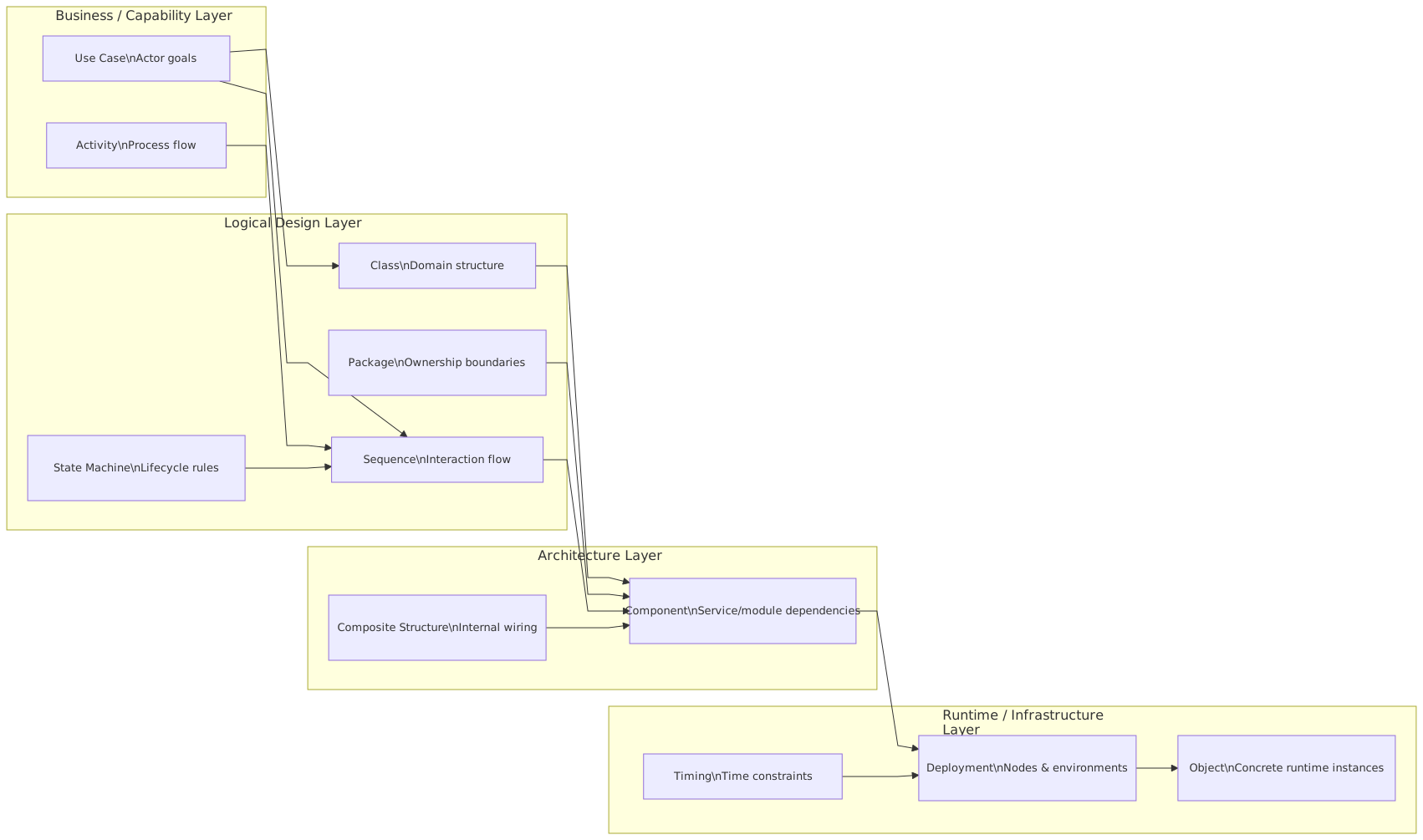
Let’s be practical. Not all diagrams deliver equal value in most enterprise work.
Here’s the rough priority order I see most often:
If I had to survive with only five in a typical enterprise architecture practice, I’d pick:
- component
- sequence
- deployment
- activity
- state or class, depending on domain complexity
That’s not orthodox UML teaching. It’s what tends to work.
Let’s make this concrete.
Imagine a bank is replacing a monolithic payments engine with a cloud-native platform. The new design includes: cloud architecture guide
- mobile and web channels
- API gateway
- OAuth2/OIDC via enterprise IAM
- payment orchestration microservice
- Kafka for event-driven integration
- fraud scoring service
- ledger posting service
- notification service
- cloud-managed Kubernetes
- centralized logging and audit
Here’s how UML actually helps.
Use case diagram
Shows actors:
- retail customer
- corporate customer
- fraud analyst
- IAM platform
- core ledger
- external payment network
This sets scope quickly.
Component diagram
Shows:
- channels
- gateway
- IAM
- orchestration
- fraud
- Kafka
- ledger
- notifications
This identifies interfaces and ownership boundaries.
Sequence diagram
Shows the payment initiation flow:
- user authenticates
- token issued by IAM
- payment request sent
- orchestration validates and publishes event
- fraud consumes event
- ledger posts if approved
- notifications sent
- audit trail written
This reveals where eventual consistency exists and where retries are needed.
State machine diagram
Defines payment states:
- Initiated
- PendingFraudCheck
- Approved
- Rejected
- Posted
- Failed
- Reversed
This prevents every downstream team from inventing its own status interpretation.
Deployment diagram
Shows:
- API gateway in DMZ or edge layer
- Kubernetes cluster in private network
- managed Kafka private endpoints
- IAM federation
- KMS/HSM integration
- DR region
- observability stack
This supports security review, resiliency review, and operational readiness.
That’s architecture work. Not abstract modeling for its own sake. The diagrams support decisions:
- where trust boundaries are
- where retries happen
- where data is authoritative
- where state transitions are valid
- where operational risk sits
Let’s be blunt.
1. Drawing diagrams too late
If diagrams appear after implementation starts, they become decoration. UML is most valuable before ambiguity hardens into code.
2. Using one diagram for everything
A component diagram cannot replace a sequence diagram. A deployment diagram cannot replace a state model. Different concerns need different views.
3. Producing diagrams nobody can maintain
If the diagram requires a full-time priesthood to update, it will die.
4. Modeling technology, not responsibility
Architects often label boxes with tools instead of business or system responsibilities. “Kafka,” “Kubernetes,” and “API Gateway” are not architecture by themselves.
5. Ignoring failure and exception paths
Enterprise systems fail in boring, predictable ways. Diagrams should show retries, dead-letter flows, timeout handling, and fallback behavior where relevant.
6. Omitting IAM and security flows
This is one of the worst habits. Authentication, token validation, role checks, service identity, and audit logging are not optional side notes.
7. Mixing logical and physical views carelessly
A logical component should not be drawn as if it were a node or subnet. Keep views clean.
8. Chasing UML purity
Real architects adapt notation when needed. If strict UML formalism makes the diagram less understandable, bend it carefully. Clarity wins.
That last point irritates some modeling purists, but it’s true. I’d rather see a slightly informal diagram that drives alignment than a perfectly compliant UML artifact nobody uses.
Here’s the practical approach I recommend.
Start from the decision you need to support
Ask:
- Are we clarifying scope? Use case.
- Are we defining system boundaries? Component.
- Are we explaining runtime behavior? Sequence.
- Are we showing cloud topology? Deployment.
- Are we modeling lifecycle? State machine.
- Are we mapping workflow? Activity.
Keep each diagram focused
One diagram, one concern. If a diagram tries to explain domain model, deployment topology, and process flow all at once, it will fail.
Show what matters operationally
Especially in enterprise systems:
- trust boundaries
- data ownership
- sync vs async interactions
- failure handling
- state transitions
- compliance-sensitive zones
Use real names
Don’t call a box “Service A.” Call it Payment Orchestration Service. It sounds obvious, but vague labels create vague conversations.
Pair diagrams
The best architecture communication often uses combinations:
- Component + Sequence
- Sequence + State
- Component + Deployment
- Use Case + Activity
Update diagrams when architecture changes
Not every sprint. But whenever a meaningful decision changes.
UML is neither dead nor magical.
It is a disciplined way to expose architecture before complexity becomes political, operational, or expensive. In enterprise work, that matters. Especially in banking, IAM-heavy environments, Kafka-based integrations, and cloud platforms where one bad assumption can ripple across ten teams and three audit findings.
The trick is not to “do UML.” The trick is to use the right diagrams at the right level, for the right audience, at the right moment.
And honestly, that is what architecture is most of the time: choosing the right view of reality so people can make better decisions.
If your diagrams do that, they are good.
If they don’t, no amount of notation will save them.
FAQ
1. Which UML diagram is most useful for enterprise architecture?
Usually the component diagram and sequence diagram. Component diagrams show structure and dependencies. Sequence diagrams show runtime behavior and integration flow. In cloud environments, deployment diagrams are also critical.
2. Are UML diagrams still relevant in microservices and cloud-native architecture?
Yes. Maybe more than ever. Distributed systems create more ambiguity, not less. UML helps clarify service boundaries, event flows, IAM interactions, deployment topology, and lifecycle behavior.
3. What UML diagrams are best for Kafka-based systems?
Use:
- Component diagrams for producers, consumers, topics, and service boundaries
- Sequence diagrams for event flow and async behavior
- State machine diagrams for event-driven lifecycle changes
- Deployment diagrams for broker placement, networking, and resilience
4. How do UML diagrams help with IAM architecture?
They are very useful. Use:
- Use case diagrams for actors and access scenarios
- Sequence diagrams for authentication and token flows
- Activity diagrams for provisioning and approval workflows
- Class/object diagrams for users, roles, groups, policies, and entitlements
- Deployment diagrams for federation, trust boundaries, and security zones
5. What is the biggest mistake architects make with UML?
Using diagrams as documentation output instead of decision-support tools. The second biggest mistake is drawing only happy paths and ignoring failure, security, and operational reality.
Frequently Asked Questions
What is UML?
UML (Unified Modeling Language) is a standardised visual modeling language for describing software systems. It defines diagram types for structure (class, component, deployment) and behaviour (sequence, activity, state machine, use case). UML is maintained by the Object Management Group (OMG) and is the most widely used modeling standard in software engineering.
What are the most useful UML diagram types?
For enterprise architects: Component diagrams (application structure and interfaces), Deployment diagrams (infrastructure topology), and Sequence diagrams (runtime interactions). For software architects and developers: Class diagrams (domain models), State Machine diagrams (lifecycle), and Activity diagrams (process flows).
How does UML relate to ArchiMate in enterprise architecture?
UML and ArchiMate are complementary. ArchiMate is used for enterprise-wide architecture views across business, application, and technology layers. UML is used for detailed software design within specific application components. Both are natively supported in Sparx EA, allowing architects to maintain full traceability from EA views down to UML design models.