⏱ 20 min read
Most enterprise architecture teams do not have a tooling problem. They have a thinking problem.
They buy Sparx Enterprise Architect, spin up a repository, import a framework, create a few hundred diagrams, and then act surprised when nobody trusts the model. The diagrams look professional. The repository is full. The governance board has a dashboard. And yet the architecture still feels vague, inconsistent, and strangely disconnected from delivery reality.
Why? Because the team is using Sparx EA as a drawing tool instead of using it as a metamodel-driven architecture system. Sparx EA training
That sounds abstract, maybe a bit academic. It isn’t. It’s one of the most practical distinctions in enterprise architecture. If you don’t understand the UML metamodel concepts behind Sparx EA, you end up with a repository full of shapes and labels. If you do understand them, you can create architecture content that is consistent, queryable, governable, and actually useful when decisions get hard.
My opinion, bluntly: most architects should spend less time debating framework purity and more time understanding classifier, stereotype, tagged values, relationships, and constraints. That’s where the value is. Not in making prettier diagrams. Not in arguing whether ArchiMate is more “business friendly” than UML. Not in inventing a custom notation every six months. ArchiMate relationship types
If you want the simple version early, here it is:
UML metamodel concepts in Sparx EA are the rules behind the modeling language. They define what an element is, what properties it can have, how it can relate to other elements, and what those relationships mean. In real architecture work, that lets you standardize how applications, APIs, events, IAM roles, cloud services, controls, and business capabilities are represented in the repository. Once you standardize that, you can govern it, analyze it, and reuse it.
That’s the short version. The deeper version matters more.
The mistake: treating Sparx EA like Visio with a database
A lot of teams say they are “using EA,” but what they really mean is they are drawing architecture diagrams in a central tool. That is not the same thing.
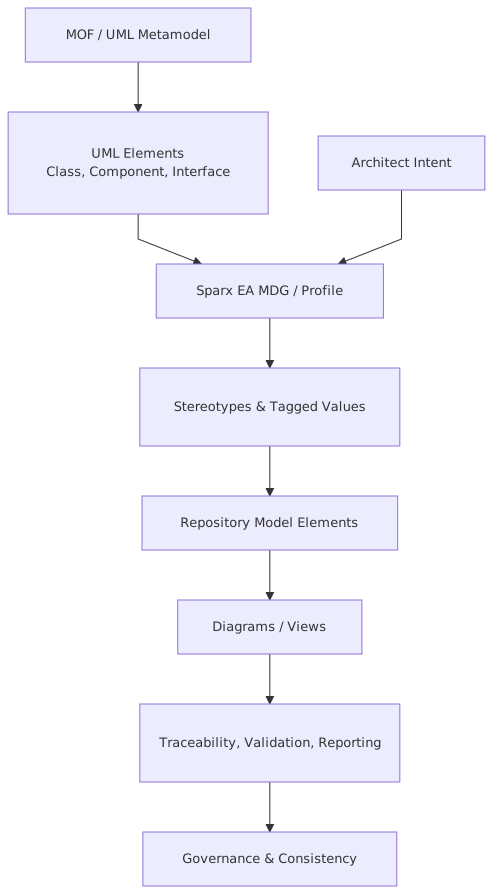
Sparx EA is powerful because diagrams are only views of an underlying model. That model is based on metamodel concepts: element types, classifiers, attributes, operations, connectors, stereotypes, profiles, constraints, tagged values, and so on. If you use those concepts deliberately, the repository starts behaving like an architecture knowledge base. If you ignore them, it becomes a graveyard of disconnected pictures.
And yes, this is where architects often get lazy.
They create an “Application” box as a generic component in one diagram, as a node in another, as a boundary in another, and as a custom stereotype in a fourth. Then they wonder why traceability reports are nonsense. Of course they are nonsense. You never decided what an application is in your model.
Strong opinion: if your metamodel is weak, your governance is theater.
What the UML metamodel actually means in plain English
Let’s strip the jargon out.
A metamodel is just the model of your modeling language. It defines the allowed building blocks and the rules between them.
In Sparx EA, that means things like:
- what kinds of elements you create
- what each element means
- which properties matter
- which relationships are valid
- how you specialize standard UML concepts for enterprise architecture
Think of it this way:
- A diagram is the picture.
- The model is the content behind the picture.
- The metamodel is the rulebook for the content.
That distinction matters a lot in enterprise work.
If you are documenting a bank’s Kafka event platform, for example, you do not want one architect modeling topics as classes, another as components, another as artifacts, and another as free text in a note. You want a clear metamodel decision, maybe a stereotype like < extending a specific UML element type, with tagged values such as retention period, data classification, owning domain, schema registry subject, and criticality. Then every topic follows the same structure.
Now the repository can answer real questions:
- Which customer-facing applications publish to regulated topics?
- Which IAM roles can administer production topics?
- Which cloud workloads consume customer identity events?
- Which interfaces depend on events carrying PII?
That is architecture. Not decoration.
The core UML metamodel concepts that actually matter in Sparx EA
You do not need to become a UML purist. Frankly, a lot of UML purism is useless in enterprise settings. But you do need to understand the concepts that make the repository coherent.
1. Elements and classifiers
An element is a modeled thing. In architecture, that might be:
- an application
- a business capability
- an API
- a Kafka topic
- an IAM role
- a cloud service
- a data store
- a control
A classifier is the thing that defines a type. In UML terms, classifiers help define what an element is and what structure or behavior it can have.
In Sparx EA, architects often blur “instance” and “type” carelessly. That creates confusion fast.
Example:
Customer Identity Servicemight be an application component.KafkaTopicmight be a modeled type or stereotype pattern.customer.profile.updatedis a specific topic.
If you don’t think in terms of type versus instance-like usage, you end up with a repository that mixes conceptual, logical, and physical levels in one mess. And then people stop trusting it.
2. Stereotypes
This is where Sparx EA becomes useful for enterprise architecture.
A stereotype extends a standard UML element with a domain-specific meaning. This is how you take generic UML and make it relevant to your enterprise.
Examples:
<> <> <> <> <>
A stereotype says: this thing is not just a generic component or class; it is a specific kind of architectural thing with a defined meaning.
This is also where architects get carried away. They create 180 stereotypes because it feels sophisticated. It isn’t. It’s usually a sign the team doesn’t know how to abstract.
Contrarian view: a smaller, sharper metamodel beats a giant “enterprise ontology” every time. If nobody can remember the difference between <, <, <, and <, you have already failed.
3. Tagged values
Tagged values are additional properties attached to stereotyped elements. They are extremely important in real architecture work because they hold the metadata that governance needs.

For a <, you might have:
- DataClassification
- OwningDomain
- RetentionDays
- EncryptionRequired
- SchemaCompatibilityMode
For an <:
- PrivilegeLevel
- Federated
- BreakGlass
- ApprovalRequired
- SoDCategory
For a <:
- CloudProvider
- Environment
- LandingZone
- AvailabilityTier
- RecoveryObjective
This is where the model becomes operationally relevant. Not because tagged values are glamorous. They aren’t. They’re actually a bit boring. But architecture is often boring in exactly the places that make it useful.
4. Relationships and connector semantics
Relationships are not lines. They are meaning.
That line on the diagram should answer a real question:
- depends on?
- publishes to?
- consumes from?
- authenticates via?
- deployed on?
- owns?
- realizes?
- traces to?
- constrained by?
If your repository uses “Association” for everything, that is usually a sign of architectural laziness. You gave up on semantics because semantics require discipline.
For example:
- An application publishes to a Kafka topic.
- Another application subscribes to that topic.
- The topic contains a regulated event schema.
- The application authenticates via an IAM provider.
- The workload deploys to a cloud Kubernetes cluster.
- The IAM role grants access to an admin function.
Each relationship should be intentionally chosen, ideally constrained by your profile or modeling guidance.
5. Constraints and rules
Constraints are how you stop the repository from turning into fiction.
Examples:
- Every
<must have an owning domain and data classification.> - Every production
<must be linked to an IAM control pattern.> - Every
<handling customer data must trace to a security control and a data retention policy.> - No
<marked as BreakGlass can be used by non-production workloads.>
This is where metamodel thinking becomes governance. Not PowerPoint governance. Actual governance.
Why this matters in real architecture work
Let’s leave theory behind for a minute.
In enterprise architecture, your model has to support at least five practical jobs:
This is not just about “good modeling.” It affects how quickly you can answer executive questions.
A CIO asks: “Which banking services depend on our legacy IAM broker, and what customer journeys break if we retire it?”
If your repository is metamodel-driven, you can answer with reasonable confidence.
If it isn’t, you call three solution architects, a platform lead, and a security manager into a meeting and hope somebody remembers the truth.
That is a very expensive way to do architecture.
A real enterprise example: retail banking, Kafka, IAM, and cloud migration
Let’s make this concrete.
Imagine a retail bank modernizing its customer servicing estate. It has:
- legacy core banking systems
- a growing event-driven architecture on Kafka
- centralized IAM with federation and privileged access controls
- workloads moving to cloud-hosted Kubernetes and managed services
- strict regulatory oversight on customer data and operational resilience
This bank wants Sparx EA to become the architecture system of record for solution and platform dependency management.
The bad version
Without metamodel discipline, the repository ends up like this:
- “Application” means web app in one domain, service in another, and platform in a third.
- Kafka topics are shown on integration diagrams but do not exist as reusable model elements.
- IAM is represented as a single box called “Okta / AD / SSO” because nobody wanted to model identity properly.
- Cloud workloads are diagrammed as vendor icons with no structured metadata.
- Security controls are written in notes or linked documents, not as model elements.
- Delivery teams clone old diagrams and tweak labels.
At first glance, this looks acceptable. Then a regulator asks for evidence of which production services consume customer profile events containing PII, what access model they use, and where they run. Suddenly the architecture repository is quiet. Because it cannot answer.
The good version
Now let’s model it properly using UML metamodel concepts in Sparx EA.
The architecture team defines a lightweight profile with stereotypes such as:
<> <> <> <> <> <> <> <> <> <> <> <>
Each stereotype has tagged values relevant to governance.
Examples:
<
- DataClassification
- DomainOwner
- Criticality
- RetentionDays
- Encryption
- SchemaRegistryRef
<
- RoleType
- PrivilegeTier
- Federated
- ApprovalWorkflow
- SoDImpact
<
- Runtime
- Environment
- Region
- RTO
- RPO
- ResilienceTier
Relationships are standardized:
- application service publishes event to Kafka topic
- workload hosts application component
- application component uses IAM provider
- IAM role authorizes administrative function
- application component stores data in data store
- security control constrains workload or service
- regulatory requirement traces to control and data asset
Now the bank can model a real flow:
Customer Profile Servicepublishescustomer.profile.updated- Topic carries schema
CustomerProfileUpdatedEvent - Topic tagged as
PII-Restricted Fraud Monitoring ServiceandCRM Sync Servicesubscribe- Both workloads run in cloud Kubernetes clusters in separate regions
- Administrative access is controlled through
PrivilegedSupportRole - The role is federated from enterprise IAM and requires step-up approval
- The service traces to data protection and operational resilience controls
This is not over-modeling. This is basic enterprise hygiene.
What the bank can do with that model
With this model, the bank can answer:
- Which services consume regulated customer events?
- Which of those services run in cloud?
- Which IAM roles can administer them?
- Which controls apply to those workloads?
- Which business capabilities are impacted if the topic is unavailable?
- Which systems must be re-certified if the event schema changes?
That is where Sparx EA starts earning its keep.
Common mistakes architects make with UML metamodel concepts in Sparx EA
Let’s be honest. The mistakes are predictable.
Mistake 1: inventing too many element types
This is the classic enterprise architecture disease. Someone discovers profiles and stereotypes and decides to model reality at molecular resolution.
Now there are 14 kinds of application and 11 kinds of interface.
Nobody uses them consistently. Nor could they.
Rule of thumb: if your architects need a cheat sheet just to decide what kind of “service” they are looking at, your metamodel is too complicated.
Mistake 2: using generic relationships for everything
If every connector is an association or dependency, your model has low semantic value.
You do not need 50 relationship types, but you do need enough to capture important distinctions:
- uses
- publishes
- subscribes
- authenticates via
- hosts
- realizes
- traces to
- constrained by
That is usually enough to make the model analytically useful.
Mistake 3: mixing abstraction levels on the same diagram and in the same package
Architects often place business capabilities, application services, deployment nodes, and implementation tasks all in one diagram because “it tells the story.”
Maybe. But it destroys model clarity.
A capability is not a workload. A topic is not a strategic objective. A cloud account is not an application service.
You can link across levels. You should. But don’t collapse them into one undisciplined blob.
Mistake 4: making stereotypes without governance fields
A stereotype without useful tagged values is half-finished work.
If you define < but do not capture owner, classification, and criticality, you have created a fancy icon, not an architecture element.
Mistake 5: treating IAM as a side note
This one is especially bad in cloud-era architecture.
Architects model apps, APIs, and data flows, but identity and access is reduced to “SSO happens here.” That is amateur stuff now. IAM is a first-class architecture concern.
Model:
- identity providers
- trust relationships
- role patterns
- privileged access
- machine identities
- authorization boundaries
In regulated sectors like banking, this is not optional.
Mistake 6: not separating the metamodel from the content
Your profile and rules should be managed centrally. Your solution content should conform to them.
Too many teams let every project customize the model as they go. That leads to repository drift. Over time, the tool becomes impossible to govern.
A practical way to apply UML metamodel concepts in Sparx EA
If you are trying to get this right in a real enterprise, here is the approach I recommend.
Step 1: define a minimal architecture metamodel
Start small. Seriously.
Cover only the architectural things you need to govern consistently, such as:
- business capabilities
- applications and services
- APIs and events
- data stores
- IAM elements
- cloud workloads and platforms
- controls and requirements
Don’t start with every UML possibility. Start with enterprise decisions you need the repository to support.
Step 2: map each concept to a base UML element intentionally
This matters more than some architects admit.
Choose whether your custom concept extends Component, Class, Node, Artifact, Requirement, or something else based on how you want to use it.
Not every decision is perfect. That’s fine. Just be deliberate.
For example:
<might extend Component> <might extend Class or Component depending on your modeling approach> <might extend Class> <might extend Node or Artifact depending on whether you model runtime or deployable unit> <might extend Requirement or Class>
There is no single holy answer. And architects who pretend there is are usually compensating. What matters is consistency and fitness for purpose.
Step 3: add only the tagged values that drive decisions
Every tag should answer one of these:
- does governance need it?
- does impact analysis need it?
- does risk assessment need it?
- does delivery need it?
If not, don’t add it.
Metadata bloat is real. I’ve seen repositories where architects spent more time filling optional fields than making decisions.
Step 4: define allowed relationships
Document what can connect to what, and what the relationship means.
For example:
ApplicationComponent -> KafkaTopic = publishes / subscribesApplicationComponent -> IAMProvider = authenticates viaCloudWorkload -> KubernetesCluster = deployed onSecurityControl -> ApplicationComponent = constrainsRegulatoryRequirement -> SecurityControl = realized by
This is where your metamodel stops ambiguity from spreading.
Step 5: create reusable patterns
Once your stereotypes and relationships are stable, create model patterns for common enterprise scenarios.
Examples:
- event-driven integration pattern using Kafka
- cloud-native application deployment pattern
- privileged admin access pattern for production support
- external API exposure pattern with IAM and WAF controls
This is one of the best ways to make architecture teams productive. Not by forcing compliance slides. By giving them reusable model structures.
Step 6: enforce just enough governance
Do not try to validate everything. You’ll create rebellion and bad data.
Enforce the few rules that matter:
- mandatory ownership
- mandatory classification for data/event assets
- mandatory IAM linkage for production workloads
- mandatory trace to control for regulated services
Good governance is selective. Bad governance is obsessive.
Contrarian thought: not everything needs to be modeled
This needs saying because architecture tools encourage overreach.
Just because Sparx EA can model something does not mean it should.
Do not model:
- every ephemeral microservice version
- every Kafka consumer group setting
- every cloud resource tag
- every IAM claim mapping detail
That level of detail belongs in platform tooling, code, configuration repositories, or operational CMDB-like systems.
Enterprise architecture should model what is necessary for decision-making, traceability, risk, and change impact. Not every implementation detail. If your repository tries to become reality itself, it will fail.
A metamodel is powerful precisely because it helps you decide what matters.
How this changes architecture behavior, not just diagrams
The real value of UML metamodel concepts in Sparx EA is behavioral.
When the repository is structured properly:
- architects ask better questions
- solution designs become more consistent
- integration patterns get reused
- IAM stops being bolted on at the end
- cloud deployment discussions connect to business impact
- governance becomes evidence-based
And that last one matters. Architecture review boards are often too subjective. A strong metamodel gives you objective checks.
Not perfect checks. Let’s not oversell it. Architecture still requires judgment. But better judgment happens when the model has clear semantics.
What good looks like in practice
A mature team using Sparx EA well usually shows these traits:
- a small, understandable architecture profile
- clear element definitions
- relationship semantics people actually follow
- tagged values tied to governance needs
- reusable patterns for common scenarios
- traceability from capability to solution to control to deployment
- reports and searches that answer real business questions
A weak team usually shows these traits:
- lots of diagrams, low trust
- duplicate elements everywhere
- no ownership metadata
- inconsistent use of stereotypes
- “association” doing all the work
- security and IAM represented vaguely
- cloud architecture captured as icons, not model content
You can tell within 20 minutes which kind of repository you are looking at.
Final thought
Sparx EA is not hard because UML is hard. It is hard because disciplined architecture is hard.
The UML metamodel concepts inside Sparx EA force you to decide what things are, what they mean, and how they relate. That is exactly why they matter. They expose sloppy thinking. They make inconsistency visible. They stop architects from hiding behind polished diagrams.
And that is a good thing.
If you are working in a bank, or any serious enterprise, with Kafka-based integration, IAM complexity, cloud migration, and regulatory pressure, you cannot afford architecture models that are just visual storytelling. You need structure. You need semantics. You need a metamodel that is lean enough to use and strong enough to govern.
So yes, learn the UML metamodel concepts. But don’t learn them as theory for theory’s sake. Learn them so your Sparx EA repository becomes something more than an expensive whiteboard.
That’s the standard.
And frankly, it should have been the standard all along.
FAQ
1. Do I need deep UML expertise to apply metamodel concepts in Sparx EA?
No. You need practical understanding, not academic mastery. Focus on elements, stereotypes, tagged values, relationships, and constraints. That gets you most of the value.
2. Should I use UML or ArchiMate in Sparx EA for enterprise architecture?
Use the language that fits your purpose, but understand the metamodel either way. Many teams mix them. My view: notation matters less than semantic discipline. A badly governed ArchiMate repository is no better than sloppy UML. ArchiMate modeling guide
3. How many stereotypes should an enterprise architecture team create?
Usually fewer than you think. Start with a minimal set for the concepts you truly need to govern. If the list keeps growing, stop and simplify.
4. How does this help with Kafka, IAM, and cloud architecture specifically?
It lets you model those domains consistently as reusable elements with metadata and relationships. That enables impact analysis, control traceability, ownership clarity, and better governance across distributed platforms.
5. What is the biggest mistake when using Sparx EA in a large enterprise?
Treating it like a diagramming tool instead of a model-driven repository. Once that happens, consistency collapses, trust drops, and the tool becomes administrative overhead instead of architectural leverage. TOGAF roadmap template
Frequently Asked Questions
What is a UML metamodel?
A UML metamodel is a model that defines UML itself — it specifies what element types exist (Class, Interface, Association, etc.), what relationships are valid between them, and what constraints apply. It uses the Meta Object Facility (MOF) standard, meaning UML is defined using the same modeling concepts it uses to define other systems.
Why does the UML metamodel matter for enterprise architects?
The UML metamodel determines what is and isn't expressible in UML models. Understanding it helps architects choose the right diagram types, apply constraints correctly, use UML profiles to extend the language for specific domains, and validate that models are internally consistent.
How does the UML metamodel relate to Sparx EA?
Sparx EA implements the UML metamodel — every element type, relationship type, and constraint in Sparx EA corresponds to a metamodel definition. Architects can extend it through UML profiles and MDG Technologies, adding domain-specific stereotypes and tagged values while staying within the formal metamodel structure.