⏱ 5 min read
Recommended Reading
Executive summary
Executive-level ArchiMate views succeed when they are built as “decision interfaces,” not IT complexity posters. The capability map viewpoint is explicitly described as enabling a structured overview of enterprise capabilities and can be used as a heat map for investment identification—making it a strong default executive view.
To preserve credibility, executive views must be traceable: each hotspot should tie to an assessment or requirement, and each planned change should tie to a roadmap element. This integrates naturally with governance processes like architecture boards and compliance review, which provide formal decision-making context. ArchiMate in TOGAF ADM
- Viewpoint selection and scoping
- Heatmapping as measurement (not decoration)
- Drill-down design: from capability to services
- Governance alignment: boards and decision records

- Capability map viewpoint + heatmap use.
- ArchiMate 3.2 framing.
- TOGAF architecture board.
- TOGAF compliance review.
- ADR practice.
Design principles for executive-level architecture views
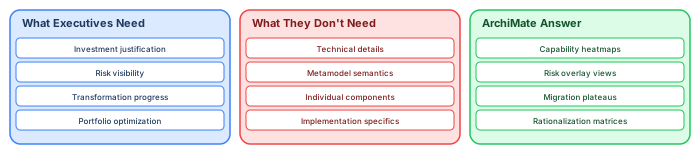
Executive-level views succeed or fail based on one principle: answer a business question in under 30 seconds. If an executive needs explanation to understand the view, it is too complex. If the view does not answer a question they actually have, it is irrelevant.
Principle 1: Maximum 20 elements. Executive views should contain 15–20 elements maximum. Each element represents a major capability, application group, or strategic initiative — not individual components. Group related elements into higher-level abstractions using ArchiMate Grouping elements.
Principle 2: Color encodes the message. Use a simple, consistent color scheme: green = healthy/compliant/on track, amber = attention needed, red = critical/non-compliant/blocked. The executive reads the color pattern before reading any text. If the view is mostly green with two red items, the conversation focuses immediately on those two items.
Principle 3: Business language, not technical language. Element names should use business terms: "Payment Processing" not "PAY_PaymentGateway_v2." Relationship labels should be plain English: "supports" not "Serving relationship." Remove all ArchiMate notation symbols if the audience does not know ArchiMate — use simple boxes and arrows instead.
Principle 4: Include the "so what." Every executive view should include an action implication. A capability heatmap should highlight which red items are on the remediation roadmap and which are unfunded. A portfolio view should show which retirements will save money and by how much. Without the "so what," the view is interesting but not actionable.
Principle 5: Link to detail on demand. The executive view is the entry point, not the entire story. Include hyperlinks (in WebEA) or page references (in PDF) to detailed domain views for executives who want to drill deeper. Most will not — but the option signals that the analysis exists.
Practical ArchiMate modeling guidance
Effective ArchiMate modeling requires discipline in three areas: element selection (choosing the right element type for each concept), relationship precision (using typed relationships instead of generic associations), and view composition (building viewpoint-specific diagrams with 15-20 elements maximum). These three disciplines determine whether an ArchiMate model communicates clearly or creates confusion. ArchiMate tutorial for enterprise architects
Start each modeling effort by identifying the stakeholder question the view must answer. "Which applications support customer onboarding?" drives an Application Cooperation view. "What infrastructure is end-of-life?" drives a Technology Usage view with lifecycle tagged values. "How does this transformation affect the business?" drives a Layered view with migration plateaus. The question determines the viewpoint, the viewpoint determines the elements, and the elements determine the relationships. ArchiMate for digital transformation
Applying these patterns in practice
The value of ArchiMate modeling is realized not through comprehensive coverage of every element type, but through disciplined application of a few core patterns that answer recurring stakeholder questions. Three patterns account for the majority of architecture communication needs. ArchiMate layers explained
The Layered View pattern shows how business processes depend on applications, and how applications depend on infrastructure. Build this view by placing Business Processes at the top, Application Components in the middle, and Technology Nodes at the bottom. Connect them with Serving and Realization relationships. This single view demonstrates cross-layer traceability — when a server is decommissioned, trace upward to see which applications and business processes are affected.
The Cooperation View pattern shows how application components interact through interfaces and data flows. Place the core application in the center and its integration partners around it, connected by Flow relationships labeled with the data exchanged. This view reveals integration dependencies that are otherwise buried in technical documentation.
The Motivation View pattern connects strategic goals to architecture decisions. Stakeholder concerns drive Goals, Goals are realized by Outcomes, Outcomes are enabled by Capabilities, and Capabilities are realized by Application Components. This chain answers the question executives always ask: "Why are we building this?"
If you’d like hands-on training tailored to your team — Sparx Enterprise Architect, BPMN, SysML, Apache Kafka or the Archi tool — or modelling coaching in ArchiMate and TOGAF-aligned governance, you can reach us via our contact page.
Frequently Asked Questions
What is enterprise architecture?
Enterprise architecture is a discipline that aligns an organisation's strategy, business operations, information systems, and technology infrastructure. It provides a structured framework for understanding how an enterprise works today, where it needs to go, and how to manage the transition.
How is ArchiMate used in enterprise architecture practice?
ArchiMate is used as the standard modeling language in enterprise architecture practice. It enables architects to create consistent, layered models covering business capabilities, application services, data flows, and technology infrastructure — all traceable from strategic goals to implementation.
What tools are used for enterprise architecture modeling?
Common enterprise architecture modeling tools include Sparx Enterprise Architect (Sparx EA), Archi, BiZZdesign Enterprise Studio, LeanIX, and Orbus iServer. Sparx EA is widely used for its ArchiMate, UML, BPMN and SysML support combined with powerful automation and scripting capabilities.