⏱ 21 min read
Most ArchiMate diagrams are not wrong because the notation is hard. They are wrong because architects use the language to avoid thinking.
That sounds harsh, but after enough architecture reviews, you stop being polite about it. I’ve seen elegant-looking ArchiMate views that were completely useless in decision-making. Beautiful color palette. Clean layout. Perfectly aligned boxes. And absolutely no help in answering basic enterprise questions like:
- What breaks if this IAM service goes down?
- Why are we moving this workload to cloud?
- Which Kafka topics carry regulated customer data?
- What business capability actually depends on this application?
- Where is the control point for risk?
That is the real problem. Too many models are created as architecture theater. They decorate PowerPoint decks, satisfy governance gates, and make repositories look busy. But they don’t clarify the enterprise. ArchiMate for governance
So let’s say the simple thing early: ArchiMate is a modeling language for showing how strategy, business, application, technology, and implementation elements relate. It is useful because it can connect business intent to operational reality. It becomes dangerous when people use it as a drawing standard instead of an architecture thinking tool.
This article is about the common mistakes architects make with ArchiMate, why those mistakes happen, and how to avoid them in real architecture work. I’ll use examples from banking, Kafka-based integration, IAM, and cloud because that’s where these mistakes become painfully visible. ArchiMate modeling guide
And yes, I have opinions.
The real purpose of ArchiMate, in plain English
Before getting into mistakes, let’s strip away the ceremony.
ArchiMate exists to help you answer enterprise questions across layers. Not just “what systems do we have,” but:
- what the business is trying to achieve,
- which capabilities matter,
- which processes and actors do the work,
- which applications support them,
- which technology runs them,
- which projects are changing them,
- and what risks, constraints, and dependencies exist.
That cross-layer traceability is the value.
If your model cannot connect a banking customer onboarding capability to IAM policies, application services, Kafka event flows, cloud runtime choices, and implementation work packages, then the model is probably decorative.
And if your model does connect those things but nobody can understand it, then it is also decorative.
That tension matters. ArchiMate is powerful because it can represent complexity. It fails when architects try to represent all complexity at once. ArchiMate tutorial
Mistake #1: Modeling the notation instead of the enterprise
This is the classic one.
Architects learn ArchiMate and become obsessed with using the “correct” element type for every noun they hear. Suddenly every workshop turns into taxonomy trivia.
“Is this a business object or a representation?”
“Should this be an application function or an application service?”
“Is this node better modeled as a device, system software, or technology service?”
Important? Sometimes. But not first.
The first question should be: what decision is this model supposed to support?
If the model is meant to show how customer identity verification works in a bank’s onboarding journey, and your team spends 30 minutes debating whether a Kafka cluster is best shown as a node or technology collaboration, you’ve already lost the plot.
What this looks like in real work
A bank is redesigning digital onboarding. The architecture team needs to explain why IAM modernization is blocking faster account opening.
A useful model would show:
- the business process for onboarding,
- the business capability of customer identity and access management,
- the application services used for identity proofing, authentication, consent capture,
- the Kafka event stream carrying onboarding state changes,
- the technology services in cloud supporting those applications,
- and the gaps causing manual intervention and fraud risk.
An unhelpful model will instead contain 70 perfectly valid ArchiMate elements with no obvious story.
That’s the difference between architecture and notation worship.
Strong opinion
If your stakeholders need a legend, a notation primer, and a 20-minute walkthrough just to understand your model, the problem is not them. It’s you.
Mistake #2: Mixing abstraction levels in one view
This one is everywhere. And it wrecks model quality fast.
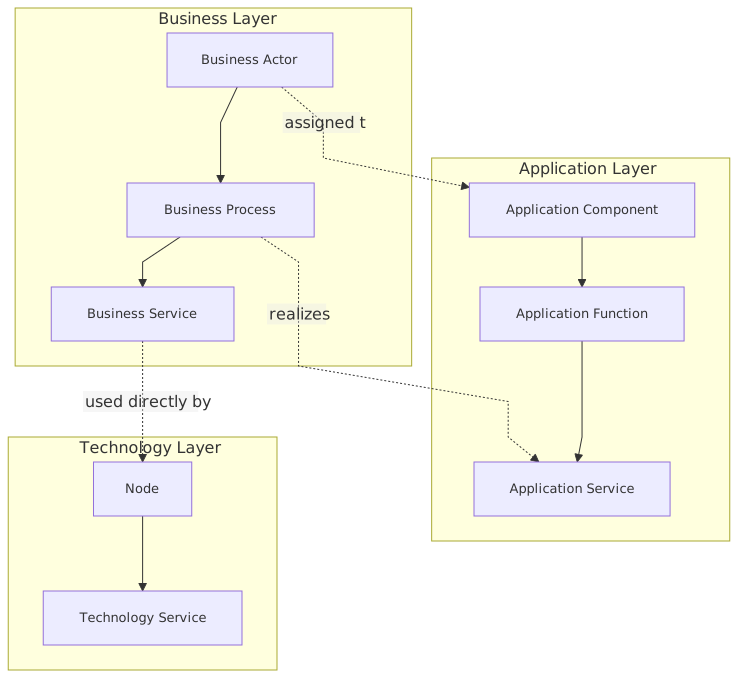
Architects put strategic goals, business capabilities, API gateways, Kubernetes clusters, Jira epics, and data retention controls all in a single diagram. Why? Because they want “one picture.”
One picture is usually a bad idea.
A single view can absolutely span layers. That’s one of ArchiMate’s strengths. But it still needs a controlled abstraction level. The moment you show a board-level outcome next to a Kafka consumer group ID, the model stops being architecture and starts being a junk drawer.
Why this happens
Because people confuse traceability with co-location.
Traceability means you can navigate from a goal to a capability to an application to infrastructure to implementation.
Co-location means you dump all of them into one canvas.
Not the same thing.
Real banking example
Suppose a retail bank is migrating fraud detection services to cloud while modernizing event-driven integration.
A bad ArchiMate view might include:
- strategic objective: reduce fraud losses by 15%,
- capability: fraud management,
- process: card transaction monitoring,
- application component: Fraud Decision Engine,
- application interface: REST scoring API,
- data object: transaction event,
- technology node: EKS cluster,
- system software: Kafka broker,
- work package: Q3 migration sprint,
- plateau: hybrid-state deployment.
Every one of those may be valid. But all in one diagram? Usually unreadable.
A better approach is to use a small set of related views:
- Strategy-to-capability view
Show why fraud management matters.
- Capability-to-application view
Show which applications support fraud operations.
- Application-to-technology view
Show cloud runtime, Kafka integration, IAM dependencies.
- Transition view
Show current state, target state, and migration work.
That is how real architecture work gets done. Not by forcing everything into one heroic mega-diagram.
Mistake #3: Treating capabilities as just another box
A lot of capability maps are nonsense. There, I said it.
People throw “Customer Management,” “Payments,” “Security,” “Data,” “Integration,” and “Reporting” into a capability map and call it architecture. But capabilities are not labels for departments, systems, or generic functions. They represent what the enterprise must be able to do.
A capability should have meaning independent of one application or one team.
Common bad patterns
- Naming systems as capabilities
Example: “Salesforce” is not a capability.
- Naming projects as capabilities
Example: “Cloud Migration” is not a capability.
- Naming org units as capabilities
Example: “Identity Team” is not a capability.
- Making capabilities too vague
Example: “Digital” means almost nothing.
In a banking context
Take IAM in a bank.
A weak model says the capability is “Security.”
That tells you very little.
A better decomposition might show:
- Identity Lifecycle Management
- Authentication
- Authorization
- Privileged Access Management
- Consent and Delegation
- Customer Identity Federation
Now you can model which business services and application services rely on which sub-capabilities. That matters when deciding whether to centralize IAM, buy a cloud-native CIAM platform, or keep legacy LDAP-based controls.
Contrarian thought
I’m not convinced every architecture initiative needs a full capability map. Sometimes architects create one because enterprise architecture textbooks told them to. If the immediate decision is about Kafka topic governance in a cloud data platform, a giant enterprise capability model may be overkill. EA governance checklist
Use capabilities where they help prioritize, rationalize, or explain investment. Not as a ritual.
Mistake #4: Modeling applications as if integration doesn’t matter
This mistake is especially common in organizations moving toward event-driven architecture.
Architects model application components nicely. Maybe they show interfaces. Maybe even services. But the real integration backbone—the flows, contracts, event ownership, trust boundaries, and dependency patterns—is mostly absent.
That is not a small omission. In many enterprises, especially banks, integration is the enterprise.
Kafka makes this obvious
In a Kafka-based architecture, the important question is not only “which applications exist?” It’s also:
- who publishes which event,
- who owns the schema,
- which consumers depend on it,
- whether the topic carries PII,
- what happens when delivery lags,
- how replay affects downstream processes,
- where IAM enforcement applies,
- and whether cloud networking or platform controls create hidden coupling.
ArchiMate can help here, but only if you model relationships intentionally.
What architects often do wrong
They draw Kafka as a central box labeled “Event Bus” and connect everything to it.
Technically not false. Architecturally almost useless.
That model hides the things that matter:
- event ownership,
- topic boundaries,
- asynchronous dependency,
- policy enforcement,
- data classification,
- cross-domain consumption,
- and operational impact.
Better way to model it
You do not need to model every topic in every enterprise view. Please don’t. But for important domains, you should model:
- producer application components,
- consumer application components,
- the application services exposed or consumed,
- the data or business objects being exchanged,
- the technology service or platform service enabling event transport,
- and the governing constraints, especially around IAM and data policy.
For example, in a bank’s payments domain:
- Payment Initiation Service publishes a “PaymentRequested” event
- Fraud Screening Service consumes it and publishes a “PaymentRiskAssessed” event
- Core Banking Posting Service consumes the approved transaction event
- Kafka platform service provides event streaming
- IAM policy services control producer and consumer authorization
- Cloud key management supports encryption requirements
Now the model tells a story. More importantly, it supports real design and governance work.
Mistake #5: Ignoring identity and access as a cross-cutting architecture concern
IAM is still modeled badly in most enterprises.
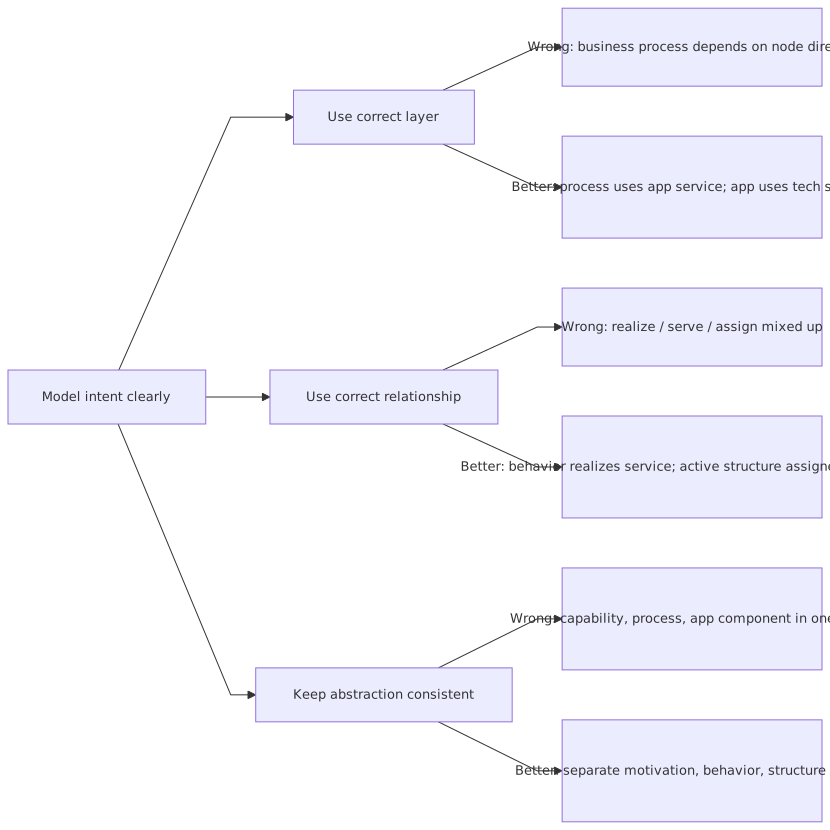
Architects either bury it inside infrastructure diagrams or abstract it away into “security services.” Both are mistakes.
IAM is not just a technology component. It is a business enabler, a control mechanism, a regulatory concern, and often a source of major transformation friction.
In banks, this is painfully real. Customer onboarding, employee access, third-party integration, API security, Kafka authorization, cloud role design, privileged operations—these all depend on identity architecture.
Real-world application
Imagine a bank moving customer channels and event-driven services to cloud.
The architecture team models:
- mobile banking app,
- API gateway,
- customer profile service,
- Kafka event platform,
- cloud container platform,
- analytics services.
Looks fine. But IAM is missing except for a tiny “SSO” box.
Then implementation starts, and suddenly the hard questions appear:
- How are customer identities federated?
- Are workforce identities separate from machine identities?
- How are service accounts authorized to publish to Kafka topics?
- How is privileged admin access handled in cloud?
- Which applications trust which token issuer?
- Where is customer consent represented?
- How are access decisions audited?
Those are architecture questions, not implementation trivia.
Strong opinion
If your ArchiMate model shows cloud, APIs, and Kafka but treats IAM as a side note, the model is immature. Full stop.
Identity is one of the main ways enterprise control is actually exercised. Model it like it matters.
Mistake #6: Confusing current state, target state, and fantasy state
This is a governance killer.
Many ArchiMate repositories are full of diagrams with no clear statement of whether they describe current reality, approved target, or somebody’s favorite future concept. Then people wonder why architecture reviews become political.
If a model does not distinguish between baseline and target, it becomes dangerous. Teams make assumptions. Funding gets misaligned. Dependencies get missed.
Common signs of this mistake
- Legacy systems quietly omitted because they “should go away”
- Cloud target components shown as if already operational
- IAM capabilities assumed to exist but not actually implemented
- Kafka represented as enterprise-standard while half the estate still uses batch integration
- Transition dependencies missing entirely
What real architects need
You need at least some disciplined way to show:
- baseline architecture: what exists now,
- target architecture: what is intended,
- transition architecture(s): what intermediate states are realistic,
- work packages and deliverables: what changes what,
- plateaus: where the enterprise will pause operationally.
This is not academic. It matters in programs.
Banking example
A bank wants to modernize customer event processing.
Current state:
- core banking emits batch files nightly,
- fraud systems rely on delayed data,
- IAM for machine identities is ad hoc,
- cloud data services exist but are disconnected.
Target state:
- Kafka-based near-real-time event streaming,
- centralized schema governance,
- managed cloud Kafka platform,
- role-based and policy-based authorization for producers/consumers,
- monitoring and replay support.
Transition state:
- coexistence of batch and event streams,
- dual publication from core systems,
- partial IAM centralization,
- selected domains onboarded first.
If your model skips the transition state, you are not doing enterprise architecture. You are drawing aspiration.
Mistake #7: Using relationships lazily
This sounds small, but it matters a lot.
Architects often overuse generic association because they are unsure which relationship to apply. Sometimes that is acceptable. More often it weakens the model enough that the semantics disappear.
ArchiMate relationships carry meaning. If everything is “associated with” everything else, then the model can’t answer impact, dependency, realization, or usage questions reliably.
Common lazy patterns
- Business capability associated with application component, instead of supported by a meaningful chain
- Application component associated with data object, without clarifying access, realization, or service exposure
- Technology node associated with application service, when serving or deployment relationships would be more informative
- Work package associated with target component, without showing implementation or realization intent
Practical advice
Don’t become religious about relationship purity. That’s another trap. But do choose relationships that preserve intent.
Ask:
- Is this thing using another thing?
- Does it serve it?
- Does it realize it?
- Does it access it?
- Is it triggering it?
- Is it flowing to it?
That discipline pays off when you need impact analysis.
Useful rule of thumb
If someone asks “what happens if this changes?” and your model can’t support an answer because all links are generic associations, the model is too weak.
Mistake #8: Over-modeling technology and under-modeling business meaning
Technical architects often do this without realizing it. They produce detailed diagrams of cloud landing zones, Kubernetes clusters, network segments, Kafka brokers, IAM proxies, and secrets stores—but the business reason for any of it is barely visible.
That’s backwards.
Enterprise architecture is not infrastructure inventory. The point is to connect technical structures to business outcomes, operating model choices, risk controls, and investment logic.
Example from cloud migration
A bank moves customer communication services to cloud. The architecture team creates a detailed technology view:
- VPCs
- subnets
- ingress
- EKS clusters
- managed Kafka
- IAM roles
- KMS keys
- observability stack
Fine. But the business questions remain unanswered:
- Which customer communications are business critical?
- What service levels are required?
- Which regulatory controls apply?
- Which capability uplift does cloud actually provide?
- Why is managed Kafka preferable to existing integration middleware?
- Which operational teams own the new platform?
Without that context, the model may be technically accurate but architecturally shallow.
Contrarian thought
Sometimes the best ArchiMate diagram for a technical initiative starts at the business layer, not the technology layer. Technical teams don’t love that. But it forces the right discipline.
Mistake #9: Building repository-perfect models nobody uses
This is the enterprise architecture version of overfitting.
Some architecture teams create incredibly complete repositories. Every element categorized. Every relation validated. Every artifact versioned. It looks impressive.
But if delivery teams, security teams, platform teams, and product owners never use it, then you have a museum, not an architecture practice.
Why this happens
Because repository quality is measurable. Real influence is harder to measure.
So people optimize for:
- completeness,
- notation compliance,
- meta-model hygiene,
- tool administration.
Meanwhile, the actual enterprise decisions happen in workshops, issue logs, risk committees, and funding conversations.
What useful ArchiMate looks like in practice
A good model gets used to:
- explain a cloud migration dependency,
- identify IAM control gaps,
- assess Kafka platform blast radius,
- support a solution review,
- justify application rationalization,
- map a business capability to investment,
- expose hidden operational ownership issues.
If your model does none of that, don’t defend it by saying “the repository is the source of truth.” It probably isn’t.
A practical table: common mistakes and what to do instead
A real enterprise example: retail bank onboarding modernization
Let’s make this concrete.
A retail bank wants to reduce customer onboarding time from two days to under fifteen minutes for standard products. The current process is fragmented:
- customer submits data through mobile or web,
- identity checks happen through multiple third-party services,
- manual review is triggered too often,
- account creation is delayed by batch integration into core banking,
- customer consent records are inconsistent,
- workforce access to onboarding cases is over-broad,
- fraud review consumes delayed data.
The bank decides to modernize using:
- cloud-native onboarding services,
- Kafka-based event streaming,
- improved IAM and consent management,
- progressive migration from legacy integration.
How bad ArchiMate modeling would look
A typical bad model would show:
- a business process called “Customer Onboarding,”
- several application components,
- a cloud platform node,
- a Kafka box,
- an IAM box,
- and arrows everywhere.
Looks modern. Says very little.
What a useful architecture model would capture
1. Business motivation and capability context
- Goal: reduce onboarding cycle time
- Outcome: improved customer conversion
- Constraint: regulatory compliance for KYC/AML
- Capability: Customer Onboarding
- Supporting capabilities: Identity Verification, Consent Management, Fraud Assessment, Account Provisioning
2. Business and application interaction
- Onboarding process uses application services for identity proofing, document verification, sanctions screening, and account setup
- Manual review remains a business process path for high-risk cases
- Customer communication service informs customer of status
3. Event-driven integration
- Onboarding service publishes onboarding state events to Kafka
- Fraud service consumes events and emits risk decisions
- Core banking integration service consumes approved onboarding events
- Analytics service consumes selected events for operational monitoring
4. IAM architecture
- Customer identity service manages registration and authentication
- Consent service records data processing permissions
- Workforce IAM controls case management access
- Machine identity policies govern service-to-service access
- Kafka topic authorization enforces producer/consumer boundaries
5. Technology and cloud dependencies
- Application services run on cloud container platform
- Managed Kafka provides event streaming service
- Cloud IAM and secrets management support workload identity
- Key management and audit logging satisfy control requirements
6. Transition architecture
- Legacy batch account setup remains for some products
- Event publication is introduced first for savings accounts
- IAM centralization for workforce access happens before machine identity standardization
- Manual review system remains temporarily but becomes event-aware
Now the model is useful. It can support sequencing, risk conversations, security review, and dependency management.
Why this matters
Without this kind of modeling, the bank will likely underestimate:
- the role of IAM in customer and workforce flows,
- the complexity of consent management,
- the need for Kafka governance,
- the coexistence period with legacy systems,
- and the operational changes required.
That is what real architecture work looks like. It is not just “drawing the future state.” It is making dependencies visible before they become expensive.
A few uncomfortable truths about ArchiMate
Let’s be honest about a few things architects don’t always say out loud.
1. Not every stakeholder needs to see pure ArchiMate
Sometimes the best thing you can do is translate the model into a simpler viewpoint. Purists hate that idea. Too bad. Stakeholder understanding matters more than notation purity.
2. A partially correct model used in a decision is more valuable than a perfect model nobody reads
This is not an argument for sloppiness. It’s an argument against paralysis.
3. ArchiMate does not replace architecture judgment
The language gives you structure. It does not tell you what is important. Architects still have to choose what to emphasize.
4. More detail is not more architecture
Sometimes it’s just more clutter.
5. If your model cannot survive contact with delivery reality, it is not enterprise architecture
It is illustration.
How to use ArchiMate better in real architecture work
Here’s the practical part.
Start with the question
Examples:
- What capabilities are affected by IAM modernization?
- What systems depend on Kafka topic X?
- What changes in moving this banking workload to cloud?
- Which transition state creates the highest operational risk?
Model toward the question.
Pick one abstraction level per view
Cross-layer is fine. Random detail is not.
Make integration visible where it matters
Especially for event-driven architecture. Don’t hide critical dependency semantics behind generic middleware boxes.
Treat IAM as architecture, not plumbing
Identity, access, trust, consent, machine credentials, privileged access—these are central.
Separate baseline, target, and transition
Always. Especially in regulated enterprises.
Use relationships deliberately
Not obsessively, but deliberately.
Keep models decision-oriented
Every serious model should help with one of these:
- investment
- risk
- dependency
- ownership
- sequencing
- rationalization
- control
If it helps with none of them, challenge why it exists.
Final thought
The biggest ArchiMate modeling mistake is not choosing the wrong symbol. It is forgetting that enterprise architecture exists to improve enterprise decisions.
The notation is useful. I use it. I recommend it. But too many architects hide behind it. They produce diagrams that are technically valid and practically empty.
Don’t do that.
If you are modeling a bank’s onboarding platform, make the risk, identity, integration, and transition issues visible. If you are modeling Kafka, show event ownership and control boundaries. If you are modeling cloud, connect it to business capability and operating model change. If you are modeling IAM, stop treating it like a sidecar to infrastructure.
Architecture models should clarify reality, expose trade-offs, and help people make better choices. That’s the standard.
Anything less is just diagramming.
FAQ
1. What is the most common ArchiMate modeling mistake?
The most common mistake is creating diagrams without a clear decision purpose. Architects focus on notation correctness, but the model does not answer a real enterprise question.
2. Should I show business, application, and technology layers in the same ArchiMate view?
Sometimes yes, but only if the abstraction level is controlled. A cross-layer view can be powerful. A mixed-detail view with strategy, cloud runtime, and project tasks all together is usually a mess.
3. How do I model Kafka in ArchiMate without overcomplicating it?
Do not model every topic in every diagram. Model the producer and consumer applications, the key event or data objects, the event streaming platform service, and the important governance or IAM constraints. Focus on dependency and ownership.
4. Why is IAM important in enterprise architecture models?
Because IAM affects business enablement, risk, audit, operational control, and system trust. In banking and cloud environments especially, weak IAM modeling hides major architecture dependencies.
5. How can I tell if my ArchiMate model is actually useful?
Ask whether it helps someone make a decision about investment, risk, sequencing, ownership, or change impact. If it only documents structure without influencing action, it is probably not useful enough.
Common ArchiMate Modeling Mistakes
Frequently Asked Questions
What is enterprise architecture?
Enterprise architecture is a discipline that aligns an organisation's strategy, business processes, information systems, and technology. Using frameworks like TOGAF and modeling languages like ArchiMate, it provides a structured view of how the enterprise operates and how it needs to change.
How does ArchiMate support enterprise architecture practice?
ArchiMate provides a standard modeling language that connects strategy, business operations, applications, data, and technology in one coherent model. It enables traceability from strategic goals through business capabilities and application services to the technology platforms that support them.
What tools are used for enterprise architecture modeling?
The main tools are Sparx Enterprise Architect (ArchiMate, UML, BPMN, SysML), Archi (free, ArchiMate-only), and BiZZdesign Enterprise Studio. Sparx EA is the most feature-rich option, supporting concurrent repositories, automation, scripting, and integration with delivery tools like Jira and Azure DevOps.