⏱ 15 min read
Introduction
Sparx Enterprise Architect stores everything — every element, connector, diagram, tagged value, baseline, audit entry, and security setting — in a relational database. When you use the GUI, you are browsing a database. When you run a search, you are running a SQL query. When you create an element, you are inserting a row into t_object.
Understanding the database schema is what separates casual users from architects who can build custom reports, automate quality checks, integrate EA with external systems, create dashboards in Power BI, and diagnose performance problems that the GUI cannot explain. This guide covers the complete schema architecture: table groups, key relationships, join patterns, practical queries for every common scenario, and governance practices that keep your repository healthy. architecture decision records
This is a long article. We cover the schema from the conceptual level down to working SQL that you can copy and run today. If you are new to the EA schema, start with the entity-relationship overview and the core tables section. If you already know the basics, skip ahead to the advanced query patterns or the integration architecture. integration architecture diagram
Conceptual overview: how the schema maps to what you see in EA
Before diving into individual tables, it helps to understand how the database schema maps to the concepts you interact with in the EA user interface. Every UI element has a database table behind it.
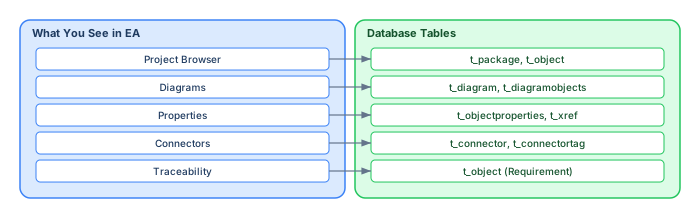
The central insight is that everything is a row in t_object. A Class, an ArchiMate Application Component, a BPMN Task, a Requirement, a Use Case, an Interface — they are all rows in the same table, distinguished by the Object_Type and Stereotype columns. This design makes the schema extremely flexible, but it also means you must filter by type in every query.
The six table groups: a complete map of the schema
The EA schema contains over 100 tables, but they cluster into six logical groups. Understanding these groups gives you a mental model for navigating the schema.
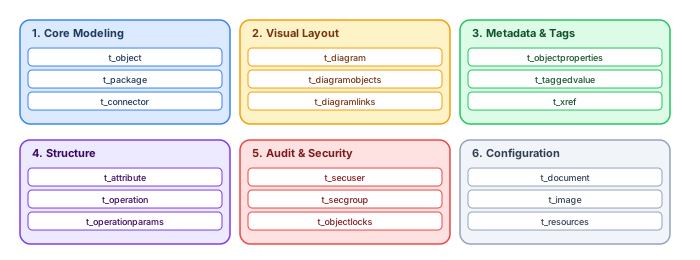
Group 1: Core modeling — the heart of the repository
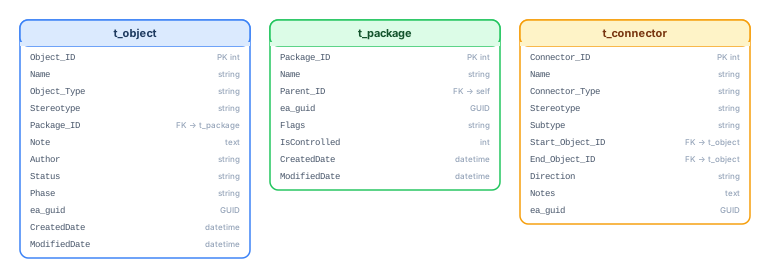
Three tables carry 90% of the modeling information:
t_object stores every element — regardless of notation. It is the single most important table. Key columns: Object_ID (PK), Name, Object_Type (Class, Component, ArchiMate_ApplicationComponent, etc.), Stereotype, Package_ID (FK to t_package), Note (documentation), Author, Status, Phase, Complexity, CreatedDate, ModifiedDate, ea_guid (globally unique identifier).
t_package represents the folder hierarchy. Key columns: Package_ID (PK), Name, Parent_ID (FK to self — recursive hierarchy), ea_guid, Flags, IsControlled (version control flag). Packages also have a corresponding row in t_object (with Object_Type = 'Package'), which is how EA treats packages as elements that can appear in diagrams and carry tagged values.
t_connector stores every relationship. Key columns: Connector_ID (PK), Connector_Type (Association, Realization, Aggregation, Composition, Serving, etc.), Start_Object_ID (FK to t_object), End_Object_ID (FK to t_object), Name, Direction, Stereotype, Subtype (ArchiMate-specific subtypes like ArchiMate_Serving, ArchiMate_Triggering).
Group 2: Visual layout — what makes diagrams look the way they do
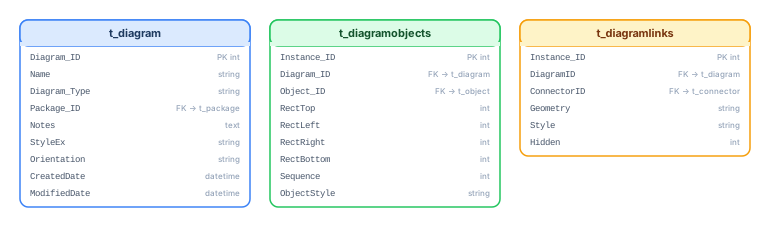
t_diagram stores diagram metadata: name, type, parent package, diagram style, and modification dates. Each row is one diagram.
t_diagramobjects stores the placement of each element on each diagram — position (RectTop, RectLeft, RectRight, RectBottom), sequence, and Object_ID. This is a many-to-many bridge: one element can appear on multiple diagrams, and each diagram contains many elements.
t_diagramlinks stores which connectors are visible on which diagrams, including routing points. A connector exists once in t_connector but may be displayed on multiple diagrams via t_diagramlinks.
Group 3: Metadata and tags — custom properties
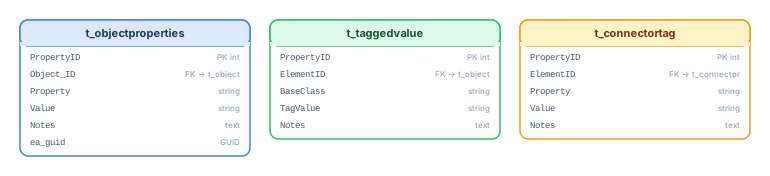
t_objectproperties stores tagged values for elements. Key columns: Object_ID (FK), Property (tag name), Value (tag value). This is where custom metadata lives — Owner, Lifecycle Status, Cost Center, API Contract URL, etc.
t_taggedvalue stores tagged values for connectors. Same structure, different scope.
t_connectortag stores tags specifically on connector properties.
t_xref is an XML-based extension table that EA uses for complex properties that do not fit neatly into columnar storage: stereotype details, custom profile data, and advanced constraint metadata. Parsing t_xref often requires XML extraction within SQL queries.
Group 4: Structure and behavior — class internals
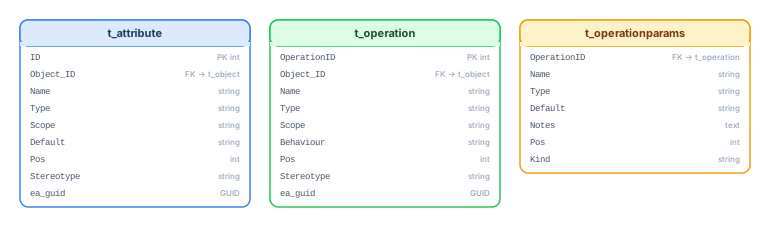
t_attribute stores attributes (properties) of elements: name, type, visibility, default value, position. Most relevant for UML class modeling and data modeling.
t_operation stores operations (methods): name, return type, visibility, parameters (via t_operationparams). Together with t_attribute, these tables describe the internal structure of classes and interfaces.
Group 5: Audit and security — who did what
t_secuser and t_secgroup manage user accounts and group permissions when EA's security model is enabled. t_objectlocks tracks which elements are currently locked for editing and by whom — essential for diagnosing concurrency issues in multi-user repositories.
Group 6: Configuration and resources
t_document stores embedded documents. t_image stores embedded images. t_resources stores linked external resources. These tables are less commonly queried but important for comprehensive model exports.
Entity-relationship model: how the core tables connect
The relationships between the core tables follow a clear pattern. Understanding this pattern is essential for writing correct JOINs.
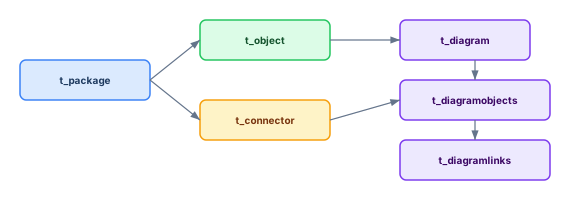
The key join patterns you will use repeatedly:
Element → Package: t_object.Package_ID = t_package.Package_ID
Element → Connector (outgoing): t_object.Object_ID = t_connector.Start_Object_ID
Element → Connector (incoming): t_object.Object_ID = t_connector.End_Object_ID
Element → Diagram placement: t_object.Object_ID = t_diagramobjects.Object_ID
Element → Tagged values: t_object.Object_ID = t_objectproperties.Object_ID
Connector → Diagram visibility: t_connector.Connector_ID = t_diagramlinks.ConnectorID
Practical SQL queries: from basic to advanced
Below are queries for real scenarios, organized by use case. All queries are written for SQL Server syntax; adjust GETDATE() to NOW() for MySQL/PostgreSQL.
Inventory and catalog queries
List all ArchiMate Application Components with their package path:
SELECT o.Name AS Component,
       p.Name AS Package,
       o.Stereotype,
       o.Status,
       o.ModifiedDate
FROM t_object o
JOIN t_package p ON o.Package_ID = p.Package_ID
WHERE o.Object_Type = 'Component'
  AND o.Stereotype LIKE '%Application%'
ORDER BY p.Name, o.Name;
Count elements by type and stereotype — the "what's in my repository?" query:
SELECT Object_Type,
       Stereotype,
       COUNT(*) AS ElementCount
FROM t_object
WHERE Object_Type NOT IN ('Package', 'Note', 'Text', 'Boundary')
GROUP BY Object_Type, Stereotype
ORDER BY ElementCount DESC;
Relationship and dependency queries
Find all systems that serve a specific Business Process (ArchiMate Serving):
SELECT source.Name AS Provider,
       c.Connector_Type,
       c.Stereotype AS RelationType,
       target.Name AS Consumer
FROM t_connector c
JOIN t_object source ON c.Start_Object_ID = source.Object_ID
JOIN t_object target ON c.End_Object_ID = target.Object_ID
WHERE target.Name = 'Order Processing'
  AND c.Stereotype LIKE '%Serving%'
ORDER BY source.Name;
Impact analysis — what depends on this Application Component?
-- Find all elements connected to a specific component (both directions)
SELECT 'Incoming' AS Direction,
       src.Name AS ConnectedElement,
       src.Object_Type,
       c.Connector_Type,
       c.Stereotype
FROM t_connector c
JOIN t_object src ON c.Start_Object_ID = src.Object_ID
WHERE c.End_Object_ID = (
    SELECT Object_ID FROM t_object WHERE Name = 'Payment Gateway'
)
UNION ALL
SELECT 'Outgoing',
       tgt.Name,
       tgt.Object_Type,
       c.Connector_Type,
       c.Stereotype
FROM t_connector c
JOIN t_object tgt ON c.End_Object_ID = tgt.Object_ID
WHERE c.Start_Object_ID = (
    SELECT Object_ID FROM t_object WHERE Name = 'Payment Gateway'
)
ORDER BY Direction, ConnectedElement;
Quality and hygiene queries
Orphan elements — exist in the repository but appear in no diagram:
SELECT o.Name, o.Object_Type, o.Stereotype,
       o.ModifiedDate, p.Name AS Package
FROM t_object o
JOIN t_package p ON o.Package_ID = p.Package_ID
LEFT JOIN t_diagramobjects do ON o.Object_ID = do.Object_ID
WHERE do.Object_ID IS NULL
  AND o.Object_Type NOT IN ('Package', 'Note', 'Text', 'Boundary', 'ProvidedInterface')
ORDER BY o.Object_Type, o.Name;
Elements without documentation (empty Note field):
SELECT o.Name, o.Object_Type, o.Stereotype, p.Name AS Package
FROM t_object o
JOIN t_package p ON o.Package_ID = p.Package_ID
WHERE (o.Note IS NULL OR o.Note = '' OR LEN(o.Note) < 10)
  AND o.Object_Type IN ('Component', 'Class', 'ArchiMate_BusinessProcess',
      'ArchiMate_ApplicationComponent', 'ArchiMate_BusinessService')
ORDER BY o.Object_Type, o.Name;
Stale elements — not modified in over 90 days:
SELECT o.Name, o.Object_Type, o.ModifiedDate, o.Author,
       DATEDIFF(day, o.ModifiedDate, GETDATE()) AS DaysSinceUpdate
FROM t_object o
WHERE o.ModifiedDate < DATEADD(day, -90, GETDATE())
  AND o.Object_Type NOT IN ('Package', 'Note', 'Text', 'Boundary')
ORDER BY o.ModifiedDate ASC;
Tagged value queries
Find elements missing a required tagged value (e.g., "Owner"):
SELECT o.Name, o.Object_Type, o.Stereotype, p.Name AS Package
FROM t_object o
JOIN t_package p ON o.Package_ID = p.Package_ID
WHERE o.Object_Type = 'Component'
  AND o.Object_ID NOT IN (
      SELECT Object_ID FROM t_objectproperties
      WHERE Property = 'Owner' AND Value IS NOT NULL AND Value != ''
  )
ORDER BY p.Name, o.Name;
Extract all tagged values for a specific element type (pivot-style):
SELECT o.Name,
       MAX(CASE WHEN tv.Property = 'Owner' THEN tv.Value END) AS Owner,
       MAX(CASE WHEN tv.Property = 'Lifecycle Status' THEN tv.Value END) AS Lifecycle,
       MAX(CASE WHEN tv.Property = 'Cost Center' THEN tv.Value END) AS CostCenter
FROM t_object o
LEFT JOIN t_objectproperties tv ON o.Object_ID = tv.Object_ID
WHERE o.Object_Type = 'Component'
GROUP BY o.Name
ORDER BY o.Name;
Diagram and visual queries
Diagrams that contain a specific element — "where is this element used?":
SELECT d.Name AS DiagramName, d.Diagram_Type,
       d.ModifiedDate, p.Name AS Package
FROM t_diagram d
JOIN t_diagramobjects do ON d.Diagram_ID = do.Diagram_ID
JOIN t_package p ON d.Package_ID = p.Package_ID
WHERE do.Object_ID = (
    SELECT Object_ID FROM t_object WHERE Name = 'Customer Portal'
)
ORDER BY d.Name;
Diagrams modified in the last 30 days — "what's been worked on recently?":
SELECT d.Name, d.Diagram_Type, d.ModifiedDate,
       p.Name AS Package,
       (SELECT COUNT(*) FROM t_diagramobjects do
        WHERE do.Diagram_ID = d.Diagram_ID) AS ElementCount
FROM t_diagram d
JOIN t_package p ON d.Package_ID = p.Package_ID
WHERE d.ModifiedDate > DATEADD(day, -30, GETDATE())
ORDER BY d.ModifiedDate DESC;
Advanced patterns: recursive package trees and cross-notation traceability
Recursive package hierarchy with CTEs
Packages form a tree structure via the Parent_ID self-referencing foreign key. To query all elements within a package and all its sub-packages, use a recursive Common Table Expression:
-- Get all packages under a root package (recursive)
WITH PackageTree AS (
    -- Anchor: the root package
    SELECT Package_ID, Name, Parent_ID, 0 AS Depth
    FROM t_package
    WHERE Name = 'Application Architecture'

    UNION ALL

    -- Recursive: all children
    SELECT p.Package_ID, p.Name, p.Parent_ID, pt.Depth + 1
    FROM t_package p
    JOIN PackageTree pt ON p.Parent_ID = pt.Package_ID
)
SELECT o.Name, o.Object_Type, o.Stereotype,
       pt.Name AS PackageName, pt.Depth
FROM t_object o
JOIN PackageTree pt ON o.Package_ID = pt.Package_ID
ORDER BY pt.Depth, pt.Name, o.Name;
Cross-notation traceability: requirements to design to implementation
One of EA's most powerful capabilities is cross-notation traceability. A Requirement (in t_object with Object_Type = 'Requirement') can be linked via Realization connectors to design elements (ArchiMate, UML) which are linked to implementation elements. The schema makes this queryable:
-- Requirements traceability: Requirement → Design → Implementation
SELECT
    req.Name AS Requirement,
    design.Name AS DesignElement,
    design.Object_Type AS DesignType,
    impl.Name AS Implementation,
    impl.Object_Type AS ImplType
FROM t_object req
JOIN t_connector c1 ON req.Object_ID = c1.Start_Object_ID OR req.Object_ID = c1.End_Object_ID
JOIN t_object design ON (
    CASE WHEN c1.Start_Object_ID = req.Object_ID
         THEN c1.End_Object_ID ELSE c1.Start_Object_ID END
) = design.Object_ID
LEFT JOIN t_connector c2 ON design.Object_ID = c2.Start_Object_ID
LEFT JOIN t_object impl ON c2.End_Object_ID = impl.Object_ID
    AND impl.Object_Type IN ('Class', 'Component')
WHERE req.Object_Type = 'Requirement'
  AND c1.Connector_Type = 'Realisation'
ORDER BY req.Name;
Integration architecture: connecting EA to external systems
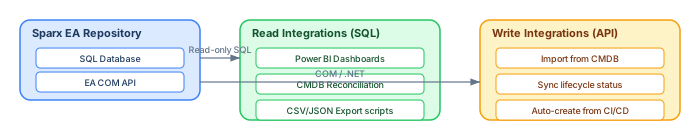
The EA database schema enables integration patterns that go far beyond what the GUI supports. By querying the schema directly (read-only) and using the EA API for writes, you can build powerful integration pipelines. modeling integration architecture with ArchiMate
Power BI integration
The most common integration: connect Power BI directly to the EA database and build dashboards. Create views or stored procedures that pre-join common table combinations, then consume them in Power BI as data sources. Typical dashboards include: application portfolio by lifecycle status, technology obsolescence heatmap, orphan element count trend, connector density per package, and model modification activity over time. application cooperation diagram
CMDB reconciliation
Architecture models and CMDBs both describe IT infrastructure, but they often drift apart. A reconciliation script queries both the EA database and the CMDB (e.g., ServiceNow), compares element lists, and generates a difference report: elements in EA but not in CMDB (modeled but not deployed), elements in CMDB but not in EA (deployed but not modeled), and attribute mismatches (different owners, different lifecycle status).
The golden rule: read via SQL, write via API
Direct SQL reads are safe and fast. Direct SQL writes are dangerous — EA uses complex internal consistency mechanisms (cross-reference tables, cached GUID lookups, XML-encoded properties) that direct SQL inserts or updates can corrupt. Always use the EA COM API (Repository.GetElementByGuid(), Element.Update(), etc.) for creating, modifying, or deleting elements. The API ensures internal consistency; direct SQL does not.
Schema governance and best practices
Read-only access for reporting
Create a dedicated read-only database user for reporting and integration queries. This prevents accidental writes and protects repository integrity. Grant SELECT permissions only on the tables your reports need.
Database views for common queries
Create database views that encapsulate your most common join patterns. For example:
-- View: elements with their package path and owner tag
CREATE VIEW v_element_catalog AS
SELECT o.Object_ID, o.Name, o.Object_Type, o.Stereotype,
       o.Status, o.Author, o.ModifiedDate,
       p.Name AS PackageName,
       owner.Value AS Owner
FROM t_object o
JOIN t_package p ON o.Package_ID = p.Package_ID
LEFT JOIN t_objectproperties owner
    ON o.Object_ID = owner.Object_ID AND owner.Property = 'Owner'
WHERE o.Object_Type NOT IN ('Package', 'Note', 'Text', 'Boundary');
Consumers (Power BI, scripts, reports) query the view instead of writing complex joins every time. When the underlying schema changes between EA versions, you update the view once — not every consumer.
Version-awareness
The EA schema evolves across major versions. New tables appear (e.g., t_objecteffort in later versions); column semantics shift slightly. Always test your queries when upgrading EA. The t_version table stores the schema version number — include a version check in your integration scripts.
Index optimization for large repositories
Repositories with more than 50,000 elements can suffer from slow queries if the database lacks proper indexes. Key indexes to verify or create:
t_object: indexes onPackage_ID,Object_Type,Stereotype,ea_guidt_connector: indexes onStart_Object_ID,End_Object_ID,Connector_Typet_diagramobjects: indexes onObject_ID,Diagram_IDt_objectproperties: composite index on(Object_ID, Property)
For SQL Server repositories, running the Database Engine Tuning Advisor against your most common queries can recommend additional indexes specific to your query patterns.
Putting it all together: a model health dashboard
Combining the queries above, you can build a "model health dashboard" that runs weekly and reports on repository quality. Here is the query set:
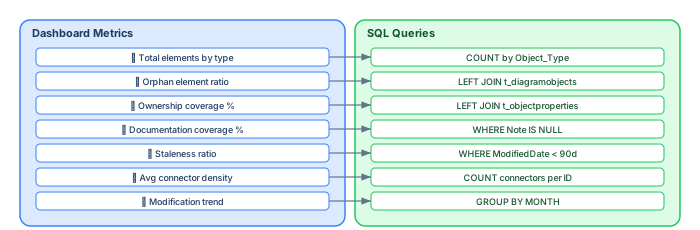
Ownership coverage percentage:
SELECT
    CAST(SUM(CASE WHEN owner.Value IS NOT NULL AND owner.Value != ''
             THEN 1 ELSE 0 END) AS FLOAT) / COUNT(*) * 100
        AS OwnershipPct,
    COUNT(*) AS TotalElements,
    SUM(CASE WHEN owner.Value IS NOT NULL AND owner.Value != ''
        THEN 1 ELSE 0 END) AS WithOwner
FROM t_object o
LEFT JOIN t_objectproperties owner
    ON o.Object_ID = owner.Object_ID AND owner.Property = 'Owner'
WHERE o.Object_Type IN ('Component', 'ArchiMate_ApplicationComponent',
                         'ArchiMate_BusinessService', 'Node');
Connector density per element (average relationships):
SELECT AVG(CAST(ConnCount AS FLOAT)) AS AvgConnectors,
       MIN(ConnCount) AS MinConnectors,
       MAX(ConnCount) AS MaxConnectors
FROM (
    SELECT o.Object_ID, o.Name,
           COUNT(c.Connector_ID) AS ConnCount
    FROM t_object o
    LEFT JOIN t_connector c
        ON o.Object_ID IN (c.Start_Object_ID, c.End_Object_ID)
    WHERE o.Object_Type NOT IN ('Package', 'Note', 'Text', 'Boundary')
    GROUP BY o.Object_ID, o.Name
) sub;
Conclusion
The Sparx EA database schema is the most underutilized asset in most EA practices. While architects interact with the GUI, the real power lies in the database: automated quality checks, integration with CMDBs and dashboards, traceability queries that span notations, and governance metrics that prove model health. Sparx EA training
Start with the core three tables — t_object, t_connector, t_package. Master the join patterns in the ER diagram. Build views that encapsulate your common queries. Connect Power BI for dashboards. And always respect the golden rule: read via SQL, write via API.
The schema is your architecture repository's API. Learn it, and your EA practice gains a level of automation, governance, and insight that the GUI alone cannot provide.
If you'd like hands-on training tailored to your team (Sparx Enterprise Architect, ArchiMate, TOGAF, BPMN, SysML, or the Archi tool), you can reach us via our contact page.
Frequently Asked Questions
What is Sparx Enterprise Architect used for?
Sparx Enterprise Architect (Sparx EA) is a comprehensive UML, ArchiMate, BPMN, and SysML modeling tool used for enterprise architecture, software design, requirements management, and system modeling. It supports the full architecture lifecycle from strategy through implementation.
How does Sparx EA support ArchiMate modeling?
Sparx EA natively supports ArchiMate 3.x notation through built-in MDG Technology. Architects can model all three ArchiMate layers, create viewpoints, add tagged values, trace relationships across elements, and publish HTML reports — making it one of the most popular tools for enterprise ArchiMate modeling.
What are the benefits of a centralised Sparx EA repository?
A centralised SQL Server or PostgreSQL repository enables concurrent multi-user access, package-level security, version baselines, and governance controls. It transforms Sparx EA from an individual diagramming tool into an organisation-wide architecture knowledge base.