⏱ 10 min read
Recommended Reading
Assumptions / unspecified constraints: No specific DBMS, identity provider, network topology, or regulator is assumed; adapt the repository topology to latency, segmentation, and audit requirements.
Executive summary
A multi-repository strategy in Sparx Enterprise Architect is fundamentally a governance and operating-model choice, not merely a database choice. The core decision is whether you treat “the repository” as a single shared system-of-record (often a DBMS repository), or whether you intentionally separate model content into multiple repositories aligned to constraints such as network segmentation, regulatory boundaries, M&A integration, or organizational autonomy. Sparx EA supports both lightweight file-based repositories and enterprise DBMS repositories, and it also supports “cloud repositories” hosted behind Pro Cloud Server, which is designed to provide secure remote access and performance optimization for high-latency connections.
In practice, the most successful multi-repo designs use one canonical repository for enterprise reference content (capabilities, standards, shared taxonomies) while allowing solution teams to work within controlled boundaries using Controlled Packages (Native/XMI externalization) and package-level version control operations. This lets you scale collaboration and enforce change boundaries without fragmenting your “truth.”
A second class of multi-repo strategies emerges when you must maintain fully separate repositories (e.g., sovereignty or legal constraints). In those cases, governance must explicitly address synchronization, publication workflows, and cross-repository traceability. Importantly, replication is a file-based mechanism in EA and cannot be performed on DBMS repositories, which means DBMS-centric strategies should rely on package control/versioning rather than replication semantics. ARB governance with Sparx EA
Background and context
Sparx Enterprise Architect repositories can be stored as a single file, a DBMS database, or a cloud-server address (Pro Cloud Server hosted). The repository is the container for one or more projects, and DBMS/cloud repositories frequently contain multiple projects where they are related or co-dependent.

A multi-repository strategy usually becomes relevant when at least one of these conditions is true:
- Scale and concurrency: you need many concurrent editors and better operational controls (DBA-grade management). Sparx positions DBMS repositories as supported configurations for Enterprise Architect, with schema creation handled outside the client tool.
- Geography and latency: remote architects need stable performance; Pro Cloud Server is described as providing secure encrypted links and optimization for high-latency WAN connections.
- Segmentation / sovereignty: a model must remain inside a network boundary or region.
- Governance maturity: you want explicit ownership, controlled releases, baselines, audits, and permission-bound updates (security-enabled repositories).
The biggest conceptual mistake is thinking “multi-repository” is required for modularity. In EA, modularity can be achieved inside one repository via structure, permissions, package boundaries, and controlled package/version control workflows, which often preserves cross-domain traceability more effectively than splitting databases.
Design patterns and reference architectures
A strong multi-repo strategy is usually a blend of topology (where repositories live) and boundary mechanisms (how change is controlled). Below are four patterns that appear repeatedly in real deployments.
Canonical DBMS repository with governed package boundaries
This is the “default enterprise” pattern:
- One DBMS repository as the authoritative system-of-record.
- Security enabled; permissions and groups defined.
- Domain teams own specific root packages; cross-domain content is read-only except to librarians.
- Use package version control operations on controlled packages where needed.
This pattern optimizes global traceability and avoids duplicated truth. It also supports “single query” repository analytics.
Cloud-access front door with Pro Cloud Server
When you have remote users or want browser-based access patterns:
- Repository (DBMS or file-based) hosted behind Pro Cloud Server.
- WebEA enabled for stakeholder access; configuration managed in Pro Cloud Server settings.
This pattern is often less about multi-repo and more about “multi-access.” It becomes a multi-repo enabler when you host multiple projects behind the same secured access layer.
Multi-repository federation with published “products”
Use this when legal or operational boundaries require separation:
- Separate repositories per business unit/region.
- Cross-repo links are either avoided or implemented via stable identifiers and catalog overlays (requires governance discipline).
File-based replication for disconnected modeling
EA supports replication for specific file-based formats, with a design master and replicas that synchronize back. It supports replication on .qea/.qeax (SQLite) and .eap/.eapx (Jet), and explicitly notes replication is not performed on DBMS repositories.
This is useful for occasional disconnected work, but it introduces merge/synchronization governance costs and is generally not the best scaling strategy for enterprise-wide collaboration. ArchiMate modeling standards
Repository topology comparison table
| Topology | Best for | Governance strengths | Typical risks | EA features that matter |
|---|---|---|---|---|
| Single DBMS “system of record” | Enterprise-wide alignment | Central standards, traceability, security | Central bottleneck if ownership not federated | DBMS repositories, permissions, package VC ops |
| DBMS + Pro Cloud Server access layer | Distributed teams | Secure remote access, performance optimization | Operational dependency on Pro Cloud Server | Cloud repos, Pro Cloud Server config |
| Multiple isolated repos + publication | Sovereignty / legal separation | Strong isolation, clear boundary | Fragmented truth, hard cross-repo impact analysis | Controlled packages, baselines |
| File-based + replication | Disconnected/offline | Simple deployment | Merge pain; not DBMS; risk of drift | Replication support and limits |
Implementation playbook
A defensible multi-repo strategy is built from a few operational decisions that you document upfront.
Define your repository classification scheme
At minimum, classify repositories as:
- Authoritative (source of truth; changes are governed).
- Working (initiative-level modeling; may be transient).
- Published/consumable (read-only views, documentation outputs, WebEA access).
This classification then drives access control, review cadence, baseline policy, and publication.
Choose the “change unit”: packages, not projects
EA’s configuration management primitives are largely oriented around packages:
- Controlled Packages externalize a package to Native/XMI for loading/saving to a file.
- Package-level version control operations become available once version control is set for a package.
- XMI-based workflows allow integration with third-party version control systems.
Practically, you will get better governance outcomes if you standardize “root package boundaries” that match ownership boundaries.
Decide how remote collaboration works
If you have remote architects or high-latency access, evaluate Pro Cloud Server as the supported “cloud repository” hosting mechanism; Sparx describes it as offering secure encrypted links and optimizing remote access for WAN latency. Sparx EA training
Define security and permissions early
With security enabled, EA assigns access permissions to users/groups to control update functions; users can still view information even if they lack update permissions.
Your multi-repo approach should explicitly define:
- Who can create packages at root level.
- Who can baseline, approve, and publish.
- Who can change reference data or standards packages.
Governance, checklists, and controls
A multi-repo strategy fails most often because it is treated as an IT admin task rather than a governance product. The following checklist is designed to be auditable. EA governance checklist
Repository governance checklist
- Repository inventory exists: for each repository, document purpose, owner, classification, and how it is accessed.
- Access model is defined: security enabled (or not), permission sets defined and assigned.
- Change boundaries are explicit: root packages mapped to accountable owners and review processes.
- Publication pipeline exists: what constitutes “published architecture” (WebEA view, report output, baseline snapshot).
- Baseline policy is defined: when baselines are taken, and how they are used to detect drift and revert.
Workflow diagram (publication and approval)
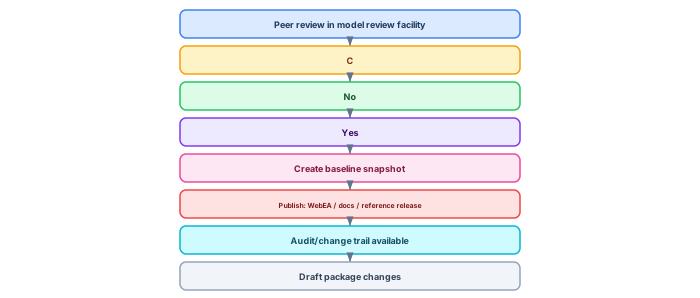
Model reviews are supported as a formal collaboration mechanism to assess model content, including elements and diagrams.
Baselines create package snapshots and allow comparison and reversion to a previous state.
Auditing records what changed, when, and who did it.
Pitfalls and anti-patterns
Anti-pattern: “Replication as enterprise scaling.” Replication is file-based and explicitly not performed on DBMS repositories; using it as a main enterprise pattern often produces drift and merge governance issues.
Anti-pattern: “Many repos, no publication contract.” If repositories are split but no publication pipeline is defined, stakeholders will consume whatever is easiest to export—creating shadow architecture.
Anti-pattern: “Version control everywhere without boundaries.” Controlled packages and package version control are powerful, but uncontrolled granularity can create coordination overhead. EA’s package-based VC operations are intended to create coherent change units.
Examples and case scenarios
Scenario: Global enterprise with domain autonomy
- One DBMS repository, security enabled.
- Domain packages mapped to business domains; enterprise reference packages owned by central EA.
- WebEA used for read access by non-architect stakeholders.
Scenario: Regulated subsidiary isolation
- Separate repository for regulated subsidiary.
- Only approved baselined packages are exported/published to a “group architecture portal.”
- Cross-repo traceability handled via published catalogs and stable IDs.
Key takeaways
A mature multi-repository strategy in EA is not about splitting databases; it is about designing ownership boundaries, publication contracts, and auditable change control using EA’s package-based configuration mechanisms (controlled packages, package VC ops, baselines) and repository access controls (security permissions, Pro Cloud Server/WAN optimization where needed).
- Sparx EA DBMS repositories overview.
- Repository types and definition (file/DBMS/cloud server).
- Controlled Packages (Native/XMI externalization).
- Package version control operations.
- XMI for version control integration.
- Cloud repositories overview and WAN optimization claim.
- Replication support and DBMS limitation.
- Model security and permissions list.
- Baselines definition and revert.
- Model reviews (formal assessment collaboration).
Synchronization workflow: keeping federated repositories coherent

The most critical operational challenge in a multi-repository strategy is keeping repositories synchronized. Without a disciplined sync process, domain repositories drift apart — naming conventions diverge, shared reference elements become stale, and cross-domain traceability breaks.
The synchronization workflow follows five stages. First, the central repository defines and publishes the shared metamodel, reference architecture, and governance standards. Second, domain teams model within their local repositories, following the shared conventions but maintaining autonomy for domain-specific content. Third, package-level synchronization pushes approved domain content to the central repository on a defined cadence (weekly or bi-weekly). Fourth, governance validation scripts run against the synchronized content to check naming compliance, required properties, and relationship validity. Fifth, validated content is promoted to a published baseline that serves as the authoritative enterprise view.
Repository selection decision matrix
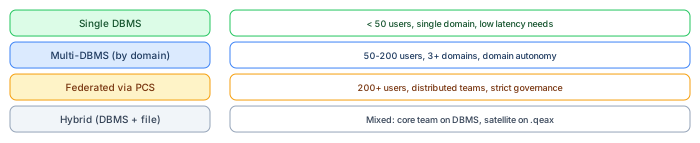
Choosing the right repository pattern depends on team size, domain complexity, geographic distribution, and governance maturity. Single DBMS works for small teams (under 50 users) in a single domain where low-latency access is critical. Multi-DBMS partitioned by domain suits organizations with 50–200 users across 3+ domains that need autonomy with central oversight. Federated via Pro Cloud Server is the enterprise pattern for 200+ users across distributed teams with strict governance requirements. The hybrid pattern combines DBMS for the core architecture team with file-based (.qeax) repositories for satellite teams or contractors who need offline access. enterprise cloud architecture patterns
The key principle: start with the simplest pattern that meets your current needs, and plan the migration path to the next level. Most organizations that start with federated architecture before they have 50 active users waste months on infrastructure that provides no value at that scale.
If you’d like hands-on training tailored to your team — Sparx Enterprise Architect, BPMN, SysML, Apache Kafka or the Archi tool — or modelling coaching in ArchiMate and TOGAF-aligned governance, you can reach us via our contact page.
Frequently Asked Questions
What is Sparx Enterprise Architect used for?
Sparx Enterprise Architect (Sparx EA) is a comprehensive UML, ArchiMate, BPMN, and SysML modeling tool used for enterprise architecture, software design, requirements management, and system modeling. It supports the full architecture lifecycle from strategy through implementation.
How does Sparx EA support ArchiMate modeling?
Sparx EA natively supports ArchiMate 3.x notation through built-in MDG Technology. Architects can model all three ArchiMate layers, create viewpoints, add tagged values, trace relationships across elements, and publish HTML reports — making it one of the most popular tools for enterprise ArchiMate modeling.
What are the benefits of a centralised Sparx EA repository?
A centralised SQL Server or PostgreSQL repository enables concurrent multi-user access, package-level security, version baselines, and governance controls. It transforms Sparx EA from an individual diagramming tool into an organisation-wide architecture knowledge base.