⏱ 5 min read
Recommended Reading
Executive summary
Hybrid cloud introduces a “split reality” governance challenge: some architecture assets must stay within regulated/on-prem boundaries, while stakeholders still need shared visibility and review across the enterprise. Pro Cloud Server is described as providing seamless access to repositories “held anywhere in the world” with secure encrypted links and WAN optimization, making it a key enabling component for hybrid collaboration when deployed appropriately. enterprise cloud architecture patterns
Hybrid governance must define repository topology (single DBMS vs multiple segregated repos), access channels (EA client vs WebEA), and security controls (HTTPS, authentication, permissions). EA’s documentation covers model security and access permission mechanisms, and also describes that HTTPS can be used to restrict access when connecting to a cloud-based server. hybrid cloud architecture
Operationally, Pro Cloud Server configuration is stored in SSProCloud.config and is not overwritten by updates by design—important for controlled configuration management in regulated environments. multi-cloud architecture strategy
- Reference architectures: single repo + access layer vs segregated repos
- Security and identity: permissions, HTTPS, audit trails
- Collaboration: WebEA and review workflows
- Operational controls: config management and change windows
- Pitfalls and governance checklists

- Cloud repositories overview (secure encrypted links, WAN optimization).
- Pro Cloud Server repositories concept.
- Model security overview (permissions).
- Repository configuration management note (HTTPS access refinement).
- Pro Cloud Server configuration persistence (SSProCloud.config).
- WebEA installation/config.
- Auditing for accountability.
- Baselines for approved states.
Hybrid cloud architecture in the EA model
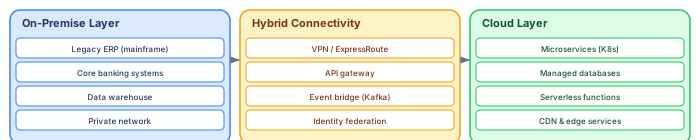
Modeling hybrid cloud environments in Sparx EA requires a clear structure that maps physical deployment reality. The three-layer model separates on-premise infrastructure, hybrid connectivity, and cloud-native services, with explicit relationships showing how applications span both environments. Sparx EA training
On-premise layer: Model legacy systems (mainframes, ERPs), core databases, and the private network infrastructure. Tag each element with Location: On-Premise, Data Center: DC-Brussels-01, and Migration Status: Keep / Migrate / Retire. These elements represent the gravity that constrains cloud migration — you cannot move what you do not model.
Hybrid connectivity layer: Model the integration fabric: VPN tunnels, ExpressRoute/Direct Connect circuits, API gateways that bridge on-premise and cloud, event bridges (Kafka clusters that replicate between environments), and identity federation services. This layer is often underdocumented and is the source of most hybrid cloud failures — missing connectivity in the model means missing connectivity in the architecture review.
Cloud layer: Model cloud-native components: Kubernetes clusters, managed databases (RDS, Cosmos DB), serverless functions, CDN services. Tag each with Cloud Provider: AWS / Azure / GCP, Region: eu-west-1, Service Type: IaaS / PaaS / SaaS.
Governance challenges unique to hybrid cloud
Data residency: Regulations (GDPR, DORA) constrain where data can be stored and processed. The EA model must show data flow paths — which data objects traverse the cloud boundary and in which direction. Tag Data Objects with Classification: Public / Internal / Confidential / Restricted and Residency: EU-Only / Global.
Latency sensitivity: Some application interactions cannot tolerate the latency of crossing the cloud boundary (real-time payment processing, high-frequency trading). Model these as constraints on the relationships between application components and technology services — the model should make it visible that certain components must remain co-located.
Cost visibility: Cloud costs are notoriously opaque. Tag cloud technology services with Monthly Cost Estimate and Cost Owner. Aggregate these in reports to give the architecture board visibility into infrastructure spend per domain.
Getting more from your Sparx EA investment
Most organizations use less than 20% of Sparx Enterprise Architect's capabilities. Three underutilized features deliver disproportionate value when activated: model validation, document generation, and the automation API. Sparx EA best practices
Model validation checks every element and relationship against metamodel rules, catching errors that human reviewers miss. Enable ArchiMate validation under Specialize → Technologies to prevent invalid relationships (for example, a Composition between elements in different layers). Add custom validation scripts that enforce your organization's naming conventions, required tagged values, and maximum elements per diagram.
Document generation produces Word or PDF reports directly from the model. Configure templates that pull element properties, tagged values, relationships, and diagrams into formatted documents. When the model changes, regenerate the document — it is always synchronized. This eliminates the manual document maintenance that typically consumes 30-40% of architect time.
The automation API (JavaScript, VBScript, or .NET) enables bulk operations that would take hours manually: updating tagged values across hundreds of elements, generating traceability matrices, exporting element catalogs to Excel, or validating naming conventions. A single validation script that runs nightly catches more errors than a monthly manual review.
If you’d like hands-on training tailored to your team — Sparx Enterprise Architect, BPMN, SysML, Apache Kafka or the Archi tool — or modelling coaching in ArchiMate and TOGAF-aligned governance, you can reach us via our contact page.
Frequently Asked Questions
What is Sparx Enterprise Architect used for?
Sparx Enterprise Architect (Sparx EA) is a comprehensive UML, ArchiMate, BPMN, and SysML modeling tool used for enterprise architecture, software design, requirements management, and system modeling. It supports the full architecture lifecycle from strategy through implementation.
How does Sparx EA support ArchiMate modeling?
Sparx EA natively supports ArchiMate 3.x notation through built-in MDG Technology. Architects can model all three ArchiMate layers, create viewpoints, add tagged values, trace relationships across elements, and publish HTML reports — making it one of the most popular tools for enterprise ArchiMate modeling.
What are the benefits of a centralised Sparx EA repository?
A centralised SQL Server or PostgreSQL repository enables concurrent multi-user access, package-level security, version baselines, and governance controls. It transforms Sparx EA from an individual diagramming tool into an organisation-wide architecture knowledge base.