⏱ 22 min read
Most UML diagrams in enterprise architecture are not wrong because people can’t draw boxes. They’re wrong because people don’t know what kind of thing they are drawing.
That sounds harsh. Good. It should.
In a lot of architecture teams, UML gets treated like decorative notation. A component diagram becomes a vague system landscape. A class diagram becomes a data model. A deployment diagram becomes “some boxes in AWS.” Sequence diagrams turn into theater. Everyone nods, the PowerPoint gets approved, and six months later the delivery teams are still arguing over ownership, integration boundaries, and what exactly “the service” even is.
The problem is not UML itself. The problem is that most people use UML without understanding the metamodel underneath it. And once you ignore the metamodel, you stop modeling and start sketching. Sketching is fine for workshops. It is terrible for enterprise decisions. UML modeling best practices
Let’s make this simple early, because this is where people get lost.
The simple version: what the metamodel actually is
The UML metamodel is the definition of what UML elements are, what they mean, and how they can relate to each other. UML for microservices
That’s it.
If a diagram is the picture, the metamodel is the grammar.
If the diagram is a map, the metamodel is what makes “road,” “border,” and “city” different things.
Without that grammar, teams mix concepts constantly:
- application vs component
- interface vs API
- actor vs user role
- class vs entity
- deployment node vs runtime environment
- event vs message vs command
And then they wonder why their models are inconsistent.
In enterprise architecture work, this matters because architecture is not just communication. It is decision support. If your model collapses different concepts into one blob, your governance, security design, integration strategy, and operating model all get weaker. ArchiMate for governance
My strong opinion: a bad UML model is worse than no UML model.
No model at least forces people to ask questions. A bad one gives false confidence.
Why architects keep making the same UML mistakes
A lot of enterprise architects learned UML in one of three broken ways:
- From developers, who usually know class and sequence diagrams but not the broader modeling semantics.
- From certification courses, which often emphasize notation over judgment.
- From old enterprise standards, where every diagram type got repurposed into a generic box-and-line template.
So what happens? Architects use familiar shapes to express things UML never meant to express in that way. And because the notation looks official, nobody challenges it.
There’s also a dirty secret here: many architecture problems are not notation problems. They’re thinking problems. UML just exposes them.
If you don’t know whether your Kafka topic is an interface contract, a deployment artifact, a communication path, or a business event stream, no notation can save you. The metamodel helps because it forces you to choose what kind of thing it is in the model.
That act of choosing is where architecture actually happens.
Why the metamodel matters in real architecture work
In real enterprise work, you are rarely drawing diagrams for academic purity. You are trying to answer questions like:
- Which system owns customer identity?
- Where is authorization enforced?
- What depends on Kafka and what only publishes to it?
- Which services can be deployed independently in cloud?
- What breaks if the IAM platform is unavailable?
- Is this integration synchronous, asynchronous, or just hand-wavy?
These are not cosmetic issues. They affect funding, sequencing, security review, resilience design, and operational accountability.
The metamodel matters because it keeps types of things separate. And architecture gets better when types are clear.
For example:
- A component is not the same as a node.
- A business actor is not the same as an application user account.
- A class is not the same as a database table.
- A message in a sequence diagram is not automatically an event in an event-driven architecture.
- A deployment environment is not the same as a cloud subscription or Kubernetes cluster.
Seems obvious. Yet teams mix these every day.
The biggest UML modeling mistakes architects make
Let’s get into the mistakes. Not theoretical mistakes. The ones that show up in architecture boards, target state decks, and implementation confusion.
1. Mixing abstraction levels in one diagram
This is probably the number one enterprise modeling failure.
You’ll see a diagram with:
- a business role like “Customer Service Agent”
- a SaaS platform
- a Kafka topic
- an IAM token
- an AWS VPC
- a microservice
- a database table
All on one page, all connected by arrows, all pretending to be at the same level of abstraction.
They are not.
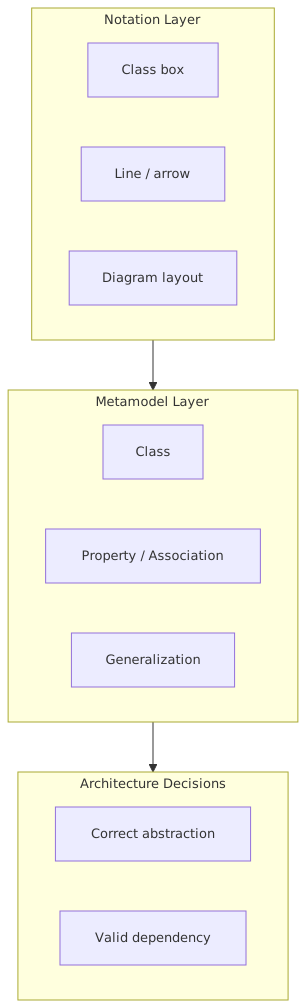
The metamodel explains the problem because UML elements belong to different conceptual categories. A deployment node, actor, component, artifact, class, and object are not interchangeable. They exist for different viewpoints.
When you mash them together, relationships become ambiguous. What does the arrow mean?
- uses?
- hosts?
- depends on?
- sends message to?
- authenticates with?
- owns?
- contains?
If one arrow means six things, your model is lying.
Real-world architecture impact
In a bank, I’ve seen a target architecture for customer onboarding that showed:
- branch user
- onboarding portal
- IAM platform
- Kafka
- customer domain service
- “KYC event”
- Azure tenant
all in one logical view.
Looks impressive. Completely useless.
Why? Because no one could tell:
- whether IAM was a runtime dependency or just an identity provider for login
- whether Kafka was carrying commands, events, or notifications
- whether customer onboarding was a component or a business capability
- whether Azure tenant boundaries mapped to deployment isolation
The result was predictable. Security assumed one trust boundary. Platform engineering assumed another. Integration teams created topic structures around team ownership rather than domain ownership. Then everyone blamed “complexity.”
No. The model was bad.
Better practice
Separate views by concern:
- business interaction view
- application/component view
- integration/message flow view
- deployment/runtime view
- security/trust boundary view
Contrarian thought: one-page architecture diagrams are overrated.
Executives say they want one picture. What they really want is one story. That story can require multiple diagrams.
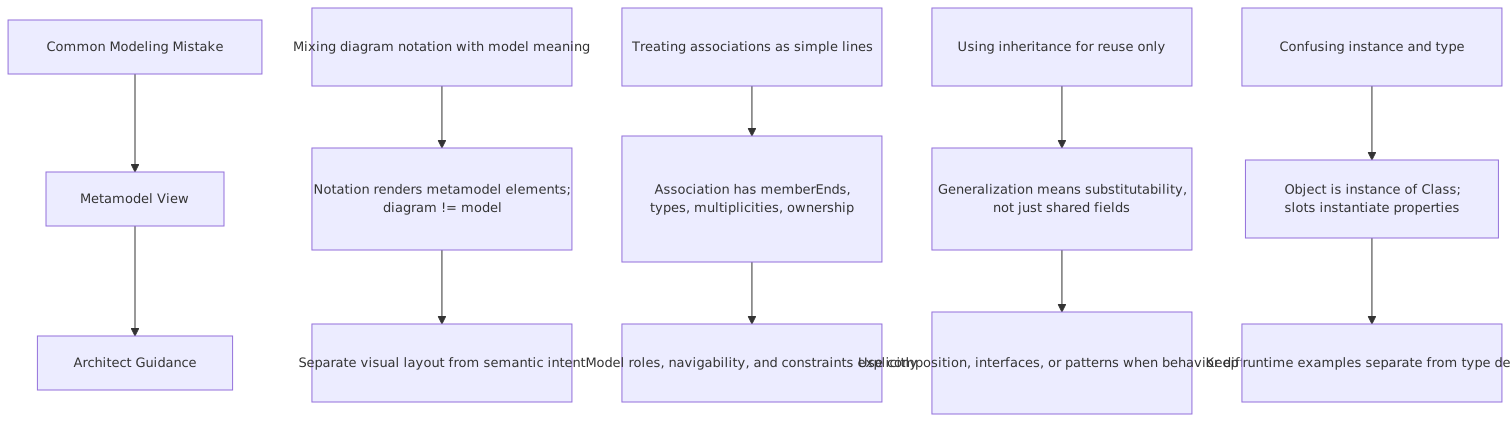
2. Treating component diagrams like generic system landscapes
This is everywhere.
Architects draw a UML component diagram, but what they really mean is “here are some systems.” So every box becomes a component. Core Banking? Component. Salesforce? Component. Kafka? Component. IAM? Component. Mobile App? Component.
Technically, maybe. Practically, sloppy.
A UML component has semantics. It encapsulates implementation and exposes provided/required interfaces. It is not just any named technology box.
The metamodel helps because it asks: what is this thing in the model?
- Is Kafka a component in your architecture? Maybe as a platform service.
- Is a Kafka topic a component? Usually no.
- Is IAM one component? Maybe not. It could include identity provider, policy decision point, user directory, token service, federation gateway.
- Is “AWS” a component? Definitely not in any useful sense.
Why this mistake happens
Because component diagrams are easy to fake. They look structured while allowing broad interpretation. Enterprise architects love them because they feel safe: high-level enough to avoid detail, formal enough to look rigorous.
That’s exactly why they get abused.
Better practice
Use components when you can answer:
- What functionality does this component encapsulate?
- What interfaces does it provide?
- What dependencies does it require?
- What is inside it that consumers should not care about?
If you cannot answer those, you probably want a different view.
Here’s a practical guide.
That table alone would clean up half the architecture decks I review.
3. Confusing classes, entities, and data stores
This one comes straight from developers into enterprise architecture and causes endless model drift.
A UML class is not automatically:
- a database table
- a canonical data entity
- a domain aggregate
- a JSON schema
- a Kafka message payload
It can be used to represent structure, yes. But the metamodel distinguishes between classifiers, instances, attributes, associations, and more. Once you flatten all of these into “data object,” you lose precision.
Why this matters in enterprise architecture
In banking especially, data semantics are political. “Customer,” “Account,” “Party,” “User,” “Principal,” and “Identity” are not synonyms. If your UML class model casually treats them as interchangeable because they all look like boxes with attributes, you create downstream damage.
A common example in IAM:
- Customer is a business party.
- User is a digital identity used for authentication.
- Principal is a security subject in an authorization context.
- Profile may be a customer preference record.
- Account might be a banking account or a login account.
I have seen enterprise models where one class named CustomerAccount was somehow expected to satisfy onboarding, IAM, CRM, and core banking. That is not simplification. That is conceptual debt.
Better practice
Use structural models intentionally:
- If modeling business concepts, say so.
- If modeling application data structures, say so.
- If modeling integration payloads, say so.
- If modeling persistence, do not pretend it is the same thing as your domain model.
Contrarian thought: canonical data models are often architecture vanity projects.
Not always. But often. Especially when the UML class diagram becomes a political compromise instead of a useful semantic model.
4. Using sequence diagrams to fake architecture certainty
Sequence diagrams are powerful. They are also incredibly easy to misuse.
What often happens is this:
An architect creates a sequence diagram for a future-state flow involving mobile app, API gateway, IAM, fraud service, Kafka, notification service, and core banking. The messages are neat. The order is clean. The interactions look deterministic.
Reality, of course, is messier:
- asynchronous retries
- partial failure
- token expiration
- eventual consistency
- compensating actions
- duplicate events
- out-of-order delivery
But the sequence diagram quietly implies certainty and linearity.
The metamodel explains part of this. A sequence diagram models interactions among lifelines over time. It does not magically define operational guarantees. A message on the diagram is not a completed enterprise integration contract. It is an interaction element in a scenario.
That distinction matters.
Kafka example
In event-driven banking architectures, I often see sequence diagrams with steps like:
- Customer Service publishes
CustomerUpdated - Kafka sends to AML Service
- AML Service updates risk profile
- Notification Service sends email
This is superficially fine. But the model usually hides the hard questions:
- Is
CustomerUpdatedan event or a command-like trigger? - What is the delivery guarantee?
- Can AML process stale versions?
- What is the partitioning key?
- Who owns schema evolution?
- Is email triggered from the same event or from a downstream decision event?
The sequence diagram is not wrong. It’s incomplete. The mistake is treating it as sufficient architecture.
Better practice
Use sequence diagrams for scenarios, not truth claims.
Pair them with:
- component view for responsibility boundaries
- information/event model for message semantics
- deployment/runtime view for topology
- operational assumptions for failure and retry behavior
If you’re doing Kafka architecture and your only model is a sequence diagram, you are not done. Not even close.
5. Modeling IAM as a box instead of a trust system
This one annoys me more than it should.
A lot of enterprise diagrams show IAM as a single shared component in the middle, connected to every application. That is not architecture. That is superstition.
IAM is not “the login thing.” It is usually a set of capabilities and runtime functions:
- identity proofing
- authentication
- federation
- token issuance
- policy evaluation
- role or attribute management
- session management
- privileged access control
- directory services
- audit and consent
The UML metamodel helps because it pushes you to distinguish elements and relationships instead of drawing one magical security box.
Real enterprise example: retail bank modernization
A bank was modernizing customer channels into cloud-native services. Their target architecture diagram showed:
- Mobile App
- API Gateway
- IAM
- Customer Service
- Payments Service
- Kafka
- Core Banking
All traffic appeared to go through IAM.
Looks secure, right? It wasn’t.
The actual architecture had at least four different concerns:
- Customer authentication through an external identity provider.
- Workforce admin access via corporate federation.
- Service-to-service authorization using workload identity and mTLS.
- Fine-grained authorization for payment entitlements and transaction limits.
Because the UML model collapsed all of that into one “IAM component,” teams made bad assumptions:
- API teams assumed token validation was enough for authorization.
- Security teams assumed central IAM owned access policy decisions.
- Product teams assumed customer identity records were mastered in IAM.
- Platform teams assumed Kafka consumers could reuse human access roles.
All wrong.
Once we decomposed the model into proper concerns, the architecture improved fast. The bank ended up with:
- a clear authentication flow for customers
- separate workforce identity federation
- service identity for cloud workloads
- domain authorization in payment services
- event-level access controls for Kafka topics
- explicit trust boundaries by channel and runtime
The modeling change wasn’t cosmetic. It changed delivery decisions, security controls, and ownership.
Better practice
For IAM-heavy architectures, model at least these separately:
- actors/principals
- authentication interactions
- authorization responsibility
- identity stores/directories
- trust boundaries
- runtime enforcement points
Contrarian thought: centralized IAM does not mean centralized authorization logic.
In fact, for many enterprise domains, centralizing all authorization is a terrible idea.
6. Confusing deployment diagrams with cloud marketing diagrams
If I see one more deployment diagram where Kubernetes, VPC, subnet, EC2, managed database, and “microservice” are all shown as the same kind of nested rectangle, I may become even more unpopular than I already am.
Cloud has made this worse because vendors trained everyone to think in service icons, not modeling semantics.
A UML deployment diagram is about runtime topology: nodes, artifacts, execution environments, and deployment relationships. It is not a generic cloud architecture poster.
Common mistake
Architects draw:
- AWS account
- EKS cluster
- namespace
- pod
- service
- Kafka topic
- Lambda
- IAM role
all in one deployment diagram without distinguishing what is a node, what is an execution environment, what is an artifact, and what is merely configuration or platform policy.
The metamodel matters here because deployment semantics are specific. If you don’t model runtime allocation correctly, you can’t reason well about:
- resilience
- fault domains
- scaling boundaries
- blast radius
- network segmentation
- operational ownership
Better practice
A useful cloud deployment model should answer:
- Where does this software execute?
- What hosts what?
- What is replicated?
- What is isolated?
- What is shared?
- What trust boundary exists between these runtime nodes?
For example in a bank using Kafka on cloud:
- Kafka brokers or managed Kafka cluster are runtime platform nodes.
- Producer and consumer services are deployed artifacts or components allocated to nodes.
- Kubernetes is an execution environment.
- A topic is not a node.
- IAM roles are not deployment nodes.
- Network policies are not components.
This sounds obvious when written plainly. Yet enterprise diagrams violate it every day.
7. Drawing arrows without relationship meaning
This is the silent killer.
In many UML diagrams, arrows are just vibes.
One arrow can mean:
- sends data to
- depends on
- invokes
- controls
- authenticates with
- deployed on
- publishes to
- owns
- replicates to
If you don’t know what the relationship means, the diagram is decoration.
The metamodel is useful precisely because UML relationships are typed. Association, dependency, realization, generalization, deployment, communication path, include, extend, and so on. Even when you simplify the notation for readability, you still need semantic discipline.
In real architecture work
This matters during review and governance. Suppose your cloud target state shows: EA governance checklist
Payments Service -> IAM
What does that mean?
- Payments Service authenticates users through IAM?
- It validates JWTs issued by IAM?
- It queries IAM for entitlements?
- It uses IAM for workload identity?
- It depends on IAM at runtime for every transaction?
- It was onboarded through IAM governance?
Those are radically different architecture implications.
A review board cannot evaluate resilience, security, and delivery risk if relationships are undefined.
Better practice
At minimum, label relationships when ambiguity exists. Better yet, use a legend with a small set of allowed relationship meanings per diagram.
Strong opinion: diagram readability is not improved by removing semantics.
That’s just laziness disguised as simplicity.
8. Forgetting that views are partial, not total
A common enterprise failure is expecting one UML diagram to settle all disagreements. It won’t.
The metamodel already assumes multiple diagram types because different concerns need different views. Structure, behavior, interaction, deployment, state, use case—they exist because the system is not one thing.
Architects get into trouble when they present one view as if it is the architecture. Then delivery teams discover omitted assumptions and fill the gaps themselves.
This is especially dangerous in regulated industries like banking, where omitted assumptions around identity, audit, and operational controls become serious issues later.
Better practice
Treat each diagram as answering a specific question.
Examples:
- Component view: Who owns what responsibility?
- Sequence view: What happens in this scenario?
- Deployment view: Where does it run?
- Information model: What are the key concepts and payloads?
- Security view: Where are trust and enforcement boundaries?
If a diagram tries to answer all five, it usually answers none of them well.
A practical enterprise example: digital onboarding in a bank
Let’s make this concrete.
Imagine a bank launching a new digital onboarding platform in cloud. The architecture includes:
- mobile and web channels
- API gateway
- customer onboarding service
- document verification vendor
- IAM platform
- Kafka event backbone
- customer master service
- AML screening
- notification service
- core banking integration
A bad UML model usually looks like this:
- all systems shown as components
- IAM as one central box
- Kafka as one component with arrows from everything
- customer represented as a class and an actor interchangeably
- cloud environment mixed into the same diagram
- arrows unlabeled
- onboarding flow shown as one happy-path sequence
That model creates these enterprise problems:
- unclear ownership of customer identity vs customer profile
- confusion over whether onboarding completion is an event or command
- no distinction between login authentication and account opening authorization
- no visibility into asynchronous AML screening and compensation
- poor understanding of runtime dependencies during vendor outage
- weak auditability for regulated approvals
A better architecture set would include:
- Business/use-case view
Customer, Operations Agent, Compliance Officer as actors with onboarding and review use cases.
- Component/application view
Onboarding Service, Identity Provider, Customer Master, AML Service, Notification Service, Core Banking Adapter, with explicit interfaces.
- Event/information view
OnboardingStarted, DocumentsVerified, CustomerScreeningRequested, CustomerApproved, AccountOpened, each with ownership and semantics.
- Sequence diagrams for key scenarios
Happy path, vendor timeout, AML hit, duplicate submission.
- Deployment/runtime view
Channel front end, API gateway, Kubernetes workloads, managed Kafka, IAM integration points, trust boundaries.
- Security view
Customer authentication, workforce access, service identity, policy enforcement, audit trail.
Notice what happened. We did not add bureaucracy. We added clarity.
And that clarity helps with real work:
- delivery teams know what to build
- security knows where to enforce controls
- platform teams know runtime dependencies
- data teams know event ownership
- operations know failure modes
- architecture governance can assess risk properly
That is what UML is for when used well.
How to use the metamodel without becoming unbearable
There is a risk here. Some architects hear “metamodel” and turn into notation police. Don’t do that. Nobody wants a review session derailed because someone used the wrong arrowhead in a workshop sketch.
The point is not pedantry. The point is conceptual integrity.
Here’s the practical rule set I use:
1. Decide the viewpoint first
Before drawing, ask: what question is this diagram answering?
2. Name the element types explicitly
Are these actors, components, events, nodes, classes, or services? Say it.
3. Keep abstraction levels consistent
Do not mix business roles, runtime infrastructure, and message payloads unless the purpose of the diagram explicitly requires it.
4. Define relationship meanings
Especially for enterprise integration and security diagrams.
5. Model scenarios separately from structure
A sequence is not a component model. A deployment view is not an information model.
6. Be honest about uncertainty
If event ownership, trust boundaries, or authorization responsibilities are undecided, show that. Fake precision is poison.
7. Use UML as a thinking tool, not a religion
Sometimes a simplified notation is fine. But simplification should preserve meaning, not erase it.
That last one matters. Real architects adapt notation. They do not worship it. But they also do not flatten everything into anonymous rectangles and then call it architecture.
The contrarian take: many UML problems are really enterprise architecture problems
Here’s the uncomfortable truth.
A lot of teams blame UML because UML exposes the fact that they have not made key architecture decisions.
They say:
- “UML is too complex.”
- “Stakeholders don’t understand it.”
- “We just need simple diagrams.”
Sometimes true. Often nonsense.
What they really mean is:
- we haven’t defined ownership
- we haven’t separated business and technical concepts
- we haven’t decided where authorization belongs
- we haven’t clarified event semantics
- we haven’t modeled runtime boundaries
- we want one diagram to hide unresolved issues
The metamodel gets blamed because it refuses to let vague thinking look precise.
That’s why I still defend UML, cautiously. Not because it is perfect. It isn’t. Some parts are bloated, some teams overuse it, and yes, many stakeholders prefer simpler visuals. Fair enough.
But when architecture gets serious—banking integration, IAM redesign, Kafka event governance, cloud operating model—semantic discipline matters. And UML with metamodel awareness gives you that discipline better than most ad hoc diagramming. architecture decision record template
Final thought
If you remember one thing, remember this:
Most UML mistakes happen when architects forget that notation elements represent different kinds of things.
The metamodel is not academic overhead. It is the reason a component is not a node, an actor is not a role, a class is not a table, and a message is not automatically an event contract.
In enterprise architecture, those distinctions are where the expensive mistakes hide.
So yes, draw simpler diagrams when needed. Be pragmatic. Don’t force every audience through formal UML purity. But do the thinking properly underneath. If your model cannot explain what kind of thing each element is, it is probably not architecture. It is branding.
And enterprise transformation has enough branding already.
FAQ
1. Do enterprise architects really need to understand the UML metamodel?
Yes. Not every detail, but enough to know what kinds of elements you are using and what relationships mean. Without that, diagrams become inconsistent and misleading.
2. Can I use simplified UML and still be rigorous?
Absolutely. In fact, you often should. The key is to simplify notation without collapsing semantics. Fewer symbols is fine. Fewer meanings is not.
3. Why do UML diagrams fail so often in cloud and Kafka architectures?
Because teams mix runtime topology, logical services, event semantics, and platform services in one picture. Cloud and event-driven systems need multiple views. One generic component diagram is rarely enough.
4. How should IAM be modeled in UML?
Not as one magical box. Separate actors, authentication flows, authorization responsibility, identity stores, trust boundaries, and enforcement points. Otherwise teams confuse login, identity, and access control.
5. What is the most common UML mistake in real architecture work?
Mixing abstraction levels. It causes almost everything else: bad dependencies, vague arrows, confused ownership, and misleading decisions. If you fix that one habit, your models improve fast.
UML Modeling Mistakes and How the Metamodel Explains Them
Frequently Asked Questions
What is a UML metamodel?
A UML metamodel is a model that defines UML itself — it specifies what element types exist (Class, Interface, Association, etc.), what relationships are valid between them, and what constraints apply. It uses the Meta Object Facility (MOF) standard, meaning UML is defined using the same modeling concepts it uses to define other systems.
Why does the UML metamodel matter for enterprise architects?
The UML metamodel determines what is and isn't expressible in UML models. Understanding it helps architects choose the right diagram types, apply constraints correctly, use UML profiles to extend the language for specific domains, and validate that models are internally consistent.
How does the UML metamodel relate to Sparx EA?
Sparx EA implements the UML metamodel — every element type, relationship type, and constraint in Sparx EA corresponds to a metamodel definition. Architects can extend it through UML profiles and MDG Technologies, adding domain-specific stereotypes and tagged values while staying within the formal metamodel structure.