⏱ 19 min read
Most architecture dashboards lie.
They glow green while the system rots underneath. Delivery teams keep shipping, platform teams keep adding rules, and enterprise architects keep presenting slides with neat boxes and arrows. But none of that tells you whether the architecture is actually getting healthier. A real architecture is not a static blueprint. It is a living thing under pressure: changing business models, changing regulations, changing teams, changing code, changing data. If you want to govern that kind of system, a one-time review board and a quarterly PowerPoint are about as useful as a thermometer in a hurricane.
This is where an architecture fitness dashboard earns its keep.
In evolutionary architecture, the point is not to design a perfect target state and force the organization to march toward it. The point is to define what must remain true while the system evolves. Those truths are your fitness functions: measurable constraints, heuristics, and guardrails that tell you whether the architecture is still capable of change without collapsing under its own weight. The dashboard is not the architecture. It is the instrument panel. It tells you where the stress is accumulating, where coupling is spreading, where delivery is slowing, where security debt is growing, and where domain boundaries are starting to blur.
And that last part matters more than many dashboards admit. Architecture health is not merely technical. It is deeply semantic. If your order domain starts leaking fulfillment concepts into billing, or customer identity logic is split across five teams, the dashboard should show that drift. Good architecture governance starts with domain-driven design thinking, because systems fail in the seams between technical components and business meaning. A dashboard that measures CPU, deployment frequency, and error rates but ignores domain cohesion is like checking a patient’s pulse while ignoring the internal bleeding. EA governance checklist
So let’s talk about what an architecture fitness dashboard really is, how to build one, how to migrate toward it in a large enterprise, where Kafka and microservices fit, how reconciliation should work, and when this whole idea is overkill. event-driven architecture patterns
Context
Evolutionary architecture is often described as “guided incremental change.” That sounds tidy. In practice, it is messy, political, and full of half-finished migrations. Enterprises rarely start from a clean slate. They start with estates: legacy ERPs, monoliths that still print money, reporting databases nobody dares touch, scattered APIs, a few heroic microservices, and a Kafka cluster that arrived before anyone had a shared event model. microservices architecture diagrams
In that world, architecture governance cannot rely on up-front design alone. Teams move too quickly, dependencies change too often, and the business usually refuses to wait for a grand rewrite. The governance model has to become continuous. That means architecture decisions must be observable, and architectural quality must be measurable over time. ArchiMate for governance
An architecture fitness dashboard is the practical mechanism for doing that. It combines technical metrics, delivery indicators, and domain-level signals into a single operating view. Not a vanity wallboard. A decision tool.
The best dashboards sit between enterprise architecture, platform engineering, and stream-aligned product teams. They make invisible erosion visible. They turn architecture from occasional review into operational feedback.
Problem
The core problem is simple: architecture degrades faster than most organizations can perceive it.
A service starts as a clean bounded context, then slowly accumulates cross-domain responsibilities. A well-intentioned shared library becomes a hidden dependency web. Event schemas proliferate. Synchronous calls creep back into supposedly event-driven designs. One team adds a reporting shortcut straight into another team’s database because “we need it for quarter close.” Six months later, nobody understands why every change to customer onboarding breaks finance reconciliation.
Traditional architecture reviews miss this because they are episodic. They examine intention, not behavior. Teams present diagrams of what they believe they built. Production tells a harsher story.
There is another problem too: many dashboards over-measure the easy things. Uptime. Build duration. Open vulnerabilities. Fine, useful, necessary. But these are not enough. Architectural fitness in an enterprise includes:
- domain boundary integrity
- coupling trends
- data ownership clarity
- policy compliance by default
- migration progress
- event contract health
- reconciliation lag between systems
- decision latency caused by architecture bottlenecks
Without these, you can run a technically efficient system that is architecturally incoherent.
Forces
Several forces shape the design of an architecture fitness dashboard.
1. Business domains evolve faster than organizational charts
Domain-driven design teaches us to model around business capabilities and bounded contexts, not around systems or departments. But enterprises reorganize constantly. If architecture metrics map only to teams or infrastructure, they become meaningless after the next reorg. The dashboard needs to express domain semantics that outlive reporting lines.
2. Migration is the norm, not the exception
Most enterprises are in some state of migration: monolith to services, batch to streaming, shared database to owned data products, on-prem to cloud, manual governance to policy-as-code. A good dashboard must show coexistence, not just target-state compliance. It should tell you how much of the legacy surface area remains, where strangler routes exist, and where reconciliation is still required.
3. Distributed systems fail in weird ways
Microservices and Kafka increase flexibility, but they also create new failure modes: schema drift, duplicate events, poison messages, replay side effects, network partitions, fan-out storms, and stale read models. A dashboard must surface architectural risks, not just runtime incidents.
4. Local optimization can destroy global architecture
A team can improve its own lead time by bypassing domain APIs and querying another service’s database replica. It can reduce immediate latency by introducing synchronous orchestration everywhere. It can “simplify” with a shared canonical model that slowly becomes a giant compromise no domain actually owns. These are rational local decisions that produce irrational enterprise outcomes.
5. Governance must be lightweight enough to survive contact with delivery
If the dashboard takes armies of analysts to maintain, it will die. If metrics are vague or manually curated, people will game them or ignore them. Fitness functions need to be automated where possible and explicit about what they are measuring.
Solution
An architecture fitness dashboard is a layered scorecard of architectural health, built from executable fitness functions and domain-oriented indicators.
The crucial design principle is this: measure outcomes that preserve evolvability, not artifacts that merely look modern.
That means the dashboard should combine at least five dimensions:
- Domain fitness
Are bounded contexts staying coherent? Are ownership lines clear? Is cross-domain change increasing?
- Structural fitness
Are dependencies aligned with intended architecture? Is coupling rising? Are anti-corruption layers actually being used?
- Operational fitness
Do deployment and reliability characteristics support change safely? Are incidents clustered around specific architectural seams?
- Data and event fitness
Are data contracts stable? Are Kafka topics governed by domain ownership? Is reconciliation lag acceptable?
- Migration fitness
Is legacy surface area shrinking? Are strangler paths increasing? Are temporary bridges becoming permanent scar tissue?
This is not one metric. It is a dashboard because architecture is a portfolio of tensions. Trying to reduce everything to a single score is management theater.
A practical metric model
A good enterprise dashboard usually has three layers:
- Executive view: a compact summary of risk trends and migration progress
- Domain view: metrics per bounded context or business capability
- Team/platform view: actionable technical indicators tied to code, pipelines, runtime, and data movement
The executive should see that customer onboarding is improving in deployability but deteriorating in domain cohesion. The product architect should see that order management has rising event replay failures and too many direct synchronous dependencies. The team should see exactly which contracts, rules, and components are causing the score.
Architecture
The architecture of the dashboard should be event-driven, automated, and opinionated about ownership.
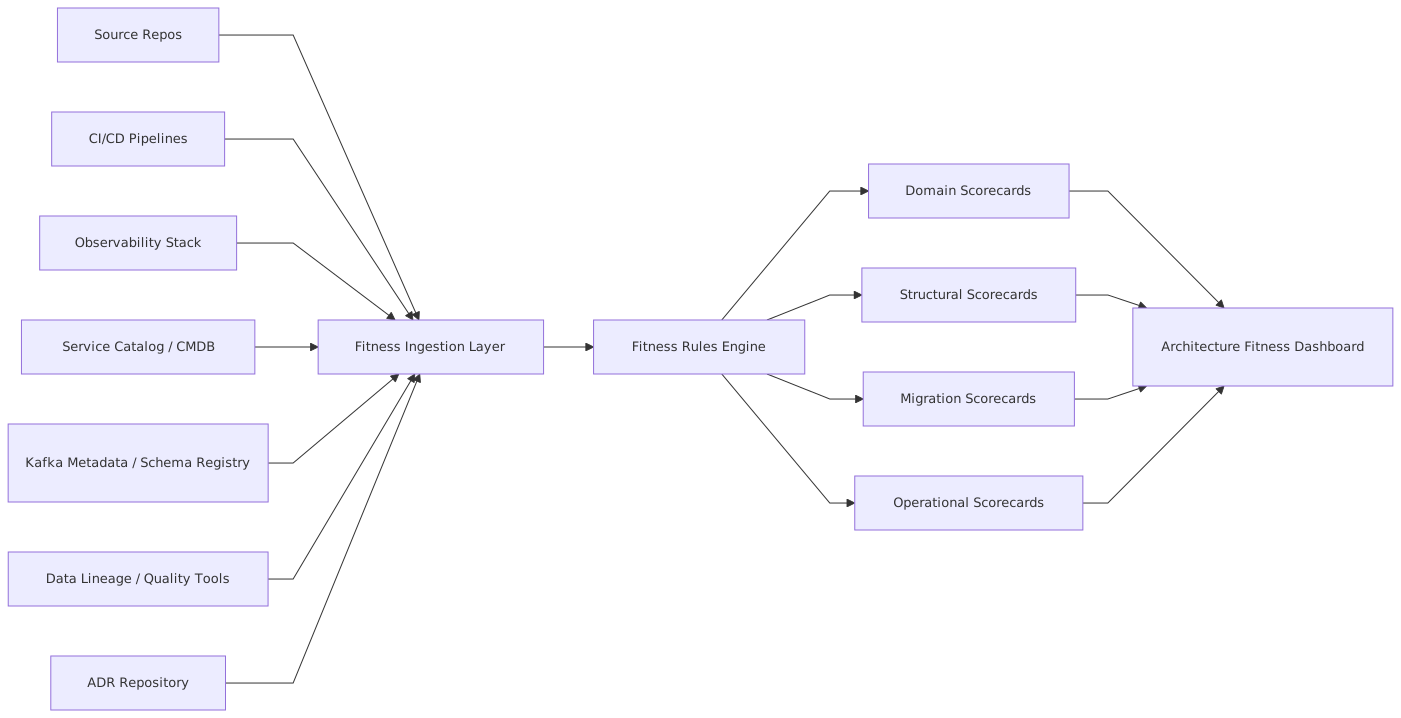
At a high level, the dashboard ingests signals from code repositories, CI/CD pipelines, runtime telemetry, service catalogs, data lineage tools, architecture decision records, API gateways, and event platforms such as Kafka. It normalizes those into a common fitness model, computes scores and trends, and publishes views tailored to different audiences.
Core components
Fitness ingestion layer
This gathers raw evidence. Not opinions, evidence. Dependency graphs from code analysis. Change failure rate from deployment systems. API call maps from service mesh telemetry. Topic ownership from Kafka governance metadata. Reconciliation lag from data pipelines. Legacy transaction traces from strangler proxies.
Fitness rules engine
This is where architecture policy becomes executable. For example:
- a bounded context should not have more than N direct synchronous dependencies outside its domain
- customer identity events must be produced only by the identity context
- no new consumer may read from a legacy database schema directly
- all payment topic schemas must be backward compatible
- strangler traffic through legacy adapters should decrease month over month
- reconciliation lag between order and billing should stay below a defined threshold
A rules engine can be implemented with policy-as-code tooling, custom rules, or a combination. The choice matters less than consistency and traceability.
Domain scorecards
This is where many dashboards fail because they stop at technical service maps. You need a domain map. Services, topics, APIs, and data stores must be linked to bounded contexts and business capabilities. Otherwise the dashboard cannot tell whether the architecture still reflects the business.
A service catalog should include domain ownership, upstream and downstream contexts, event responsibilities, and anti-corruption layers. That gives you semantic observability, not just technical observability.
Migration scorecards
Migration needs first-class treatment. Most dashboards pretend the old world doesn’t exist. That is a mistake. During progressive strangler migration, both old and new paths coexist. You need to track:
- percentage of traffic routed through new capabilities
- remaining legacy transactions by business function
- duplicated logic awaiting decommission
- reconciliation exceptions between systems of record
- time spent inside temporary adapters and translation layers
A migration that is not measured becomes permanent.
Domain semantics in the dashboard
Let’s be blunt: if your dashboard has no model of the domain, it is not an architecture dashboard. It is infrastructure reporting with good branding.
Domain semantics allow you to ask useful questions:
- Are multiple contexts publishing “customer created” with different meanings?
- Is order status an operational concept in fulfillment but a financial concept in billing?
- Are teams changing the same business concepts across multiple codebases in the same sprint?
- Is a generic shared “party” service actually collapsing distinct domain concepts into one mushy abstraction?
These questions matter because architecture debt often begins as semantic drift.
A dashboard should therefore include a domain glossary, mappings from technical assets to bounded contexts, and indicators of cross-context change coupling. If every pricing change also touches catalog, promotions, and checkout, maybe the boundaries are wrong. Or maybe an anti-corruption layer is missing. The metric does not make the decision for you, but it tells you where to look.
Migration Strategy
The migration path to an architecture fitness dashboard should itself be evolutionary. Trying to build the whole thing at once is a classic enterprise trap.
Start with one painful domain. Pick a business capability where architecture drift is already visible: customer onboarding, order-to-cash, claims handling, digital identity. Then define a small set of fitness functions that matter enough to change behavior.
A sensible sequence looks like this:
Phase 1: Baseline the estate
Inventory services, repos, pipelines, data stores, Kafka topics, APIs, and ownership. Imperfect is fine. You are building a map, not a museum exhibit.
Establish bounded contexts. This is where domain-driven design work pays off. If the domain map is fuzzy, your metrics will be fuzzy too.
Phase 2: Automate a small set of hard metrics
Do not start with fifty indicators. Start with ten that reveal structural truth. For example:
- deployment frequency by bounded context
- change failure rate by bounded context
- number of cross-context synchronous dependencies
- topic schema compatibility violations
- direct legacy database reads
- strangler traffic percentage
- reconciliation exception count
- lead time for changes touching multiple contexts
Phase 3: Introduce migration metrics
Once the dashboard exposes the current architecture, add measures that show movement. Migration is not “we built three microservices.” Migration is reduction of dependency on the old model.
Phase 4: Expand to policy and governance
After teams trust the dashboard, add policy-as-code checks, architecture conformance tests, and score thresholds tied to engineering guardrails. Not heavy approval gates. More like road signs with teeth.
Progressive strangler migration
The dashboard is especially useful in progressive strangler migrations because those migrations create ambiguity by design. There are two paths, two models, often two truths for a while.
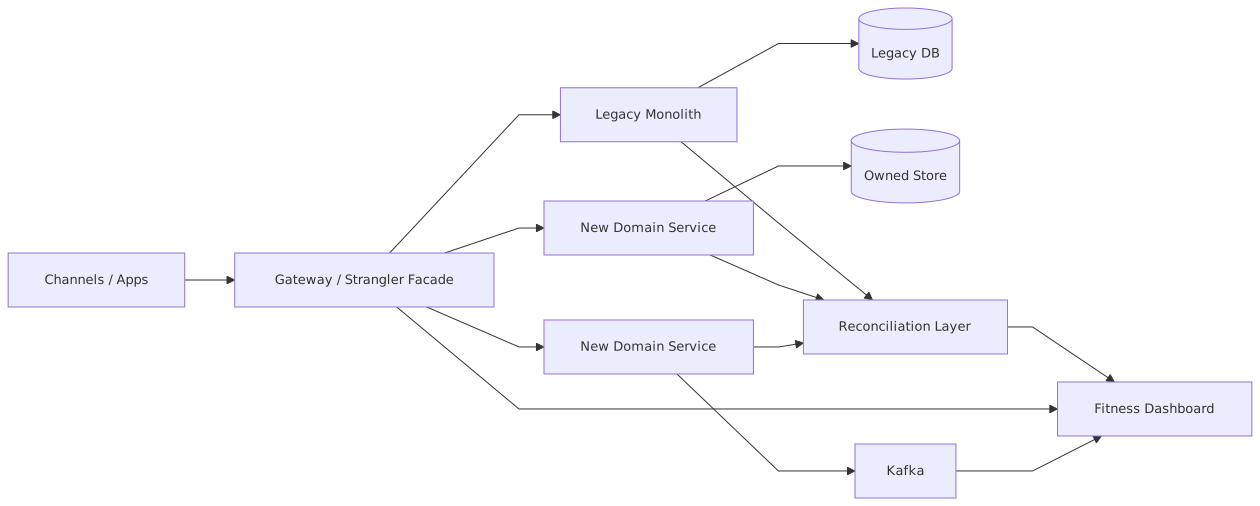
The strangler facade gives you a control point. Traffic split can be measured. Legacy calls can be classified by domain capability. Exceptions can be tracked. You can see where the migration has real business penetration and where it is still cosmetic.
Reconciliation during migration
Reconciliation deserves more respect than it gets. In enterprise migrations, reconciliation is not a side concern. It is how you survive coexistence.
When a monolith remains system of record for some capabilities while new services take ownership of others, there will be lag, duplicate representations, and occasional conflicts. A mature dashboard tracks reconciliation as a first-class architectural signal:
- event arrival lag
- unmatched records
- compensating transactions
- replay backlog
- semantic mismatches between old and new status models
- manual intervention volume
If reconciliation numbers are rising, your migration is sick even if deployments are green.
Enterprise Example
Consider a global insurer modernizing its claims platform.
The company had a twenty-year-old claims monolith. It worked, mostly. It also embedded pricing rules, customer identity, document handling, fraud scoring, and payment orchestration in one giant codebase. The organization wanted microservices and Kafka. Naturally, several teams started building them.
Within a year, they had eight new services, a flurry of events, and no improvement in business agility. Why? Because the new services were organized around technical functions, not domain boundaries. “Document service” was used by everyone. “Customer service” mixed identity, contact preferences, policyholder data, and broker data. The fraud team subscribed to every claims event because no one had agreed on event semantics. Worse, settlement logic existed in both the monolith and a new payments service, forcing nightly reconciliation that grew more painful each month.
They introduced an architecture fitness dashboard, but not as a vanity project. They started with claims intake and claims settlement as separate bounded contexts. That was the key move. It shifted the discussion from services to business meaning.
They defined and tracked:
- cross-context synchronous calls in the claims domain
- Kafka topic ownership by bounded context
- schema evolution violations
- reconciliation lag between monolith settlements and new payment events
- percentage of intake traffic routed through the strangler facade
- number of changes requiring both claims intake and settlement teams
- direct reads from the monolith claims schema by new services
The first dashboard was ugly, but it exposed the truth. The new settlement service was tightly coupled to legacy customer tables. Intake changes touched five codebases. Two topics called claim-updated had incompatible meanings. Reconciliation exceptions spiked every Friday after batch jobs.
The enterprise architect used the dashboard to force a hard conversation: they were not building bounded contexts; they were distributing the monolith.
So they changed course. They introduced anti-corruption layers around customer and policy data. They split event models by domain meaning rather than generic lifecycle labels. They made settlement the authoritative publisher for payment lifecycle events. And they used the strangler facade to gradually route first-notice-of-loss traffic into the new intake context while leaving downstream adjudication in legacy.
Within nine months, lead time for intake changes dropped significantly, reconciliation exceptions stabilized, and legacy database reads by new services decreased sharply. Not because of better slides. Because the dashboard made architecture visible enough to argue about honestly.
Operational Considerations
An architecture fitness dashboard only works if it is embedded into operational routines.
Make ownership explicit
Every fitness function must have an owner. Not “architecture.” A real owner. Platform team, domain architect, stream-aligned team, data governance lead. Unowned metrics become decorative.
Prefer trend over snapshot
Architecture is about direction. A single value matters less than movement. Rising cross-context dependencies over three months is a smell even if the absolute number remains “within tolerance.”
Integrate with delivery flow
Expose fitness indicators in pull requests, CI pipelines, release dashboards, and service catalogs. If developers only see the dashboard during quarterly reviews, it is already too late.
Support drill-down
An executive may see that order-to-cash architectural fitness declined. A team needs to click through to discover the cause: two new synchronous calls from fulfillment to billing, one schema break on a Kafka topic, and a rise in manual reconciliation tasks after deployment.
Calibrate thresholds carefully
Hard gates are seductive and dangerous. If every policy violation blocks delivery, teams will create side channels and exceptions will become routine. Use a mix of soft alerts, trend analysis, and selective hard stops for genuinely dangerous violations like prohibited data access patterns or critical contract breaks.
Build for imperfect data
Enterprises never have perfect metadata. CMDBs drift. catalogs lag reality. Topic owners are missing. That is normal. Design the dashboard to express confidence levels and unknowns rather than pretending to certainty.
Tradeoffs
There is no free lunch here.
The biggest tradeoff is between precision and adoption. Rich, domain-aware metrics are more useful but harder to maintain. Simple technical metrics are easier to automate but can miss the architecture’s actual problems.
Another tradeoff is governance versus autonomy. A strong dashboard can improve consistency, but it can also become a centralized control mechanism that teams resent. The answer is not to avoid governance. It is to make governance transparent, automated, and tied to clear outcomes.
There is also the tradeoff between standardization and local context. Enterprises want common metrics across domains. But not every domain should look the same. A payment context may need stricter contract and reconciliation thresholds than a content publishing context.
And then there is Kafka. Event streaming is powerful for exposing architectural signals—topic ownership, schema drift, consumer sprawl, replay behavior. But once you make Kafka central to the dashboard, you are implicitly endorsing event discipline. If the organization is not ready to define domain events properly, you may simply produce a highly instrumented mess.
Failure Modes
Architecture fitness dashboards fail in recognizable ways.
Vanity metrics
The dashboard becomes a catalog of numbers that are easy to collect and easy to celebrate, but disconnected from architectural outcomes.
No domain model
Everything is organized by system or team rather than bounded context. The dashboard cannot see semantic drift, so it reports health while the business model fractures.
Treating temporary migration structures as permanent
Adapters, reconciliation layers, and dual-write mechanisms appear as transitional, but nobody tracks their retirement. The dashboard should expose age and dependency on transitional constructs.
Score gaming
Teams optimize for the metric rather than the architecture. For example, reducing synchronous calls by hiding them behind a shared gateway that still preserves the coupling.
Excessive centralization
An architecture office defines dozens of rules without team involvement. The dashboard becomes compliance theater, and delivery teams route around it.
Missing reconciliation insight
During migration, the dashboard celebrates traffic shifting to new services while ignoring the growing cost of reconciliation and manual correction work. This is common and dangerous.
When Not To Use
Do not build a sophisticated architecture fitness dashboard if you are a small product company with one team, one codebase, and straightforward delivery paths. You probably need good engineering metrics, not an enterprise architecture instrument panel.
Do not start here if your domain model is completely unclear. First clarify bounded contexts, ownership, and business capabilities. Otherwise you will automate confusion.
Do not over-invest if the architecture is intentionally short-lived. For a temporary campaign platform, acquisition landing site, or throwaway integration layer, the dashboard may cost more than the problem.
And do not use this as a substitute for architecture judgment. A dashboard is a guide, not a governor. It can reveal a bad smell. It cannot tell you whether to split a context, merge two services, or accept a tradeoff for strategic speed.
Related Patterns
Several patterns sit naturally beside an architecture fitness dashboard.
Fitness functions
The dashboard is really the visual expression of architectural fitness functions. These may be static code rules, runtime policies, contract checks, or migration indicators.
Domain-driven design
Bounded contexts, ubiquitous language, context mapping, anti-corruption layers, and domain ownership are foundational. Without them, fitness metrics drift into technical trivia.
Strangler fig pattern
This is the migration backbone for many enterprises. The dashboard should track the strangler’s progress, not merely its existence.
Event-driven architecture
Kafka and event streams are useful both operationally and architecturally, especially for exposing domain event ownership, contract health, and asynchronous decoupling patterns.
Reconciliation and eventual consistency
Whenever systems coexist, especially during migration, reconciliation is part of the architecture. The dashboard must acknowledge that reality.
Architecture decision records
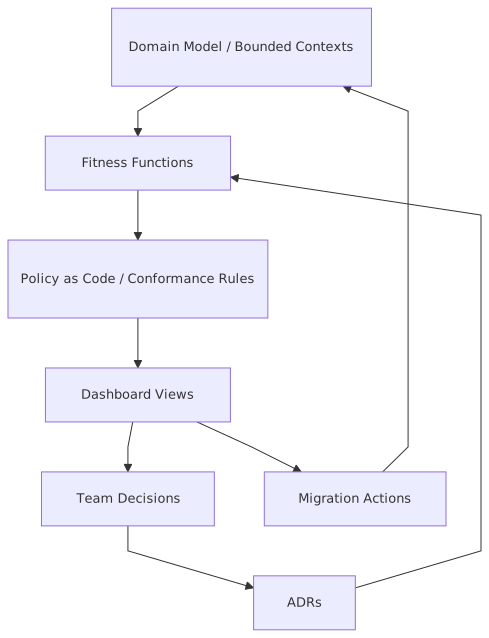
ADRs help connect metrics to intent. If a rule exists because of a decision—say, customer identity remains a protected upstream context—the dashboard should link violations back to the rationale.
Summary
An architecture fitness dashboard is not a reporting accessory. It is a mechanism for keeping architecture honest while it evolves.
The value comes from measuring what makes change sustainable: domain cohesion, structural integrity, operational resilience, event and data discipline, and migration progress. The dashboard must be domain-aware, because technical neatness without semantic integrity is just a better-organized mess. It must treat migration as a first-class concern, because most enterprises live in the in-between. And it must include reconciliation, because coexistence is where architectural truth gets expensive.
Use Kafka where event streams are genuinely part of the architecture, not because every dashboard looks more modern with a broker in the middle. Use microservices where bounded contexts justify autonomy, not because the monolith is unfashionable. And build the dashboard incrementally, the same way you should evolve the architecture itself: from pain, from evidence, and from the domain outward.
The best architecture dashboards do not merely reassure leaders. They provoke better decisions.
That is their job.
Frequently Asked Questions
What is enterprise architecture?
Enterprise architecture aligns strategy, business processes, applications, and technology in a coherent model. It enables impact analysis, portfolio rationalisation, governance, and transformation planning across the organisation.
How does ArchiMate support architecture practice?
ArchiMate provides a standard language connecting strategy, business operations, applications, and technology. It enables traceability from strategic goals through capabilities and services to infrastructure — making architecture decisions explicit and reviewable.
What tools support enterprise architecture modeling?
The main tools are Sparx Enterprise Architect (ArchiMate, UML, BPMN, SysML), Archi (free, ArchiMate-only), and BiZZdesign. Sparx EA is the most feature-rich, supporting concurrent repositories, automation, scripting, and Jira integration.