⏱ 6 min read
Recommended Reading
Executive summary
Kafka introduces powerful capabilities but also real governance and operational complexity. Kafka’s topic/partition model implies distributed operations and durable logs; if an organization cannot govern schema evolution and compatibility, Kafka may increase integration risk rather than reduce it. integration architecture diagram
- Red flags: no ownership, no compatibility governance
- Misuse patterns: Kafka as RPC, shared dumping topics
- Alternatives and phased adoption
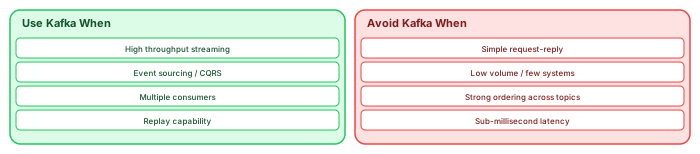
The decision framework: Kafka vs alternatives
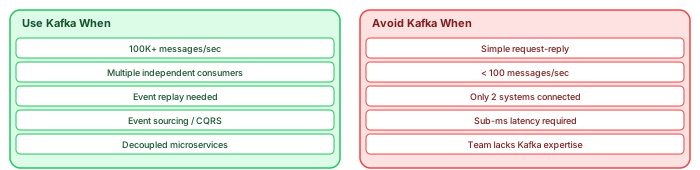
Kafka is powerful, but it is not the right tool for every integration problem. Using Kafka where a simpler solution suffices adds operational cost, complexity, and team cognitive load without corresponding benefit. Knowing when NOT to use Kafka is as important as knowing when to use it. modeling integration architecture with ArchiMate
Avoid Kafka for simple request-reply. If Service A needs an immediate response from Service B ("Is this customer credit-worthy?"), use a synchronous HTTP/gRPC call. Routing this through Kafka adds latency, complexity, and the need to correlate requests with responses across topics. REST or gRPC is simpler, faster, and sufficient.
Avoid Kafka for low-volume integrations. If two systems exchange 100 messages per hour, Kafka's distributed infrastructure is massive overkill. A simple message queue (RabbitMQ, SQS) or even a database-backed queue handles this with far less operational overhead.
Avoid Kafka when sub-millisecond latency is required. Kafka's latency is typically 2-10ms under normal load. For high-frequency trading, real-time game state, or latency-sensitive control systems, specialized messaging (Aeron, ZeroMQ) or in-memory data grids (Hazelcast) are better choices.
Avoid Kafka when the team lacks expertise. A Kafka cluster is a distributed system that requires skilled operations. If your team has never operated distributed infrastructure and you cannot hire or train Kafka expertise, a managed service (Confluent Cloud, AWS MSK) or a simpler alternative (AWS EventBridge, Google Pub/Sub) may be more appropriate.
The right question
Before adopting Kafka, ask: "Do we need high-throughput streaming with multiple independent consumers and event replay?" If the answer to all three parts is yes, Kafka is the right choice. If any part is no, evaluate simpler alternatives first. The best architecture is the simplest one that meets the requirements — not the most impressive one on the architect's resume.
Alternatives for each use case
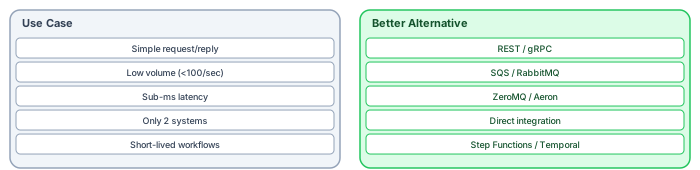
For every use case where Kafka is wrong, a simpler technology is right. Knowing the alternatives prevents the "golden hammer" problem — treating every integration problem as a Kafka problem. application cooperation diagram
Simple request-reply → REST or gRPC. When Service A needs an immediate response from Service B, synchronous communication is simpler, faster, and easier to debug. gRPC is particularly effective for internal microservice communication with strong typing and code generation. Reserve Kafka for workflows where the producer does not need an immediate response.
Low volume → SQS or RabbitMQ. When two systems exchange fewer than 100 messages per second, a simple managed queue (AWS SQS, Azure Service Bus) or lightweight message broker (RabbitMQ) provides reliable delivery without the operational overhead of a Kafka cluster. These services are fully managed, require zero infrastructure expertise, and cost a fraction of a Kafka deployment.
Sub-millisecond latency → ZeroMQ or Aeron. Kafka's typical latency is 2-10ms. For high-frequency trading, real-time gaming, or industrial control systems that need sub-millisecond messaging, specialized brokerless messaging libraries (ZeroMQ, Aeron) bypass the overhead of broker-mediated communication.
Only two systems → Direct integration. When exactly two systems need to exchange data, the overhead of an intermediary (Kafka, queue, or bus) may not be justified. A direct API call, database-level replication, or file transfer may be simpler and more reliable. Kafka's value comes from decoupling many producers from many consumers — with only two parties, there is nothing to decouple.
Short-lived workflows → Step Functions or Temporal. When a business process requires orchestration across multiple steps with branching, retries, timeouts, and human approval gates, a workflow engine (AWS Step Functions, Temporal, Camunda) provides better visibility and control than choreography across Kafka topics. Workflow engines show the process state visually, handle compensation (rollback) natively, and provide built-in retry with backoff.
The hybrid architecture: Kafka + alternatives
The best architectures use Kafka where it excels and alternatives where they are more appropriate. A typical enterprise might use Kafka for high-volume domain events and cross-service integration, REST/gRPC for synchronous queries and commands, SQS for simple background job processing, and Temporal for complex business workflows. Model all integration patterns in the architecture repository — the integration landscape view should show which pattern is used for which integration and why. This prevents the gradual drift toward "Kafka for everything" that happens when teams adopt a technology without architecture governance. architecture decision records
The cost-benefit analysis framework
Before adopting Kafka for any integration, run a quick cost-benefit analysis with four dimensions.
Infrastructure cost: A production Kafka cluster requires minimum 3 brokers, 3 ZooKeeper nodes (or KRaft controllers), monitoring infrastructure, and a Schema Registry. Managed services (Confluent Cloud, AWS MSK) reduce operational effort but not cost — expect $2,000-10,000/month for a production cluster. Compare this to the alternative: SQS costs $0.40 per million messages with zero infrastructure.
Operational cost: Kafka requires skilled engineers for operations. Budget 0.5-1.0 FTE for a small cluster, 2-3 FTE for an enterprise deployment. If your organization does not have distributed systems expertise and cannot hire it, the operational cost may exceed the integration benefit.
Learning cost: Development teams must learn new concepts: partitions, consumer groups, offset management, schema evolution, idempotent processing. Budget 2-4 weeks of learning time per team adopting Kafka for the first time. Factor this into project timelines.
Benefit threshold: Kafka's benefits (decoupling, replay, multi-consumer, high throughput) are real but only valuable when the use case needs them. If the integration is point-to-point, low-volume, and does not need replay, the benefits do not justify the costs. Be honest about whether the use case genuinely requires Kafka's capabilities or whether it is a simpler problem being solved with an impressive-sounding technology.
If you’d like hands-on training tailored to your team — Sparx Enterprise Architect, BPMN, SysML, Apache Kafka or the Archi tool — or modelling coaching in ArchiMate and TOGAF-aligned governance, you can reach us via our contact page.
Frequently Asked Questions
What is enterprise architecture?
Enterprise architecture is a discipline that aligns an organisation's strategy, business operations, information systems, and technology infrastructure. It provides a structured framework for understanding how an enterprise works today, where it needs to go, and how to manage the transition.
How is ArchiMate used in enterprise architecture practice?
ArchiMate is used as the standard modeling language in enterprise architecture practice. It enables architects to create consistent, layered models covering business capabilities, application services, data flows, and technology infrastructure — all traceable from strategic goals to implementation.
What tools are used for enterprise architecture modeling?
Common enterprise architecture modeling tools include Sparx Enterprise Architect (Sparx EA), Archi, BiZZdesign Enterprise Studio, LeanIX, and Orbus iServer. Sparx EA is widely used for its ArchiMate, UML, BPMN and SysML support combined with powerful automation and scripting capabilities.