⏱ 20 min read
Most ArchiMate diagrams fail for one simple reason: they try to look complete before they try to be useful.
That’s the uncomfortable truth. I’ve seen teams spend weeks building immaculate models with perfect layers, elegant colors, and relationships so technically correct they could make a standards committee weep with joy. And then nobody uses them. Not the CIO. Not the delivery leads. Not the security team. Definitely not the people trying to make a cloud migration or Kafka rollout actually work.
Enterprise architecture has a bad habit of confusing modeling with communication. ArchiMate is powerful, yes. But if your model doesn’t help someone make a decision, challenge an assumption, or avoid an expensive mistake, it’s just decorative architecture.
So let’s be blunt: ArchiMate is not the goal. Better enterprise decisions are the goal.
This article walks through how to model with ArchiMate step by step, from strategy to implementation, in a way that reflects real architecture work. Not textbook work. Real work. The kind where a bank is modernizing customer onboarding, IAM is a political battlefield, Kafka is somehow both the answer and the problem, and cloud teams are moving faster than governance can keep up. ArchiMate layers explained
We’ll start simple, because that matters both for understanding and for not losing half the room in the first ten minutes.
What ArchiMate is, in plain English
ArchiMate is a modeling language for enterprise architecture. It helps you describe how strategy, business processes, applications, data, technology, and implementation efforts relate to each other.
That’s the clean definition.
In practice, ArchiMate is useful because it lets you answer questions like:
- What business capability are we trying to improve?
- Which processes and applications support that capability?
- Where does identity and access management fit?
- What technology components are involved?
- What projects or work packages are changing the landscape?
- What risks, dependencies, and gaps exist between strategy and delivery?
If you use it well, ArchiMate gives leaders a line of sight from strategic intent all the way to systems and implementation work. ArchiMate modeling guide
If you use it badly, it becomes a giant wallpaper of boxes.
Why “step-by-step” matters more than most architects admit
A lot of architects jump too quickly into application and technology views because those are concrete. They feel safer. You can point to Kafka clusters, API gateways, cloud landing zones, IAM platforms, and say, “See? Architecture.”
But starting there is often backwards.
If you model the technology first, you usually end up justifying the current solution landscape rather than challenging it. That’s not architecture. That’s inventory management with better notation.
The better approach is to move from:
- Strategy
- Capabilities and value
- Business processes
- Application and information
- Technology
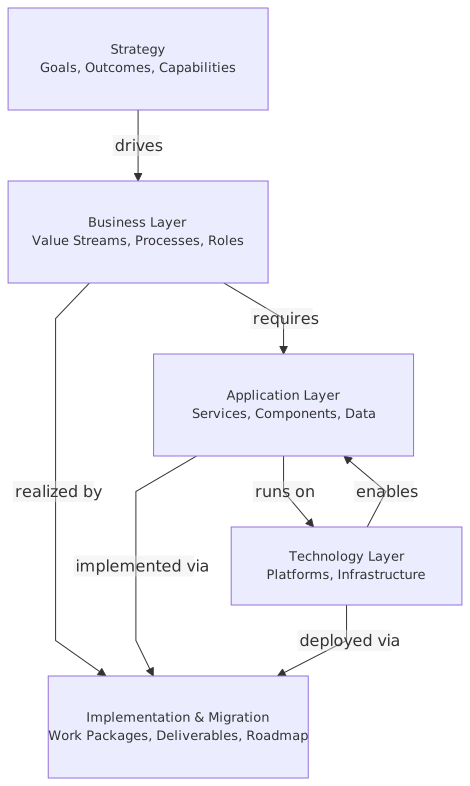
- Implementation and migration
That order is not academic. It forces discipline. It forces you to explain why before you explain what. And in enterprise work, the “why” is where the real argument lives.
Step 1: Model the strategy first, even if the organization is fuzzy about it
Here’s another opinion that tends to annoy people: most enterprise strategy is too vague to model directly. That’s normal. Don’t wait for perfect strategic clarity. You’ll be waiting forever.
Instead, start by identifying:
- Drivers: market pressure, regulatory demand, cost pressure, customer expectations
- Goals: improve onboarding speed, reduce fraud, increase resilience
- Outcomes: lower abandonment, faster approval, fewer access violations
- Principles: event-driven integration, zero trust, cloud-first where justified
- Requirements / constraints: regulatory compliance, auditability, data residency
In ArchiMate terms, this usually means using elements from the Strategy and Motivation areas: capabilities, resources, courses of action, drivers, goals, outcomes, principles, requirements, constraints.
Real banking example: digital customer onboarding
Let’s use a common enterprise case: a retail bank wants to modernize customer onboarding for personal current accounts.
The executive story sounds simple:
- Customers abandon onboarding too often
- KYC and identity verification take too long
- IAM controls are inconsistent across channels
- Legacy integration makes process changes slow
- The bank wants to use cloud-native services and event streaming to improve agility
That’s enough to start.
A useful strategy view might include:
- Driver: competitive pressure from digital-native banks
- Driver: regulatory requirements for KYC/AML
- Goal: reduce onboarding completion time from 2 days to 15 minutes for low-risk customers
- Goal: reduce onboarding abandonment by 30%
- Outcome: higher account conversion
- Capability: customer onboarding
- Capability: identity and access management
- Capability: fraud detection
- Course of action: event-driven onboarding orchestration
- Principle: identity is centralized, authorization is policy-based
- Requirement: all customer identity events must be auditable
- Constraint: customer PII must remain in approved regions
Notice what we did not do. We did not start by drawing Kafka topics and cloud services. Good. Resist the urge.
How this applies in real architecture work
In real architecture work, strategy modeling is where you expose hidden disagreement.
The head of digital says speed matters most. Risk says control matters most. Operations says resilience matters most. Security says IAM consistency matters most. Product says abandonment matters most.
Your strategy model makes those tensions visible. That’s valuable. Architecture is not only about describing systems. It’s about making trade-offs discussable.
Common mistake
Mistake #1: Modeling vague aspirations as if they were architecture decisions.
“Be more digital” is not a model input. It’s a slogan. Translate slogans into goals, outcomes, principles, and measurable capability improvements.
Step 2: Move from strategy to capability thinking
Capabilities are where ArchiMate becomes genuinely useful. They act as the bridge between ambition and operational reality. ArchiMate tutorial
A capability is not a process, not an application, not a team. It’s an ability the enterprise needs.
For our banking example, relevant capabilities might be:
- Customer onboarding
- Identity proofing
- Access governance
- Fraud detection
- Customer communications
- Event management
- Regulatory reporting
This matters because strategy almost always lands unevenly across the enterprise. Some capabilities are strategic differentiators. Some are commodity. Some are broken but politically protected.
You need to know which is which.
A practical way to model capabilities
For each capability, ask:
- Why does it matter?
- What business outcome does it support?
- What level of maturity do we have today?
- What level do we need?
- Which applications, data, and technologies enable it?
- Where are the biggest pain points?
At this stage, a capability map with heat indicators is often more useful than a giant layered diagram.
Here’s a simple example.
This table is not “just analysis.” It drives what you model next.
Contrarian thought
A lot of architects over-model capabilities and under-model politics. Capability maps are useful, but don’t pretend they are objective truth. They reflect priorities, and priorities reflect power.
If IAM is weak but nobody wants to fund it because it’s not customer-facing, your capability model should make that visible. Otherwise you’re producing polite fiction.
Step 3: Model business processes only after you know which capabilities matter
Business process models are where many EA efforts go to die. Too much detail, too early.
You do not need to model every task, exception path, and handoff in ArchiMate. If you need operational process design, use BPMN as well. ArchiMate should stay at the level where enterprise relationships remain visible. ArchiMate relationship types
For the onboarding scenario, key business processes could include:
- Start application
- Capture customer identity
- Verify identity and documents
- Screen against AML/fraud rules
- Create customer profile
- Provision digital access
- Notify customer
- Escalate exceptions
These processes realize the onboarding and identity-related capabilities. That relationship matters because it lets you ask a useful question:
Which process changes are required to improve the capability?
What a good business view looks like
A useful business view in ArchiMate might show: ArchiMate modeling best practices
- Business actor: customer
- Business role: onboarding operations
- Business process: customer onboarding
- Business process: identity verification
- Business service: account opening service
- Business object: customer application
- Business object: identity verification result
Don’t clutter it. The point is to show how value is delivered and where the friction sits.
Real architecture use
This is where you bring in business stakeholders and delivery leads. Not to validate notation. Nobody cares. They care whether the model reflects the real journey, the real bottlenecks, and the real ownership boundaries.
In real workshops, the useful conversation is usually not “Is this relationship assignment or serving?” It’s more like:
- Why does identity verification happen twice?
- Why is customer access provisioned by a batch job?
- Why does fraud scoring only happen after manual review?
- Why do branch, web, and mobile channels use different onboarding paths?
If the model doesn’t trigger those conversations, simplify it until it does.
Common mistake
Mistake #2: Using ArchiMate to produce pseudo-BPMN.
ArchiMate business process views should explain architecture, not mimic detailed operations manuals.
Step 4: Connect business to applications and information
Now we get to the layer many architects start with. Fine. But it works much better when it’s anchored in capability and process context.

For the bank example, supporting applications might include:
- Mobile banking app
- Web onboarding portal
- CRM platform
- KYC/document verification service
- IAM platform
- Customer master service
- Fraud rules engine
- Notification service
- Kafka event backbone
- Data lake / reporting platform
Information objects might include:
- Customer profile
- Identity document
- Verification result
- Access entitlement
- Fraud alert
- Onboarding event
Why this layer matters
This is where business pain turns into application change decisions.
For example:
- If the onboarding process is slow because applications are tightly coupled, that points to integration redesign.
- If IAM is fragmented, that points to central policy and identity service patterns.
- If fraud signals arrive too late, event streaming may help.
- If customer data is duplicated, maybe the issue is information ownership, not technology.
That last one is important. Architects often blame integration when the real issue is unclear data authority.
Kafka example in ArchiMate
Let’s say the bank wants to use Kafka to decouple onboarding events.
A bad model shows “Kafka” in the technology layer and calls it transformation.
A better model shows:
- Application component: onboarding orchestration service
- Application component: IAM service
- Application component: fraud scoring service
- Application component: customer profile service
- Application event: onboarding initiated
- Application event: identity verified
- Application event: fraud alert raised
- Technology service: event streaming platform
- Technology node: Kafka cluster
Now the model tells a story: business processes trigger application behavior, which emits and consumes events over a platform.
That’s architecture.
IAM example in ArchiMate
IAM often gets modeled badly because teams either treat it as a single box or explode it into vendor-specific nonsense.
Model it as a set of architectural responsibilities:
- Identity lifecycle management
- Authentication
- Authorization / policy decision
- Access governance
- Audit logging
Then map these to application services and technology services as appropriate.
For onboarding, that might mean:
- The customer identity is established during proofing
- Credentials are issued by the IAM platform
- Access policies are applied based on product and risk profile
- Audit events are emitted for regulatory traceability
That is far more useful than drawing “Okta” or “ForgeRock” or “Entra ID” and pretending the architecture is done.
Common mistake
Mistake #3: Confusing products with architecture building blocks.
Products matter, obviously. But if your model depends on vendor names to make sense, you probably skipped a level of abstraction.
Step 5: Model the technology layer, but only where it changes decisions
This is where some architects get religious. Every node, every device, every network path, every cloud service. Honestly, most of that belongs in infrastructure architecture or platform engineering artifacts, not in your core enterprise model.
The enterprise architect’s job is to model the technology layer to the extent needed to support decisions, dependencies, and risk management.
For our scenario, useful technology elements might include:
- Cloud landing zone
- Kafka cluster
- API gateway
- Container platform
- IAM runtime platform
- Secrets management
- Logging and observability platform
- Regional data storage
- Network segmentation controls
Cloud example
Suppose the bank is moving onboarding workloads to cloud, but IAM remains partly on-prem due to legacy dependencies and audit concerns.
A useful technology view could show:
- Onboarding application services deployed on container platform in cloud
- Event streaming provided by managed or self-managed Kafka
- IAM integration split between cloud-native access layer and legacy identity store
- Secure connectivity between cloud workloads and on-prem directory
- Audit logs centralized in security monitoring platform
- Data residency constraints affecting storage choices
This gives decision-makers something real to work with:
- Where are the trust boundaries?
- What are the latency or resilience risks?
- Which dependencies block migration?
- Which controls are compensating versus strategic?
Contrarian thought
Cloud-first is one of the most abused principles in enterprise architecture.
Sometimes cloud is exactly right. Sometimes it’s lazy thinking with a procurement badge. If your ArchiMate model can’t show why cloud improves a capability or enables a strategy, then “move it to cloud” is not architecture. It’s fashion.
Step 6: Use implementation and migration views to connect architecture to delivery
This is where ArchiMate separates itself from many other architecture approaches. You can model not just the target state, but the path to get there.
That matters because most enterprise failure happens in the transition, not in the target picture.
For the onboarding transformation, implementation elements might include:
- Work package: establish event backbone for onboarding
- Work package: centralize IAM policy decision
- Work package: replace manual document verification flow
- Work package: migrate onboarding portal to cloud platform
- Plateau: current state onboarding
- Plateau: interim event-enabled onboarding
- Plateau: target integrated digital onboarding
- Gap: no centralized customer identity event model
- Gap: inconsistent access policy enforcement
- Deliverable: onboarding event taxonomy
- Deliverable: IAM integration blueprint
Why this matters in real life
Architecture without migration planning is fantasy.
Real enterprises have constraints:
- Budget cycles
- Vendor contracts
- Skill shortages
- Program sequencing
- Regulatory deadlines
- Legacy systems that absolutely cannot be touched this quarter, no matter what your target architecture says
Implementation and migration views let you be honest about that.
A practical sequencing example
A sensible roadmap might be:
- Define onboarding domain events and ownership
- Stand up Kafka-based event backbone for onboarding use cases
- Introduce centralized IAM policy engine for new digital channels
- Modernize identity verification integration
- Refactor onboarding orchestration away from batch-heavy legacy flows
- Move selected onboarding services to cloud platform
- Expand event-driven pattern to fraud and reporting use cases
Notice what’s happening: we’re not trying to boil the ocean. We’re sequencing architecture around value and dependency.
Common mistake
Mistake #4: Drawing target-state architecture with no credible migration path.
If your target requires replacing five core systems before any value appears, it’s probably not a strategy. It’s a wish.
How to build an ArchiMate model step by step in practice
Let me make this concrete. If I were coaching a team through this work, I’d use something like the following sequence.
Phase 1: Define the decision scope
Ask:
- What decision are we trying to support?
- What business change is in scope?
- Who will use the model?
- What level of detail do they need?
For our example: “How should the bank modernize customer onboarding using event-driven integration, stronger IAM, and cloud deployment without compromising compliance?”
That gives the model purpose.
Phase 2: Create the strategy and motivation view
Capture:
- Drivers
- Goals
- Outcomes
- Principles
- Requirements
- Constraints
- Capabilities
Keep it to one page if possible.
Phase 3: Build the capability and business view
Map:
- Core capabilities
- Business processes
- Business services
- Key actors/roles
- Key information objects
This is where you expose handoffs, duplication, and weak ownership.
Phase 4: Build application cooperation and information views
Map:
- Application components
- Application services
- Data/information objects
- Events
- Integrations
- Ownership boundaries
This is where Kafka and IAM become meaningful, because they are tied to business needs.
Phase 5: Add technology and deployment views selectively
Show:
- Platforms
- Nodes
- Technology services
- Cloud/on-prem placement
- Security boundaries
- Operational dependencies
Do not model every subnet unless the decision requires it.
Phase 6: Build implementation and migration views
Show:
- Gaps
- Work packages
- Deliverables
- Plateaus
- Dependencies
- Transition architecture
This is the view delivery teams and portfolio governance actually need. ArchiMate for governance
What architects usually get wrong with ArchiMate
Let’s be honest about the recurring failures.
1. They model everything
Completeness is seductive and mostly useless. Model what matters to the decision.
2. They start too technical
Starting with systems biases the whole conversation toward solution preservation rather than business change.
3. They ignore stakeholders
A model understood only by architects is a failed model.
4. They hide uncertainty
Real architecture has assumptions, ambiguities, and contested ownership. Show them.
5. They confuse repository building with architecture
A metamodel-complete repository is not evidence of architectural value.
6. They skip implementation reality
No migration path, no architecture. Just aspiration.
7. They overuse notation purity
I like correctness. But if your model is formally elegant and practically unreadable, you’ve missed the point.
That one tends to upset ArchiMate purists. Fine. I’d rather have a slightly imperfect model that gets funded and executed than a perfect one nobody can act on.
A full real-world-style example: bank onboarding modernization
Let’s stitch the layers together in one narrative.
The strategic problem
A retail bank’s digital onboarding process is underperforming. Abandonment is high, manual verification delays are common, and customer access setup is inconsistent across channels. Regulators are also increasing scrutiny of identity controls and auditability.
Strategy view
Drivers include competitive pressure, compliance requirements, and operational cost. Goals include reducing onboarding time, improving conversion, and strengthening identity governance. Capabilities prioritized are customer onboarding, identity proofing, access governance, and event management.
Business view
The onboarding process spans mobile, web, branch support, KYC checks, fraud screening, and account setup. Multiple teams own fragments of the journey. Identity verification happens in different ways depending on the channel. Access provisioning is partially batch-driven.
Application view
The bank has a web portal, mobile app, CRM, KYC vendor integration, fraud engine, IAM platform, and customer master service. Integrations are mostly synchronous and tightly coupled. Failures in one service create cascading delays. Audit data is fragmented.
Information and event view
Key information objects are customer profile, verification result, access entitlement, and onboarding status. The target architecture introduces domain events such as:
- onboarding initiated
- identity verified
- customer profile created
- account opened
- access provisioned
- fraud alert raised
Kafka is used as the event backbone, not as magic dust. It solves a specific problem: decoupling process steps and improving event visibility.
Technology view
New onboarding orchestration services run on a cloud container platform. Kafka is deployed as a managed event streaming service or hardened self-managed platform depending on policy. IAM remains hybrid for a period, with cloud-based policy enforcement but legacy identity stores still in use. Logs and audit records are centralized.
Migration view
The bank first standardizes event taxonomy and onboarding ownership. Then it introduces Kafka for selected onboarding events. IAM policy centralization follows for digital channels. Legacy batch provisioning is replaced incrementally. Cloud migration happens where dependencies allow. Regulatory reporting consumes auditable event streams later in the roadmap. EA governance checklist
The value
This architecture is useful because it links:
- strategic goals
- capability gaps
- process redesign
- application changes
- IAM improvement
- Kafka adoption
- cloud deployment
- implementation sequencing
That’s the point of ArchiMate. Line of sight.
How to keep ArchiMate human and not turn it into architecture theater
Some practical advice.
Use multiple views, not one mega-diagram
One diagram for executives, one for business/process owners, one for solution architects, one for migration planning. Same model, different views.
Label relationships in business language when presenting
Not every audience needs to hear “realization” and “serving.” They need to hear “this process depends on this application service.”
Be explicit about what is current, target, and transitional
Half the confusion in architecture reviews comes from mixed timelines.
Tie every major element to a question
Why is Kafka here?
Why is IAM centralized?
Why is this workload in cloud?
Why is this process still manual?
If you can’t answer quickly, the model may be decorative.
Don’t model around organization charts
Teams change. Capabilities and services usually outlive org structures.
Accept imperfection
Models evolve. If you wait until everything is stable, you’ll be irrelevant.
Final thought
ArchiMate is at its best when it forces architectural honesty.
It makes you say what the strategy really is, which capabilities matter, where the process breaks, which applications are actually doing the work, where IAM is weak, where Kafka helps and where it does not, and how cloud changes the operating model instead of just the hosting location.
That’s why step-by-step modeling matters. It prevents the classic failure mode of enterprise architecture: beautiful technical abstraction disconnected from business reality.
So yes, use ArchiMate. Absolutely. But use it like an architect, not like a diagram clerk.
Start with strategy. Move through capability and business. Connect to applications and information. Add technology where it matters. Finish with implementation and migration. And the whole time, keep asking the only question that really matters:
What decision does this model help us make?
If you can answer that, your model has a chance of surviving contact with the enterprise.
FAQ
1. Should I start ArchiMate modeling with the business layer or the application layer?
Start with strategy and capability context, then move into business and applications. Starting with applications is tempting, but it usually locks you into current-state thinking too early.
2. How detailed should an ArchiMate model be?
Only as detailed as needed to support the decision at hand. If you’re discussing enterprise transformation, don’t model every server. If you’re assessing deployment risk, then more technology detail may be justified.
3. Is ArchiMate enough for process modeling, or do I still need BPMN?
You often still need BPMN for detailed operational workflows. ArchiMate is better for showing how processes relate to capabilities, applications, information, and technology across the enterprise. BPMN 2.0 training
4. How do Kafka and event-driven architecture fit into ArchiMate?
Model Kafka as part of the technology/service landscape, but more importantly model the application events, producers, consumers, and business outcomes it supports. Don’t treat Kafka as the architecture by itself.
5. How should IAM be represented in an ArchiMate model?
Model IAM as a set of services and responsibilities—authentication, authorization, identity lifecycle, governance, audit—not just as a product box. Then connect those services to business processes, applications, and implementation work.
Frequently Asked Questions
What is enterprise architecture?
Enterprise architecture is a discipline that aligns an organisation's strategy, business processes, information systems, and technology. Using frameworks like TOGAF and modeling languages like ArchiMate, it provides a structured view of how the enterprise operates and how it needs to change.
How does ArchiMate support enterprise architecture practice?
ArchiMate provides a standard modeling language that connects strategy, business operations, applications, data, and technology in one coherent model. It enables traceability from strategic goals through business capabilities and application services to the technology platforms that support them.
What tools are used for enterprise architecture modeling?
The main tools are Sparx Enterprise Architect (ArchiMate, UML, BPMN, SysML), Archi (free, ArchiMate-only), and BiZZdesign Enterprise Studio. Sparx EA is the most feature-rich option, supporting concurrent repositories, automation, scripting, and integration with delivery tools like Jira and Azure DevOps.