⏱ 20 min read
Most enterprise architecture diagrams fail for one very simple reason: they try to show everything at once, and end up explaining nothing.
I’ve seen huge “enterprise views” pinned to walls in banks, insurance companies, and government programs that were technically correct, fully color-coded, and completely useless. They had every application, every integration, every process box imaginable. Nobody could answer the only question that mattered: how does the business actually depend on this technology, and where does change really hurt?
That’s where ArchiMate layers matter.
Not because ArchiMate is magical. It isn’t. And not because every architect should become a notation purist. Please don’t. The value is simpler than that: ArchiMate layers force you to separate concerns. They give structure to conversations that otherwise collapse into a swamp of apps, APIs, projects, and vague strategy slides.
If you want the short version early: ArchiMate organizes architecture into layers like Business, Application, and Technology so you can model how business capabilities, processes, software systems, and infrastructure relate to each other. In practice, that means you can trace something like “customer onboarding” from a business service, to the IAM platform and Kafka event flows that support it, down to the cloud infrastructure that runs it.
That’s the clean explanation. Now let’s talk about the messier reality, because that’s where enterprise architecture actually lives.
What ArchiMate layers really are
At a basic level, ArchiMate uses layers to describe different parts of an enterprise:
- Business layer: what the enterprise does, for whom, and why
- Application layer: what software behavior supports the business
- Technology layer: what infrastructure and technical services run the applications
Depending on how formal you want to be, you can also include:
- Strategy layer
- Physical layer
- Implementation and Migration
- Motivation aspects
- Cross-cutting relationships
But in real architecture work, if you cannot clearly explain the first three layers, the rest becomes decoration.
Here’s the practical interpretation:
That table looks obvious. Good. It should. Most architecture value comes from making obvious things visible in a disciplined way.
The problem is that many architects blur these layers constantly.
They call an application a capability.
They call a process a service.
They call Kafka “the architecture.”
They draw AWS icons inside business process diagrams.
Then they wonder why nobody trusts architecture artifacts.
Why layers matter more in large enterprises than in small ones
In a small company, people can often survive with fuzzy architecture. The same team knows the product, the code, the infrastructure, and the customers. Context lives in people’s heads.
In a bank, that breaks instantly.
A bank has:
- customer channels
- product teams
- shared identity platforms
- risk and compliance functions
- event streaming platforms
- regulatory constraints
- cloud landing zones
- legacy systems that absolutely refuse to die
Without layers, every conversation becomes an argument about the wrong thing.
The business says: “We need faster onboarding.”
The security team says: “IAM policies are complex.”
The integration team says: “Kafka topics are inconsistent.”
The cloud team says: “The workload placement model is broken.”
The architecture team says: “We need a target state.”
Everyone is right. Nobody is aligned.
ArchiMate layers help because they let you say:
- At the business layer, onboarding is a business process and customer access is a business service.
- At the application layer, onboarding depends on CRM, KYC services, IAM, and event-driven integration.
- At the technology layer, those systems run on cloud infrastructure, Kubernetes, managed databases, and Kafka clusters.
Now we can discuss dependencies with precision.
That’s the point. Not notation purity. Precision.
The three core layers, explained like a working architect
1. Business layer: where architecture should start, but often doesn’t
The business layer describes how the enterprise creates value. That includes:
- business actors
- roles
- capabilities
- business processes
- business services
- products
- customer interactions
This is the layer executives pretend to care about and many architects only half understand.
A strong business layer model is not a glossy operating model poster. It is a map of what the business must perform and expose.
For example, in retail banking, you might model:
- Business capability: Customer Identity and Access Management
- Business process: Customer Onboarding
- Business service: Secure Digital Access
- Business actor: Retail Customer
- Business role: Operations Analyst
- Product: Retail Current Account
Notice something important: IAM can appear in the business layer too, but not as the IAM platform. At the business layer, it appears as a business need or service, such as secure customer access, identity verification, or delegated access management.
This is where many architects go wrong. They hear “identity” and immediately draw Azure AD, Keycloak, Okta, or Ping. That’s application thinking too early.
A business stakeholder does not need “OIDC token brokerage” as a primary concern. They need secure access, fraud reduction, regulatory compliance, and lower onboarding abandonment.
If you skip that distinction, your architecture gets technical before it gets useful.
Common business-layer mistake
A very common mistake is modeling the organization chart instead of the business architecture.
Departments are not capabilities. Teams are not services. Reporting lines are not value streams.
If your business layer is just boxes labeled “Operations,” “Technology,” “Security,” and “Risk,” you haven’t modeled the business. You’ve modeled who attends steering committees.
That’s not architecture. That’s corporate anthropology.
2. Application layer: where most architects spend too much time and still get it wrong
The application layer describes software systems and the services they provide to the business.
This includes:
- applications
- application components
- application services
- interfaces
- data objects
- integrations
- event flows
This is the layer people usually rush toward because it feels concrete. There are systems to name, APIs to list, and diagrams to draw. It feels productive.
But there’s a trap here too: too many application-layer models are just inventory diagrams.
A pile of boxes called CRM, ERP, IAM, Mobile App, Data Lake, Kafka, Payments Engine, Fraud Engine — that’s not architecture unless you show what they do, who they serve, and how they relate.
A real banking example
Let’s say a bank wants to modernize customer onboarding for digital channels.
At the application layer, you may have:
- Mobile Banking App
- Onboarding Orchestration Service
- CRM Platform
- KYC/AML Screening Service
- IAM Platform
- Kafka Event Streaming Platform
- Notification Service
- Core Banking Adapter
The business process “Customer Onboarding” is supported by application services such as:
- Identity Proofing
- Access Provisioning
- Customer Profile Management
- Compliance Screening
- Event Publication
- Welcome Notification
This is where Kafka often gets misrepresented.
Kafka is not a business capability. It is not your operating model. It is not your digital transformation strategy. It is a platform that enables event-driven application integration.
Yes, Kafka matters a lot. In many enterprises it becomes mission-critical. But architects often over-romanticize it. They start drawing enterprise diagrams where Kafka sits in the center like the sun and every domain orbits around it.
That’s not architecture. That’s platform vanity.
Kafka belongs primarily in the application and technology discussion, depending on what you’re showing:
- At the application layer, Kafka can support application services like event publication and event consumption.
- At the technology layer, Kafka is also a platform/runtime component requiring clusters, brokers, storage, monitoring, and network design.
You need to model both, but with discipline.
What good application-layer modeling looks like
A good application model answers things like:
- Which application service supports which business service?
- Which systems are system-of-record versus transient processors?
- Where are events published and consumed?
- Which interfaces are synchronous, asynchronous, batch, or file-based?
- Which applications own customer identity?
- Which application components are strategic versus legacy containment?
If your application layer cannot answer those questions, it’s too shallow.
Common application-layer mistakes
Here are the mistakes I see all the time:
1. Confusing applications with capabilities
“Payments Platform” might be an application. “Payments Processing” is a capability. Those are not the same thing.
2. Drawing every interface
If your application view has 200 arrows, nobody learns anything. Show the interactions relevant to the decision.
3. Ignoring ownership
A clean application landscape with no indication of ownership, lifecycle, or accountability is politically useless.
4. Modeling products as systems
“Customer Onboarding” is not an application. It’s a business process or service supported by multiple applications.
5. Treating IAM as a login screen
IAM is often one of the most strategically important application services in the enterprise. It affects customer experience, workforce access, compliance, fraud exposure, and API security. Yet many diagrams reduce it to a tiny lock icon.
That’s amateur hour, honestly.
3. Technology layer: the layer architects either oversimplify or drown in detail
The technology layer describes the infrastructure and platform services that support applications.

This includes:
- compute
- containers
- networks
- storage
- databases
- middleware
- cloud services
- platform runtimes
- technical nodes and system software
This is where cloud architecture, platform engineering, and operational reality finally show up.
In older enterprises, the technology layer was often treated as “servers and networks.” That’s outdated. In modern enterprises, the technology layer includes shared platforms and technical services that shape architecture decisions directly:
- Kubernetes/OpenShift
- managed cloud databases
- service mesh
- API gateway
- Kafka infrastructure
- IAM runtime hosting
- observability platforms
- secrets management
- CI/CD platforms
- landing zones and network segmentation
Real cloud example
Take the same banking onboarding scenario.
The application layer includes:
- Onboarding Service
- IAM Platform
- Kafka Event Service
- CRM Integration Service
At the technology layer, those may run on:
- AWS EKS or Azure Kubernetes Service
- managed PostgreSQL
- managed Kafka or self-hosted Kafka on Kubernetes
- cloud load balancers
- WAF
- private networking
- secrets vault
- centralized logging and monitoring
- IAM connectors to on-prem Active Directory or legacy identity stores
Now here’s the uncomfortable truth: many enterprise architects stop too early and treat cloud as a generic destination box.
They draw “AWS Cloud” under 30 applications and call it done.
No. That tells me almost nothing.
Cloud is not a layer by itself. It is part of the technology layer. And “moved to cloud” is not an architecture state unless you can explain:
- deployment model
- resiliency pattern
- security boundary
- data residency
- operational ownership
- runtime dependencies
- platform constraints
Otherwise you’ve just changed the hosting line on a spreadsheet.
Common technology-layer mistakes
1. Confusing platform with infrastructure
Kafka, IAM, and API management are often platform capabilities, not just infrastructure boxes. They need to be modeled as technical services with consumers and constraints.
2. Going too physical too soon
A lot of technology diagrams collapse into low-level deployment details. Useful for engineers, maybe. Not useful for enterprise decisions.
3. Ignoring non-functional architecture
Availability, latency, recovery, observability, and security controls often matter more than the server count.
4. Treating cloud as simplification
Cloud often increases architectural options and governance complexity. It doesn’t automatically simplify anything. ArchiMate for governance
That last point is unpopular, but true.
How the layers connect in real architecture work
This is where ArchiMate becomes genuinely useful.
The real value is not in drawing the layers separately. The value is in tracing cross-layer relationships.
A real architect needs to answer questions like:
- Which business service depends on this IAM platform?
- Which customer journeys break if Kafka is unavailable?
- Which cloud platform services are required to support fraud detection?
- Which legacy applications still support critical business capabilities?
- What business impact comes from replacing a core integration pattern?
Layering makes those impact paths visible.
Here’s a simplified example.
This is how architecture becomes operationally useful. You can follow the chain from business intent to technical dependency.
That helps with:
- investment decisions
- roadmap sequencing
- risk analysis
- resilience planning
- regulatory impact assessment
- platform rationalization
Without layered traceability, enterprise architecture drifts into PowerPoint theater.
A real enterprise example: retail bank onboarding with Kafka, IAM, and cloud
Let’s make this concrete.
A mid-sized retail bank wants to improve digital account opening. Current onboarding takes too long, dropout is high, fraud controls are inconsistent, and customer identity handling is fragmented across channels.
The business problem
From the business perspective, the bank wants:
- faster customer onboarding
- better conversion rates
- stronger fraud controls
- consistent digital access after onboarding
- lower operational rework
- compliance with KYC and audit requirements
At the business layer, the architect models:
- Business capability: Customer Acquisition
- Business capability: Identity and Access Control
- Business process: Digital Customer Onboarding
- Business service: Secure Customer Access
- Business service: Account Opening
- Business actor: Prospective Customer
- Business role: Compliance Analyst
Already this helps. It separates the business intent from the systems.
The application view
The bank has these systems:
- Mobile App
- Web Onboarding Portal
- Onboarding Orchestration Service
- IAM Platform
- KYC/AML Screening Service
- CRM
- Core Banking System
- Notification Service
- Kafka Platform
The architect models the application relationships roughly like this:
- Mobile App and Web Portal consume the Onboarding Application Service
- Onboarding Orchestration calls KYC and CRM services
- IAM provides Authentication, Identity Registration, and Access Provisioning
- Kafka supports publication of events like:
- Notification Service consumes onboarding events to send customer communications
- Core Banking Adapter consumes approved onboarding events and creates the account record
- CustomerRegistered
- KYCCompleted
- AccountOpened
- CredentialsActivated
This matters because the architecture is not just “integrated.” It is showing which application services support which business outcomes.
The technology view
Now the technology layer:
- Onboarding services deployed on Kubernetes in cloud
- IAM platform split between managed SaaS and bank-hosted connectors
- Kafka cluster deployed regionally with DR pattern
- API gateway for external channel traffic
- WAF and fraud telemetry controls
- managed PostgreSQL for orchestration state
- centralized observability stack
- secrets manager and certificate services
- private connectivity back to on-prem core banking
That view exposes technical constraints immediately:
- IAM latency can affect onboarding conversion
- Kafka availability affects downstream event-driven processing, but not necessarily the initial screen flow if properly decoupled
- network dependency to on-prem core banking may still be the real bottleneck
- cloud deployment improves elasticity, but compliance controls still govern identity data handling
Now we have architecture. Not just a solution diagram.
What this reveals in practice
A layered ArchiMate model in this case helps identify several real issues:
1. The business thinks onboarding is one process, but the application landscape supports three different identity flows
One for branch, one for web, one for mobile. That fragmentation creates policy inconsistency and customer friction.
2. Kafka is overused for command-style interactions
Teams are publishing events for things that should be direct service calls. This creates eventual consistency problems in customer identity activation.
3. IAM is treated as a shared utility, but it is actually business-critical
That changes funding, resilience requirements, and governance. EA governance checklist
4. Cloud migration didn’t remove legacy dependence
The onboarding front end is modernized, but account creation still depends on a synchronous mainframe call through a fragile adapter.
5. Business capabilities are stronger than the org model
Separate teams own onboarding, identity, CRM, and integration. The customer doesn’t care. The architecture has to expose the cross-team dependency chain anyway.
That last point is where enterprise architecture earns its salary.
Common mistakes architects make with ArchiMate layers
Let’s be blunt about this.
Mistake 1: Using layers as silos
Some architects create one business diagram, one application diagram, one technology diagram, and never connect them. That defeats the purpose.
Layering is not separation for its own sake. It is separation with traceability.
Mistake 2: Modeling the whole enterprise in one view
A single all-enterprise layered diagram is usually unreadable. Create purpose-driven views instead.
Mistake 3: Getting religious about notation
If stakeholders can’t follow your diagram, your notation purity is not a virtue. It’s a failure.
Mistake 4: Starting from technology
This is the classic enterprise disease. A team buys Kafka, adopts cloud, or launches a new IAM platform, then architecture gets reverse-engineered around that choice.
Start with business change. Then map application impact. Then technology implications.
Mistake 5: Ignoring time
Layers show structure, but real architecture also needs roadmap and transition thinking. Current state and target state without transition states is fantasy planning. TOGAF roadmap template
Mistake 6: Treating shared platforms as generic boxes
Kafka, IAM, API management, observability, and cloud platform services have architecture significance. Show their consumers, dependencies, and constraints.
Mistake 7: Confusing capability maps with architecture views
Capability maps are useful. They are not enough. You still need process, service, application, and technology relationships.
Contrarian view: not every architecture problem needs all ArchiMate layers
This needs saying because architecture communities sometimes oversell completeness.
You do not need to model every layer for every decision.
If you are deciding whether two IAM products should be consolidated, you may focus mostly on:
- business services affected
- application dependencies
- technology and operational constraints
You probably do not need a grand strategic decomposition of the whole enterprise.
Likewise, if you’re reviewing Kafka tenancy and topic governance, a detailed business-process model may be less important than application ownership, event contracts, and platform constraints.
Good architects don’t produce maximum model volume. They produce enough model precision to support a decision.
That’s a very different mindset.
And frankly, a lot of enterprise architecture teams would improve overnight if they created fewer diagrams with stronger intent.
How to use ArchiMate layers in actual enterprise architecture practice
Here’s the practical workflow I recommend.
1. Start with the business change or pain point
Not “model the domain.”
Start with a real trigger:
- onboarding dropout too high
- IAM fragmentation causing audit findings
- Kafka platform scaling issues
- cloud migration lacks business prioritization
2. Identify the business services and capabilities affected
Keep it simple at first. Don’t boil the ocean.
3. Map the supporting application services and systems
Focus on support relationships and critical interfaces.
4. Add the enabling technology and platform dependencies
Only the ones that matter to the decision.
5. Trace risks, bottlenecks, and ownership gaps across layers
This is where the insight lives.
6. Build targeted views for different audiences
- executives: business impact and strategic dependency
- domain architects: application interactions and ownership
- platform teams: technology constraints and service dependencies
- delivery teams: transition-state architecture
7. Use the model to drive action
If the architecture artifact does not influence funding, roadmap, standards, or delivery decisions, it’s just wall art. ArchiMate in TOGAF ADM
What good layered architecture feels like
A good layered model gives you a kind of architectural x-ray.
You can look at a business problem and see:
- which applications matter
- which platforms are critical
- where coupling is hidden
- where teams are misaligned
- where resilience assumptions are false
- where modernization claims are exaggerated
That last one is important too.
A lot of “modern architectures” are just old architectures with containers and Kafka added. The business dependency structure hasn’t changed. The control points haven’t changed. The bottlenecks haven’t changed. The governance certainly hasn’t changed.
Layered modeling exposes that.
And yes, that can make people uncomfortable. Good.
Architecture should create clarity, not comfort.
Final thought
ArchiMate layers are not valuable because the framework says so. They are valuable because enterprises are messy, political, interdependent systems, and layered thinking is one of the few ways to describe that mess without collapsing into nonsense.
Use the business layer to explain value and intent.
Use the application layer to explain behavior and system support.
Use the technology layer to explain operational reality and constraint.
Then connect them.
That’s the whole game.
If you do that well, your architecture stops being documentation and starts becoming a decision tool. In a bank dealing with IAM complexity, Kafka sprawl, and cloud migration pressure, that difference is enormous.
Because in real enterprises, the hardest question is rarely “what systems do we have?”
It’s usually: what actually depends on what, and what breaks when we change it?
ArchiMate layers, used properly, answer that better than most architecture teams do today.
FAQ
1. What are the main ArchiMate layers?
The core layers are Business, Application, and Technology. Business covers capabilities, processes, and services. Application covers systems and software services. Technology covers infrastructure and platform services such as cloud, Kubernetes, databases, and Kafka runtime components.
2. How do ArchiMate layers help in real enterprise architecture work?
They help architects trace dependencies from business outcomes to systems and infrastructure. That’s useful for impact analysis, modernization planning, platform rationalization, resilience reviews, and regulatory assessments.
3. Where do Kafka and IAM fit in ArchiMate layers?
Usually in more than one place. At the application layer, they provide application services and integration behavior. At the technology layer, they also exist as runtime platforms with infrastructure, operational, and security dependencies. IAM may also relate to business services like secure access at the business layer.
4. What is the biggest mistake when using ArchiMate?
Probably starting with technology and forcing the rest of the model around it. The second biggest mistake is creating disconnected layer diagrams that don’t show traceability across business, application, and technology concerns.
5. Do I need to model the whole enterprise with all layers?
No. That’s usually wasteful. Model enough of the relevant layers to support a real decision, roadmap, or risk discussion. Good architecture is purposeful, not exhaustive.
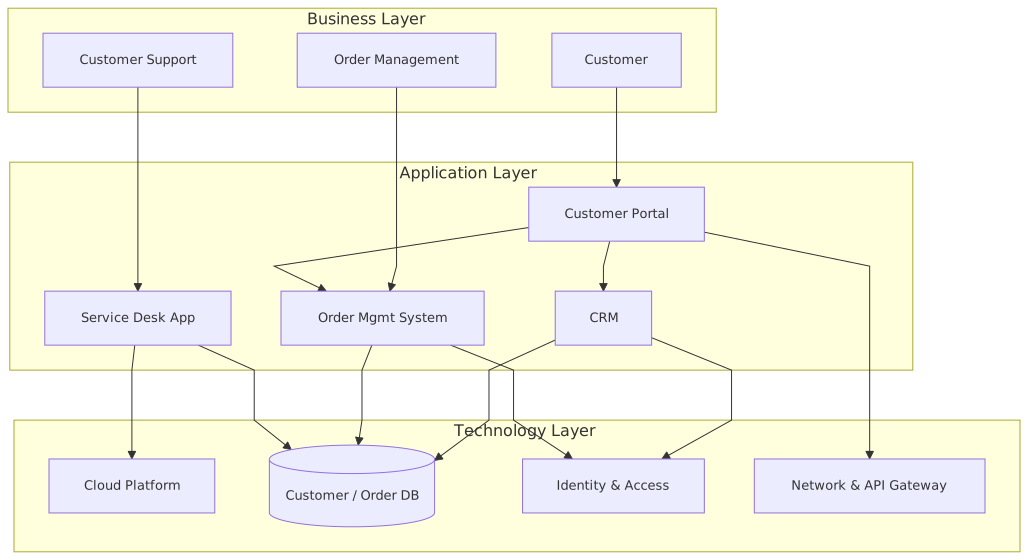
- Business layer: customer-facing behavior and operational capabilities such as order handling and support.
- Application layer: systems that automate or enable business services, e.g. CRM, portal, OMS.
- Technology layer: infrastructure and platform services that host, secure, and connect applications.
- Dependency flow: business services depend on applications; applications depend on technology services.
- Enterprise example: a retailer’s order-to-cash capability uses portal + OMS + CRM on cloud, database, IAM, and API/network services.
Frequently Asked Questions
What is enterprise architecture?
Enterprise architecture is a discipline that aligns an organisation's strategy, business processes, information systems, and technology. Using frameworks like TOGAF and modeling languages like ArchiMate, it provides a structured view of how the enterprise operates and how it needs to change.
How does ArchiMate support enterprise architecture practice?
ArchiMate provides a standard modeling language that connects strategy, business operations, applications, data, and technology in one coherent model. It enables traceability from strategic goals through business capabilities and application services to the technology platforms that support them.
What tools are used for enterprise architecture modeling?
The main tools are Sparx Enterprise Architect (ArchiMate, UML, BPMN, SysML), Archi (free, ArchiMate-only), and BiZZdesign Enterprise Studio. Sparx EA is the most feature-rich option, supporting concurrent repositories, automation, scripting, and integration with delivery tools like Jira and Azure DevOps.