⏱ 8 min read
Introduction: when your repository slows you down
Sparx Enterprise Architect (EA) is a powerful modeling tool — but with power comes complexity. When EA performance degrades, the consequences go beyond inconvenience: architects stop using the tool, stakeholders lose trust in the repository, and the architecture practice loses credibility. This is the story of how we diagnosed, remediated, and future-proofed a performance crisis at a major enterprise client — and the patterns you can apply in your own organization. Sparx EA training
Performance optimization in EA is not a one-time activity. It requires understanding the interaction between the database, the model structure, user behavior, integration load, and infrastructure. This article covers the full diagnostic and remediation process, with concrete metrics, SQL queries, and governance practices. integration architecture diagram
Client context
The client was a multinational logistics and infrastructure company with global architecture and engineering teams. Their EA environment included over 100,000 elements and 800+ diagrams, hosted on an internal MS SQL Server. Around 35 concurrent users accessed EA through thick clients, while stakeholders consumed model content through Prolaborate dashboards. The system was integrated with Jira for requirements traceability and SharePoint for document management.
What began as "it's a bit slow" turned into a full-scale productivity crisis: long model load times, UI lag across the board, and frustrated architects who started maintaining separate spreadsheets because the repository had become too painful to use.
Symptoms of the performance problem
The symptoms fell into five categories, each pointing to different root causes:
Slow diagram load times: Opening large diagrams (100+ elements) took 8–12 seconds. Users reported that switching between diagrams required waiting, which disrupted their modeling flow and encouraged workarounds.
Search and filter lag: The "Find in Project" feature and relationship matrix became unusable for broad searches. Complex filters across the full repository would hang for 15–30 seconds or cause EA to become unresponsive.
Integration-related slowdowns: The Jira synchronization, configured to run live during peak hours, added significant load to the SQL Server. Prolaborate dashboard queries compounded the problem, especially when multiple stakeholders accessed dashboards simultaneously.
Frequent crashes and freezes: EA would freeze during bulk imports, XMI exports, and scripted operations. These incidents were occurring weekly, eroding trust in the tool.
Remote office latency: Users in offices outside the primary data center experienced additional latency, making the above problems significantly worse.
Step-by-step diagnosis

Step 1: Measure repository health
We started with the database. By querying the EA schema tables directly, we established baseline metrics:
-- Repository size analysis
SELECT Object_Type, COUNT(*) AS ElementCount
FROM t_object
GROUP BY Object_Type
ORDER BY ElementCount DESC;

-- Find the largest diagrams (most elements per diagram)
SELECT d.Name, COUNT(do.Object_ID) AS ElementCount
FROM t_diagram d
JOIN t_diagramobjects do ON d.Diagram_ID = do.Diagram_ID
GROUP BY d.Name
ORDER BY ElementCount DESC;
Results revealed: 30,000+ orphan elements (not on any diagram), 12 diagrams with over 200 elements each, and the t_xref table had grown to 2.3 million rows — a common source of performance degradation that EA uses for storing stereotype and constraint metadata.
Step 2: Check user patterns
We profiled SQL Server queries during typical usage hours and identified the slowest operations: deep searches across the full repository, relationship matrix generation for large packages, and diagram rendering for views with many cross-package references. We also discovered that several users had configured automatic "expand all packages" in the Project Browser, which triggered cascade queries on every model open.
Step 3: Analyze integration overhead
The Jira integration was configured for live bidirectional synchronization, meaning every Jira update triggered a SQL write, and every EA update triggered a REST call. During peak hours (10 AM–12 PM), the sync generated 200–400 database operations per hour. Prolaborate dashboard queries added another layer of read load, particularly for dashboards with complex filters spanning multiple packages. modeling integration architecture with ArchiMate
Step 4: Inspect diagram structure
The worst-performing diagrams shared common antipatterns: more than 200 elements on a single canvas, heavy use of embedded images (screenshots, logos), cross-package references that forced EA to load multiple package trees, and virtual diagrams linked to shared elements that triggered cascading reads.
Remediation actions
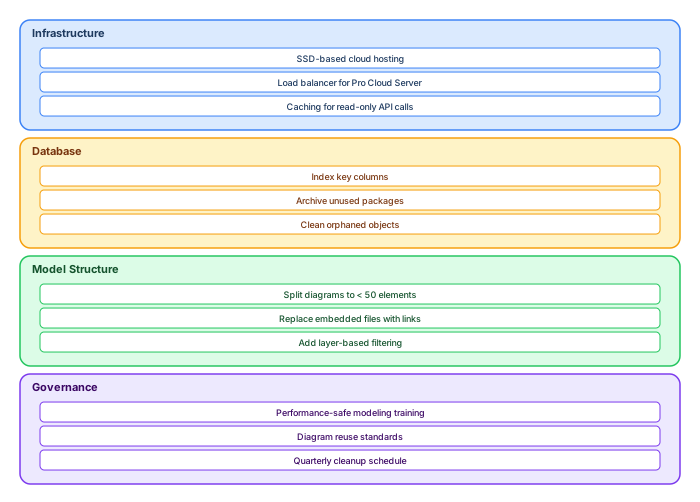
Layer 1: Infrastructure optimization
Moved the SQL Server to SSD-based cloud hosting with dedicated IOPS. Added a load balancer for Pro Cloud Server traffic. Enabled read caching for Prolaborate API calls. Separated the Jira sync process to run on a dedicated service account during off-peak hours (6 PM–6 AM). enterprise cloud architecture patterns
Layer 2: Database optimization
Created targeted indexes on the most-queried columns:
-- Critical indexes for EA performance
CREATE INDEX IX_object_type ON t_object (Object_Type, Stereotype);
CREATE INDEX IX_object_package ON t_object (Package_ID);
CREATE INDEX IX_connector_start ON t_connector (Start_Object_ID);
CREATE INDEX IX_connector_end ON t_connector (End_Object_ID);
CREATE INDEX IX_diagramobjects_obj ON t_diagramobjects (Object_ID);
CREATE INDEX IX_xref_client ON t_xref (Client);
Rebuilt fragmented indexes. Updated SQL Server statistics. Archived legacy packages (30% of content was unused). Cleaned orphaned objects and stale diagram references.
Layer 3: Model structure refactoring
Split all diagrams with more than 50 elements into layered sub-views (Business, Application, Infrastructure). Replaced embedded images with hyperlinks to SharePoint. Removed virtual diagrams that created cascading cross-package references. Introduced a view naming convention that makes it easy to identify scope and layer.
Layer 4: Governance and training
Trained all architects on "performance-safe modeling" patterns. Established rules for diagram size limits (50 elements maximum), tag-based filtering instead of deep searches, and quarterly cleanup reviews. Published a one-page "EA Performance Hygiene" guide for the modeling team.
Results achieved
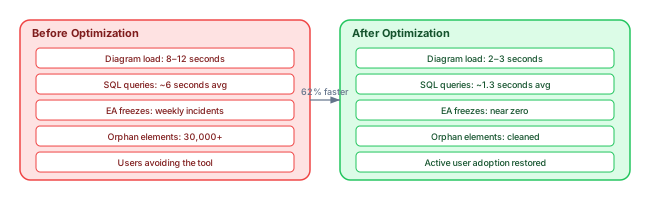
The results were measured two weeks after completing all remediation actions:
Diagram load time: reduced from 8–12 seconds to 2–3 seconds (62% improvement). SQL query time: dropped from ~6 seconds average to ~1.3 seconds. EA freeze incidents: dropped from weekly to near zero. Repository size: reduced by 28% after orphan cleanup and archival. User satisfaction: architects returned from spreadsheets to the repository. The architecture board reinstated trust in EA as the single source of truth.
Continuous performance monitoring
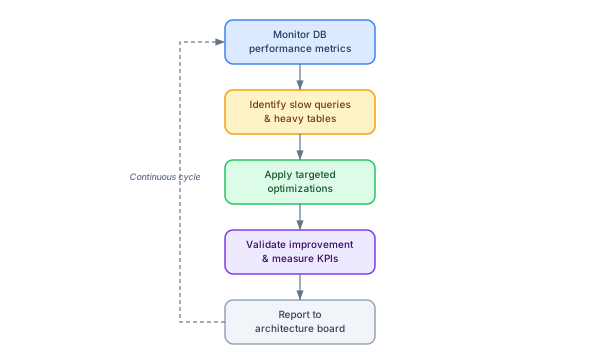
Performance optimization is not a one-time fix. We established a continuous monitoring cycle: monthly SQL Server performance reports, quarterly orphan element audits, dashboard load time tracking, and a feedback channel for architects to report performance issues before they become crises.
Key monitoring queries
-- Monitor repository growth
SELECT YEAR(CreatedDate) AS Year, MONTH(CreatedDate) AS Month,
       COUNT(*) AS NewElements
FROM t_object
GROUP BY YEAR(CreatedDate), MONTH(CreatedDate)
ORDER BY Year DESC, Month DESC;

-- Find diagrams that may need splitting
SELECT d.Name, COUNT(do.Object_ID) AS Elements
FROM t_diagram d
JOIN t_diagramobjects do ON d.Diagram_ID = do.Diagram_ID
GROUP BY d.Name
HAVING COUNT(do.Object_ID) > 50
ORDER BY Elements DESC;
Top 10 performance rules for EA repositories
1. Limit diagrams to 50–70 elements maximum. Larger diagrams cause exponential rendering and query overhead.
2. Index the critical columns. At minimum: t_object(Object_Type, Package_ID), t_connector(Start_Object_ID, End_Object_ID), t_diagramobjects(Object_ID).
3. Clean orphans quarterly. Elements not on any diagram accumulate and bloat every query.
4. Avoid embedded images. Use hyperlinks to external storage instead.
5. Schedule integration sync off-peak. Jira/ServiceNow synchronization should not compete with interactive users.
6. Use Pro Cloud Server for distributed access. Direct SQL connections from remote offices are slow and fragile.
7. Monitor t_xref table size. This table grows silently and can become the largest table in the repository.
8. Train users on performance-aware modeling. Most performance problems are caused by modeling patterns, not infrastructure.
9. Rebuild indexes after bulk operations. Large imports, exports, and script operations fragment indexes.
10. Measure, report, repeat. Performance without metrics is guesswork. Track load times, query times, and user satisfaction.
Conclusion
Performance is a trust factor. Architects stop using the tool if it lags. Stakeholders stop believing in models they cannot access quickly. By treating EA performance as an ongoing practice — not a one-time fix — you protect the investment in your architecture repository and ensure that the modeling tool remains the enabler it is designed to be.
The patterns in this case study — diagnosis workflow, four-layer remediation, continuous monitoring, and the ten performance rules — are applicable to any Sparx EA deployment with more than 10,000 elements. Start with the diagnostic queries, measure your baselines, and address the highest-impact layer first. Sparx EA best practices
If you’d like hands-on training tailored to your team — Sparx Enterprise Architect, BPMN, SysML or the Archi tool — or modelling coaching in ArchiMate and TOGAF-aligned governance, you can reach us via our contact page.
Frequently Asked Questions
What is Sparx Enterprise Architect used for?
Sparx Enterprise Architect (Sparx EA) is a comprehensive UML, ArchiMate, BPMN, and SysML modeling tool used for enterprise architecture, software design, requirements management, and system modeling. It supports the full architecture lifecycle from strategy through implementation.
How does Sparx EA support ArchiMate modeling?
Sparx EA natively supports ArchiMate 3.x notation through built-in MDG Technology. Architects can model all three ArchiMate layers, create viewpoints, add tagged values, trace relationships across elements, and publish HTML reports — making it one of the most popular tools for enterprise ArchiMate modeling.
What are the benefits of a centralised Sparx EA repository?
A centralised SQL Server or PostgreSQL repository enables concurrent multi-user access, package-level security, version baselines, and governance controls. It transforms Sparx EA from an individual diagramming tool into an organisation-wide architecture knowledge base.