⏱ 19 min read
Let me start with the unpopular opinion first: most cloud-native architecture diagrams are junk.
Not because the architects are lazy. Usually the opposite. They’re trying to capture too much, too fast, with too many tools, under too much pressure. So they end up producing one of two things: a pretty marketing poster with Kubernetes logos all over it, or a giant “everything bagel” diagram that nobody can read after the second zoom level.
And then someone says, “UML is too old for cloud-native.” I hear that a lot. I also think it’s mostly wrong. UML modeling best practices
UML is not the problem. Bad modeling is the problem. Vague thinking is the problem. Treating architecture diagrams like decoration is the problem. In real enterprise work, especially in banking, insurance, government, and any place with controls, integration complexity, IAM sprawl, and Kafka in the middle of everything, UML is still one of the most useful tools we have. Not because it’s trendy. Because it forces discipline. UML for microservices
What this means, simply
If you want the short version early: modeling cloud-native architectures with UML means using a standard visual language to describe services, events, identities, dependencies, runtime behavior, and deployment across cloud platforms.
That’s it.
You use UML to answer practical questions like:
- What are the main services and who owns them?
- Which systems communicate synchronously and which through Kafka?
- Where does authentication happen?
- How are IAM roles and trust boundaries separated?
- What gets deployed where?
- What fails when a dependency goes down?
- What is runtime behavior versus just a static box on a slide?
Cloud-native doesn’t make modeling obsolete. It makes modeling more necessary. The architecture is more distributed, more dynamic, and more operationally sensitive. So if anything, the need for precise visual thinking increases.
The trick is not to use all of UML. That would be absurd. The trick is to use the right parts of UML, in a pragmatic way, for the decisions you actually need to make.
Why UML still matters in cloud-native architecture
A lot of architects rejected UML because they associated it with heavyweight design methods, over-modeled class diagrams, and 200-page specification documents no engineer wanted. Fair criticism. I lived through some of that too.
But cloud-native architecture has created a different kind of mess. We now have:
- microservices with unclear boundaries
- event streams nobody can explain end-to-end
- IAM policies copied from old projects
- Kubernetes clusters treated like architecture instead of infrastructure
- diagrams that show tools but not responsibilities
- “serverless” systems with hidden coupling everywhere
UML helps because it gives you a small set of modeling lenses:
- Use case diagrams for who interacts with what, at a high level
- Component diagrams for service boundaries and dependencies
- Sequence diagrams for runtime behavior and interaction flow
- Deployment diagrams for cloud runtime placement and trust zones
- State diagrams when lifecycle really matters
- Package diagrams for domain separation and ownership
You do not need to become doctrinaire about notation. In enterprise architecture work, usefulness beats purity. But some rigor matters. If every box means something different each time, your diagram isn’t architecture. It’s vibes.
The first thing architects get wrong: they model technology before responsibility
This is the most common mistake I see.
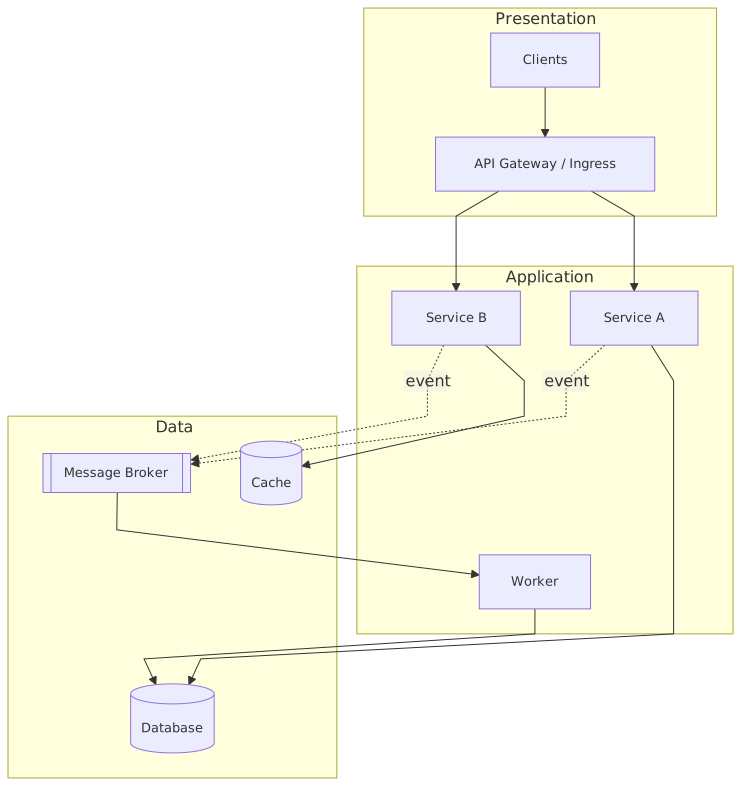
The diagram starts with AWS icons, Azure icons, Kubernetes, Kafka, API Gateway, Vault, service mesh, and maybe some CI/CD symbols. Fine. But where are the business capabilities? Where are the bounded responsibilities? Where does customer onboarding end and payments begin? Which service owns account balance? Which team owns identity federation? Which component is system of record versus cache versus projection?
Cloud-native architecture should be modeled around responsibility and interaction, not around vendor products.
In UML terms, that usually means starting with a component view, not a deployment view. Get the logical architecture right before you obsess over clusters and subnets.
For example, in a banking platform, a useful first-pass component model might include:
- Customer Channel App
- API Gateway
- IAM / Identity Provider
- Customer Profile Service
- Account Service
- Payment Orchestration Service
- Fraud Decision Service
- Notification Service
- Kafka Event Backbone
- Core Banking Integration Adapter
- Audit Logging Service
That is already more useful than a giant cloud diagram with twenty logos.
Because now you can ask real questions:
- Is Payment Orchestration the owner of payment state, or just a coordinator?
- Does Fraud Decision operate synchronously in the payment request path?
- Are customer events published by the source service or by CDC from a database?
- Is IAM centralized or embedded in each service?
- What is the trust boundary between internet-facing APIs and internal event consumers?
These are architecture questions. “Should we use managed Kafka or self-hosted?” is important too, but it comes later.
A pragmatic UML approach for cloud-native systems
Here’s the approach I recommend in real architecture work. Not in theory. In actual programs with deadlines, politics, security reviews, and six teams shipping at once.
1. Start with a context or use-case level view
You need one diagram that explains the system to a non-specialist stakeholder in under two minutes.
Who are the actors?
- Retail Customer
- Call Center Agent
- Fraud Analyst
- External Payment Network
- Identity Provider
- Core Banking Platform
What are the major interactions?
- Authenticate user
- View account balances
- Initiate payment
- Approve payment
- Receive event notifications
- Investigate suspicious activity
This isn’t where you model Kafka topics. This is where you establish purpose and system boundary.
2. Move to a component diagram
This is the workhorse.
A component diagram is where you model the main cloud-native services and their dependencies. You show which components expose APIs, which consume events, which publish events, which depend on IAM, which integrate with legacy systems.
For cloud-native architecture, I usually annotate component diagrams with a few practical stereotypes:
<> <> <> <> <> <> <>
Purists may complain. Ignore them. If the notation improves clarity and stays consistent, it’s doing its job.
3. Use sequence diagrams for the flows that actually matter
This is where UML becomes incredibly valuable in cloud-native systems.
A static service map does not reveal runtime truth. Sequence diagrams do.
You need sequence diagrams for things like:
- customer login with OAuth2/OIDC
- payment initiation with fraud check
- event-driven account update propagation
- failure and retry behavior through Kafka
- token exchange across service calls
- compensation when downstream processing fails
This is where hidden coupling gets exposed. This is where you discover that your “asynchronous architecture” still has three synchronous dependencies in the critical path.
4. Use deployment diagrams sparingly but seriously
A deployment diagram should answer where components run, in what trust zones, under what network and platform constraints.
For cloud-native systems, deployment diagrams often include:
- cloud region(s)
- VPC/VNet segmentation
- Kubernetes clusters or serverless runtime
- managed Kafka cluster
- IAM integration points
- ingress and internal gateways
- secrets management
- observability stack
- on-prem connectivity
This is not just infrastructure decoration. In enterprise work, deployment placement determines latency, compliance exposure, blast radius, and operational ownership.
5. Add state modeling only when lifecycle is important
Not every service needs a state diagram. Most don’t.
But some domains absolutely do. Payments are one. Identity onboarding is another. Loan processing too.
If you have a payment lifecycle like:
- Initiated
- Authenticated
- Fraud Checked
- Submitted
- Accepted
- Settled
- Rejected
- Reversed
then a state diagram is often more useful than another sequence diagram. It clarifies legal transitions, retry boundaries, and event semantics.
Where UML fits in real enterprise architecture work
This is the part a lot of articles skip. They talk about diagrams as if the job ends once the Visio or draw.io file is saved.
In real architecture work, UML models are useful because they support decision-making across multiple conversations:
- solution design workshops
- security reviews
- integration planning
- platform onboarding
- operational readiness
- risk and control assessment
- architecture governance
- delivery alignment
A good UML model is not documentation after the fact. It is a tool to force architectural decisions into the open.
For example, in a cloud migration program for a bank, I’ve seen one sequence diagram settle three weeks of argument between security, platform, and application teams. Why? Because once the login and token propagation flow was modeled properly, everyone could see where trust was being assumed without being designed.
That’s the value.
Not the diagram itself. The clarity it creates.
A real enterprise example: digital payments modernization in banking
Let’s make this concrete.
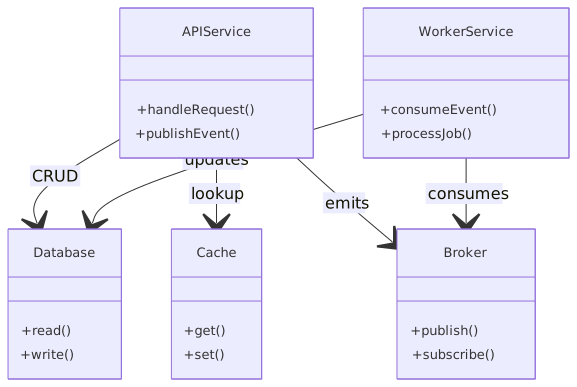
Imagine a mid-sized retail bank modernizing its digital payments platform. The legacy estate includes:
- a core banking system on-prem
- an existing ESB used for batch and some API mediation
- fragmented IAM, with customer auth and workforce auth handled separately
- multiple mobile and web channels
- fraud controls partly embedded in legacy payment code
- increasing demand for real-time notifications and event streaming
The target state is cloud-native, running mostly in AWS, with managed Kubernetes, Kafka for event distribution, centralized IAM federation, and API-led access for channels.
The bank wants:
- real-time payment initiation
- stronger fraud screening
- event-driven notifications
- better auditability
- lower change lead time
- reduced dependency on the old ESB
Now, how do you model this without creating nonsense?
Step 1: Component model
At the logical component level, you might define:
This table is useful because it forces explicit ownership and interface thinking. Too many architecture diagrams skip that and jump straight to “microservices.”
Step 2: Sequence model for payment initiation
Now model a specific flow:
- Customer logs into mobile app through Customer IAM.
- IAM issues access token.
- Mobile app calls Channel API Gateway with token.
- Gateway validates token and forwards request to Payment API Service.
- Payment API Service calls Account Service to validate source account and limits.
- Payment API Service calls Fraud Decision Service synchronously for pre-check.
- If approved, Payment Workflow Service creates payment in
Initiatedstate. - Payment Workflow Service publishes
PaymentInitiatedevent to Kafka. - Core Banking Adapter consumes event and submits transaction to core banking.
- Core Banking Adapter publishes
PaymentAcceptedorPaymentRejected. - Notification Service consumes outcome event and sends customer notification.
- Audit Service records all regulated interaction points.
This sequence model exposes critical design issues immediately:
- Fraud is synchronous in the request path. Is that acceptable for latency?
- The workflow service owns payment state, not the adapter. Good.
- Kafka is used for propagation, not as a substitute for transaction management.
- Core banking remains asynchronous from the cloud-native domain perspective.
- Audit is not an afterthought.
That is architecture.
Step 3: Deployment model
Now place the components:
- API Gateway in internet-facing zone
- IAM integrated with external identity federation and internal policy stores
- Payment services deployed in Kubernetes in private subnets
- Kafka as managed multi-AZ cluster
- Core Banking Adapter deployed in a tightly controlled integration subnet with hybrid connectivity to on-prem
- Audit storage in immutable cloud storage with retention controls
- Secrets retrieved from cloud secrets manager
- Service-to-service authentication via workload identity and short-lived credentials
This matters because the deployment view reveals concerns the component diagram cannot:
- where east-west traffic crosses trust boundaries
- which services need egress to on-prem
- what IAM roles are required for workloads
- which components are internet-exposed
- what has regional failover implications
Kafka changes the architecture model more than most teams admit
Let’s talk about Kafka, because many architects model it badly.
They draw a Kafka box in the middle and arrows going everywhere. Done. That’s not useful.
Kafka in enterprise architecture is not just middleware. It changes ownership, consistency expectations, replay behavior, operational support, and even governance. So your UML model needs to reflect more than “publishes event.” EA governance checklist
At minimum, when Kafka is central to the architecture, model:
- which service is the source of truth for each event
- whether events are commands, facts, or notifications
- topic ownership
- consumer dependency direction
- retry and dead-letter patterns
- idempotency expectations
- schema governance
- ordering assumptions
Here’s the contrarian bit: if your UML component diagram says “Service A publishes to Kafka” but your sequence diagram still depends on downstream consumers completing before the user flow is valid, then your architecture is not really asynchronous. It’s just pretending to be.
I see this all the time in banks. Teams move to event-driven patterns but keep business commitments tied to immediate downstream side effects. Then they act surprised when reconciliation becomes the real architecture.
Model the truth. Not the aspiration.
IAM is usually the least well-modeled part of cloud-native architecture
Another strong opinion: most enterprise architecture diagrams under-model identity and access management by about 70%.
IAM is not a side concern. In cloud-native systems, IAM is part of the architecture fabric.
In UML terms, you should explicitly model:
- user authentication flows
- token issuance and validation
- service-to-service identity
- role or attribute propagation
- trust boundaries
- privileged access paths
- machine identities
- secrets and key dependencies
- federation with enterprise identity providers
In banking, this is especially important because customer IAM, workforce IAM, and workload IAM often get mixed up conceptually even when they are operationally separate.
A realistic architecture might include:
- customer authentication via OIDC
- API gateway token validation
- service authorization based on scopes or claims
- Kubernetes workloads assuming cloud IAM roles via workload identity
- adapter services using tightly scoped roles to access legacy integration endpoints
- admin access federated from enterprise identity provider with MFA and just-in-time elevation
If you don’t model these explicitly, security review becomes a game of assumptions. That never ends well.
Common mistakes architects make when modeling cloud-native systems
Some of these are technical mistakes. Some are modeling mistakes. In practice, they are usually the same thing.
1. Confusing containers with architecture
A deployment artifact is not a business capability.
Just because something runs in a container does not mean it deserves to be a separate service. UML component models should represent meaningful responsibilities, not every deployable image in the CI/CD pipeline.
2. Drawing one diagram for every audience
This is a classic failure.
Executives, engineers, security teams, and operations teams do not need the same level of abstraction. One diagram cannot do everything. Use multiple UML views with clear intent.
3. Ignoring runtime behavior
Static diagrams are easy to produce and often misleading. If you don’t model at least the critical sequences, you will miss latency chains, failure paths, and trust assumptions.
4. Treating Kafka like a magic decoupling machine
It’s not. It reduces some forms of coupling and introduces others. Event schema coupling, consumer lag, replay risk, ordering assumptions, and operational dependency are all real.
5. Skipping IAM because “security will handle it”
No. Security defines controls. Architecture defines how trust is structured in the system. If IAM is absent from your model, your model is incomplete.
6. Modeling the happy path only
In enterprise systems, especially banking, failure behavior is architecture. Retry, timeout, duplicate event handling, compensation, partial success, and audit all need explicit treatment.
7. Over-modeling low-value detail
This is the old UML trap. If your diagrams become too dense to read, they stop helping. Model what drives decisions. Leave implementation trivia to code and runbooks.
8. Hiding legacy dependencies
A lot of “cloud-native” architectures are really cloud-fronted architectures with legacy gravity underneath. That’s fine. Just model it honestly. The Core Banking Adapter box is not a shameful secret. It is a critical architectural fact.
How I would actually run this in an architecture engagement
Let’s make this practical.
If I were leading architecture for a cloud-native banking platform, I would not begin with a giant target-state blueprint. I’d run the modeling in layers.
Workshop 1: Domain and responsibility mapping
Identify:
- business capabilities
- service candidates
- ownership boundaries
- systems of record
- event candidates
Output:
- high-level component diagram
- initial capability-to-service map
Workshop 2: Identity and trust
Identify:
- user types
- authentication methods
- federation points
- service identity patterns
- privileged access paths
Output:
- IAM-focused sequence diagram
- trust boundary deployment overlay
Workshop 3: Runtime flow modeling
Pick 3–5 critical business flows:
- login
- payment initiation
- fraud review
- notification
- exception/reversal
Output:
- sequence diagrams
- failure annotations
- latency and dependency notes
Workshop 4: Deployment and operational architecture
Identify:
- cloud runtime placement
- hybrid connectivity
- secrets and certificate dependencies
- observability
- HA/DR patterns
Output:
- deployment diagram
- operational dependency map
Workshop 5: Review for control and delivery alignment
Use the models to assess:
- security controls
- resilience assumptions
- team ownership
- release dependencies
- migration phases
This is where UML becomes a working instrument, not a static artifact.
Contrarian thought: C4 and ArchiMate are useful, but UML still wins in flow precision
I’m not anti-C4. It’s simple and effective. I’m not anti-ArchiMate either; it’s strong for enterprise-level traceability. enterprise architecture guide
But for cloud-native architecture, especially when you need to model runtime interaction with enough precision to make decisions, UML sequence diagrams still beat most alternatives. They are direct. Engineers understand them. Security teams can reason over them. Integration teams can challenge them. They expose nonsense quickly.
The mistake is thinking one notation should do everything.
Use C4 if it helps for hierarchical structural views. Use ArchiMate if you need enterprise traceability across business, application, and technology layers. But don’t throw away UML because someone thinks it feels old. Old is not the same as obsolete. TCP is old too. ArchiMate modeling guide
What good looks like
A good UML model for cloud-native architecture has a few characteristics:
- it is layered by audience and purpose
- it distinguishes logical architecture from deployment architecture
- it models identity explicitly
- it captures event-driven interaction honestly
- it includes failure-sensitive runtime flows
- it shows legacy integration without embarrassment
- it stays readable
- it drives decisions, not just documentation
Most importantly, it is maintained just enough to remain trustworthy. Not perfect. Trustworthy.
That’s the standard that matters.
Because in enterprise architecture, a slightly imperfect diagram that teams actually use is worth far more than an immaculate model repository nobody opens.
Final thought
Cloud-native architecture is often sold as freedom: loosely coupled services, autonomous teams, elastic runtime, rapid delivery. Some of that is true. But the hidden reality is that cloud-native systems create more moving parts, more identity surfaces, more integration paths, and more operational dependencies than the old monoliths ever did.
So no, I don’t buy the argument that formal modeling is outdated.
If anything, modern distributed systems need better modeling discipline, not less. UML remains one of the most practical ways to get there, provided you use it like an architect and not like a process priest.
Model responsibilities first. Model interactions truthfully. Model IAM explicitly. Model Kafka as a real architectural commitment, not a buzzword in the middle of a slide.
Do that, and UML becomes what it should be: not ceremony, not nostalgia, but a sharp tool for making cloud-native architecture understandable enough to build and safe enough to run.
FAQ
1. Is UML really appropriate for microservices and cloud-native architecture?
Yes. Not all of UML, but the useful parts. Component, sequence, deployment, and sometimes state diagrams are highly effective for modeling microservices, Kafka flows, IAM interactions, and cloud placement.
2. Which UML diagrams are most useful for cloud-native systems?
Usually:
- component diagrams for service boundaries
- sequence diagrams for runtime flows
- deployment diagrams for cloud and trust zones
- state diagrams for lifecycle-heavy domains like payments
Use case diagrams can help at the top level, but they’re not the main workhorse.
3. How do you model Kafka in UML without making the diagram messy?
Treat Kafka as an interaction mechanism, not just a box. Show which services publish and consume, then use sequence diagrams to model event timing, retries, and downstream processing. Keep topic-level detail in supporting documentation if the main diagram gets cluttered.
4. How detailed should IAM be in architecture diagrams?
More detailed than most teams expect. You should show authentication, token validation, service identity, trust boundaries, and privileged access paths. In regulated environments like banking, IAM is core architecture, not a side note.
5. What is the biggest mistake when modeling cloud-native architecture?
Modeling infrastructure before responsibility. If you begin with Kubernetes clusters, cloud icons, and network zones before clarifying service ownership and runtime interactions, the architecture will look modern but remain conceptually weak.
UML for Cloud-Native Architectures
Frequently Asked Questions
How is ArchiMate used for cloud transformation?
ArchiMate models cloud transformation by comparing baseline and target architectures across all layers. Cloud platforms appear as Technology Services, workloads as Application Components assigned to Technology Nodes. The Implementation and Migration layer models transition plateaus, work packages, and migration events — producing a traceable cloud roadmap.
How does ArchiMate align with DevOps practices?
ArchiMate supports DevOps by modeling the CI/CD pipeline as Application Behavior elements, infrastructure as code as Technology Artifacts, and deployment topology as Technology Nodes. Traceability from requirements through design to deployed infrastructure helps DevOps teams understand architectural constraints and governance requirements.
What cloud architecture patterns can be modeled in ArchiMate?
ArchiMate can model cloud-native patterns including: multi-region active-active deployments, event-driven integration via messaging platforms, API-led integration architectures, zero-trust network topology, container orchestration (Kubernetes), and hybrid cloud connectivity. Each pattern maps to specific Technology and Application layer elements.