⏱ 8 min read
What Is PlantUML?
PlantUML is an open-source tool that generates UML diagrams and other technical diagrams from a concise plain-text notation. Write a structured description of what you want to model, and PlantUML produces a clean, correctly laid-out diagram — without you touching a mouse to position a single element.
First published in 2009, PlantUML is distributed under the GPL v3 license. The software runs on a Java server; the public rendering endpoint at plantuml.com processes your diagram code and returns the output image. Critically, images generated by PlantUML are owned entirely by the author — they are not covered by the GPL and carry no redistribution restrictions. You own your diagrams.
PlantUML is natively integrated into Confluence, GitLab, IntelliJ IDEA, Visual Studio Code, Doxygen, and over a dozen other tools. Its syntax covers formal UML diagram types — sequence, class, use case, activity, component, state, object — plus non-UML formats like mind maps, Gantt charts, Archimate, and network diagrams. ArchiMate relationship types
To start immediately, open our free PlantUML editor online — eight diagram templates, live rendering via plantuml.com, and one-click SVG/PNG export.
PlantUML vs Mermaid: When to Use Which
Both tools convert text to diagrams, but they are optimised for different contexts. Understanding the trade-offs helps you choose the right tool for each situation.
Choose PlantUML when: you need formal UML compliance, you are working in a Java-heavy environment (Confluence, IntelliJ, Doxygen), you need complex class diagrams with inheritance and multiplicity, or you need to generate diagrams programmatically from structured data.
Choose Mermaid when: the diagram lives in a Markdown file or GitHub README, you want zero-dependency browser rendering, the audience includes non-technical stakeholders who might edit the source, or you need Git graph or timeline diagrams (which PlantUML does not natively support).
For enterprise architecture teams, both tools earn their place. We use our Mermaid editor for lightweight technical documentation and our PlantUML editor for formal UML deliverables and architecture specifications.
PlantUML Diagram Types
Every PlantUML diagram opens with a type declaration and closes with its matching end tag. The declaration tells the renderer which layout engine and notation rules to apply:
@startuml/@enduml— sequence, class, use case, activity, component, state, object@startmindmap/@endmindmap— hierarchical mind maps@startgantt/@endgantt— Gantt project charts@startwbs/@endwbs— work breakdown structures@startjson/@endjson— JSON visualisation@startyaml/@endyaml— YAML visualisation
Within a @startuml block, PlantUML infers the diagram type from the first element it encounters: class declarations produce class diagrams, -> arrows produce sequence diagrams, [Component] syntax produces component diagrams, and so on.
Class Diagram: E-Commerce Domain Model
Class diagrams are one of PlantUML's strongest areas. The notation supports all UML relationship types — inheritance (<|--), composition (*--), aggregation (o--), association (--), dependency (..>) — with precise multiplicity, stereotypes, and visibility modifiers.

The PlantUML source for this model is clean and readable:
@startuml
abstract class Entity {
  +id : UUID
  +createdAt : DateTime
}
class User {
  +email : String
  +name : String
  +placeOrder() : Order
}
class Order {
  +status : OrderStatus
  +total : Decimal
  +submit() : void
}
class Product {
  +name : String
  +price : Decimal
  +reserve(n : int) : bool
}
Entity <|-- User
Entity <|-- Order
Entity <|-- Product
User "1" --o{ "0..*" Order : places
Order "0..*" }o-- "1..*" Product : contains
@enduml
The abstract modifier renders the class name in italics, clearly distinguishing it from concrete classes. Multiplicity strings on relationship ends ("1", "0..*") are explicit and visible in the diagram without requiring any additional annotation.
Component Diagram: Microservices Architecture
Component diagrams model the static structure of a system at the architectural level: which components exist, which interfaces they expose, and which dependencies connect them. They sit between the class level (too detailed) and the deployment level (too infrastructure-focused), making them ideal for communicating architecture decisions to mixed technical and managerial audiences. integration architecture diagram
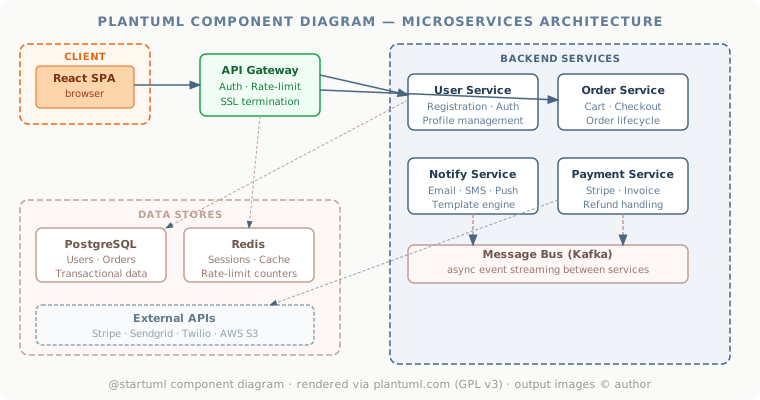
PlantUML component diagrams use square-bracket notation for components ([API Gateway]), package blocks for grouping (package "Backend" { }), and the standard dependency arrow (-->) for inter-component relationships. Interfaces are declared with the interface keyword and connected with lollipop notation.
@startuml
package "Backend Services" {
  [User Service]
  [Order Service]
  [Payment Service]
  [Notify Service]
}
database "PostgreSQL"
database "Redis"
[React SPA] --> [API Gateway]
[API Gateway] --> [User Service]
[API Gateway] --> [Order Service]
[Order Service] --> [Payment Service]
[User Service] --> PostgreSQL
[API Gateway] --> Redis
@enduml
Sequence Diagram Syntax
Sequence diagrams are PlantUML's most widely-used diagram type. The arrow syntax is expressive: -> for solid synchronous calls, --> for dashed return messages, ->> for asynchronous messages. Activation bars appear automatically on the lifeline of any participant that receives a call.
@startuml
actor User
participant "API Gateway" as API
database Database

User -> API : POST /login
activate API
API -> Database : SELECT user
Database --> API : user record
API --> User : JWT token
deactivate API

User -> API : GET /data (Bearer token)
activate API
API --> User : protected resource
deactivate API
@enduml
Use activate and deactivate to control activation bars manually for precision. The autonumber directive numbers every message automatically. note left, note right, and note over A, B add inline annotations without cluttering the arrow flow.
Core PlantUML Syntax Reference
Relationship arrows in class diagrams:
<|--— inheritance (extends)*--— composition (filled diamond)o--— aggregation (open diamond)-->— directed association..>— dependency (dashed)..|>— realisation / implements
Visibility modifiers:
+— public-— private#— protected~— package-private
Skinparam controls global styling. skinparam classBackgroundColor #F0F4F8 sets the fill colour for all class boxes. You can apply skinparam per element type, per stereotype, or globally — giving full control over the diagram's visual output without touching the structural content.
Preprocessing: PlantUML supports !include to import reusable fragments, !define for macros, and !if/!endif for conditional inclusion. This makes it practical to build libraries of approved component templates that teams include in their diagrams by reference.
Enterprise Architecture Use Cases
PlantUML has a dedicated Archimate mode (!include <archimate/Archimate>) that renders official ArchiMate notation — the same notation used in Sparx Enterprise Architect and Archi. For teams that need quick ArchiMate sketches without opening a full modelling tool, this is a practical bridge.
PlantUML's C4 support (via the C4-PlantUML library) renders the four C4 diagram levels — Context, Container, Component, and Code — using the official C4 notation. This makes it the preferred text-based tool for C4 architecture documentation.
For architecture governance, PlantUML diagrams stored in a repository provide an auditable, diffable record of architecture decisions. When an Architecture Review Board approves a change, the diagram source file captures the before and after state in version control — something no GUI tool's binary format can match. architecture decision records
Our ArchiMate modelling coaching, enterprise architecture consulting, and Sparx EA training all cover diagram-as-code practices alongside their respective modelling standards.
Try the Free PlantUML Editor
Our free PlantUML editor online provides eight diagram templates (sequence, class, component, use case, activity, state, ER, and mind map), live rendering via the public plantuml.com server, SVG and PNG export, and shareable diagram links. Open it, paste your diagram code, and the preview updates within half a second.
Note: because PlantUML requires a Java rendering server, your diagram source code is sent to plantuml.com for processing. Do not enter confidential or proprietary information. For sensitive diagrams, install a self-hosted PlantUML server and point the encoder to your own endpoint. BPMN training
Contact us to discuss architecture documentation practices, tooling governance, or training for your team.
PlantUML is distributed under the GPL v3 License. Images and diagrams generated by PlantUML are owned by the author of their source code and are not covered by the GPL. Rendering in this editor is performed by the public plantuml.com server; do not submit confidential information.
Frequently Asked Questions
What is enterprise architecture?
Enterprise architecture is a discipline that aligns an organisation's strategy, business operations, information systems, and technology infrastructure. It provides a structured framework for understanding how an enterprise works today, where it needs to go, and how to manage the transition.
How is ArchiMate used in enterprise architecture practice?
ArchiMate is used as the standard modeling language in enterprise architecture practice. It enables architects to create consistent, layered models covering business capabilities, application services, data flows, and technology infrastructure — all traceable from strategic goals to implementation.
What tools are used for enterprise architecture modeling?
Common enterprise architecture modeling tools include Sparx Enterprise Architect (Sparx EA), Archi, BiZZdesign Enterprise Studio, LeanIX, and Orbus iServer. Sparx EA is widely used for its ArchiMate, UML, BPMN and SysML support combined with powerful automation and scripting capabilities.
Where a diagram tool stops being enough
PlantUML is excellent at what this article describes: turning a precise description into a clean diagram, repeatably. The limit shows up when the same systems keep reappearing across many diagrams and nothing connects those appearances to each other.
At that point the useful question is not which diagram tool to use but whether there is a model at all. Mooodels keeps applications, services and their dependencies as one queryable model and renders views from it, so "what depends on this" is a traversal rather than a search through old diagrams.