⏱ 16 min read
Introduction: why scripting matters for ArchiMate practices
Archi is the most widely used open-source ArchiMate modeling tool. It is fast, accessible, and ArchiMate-first — which makes it the natural choice for thousands of architecture teams worldwide. But as models grow beyond a few dozen elements, a gap emerges between what the GUI offers and what architecture governance demands. Naming conventions slip. Tagged values are incomplete. Orphan elements accumulate. Views become stale. Quality checks require manual inspection that nobody has time for.
jArchi — Archi's JavaScript-based scripting plugin — closes that gap. It gives architects programmatic access to the entire model: elements, relationships, views, properties, visual objects, and diagram layout. With jArchi, you can automate validation, enforce naming conventions, generate reports, build views programmatically, perform impact analysis, and integrate Archi models with external systems.
This article goes beyond "hello world" examples. We cover the jArchi API architecture, practical automation patterns for real enterprise use cases, advanced scripting techniques, integration with Git and CI pipelines, reporting and dashboard generation, governance workflows — and the limitations you will hit. Every script example is production-tested and explained in context.
The jArchi API architecture: understanding the object model
Before writing scripts, you need a mental model of how jArchi exposes the Archi data. jArchi provides a JavaScript API that wraps Archi's internal Java model. The key entry point is the model global object, which gives you access to every element, relationship, view, and folder in the currently open model.
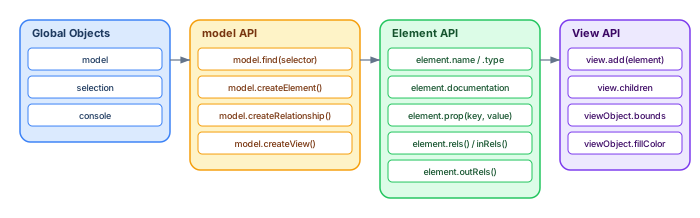
The most important methods are:
model.find(selector) — returns a collection of model objects matching a selector string. Selectors include "element", "relationship", "view", "folder", and type-specific selectors like "application-component" or "business-process".
element.prop(key) / element.prop(key, value) — reads or writes custom properties (tagged values). This is how you manage metadata like Owner, Lifecycle Status, or Cost Center.
element.rels(), element.inRels(), element.outRels() — navigate relationships. These methods return collections of relationships that you can filter by type.
model.createElement(type, name, folder) — creates a new element programmatically. Combine with model.createRelationship(type, name, source, target) to build model content from external data.
Getting started: installation and first script
Installation
Download the jArchi plugin from the Archi plugin repository. Place the plugin JAR file in the /dropins folder (or /plugins in older versions) of your Archi installation. Restart Archi — you will see a "Scripts" section in the left panel and a "Scripts Manager" view. Scripts are plain .ajs files stored in a configurable directory on your filesystem.
First script: list all Application Components
// List all Application Components with their properties
$("application-component").forEach(function(e) {
    console.log(e.name + " | Owner: " + (e.prop("Owner") || "UNSET") +
                " | Status: " + (e.prop("Lifecycle") || "UNSET"));
});
The $() function is jArchi's shorthand for model.find(). It returns a collection that supports forEach, filter, map, and other array-like methods.
Practical automation patterns
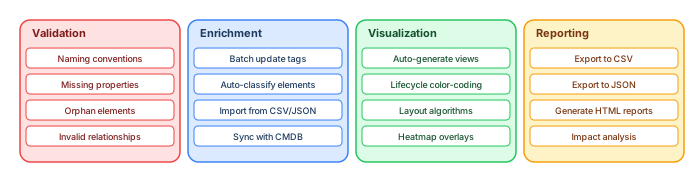
The following patterns address the most common automation needs in enterprise architecture practices. Each pattern includes a working script, an explanation of when to use it, and notes on edge cases.
Pattern 1: Enforce naming conventions
Naming consistency is the foundation of a trustworthy model. This script checks that all Application Components follow the pattern "Domain — Component Name" and reports violations:
// Validate naming: "Domain — ComponentName"
var pattern = /^[A-Z][a-zA-Z0-9\s]+ — [A-Z]/;
var violations = [];

$("application-component").forEach(function(e) {
    if (!pattern.test(e.name)) {
        violations.push({
            name: e.name,
            id: e.id,
            folder: $(e).parents("folder").first()
                ? $(e).parents("folder").first().name : "root"
        });
    }
});

console.log("=== Naming Convention Report ===");
console.log("Total Application Components: " + $("application-component").size());
console.log("Violations: " + violations.length);
violations.forEach(function(v) {
    console.log("  ✗ " + v.name + " (in " + v.folder + ")");
});
Pattern 2: Find orphan elements
Elements that exist in the model but appear in no view are invisible to stakeholders and often stale. This script finds them:
// Find elements not placed on any view
var orphans = [];
$("element").forEach(function(e) {
    var onViews = $("view").filter(function(v) {
        return $(v).find("element").filter(function(ve) {
            return ve.concept && ve.concept.id === e.id;
        }).size() > 0;
    });
    if (onViews.size() === 0) {
        orphans.push(e.type + ": " + e.name);
    }
});

console.log("=== Orphan Elements (" + orphans.length + ") ===");
orphans.forEach(function(o) { console.log("  " + o); });
Run this monthly. If your orphan count exceeds 10–15% of total elements, your model maintenance discipline needs attention.
Pattern 3: Validate required properties
Ensure all elements of a given type have mandatory tagged values. This is the jArchi equivalent of OCL constraints in Sparx EA: Sparx EA performance optimization
// Check that all Application Components have Owner and Lifecycle properties
var required = ["Owner", "Lifecycle Status"];
var missing = [];

$("application-component").forEach(function(e) {
    required.forEach(function(prop) {
        var val = e.prop(prop);
        if (!val || val.trim() === "") {
            missing.push(e.name + " is missing '" + prop + "'");
        }
    });
});

console.log("=== Property Completeness Report ===");
console.log("Missing properties: " + missing.length);
missing.forEach(function(m) { console.log("  ✗ " + m); });
Pattern 4: Batch update properties from business rules
Mass-update tagged values based on element characteristics. This script auto-classifies elements by layer:
// Auto-tag elements with their ArchiMate layer
var layerMap = {
    "BusinessActor": "Business", "BusinessRole": "Business",
    "BusinessProcess": "Business", "BusinessService": "Business",
    "BusinessObject": "Business", "BusinessFunction": "Business",
    "ApplicationComponent": "Application", "ApplicationService": "Application",
    "ApplicationInterface": "Application", "DataObject": "Application",
    "Node": "Technology", "Device": "Technology",
    "SystemSoftware": "Technology", "TechnologyService": "Technology",
    "Artifact": "Technology", "CommunicationNetwork": "Technology"
};

var updated = 0;
$("element").forEach(function(e) {
    var layer = layerMap[e.type];
    if (layer && e.prop("Layer") !== layer) {
        e.prop("Layer", layer);
        updated++;
    }
});
console.log("Updated " + updated + " elements with Layer tag.");
Pattern 5: Impact analysis — what depends on this component?
Trace all direct and indirect dependencies from a specific element. This is one of the most valuable scripts for architecture decision-making:
// Impact analysis: find all elements that depend on a target
function impactAnalysis(targetName, depth) {
    var target = $("element").filter(function(e) {
        return e.name === targetName;
    }).first();
    if (!target) { console.log("Element not found: " + targetName); return; }

    var visited = {};
    var queue = [{elem: target, level: 0}];
    visited[target.id] = true;

    console.log("=== Impact Analysis: " + targetName + " ===");

    while (queue.length > 0) {
        var current = queue.shift();
        if (current.level > 0) {
            var indent = "  ".repeat(current.level);
            console.log(indent + "→ " + current.elem.type + ": " +
                        current.elem.name + " (level " + current.level + ")");
        }
        if (current.level < (depth || 3)) {
            $(current.elem).inRels().forEach(function(rel) {
                if (!visited[rel.source.id]) {
                    visited[rel.source.id] = true;
                    queue.push({elem: rel.source, level: current.level + 1});
                }
            });
        }
    }
}

impactAnalysis("Payment Gateway", 3);
Pattern 6: Generate a view automatically
Create a diagram programmatically showing all Application Components and their Serving relationships:
// Auto-generate an application landscape view
var view = model.createArchimateView("Auto — Application Landscape");
var apps = $("application-component");
var y = 20;
var positions = {};

// Place elements
apps.forEach(function(app) {
    var vo = view.add(app, 20, y, 200, 50);
    positions[app.id] = {x: 20, y: y};
    y += 70;
});

// Add serving relationships that connect placed elements
$("serving-relationship").forEach(function(rel) {
    if (positions[rel.source.id] && positions[rel.target.id]) {
        view.add(rel);
    }
});

console.log("Created view with " + apps.size() + " components.");
Pattern 7: Lifecycle color-coding on views
Visually distinguish element lifecycle status by applying colors to view objects:
// Color-code elements by lifecycle status on the active view
var colorMap = {
    "Active": "#22c55e",     // green
    "Phase Out": "#f59e0b",  // amber
    "Retired": "#ef4444",    // red
    "Planned": "#3b82f6",    // blue
    "Under Review": "#8b5cf6" // violet
};

var view = selection.filter("archimate-diagram-model").first();
if (!view) { console.log("Select a view first."); }
else {
    $(view).children().forEach(function(obj) {
        if (obj.concept) {
            var status = obj.concept.prop("Lifecycle Status");
            var color = colorMap[status] || "#e2e8f0"; // gray default
            obj.fillColor = color;
        }
    });
    console.log("Applied lifecycle colors to " + $(view).children().size() + " objects.");
}
Reporting and export patterns
Architecture models are only valuable when their content reaches stakeholders. jArchi enables structured data export for dashboards, reports, and compliance documentation.
Export to CSV for spreadsheet analysis
// Export application catalog to CSV
var JavaFile = Java.type("java.io.FileWriter");
var file = new JavaFile("/tmp/app_catalog.csv");
file.write("Name,Type,Owner,Lifecycle,Documentation\n");

$("application-component").forEach(function(e) {
    var row = [
        '"' + (e.name || "") + '"',
        e.type,
        '"' + (e.prop("Owner") || "") + '"',
        '"' + (e.prop("Lifecycle Status") || "") + '"',
        '"' + (e.documentation || "").replace(/"/g, '""').substring(0, 200) + '"'
    ].join(",");
    file.write(row + "\n");
});
file.close();
console.log("Exported to /tmp/app_catalog.csv");
Export to JSON for dashboard consumption
// Export model summary as JSON
var data = {
    exportDate: new Date().toISOString(),
    elements: [],
    relationships: []
};

$("element").forEach(function(e) {
    data.elements.push({
        id: e.id, name: e.name, type: e.type,
        owner: e.prop("Owner") || null,
        lifecycle: e.prop("Lifecycle Status") || null
    });
});

$("relationship").forEach(function(r) {
    data.relationships.push({
        id: r.id, type: r.type, name: r.name || "",
        sourceId: r.source.id, sourceName: r.source.name,
        targetId: r.target.id, targetName: r.target.name
    });
});

var JavaFile = Java.type("java.io.FileWriter");
var file = new JavaFile("/tmp/model_export.json");
file.write(JSON.stringify(data, null, 2));
file.close();
console.log("Exported " + data.elements.length + " elements, " +
            data.relationships.length + " relationships.");
Generate an HTML model quality report
// Generate a self-contained HTML quality report
var totalElements = $("element").size();
var withOwner = $("element").filter(function(e) {
    return e.prop("Owner") && e.prop("Owner").trim() !== "";
}).size();
var withDocs = $("element").filter(function(e) {
    return e.documentation && e.documentation.length > 20;
}).size();

var html = '<!DOCTYPE html><html><head><title>Model Quality Report</title>' +
    '<style>body{font-family:system-ui;max-width:800px;margin:2em auto;padding:1em}' +
    '.metric{display:inline-block;padding:1em;margin:0.5em;border-radius:8px;background:#f8fafc;' +
    'border:1px solid #e2e8f0;text-align:center;min-width:150px}' +
    '.metric .value{font-size:2em;font-weight:bold;color:#1e293b}' +
    '.metric .label{font-size:0.85em;color:#64748b}</style></head><body>' +
    '<h1>Model Quality Report</h1>' +
    '<p>Generated: ' + new Date().toISOString() + '</p>' +
    '<div class="metric"><div class="value">' + totalElements + '</div>' +
    '<div class="label">Total Elements</div></div>' +
    '<div class="metric"><div class="value">' +
    Math.round(withOwner/totalElements*100) + '%</div>' +
    '<div class="label">Ownership Coverage</div></div>' +
    '<div class="metric"><div class="value">' +
    Math.round(withDocs/totalElements*100) + '%</div>' +
    '<div class="label">Documentation Coverage</div></div>' +
    '</body></html>';

var JavaFile = Java.type("java.io.FileWriter");
var file = new JavaFile("/tmp/model_quality.html");
file.write(html);
file.close();
Integration with Git and coArchi
Archi models can be stored in Git repositories using the coArchi plugin. jArchi scripts can be combined with Git workflows to create architecture-as-code practices:

The workflow: an architect edits the model, runs the jArchi validation suite (naming, orphans, required properties), fixes any violations, then commits via coArchi. On the CI server, export scripts generate CSV/JSON for dashboards and HTML reports for stakeholders. This creates a repeatable, auditable architecture development cycle.
Pre-commit validation script
Combine multiple validation checks into a single script that returns a pass/fail summary:
// Pre-commit validation suite
var errors = 0;
var warnings = 0;

// Check 1: Naming conventions
$("application-component").forEach(function(e) {
    if (!/^[A-Z]/.test(e.name)) {
        console.log("ERROR: Naming violation — " + e.name);
        errors++;
    }
});

// Check 2: Required properties
$("application-component").forEach(function(e) {
    if (!e.prop("Owner") || e.prop("Owner").trim() === "") {
        console.log("WARNING: Missing Owner — " + e.name);
        warnings++;
    }
});

// Check 3: Orphan relationships (connected to deleted elements)
$("relationship").forEach(function(r) {
    if (!r.source || !r.target) {
        console.log("ERROR: Broken relationship — " + r.id);
        errors++;
    }
});

console.log("\n=== VALIDATION SUMMARY ===");
console.log("Errors: " + errors + " | Warnings: " + warnings);
console.log(errors === 0 ? "✓ READY TO COMMIT" : "✗ FIX ERRORS BEFORE COMMIT");
Advanced techniques
Import elements from external CSV
Populate an Archi model from a spreadsheet export (e.g., from a CMDB or application portfolio tool):
// Import Application Components from CSV
var JavaFile = Java.type("java.io.BufferedReader");
var FileReader = Java.type("java.io.FileReader");
var reader = new JavaFile(new FileReader("/tmp/app_inventory.csv"));
var header = reader.readLine(); // skip header
var line;
var count = 0;

while ((line = reader.readLine()) !== null) {
    var cols = line.split(",");
    var name = cols[0].replace(/"/g, "");
    var owner = cols[1] ? cols[1].replace(/"/g, "") : "";
    var status = cols[2] ? cols[2].replace(/"/g, "") : "";

    // Check if element already exists
    var existing = $("application-component").filter(function(e) {
        return e.name === name;
    }).first();

    if (!existing) {
        var elem = model.createElement("application-component", name);
        elem.prop("Owner", owner);
        elem.prop("Lifecycle Status", status);
        count++;
    }
}
reader.close();
console.log("Imported " + count + " new Application Components.");
Recursive folder traversal
Process elements by folder hierarchy for scoped operations:
// Process elements within a specific folder tree
function processFolder(folder, depth) {
    var indent = "  ".repeat(depth);
    console.log(indent + "📁 " + folder.name);

    $(folder).children("element").forEach(function(e) {
        console.log(indent + "  " + e.type + ": " + e.name);
    });

    $(folder).children("folder").forEach(function(sub) {
        processFolder(sub, depth + 1);
    });
}

// Start from root folders
$("folder").filter(function(f) {
    return f.name === "Application";
}).forEach(function(f) {
    processFolder(f, 0);
});
Limitations of jArchi: what you need to know
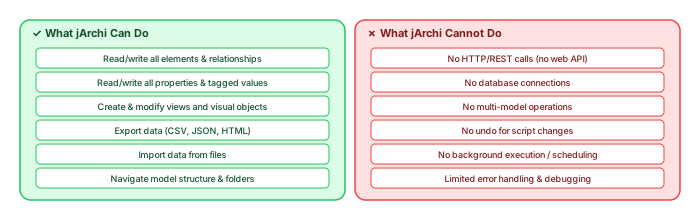
JArchi is powerful, but it has real limitations that affect what you can build. Understanding these upfront saves frustration and helps you make realistic plans.
No network access
JArchi runs inside Archi's GraalVM sandbox. It cannot make HTTP requests, call REST APIs, or connect to databases. If you need to integrate with external systems (CMDB, Jira, ServiceNow), you must use file-based exchange: export from jArchi to CSV/JSON, then use an external script (Python, PowerShell) to push data to the API, or vice versa. This is the single biggest limitation for enterprise integration scenarios.
No scheduled execution
JArchi scripts run manually — you click "Run" in the Scripts Manager. There is no built-in scheduler, no cron-like trigger, and no way to run scripts automatically when the model is opened or saved. Workaround: use an external scheduler that launches Archi in headless mode via command line and executes scripts. This is complex to set up and fragile.
No undo for script changes
When a jArchi script modifies the model, there is no undo. If a script deletes 500 elements by mistake, you must revert from a saved backup or Git commit. This makes testing on a copy of the model essential for any destructive operation. Always back up your .archimate file before running write scripts for the first time.
No multi-model operations
JArchi operates on the currently open model only. You cannot open multiple models simultaneously or merge content between models programmatically. If you need to merge models, use the ArchiMate Open Exchange format and import/export through Archi's built-in features. ArchiMate tutorial for enterprise architects
Performance with large models
JArchi works well for models up to a few thousand elements. For models with 10,000+ elements and extensive relationship networks, scripts that iterate all elements and relationships can become slow (seconds to minutes). Optimize by using type-specific selectors ($("application-component") instead of $("element")) and by avoiding nested iterations where possible.
Limited debugging
JArchi's debugging capabilities are minimal — you have console.log() and that is essentially it. There is no breakpoint debugger, no step-through execution, and no variable inspector. For complex scripts, add liberal logging, test incrementally, and keep functions small and testable.
GraalVM compatibility
JArchi uses GraalVM JavaScript, which supports most ES6+ syntax (arrow functions, let/const, template literals, destructuring). However, some newer JavaScript features may not work, and Java interop has quirks. The Java.type() function gives access to Java classes for file I/O, but the available Java APIs are limited to what Archi bundles.
jArchi vs Sparx EA scripting: when to use what
If your organization uses both Archi and Sparx EA, or is deciding between them, it helps to understand how their scripting capabilities compare: Sparx EA best practices
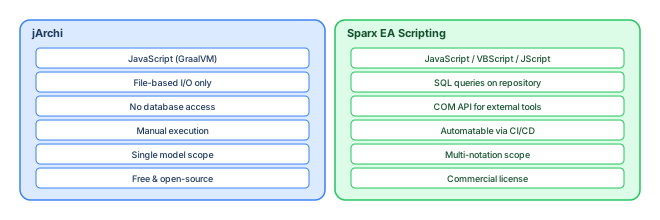
JArchi is ideal for lightweight, ArchiMate-focused automation: validation, reporting, view generation, and model enrichment. Sparx EA scripting is more powerful for enterprise-scale scenarios: SQL-based querying, COM automation for CI/CD integration, multi-notation traceability, and complex repository operations. If your needs are ArchiMate-only and your model is under 5,000 elements, jArchi is excellent. If you need cross-notation traceability, database-level querying, or headless automation, Sparx EA's scripting is stronger. ArchiMate layers explained
Organizing a jArchi script library
As your script collection grows, organization becomes critical. A recommended folder structure:
scripts/
├── validation/
│   ├── check-naming-conventions.ajs
│   ├── check-required-properties.ajs
│   ├── find-orphan-elements.ajs
│   └── pre-commit-suite.ajs
├── enrichment/
│   ├── auto-tag-layers.ajs
│   ├── import-from-csv.ajs
│   └── batch-update-lifecycle.ajs
├── visualization/
│   ├── generate-app-landscape.ajs
│   ├── lifecycle-color-coding.ajs
│   └── capability-heatmap.ajs
├── reporting/
│   ├── export-csv-catalog.ajs
│   ├── export-json-dashboard.ajs
│   └── generate-quality-report.ajs
└── utilities/
    ├── count-elements-by-type.ajs
    ├── impact-analysis.ajs
    └── folder-traversal.ajs
Store scripts alongside the model in Git (via coArchi). This ensures that everyone on the team uses the same validation rules and export formats. Version the scripts just like you version the model.
Governance workflow: making scripting a team practice
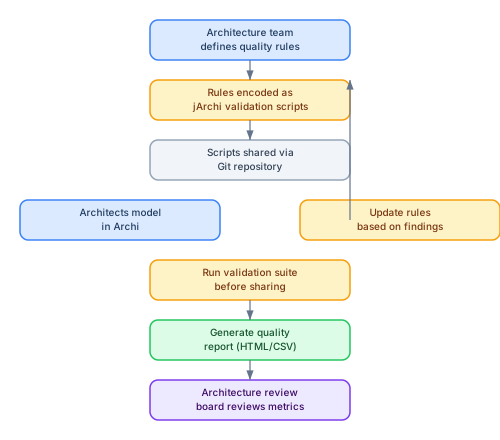
The architecture team defines quality rules (naming conventions, required properties, relationship patterns). These rules are encoded as jArchi scripts and distributed via Git. Architects run the validation suite before committing changes. Quality reports are generated and reviewed by the architecture governance board. Based on review findings, rules are updated — and the cycle continues.
This workflow transforms jArchi from a personal productivity tool into an organizational governance mechanism. The scripts become the executable expression of your architecture standards.
Conclusion
JArchi transforms Archi from a diagramming tool into a programmable architecture workbench. The automation patterns in this article — validation, enrichment, visualization, reporting, and integration — address the operational challenges that architecture teams face daily: inconsistent naming, missing metadata, stale content, and manual reporting.
Start with two or three validation scripts. Run them regularly. Add reporting when stakeholders need structured data. Build view-generation scripts when you find yourself creating the same diagram layout repeatedly. And be honest about the limitations: jArchi cannot replace a full repository platform for enterprise-scale needs, but it can make a small-to-medium Archi practice dramatically more efficient, consistent, and governable.
The scripts in this article are starting points. Adapt them to your naming conventions, your tagged value scheme, and your governance workflow. Store them in Git. Share them with your team. And treat them as first-class architecture artifacts — because that is exactly what they are.
If you’d like hands-on training tailored to your team — Sparx Enterprise Architect, BPMN, SysML or the Archi tool — or modelling coaching in ArchiMate and TOGAF-aligned governance, you can reach us via our contact page.
Frequently Asked Questions
What is enterprise architecture?
Enterprise architecture is a discipline that aligns an organisation's strategy, business operations, information systems, and technology infrastructure. It provides a structured framework for understanding how an enterprise works today, where it needs to go, and how to manage the transition.
How is ArchiMate used in enterprise architecture practice?
ArchiMate is used as the standard modeling language in enterprise architecture practice. It enables architects to create consistent, layered models covering business capabilities, application services, data flows, and technology infrastructure — all traceable from strategic goals to implementation.
What tools are used for enterprise architecture modeling?
Common enterprise architecture modeling tools include Sparx Enterprise Architect (Sparx EA), Archi, BiZZdesign Enterprise Studio, LeanIX, and Orbus iServer. Sparx EA is widely used for its ArchiMate, UML, BPMN and SysML support combined with powerful automation and scripting capabilities.