⏱ 19 min read
Most architecture teams don’t have a modeling problem. They have a clarity problem.
That sounds harsh, but it’s true. I’ve seen enterprises buy expensive modeling tools, define repositories, create governance boards, and still produce diagrams that nobody trusts. The issue usually isn’t the notation itself. It’s that architects pick ArchiMate when they need precision in software design, or they pick UML when they need a map of the enterprise. Then they wonder why delivery teams ignore the diagrams and executives ask for PowerPoint instead.
So let’s say it plainly: ArchiMate and UML are not competitors in the way people often frame them. They solve different problems. Yes, there is overlap. Yes, both can be abused. But if you’re doing real enterprise architecture work—banking platforms, IAM modernization, Kafka event integration, cloud migration—you need to know when each one helps and when each one becomes theater.
Here’s the simple version early, because this is where people get lost:
- UML is mainly for describing software structure and behavior
- ArchiMate is mainly for describing enterprise structure, relationships, and change across business, application, and technology layers
If you remember only that, you’ll already make better decisions than half the architecture forums on the internet.
But that simple answer is not enough in practice. Real architecture work is messy. Teams need diagrams for different audiences. CIOs want impact and transition states. Engineers want interfaces and flows. Security wants trust boundaries. Product teams want dependencies. Operations wants runtime reality. And if you use one notation for all of that, you usually end up with diagrams that are technically valid and practically useless.
The false debate: “Which is better?”
Neither. That’s the wrong question.
Asking whether ArchiMate is better than UML is like asking whether a city map is better than a building blueprint. Depends what you’re trying to do. If you’re planning a road network, a blueprint is useless. If you’re designing the electrical system in a hospital, a city map won’t save you. ArchiMate modeling guide
Still, people turn this into a tribal argument:
- “UML is too technical for enterprise architecture”
- “ArchiMate is too abstract to be useful”
- “We only need C4”
- “Nobody understands these notations anyway”
- “Good architects can explain anything with boxes and arrows”
There’s a little truth in each of those. That’s why this debate keeps going.
My contrarian view: notation matters less than architects think, but more than they admit.
It matters less because stakeholders care about decisions, not symbol purity. It matters more because the notation shapes how you think. If your notation cannot express motivation, capability impact, technology dependencies, or implementation transitions, you’ll skip those conversations. If your notation cannot express sequence, object lifecycle, interaction detail, or component responsibility, you’ll hand-wave software complexity. In both cases, the architecture suffers.
What UML actually does well
UML has been around forever, and because of that, many architects either over-respect it or dismiss it too quickly.
At its best, UML is good at showing:
- software components and their relationships
- class structures and object models
- dynamic interactions between systems
- activity and sequence flows
- deployment views for technical solutions
- use cases and behavioral decomposition
In plain English, UML is useful when you need to explain how a system works or will work.
That matters a lot in enterprise architecture, even if some enterprise architects pretend they live above implementation. They don’t. If your target-state architecture depends on Kafka topics, IAM token flows, microservice boundaries, API gateways, event consumers, and cloud deployment patterns, then eventually someone has to describe system behavior in enough detail to avoid expensive misunderstandings. UML can help there. UML modeling best practices
But UML has a weakness in enterprise architecture: it doesn’t naturally tell the broader business story. You can force it. People do. They create packages for business domains, use components for applications, stereotypes for capabilities, and notes for strategy. It works for a while. Then the repository turns into a museum of custom conventions nobody can read without a legend and a committee.
That’s the hidden cost of UML in enterprise-level work. It is expressive, but often too software-centric unless heavily adapted.
What ArchiMate actually does well
ArchiMate was built for enterprise architecture, and that shows.
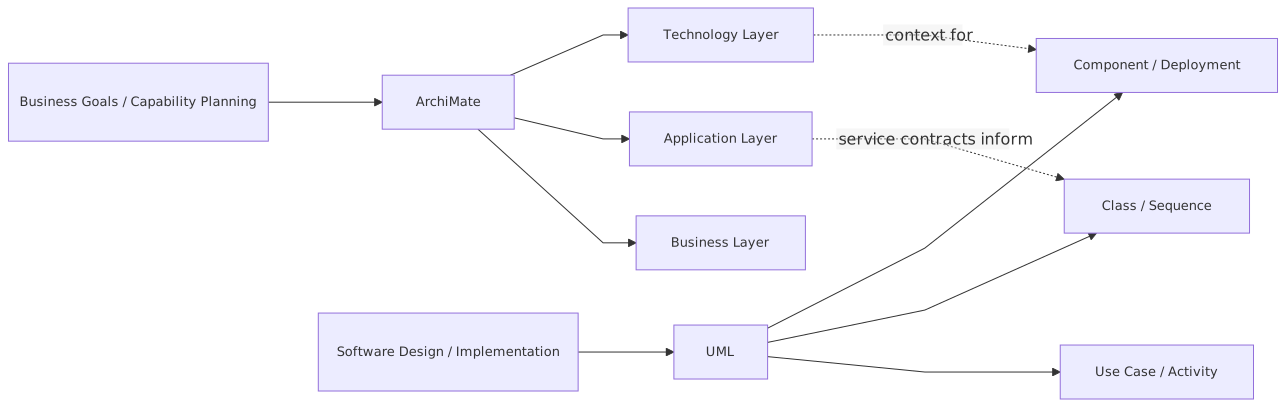
It gives you a way to model:
- business actors, processes, services, and capabilities
- applications, data objects, and application services
- infrastructure, nodes, technology services, and networks
- motivation elements like goals, outcomes, and requirements
- implementation and migration concepts like work packages and plateaus
In plain English, ArchiMate is useful when you need to explain how the enterprise hangs together, what changes, and what depends on what.
This is why ArchiMate works well for target-state architecture, operating model discussions, transformation roadmaps, and impact analysis. It’s especially strong when you need traceability across layers. For example: EA governance checklist
- this business capability depends on these applications
- those applications depend on this IAM platform
- that IAM platform runs on this cloud foundation
- this migration work package changes all of the above
That kind of line of sight is gold in real architecture work. It’s how you move from “we should modernize” to “here is what gets touched, what breaks, what improves, and what sequence makes sense.”
But ArchiMate has its own weakness: teams often use it to avoid technical depth.
This is one of my stronger opinions. Some architecture teams love ArchiMate because it lets them stay abstract. They produce beautiful layered diagrams showing business, application, and technology relationships, but if you ask how identity propagation works across channels, how Kafka event ownership is governed, or how failover behaves across cloud regions, the room gets quiet.
ArchiMate is not the problem there. The architects are. But the notation can enable that behavior if you let it.
The practical difference in one table
Here’s the comparison most teams actually need.
If you’re an enterprise architect, that table should already tell you the answer: you usually need both, just not for the same thing.
How this applies in real architecture work
This is where theory stops being useful and architecture starts being a job.
In real organizations, architecture artifacts need to support at least five different outcomes:
- Decision-making
- Alignment across teams
- Impact analysis
- Delivery guidance
- Governance and auditability
ArchiMate and UML support these outcomes differently.
1. Decision-making
Executives and portfolio boards don’t need sequence diagrams. They need to understand:
- what business outcome is supported
- which capabilities improve
- which systems are affected
- what dependencies exist
- where risk sits
- what transition path is realistic
That is ArchiMate territory.
If you are discussing whether to consolidate IAM platforms across retail banking and corporate banking, or whether to move customer event processing from point-to-point integration to Kafka, ArchiMate gives you a way to show the enterprise impact cleanly. ArchiMate tutorial
2. Alignment across teams
Cross-functional alignment is where architecture often fails. Security sees identity domains. Integration sees event streams. Cloud sees landing zones and network controls. Product teams see customer journeys. Architects are supposed to connect those views, not just collect them.
ArchiMate is useful to create the common enterprise picture. UML is useful to clarify solution-level interactions when teams start arguing over implementation assumptions.
A common pattern that works:
- use ArchiMate to show domains, capabilities, applications, ownership, and dependencies
- use UML to show the behavior of a specific solution or integration inside that context
That split sounds obvious. Yet teams constantly skip it and try to make one diagram do everything. That’s usually a sign the architect wants one artifact for governance convenience rather than stakeholder usefulness.
3. Impact analysis
This is where ArchiMate earns its keep.
Suppose a bank wants to replace a legacy IAM platform with a cloud-based identity service supporting workforce SSO, customer identity federation, and API access management. The question is not just “what are we replacing?” The real questions are:
- which business processes depend on the platform?
- which channels and applications will be impacted?
- what regulatory controls are tied to it?
- what cloud services and network zones are involved?
- what migration sequencing avoids outages?
ArchiMate lets you trace those relationships in a way UML generally does not, at least not elegantly.
4. Delivery guidance
Now flip to delivery. The IAM team needs to know:
- how OIDC token exchange works across channels
- where trust is established
- how MFA is invoked
- how provisioning events are emitted
- what services consume identity changes
- what happens when Kafka is unavailable
That’s no longer just enterprise structure. That’s behavior. Interaction. Runtime logic. UML sequence, activity, and component diagrams become much more useful here.
5. Governance and auditability
Architecture governance is often painful because artifacts are either too vague to govern or too detailed to maintain.
ArchiMate is better for governance at the portfolio and transformation level because it gives a durable map of the enterprise. UML is better for design assurance because it can show whether a proposed solution actually aligns with patterns and constraints.
Again, this is not either/or. It’s layered usage.
A real enterprise example: bank modernization with Kafka, IAM, and cloud
Let’s make this concrete.
Imagine a mid-sized bank. It has:
- retail banking channels on a mix of legacy web apps and newer mobile services
- corporate banking platforms acquired through merger
- separate IAM stacks for workforce and customers
- point-to-point integrations between core banking, CRM, fraud, and notification systems
- early cloud adoption with some workloads in AWS, some in Azure, and a lot still on-prem
Leadership wants three things:
- modernize customer identity
- move event distribution to Kafka
- accelerate cloud migration without breaking regulatory controls
Classic enterprise architecture mess. Very normal.
Step 1: Use ArchiMate to frame the enterprise problem
The first useful artifact is not a UML diagram. It’s an enterprise dependency view.
You would model:
- business capabilities like Customer Onboarding, Account Servicing, Fraud Management, Identity and Access Management
- business processes such as Login, Password Reset, Customer Verification, Payment Initiation
- application components such as Mobile Banking App, Web Portal, IAM Platform, CRM, Fraud Engine, Notification Service, API Gateway
- technology services such as Kafka Platform, Cloud IAM, Kubernetes, Private Network Connectivity
- motivation elements like regulatory compliance, reduced integration cost, faster product launch
- implementation elements like Customer IAM Consolidation, Event Backbone Rollout, Channel Migration Phase 1
This gives stakeholders a map of why the change exists and what it touches.
Without this, teams jump directly into technical design and miss systemic dependencies. That’s how you end up modernizing login while forgetting downstream consent, audit, and fraud integrations.
Step 2: Use UML to explain key solution behaviors
Now pick one critical flow: customer login with event publication.
The bank wants:
- customer authenticates through new IAM
- successful login emits an event to Kafka
- fraud engine consumes event
- analytics platform consumes event
- session context is passed to downstream APIs
ArchiMate can show the relationships and services involved. But if you want real delivery confidence, you need UML sequence diagrams or at least behavior-focused design views.
You would show:
- Mobile app sends authentication request
- IAM service redirects or handles OIDC flow
- MFA challenge occurs if risk score requires it
- IAM issues tokens
- Authentication service publishes
customer.authenticatedevent to Kafka - Fraud engine consumes event
- Notification service may trigger alert under specific conditions
- API gateway validates token for downstream banking APIs
That level of interaction is where UML is stronger. It answers practical questions that enterprise diagrams often hide:
- who initiates what?
- what is synchronous vs asynchronous?
- where is retry logic?
- what payload or object matters?
- what are the trust and failure boundaries?
Step 3: Keep both views linked
This is the part many architects skip. They create an enterprise model and separate solution diagrams with no traceability between them.
Bad move.
The value is in linking:
- the ArchiMate application service to the UML sequence
- the business process to the application component
- the implementation work package to the affected interfaces
- the technology service to the deployed runtime pattern
If your repository or architecture practice can’t maintain those relationships, then at least maintain them conceptually and in naming. Otherwise your models become nice pictures with no operational value.
Common mistakes architects make
This is the uncomfortable part.
Mistake 1: Treating ArchiMate like executive wallpaper
A lot of ArchiMate diagrams are polished nonsense. Layered boxes, clean colors, vague labels like “Digital Platform” and “Integration Service,” no clear ownership, no business outcome, no actual decision support.
If your ArchiMate view doesn’t help answer “what changes, why, and what depends on it,” it’s decoration.
Mistake 2: Treating UML like a universal language for everything
Some architects come from software backgrounds and try to model the enterprise in UML because that’s what they know. Soon you get custom stereotypes for capabilities, goals, value streams, organizations, and programs. Technically possible. Practically painful.
Just because UML can be extended doesn’t mean it should be used to replace an enterprise architecture language.
Mistake 3: Going too abstract too early
Architecture teams love abstraction. It feels strategic. But real work needs specificity.
If you are discussing Kafka adoption in a bank, “Event Streaming Platform supports Integration Modernization” is not enough. You need to know:
- which domains own which topics
- whether events are canonical or domain-native
- how schema evolution works
- where IAM controls topic access
- what cloud networking constraints exist
ArchiMate can frame these concerns, but not replace the detail discussion.
Mistake 4: Going too detailed too early
The opposite mistake is just as bad. Architects start with detailed UML sequences before the enterprise boundaries are clear. Then they optimize a local design that doesn’t fit the broader operating model.
I’ve seen teams produce immaculate sequence diagrams for onboarding flows while nobody had clarified whether the bank wanted a centralized customer identity domain or federated brands with local consent management. The sequence was fine. The architecture direction was not.
Mistake 5: Using notation as status
This one is subtle. Some architects use formal notation to signal professionalism rather than communicate. They produce diagrams for other architects, not for the people making decisions or building systems.
That’s vanity, not architecture.
A good architect adapts the view to the audience without losing rigor. Sometimes that means a proper ArchiMate viewpoint. Sometimes a UML sequence. Sometimes a simpler hybrid diagram for a steering committee. Purity is overrated. Clarity is not.
Mistake 6: Ignoring runtime reality
This is common in cloud architecture.
A team models applications and technology neatly, but the actual runtime behavior depends on autoscaling, managed services, network policies, IAM roles, secrets management, region failover, and event backpressure. If those realities are missing from your architecture, your model is lying by omission.
UML can help show runtime interactions. ArchiMate can help show dependency and deployment context. Use both where needed.
Where ArchiMate is the better choice
Let me be direct. Use ArchiMate first when you need to answer questions like:
- What business capabilities are impacted by this change?
- Which applications support those capabilities?
- What technology services do those applications depend on?
- What migration work packages are required?
- What does the transition from current to target state look like?
- Which stakeholders and requirements are driving this?
Typical examples:
- banking core modernization roadmap
- IAM platform consolidation across business units
- cloud landing zone adoption across portfolios
- Kafka platform rollout as an enterprise integration backbone
- rationalization of overlapping CRM or workflow platforms
In these cases, UML alone is usually the wrong tool. It’s too close to implementation and too weak at enterprise traceability.
Where UML is the better choice
Use UML when the real question is about system design and behavior.
Questions like:
- How do these services interact at runtime?
- What is the sequence of calls in this authentication flow?
- What components own which responsibilities?
- What deployment nodes host which components?
- What domain model or object relationships matter?
- Where are synchronous and asynchronous boundaries?
Typical examples:
- OIDC/OAuth flows in a new IAM-enabled customer channel
- Kafka producer/consumer interaction for fraud events
- API orchestration and service decomposition
- cloud-native deployment of a banking service on Kubernetes
- event-driven notification processing
In those cases, ArchiMate alone won’t give enough implementation confidence.
A contrarian take: many teams don’t need full formalism
Now for the part some architecture purists won’t like.
A lot of teams do not need “perfect” ArchiMate or “complete” UML. They need just enough formalism to avoid ambiguity.
That means:
- don’t force every project into a full metamodel
- don’t require every solution to produce seven diagram types
- don’t confuse repository completeness with architectural maturity
Some of the best architecture practices I’ve seen use ArchiMate selectively for enterprise views and UML selectively for technical depth, with simpler supporting visuals where needed. The discipline is in the semantics, not in worshipping every notation rule.
Formal standards are useful. Religious adherence is not.
How I’d use them in an enterprise architecture practice
If I were setting a practical standard for an architecture team, it would look something like this:
For enterprise architects
Mandate ArchiMate for:
- capability-to-application mapping
- application landscape views
- technology dependency views
- target-state and transition-state diagrams
- transformation initiative traceability
For solution and domain architects
Recommend UML for:
- sequence diagrams of critical flows
- component diagrams for service decomposition
- deployment diagrams for runtime architecture
- activity diagrams where process logic matters
For governance
Require that:
- every major transformation has an ArchiMate view showing business, application, and technology impact
- every high-risk or integration-heavy solution has at least one behavior-focused UML view
- naming and traceability align across both
This is not bureaucracy if done well. It’s basic architectural hygiene.
The banking, Kafka, IAM, cloud pattern in one sentence
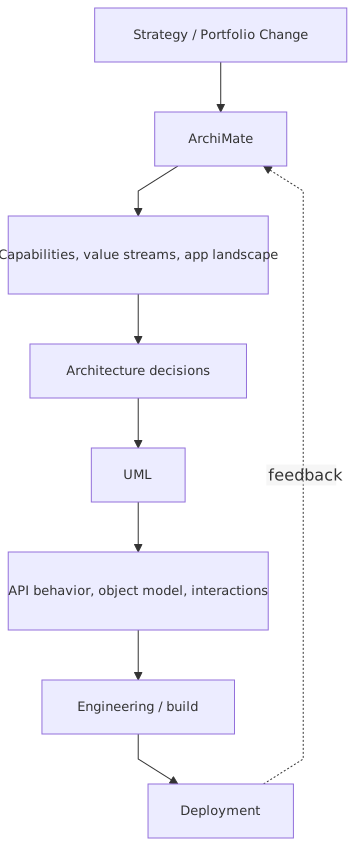
If you are modernizing a bank’s IAM and event architecture on cloud, use ArchiMate to explain the enterprise change, and UML to explain how the critical solution flows actually work.
That’s it. That’s the practical answer.
Everything else is detail.
Final thought
Architects get seduced by tools and notation because they feel concrete. But the real job is to reduce ambiguity and improve decisions.
ArchiMate is better for seeing the enterprise as a system of business, applications, technology, and change. UML is better for seeing a solution as a system of interacting parts and behaviors. If you use ArchiMate where precision is needed, you’ll get pretty vagueness. If you use UML where enterprise context is needed, you’ll get detailed irrelevance.
And yes, many stakeholders won’t care which notation you used. They care whether your model helped them move.
That’s the standard that matters.
FAQ
1. Should enterprise architects learn both ArchiMate and UML?
Yes. Not necessarily at expert level in both, but enough to know when to use each. If you only know ArchiMate, you may stay too abstract. If you only know UML, you may miss enterprise impact and transition thinking.
2. Can ArchiMate replace UML in solution architecture?
Usually no. ArchiMate can support solution architecture context, but it is weaker for detailed interaction and behavioral modeling. For flows like IAM token exchange, Kafka event processing, or API orchestration, UML is often more practical.
3. Can UML replace ArchiMate for enterprise architecture?
Technically you can force it, but I wouldn’t recommend it. UML does not naturally support enterprise-level concepts like capabilities, motivation, and transition architecture in a clean way. You’ll end up inventing conventions that don’t scale well.
4. What’s better for cloud architecture: ArchiMate or UML?
Both, depending on the question. Use ArchiMate for cloud adoption patterns, platform dependencies, and migration views. Use UML for runtime behavior, service interactions, and deployment logic. Cloud architecture without runtime modeling is incomplete.
5. What is the biggest mistake teams make when choosing between them?
They assume they must choose one standard for everything. In real architecture work, that’s usually the wrong move. Pick the notation based on the decision you need to support, not based on ideology.
ArchiMate vs UML: Practical Use Cases
- Use ArchiMate for enterprise architecture: cross-layer impact, dependencies, transformation planning.
- Use UML for solution architecture and engineering: precise system behavior, structure, and implementation design.
- Practical pattern: ArchiMate defines what changes and why; UML defines how it works in detail.
Frequently Asked Questions
What is the difference between UML and ArchiMate?
UML is a general-purpose modeling language primarily used for software design — class structures, sequences, components, states, deployments. ArchiMate is an enterprise architecture language covering business, application, and technology layers. They are complementary: ArchiMate for cross-domain EA views, UML for detailed software design.
When should you use ArchiMate instead of UML?
Use ArchiMate when you need to model cross-domain architecture (business capabilities linked to applications linked to infrastructure), traceability from strategy to implementation, or portfolio views for stakeholders. Use UML when you need detailed software design — class models, sequence interactions, state machines, component interfaces.
Can ArchiMate and UML be used together?
Yes. In Sparx EA, both exist in the same repository. ArchiMate models the enterprise landscape; UML models the internal design of specific application components. An ArchiMate Application Component can link to the UML class diagram that defines its internal structure, maintaining traceability across abstraction levels.