⏱ 20 min read
Most architecture confusion is not caused by technology. It is caused by diagrams.
That sounds harsh, but after enough transformation programs, cloud migrations, core banking upgrades, IAM cleanups, and Kafka platform rollouts, you start to see the same pattern: smart people using the wrong modeling language for the wrong conversation, then acting surprised when nobody agrees on anything.
A delivery team brings a UML sequence diagram to an executive governance review.
A business architect draws BPMN for a target-state capability discussion.
An enterprise architect tries to explain a cross-domain operating model with boxes and arrows that are basically ArchiMate, except not really, and now everyone interprets them differently.
This is the actual problem.
So here’s the blunt opinion: UML, BPMN, and ArchiMate are not interchangeable. They solve different problems, speak to different audiences, and operate at different levels of abstraction. If you use them casually, your architecture gets fuzzy. If you use them well, they become decision tools instead of decoration.
And yes, I’m going to say something slightly unfashionable: most enterprises do not need more diagrams. They need fewer diagrams, with clearer intent.
The short answer first
If you want the SEO-friendly version up front, here it is:
- Use UML when you need to describe software structure or software behavior in detail. Think classes, components, interactions, APIs, service logic.
- Use BPMN when you need to describe business processes and workflow, especially where handoffs, decisions, exceptions, approvals, and automation matter.
- Use ArchiMate when you need to describe enterprise architecture across business, application, technology, and strategy layers. It’s for traceability and impact analysis, not coding detail.
That’s the clean answer. But the real world is messier.
Because in real architecture work, the question is rarely “Which notation is correct?”
The real question is: What decision are we trying to support, and who needs to understand it?
That’s where architects either become useful or become diagram hobbyists.
Why these three get confused all the time
The confusion is understandable. All three are visual modeling languages. All three can describe systems in some way. All three can be abused into drawing almost anything if someone is determined enough.
But they are built for different jobs.
- UML came from software engineering.
- BPMN came from process analysis and workflow design.
- ArchiMate came from enterprise architecture and cross-layer modeling.
The problem is that in large organizations, especially banks and insurers and government-style enterprises, these concerns overlap constantly.
Take a simple banking scenario:
- A customer applies for a loan.
- The process includes identity verification, fraud checks, credit decisioning, manual review, document collection, and core banking updates.
- Events are emitted into Kafka.
- IAM controls determine who can approve what.
- Parts run in cloud-native services, parts still sit in legacy systems.
Now ask: how do we model this?
If you answer “one diagram,” you are already in trouble.
Because:
- the business operations team needs to understand the process flow,
- the solution team needs to understand service interactions,
- the enterprise architecture team needs to understand how business capabilities, applications, platforms, and technology relate,
- and governance needs to understand impact and dependency.
That is exactly why UML, BPMN, and ArchiMate all exist. ArchiMate modeling guide
UML: still useful, still overused, still misunderstood
Let’s start with UML.
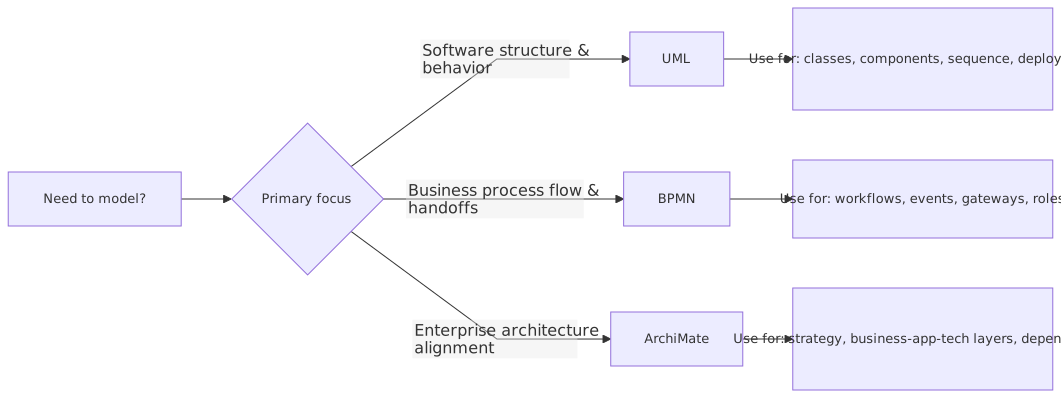
What UML is actually for
UML (Unified Modeling Language) is primarily for modeling software systems. It helps you describe:
- structure,
- interactions,
- object relationships,
- components,
- deployment,
- and behavior.
In practical enterprise terms, UML is useful when you need to explain:
- how services collaborate,
- how an application is decomposed,
- what interfaces exist,
- how a workflow is executed inside software,
- or how runtime components interact.
The most useful UML diagrams in real architecture work are usually:
- Component diagrams
- Sequence diagrams
- Deployment diagrams
- occasionally Use case diagrams
- sometimes Class diagrams, but far less often than model-driven purists would like to admit
Where UML shines
UML is strong when the audience is technical and the conversation is about implementation logic or software structure.
For example, if your bank is introducing a Kafka-based event backbone for customer and account events, UML sequence diagrams can be extremely useful to show:
- customer profile service receives update,
- service persists change,
- service publishes
CustomerUpdatedevent to Kafka, - IAM token validation occurs at API gateway,
- downstream CRM and fraud services consume the event,
- reconciliation service handles failures.
That is not BPMN territory. That’s software interaction territory.
Likewise, if you are modernizing IAM and introducing federated authentication across cloud applications, UML component diagrams can clarify:
- identity provider,
- policy decision point,
- policy enforcement point,
- API gateway,
- user directory,
- privileged access tooling,
- cloud workloads.
This is real architecture work. Not theoretical.
Where UML gets misused
The most common mistake: architects use UML to model business reality for non-technical stakeholders.
That usually fails.
A sequence diagram with lifelines and activation bars might be precise, but a head of operations or compliance manager will not care. They want to know:
- where approvals happen,
- where delays happen,
- where control points exist,
- where exceptions go,
- what is manual vs automated.
UML is usually too software-centric for that discussion.
Another mistake: using UML because it feels rigorous, even when a simpler diagram would do. Architects sometimes hide behind notation. It gives the impression of discipline. But if nobody can read it, it’s just expensive wallpaper.
My opinion on UML in enterprise architecture
Here’s the contrarian take: most enterprise architects should use less UML than they think.
Not because UML is bad. It isn’t. It’s valuable. But many enterprise architecture problems are not really software design problems. They are business-system alignment problems, operating model problems, capability problems, ownership problems, platform problems.
UML becomes essential once you are crossing into solution architecture and engineering design. Before that, it often drags the conversation into too much detail too early.
Use UML when you need technical precision. Don’t use it to look serious.
BPMN: the best tool for process clarity, and a trap when overdone
What BPMN is actually for
BPMN (Business Process Model and Notation) is for modeling process flow. It is designed to show:
- tasks,
- events,
- gateways,
- handoffs,
- participants,
- exceptions,
- timers,
- messages,
- and orchestration.
If the question is “How does work flow from start to finish?” BPMN is usually the best answer.
That matters a lot in enterprises because so many transformation efforts are really process problems wearing technology costumes.
A bank says, “We need AI in onboarding.”
Often what they actually need is to fix a broken onboarding process with too many manual reviews, disconnected systems, and unclear exception handling.
BPMN is good at exposing that.
Where BPMN shines
Imagine a retail bank redesigning its customer onboarding and KYC process.
The process includes:
- customer starts onboarding in mobile app,
- identity verification service checks documents,
- sanctions screening runs,
- risk score calculated,
- low-risk cases are auto-approved,
- high-risk cases go to manual compliance review,
- account created in core banking,
- welcome notifications triggered,
- Kafka event published for downstream analytics,
- IAM roles assigned for internal servicing.
This is classic BPMN territory.
Why? Because the key questions are:
- where are the decision points,
- where do manual reviews happen,
- what are the SLAs,
- what triggers downstream actions,
- what exceptions exist,
- who owns each step.
BPMN can show all of that elegantly if done well.
Where BPMN gets misused
The biggest BPMN mistake is simple: people use BPMN to model system architecture.
That is not what it’s for.
You can absolutely put systems in pools and lanes and show message flows, but once you start trying to explain application landscapes, event platforms, cloud hosting patterns, domain boundaries, and strategic capability relationships through BPMN, it gets ugly fast.
Another common mistake: modeling every possible exception until the diagram becomes unreadable.
This happens a lot in regulated industries. Someone says, “But what about if the customer is politically exposed, and the OCR confidence is below threshold, and the document service is unavailable, and the reviewer is in the wrong region?”
Yes, those cases matter. No, they do not all belong in one monster BPMN page.
Architects need to have some discipline. Model the primary process. Then model exception subprocesses separately if needed.
And here’s another strong opinion: many BPMN diagrams are too operational to be useful for architecture. They become process analysis artifacts, not architecture artifacts. That’s fine if your goal is process optimization. It’s not fine if your goal is enterprise decision-making.
My opinion on BPMN in enterprise architecture
BPMN is often underused by architects who are too technology-focused. That’s a mistake.
If you don’t understand the business process, your architecture will be elegant and wrong.
But BPMN is also overused by teams trying to force process thinking into places where structural architecture thinking is needed. A process diagram will not tell you:
- what application should own customer master data,
- what platform services should be standardized,
- how cloud landing zones support workloads,
- how IAM controls map across domains,
- or what strategic capability gaps exist.
So yes, BPMN matters. A lot. But it is not an enterprise map. It is a process map.
ArchiMate: the most architecturally powerful, and the least naturally loved
What ArchiMate is actually for
ArchiMate is a modeling language for enterprise architecture. It is designed to connect different layers of the enterprise:
- strategy,
- motivation,
- business,
- application,
- technology,
- physical,
- and implementation/migration.
Its real strength is not that it draws prettier boxes. Its strength is that it creates traceable relationships across the enterprise.
For example:
- a business capability supports a value stream,
- that capability is realized by business processes,
- those processes use application services,
- those services are delivered by applications,
- those applications run on technology services and infrastructure,
- and all of it maps to change initiatives and roadmaps.
That is very powerful when done properly.
Where ArchiMate shines
ArchiMate shines when you need to answer enterprise questions like:
- What applications support the loan origination capability?
- Which business processes depend on the IAM platform?
- What happens to customer servicing if we retire this legacy integration hub?
- Which cloud platform services are enabling which target business outcomes?
- What is the impact of introducing Kafka as the enterprise event streaming platform?
This is the language of architecture, not workflow and not code design.
Let’s take a concrete example.
A bank wants to establish Kafka as a strategic integration backbone while also moving customer-facing workloads to cloud. At the same time, it is consolidating IAM across channels and internal platforms.
ArchiMate can model:
- the business capabilities affected: customer onboarding, account servicing, fraud monitoring, payments processing
- the business processes using event-driven interactions
- the application components producing and consuming events
- the technology services: Kafka clusters, API gateways, cloud networking, IAM services
- the plateaus and transition architectures during migration
- the dependencies and impact of retiring point-to-point integrations
Try doing that coherently in BPMN. You’ll hate yourself.
Try doing it in UML. You’ll drown in detail.
This is where ArchiMate earns its keep.
Why people resist ArchiMate
Because it feels abstract. Sometimes it is abstract.
And because many ArchiMate diagrams are awful. ArchiMate tutorial
Let’s be honest. A lot of ArchiMate content in enterprises is technically valid and practically useless. It becomes a repository exercise: every element typed correctly, every relationship compliant, and absolutely nobody outside the architecture team can understand the picture.
This is the central danger of ArchiMate: it can turn architecture into taxonomy management.
If your ArchiMate model does not help someone make a decision, it is not architecture. It is catalog maintenance.
My opinion on ArchiMate in enterprise architecture
Strong opinion: ArchiMate is the best of the three for enterprise architecture proper. Not for every audience, not for every artifact, but for actual cross-layer architecture thinking, it is the most suitable language.
Also strong opinion: most enterprises should use ArchiMate more selectively than they do.
You do not need to model the whole universe. Model the parts tied to actual decisions:
- platform standardization,
- application rationalization,
- capability gaps,
- regulatory impact,
- migration states,
- ownership and dependency.
Use ArchiMate as a decision-support language, not a religion.
A simple comparison table
Here’s the practical summary.
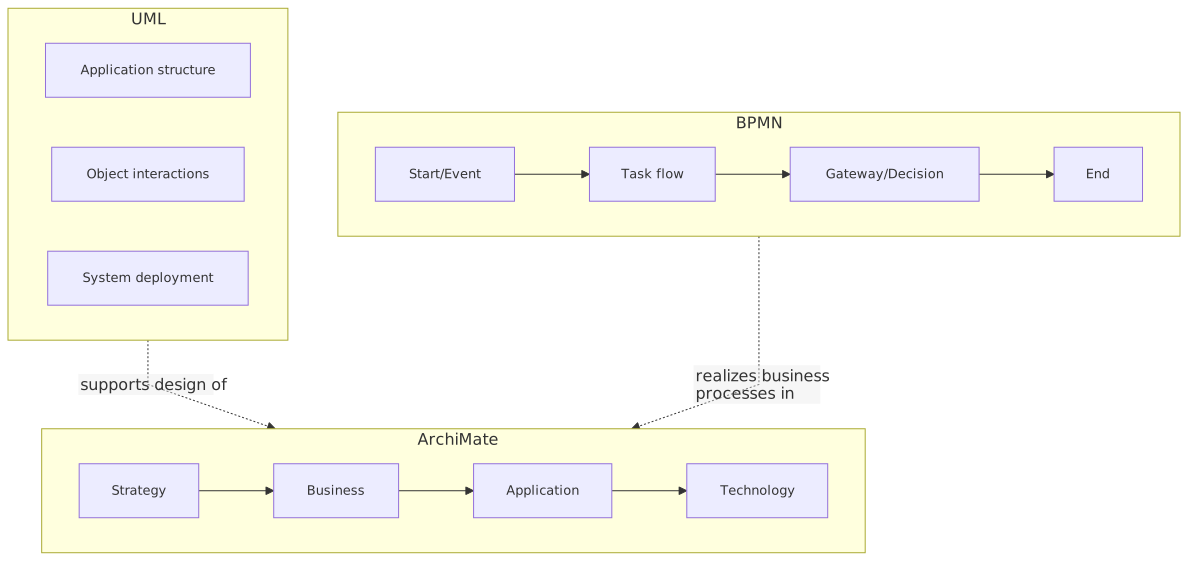
If you remember nothing else, remember this:
UML explains software. BPMN explains work. ArchiMate explains the enterprise.
That’s not perfect, but it’s a useful rule.
How this works in real architecture work
This is where theory usually falls apart, so let’s make it practical.
In real enterprise architecture work, you are almost never choosing one notation forever. You are choosing the right notation for the artifact and the decision.
Scenario: banking modernization program
Let’s say a bank launches a transformation initiative with these goals:
- modernize onboarding,
- introduce Kafka for event streaming,
- centralize IAM,
- migrate customer interaction services to cloud,
- reduce dependency on a legacy ESB,
- improve compliance traceability.
A competent architecture team will not produce one mega-diagram. It will produce a small set of purposeful views.
1. ArchiMate for target-state architecture
Use ArchiMate to show:
- business capabilities impacted,
- target application landscape,
- strategic role of Kafka,
- IAM as shared platform capability,
- cloud platform services,
- transition architectures from legacy to target state.
This helps with:
- investment decisions,
- architecture governance,
- dependency analysis,
- roadmap planning.
2. BPMN for onboarding and KYC process
Use BPMN to show:
- customer journey steps,
- compliance checks,
- manual review points,
- SLA-sensitive handoffs,
- process triggers to downstream systems,
- exception paths.
This helps with:
- business alignment,
- controls design,
- operational improvement,
- automation opportunities.
3. UML for solution interaction and design
Use UML to show:
- sequence of API calls and event publication,
- interaction between onboarding service, IAM, Kafka, fraud engine, core banking,
- deployment view for cloud-hosted services and managed platform components,
- component responsibilities.
This helps with:
- solution design,
- engineering handoff,
- interface definition,
- implementation quality.
That is how mature architecture teams work. They use multiple views, each fit for purpose, each tied to a stakeholder need.
Not every project needs all three. But many serious transformation initiatives will touch at least two.
Common mistakes architects make
Let’s get into the ugly bits.
1. Choosing notation based on preference instead of purpose
Some architects are UML people. Some are BPMN people. Some discover ArchiMate and suddenly every discussion becomes a layered metamodel.
That is amateur behavior dressed as professionalism.
Choose based on:
- audience,
- decision,
- abstraction level,
- lifecycle stage.
Not personal taste.
2. Mixing abstraction levels in one diagram
This is probably the most common failure.
You see a diagram with:
- strategic capabilities,
- process steps,
- Kafka topics,
- IAM roles,
- AWS services,
- and user personas
all on one page.
That is not rich architecture. That is confusion.
A good architect controls abstraction. One view, one purpose.
3. Modeling too much
Architecture teams often confuse completeness with usefulness.
You do not need:
- every BPMN exception in one chart,
- every UML class in a target-state deck,
- every ArchiMate relationship in a governance paper.
Sometimes the most architecturally mature thing you can do is leave things out.
4. Using ArchiMate without translation
ArchiMate is powerful, but many stakeholders do not speak it naturally.
If you put a pure ArchiMate diagram in front of a senior business executive and expect instant clarity, that is on you, not them.
Use the notation discipline underneath, but simplify labels, views, and narrative around it.
5. Treating BPMN as architecture by itself
A process is not an architecture. It is part of the architecture.
You can redesign a process beautifully and still fail because:
- application ownership is wrong,
- IAM policies are fragmented,
- event contracts are unmanaged,
- cloud platform standards are inconsistent.
BPMN alone won’t save that.
6. Treating UML as implementation truth too early
Solution teams often jump into sequence diagrams before key architecture choices are made.
So they produce detailed interactions for an architecture that is not yet settled:
- wrong system of record,
- unclear event ownership,
- no IAM pattern decision,
- no cloud boundary assumptions.
That creates fake certainty.
7. Ignoring repository discipline
This one is less glamorous but important. If your ArchiMate model, process inventory, and solution diagrams all use different names for the same thing, your architecture function becomes untrustworthy.
A “Customer Profile Service” in one place cannot be “Party Master API” somewhere else and “CRM Sync Component” elsewhere unless there is a very clear reason.
Naming discipline matters more than most architects admit.
A real enterprise example
Here’s a realistic composite example based on patterns I’ve seen repeatedly in banking.
The situation
A mid-sized bank wanted to improve business account onboarding. The process took too long, compliance checks were inconsistent, and downstream systems received updates late or not at all. The bank also had:
- a fragmented IAM setup across branch, web, and internal ops,
- increasing use of cloud services,
- and a strategic push to use Kafka instead of brittle point-to-point integrations.
Three teams started modeling the problem independently.
- The process team created BPMN diagrams for onboarding.
- The solution architects created UML sequence diagrams for service interactions.
- The enterprise architecture team created ArchiMate views for target-state capabilities and platform dependencies.
Initially, people complained that this was duplication. It wasn’t. It was healthy specialization.
What each notation revealed
BPMN revealed process pain
The BPMN model showed:
- too many manual review loops,
- duplicate KYC checks,
- unclear ownership between sales ops and compliance,
- no clean exception path when external identity verification failed,
- and hidden delays caused by email-based approvals.
Without BPMN, those issues stayed buried in operational folklore.
UML revealed technical fragility
The UML sequence views showed:
- synchronous dependencies that would create timeouts,
- no clear retry pattern for Kafka publication failures,
- IAM token propagation issues across internal services,
- and a dangerous assumption that core banking updates would always complete before downstream notifications.
Without UML, those design flaws would have appeared in production.
ArchiMate revealed strategic dependency problems
The ArchiMate model showed:
- onboarding relied on too many overlapping customer data services,
- IAM was treated as a project concern instead of a shared enterprise platform,
- cloud adoption was inconsistent across applications supporting the same capability,
- and retiring the old ESB would impact more processes than people realized.
Without ArchiMate, leadership would have approved local fixes that reinforced enterprise fragmentation.
What the architecture team did right
They did not argue about which notation was “best.”
They used all three, but with boundaries.
- BPMN for process redesign
- UML for solution design
- ArchiMate for enterprise dependency and target-state planning
That sounds obvious. It rarely happens cleanly.
The outcome
The bank ended up:
- simplifying onboarding paths,
- introducing event-driven updates via Kafka for customer and account events,
- standardizing IAM integration patterns for onboarding-related services,
- moving selected onboarding components to cloud with clearer platform guardrails,
- and sequencing the legacy integration retirement realistically.
The important point is this: the architecture improved because the team used the right model for the right question.
Not because they had more notation. Because they had better architectural intent.
So when should you use each?
Here’s my practical recommendation.
Use UML when:
- you are designing or reviewing application interactions,
- you need technical precision,
- engineering teams need a common design view,
- API, event, and component behavior matters,
- deployment/runtime structure matters.
Typical examples:
- Kafka producer/consumer interaction design
- IAM authentication and token flow design
- cloud microservice interaction patterns
- service decomposition and component responsibility
Use BPMN when:
- the process itself is under review,
- business handoffs and decisions matter,
- manual vs automated steps need to be visible,
- compliance and controls need process clarity,
- operational improvement is a core goal.
Typical examples:
- banking onboarding and KYC
- access request and approval workflow in IAM
- incident response process for cloud operations
- payment exception handling
Use ArchiMate when:
- you need cross-layer enterprise traceability,
- target-state architecture is being defined,
- roadmaps and transition states matter,
- platform dependencies need visibility,
- capability/application/technology alignment matters.
Typical examples:
- Kafka as a strategic enterprise platform
- IAM capability consolidation across channels
- cloud migration target architecture
- application rationalization in regulated environments
Final opinion
If you force me to be blunt:
- UML is for building things
- BPMN is for fixing how work happens
- ArchiMate is for understanding what the enterprise is becoming
And if you use one to do the job of another, you usually create noise.
Also, one more contrarian thought before we close: the industry spends too much time debating notation and not enough time debating architectural clarity. A mediocre architect with perfect notation is still mediocre. A strong architect can often sketch the right view on a whiteboard before formalizing it later.
The notation matters. But the judgment matters more.
So don’t ask, “Should we use UML, BPMN, or ArchiMate?” as if this is a tooling preference.
Ask:
- What decision are we supporting?
- Who needs to understand it?
- What level of detail is appropriate?
- What kind of truth are we trying to capture: software, process, or enterprise structure?
Once you answer that honestly, the notation choice gets much easier.
And your architecture gets a lot more useful.
FAQ
1. Can UML, BPMN, and ArchiMate be used together in one architecture practice?
Yes, and in serious enterprises they usually should be. The trick is not to blend them into one mess. Use each for its intended purpose: UML for technical design, BPMN for process flow, ArchiMate for enterprise structure and dependency.
2. Which one is best for enterprise architecture?
If we mean enterprise architecture in the strict sense—business, application, technology, strategy alignment—then ArchiMate is the strongest fit. But it is not enough by itself. You will still need BPMN for process-heavy analysis and UML for technical solution design.
3. Is BPMN enough for digital transformation architecture?
No. BPMN is excellent for showing workflow and operational behavior, but digital transformation also involves platform choices, capability gaps, data ownership, IAM models, cloud architecture, and migration states. BPMN covers only part of that picture.
4. Should enterprise architects still learn UML?
Absolutely. Even if they do not model deeply every day, they need to understand UML well enough to review solution designs, challenge assumptions, and communicate with engineering teams. But they should not default to UML for every architecture conversation.
5. What’s the biggest mistake when adopting ArchiMate?
Trying to model everything. That usually leads to bloated repositories and diagrams nobody trusts or reads. Start with a few high-value viewpoints tied to real decisions: target state, dependency mapping, platform impact, transition roadmap. Keep it useful. ArchiMate in TOGAF ADM
Frequently Asked Questions
What is the difference between UML and ArchiMate?
UML is a general-purpose modeling language primarily used for software design — class structures, sequences, components, states, deployments. ArchiMate is an enterprise architecture language covering business, application, and technology layers. They are complementary: ArchiMate for cross-domain EA views, UML for detailed software design.
When should you use ArchiMate instead of UML?
Use ArchiMate when you need to model cross-domain architecture (business capabilities linked to applications linked to infrastructure), traceability from strategy to implementation, or portfolio views for stakeholders. Use UML when you need detailed software design — class models, sequence interactions, state machines, component interfaces.
Can ArchiMate and UML be used together?
Yes. In Sparx EA, both exist in the same repository. ArchiMate models the enterprise landscape; UML models the internal design of specific application components. An ArchiMate Application Component can link to the UML class diagram that defines its internal structure, maintaining traceability across abstraction levels.