⏱ 18 min read
Most enterprise architects don’t have a modeling problem. They have a discipline problem.
That sounds harsh, but it’s true. I’ve seen teams buy Sparx Enterprise Architect, create a few repositories, import some UML profiles, throw ArchiMate on top, and then proudly announce they now have “governed architecture.” What they actually have is a very expensive drawing habit. Boxes everywhere. Connectors everywhere. No consistency. No semantics. No trust. enterprise architecture guide
And this is exactly where the UML metamodel matters.
Not because you need to become a UML purist. Honestly, that’s another trap. But because if you don’t understand the metamodel at least well enough to shape how Sparx EA behaves, your models will drift into ambiguity fast. Teams will use Class when they mean Component, Association when they mean Dependency, stereotypes as decoration, tagged values as a junk drawer, and packages as if they were PowerPoint folders. Then six months later someone asks a simple question—which IAM capability depends on Kafka event delivery in the customer onboarding flow?—and nobody can answer it without opening ten diagrams and guessing.
So here’s the practical position: the UML metamodel in Sparx EA is not academic overhead. It is the thing that turns diagrams into architecture assets.
That’s the core idea. If you take nothing else from this article, take that.
What the UML metamodel means in plain English
Let’s simplify this early.
The UML metamodel is basically the rulebook behind UML. It defines the kinds of things you can model—like classes, components, interfaces, activities, nodes—and the legal relationships between them.
In Sparx EA, this matters because every element you create is not just a shape on a diagram. It is an instance of a metaclass, with properties, behavior, constraints, and relationships that the tool can understand. If you use that structure properly, EA becomes a working architecture repository. If you ignore it, EA becomes Visio with a database attached.
That’s the SEO-friendly explanation. Simple enough.
Now the deeper truth: the metamodel is how you encode meaning, not just notation.
An enterprise architect doesn’t just need to show that System A talks to System B. We need to express what kind of thing each system is, what role it plays, what interfaces it exposes, what dependencies are acceptable, what deployment context it runs in, what domain it belongs to, and what lifecycle rules apply. The metamodel is where this starts.
And in Sparx EA, the effective use of the metamodel usually comes down to four practical things:
- Choosing the right base UML element
- Applying stereotypes deliberately
- Using tagged values for real metadata, not random notes
- Enforcing consistency through profiles, patterns, and governance
That’s it. Not glamorous. Very useful.
Why architects get this wrong in Sparx EA
Let me be blunt: many architects use Sparx EA like a whiteboard with version control. That’s the root issue. Sparx EA training
They focus on:
- making diagrams look neat
- adding lots of detail early
- creating custom stereotypes too soon
- mixing notation styles in the same view
- modeling everything as “ApplicationComponent” or “Class”
- storing critical semantics in free text notes
This creates false confidence. The repository looks rich, but it’s structurally weak.
The irony is Sparx EA actually gives you enough flexibility to do this badly at scale. That’s one of its strengths and one of its dangers. EA does not force good architecture modeling. It permits it.
That means the architect has to be opinionated.
My strong opinion: start with metaclasses, not stereotypes
Here’s a contrarian thought. A lot of teams jump into custom stereotypes way too early. They think maturity means creating a giant enterprise profile with 120 stereotypes and color-coded icons for every possible artifact.
Usually it means the opposite. It means the team hasn’t agreed on basic semantics, so they’re trying to hide confusion under customization.
Start with the base UML metaclass first.
Ask:
- Is this thing fundamentally a Component, Class, Node, Artifact, Interface, Actor, Activity, Requirement, or Package?
- Does the relationship really mean dependency, realization, association, information flow, or trace?
- Is this a structural element, behavioral element, or deployment element?
If you can’t answer that, you are not ready to invent a stereotype.
A stereotype should refine meaning, not rescue bad modeling.
For example:
<on top of a UML Component can be useful.> <on top of a UML Artifact or Component can be useful depending on your modeling approach.> <on top of a Package or Component can be useful.> <on top of literally everything is not useful.>
I’ve seen repositories where almost every object had a custom stereotype but nobody could explain the underlying metaclass. That’s not architecture. That’s taxonomy cosplay.
How this applies in real architecture work
In real enterprise architecture work, the metamodel matters because architecture questions are never just visual.
You get asked things like:
- Which cloud services support the digital identity onboarding journey?
- Which applications publish customer lifecycle events to Kafka?
- Which IAM components enforce privileged access policies?
- What systems are deployed in AWS versus on-prem?
- What interfaces are consumed by the retail banking mobile app?
- Which dependencies violate our target integration principles?
These are repository questions. Traceability questions. Governance questions.
If your Sparx EA model is metamodel-aware, you can answer them with confidence. If not, every answer is a workshop.
That’s the practical difference.
Example: banking customer onboarding
Take a retail bank modernizing customer onboarding.
The architecture includes:
- a mobile banking app
- an onboarding API layer in the cloud
- an IAM platform handling identity proofing and authentication
- a Kafka event backbone
- core banking systems on-prem
- fraud and AML services
- customer master data services
Now, if this is modeled lazily, someone draws:
- boxes for systems
- arrows for “integrates with”
- a few labels like REST or Kafka
- deployment notes in text
- IAM concerns buried in comments
Looks fine in a steering committee. Useless for governance.
If modeled properly using the UML metamodel in Sparx EA, you can distinguish: Sparx EA guide
- Components for application services and platforms
- Interfaces for exposed APIs
- Artifacts for deployable units or event schemas
- Nodes for cloud runtime or on-prem infrastructure
- Actors for external users or partner systems
- Dependencies and realizations to show who uses what and who implements what
- Tagged values for environment, data classification, resilience tier, and ownership
- Stereotypes like
<,> <,> <,> <>
Now your model can support actual architecture work:
- impact analysis when IAM changes token policy
- cloud migration planning
- event lineage tracing
- audit evidence for regulated controls
- identifying hidden coupling between onboarding and core banking
That’s where the metamodel pays off.
The Sparx EA mindset that actually works
The best way to use UML metamodel concepts in Sparx EA is not to think “how do I draw architecture?” but “how do I create architecture objects with reliable meaning?” free Sparx EA maturity assessment
That leads to a healthier modeling approach:
1. Model once, view many
Create repository elements first. Then place them in diagrams.
Do not create disposable diagram-only clutter.
2. Separate concerns
Use different views for:
- business capability mapping
- application interaction
- deployment topology
- security controls
- event flows
Trying to show all of that in one diagram is amateur hour. Sorry, but it is.
3. Keep the core metamodel small
A compact, governed modeling language beats a giant “enterprise ontology” nobody uses.
4. Let stereotypes do business-specific refinement
Use stereotypes to express your enterprise context, but only on top of sound UML foundations.
5. Put metadata in tagged values, not in shape labels
If cloud region, criticality, IAM control owner, or Kafka retention policy matters, store it as metadata.
That’s how you make the repository queryable and reusable.
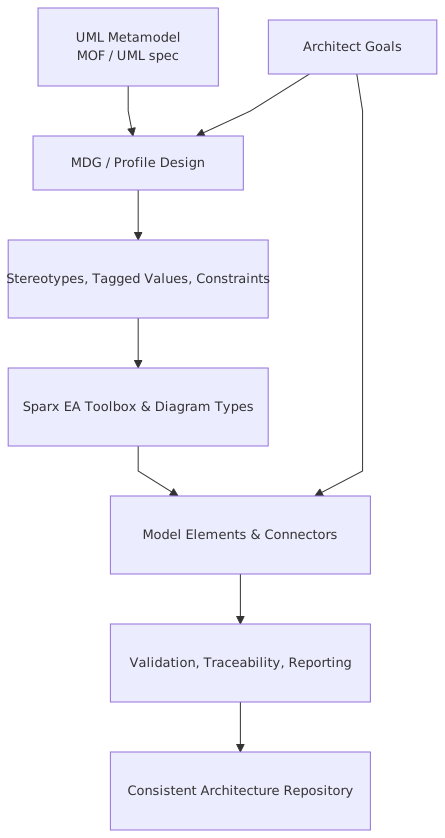
A practical metamodel approach for enterprise architects in Sparx EA
Here’s a workable pattern. Not the only one, but a good one.
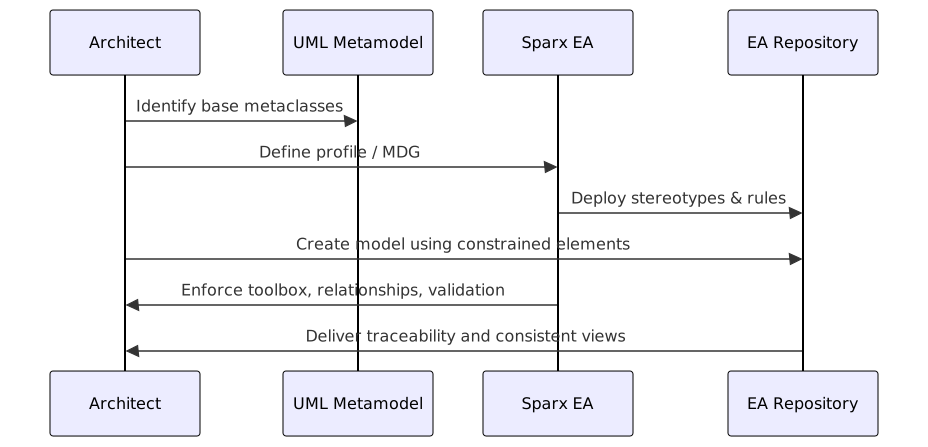
There are debates about some of these choices. Good. There should be. For example, whether a Kafka topic should be an Artifact, InformationItem, or Component depends on what you want to analyze: deployment, logical event channels, or ownership. The mistake is pretending the choice doesn’t matter.
Banking example: modeling Kafka and IAM the right way
Let’s go deeper with the retail bank example.
The bank has:
- Mobile Onboarding App
- Customer Identity Service
- IAM Platform
- Kafka cluster
- Customer Profile Service
- Fraud Decision Engine
- Core Banking Adapter
- AML Screening Service
The onboarding flow works like this:
- Customer starts onboarding in the mobile app.
- Mobile app calls Customer Identity Service API.
- Customer Identity Service relies on IAM Platform for authentication, token issuance, and policy enforcement.
- Identity verification events are published to Kafka.
- Fraud and AML services subscribe to relevant topics.
- Customer Profile Service updates the customer record.
- Core Banking Adapter pushes approved accounts into the core system.
Now here’s how I would model that in Sparx EA if I wanted it to survive governance, audit, and change impact analysis.
Structural model
Use Components for:
- Mobile Onboarding App
- Customer Identity Service
- IAM Platform
- Fraud Decision Engine
- AML Screening Service
- Customer Profile Service
- Core Banking Adapter
Use Interfaces for:
- Onboarding REST API
- Token Validation API
- Customer Event Subscription Interface
Use Artifacts or Components for:
CustomerIdentityVerifiedKafka topicCustomerOnboardingSubmittedKafka topic- event schema versions
Use Nodes for:
- AWS EKS Cluster
- Managed Kafka Platform
- On-Prem Core Banking Host
Stereotypes
Apply deliberate stereotypes like:
<> <> <> <> <> <>
Tagged values
Capture metadata such as:
- data classification = confidential
- resilience tier = tier 1
- auth method = OAuth2/OIDC
- deployment = AWS eu-west-1
- owner = Digital Identity Team
- RTO = 15 minutes
- regulatory scope = KYC / AML / GDPR
Relationships
Use:
- Dependency from Mobile Onboarding App to Onboarding REST API
- Realization from Customer Identity Service to Onboarding REST API
- Dependency from Customer Identity Service to IAM Platform with stereotype
<> - Dependency from Fraud Decision Engine to
CustomerIdentityVerifiedtopic with stereotype<> - Dependency from Customer Identity Service to topic with stereotype
<> - Deployment relationships from components to nodes
Now compare that with the usual lazy version: seven boxes and arrows saying “REST” and “Kafka.” One of these supports architecture decisions. The other supports meetings.
Common mistakes architects make
This is where most teams lose the plot.
1. Using one element type for everything
This is probably the most common failure. Everything becomes a Component. Or worse, everything becomes a Class because “it doesn’t really matter.”
Yes, it does matter.
If your IAM policy, Kafka topic, cloud node, and customer onboarding service are all modeled as the same base type, you’ve thrown away semantics before you even start.
2. Confusing notation with metamodel
People think if a shape looks right, it is right. No. A rectangle with a nice icon is not architecture truth.
In Sparx EA, the underlying type drives behavior, relationships, and traceability. Shape scripts and icons are secondary.
3. Over-stereotyping
I mentioned this earlier, but it deserves another hit. If your profile has dozens of overlapping stereotypes—<, <, <, <, <—you probably have governance theater, not clarity.
4. Under-modeling interfaces
A lot of architects model systems but not interfaces. That’s a serious blind spot, especially in cloud and event-driven estates.
Applications don’t just “connect.” They expose APIs, consume events, publish messages, authenticate via protocols, and depend on contracts. If you skip interfaces, you skip where coupling actually lives.
5. Mixing logical and physical views carelessly
A logical service and its deployment node are not the same thing. A Kafka topic is not the Kafka broker. An IAM capability is not the IAM product. A cloud workload is not the business service it hosts.
Mixing these in one undifferentiated model creates confusion fast.
6. Free-text metadata
If critical information is stored only in notes fields or diagram labels, it won’t be governed, queried, or reused. Text is important, but metadata should be structured where possible.
7. No repository curation
Sparx EA repositories decay unless someone owns standards. This is not optional. If nobody reviews model quality, names, stereotypes, package structures, and relationship usage, entropy wins.
And entropy always wins eventually.
A practical governance model for Sparx EA metamodel usage
You do not need a giant architecture review board to govern the UML metamodel effectively. You need a few clear rules.
Here’s a lightweight operating model that works.
Define a minimal enterprise modeling profile
Keep it small. Maybe 15–20 stereotypes at first. Enough to cover:
- core application types
- interfaces
- event assets
- deployment targets
- IAM/security controls
- business capabilities
- integration relationships
Publish modeling conventions
Not a 90-page manual nobody reads. A short guide that answers:
- when to use Component vs Interface vs Node
- which relationships are approved
- required tagged values
- naming standards
- examples of good models
Create starter patterns
In Sparx EA, patterns are underrated. Build reusable patterns for:
- REST API integration
- Kafka publish/subscribe
- IAM authentication flow
- cloud deployment
- system-of-record interaction
Architects copy patterns more reliably than they read standards. That’s just reality.
Review repository quality monthly
Not every diagram. The metamodel usage. Check:
- invalid stereotypes
- duplicate elements
- overuse of generic dependencies
- missing tagged values
- orphaned interfaces
- deployment mismatches
Train by real scenarios
Don’t teach UML in the abstract. Teach it through the bank onboarding case, the IAM modernization case, the Kafka event lineage case, the AWS migration case.
Architects learn faster when the model solves a real problem.
Contrarian view: not every architecture problem needs more UML
Here’s another opinion that may annoy modeling enthusiasts.
Sometimes the best use of the UML metamodel in Sparx EA is to model less.
Yes, less.
Architects often over-model because the tool makes it easy. They produce detailed sequence diagrams for interactions that change every sprint, deployment diagrams for ephemeral cloud internals nobody governs, or class-like structures for business domains that belong in a data model tool or code repository.
You do not need to model every lambda, pod, or Kafka partition in enterprise architecture.
What you need is enough metamodel discipline to represent stable architectural meaning:
- ownership
- dependency
- interface contracts
- deployment responsibility
- security boundaries
- event channels
- systems of record
- control points
Everything else should be modeled only if it supports a decision.
This is where architects need judgment. Sparx EA can hold a lot. That doesn’t mean it should.
How to structure packages in Sparx EA without making a mess
Package structure is one of those boring topics that quietly determines whether the repository remains usable.
A practical structure might look like:
- Business Architecture
- Application Architecture
- Technology Architecture
- Security Architecture
- Solution Architectures
- Reference Models
- Capabilities
- Value Streams
- Domains
- Systems
- Interfaces
- Events
- Cloud Platforms
- Runtime Nodes
- Network Zones
- IAM
- Policies
- Controls
- Programs
- Projects
- Patterns
- Standards
- Approved Stereotypes
The key is to separate reusable enterprise objects from solution-specific views. Otherwise every project clones the same application components into its own folder and your repository becomes a duplicate farm.
Again, common mistake.
What good looks like in a cloud and IAM context
Let’s say your bank is moving customer identity services to the cloud while centralizing IAM.
A good metamodel-aware Sparx EA repository should let you answer:
- Which application components use the IAM token service?
- Which APIs require OIDC versus mutual TLS?
- Which Kafka topics carry regulated customer identity data?
- Which workloads run in AWS and which remain on-prem?
- Which systems depend on the legacy LDAP platform?
- Which business capabilities are exposed to customer-facing channels?
- Which deployment nodes host critical authentication services?
If your current repository can’t answer those without manual diagram hunting, that’s not a tooling issue. That’s a metamodel issue.
A short real-world style example
In one banking environment I worked with, the architecture team had documented “event-driven integration” as a strategic principle. Sounds modern. Sounds sensible. But when we looked at the repository, every integration was just an arrow labeled “Kafka” between applications.
That meant:
- no distinction between publisher and subscriber
- no explicit topic ownership
- no schema version visibility
- no indication of regulated data
- no traceability from business event to technical asset
- no way to assess blast radius when a topic changed
The result? Every platform change required tribal knowledge.
We reworked the model using a constrained metamodel approach in Sparx EA:
- topics became first-class elements
- publishers and subscribers used typed dependencies
- schemas were modeled as artifacts
- IAM-protected APIs were represented as interfaces with tagged security metadata
- workloads were linked to cloud nodes
- regulated topics were tagged and traceable to control requirements
Was it glamorous? Not at all. Did it make architecture reviews sharper? Absolutely. Suddenly we could answer whether a proposed IAM token claim change would affect event consumers downstream. That’s real enterprise architecture.
If you only do five things, do these
If your team wants a practical starting point, do these five things first:
- Standardize base UML element usage
Define what is a Component, Interface, Node, Artifact, Actor, Requirement.
- Limit custom stereotypes
Start small and tie each stereotype to a clear architectural purpose.
- Model interfaces and events explicitly
Don’t hide integration meaning in arrows.
- Use tagged values for operational metadata
Cloud region, owner, criticality, IAM method, data classification.
- Govern the repository like a product
Someone must own quality, not just tooling.
These five moves will improve architecture output more than any fancy framework overlay.
Final thought
The UML metamodel in Sparx EA is not there to impress methodology people. It’s there to stop architecture from collapsing into decorative ambiguity.
That’s the practical truth.
If you use it well, Sparx EA becomes a real enterprise architecture platform:
- you can trace IAM controls to services
- map Kafka event dependencies with confidence
- separate cloud deployment from application logic
- support banking governance without drowning in diagrams
- answer impact questions without starting from scratch
If you use it badly, you’ll still get diagrams. You’ll just get diagrams nobody fully trusts.
And in enterprise architecture, trust is the whole game.
FAQ
1. Do I need deep UML expertise to use the metamodel effectively in Sparx EA?
No. You need practical competence, not academic mastery. Understand the main element types, relationship meanings, and how stereotypes extend base metaclasses. That’s enough to model architecture well.
2. Should I use UML or ArchiMate in Sparx EA for enterprise architecture?
Use the one that fits your purpose, and don’t turn it into a religion. UML is often stronger for detailed solution structure, interfaces, deployment, and behavior. ArchiMate can be better for high-level enterprise views. In practice, many teams use both badly. Better to use one well than two inconsistently. ArchiMate modeling guide
3. What is the biggest mistake when modeling Kafka in Sparx EA?
Treating Kafka as just a line label between systems. Model topics, publishers, subscribers, and—if relevant—schemas explicitly. Otherwise you can’t do impact analysis or govern ownership properly.
4. How should IAM be represented in a UML-based enterprise model?
Usually as a mix of Components, Interfaces, Requirements/Constraints, and deployment Nodes. The IAM platform is not just one box. Authentication APIs, policy services, token services, directories, and control requirements often need separate representation.
5. How many stereotypes should an architecture team create at the start?
Very few. Start with the minimum needed to express enterprise-specific meaning, maybe 15–20. If you need 80 stereotypes before your repository is useful, your problem is not lack of vocabulary. It’s lack of clarity.
Frequently Asked Questions
What is a UML metamodel?
A UML metamodel is a model that defines UML itself — it specifies what element types exist (Class, Interface, Association, etc.), what relationships are valid between them, and what constraints apply. It uses the Meta Object Facility (MOF) standard, meaning UML is defined using the same modeling concepts it uses to define other systems.
Why does the UML metamodel matter for enterprise architects?
The UML metamodel determines what is and isn't expressible in UML models. Understanding it helps architects choose the right diagram types, apply constraints correctly, use UML profiles to extend the language for specific domains, and validate that models are internally consistent.
How does the UML metamodel relate to Sparx EA?
Sparx EA implements the UML metamodel — every element type, relationship type, and constraint in Sparx EA corresponds to a metamodel definition. Architects can extend it through UML profiles and MDG Technologies, adding domain-specific stereotypes and tagged values while staying within the formal metamodel structure.