⏱ 21 min read
Agile teams like to say they value working software over documentation.
That part is true. Mostly.
What usually goes unsaid is that teams still document architecture — they just do it poorly when they avoid doing it on purpose. A dependency gets explained in a Jira comment. An exception flow lives in a screenshot of a whiteboard from three sprints back. Someone on the integration team “just knows” that the fraud service callback can arrive after the payment hub acknowledgement, except on Fridays when the batch reconciliation window changes the order of events. None of that exists in a form people can really rely on.
In banking, that kind of casualness gets expensive fast. Payment orchestration is misunderstood. Regulatory handoffs stay implicit. IAM assumptions sit buried in story notes. Service dependencies remain invisible until release week. Then, almost inevitably, production becomes the place where architecture gets rediscovered.
I’ve seen this play out more than once while leading integration architecture across banking programs where several squads were moving at different speeds, with very different levels of delivery maturity, under the usual combination of time pressure, audit scrutiny, vendor constraints, and stubborn platform realities. In that environment, the practical question was never whether UML was theoretically useful. It was much more grounded than that: UML modeling best practices
How much UML is enough to improve delivery without creating architecture theater?
That question matters because there are two bad extremes. One is no modeling at all, where teams survive on verbal explanations and shared memory until complexity wins. The other is modeling bureaucracy, where diagrams get produced for governance optics and nobody doing the real work looks at them after sprint 2. ArchiMate for governance
There is a sweet spot.
But in practice, it is narrower than most architecture standards suggest.
The problem was never UML. It was timing.
A few years ago, on a customer onboarding and KYC modernization program, we had several agile squads working in parallel: digital channel, customer profile, orchestration, integration, and the shared services team managing IAM, Kafka topics, and API gateway policy. On paper, it looked sensible enough. We did what many architecture teams do at the start of a program: produced polished component diagrams and sequence diagrams up front.
They were good diagrams too. Clear notation. Well structured. Easy to present in governance forums. EA governance checklist
By sprint 3, they were already wrong.
API ownership had shifted. A sanctions screening vendor changed its callback contract. The early assumption that some KYC checks would complete synchronously turned out to be optimistic at best and naive at worst. One squad introduced an event-driven pattern over Kafka for downstream notifications, while another was still assuming direct REST orchestration. The diagrams did not survive because they had been created before the real decisions had surfaced.
That experience taught me something I now treat almost as a rule: UML is useful when it is attached to a decision, a risk, or a handoff. It becomes waste when it is created for completeness, for reassurance, or because a governance checklist expects a picture.
So I’m not anti-UML. Not remotely.
I’m anti-speculative modeling.
And I’m strongly in favor of targeted diagrams created at the point a team needs shared precision.
That sounds obvious, but in enterprise environments it still takes discipline. Especially in banks, where architecture controls are unavoidable and people often confuse “well governed” with “heavily documented.”
Where UML actually earns its keep in agile banking teams
Banking is one of the better environments for lightweight UML. Not because bankers love notation, but because banking systems are full of interactions that become hard to hold in your head once a few teams and external dependencies are involved.
Sequence diagrams earn their keep quickly in payment initiation, fraud checks, account opening, KYC orchestration, and core banking acknowledgements. If you are dealing with asynchronous callbacks, retries, timeout behavior, idempotency, or compensating actions, a paragraph of prose usually is not enough. You need to see ordering and responsibility.
Component diagrams are consistently useful as well. Not the bloated enterprise-landscape posters nobody reads. The lean kind. Which squad owns which service. Where the API gateway sits. What goes through Kafka versus direct REST. Which middleware layer is merely routing and which one is performing business transformation. Where IAM token validation happens. Which mainframe adapter is in play. These are exactly the questions that derail planning when they are left vague.
State machine diagrams are underrated in banking. Payment statuses, account lifecycle, onboarding application states, dispute cases, card replacement journeys — these are all domains where transition rules matter, and where ambiguity creates either compliance risk or customer confusion. I’ve had more productive refinement sessions from one clean state model than from ten pages of acceptance criteria. That’s not theory; it’s just how these conversations tend to go in practice.
Deployment diagrams are a different story. They have value, but only when runtime topology materially affects the design. If latency, resilience zones, active-active failover, network segmentation, cloud region placement, or message broker locality matter, then show it. If not, don’t create a deployment view just because some architecture method says one should exist.
That is the broader point. UML in agile banking teams should show interaction and responsibility. It should not try to become full system documentation. Once you start using UML to describe everything, it stops helping with the things that actually matter.
The first mistake teams make: drawing too early
This is probably the most common failure pattern I’ve seen.
A program starts. There is a sprint 0 or inception phase. The architecture workshop happens before API contracts are stable, before the non-functional requirements are properly understood, before operational constraints are clear, and definitely before the ugly exception cases emerge. The team produces broad diagrams anyway, because everyone wants to feel the shape of the solution.
I understand the impulse. I’ve done it myself, more than once.
The trouble is that early diagrams have a tendency to fossilize. They get copied into architecture pages. Governance decks reference them. New joiners assume they are current. Engineers stop trusting architecture artifacts because the artifacts describe a solution that no longer exists. Maintenance becomes a side job. Nobody wants that job.
A better pattern is to delay detailed UML until there is something concrete to reason through: a story cluster, a meaningful dependency, a failure mode, a contentious integration assumption.
Start with rough sketches. Whiteboard first. Collaboration board if the team is remote. Then formalize only the pieces that need shared precision across teams.
One loan origination initiative made this painfully clear for us. We modeled the workflow too early and assumed the anti-money-laundering vendor would provide a synchronous approval response for the initial screening step. That assumption made the sequence diagram look clean.
It also made it wrong.
Later, when the real vendor behavior turned out to be asynchronous with occasional delayed callbacks and a manual review branch, we had to rework orchestration logic, acceptance criteria, and even notification timing. The issue was not that we used UML. The issue was that we turned uncertainty into a neat diagram before it had earned that level of confidence.
A better trigger model: when to create a diagram, and when not to
I’ve had more success with trigger-based modeling than with any formal modeling standard.
Here’s the simple decision framework I wish more teams used.
Create a UML diagram when more than two systems are involved. Create one when asynchronous behavior appears. Create one when ownership is split across squads, vendors, or platform teams. Create one when failure handling affects customer experience, financial integrity, or compliance. Create one when refinement stalls because people are using the same words but imagining different flows. Create one when every new engineer needs the same ten-minute verbal explanation.
Those are real triggers. They are usually the point where shared mental models stop being enough.
On the other hand, UML is usually unnecessary for simple CRUD changes inside one bounded service. It is often unnecessary for straightforward internal logic that is already well expressed in code, tests, and a few comments. It is unnecessary for temporary spikes with no production consequence. And it is definitely unnecessary when a diagram exists only because someone wants every project to produce “the full set.”
One useful diagram beats six decorative ones. Every time.
That sounds opinionated because it is. I’ve watched teams lose momentum trying to maintain diagram inventories that added almost nothing to delivery. Once UML becomes mandatory by habit rather than by need, it starts competing with engineering attention instead of supporting it.
What “just enough UML” looked like on a payments modernization program
A payments modernization program made this practical for us.
The context was familiar enough: a mobile app initiated a transfer; the API layer validated the request and applied IAM policies; a payment service enriched the transaction; a fraud engine scored it; a payment hub submitted it to clearing; a notification service updated the customer. Around that core path sat Kafka events for downstream status updates, a cloud API gateway, token introspection with the identity platform, and some deeply unglamorous but essential adapters into older core systems.
We did not model everything.
We created one sequence diagram for the happy path and the key exception branches. Not every branch, just the ones with real consequences: fraud timeout, duplicate payment submission, payment hub rejection after customer acknowledgement, and delayed clearing confirmation. We created one component diagram to show service ownership, interfaces, and the split between synchronous APIs and event-driven integration. We created one state model for the payment lifecycle.
That was enough.
What we deliberately did not model mattered almost as much. We did not draw every class. We did not show every internal method call. We did not produce lower-environment deployment views. We did not model every Kafka topic subscription unless it materially affected behavior or ownership. The point was not exhaustiveness. The point was to reduce ambiguity.
Here’s a stripped-down example of the kind of sequence view that actually helped people:
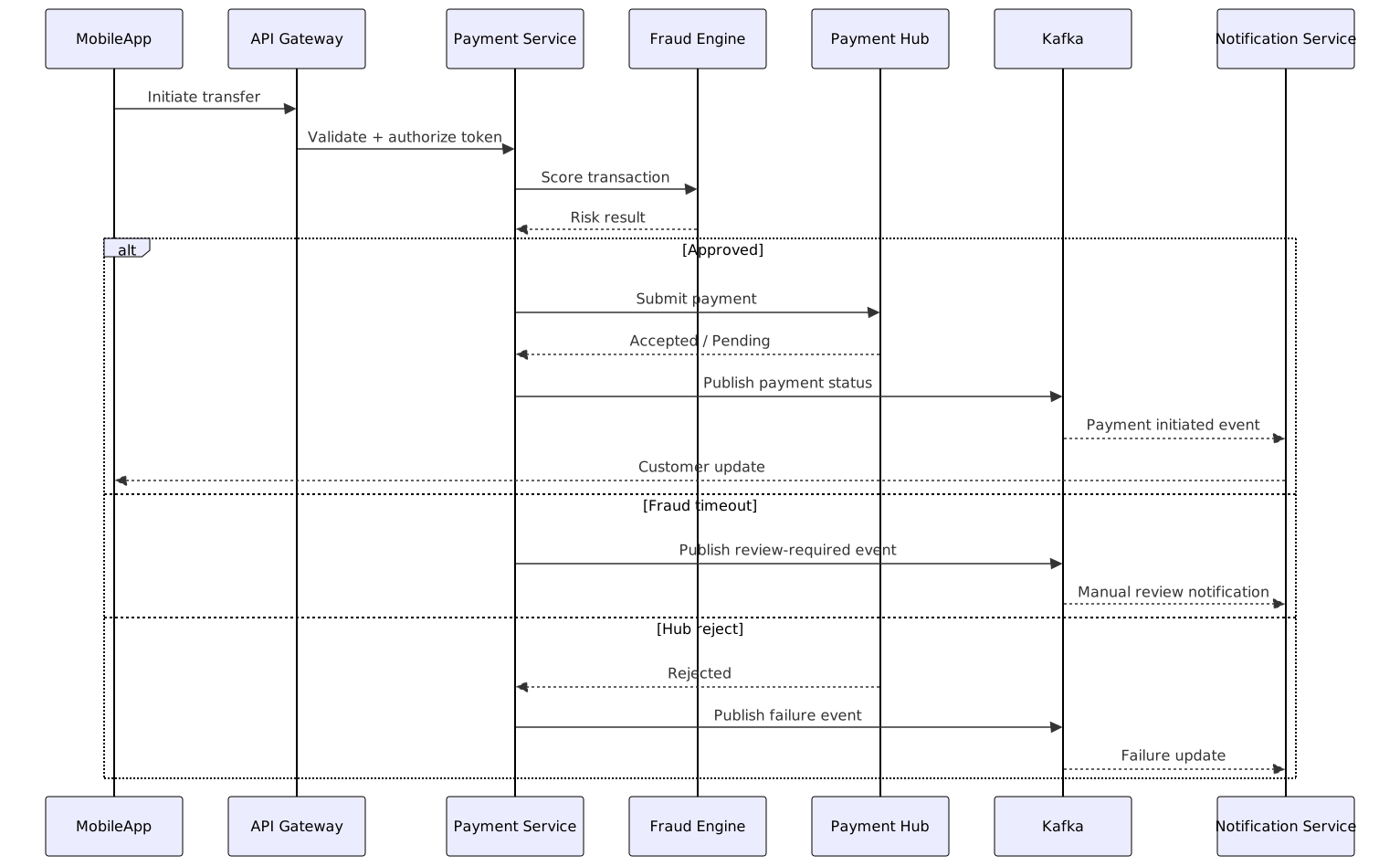
This was not a masterpiece of notation. It was readable, close enough to reality, and easy to work through in sprint refinement.
The impact was immediate. The integration team and the product squads argued less about ownership. Retry behavior became explicit. Timeout handling stopped being hand-wavy. Acceptance criteria for cross-system stories got cleaner because the sequence made visible where customer-facing states changed and where they did not.
That is what “just enough UML” looks like in practice. It helps a team make better decisions. It does not try to impress anyone.
The diagrams agile teams usually need — and the ones they rarely do
I’m fairly opinionated here.
If you are working in agile banking teams, you will probably get the most value from three UML diagram types: sequence, component, and state.
Sequence diagrams are the workhorse. They expose ordering, latency, retries, asynchronous acknowledgements, and exception paths in a way prose usually cannot. They are often the fastest way to reveal that two squads have very different assumptions about the same transaction.
Component diagrams come next. They help with ownership and boundaries. Not abstract architecture. Real boundaries. Which service owns the customer profile. Which team owns the API facade. Whether an event broker is part of the business flow or just transport. Where IAM responsibilities sit. Whether a shared integration layer is providing orchestration or merely mediation.
State diagrams come into their own when a business object lives over time. Payments, onboarding applications, loan cases, account statuses, disputes. Anywhere invalid transitions matter.
Use activity diagrams sparingly. They can be useful, but in many enterprises the business analysts already maintain process models in BPMN or something equivalent. Duplicating that work in UML often creates confusion rather than clarity. BPMN training
Use deployment diagrams only when runtime concerns are architecture-significant. If cloud topology, network zones, broker placement, resilience patterns, or data residency affect the design, then yes, draw it. If not, skip it.
Usually avoid exhaustive class diagrams for microservices. I say that with full awareness that some model-driven enthusiasts will disagree. In modern service-oriented teams, class diagrams are often too low-value relative to the effort of maintaining them. The code and tests usually tell that story better. The same goes for use case diagrams unless the audience genuinely needs that lens.
The audience matters more than the notation. Engineers need interaction clarity. Product owners need implications and sequencing, not textbook UML purity. Operations teams need runtime consequences, dependencies, and failure signals. Auditors need traceability of decision and control, but even there, clarity beats volume.
A practical view by situation
This is the rough cheat sheet I’ve used with teams.
That last row matters more than it first appears to. Some of the best diagrams I’ve seen started as ugly sketches because the team was trying to answer a hard question, not produce a neat artifact.
The second mistake: confusing UML with completeness
Enterprise teams, especially in banks, often assume that if a diagram set is not comprehensive, it is somehow not professional.
I think that idea does real damage.
Architecture value does not come from exhaustive description. It comes from supporting decisions, exposing risk, and aligning delivery. A partial but relevant model is far more useful than a complete but ignored one.
You can usually tell when a team has crossed into over-engineering. The diagrams are updated for audit, not for delivery. Notation correctness matters more than whether anyone understands the problem. Nobody references the model during refinement or incident review. The architect becomes the only person “allowed” to edit diagrams. At that point, UML has turned into a museum piece.
My practical rule is simple: if a diagram does not answer a real question, retire it.
That rule annoys some governance people at first. Then they notice that the remaining diagrams are the ones teams actually use, and the conversation changes.
Fitting UML into agile ceremonies without slowing the team
The trick is to put UML inside delivery conversations, not alongside them as a separate architecture workstream.
Backlog refinement is an obvious place. If a story cluster has integration complexity, sketch the sequence. Not because refinement needs formality, but because ambiguity around ordering, ownership, or failure handling will otherwise surface later as blocked work.
Sprint planning is a good place for a component view, especially when squad boundaries or external dependencies are involved. A simple diagram can reveal that one “small” story actually depends on API gateway policy changes, a Kafka topic definition, and IAM scope updates owned by three different teams.
Design huddles are where models should evolve. If assumptions shift, update the state model or sequence there and then. Don’t wait for an architect to refresh the official repository later.
Definition of done should include diagram updates only when the change affects shared architecture understanding. That caveat matters. Do not force teams to update diagrams for every internal refactor.
Post-incident reviews are one of the best places to use UML retrospectively. A sequence diagram built after an incident often exposes missing timeout assumptions, duplicate event paths, or unowned compensating actions far more clearly than a verbal incident narrative.
One thing I learned the hard way: co-create diagrams with engineers. Don’t hand over polished artifacts from an ivory tower. If the team did not help shape the diagram, they usually will not trust it, and they definitely will not maintain it.
A real banking example: account opening and KYC orchestration
Account opening is a perfect example of where lightweight UML earns its keep.
The scenario was straightforward on the surface. A digital channel initiated account opening. A customer profile service created a provisional customer. A KYC vendor validated identity. Sanctions screening ran asynchronously. Only after those gating conditions passed did core banking account creation proceed.
On paper, the happy path was fine.
The real complexity sat in timing and exceptions: vendor timeout, duplicate submission, manual review, and partial completion after a core banking delay. That was where the confusion lived, and that was exactly where UML helped.
We used a sequence diagram for orchestration and exception routes. We also created a state model for the application lifecycle: initiated, pending-KYC, review-required, approved, rejected, account-created.
A simplified state view looked something like this:

The biggest value did not come from the happy path. It came from forcing us to model the boring edge cases properly.
In one early version, we ignored re-entry behavior for resumed applications. That seemed minor at the time.
It was not.
Customers who dropped out and returned could trigger duplicate downstream events because the orchestration layer treated resumed flows as fresh submissions while some downstream consumers treated them as updates. The result was messy: duplicate notifications, inconsistent application state, and a support queue full of avoidable confusion.
That mistake changed how I think about banking integration diagrams. In this domain, edge cases do not stay edge cases for long. They are where customer trust and control effectiveness actually live.
Keep notation disciplined, but don’t become doctrinaire
I’m not arguing for diagram chaos.
Teams do need some discipline. Use consistent names for systems and services. Distinguish clearly between synchronous and asynchronous interactions. Show external vendors explicitly. Mark batch processes when they matter. Indicate system-of-record responsibility. These conventions save a surprising amount of wasted conversation.
But this is also where some architecture practices go off the rails. They confuse discipline with purity.
Endless debates about exact UML compliance in sprint meetings are a terrible use of collective energy. If the team understands the model and can make a decision from it, that matters more than whether every arrowhead is academically pristine.
Readable beats pure.
Always.
I’ve had engineers maintain text-based sequence diagrams in version control for months because they were accessible and useful. I’ve also seen beautifully compliant models in heavyweight repositories die almost immediately because changing them required specialist tooling and patience nobody had.
The third mistake: using one diagram for every audience
This is another common failure mode.
A single diagram tries to satisfy architects, developers, product owners, operations, support teams, and auditors. So it grows. And grows. Until nobody can read it in under two minutes and everybody leaves with a different interpretation.
Don’t do that.
The same underlying problem often needs different views. On one payments program, the engineering audience needed a sequence diagram showing retry logic, Kafka publication timing, fraud callback behavior, and the exact point where idempotency keys were checked. Compliance stakeholders needed a simpler business flow showing control gates and approval points. Operations needed a runtime dependency map highlighting where support should look during delayed acknowledgements.
Those are not competing truths. They are different cuts through the same architecture.
Trying to overload one artifact with every concern is one of the fastest ways to make UML useless. If the audience cannot read it quickly, split it.
Tooling reality: what works, what gets abandoned
Here’s the unglamorous truth: tooling choice matters more than most architecture teams admit. ArchiMate in TOGAF ADM
Whiteboards and digital collaboration boards are excellent for discovery. They are fast, disposable, and democratic. For early conversations, I still think they are hard to beat.
But for durable engineering-facing diagrams, text-based diagramming often ages better. PlantUML, Mermaid, similar approaches — not because they are beautiful, but because engineers will actually version them with code, review changes, and update them during a sprint. In my experience, that practical maintainability matters far more than visual sophistication.
Repository-linked architecture pages also work well when they are lightweight and close to the delivery context. A component diagram tied to an ADR, API spec, and service repo tends to survive. A diagram sitting alone in a central modeling portal usually does not.
What tends to fail? Heavy centralized modeling repositories that nobody opens. Tools that require specialist knowledge to make small edits. Governance workflows where diagram changes trail actual implementation by weeks. Those are all common in large enterprises, and they all encourage model decay.
If I had to give one tooling rule to agile teams, it would be this: choose the lowest-friction tool that supports team editing. If a diagram cannot be changed easily during a sprint, it will stop reflecting reality.
A lightweight governance model that doesn’t suffocate delivery
Banking organizations cannot pretend governance does not exist. Nor should they. There are too many regulatory, operational, and financial risks for that.
But governance does not need to demand a standard pack of UML artifacts for every initiative.
A better approach is risk-based. Require UML only for architecture-significant change. Define a small set of expected artifacts by risk profile, not by project phase.
For a low-risk internal enhancement, maybe no UML at all. For a medium-risk cross-service change, perhaps a component diagram and a sequence diagram. For a high-risk regulated transaction flow, require a component view, sequence view, and state model. That is enough structure to satisfy control needs without suffocating delivery.
More importantly, review diagrams as part of design decisions, not as standalone compliance submissions. The governance question should be: What ambiguity did this diagram remove? Not: Have all standard UML artifacts been completed?
That shift sounds small.
In practice, it changes behavior.
How to know the team is getting value from UML
You don’t need a complicated measurement framework.
If UML is helping, you will see fewer integration surprises late in the sprint. Design clarification meetings get shorter. Handoffs between squads become less painful. Incident reviews reference diagrams because the diagrams still roughly match reality. New engineers ramp faster on complex flows because they do not need architecture explained from scratch every time.
Negative signals are obvious too. Diagrams are outdated within one release. Architects maintain them alone. Teams prefer Slack threads over the official model. Nobody opens the architecture pages except before governance checkpoints.
That last sign is damning.
My preferred review cadence is light: revisit architecture-significant diagrams at release boundaries or when interfaces materially change. Not every sprint. Not every code change. Just when shared understanding genuinely needs refreshing.
What I would do differently now
A bit of scar tissue, because doctrine is less useful than hindsight.
I would model exception flows earlier than happy paths in banking integrations. Happy paths are seductive because they make progress visible, but the real delivery risk is usually in timeouts, retries, re-entry, duplicates, and partial failure.
I would stop asking teams for deployment diagrams unless runtime placement changes behavior. Too many of those diagrams are expensive wallpaper.
I would keep class diagrams out of most microservice discussions. They are almost never where the ambiguity is.
I would insist every diagram names the decision it supports. If the team cannot say why the artifact exists, it probably should not.
And I would push even harder for engineers to own the models with architects, rather than consume them passively. Shared artifacts stay alive. Architect-only artifacts decay.
UML is a conversation aid, not an architectural deliverable
That is really the whole point.
Agile teams do not need less thinking. They need less ceremonial modeling.
Used well, UML gives teams a way to expose complexity before it becomes rework, incident noise, or audit pain. Used badly, it becomes one more artifact to maintain, defend, and quietly ignore.
So use UML when complexity crosses the limits of team memory and verbal explanation stops being enough. Use it when there is a real dependency, a real disagreement, a real handoff, or a real failure mode to understand. Then stop as soon as the ambiguity is removed.
In regulated, integration-heavy environments like banking, lightweight diagrams are often one of the cheapest forms of risk control available. Not because they are formal. Because they make hidden assumptions visible while there is still time to do something about them.
The right UML diagram should shorten delivery conversations, not become one more artifact to defend.
FAQ
Do agile teams need UML at all?
Sometimes no. But in integration-heavy banking work, often yes. Especially when multiple systems, squads, or asynchronous behaviors are involved.
Which UML diagram should we start with?
Usually a sequence diagram. If ownership or boundaries are unclear, add a component diagram next.
How often should diagrams be updated?
Only when architecture-significant behavior changes — interfaces, responsibilities, key states, runtime-relevant topology.
Can user stories replace UML?
Not when timing, dependencies, retries, and state transitions matter across systems. Stories describe intent. They rarely describe interaction well enough.
Should diagrams live with code?
For engineering-facing artifacts, often yes. Teams are much more likely to maintain them there than in a separate architecture repository.
Frequently Asked Questions
Can UML be used in Agile development?
Yes — UML and Agile are compatible when used proportionately. Component diagrams suit sprint planning, sequence diagrams clarify integration scenarios, and class diagrams align domain models. Use diagrams to resolve specific ambiguities, not to document everything upfront.
Which UML diagrams are most useful in enterprise architecture?
Component diagrams for application structure, Deployment diagrams for infrastructure topology, Sequence diagrams for runtime interactions, Class diagrams for domain models, and State Machine diagrams for lifecycle modelling.
How does UML relate to ArchiMate?
UML models internal software design. ArchiMate models enterprise-level architecture across business, application, and technology layers. Both coexist in Sparx EA with full traceability from EA views down to UML design models.