⏱ 20 min read
Most ArchiMate diagrams are bad.
That’s the uncomfortable truth. They’re either bloated poster-sized messes that nobody reads, or they’re so abstract they might as well be motivational art. A lot of architects say they use ArchiMate, but what they really mean is: we draw boxes with official-looking icons and hope that counts as architecture.
I’m opinionated about this because ArchiMate is actually useful. Not magical. Not easy. But useful. Especially when the enterprise gets messy: multiple business domains, IAM sprawl, Kafka everywhere, cloud migration half-finished, and a leadership team asking why “the target state” still looks like a ransom note.
So this is not a documentation-style walkthrough. It’s a practical ArchiMate tutorial, step by step, from the perspective of someone who has seen architecture models help real decisions—and also seen them become expensive wallpaper. ArchiMate modeling guide
What ArchiMate is, in plain English
Let’s get the simple explanation out early.
ArchiMate is a modeling language for enterprise architecture. It helps you describe how business, applications, technology, and strategy/change relate to each other.
That’s the point. Not drawing. Not notation purity. Relationships.
If BPMN is mainly about process flow, and UML is mainly about software design, ArchiMate is about the wider enterprise picture: ArchiMate tutorial
- what the business does
- what applications support it
- what technology runs it
- what changes are underway
- what depends on what
- what breaks if something changes
In practical terms, ArchiMate helps answer questions like: ArchiMate layers explained
- Which business capability depends on this IAM platform?
- What applications publish customer events into Kafka?
- Which cloud services support onboarding in retail banking?
- What work packages are needed to move this legacy integration to event-driven architecture?
- If we retire a system, what business process gets hit?
That’s why people use it.
Why architects struggle with ArchiMate
Here’s the contrarian bit: ArchiMate is not hard because the notation is complex. It’s hard because most architects don’t know what they’re trying to say before they start drawing.
They open the tool too early.
Then they create a “current state architecture” with 147 elements, 212 relationships, and no point of view. That’s not enterprise architecture. That’s visual hoarding.
A good ArchiMate model starts with a question, not a canvas.
Examples:
- How does customer onboarding work end-to-end across channels?
- What systems are in scope for IAM modernization?
- Where is Kafka creating actual decoupling, and where is it just another dependency?
- What does a cloud landing zone actually support in business terms?
If you can’t state the question, don’t draw yet.
The step-by-step approach
This is the method I recommend in real architecture work. It’s practical, scalable, and doesn’t assume your repository is already beautifully managed. Because it probably isn’t.
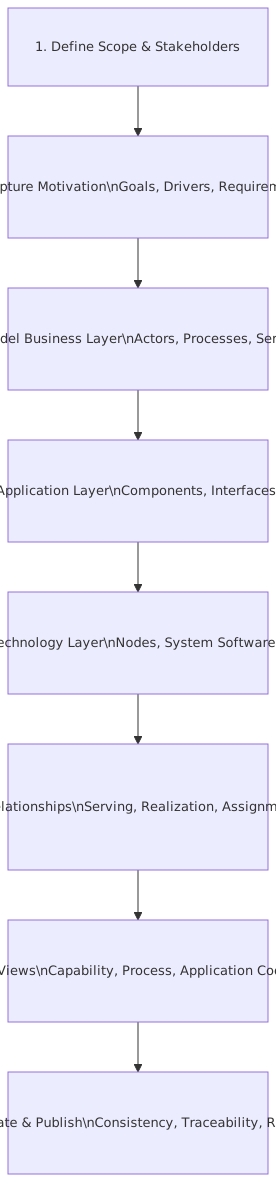
Step 1: Start with the decision you need to support
Before choosing ArchiMate elements, define the decision. ArchiMate relationship types
This is where many architects fail. They model the enterprise instead of modeling what matters for a decision.
Ask:
- Who is the audience?
- What decision are they making?
- What do they need to see?
- What can be left out?
For example, in a bank, leadership may ask:
> “Can we centralize IAM for retail and commercial channels without breaking onboarding, payments, and branch operations?”
That’s a real architecture question. It has business impact, application implications, technology dependencies, and transformation work. Perfect ArchiMate territory. ArchiMate modeling best practices
Real architecture work tip
Write a one-line purpose statement at the top of your model or view:
Purpose: Show how customer onboarding depends on IAM, event streaming, and cloud-hosted services to support IAM modernization decisions.
That sentence will save you from 40% of unnecessary content.
Step 2: Pick the right viewpoint, not all viewpoints
ArchiMate gives you a lot of concepts. Too many, frankly, if you’re undisciplined.
The answer is not “use everything correctly.” The answer is use only what helps.
At a high level, think in these layers:
- Business layer: capabilities, processes, actors, services
- Application layer: applications, components, services, data objects
- Technology layer: nodes, devices, system software, technology services
- Strategy / Motivation / Implementation layers: goals, outcomes, requirements, work packages, plateaus
In real work, most useful views combine 2–3 layers, not all of them.
Common viewpoints that actually matter
If you’re doing a tutorial for yourself, start with one business-to-application view and one implementation view. That’s enough to learn the language properly.
Step 3: Model the business first, but keep it lean
This is another strong opinion: if your ArchiMate model starts with servers and containers, you’re probably doing solution design, not enterprise architecture.
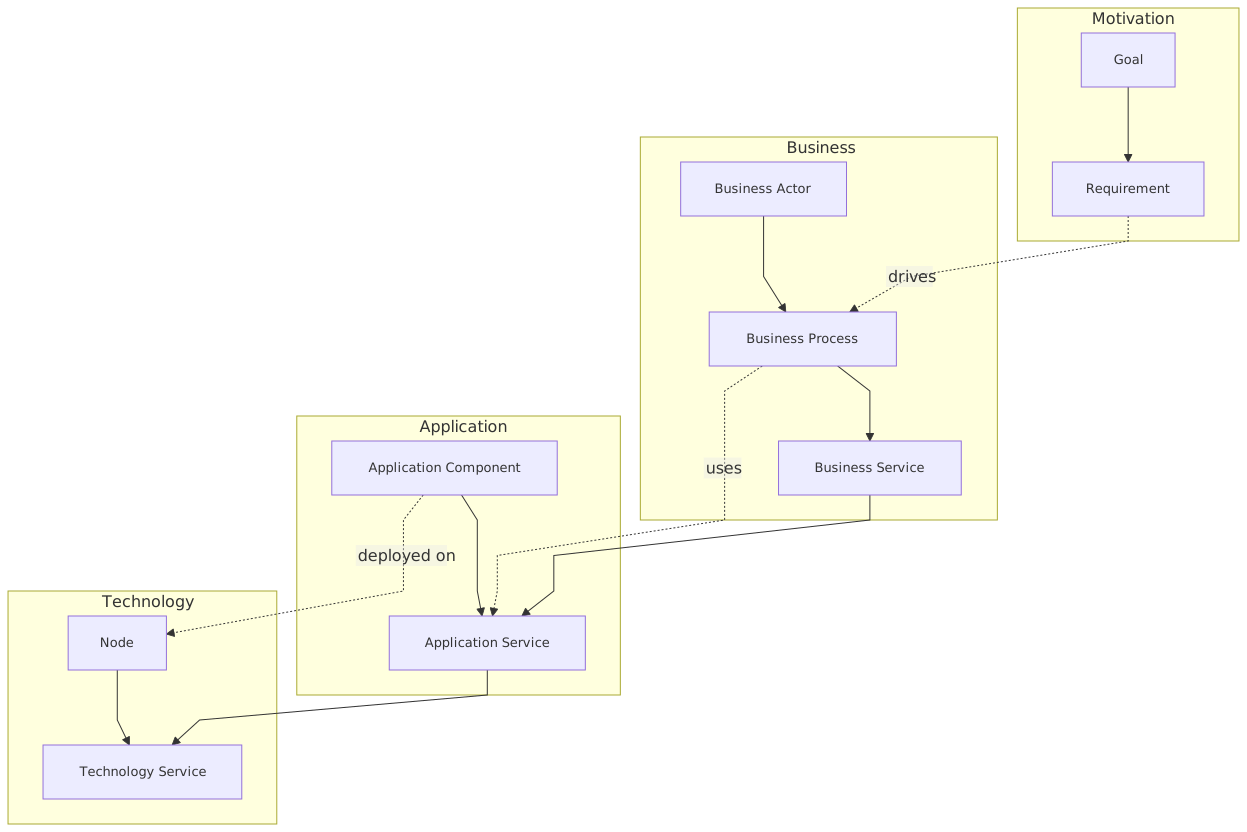
Start with the business.
For a banking example, imagine a Customer Onboarding domain. Keep it simple.
You might model:
- Business Actor: Retail Customer
- Business Role: Customer Service Agent
- Business Process: Customer Onboarding
- Business Service: Account Opening Service
- Business Object: Customer Profile
- Capability: Identity Verification
- Capability: Account Servicing
Already, you’ve got something meaningful.
The trick is not to over-model. You do not need 19 subprocesses on day one. You need enough structure to connect business intent to systems and change.
What this looks like in real work
In a bank, onboarding is never just onboarding. It touches:
- KYC and AML checks
- identity proofing
- consent capture
- branch and digital channels
- downstream account creation
- fraud screening
- notifications
- audit and retention
If you don’t model the business edge of that, technology conversations get distorted fast. You end up discussing Kafka topics or IAM token lifetimes while nobody has made clear which business service is actually at risk.
That happens all the time.
Step 4: Add the application layer that supports the business
Now connect the business model to applications.
For the same banking example, you could add:
- Application Component: Digital Onboarding Portal
- Application Component: IAM Platform
- Application Component: KYC Service
- Application Component: Core Banking Platform
- Application Component: Notification Service
- Application Component: Event Streaming Platform
Then define the relationships:
- Customer Onboarding uses Digital Onboarding Portal
- Account Opening Service is realized by Core Banking Platform
- IAM Platform serves authentication and authorization functions
- KYC Service supports identity verification
- Event Streaming Platform enables event exchange between onboarding and downstream systems
This is where ArchiMate starts earning its keep. You can show not just that systems exist, but how they support business behavior.
A note on Kafka
Please don’t model Kafka as a magic cloud in the middle with arrows from everything to everything. That’s what people do when they want to signal “modern architecture” without admitting they’ve created a new central dependency. ArchiMate in TOGAF ADM
In ArchiMate terms, Kafka can be represented in a few ways depending on your purpose:
- as a Technology Service if you’re emphasizing platform capability
- as a System Software or Node if you’re emphasizing runtime/infrastructure
- as part of an Application Cooperation view if you’re emphasizing app interaction through events
For many enterprise diagrams, the useful thing is not Kafka itself. It’s the event flow and dependency pattern:
- Digital Onboarding Portal publishes
CustomerOnboardingStarted - IAM Platform emits
IdentityVerified - KYC Service emits
KYCCompleted - Core Banking consumes onboarding completion events
- Notification Service reacts asynchronously
That’s architecture. Not just “we have Kafka.”
Step 5: Add data and integration, but only where it matters
One reason ArchiMate models get ugly is because architects try to express every interface and every payload.
Don’t.
Model important information objects and integration responsibilities, not every technical detail.
For example:
- Data Object: Customer Identity Record
- Data Object: KYC Result
- Data Object: Account Application
- Application Interface: Authentication API
- Application Interface: Event Topic / Event Stream abstraction if your tool supports your convention
You want enough detail to answer real questions:
- Where is customer identity mastered?
- Which application owns KYC results?
- What events are authoritative?
- Which services are synchronous vs event-driven?
Real-world banking example
A retail bank modernizes onboarding. The old world looks like this:
- branch staff use a legacy onboarding app
- digital channel uses a separate portal
- IAM is fragmented across online banking, mobile app, and branch tools
- KYC checks are batch-oriented
- account creation is tightly coupled to the core banking platform
The target state introduces:
- a centralized IAM platform
- Kafka for onboarding and identity events
- cloud-hosted onboarding services
- reusable KYC and consent APIs
- event-driven notifications
In ArchiMate, this can be shown clearly if you resist the urge to model every microservice. Show the major application components, the core data objects, and the key services. That’s enough for enterprise decisions.
Step 6: Model the technology layer only after the application story is clear
This is where cloud comes in.
Once you know what applications matter, then show the technology support:
- Node: Cloud Kubernetes Cluster
- Node: Managed Kafka Platform
- System Software: API Gateway
- Technology Service: Container Hosting
- Technology Service: Event Streaming
- Technology Service: Secrets Management
- Artifact: Onboarding Service Deployment
For IAM-heavy scenarios, also model:
- identity provider runtime
- secrets/certificate management
- network segmentation
- logging and audit services
- privileged access controls
Why this matters in real architecture work
Cloud conversations go wrong when they stay at the platform level.
You hear things like:
- “We’re moving to Kubernetes.”
- “Kafka is managed now.”
- “IAM is centralized.”
- “The landing zone is ready.”
Fine. But what business service is safer, faster, or cheaper because of that?
ArchiMate helps connect cloud platform services to application services and then to business services. That traceability is what makes architecture credible.
Without it, cloud architecture becomes a collection of technical preferences dressed up as strategy.
Step 7: Use relationships carefully. This is where meaning lives
ArchiMate is basically nouns plus relationships. The nouns are easy. The relationships are where people get sloppy.
The most useful relationships in daily architecture work are usually:
- serving
- used by
- realization
- assignment
- access
- composition / aggregation
- triggering
- flow
- association as a last resort, not a default
Strong opinion
If your diagram is full of generic associations, you’re avoiding thinking.
Use a stronger relationship when you can. It forces clarity.
Examples:
- IAM Platform serves Authentication Service
- Customer Onboarding Process uses Authentication Service
- Core Banking Platform realizes Account Opening Application Service
- KYC Service accesses Customer Identity Record
- Identity Verified Event triggers Account Creation Process
That level of precision matters, especially when doing impact analysis.
Step 8: Create multiple views, not one “masterpiece”
A single all-in-one diagram is almost always a mistake.
Real architects work with viewpoints for audiences:
Executive view
Shows:
- business capabilities
- key applications
- strategic change
- maybe a few risks
Domain architecture view
Shows:
- business processes
- application services
- dependencies
- key data objects
Platform/technology view
Shows:
- cloud services
- IAM platform
- Kafka/eventing platform
- deployment/runtime dependencies
Transformation view
Shows:
- work packages
- transition architectures
- target state
- dependencies between initiatives
This is how ArchiMate applies in real work: not as a single perfect model, but as a consistent set of views from one underlying model.
That distinction matters.
Step 9: Add motivation and change elements only when they help decisions
A lot of tutorials either ignore motivation and implementation layers or drown in them. The practical middle ground is better.
Useful motivation elements:
- Goal: Reduce onboarding abandonment
- Goal: Strengthen identity assurance
- Requirement: Centralized authentication for all digital channels
- Constraint: Regulatory retention and audit obligations
- Outcome: Faster customer activation
Useful implementation elements:
- Work Package: Deploy centralized IAM
- Work Package: Introduce onboarding event model
- Work Package: Migrate branch onboarding to shared APIs
- Plateau: Current State
- Plateau: Interim State – Dual IAM
- Plateau: Target State – Unified Identity and Event-Driven Onboarding
This is where ArchiMate becomes more than a static picture. It becomes a way to structure transformation.
Real architecture application
Suppose the bank cannot cut over all channels at once. Branch systems still depend on legacy authentication, while digital channels move to the new IAM platform first.
A good ArchiMate migration view can show:
- current and target plateaus
- which business services are impacted
- where dual-running is required
- which work packages enable downstream changes
- where Kafka events bridge old and new worlds temporarily
That’s useful. That gets discussed in steering committees. That affects funding and sequencing.
Step 10: Validate the model against reality, not notation purity
This might be the most important step.
Once you’ve built your views, ask:
- Can an engineering lead recognize the system landscape?
- Can a business stakeholder see their process in it?
- Can a security architect verify IAM dependencies?
- Can a platform team identify what cloud services are in scope?
- Can a program manager derive work packages from it?
If not, the model is not done.
And no, “but the notation is correct” does not save it.
I’ve seen technically valid ArchiMate models that were practically useless. The reverse also happens: slightly imperfect notation, but the model clearly supports a major transformation decision. I know which one I’d keep.
A practical example: Retail bank onboarding modernization
Let’s pull this together into a more complete example.
The situation
A retail bank has these problems:
- three different IAM solutions across mobile, web, and branch
- onboarding takes too long
- KYC checks are fragmented
- downstream systems rely on brittle point-to-point integration
- cloud adoption is uneven
- event streaming exists, but governance is weak
Leadership wants a target architecture for onboarding modernization.
Step A: Business view
Model:
- Business Actor: Retail Customer
- Business Role: Branch Agent
- Business Process: Customer Onboarding
- Business Service: Account Opening
- Capability: Identity and Access Management
- Capability: Customer Due Diligence
- Capability: Customer Communication
This gives the business frame.
Step B: Application view
Add:
- Application Component: Mobile Banking App
- Application Component: Web Onboarding Portal
- Application Component: Branch Onboarding Workbench
- Application Component: Central IAM Platform
- Application Component: KYC Engine
- Application Component: Core Banking
- Application Component: Notification Platform
- Application Component: Customer Event Hub
Relationships:
- customer channels use Central IAM Platform for authentication
- KYC Engine supports due diligence
- Core Banking realizes account creation service
- Customer Event Hub enables asynchronous integration between onboarding, KYC, core banking, and notifications
Step C: Technology view
Add:
- Node: Cloud Container Platform
- Technology Service: Managed Kafka
- Technology Service: API Management
- Technology Service: Secrets Vault
- Technology Service: Audit Logging
Now you can show:
- Web Onboarding Portal and IAM services deployed on cloud container platform
- Customer Event Hub supported by managed Kafka
- IAM depends on secrets vault and audit logging
- Core Banking remains on-prem for now
Step D: Transformation view
Add:
- Work Package: Consolidate digital authentication
- Work Package: Standardize onboarding events
- Work Package: Expose branch onboarding APIs
- Work Package: Integrate KYC Engine with event hub
- Plateau: Current fragmented state
- Plateau: Interim hybrid identity state
- Plateau: Target unified onboarding architecture
This lets you tell the real story:
not just what the target looks like, but how you get there.
That’s what enterprise architecture is for.
Common mistakes architects make with ArchiMate
Let’s be blunt. These are the patterns I see over and over.
1. Modeling everything they know
This is the classic failure mode. The architect dumps all known systems into one diagram.
Result:
- unreadable view
- no audience fit
- no decision support
Fix:
Model to a question.
2. Starting from infrastructure
If the first thing in the model is VPCs, clusters, and subnets, you’ve probably skipped enterprise architecture and gone straight to platform design.
Fix:
Start with business capabilities or business services.
3. Confusing ArchiMate with process notation
ArchiMate can show process relationships, but it is not BPMN. Don’t force detailed workflow logic into it. BPMN 2.0 training
Fix:
Use ArchiMate for structural and cross-layer understanding. Use BPMN for process detail if needed. how BPMN and UML complement each other
4. Using the wrong level of abstraction
A diagram with “Customer Management System” next to “OAuth Token Introspection Endpoint” is already in trouble.
Fix:
Keep a consistent level of detail per view.
5. Treating Kafka as architecture by itself
Using Kafka does not mean you have decoupled architecture. Plenty of enterprises just move their coupling into event contracts and topic governance failures.
Fix:
Model event ownership, service boundaries, and business outcomes.
6. Ignoring IAM as a business enabler
Architects often model IAM as security plumbing only. In banking, that’s a mistake. IAM directly affects onboarding, fraud, channel access, customer experience, and regulatory posture.
Fix:
Connect IAM to business services and customer journeys.
7. No migration story
The target state is clean, but nobody can get there from here.
Fix:
Use plateaus and work packages. Show interim states honestly.
8. No ownership in the model
A beautiful model with no accountable actors or teams is architecture theater.
Fix:
Use roles, assignments, and implementation elements tied to real teams or domains.
How ArchiMate helps in real architecture work
This is the part people often skip, but it’s the whole reason to bother.
1. Impact analysis
If the IAM platform changes, which business services, applications, and channels are affected?
With a good model, that answer is not tribal knowledge.
2. Investment prioritization
Should the bank fund event standardization first, or branch API modernization, or IAM consolidation?
A cross-layer model reveals dependencies and business impact.
3. Cloud migration clarity
Instead of saying “move onboarding to cloud,” you can show:
- which application services move
- which technology services support them
- what remains on-prem
- what business services improve
4. Security architecture integration
Security should not sit in a separate universe. ArchiMate helps integrate IAM, audit, secrets, and trust boundaries into enterprise conversations.
5. Better roadmaps
A roadmap without architecture traceability is just a wish list. ArchiMate gives you structure from goals to work packages.
A practical modeling sequence you can follow tomorrow
If you want a usable ArchiMate tutorial, here is the simplest sequence that works in real projects:
- Write the decision statement.
- Identify 3–5 business capabilities or services in scope.
- Add 5–8 application components that matter.
- Connect business usage to application support.
- Add 2–4 important data objects or integration services.
- Add only the technology services that explain deployment/runtime reality.
- Add goals, requirements, and work packages if transformation is in scope.
- Create separate views for executives, domain stakeholders, and technology teams.
- Review the model with actual stakeholders.
- Remove anything that doesn’t help a decision.
That last step is the hardest. Architects love adding. Good architects know when to cut.
A few contrarian thoughts on ArchiMate
Since you asked for a real architect tone, here it is.
Not every architecture problem needs ArchiMate
Sometimes a simple matrix, a capability heatmap, or a one-page concept diagram is enough. Don’t force ArchiMate into every conversation.
Tool vendors oversell repository purity
Yes, a governed repository is valuable. No, it will not automatically make your architecture better. Plenty of organizations have beautifully structured repositories full of stale nonsense.
Standard notation does not guarantee shared understanding
People understand architecture when it reflects their world. ArchiMate helps, but only if the model is grounded in real decisions and real operating constraints.
Most organizations are too detailed in the wrong places
They can tell you every cloud resource tag, but not which business capabilities depend on which IAM flows. That imbalance is common and expensive.
The best ArchiMate models are usually a bit boring
That’s fine. Architecture is not judged by artistic flair. It’s judged by whether it helps people make better choices.
Final advice
If you’re learning ArchiMate, don’t start by memorizing the full metamodel. Start by modeling one real problem.
A banking onboarding journey.
An IAM consolidation.
A Kafka-based integration domain.
A cloud migration with legacy dependencies.
Use ArchiMate to connect the layers. Keep the story clear. Be ruthless about scope. And never confuse “more notation” with “more architecture.”
Because in enterprise work, the value is not the diagram. The value is the shared understanding and better decisions that come from it.
That’s the standard.
FAQ
1. Is ArchiMate only for enterprise architects?
No. Enterprise architects use it most, but domain architects, solution architects, security architects, and platform architects can all benefit from it. The trick is using the right level of abstraction. A security architect modeling IAM dependencies across banking channels can get a lot of value from ArchiMate.
2. How is ArchiMate different from UML or BPMN?
UML is mainly for software design. BPMN is mainly for detailed process modeling. ArchiMate is for cross-layer enterprise architecture—business, application, technology, and change. It’s better for showing how onboarding, IAM, Kafka, and cloud services fit together at enterprise level.
3. Should I model Kafka topics and every event in ArchiMate?
Usually no. Model the eventing pattern, major event flows, and ownership where it matters. If you model every topic and schema in an enterprise view, the diagram will collapse under its own weight. Keep detailed event catalogs elsewhere.
4. What are the biggest mistakes beginners make with ArchiMate?
The big ones: modeling too much, mixing abstraction levels, starting with infrastructure, using vague relationships, and creating one giant diagram for everyone. Also, many beginners forget migration planning entirely.
5. Can ArchiMate be used for cloud and IAM architecture?
Absolutely. In fact, it’s very effective there when used well. You can show how IAM services support customer journeys, how cloud platform services host applications, and how Kafka or API platforms enable integration. That makes cloud and security architecture much more connected to business outcomes.
Frequently Asked Questions
What is enterprise architecture?
Enterprise architecture is a discipline that aligns an organisation's strategy, business processes, information systems, and technology. Using frameworks like TOGAF and modeling languages like ArchiMate, it provides a structured view of how the enterprise operates and how it needs to change.
How does ArchiMate support enterprise architecture practice?
ArchiMate provides a standard modeling language that connects strategy, business operations, applications, data, and technology in one coherent model. It enables traceability from strategic goals through business capabilities and application services to the technology platforms that support them.
What tools are used for enterprise architecture modeling?
The main tools are Sparx Enterprise Architect (ArchiMate, UML, BPMN, SysML), Archi (free, ArchiMate-only), and BiZZdesign Enterprise Studio. Sparx EA is the most feature-rich option, supporting concurrent repositories, automation, scripting, and integration with delivery tools like Jira and Azure DevOps.