⏱ 7 min read
Recommended Reading
Executive summary
ArchiMate can provide the cross-layer visibility Kafka governance needs: from business capabilities to event streams to platform services. Kafka’s topic model and Confluent’s compatibility controls provide the technical backbone, while ArchiMate provides the semantic and stakeholder communication layer.
- Modeling pattern: capabilities ↔ event streams ↔ services
- Risk/compliance overlays: provenance and lineage
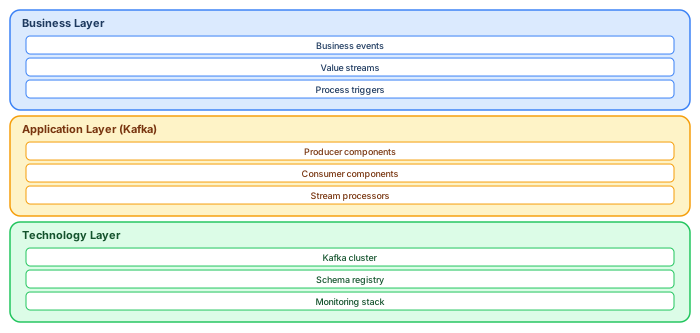
- ArchiMate 3.2 framing.
ArchiMate layers for Kafka architecture
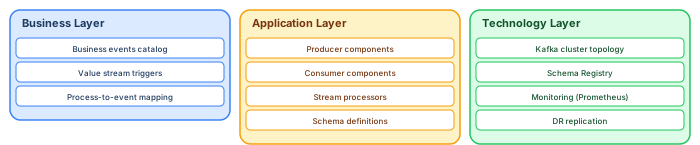
Governing a Kafka-based architecture with ArchiMate requires mapping Kafka concepts to ArchiMate elements across all three core layers. This mapping makes the event-driven architecture visible, governable, and traceable within the standard EA framework. ArchiMate tutorial for enterprise architects
Business layer: Model business events as Business Events (ArchiMate element type). Each business event maps to one or more Kafka topics. Business processes trigger business events — model this with Triggering relationships. Value streams show where events fit in the customer journey. This layer answers: "What business-meaningful events does our organization produce and consume?"
Application layer: Model producers as Application Components that produce Application Events. Model consumers as Application Components that consume from topics. Model stream processors as Application Functions that transform events. Model schemas as Data Objects associated with topics. This layer answers: "Which applications participate in event flows, and what data do they exchange?"
Technology layer: Model the Kafka cluster as a Technology Service (or set of Nodes for broker-level detail). Model the Schema Registry as a Technology Service. Model the monitoring stack (Prometheus, Grafana) as supporting Technology Services. Model DR replication (MirrorMaker 2) as a Technology Process. This layer answers: "What infrastructure supports our event-driven platform?"
Cross-layer governance views
The power of this mapping is cross-layer traceability. When a business process changes, trace from the Business Event through the Application Components (producers/consumers) to the Technology Services. When the platform team plans a Kafka upgrade, trace from Technology Services up to Application Components and Business Events to assess impact. The ArchiMate model makes these traces queryable — architecture governance for event-driven systems becomes as structured as governance for traditional request-reply architectures. ArchiMate layers explained
Five essential ArchiMate viewpoints for Kafka governance
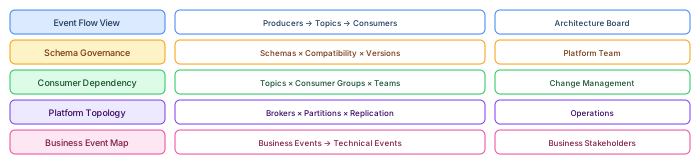
Governing Kafka with ArchiMate requires purpose-built viewpoints that answer specific governance questions. Standard ArchiMate viewpoints (Layered, Cooperation, Implementation) are a starting point, but Kafka-specific viewpoints provide the focused views that the architecture board, platform team, and business stakeholders actually need. ArchiMate relationship types
Event Flow View: Shows producers (left), topics (center), and consumers (right) with data flow arrows. This is the primary governance view — it answers "who produces what, who consumes what, and where are the dependencies?" The architecture board uses this view to assess the impact of schema changes, evaluate new consumer requests, and identify single points of failure. Model producers and consumers as Application Components, topics as Application Collaborations or Data Objects, and data flows as Access relationships.
Schema Governance View: Shows all schemas registered in the Schema Registry, grouped by compatibility mode (backward, forward, full, none). Highlights schemas with version count above threshold (indicating frequent evolution) and schemas with "none" compatibility (high-risk, breaking changes possible). The platform team reviews this view monthly to identify governance gaps.
Consumer Dependency View: For each topic, shows all consumer groups and the teams that own them. High fan-out topics (10+ consumers) are governance hotspots — a schema change on these topics affects many teams. This view drives the tiered review process: changes to high-fan-out topics require full board review, while changes to single-consumer topics can be fast-tracked.
Platform Topology View: Shows the Kafka infrastructure: clusters, brokers, partitions, replication factor, and storage tiers. The operations team uses this view for capacity planning and disaster recovery design. Tag each broker with Cluster, Region, Rack, and Storage_Tier.
Business Event Map: Shows Business Events linked to the technical Application Events that realize them. Business stakeholders see domain events in business language ("Customer Placed Order") without technical details (topic names, partition counts). This view connects business process owners to the event architecture, enabling conversations about business requirements driving technical design.
Building the event flow view step by step
The Event Flow View is the most important ArchiMate viewpoint for Kafka governance. Here is how to build it in practice. ArchiMate modeling best practices
Step 1: Model producers. Create an Application Component for each producing service. Tag with Team, Language, Deployment (Kubernetes namespace or server). Position producers on the left side of the diagram.
Step 2: Model topics. Create Application Collaboration or Data Object elements for each Kafka topic. Tag with Partitions, Replication, Retention, Cleanup_Policy, Schema_Subject. Position topics in the center of the diagram, grouped by domain.
Step 3: Model consumers. Create Application Components for each consuming service. Tag with Team, Consumer_Group, Processing_Type (real-time / batch / CDC). Position consumers on the right side.
Step 4: Draw relationships. Access relationships from producers to topics (write), and from topics to consumers (read). For stream processors that both consume and produce, show both relationships — this makes the transformation pipeline visible.
Step 5: Add governance metadata. Color-code topics by data classification (green = public, amber = internal, red = confidential). Add annotations for high-fan-out topics (10+ consumers) that require Tier 3 review for schema changes. Add annotations for topics with upcoming deprecation dates.
The completed view fits on a single diagram with 20-40 elements for a typical domain. Publish via WebEA for self-service access. Update whenever topics, producers, or consumers change — which the platform team can automate through Kafka admin API queries that reconcile the model against runtime reality.
Reconciling the model with runtime reality
The architecture model is only useful if it matches what is actually running. Implement automated reconciliation between the ArchiMate model and the Kafka runtime. Weekly, a script queries the Kafka admin API for all topics, consumer groups, and Schema Registry subjects. It compares this runtime inventory against the model elements in Sparx EA. Discrepancies are flagged: topics that exist in Kafka but not in the model (undocumented — governance gap), topics that exist in the model but not in Kafka (stale model entries — cleanup needed), consumer groups active in Kafka but not modeled (shadow consumers — security concern). This reconciliation report is reviewed by the platform team weekly and by the architecture board monthly. Without automated reconciliation, the model drifts from reality within weeks — and a model that does not match reality is worse than no model at all, because it creates false confidence in governance coverage.
If you’d like hands-on training tailored to your team — Sparx Enterprise Architect, BPMN, SysML, Apache Kafka or the Archi tool — or modelling coaching in ArchiMate and TOGAF-aligned governance, you can reach us via our contact page.
Frequently Asked Questions
What is enterprise architecture?
Enterprise architecture is a discipline that aligns an organisation's strategy, business operations, information systems, and technology infrastructure. It provides a structured framework for understanding how an enterprise works today, where it needs to go, and how to manage the transition.
How is ArchiMate used in enterprise architecture practice?
ArchiMate is used as the standard modeling language in enterprise architecture practice. It enables architects to create consistent, layered models covering business capabilities, application services, data flows, and technology infrastructure — all traceable from strategic goals to implementation.
What tools are used for enterprise architecture modeling?
Common enterprise architecture modeling tools include Sparx Enterprise Architect (Sparx EA), Archi, BiZZdesign Enterprise Studio, LeanIX, and Orbus iServer. Sparx EA is widely used for its ArchiMate, UML, BPMN and SysML support combined with powerful automation and scripting capabilities.