⏱ 5 min read
Start with a deployment decision: what are you optimizing?
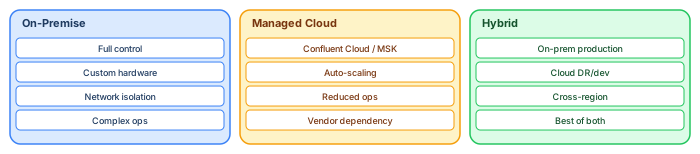
Kafka deployment strategy is typically a trade-off between:
Recommended Reading
- Control, customization, and data locality (often on-prem)
- Operational simplicity and managed scaling (often cloud)
The architecture fundamentals—partitioning, replication, consumer group scaling—remain the same, but operational responsibilities shift significantly. turn16view0
On-premise deployments: control comes with operational burden
On-prem Kafka teams must own:
- Hardware sizing and storage performance for durable retention turn16view0
- Networking reliability and latency budgets
- Security integration
Because Kafka persists logs and relies on replication and leader/follower dynamics, storage and network quality directly impact throughput, durability, and availability. turn16view0
Kubernetes deployments with operators
Many organizations use Kubernetes operators to standardize cluster lifecycle management. Strimzi documentation explicitly positions Strimzi as simplifying Kafka cluster management via specialized operators (cluster lifecycle, topic management, user management).
This can reduce operational toil, but enterprises still need mature observability, security controls, and upgrade practices.
Cloud managed services: shift the responsibility boundary
An example of cloud-managed Kafka security posture is Amazon MSK documentation, which describes authentication/authorization options including IAM-based authentication/authorization, and alternatives such as TLS or SASL/SCRAM paired with Kafka ACLs. enterprise cloud architecture patterns
The deeper enterprise question is: which team owns topics, schemas, ACL/RBAC policy, and compliance evidence? Managed services reduce infrastructure toil, not governance obligations. turn19view0turn17view0 architecture decision records
KRaft readiness and controller design
Kafka operations documentation describes KRaft process roles (broker, controller, or both) and warns that combined broker/controller mode is not recommended for critical environments due to isolation and scaling limitations. turn18view0
It also provides explicit guidance on controller quorum sizing (“typically 3 or 5”) and the majority-availability requirement, which should inform enterprise HA design. turn18view0
A deployment checklist that prevents outages
A minimal enterprise checklist:
- Replication factor and failure tolerance defined turn16view0turn18view0
- Partitioning strategy aligned to ordering/business keys turn16view0
- Default-deny authorization enforced (no “open topics”) turn17view0
- Schema governance and compatibility rules in place turn19view0
Frequently asked questions
Is Kubernetes always the best answer?
Not always. Operators simplify lifecycle management, but the organization must still be capable of operating the platform with the required reliability and security posture. turn17view0
Kafka in the enterprise architecture context
Kafka is not just a messaging system — it is an architectural decision that reshapes how systems communicate, how data flows, and how teams organize. Enterprise architects must understand the second-order effects: integration topology changes from N×(N-1)/2 point-to-point connections to 2N topic-based connections, data flows become visible and governable through the topic catalog, and team structure shifts toward platform-plus-domain ownership. Sparx EA guide
Model Kafka infrastructure in the ArchiMate Technology Layer and the event-driven application architecture in the Application Layer. Use tagged values to track topic ownership, retention policies, and consumer dependencies. Build governance views that the architecture review board uses to approve new topics, review schema changes, and assess platform capacity. enterprise architecture guide
Operational considerations
Kafka deployments require attention to operational fundamentals that are often underestimated during initial architecture decisions. Partition strategy determines consumer parallelism — too few partitions limits throughput, too many creates metadata overhead and increases leader election time during broker failures. A practical starting point: 3 partitions for low-volume topics, 6-12 for medium traffic, and 30+ only for topics exceeding 10,000 messages per second.
Retention configuration directly affects storage costs and replay capability. Set retention per topic based on the business requirement: 7 days for operational events (sufficient for most consumer catch-up scenarios), 30 days for analytics events (covers monthly reporting cycles), and multi-year for regulated data (financial transactions, audit trails). Use tiered storage to move older data to object storage (S3, Azure Blob) automatically, reducing broker disk costs without losing replay capability. hybrid cloud architecture
Monitoring must cover three levels: cluster health (broker availability, partition balance, replication lag), application health (consumer group lag, producer error rates, throughput per topic), and business health (end-to-end event latency, data freshness at consumers, failed processing rates). Deploy Prometheus with JMX exporters for cluster metrics, integrate consumer lag monitoring into the platform team's alerting, and build business-level dashboards that domain teams can check independently.
If you’d like hands-on training tailored to your team — Sparx Enterprise Architect, BPMN, SysML, Apache Kafka or the Archi tool — or modelling coaching in ArchiMate and TOGAF-aligned governance, you can reach us via our contact page.
Frequently Asked Questions
How is ArchiMate used in cloud architecture?
ArchiMate models cloud architecture using the Technology layer — cloud platforms appear as Technology Services, virtual machines and containers as Technology Nodes, and networks as Communication Networks. The Application layer shows how workloads depend on cloud infrastructure, enabling migration impact analysis.
What is the difference between hybrid cloud and multi-cloud architecture?
Hybrid cloud combines private on-premises infrastructure with public cloud services, typically connected through dedicated networking. Multi-cloud uses services from multiple public cloud providers (AWS, Azure, GCP) to avoid vendor lock-in and optimise workload placement.
How do you model microservices in enterprise architecture?
Microservices are modeled in ArchiMate as Application Components in the Application layer, each exposing Application Services through interfaces. Dependencies between services are shown as Serving relationships, and deployment to containers or cloud platforms is modeled through Assignment to Technology Nodes.