⏱ 11 min read
Introduction: why governance is the foundation of EA success
A Sparx Enterprise Architect repository without governance is a shared folder with diagrams — it looks like architecture, but it lacks the controls that make it trustworthy. Governance transforms EA from a diagramming tool into an auditable, version-controlled, role-based architecture management platform. This article covers the three pillars of EA governance: repository architecture, model security, and Pro Cloud Server configuration for distributed teams. Sparx EA training
Recommended Reading
Choosing the repository architecture

The repository is the foundation: packages, elements, diagrams, connectors, discussions, audits, baselines, and documents all live here. The choice of repository type determines everything that follows — security options, concurrency support, performance characteristics, and integration capabilities.
File-based repository (.qea/.qeax)
SQLite-based file repositories are the simplest option. They are portable, require no database infrastructure, and work offline. Use them for proofs of concept, personal modeling, or very small teams (2–3 people). The limitation is concurrency: file-level locking means only one user can write at a time, and performance degrades with model size beyond approximately 10,000 elements.
DBMS repository
Database-backed repositories (SQL Server, Oracle, MySQL/MariaDB, PostgreSQL) are the enterprise standard. They provide transaction-level concurrency, robust backup/restore, DBA-grade monitoring, and excellent performance for large models (100,000+ elements). The cost is operational complexity: you need a database server, DBA support, network connectivity, and proper backup routines. This is the recommended default for any team with more than 5 modelers.
Pro Cloud Server access
Pro Cloud Server (PCS) adds a layer between EA clients and the DBMS, providing URL-based connections (no client-side database drivers needed), WebEA for browser-based read access, OSLC integration for cross-tool traceability, and server-side security controls. PCS should be deployed on the same LAN as the DBMS for performance. It is essential for distributed teams and external stakeholder access. enterprise cloud architecture patterns
Defining the governance baseline

Before configuring security or installing PCS, define the governance baseline: who can do what, how changes are reviewed, and how the repository evolves over time.
Role definitions
Define clear roles with specific permissions: Architecture Board (full read/write, approve structural changes, manage baselines), Lead Architects (read/write within their domain, create/modify diagrams and elements), Contributing Architects (read/write within assigned packages, cannot modify shared libraries), Reviewers (read-only access, can add comments and discussions), Stakeholders (WebEA read-only access to published views).
Change management process
Establish a change management workflow for structural changes (new packages, new domains, framework changes) versus content changes (new elements, updated diagrams). Structural changes require Architecture Board approval. Content changes follow a create-review-publish cycle within each team.
Configuring model security
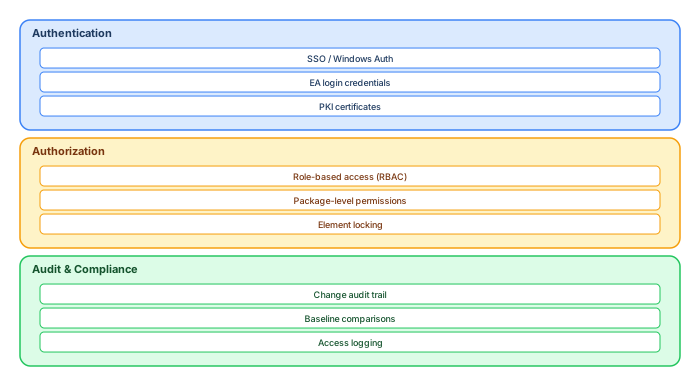
EA's security model operates at three levels: authentication (who are you), authorization (what can you do), and auditing (what did you do).
Authentication
Enable EA's built-in security model and configure authentication. Options include: Windows domain authentication (SSO via Active Directory), database-level credentials (for environments without AD), and certificate-based authentication via PCS. For enterprise deployments, Windows authentication is preferred because it integrates with existing identity management and eliminates separate credential management.
Authorization
Configure package-level permissions using EA's security groups. Each package can have read, write, and lock permissions assigned to specific groups. Best practice: create a security group per role (e.g., "BusinessArchitects", "ApplicationArchitects", "ReadOnly") and assign permissions by package tree. Use element locking to prevent concurrent edits: EA supports user locks (manual), group locks (per security group), and model-level locking policies.
Audit trail
Enable EA's audit logging to track who changed what and when. Audit logs capture element creation, modification, deletion, property changes, and relationship changes. Combine with baselines (point-in-time snapshots) for formal change tracking. For regulated environments, export audit logs to a centralized SIEM system.
Installing and hardening Pro Cloud Server
Pro Cloud Server is the gateway between EA clients and the repository for distributed teams. Installation involves: deploying PCS on a server with LAN access to the DBMS, configuring TLS certificates for encrypted connections, setting up WebEA for browser-based access, and configuring OSLC endpoints for cross-tool integration.
Hardening checklist
Enforce HTTPS-only connections (disable HTTP). Use a reverse proxy (NGINX, Apache) for TLS termination. Restrict WebEA to read-only access by default. Configure session timeouts (15 minutes for idle sessions). Enable IP whitelisting for PCS administration endpoints. Monitor PCS logs for authentication failures. Back up PCS configuration alongside the DBMS. EA governance checklist
Change management workflow
A formal change management workflow prevents the repository from degrading into an uncontrolled collection of diagrams. The recommended workflow: architect requests a change, lead architect reviews the request, approved changes are implemented in a branch or copy, a baseline is created before merging, and the change is merged into the main repository. Rejected changes receive feedback and can be resubmitted.
EA supports this workflow through baselines (snapshots before changes), package control (controlled packages with check-in/check-out), and discussions (threaded comments on any element). For teams using XMI-based version control, consider integrating with Git for branch-based workflows.
WebEA and stakeholder engagement
One of the most common governance failures is that stakeholders never see the architecture. Models exist in EA, but only architects access them. WebEA solves this by providing browser-based, read-only access to the repository. Stakeholders can browse diagrams, view element details, read documentation, and follow traceability links — all without installing EA.
Configure WebEA with role-specific views: executive dashboards showing capability heatmaps and roadmaps, project views showing requirements and component designs, and operations views showing deployment architectures and technology landscapes. Each view is a URL that can be shared via email, embedded in wikis, or bookmarked in browsers. ArchiMate for governance
For more interactive stakeholder engagement, consider Prolaborate — Sparx's web-based collaboration platform that adds commenting, discussions, and customizable dashboards on top of the EA repository. Prolaborate is particularly valuable for architecture review processes where stakeholders need to provide feedback without modifying the model. Sparx EA best practices
Baselines and version management
Baselines are point-in-time snapshots of a package tree. They are essential for governance because they enable: rollback (restore a package to a previous state if a change causes problems), comparison (generate a diff report showing what changed between two baselines), and compliance (prove to auditors that the architecture was in a specific state at a specific date).
Create baselines at three points: before any structural change (new packages, framework changes), before each architecture review board meeting (to document the state that was reviewed), and at the end of each architecture development cycle (quarterly or per release). Name baselines consistently: {Date} — {Reason} (e.g., "2026-01-15 — Pre-Q1 Review").
For teams that need Git-style version control, EA supports XMI-based package export that can be committed to Git repositories. This enables branch-based workflows, pull request reviews, and merge operations — though the tooling for XML merge is less mature than for code. Alternatively, use EA's built-in Transfer mechanism for controlled package sharing between repositories.
Integration with enterprise tools
A governed EA repository should not be an island. Common integrations include: ServiceNow / BMC for CMDB synchronization (application inventory, infrastructure components), Jira / Azure DevOps for requirements traceability (linking EA requirements to development work items), SharePoint / Confluence for document management (linking EA elements to external documentation), and Power BI for dashboard generation (SQL queries against the EA database feeding executive dashboards).
Each integration should be governed: define who owns the integration, how frequently data synchronizes, what happens when conflicts arise, and who is responsible for monitoring integration health. Document these decisions in the Governance package of the repository.
Best practices and common pitfalls
Do: Define roles and permissions before adding content. Create baselines before structural changes. Use package control for shared libraries. Enable audit logging from day one. Train all users on the governance model.
Don't: Give everyone admin access "to keep things simple." Skip baselines because "we'll remember what changed." Deploy PCS without TLS. Allow direct DBMS access from client machines in remote offices. Ignore the audit log until an incident occurs.
Security architecture for the EA repository
EA repository security operates at three layers. Authentication verifies identity: EA supports Windows Authentication (SSO via Active Directory), native EA credentials, and PKI certificate-based authentication for Pro Cloud Server connections. For enterprise deployments, SSO via Active Directory is strongly recommended — it eliminates credential sprawl and integrates with existing identity management.
Authorization controls what authenticated users can do. EA provides role-based access control (RBAC) at multiple granularities: global roles (admin, modeler, reader), package-level permissions (who can modify which parts of the model), element locking (exclusive or shared locks during editing), and diagram-level read restrictions. The recommended approach is to define three to five roles (Admin, Lead Architect, Architect, Reviewer, Stakeholder) and map them to Active Directory groups.
Audit and compliance ensures traceability. EA supports change auditing that records who modified which element, when, and what changed. Baselines capture model snapshots for comparison. Access logging (via Pro Cloud Server) records every connection and operation. For regulated industries (banking, pharma, government), enable all three audit mechanisms and configure retention policies that match your compliance requirements.
Configuring role-based security: step by step
-- SQL: Create read-only role for stakeholders
INSERT INTO t_secgroup (GroupID, GroupName, Description)
VALUES ('STAKEHOLDER', 'Stakeholder', 'Read-only access to published models');

-- Grant read access to published packages
INSERT INTO t_secpolicies (GroupID, PackageID, AccessType)
SELECT 'STAKEHOLDER', Package_ID, 'READ'
FROM t_package WHERE Name LIKE '99_Published%';
Pro Cloud Server architecture
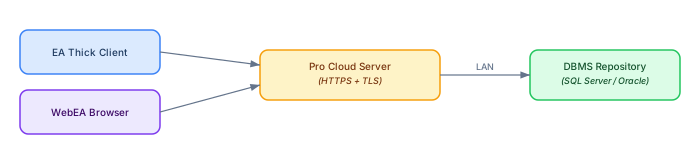
Pro Cloud Server (PCS) is the recommended access layer for distributed teams. PCS sits between EA clients (both thick client and WebEA browser) and the DBMS repository. All communication between clients and PCS is encrypted via HTTPS/TLS. PCS communicates with the DBMS over a LAN connection for optimal performance.
Critical deployment rule: PCS and the DBMS must be on the same LAN (or very low-latency network). If PCS is in a different data center than the DBMS, every model operation incurs network latency that multiplies across the hundreds of SQL queries EA executes per user action. This is the single most common cause of poor EA performance in distributed deployments.
WebEA configuration: WebEA provides browser-based read access to models, diagrams, and element properties. It is ideal for stakeholders who need to view architecture content but do not model. Configure WebEA with SSO integration and restrict write operations to the thick client for governance control.
PCS hardening checklist
Enforce HTTPS with TLS 1.2+ and valid certificates (no self-signed in production). Enable authentication for all connections. Configure connection pooling (max 50 concurrent connections per repository is a reasonable starting point). Set session timeout to 30 minutes for interactive users. Enable access logging for compliance. Place PCS behind a reverse proxy (nginx, HAProxy) for load balancing and DDoS protection. Monitor PCS memory and connection count — if connection count approaches the pool limit, users experience timeouts.
Conclusion
EA governance is not bureaucracy — it is the mechanism that makes a shared architecture repository trustworthy, auditable, and maintainable. Start with the repository architecture decision (DBMS + PCS for most enterprises), define roles and permissions, enable security and auditing, and establish a change management workflow. The investment in governance pays compound returns as the model grows and more teams depend on it as the single source of architecture truth.
If you’d like hands-on training tailored to your team — Sparx Enterprise Architect, BPMN, SysML or the Archi tool — or modelling coaching in ArchiMate and TOGAF-aligned governance, you can reach us via our contact page.
Frequently Asked Questions
What is Sparx Enterprise Architect used for?
Sparx Enterprise Architect (Sparx EA) is a comprehensive UML, ArchiMate, BPMN, and SysML modeling tool used for enterprise architecture, software design, requirements management, and system modeling. It supports the full architecture lifecycle from strategy through implementation.
How does Sparx EA support ArchiMate modeling?
Sparx EA natively supports ArchiMate 3.x notation through built-in MDG Technology. Architects can model all three ArchiMate layers, create viewpoints, add tagged values, trace relationships across elements, and publish HTML reports — making it one of the most popular tools for enterprise ArchiMate modeling.
What are the benefits of a centralised Sparx EA repository?
A centralised SQL Server or PostgreSQL repository enables concurrent multi-user access, package-level security, version baselines, and governance controls. It transforms Sparx EA from an individual diagramming tool into an organisation-wide architecture knowledge base.