⏱ 27 min read
1. Why Agile Teams Struggle with Requirements in Sparx Enterprise Architect
Teams that have used Sparx Enterprise Architect (EA) for years often build a disciplined analysis structure around domain models, requirement models, and user interface documentation. That approach works well in delivery models where analysis, design, and implementation are strongly documented and governed. The tension starts when the organization moves toward Agile delivery and introduces a Scrum tool as the operational system for epics, user stories, backlog items, sprint planning, and release traceability. Sparx EA training
At first glance, the change looks harmless. The Scrum tool becomes the place where delivery teams manage work, while EA remains the place where analysts and architects describe the business. In practice, however, the boundary is rarely that clean. As soon as a user story becomes more detailed, it starts to overlap with the requirement model already maintained in EA. Acceptance criteria may look like business rules. Story descriptions may look like functional requirements. UI behavior written in the backlog may mirror requirements already documented in the user interface insight.
This is why many teams feel immediate friction. They are not really struggling with Agile itself. They are struggling with ownership of detail. If a requirement is written in EA and then rewritten as a user story in the Scrum tool, the team has created two sources of truth. If the story changes during sprint refinement but the EA model is not updated, the architecture repository starts to drift away from delivery reality. If the team updates EA but leaves the Scrum item unchanged, developers and testers may implement the wrong behavior.
The problem becomes even more visible in organizations that have already separated their EA repository into logical areas such as Concepts and User Interface. This is usually a mature and sensible setup. The Concepts insight often contains the domain model, business rules, validations, and sometimes activity diagrams that explain server-side behavior. The User Interface insight contains UI-specific requirements, mockups, and links back to conceptual elements. That separation improves clarity, but under Agile it also raises a new question: where should the user story live, and how much of it should be repeated across tools?
The answer is usually not to force everything into one place. User stories and requirements are not identical, even though they often look similar. A user story is primarily a delivery planning object. It exists to help the team prioritize work, discuss value, and connect implementation to releases, builds, and test execution. A requirement in EA is primarily a knowledge and traceability object. It exists to preserve meaning, structure, relationships, and architectural context beyond a single sprint.
Agile teams struggle when they try to make one artifact do both jobs. If EA is treated like a backlog tool, it becomes cluttered with sprint-level operational data. If the Scrum tool is treated like the complete business analysis repository, deeper structure is lost over time. The real challenge is not choosing one tool over the other. It is defining what level of information belongs in each one, and how they connect without duplication.
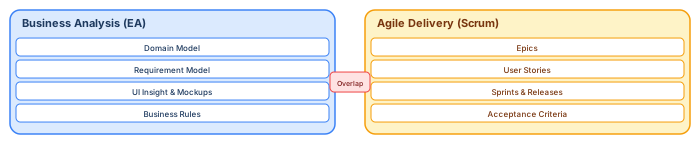
This is the central reason Agile adoption feels awkward in model-driven environments. The issue is not that Scrum and EA cannot work together. The issue is that without explicit rules, both tools start storing the same information in different forms.
2. Traditional EA Modeling vs Agile User Stories: Where the Conflict Starts
The conflict between traditional EA modeling and Agile user stories usually begins with good intentions. Business analysts want completeness, consistency, and reusable knowledge. Product owners and Agile teams want lightweight communication, fast refinement, and direct linkage between backlog items and implementation. Both goals are legitimate. The trouble starts when teams assume these two styles of work are naturally interchangeable.
In a traditional Enterprise Architect setup, requirements are often modeled with a level of precision that supports long-term understanding. Analysts create domain concepts, define relationships, document business rules, capture validation logic, and sometimes show process flow in activity diagrams. This approach is strong because it creates a stable analytical foundation. The model explains not just what the system should do, but how business meaning is organized across the solution. Sparx EA best practices
User stories, by contrast, are intentionally narrower. A user story is not meant to replace the entire analysis repository. Its role is to express a unit of value that can be discussed, estimated, implemented, and validated within an Agile delivery process. It is temporary in nature compared with architectural knowledge. A sprint may close the story, but the business concept and the rule behind it often remain relevant for years.
The conflict starts when teams enrich user stories to the point that they no longer behave like lightweight planning items. A detailed story may contain process logic, data definitions, screen behavior, validations, edge cases, and technical constraints. At that point it begins to resemble a structured requirement in EA. The team then asks a reasonable but dangerous question: if the story already contains all of this detail, why keep the requirement in Enterprise Architect at all? free Sparx EA maturity assessment
That question seems efficient, but it creates downstream problems. Scrum tools are excellent at prioritization and workflow, yet they are usually weaker at expressing formal relationships between concepts, requirements, UI elements, business rules, and architecture views. They can store text, attachments, links, and custom fields, but they rarely provide the same modeling depth as EA. Once analysis is moved fully into the backlog, teams often discover that traceability becomes flatter, reuse declines, and cross-project understanding becomes harder.
The opposite mistake is equally harmful. Some teams continue to maintain detailed EA requirements and then create equally detailed user stories for delivery. In this case, the Scrum tool becomes a second documentation layer instead of a lightweight execution layer. Refinement sessions grow heavy, stories become bloated, and every change requires updates in multiple places. The process becomes slower precisely when the goal of Agile was to become faster.
A healthier view is to see the two artifacts as related but different:
- EA models the enduring structure of knowledge
- The Scrum tool manages the flow of delivery work
When that principle is respected, the conflict becomes manageable. EA can remain the place for domain semantics, business rules, validation logic, and reusable requirement knowledge. The Scrum tool can remain the place for epics, user stories, acceptance criteria, sprint execution, and development traceability. The user story does not need to repeat the full requirement; it only needs enough detail to deliver the increment, plus a reference back to the relevant EA elements when deeper context is needed.
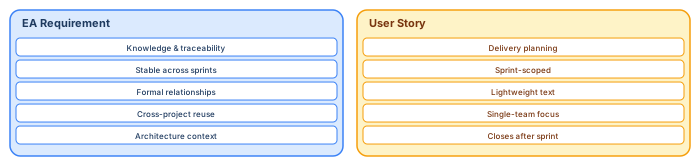
The key insight is simple: the conflict does not start because EA and Scrum tools are incompatible. It starts because teams do not define a clear boundary between persistent analysis knowledge and delivery-oriented backlog detail. Once that boundary is explicit, both tools can support each other instead of competing with each other.
3. Understanding the Difference Between Requirements and User Stories
One of the most common sources of confusion when combining Enterprise Architecture modeling with Agile delivery is the apparent similarity between requirements and user stories. At a surface level, both describe system behavior, user expectations, and validation criteria. However, their purpose, lifecycle, and scope are fundamentally different.
A requirement in an architecture repository such as Sparx Enterprise Architect is typically designed to capture long‑lasting knowledge about the system. Requirements often represent business rules, regulatory obligations, validation logic, or structural expectations that remain valid across multiple releases. They are not tied to a single sprint or development task; instead, they help define how the system should behave from a domain perspective.
Requirements are therefore strongly connected to other architectural artifacts. They may be linked to:
- domain model elements
- data objects
- business processes
- validation rules
- UI behaviors
- system components
This interconnected structure allows analysts and architects to maintain traceability and understand how a business concept affects multiple parts of a system.
User stories, on the other hand, are intentionally designed to be temporary delivery artifacts. Their purpose is to facilitate collaboration within an Agile team and ensure that a specific increment of value can be delivered during a sprint or release cycle.
A typical user story focuses on three things: 1. Who wants something (the user or role)
2. What capability is needed 3. Why it provides value For example:
“As a customer, I want to validate my address during registration so that my account information is correct.”
The story does not attempt to capture the entire domain logic behind address validation. That logic may already exist in a requirement describing postal code rules, country validation logic, or data integrity constraints.
Problems arise when teams start embedding full requirement specifications directly inside user stories. When stories contain complete validation logic, domain definitions, and technical behavior, they begin to duplicate the architecture repository.
The healthier pattern is to treat user stories as entry points into deeper knowledge stored elsewhere. Instead of repeating everything inside the backlog, the story can reference the relevant domain model element, requirement, or business rule documented in Enterprise Architect.
This allows each artifact to serve its intended role:
- Enterprise Architect stores durable analytical knowledge
- Scrum tools manage short‑lived delivery work
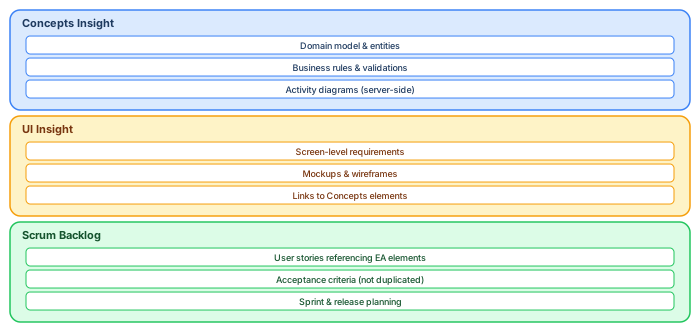
This separation keeps the backlog lightweight while preserving the architectural depth required for long‑term maintainability.
4. Typical Enterprise Architect Project Structure for Business Analysis
Many teams using Enterprise Architect organize their repositories into logical views or “insights” that separate conceptual knowledge from implementation‑level detail. This structure improves clarity and makes it easier for analysts, architects, and developers to understand where specific types of information belong.
A common and effective approach is to divide the repository into two main analytical areas:
Concepts InsightThis area focuses on the conceptual understanding of the system. It typically contains elements that represent business meaning rather than technical implementation.
Typical contents include:
- domain models describing core business entities
- requirement models capturing business rules and validations
- activity diagrams explaining processes and server‑side logic
The purpose of this insight is to ensure that the team understands how the business domain works, independent of any specific interface or technical component.
User Interface InsightThe second area focuses on how users interact with the system. Instead of describing domain semantics, this view concentrates on interaction patterns and client‑side behavior.
Typical contents include:
- UI requirements describing interface behavior
- mockups or screenshots imported from design tools
- navigation or interaction diagrams
- references to domain objects used by the UI
In practice, UI elements are rarely independent. A screen might display domain objects, trigger business validations, or update system state. Because of this, UI artifacts frequently reference elements defined in the conceptual insight.
For example:
- a form may display a Customer domain object
- a button may trigger a validation requirement
- a workflow may correspond to a business activity diagram
This layered organization helps teams maintain a clear separation between business meaning and user interaction while still allowing traceability across both perspectives.

This structure works very well in traditional analysis environments. The challenge appears when Agile delivery introduces user stories that overlap with both insights. Without clear boundaries, teams may end up reproducing requirement logic in backlog items instead of linking stories back to the relevant architectural elements.
Understanding the structure of the EA repository is therefore the first step toward designing a workflow where modeling and Agile delivery complement each other instead of creating redundant documentation.
5. The Risk of Duplicate Work Between EA Requirements and Scrum Tools
When organizations introduce Agile delivery tools alongside an existing Enterprise Architect repository, one of the first operational problems that appears is duplicate work. This duplication does not usually happen intentionally. Instead, it grows gradually as analysts, product owners, and developers attempt to ensure that everyone has the information they need.
Initially, the team may create high-level epics and user stories in the Scrum tool while keeping detailed requirements in Enterprise Architect. This approach seems clean and logical. However, during backlog refinement sessions, developers often ask for more detailed explanations of system behavior. Product owners then expand the user stories with additional descriptions, acceptance criteria, validation logic, and edge cases.
Over time, the user story begins to look increasingly similar to the requirement already stored in EA.
For example:
- The EA requirement may describe the validation rules for a customer registration process.
- The user story may describe implementing customer registration validation.
- The acceptance criteria may list the same validation rules already modeled in EA.
At that moment, the team unknowingly creates two parallel descriptions of the same behavior.
This duplication leads to several practical risks.
First, maintenance overhead increases. Every change to a business rule now requires updates in both the EA repository and the Scrum tool. If the change only happens in one place, inconsistencies appear.
Second, traceability becomes unreliable. Developers may implement behavior based on the user story while architects assume the EA requirement remains the authoritative definition. If the two diverge, the architecture documentation no longer reflects the real system.
Third, analysis effort becomes fragmented. Instead of maintaining a structured requirement model, analysts may start writing large textual descriptions inside backlog items. This gradually erodes the value of the architecture repository.
The goal should not be to eliminate one of the tools, but to clearly define their responsibilities. The Scrum tool should describe what needs to be delivered in a sprint, while EA should explain why the system behaves the way it does and how the concepts are structured.

Without a clear governance rule, teams quickly accumulate duplicated information across tools, which undermines the benefits of both Agile workflows and architectural modeling.
6. How to Organize Domain Models, Requirements, and UI Models in Enterprise Architect
A common challenge when using Enterprise Architect together with Agile delivery tools is deciding what information belongs in the architecture repository and what information belongs in the Scrum backlog. The key principle is that Enterprise Architect should store structured and reusable knowledge, while the Scrum tool should manage delivery work and sprint planning.
A practical way to achieve this is by organizing the Enterprise Architect repository into layers of knowledge rather than task-oriented artifacts.
Domain Layer
The domain layer represents the core business concepts. These are the entities and relationships that define how the business works independently of any specific interface or technical implementation.
Typical elements include:
- Customer
- Order
- Product
- Account
- Transaction
Domain models change slowly over time and often remain stable across many sprints or releases.
Requirement Layer
The requirement layer captures business rules, validations, and constraints associated with domain concepts. These requirements explain system behavior but are not tied to a specific delivery iteration.
Examples include:
- validation rules
- regulatory constraints
- business policies
- calculation logic
Instead of being scattered across many backlog items, these rules remain centralized and reusable.
UI Layer
The user interface layer focuses on how users interact with the system. This includes UI requirements, mockups, interaction flows, and navigation patterns.
UI artifacts should reference domain concepts and requirements rather than redefining them.
For example:
- a registration screen references the Customer domain object
- a form validation references a validation requirement
- a process flow references an activity diagram
This layered approach ensures that Enterprise Architect functions as a structured knowledge repository rather than a backlog management tool.
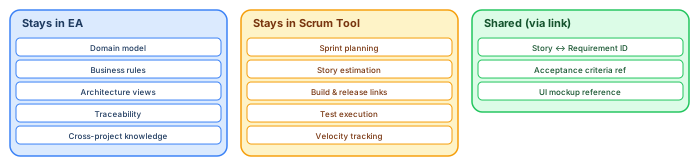
In this structure, Enterprise Architect captures stable system knowledge, while the Scrum tool references these elements when defining user stories.
7. Best Practices for Integrating Enterprise Architect with Scrum Tools
Once the architecture repository is properly structured, the next step is to define how Agile tools interact with Enterprise Architect. Without clear integration rules, teams quickly fall back into duplication and inconsistent documentation.
A practical integration model separates responsibilities between the two environments. integration architecture diagram
Enterprise Architect Responsibilities
Enterprise Architect should focus on long-term architectural knowledge, including:
- domain models
- business requirements
- validation rules
- process flows
- UI interaction structures
These elements represent the meaning and structure of the system, not the delivery plan.
Scrum Tool Responsibilities
The Scrum tool should focus on delivery execution, including:
- epics
- user stories
- backlog prioritization
- sprint planning
- builds and releases
- testing tasks
User stories should describe what functionality needs to be implemented, but they should not attempt to replicate the entire requirement model.
Referencing Instead of Copying
The most effective integration pattern is reference-based traceability.
Instead of copying requirements into user stories, the story should reference relevant architecture elements such as:
- domain objects
- business rules
- UI models
- activity diagrams
This allows developers to access the full context without duplicating information.

With this model:
- Enterprise Architect remains the source of architectural truth
- The Scrum tool remains the engine of Agile delivery
This separation prevents duplication while ensuring that development teams still have direct access to the architectural knowledge they need.
8. Where User Stories Should Live in an Agile Architecture Workflow
A recurring question in organizations that use Enterprise Architect for business analysis is whether user stories should also be modeled inside EA. At first glance, it might seem logical to keep everything in one place. However, this approach usually creates unnecessary complexity.
User stories are primarily delivery management artifacts. They exist to organize work, guide sprint planning, and connect development activities with builds, tests, and releases. Because of this operational role, they naturally belong in Scrum tools such as Jira, Azure DevOps, or similar backlog management platforms.
Enterprise Architect, on the other hand, serves a different purpose. It provides a structured repository where teams capture:
- domain models
- business rules
- architectural decisions
- system behaviors
- UI interaction models
These elements represent knowledge about the system, not tasks that need to be scheduled in a sprint.
The Lifecycle Difference
Another important distinction is lifecycle. A user story usually exists for a short period of time. It is created, refined, implemented, tested, and eventually closed.
Architectural artifacts in EA have a much longer lifecycle. A domain concept or business rule may remain relevant for years and may influence many different features or releases.
When user stories are modeled inside EA, the repository quickly becomes cluttered with temporary delivery artifacts that provide little long-term architectural value.
The Better Pattern: Reference, Not Replication
Instead of storing user stories in Enterprise Architect, teams should allow the Scrum tool to manage stories while linking them to architectural elements in EA.
A story might reference:
- a domain object defined in EA
- a requirement describing business validation
- a UI model or mockup
- an activity diagram explaining process flow
This approach allows developers to access architectural context without duplicating the information.

In this structure, the Scrum tool manages work execution, while Enterprise Architect remains the knowledge repository of the system architecture.
9. Using Traceability Between User Stories, Requirements, and Domain Models
One of the strongest advantages of using Enterprise Architect alongside Agile tools is the ability to maintain traceability across different levels of system knowledge.
Traceability allows teams to connect business intent with technical implementation. Instead of relying solely on textual descriptions inside backlog items, teams can navigate relationships between architecture elements and delivery tasks.
Why Traceability Matters
Traceability helps teams answer important questions such as:
- Which user stories implement a specific business requirement?
- Which domain concepts are impacted by a feature?
- Which requirements are affected by a change request?
- Which releases introduced changes to certain business rules?
Without traceability, architectural models and delivery artifacts evolve independently, which increases the risk of inconsistencies.
Linking Stories to Architecture
Traceability does not require duplicating information. Instead, teams create lightweight links between artifacts.
Typical relationships include:
- User Story → Requirement
- Requirement → Domain Object
- User Story → UI Model
- Requirement → Activity Diagram
These relationships allow analysts and architects to track how business concepts are implemented across multiple features and releases.
Traceability as a Knowledge Graph
When properly connected, the architecture repository becomes a knowledge graph of the system. Domain concepts connect to requirements, which connect to UI behaviors, which are implemented through user stories and features.
This structure enables teams to understand the impact of changes much more effectively.

This traceability structure allows organizations to combine Agile delivery speed with architectural clarity, ensuring that short-term implementation work remains connected to long-term system knowledge.
10. Practical Architecture Setup: Concepts vs User Interface Insights
A practical way to structure an Enterprise Architect repository is to divide it into two complementary perspectives: the Concepts insight and the User Interface insight. This separation helps teams maintain a clear distinction between business meaning and user interaction behavior.
This approach is particularly useful when working in Agile environments where UI development evolves rapidly while domain knowledge remains relatively stable.
Concepts Insight
The Concepts insight focuses on the conceptual and structural understanding of the system. It contains models that describe how the business domain works independently of the user interface.
Typical elements found in this area include:
- domain models describing entities and relationships
- requirement models capturing business rules and validations
- activity diagrams describing server-side processes
- conceptual architecture views
This insight answers questions such as:
- What are the core business entities?
- What rules govern their behavior?
- How do processes interact with these entities?
The goal is to ensure that the architecture repository captures stable knowledge about the domain.
User Interface Insight
The User Interface insight focuses on how users interact with the system. This part of the repository describes UI behavior and interaction patterns rather than domain semantics.
Typical elements include:
- UI-specific requirements
- screen mockups imported from design tools
- interaction diagrams
- navigation flows
UI artifacts often reference domain concepts defined in the Concepts insight.
For example:
- a UI form may display a Customer entity
- a validation message may reference a business rule
- a workflow may trigger a domain process
This separation allows UI development to evolve without disrupting the conceptual model of the system.

By separating these insights, teams avoid mixing domain knowledge with presentation logic, which improves maintainability and traceability.
11. How Agile Teams Use Enterprise Architect Without Overloading It with User Stories
When organizations adopt Agile practices, there is often a temptation to turn Enterprise Architect into a complete project management tool. However, this typically leads to repositories filled with temporary artifacts that provide little architectural value.
Instead, Agile teams should treat Enterprise Architect as a strategic knowledge base, while allowing Scrum tools to handle operational delivery management.
Keep EA Focused on Architecture
Enterprise Architect should continue to capture elements such as:
- domain models
- business rules
- system interactions
- architecture views
- UI interaction structures
These artifacts represent persistent system knowledge that remains relevant beyond a single sprint.
Let Scrum Tools Manage Execution
Scrum tools should manage the operational side of Agile delivery, including:
- epics and features
- user stories
- sprint tasks
- backlog prioritization
- release tracking
These artifacts are highly dynamic and change frequently during development cycles.
Link, Don't Duplicate
The key to successful collaboration between EA and Scrum tools is linking rather than duplicating information.
For example:
- a user story references a requirement ID
- acceptance criteria reference a business rule
- a UI story references a mockup or interaction diagram
This ensures developers have access to architectural context while keeping the architecture repository clean and structured.

In this workflow, Enterprise Architect and the Scrum tool work together without overlapping responsibilities. The architecture repository remains clean and meaningful, while Agile teams retain the flexibility required for iterative development.
12. Recommended Workflow: Enterprise Architect for Architecture, Scrum Tools for Delivery
Once the roles of Enterprise Architect and Scrum tools are clearly defined, teams can establish a simple and sustainable workflow that prevents duplication and keeps architectural knowledge connected to delivery activities.
The key principle is straightforward:
- Enterprise Architect manages architecture and system knowledge
- Scrum tools manage delivery planning and execution
Step 1: Model the Domain and Core Requirements
Architects and analysts first capture the domain model, business rules, and conceptual architecture inside Enterprise Architect. These models represent the foundation of the system and should evolve slowly over time.
Typical artifacts created in EA include:
- domain entities and relationships
- business requirements and validation rules
- activity diagrams describing processes
- UI interaction models
This ensures that the architecture repository provides a clear and reusable understanding of the system.
Step 2: Create Epics and User Stories in the Scrum Tool
Product owners then translate business needs into epics and user stories inside the Scrum tool. These stories represent deliverable increments of functionality.
User stories should remain lightweight descriptions of value, not full requirement specifications.
Instead of duplicating architectural information, stories should reference relevant EA elements such as:
- domain entities
- business requirements
- UI models
- process diagrams
Step 3: Implement and Deliver
During development, the Scrum tool drives sprint execution while developers use EA models for deeper understanding when needed.
Once a feature is implemented and released, architectural models may be updated if new concepts or rules emerge.
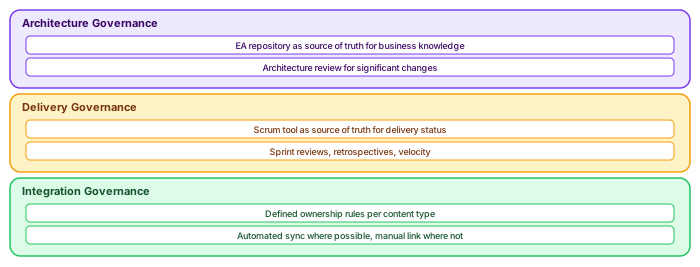
This workflow keeps both environments synchronized while preserving their distinct responsibilities.
13. Common Mistakes When Combining Enterprise Architect and Agile
Even with a clear integration strategy, teams often fall into common traps when combining architecture modeling with Agile delivery. Understanding these pitfalls can help organizations avoid unnecessary complexity. modeling integration architecture with ArchiMate
Mistake 1: Treating EA as a Backlog Tool
Enterprise Architect is not designed to manage sprint tasks, backlog prioritization, or development workflow. When teams attempt to use EA as a backlog management system, the repository becomes cluttered with temporary artifacts.
User stories should remain inside the Scrum tool where they can be connected to:
- builds
- test cases
- release pipelines
- sprint planning
Mistake 2: Duplicating Requirements in Multiple Tools
Another frequent mistake is copying the same requirement descriptions into both EA and the Scrum tool. This duplication creates maintenance overhead and increases the risk of inconsistencies.
A better approach is to maintain requirements in EA and reference them from user stories.
Mistake 3: Overloading User Stories with Analysis Details
User stories are meant to support discussion and delivery, not replace detailed system analysis. When stories become long documents describing every rule, exception, and data structure, the backlog becomes difficult to maintain.
Detailed analysis should remain inside the architecture repository.
Mistake 4: Losing Traceability Between Architecture and Delivery
If stories and architectural models are disconnected, teams lose the ability to answer key questions such as:
- Which features implement a specific business rule?
- Which domain concepts are affected by a release?
- Which requirements were introduced by a change request?
Maintaining traceability between EA and the Scrum tool helps ensure that architectural knowledge remains aligned with real system behavior.
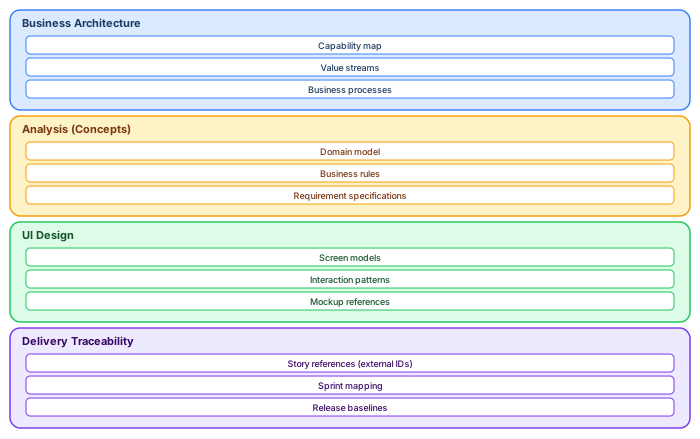
Avoiding these mistakes allows teams to maintain a clean architecture repository while still benefiting from Agile delivery speed and flexibility.
14. A Scalable Modeling Strategy for Agile Enterprise Architecture
As organizations grow and systems become more complex, the relationship between architecture models and Agile delivery must scale. A scalable modeling strategy ensures that Enterprise Architect continues to provide long‑term architectural clarity without slowing down development teams.
The goal is not to model everything, but to model what provides structural value.
Focus on Stable Knowledge
Architectural repositories should prioritize elements that change slowly and influence multiple parts of the system. These include:
- core domain models
- business capabilities
- cross‑system business rules
- integration contracts
- key architecture decisions
By focusing on stable elements, Enterprise Architect becomes a strategic map of the system, rather than a detailed log of every implementation task.
Support Multiple Agile Teams
In larger organizations, multiple Agile teams may work on the same system or domain. A shared architectural model helps teams align around:
- common domain language
- consistent data structures
- shared business rules
- integration boundaries
Without this shared understanding, teams may independently implement similar concepts in different ways, which leads to fragmentation over time.
Enterprise Architect helps prevent this by acting as a central knowledge hub that connects domain concepts, requirements, and system components.
Use Traceability to Manage Complexity
As systems evolve, new features and services are added. Traceability between architecture elements and delivery artifacts allows teams to understand the impact of changes.
For example:
- a change to a business rule may affect several user stories
- a modification to a domain entity may impact multiple services
- a UI change may depend on an underlying process model
Traceability ensures that architectural knowledge remains connected to implementation reality.

In this scalable model, Enterprise Architect remains the long‑term knowledge structure, while Agile teams continuously deliver functionality using that structure as guidance.
15. Conclusion: Making Enterprise Architect Work in an Agile Environment
Integrating Enterprise Architect with Agile delivery does not require abandoning structured modeling or forcing architecture tools to behave like backlog systems. Instead, success comes from clearly separating responsibilities between tools while maintaining traceability between them.
Enterprise Architect excels at representing:
- domain knowledge
- business rules
- system structure
- architecture decisions
- UI interaction models
These artifacts provide the long‑term understanding of how the system works.
Scrum tools excel at managing:
- epics and user stories
- sprint planning
- development tasks
- builds and releases
These artifacts support fast and iterative delivery.
When these roles are respected, both tools complement each other rather than competing for the same information.
The Key Principles
A successful Agile architecture workflow typically follows these principles: 1. Model stable knowledge in Enterprise Architect
2. Manage delivery work in the Scrum tool
3. Link user stories to architectural elements instead of duplicating requirements
4. Maintain traceability between architecture and implementation
5. Continuously update architectural models as the system evolves
This approach allows organizations to combine the discipline of enterprise architecture with the speed of Agile delivery.

By adopting this balanced approach, teams can maintain a clean architecture repository, avoid duplicated requirements, and still benefit from the flexibility and speed of Agile development.
Frequently Asked Questions
What is Sparx Enterprise Architect used for?
Sparx Enterprise Architect (Sparx EA) is a comprehensive UML, ArchiMate, BPMN, and SysML modeling tool used for enterprise architecture, software design, requirements management, and system modeling. It supports the full architecture lifecycle from strategy through implementation.
How does Sparx EA support ArchiMate modeling?
Sparx EA natively supports ArchiMate 3.x notation through built-in MDG Technology. Architects can model all three ArchiMate layers, create viewpoints, add tagged values, trace relationships across elements, and publish HTML reports — making it one of the most popular tools for enterprise ArchiMate modeling.
What are the benefits of a centralised Sparx EA repository?
A centralised SQL Server or PostgreSQL repository enables concurrent multi-user access, package-level security, version baselines, and governance controls. It transforms Sparx EA from an individual diagramming tool into an organisation-wide architecture knowledge base.