⏱ 10 min read
Introduction: why repository structure determines EA success
The package structure of a Sparx EA repository is the architecture of the architecture. A well-designed structure enables teams to work independently, find content quickly, maintain clear ownership, and scale from hundreds to hundreds of thousands of elements. A poorly designed structure creates confusion, duplication, orphan content, and eventually abandonment. This article covers the structural patterns that work for large organizations with 20+ architects and 50,000+ elements. Sparx EA training
Recommended Reading
Repository package hierarchy
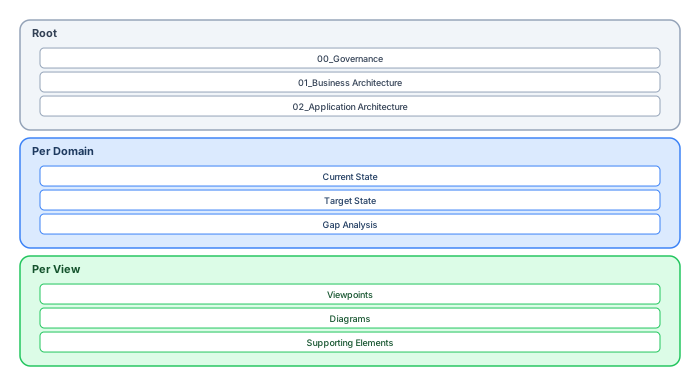
The root package structure should reflect your architecture framework. A proven pattern for TOGAF-aligned organizations: TOGAF roadmap template
00_Governance: Architecture principles, standards, decision log, reference models, and metamodel definitions. Owned by the Architecture Board. Read access for all, write access restricted.
01_Business_Architecture: Business capabilities, value streams, organizational models, and business services. Owned by Business Architecture team.
02_Application_Architecture: Application components, services, interfaces, and data objects. Owned by Solution Architecture team.
03_Technology_Architecture: Infrastructure nodes, platforms, networks, and deployment models. Owned by Infrastructure Architecture team.
04_Shared_Libraries: Reusable elements — standard stereotypes, tagged value profiles, common patterns, and reference architectures. Controlled packages with strict change management.
05_Viewpoints: Cross-cutting viewpoints that combine elements from multiple layers — application landscape, technology roadmap, capability heatmaps, integration maps.
06_Archive: Deprecated content that has been superseded. Never delete — move to archive. This preserves traceability and audit history.
Package tree: detailed structure
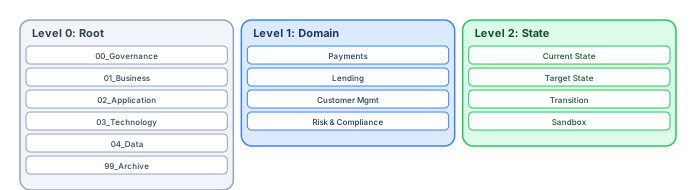
Use numbered prefixes (00_, 01_, 02_) to control display order in the Project Browser. Without prefixes, EA sorts alphabetically, which rarely matches the logical reading order.
Within each domain package
Each architecture domain package should contain three sub-packages:
Current State: The as-is architecture — what exists today. This is the baseline against which changes are measured.
Target State: The to-be architecture — the desired future state as defined by the architecture roadmap.
Gap Analysis: Transition architectures, migration plans, and gap assessment artifacts that bridge current and target states.
This three-part structure supports TOGAF's Architecture Development Method (ADM) and enables clear separation between what exists, what is planned, and how to get there. ArchiMate in TOGAF ADM
Naming conventions
Consistent naming is more important than any structural decision. Establish naming conventions for:
Packages: {Number}_{Domain}_{SubDomain} (e.g., 02_Application_CRM)
Elements: {Type prefix} — {Name} (e.g., APP — Customer Portal, SVC — Payment Processing)
Diagrams: {Package} — {ViewType} — {Subject} (e.g., CRM — Landscape — Application Components)
Enforce naming conventions with validation scripts (see our Automation Guide). Manual enforcement does not scale beyond a small team.
Ownership and permissions
Every package must have a clear owner — a named individual or team responsible for the content quality and currency. Map package ownership to EA security groups:
Business Architecture packages → BusinessArchitects group (read/write). Application Architecture packages → SolutionArchitects group (read/write). Shared Libraries → ArchitectureBoard group (write), all others (read). Archive → ArchitectureBoard group (write), all others (read).
Cross-domain packages (Viewpoints) may need multiple owners or a shared ownership model with defined review cycles.
Scaling patterns for large organizations
Domain-based partitioning: For organizations with distinct business units (e.g., Retail Banking, Corporate Banking, Insurance), create top-level domain packages under each architecture layer. Each domain team owns their sub-tree.
Controlled packages: Use EA's package control feature for shared libraries and reference models. Changes require check-out, modification, and check-in — preventing concurrent edits on shared content.
Model branching: For large transformation programs, create a program-specific branch of the repository (via XMI export or database copy). Develop the target architecture in the branch, then merge back after governance review.
Federated repositories: For very large organizations (1000+ architects), consider federated EA repositories connected via Pro Cloud Server. Each business unit maintains its own repository, with cross-references via OSLC links.
Anti-patterns to avoid
Flat structure: All packages at the root level with no hierarchy. Becomes unnavigable beyond 20 packages.
Personal folders: Packages named "John's Work" or "Draft — Do Not Use." Use proper domain packages with lifecycle tags instead.
Notation-based organization: Packages organized by diagram type ("UML Diagrams", "ArchiMate Views") rather than by architecture domain. This fragments content that should be together.
No archive: Deleting deprecated content loses audit history and breaks traceability. Always archive, never delete.
Migration strategy: restructuring an existing repository
If your repository already has thousands of elements in a poor structure, restructuring is a significant effort but essential for long-term viability. The recommended approach:
Phase 1 — Assessment (1–2 weeks): Run SQL queries to inventory the current state: element counts by type, package depth, orphan elements, diagram sizes, property completeness. Identify the worst structural problems and the highest-value content.
Phase 2 — Design (1 week): Design the target structure using the patterns in this article. Map existing packages to the new structure. Identify content that should be archived, merged, or reorganized.
Phase 3 — Migration (2–4 weeks): Create the new package tree. Move elements and diagrams to their new locations using EA's package move operations (which preserve relationships and diagram references). Update security groups and permissions. Create baselines at each milestone.
Phase 4 — Validation (1 week): Run validation scripts to verify: all elements are in the correct packages, no orphan elements were created during migration, all relationships still resolve correctly, and all diagrams render without broken references.
Phase 5 — Training and communication (ongoing): Train all users on the new structure. Update documentation, bookmarks, and WebEA configurations. Monitor adoption and address issues quickly.
Repository metrics: measuring structural health
Monitor these metrics quarterly to detect structural degradation before it becomes a crisis:
Orphan ratio: Elements not placed on any diagram divided by total elements. Target: below 10%. Above 20% indicates maintenance neglect.
Average diagram size: Elements per diagram. Target: 15–50. Above 100 indicates diagrams that need splitting.
Package depth: Maximum nesting depth. Target: 3–5 levels. Above 7 indicates over-engineering the structure.
Property completeness: Percentage of elements with all required tagged values filled. Target: above 80%. Below 50% indicates governance failure.
Staleness ratio: Elements not modified in the last 12 months divided by total elements. Target: below 30%. Above 50% indicates significant portions of the model are unmaintained.
Package naming conventions
Naming conventions are the foundation of a navigable repository. Use numeric prefixes for root packages to enforce sort order: 00_Governance, 01_Business, 02_Application, 03_Technology, 04_Data, 99_Archive. This ensures consistent navigation across all users.
Within each root package, organize by business domain (Payments, Lending, Customer Management, Risk & Compliance). Each domain package contains state-based sub-packages: Current State (what exists today), Target State (approved future design), Transition (migration plans and gap analysis), and Sandbox (experimental work that has not been approved). This state-based organization prevents the most common repository problem: mixing current and target state in the same package, making it impossible to distinguish what is real from what is planned.
Element naming conventions
Define naming patterns per element type and enforce them with validation scripts: Application Components use PascalCase with domain prefix (e.g., PAY_PaymentGateway), Business Processes use verb-noun pairs (e.g., Process Payment, Onboard Customer), Requirements use ID prefixes (e.g., REQ-PAY-001: Authorize Transaction), and Interfaces use the pattern {Provider}_{Consumer}_{Protocol} (e.g., PaymentGW_FraudEngine_REST).
-- SQL: Find elements violating naming conventions
SELECT Name, Object_Type, Stereotype
FROM t_object
WHERE Object_Type = 'Component'
AND Name NOT LIKE '[A-Z][A-Z][A-Z]_%'  -- Missing domain prefix
ORDER BY Name;

-- Find packages without numeric prefix
SELECT Name, Package_ID, Parent_ID
FROM t_package
WHERE Parent_ID = 0  -- Root packages only
AND Name NOT LIKE '[0-9][0-9]_%'
ORDER BY Name;
Repository governance lifecycle
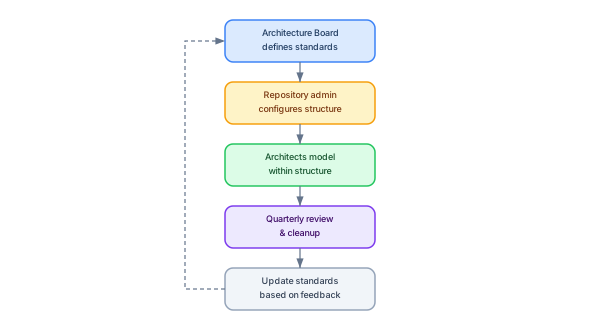
Repository structure is not a one-time setup — it requires continuous governance. The lifecycle follows five stages: ARB governance with Sparx EA
1. Architecture board defines standards. Package structure, naming conventions, required tagged values, and diagram size limits are defined by the architecture governance board and documented in a modeling guide.
2. Repository administrator configures structure. The EA admin creates the root package hierarchy, configures security permissions, sets up validation scripts, and publishes the modeling guide via WebEA.
3. Architects model within the structure. All modeling work follows the defined standards. New domains or capabilities are created through a request process — architects do not create root packages independently.
4. Quarterly review and cleanup. Every quarter, run automated quality reports: orphan elements (not on any diagram), stale elements (not modified in 180+ days), naming violations, missing required properties, oversized diagrams, and packages with no content. Archive or delete elements that fail review.
5. Update standards based on feedback. After each review, the architecture board assesses whether the standards need adjustment. If a naming convention creates friction, revise it. If a package structure does not scale, restructure. The standards serve the architects, not the other way around.
Scaling to 100+ users
Large organizations (100+ EA users) face specific challenges: package locking conflicts (two architects trying to modify the same package), search performance degradation (queries across 50,000+ elements), and governance enforcement (ensuring 100 architects follow the same conventions). Solutions: enable optimistic locking (warn on conflicts rather than exclusive locks), create database views for common search patterns (pre-join t_object with t_objectproperties for frequently filtered tagged values), and automate governance with CI/CD validation that runs nightly and publishes a quality dashboard. ArchiMate modeling standards
Conclusion
Repository structure is the most underestimated aspect of EA governance. A well-designed structure makes content discoverable, ownership clear, permissions enforceable, and scaling possible. Start with the framework-aligned root structure, establish naming conventions, assign ownership, and use numbered prefixes for display order. The structure you establish in the first month will determine whether the repository is still trustworthy in year five.
If you’d like hands-on training tailored to your team — Sparx Enterprise Architect, BPMN, SysML or the Archi tool — or modelling coaching in ArchiMate and TOGAF-aligned governance, you can reach us via our contact page.
Frequently Asked Questions
What is Sparx Enterprise Architect used for?
Sparx Enterprise Architect (Sparx EA) is a comprehensive UML, ArchiMate, BPMN, and SysML modeling tool used for enterprise architecture, software design, requirements management, and system modeling. It supports the full architecture lifecycle from strategy through implementation.
How does Sparx EA support ArchiMate modeling?
Sparx EA natively supports ArchiMate 3.x notation through built-in MDG Technology. Architects can model all three ArchiMate layers, create viewpoints, add tagged values, trace relationships across elements, and publish HTML reports — making it one of the most popular tools for enterprise ArchiMate modeling.
What are the benefits of a centralised Sparx EA repository?
A centralised SQL Server or PostgreSQL repository enables concurrent multi-user access, package-level security, version baselines, and governance controls. It transforms Sparx EA from an individual diagramming tool into an organisation-wide architecture knowledge base.