⏱ 8 min read
Recommended Reading
Assumptions / unspecified constraints: No specific modeling framework (TOGAF/ArchiMate/SysML) is assumed; the guidance focuses on upgrade-safe extension mechanisms and governance.
Executive summary
Meta-model customization is one of the fastest ways to turn Sparx EA into a “real enterprise architecture operating system”—and one of the fastest ways to create long-term model debt if it is done without governance. The upgrade-safe approach in EA is to use UML extension mechanisms (stereotypes, tagged values, profiles) and distribute them as MDG Technologies, rather than embedding ad-hoc conventions in team-specific diagrams. Sparx documentation describes profiles as collections of stereotype-based extensions stored as XML files, applied by bundling them into an MDG Technology and deploying that technology.
Stereotypes can define associated tagged values that are automatically added when using profile-defined toolbox items—an essential scaling feature because it nudges modelers toward consistent metadata capture.
The “when” question is economic and governance-driven: extend only when the cost of inconsistency is higher than the cost of maintaining an enterprise modeling language (documentation, versioning, migration). The “how” question is chiefly about minimizing coupling: define a small stable vocabulary (core stereotypes and tags) and evolve it via versioned releases, baselined reference models, and clear deprecation rules. Baselines and auditing become governance allies—baselines for comparing approved states, auditing for accountability about who changed what and when. ArchiMate modeling best practices
A safe customization program therefore looks like product management: an owner, a release cadence, a compatibility contract, and a validation discipline.
Background and context
EA supports modeling against standards like UML and enables extension within those standards’ extension mechanisms (profiles, stereotypes, tags). Sparx explicitly documents that profiles are stored as XML and are applied by adding the XML as part of an MDG Technology, then deploying the technology. Sparx EA training
At enterprise scale, meta-model customization usually aims to solve one of four problems:
- Vocabulary coherence: forcing consistent naming and meaning across federated teams.
- Governance metadata: capturing ownership, criticality, classification, lifecycle state.
- Traceability: ensuring elements have required links and evidence fields.
- Automation: enabling reporting, compliance checks, and consistent views.
The danger is turning EA into a “custom database” where the logic is implicit and undocumented. An MDG-based approach forces explicit definition and packaging of the language.
Design patterns and safe extension architecture
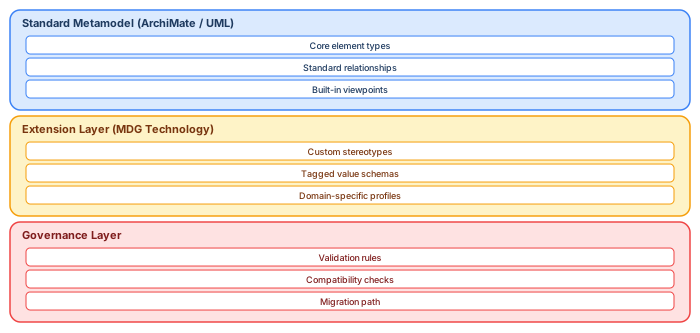
Core-and-extension pattern
- Core profile: minimal stereotypes + tags that are stable for years (e.g., “Capability,” “Control,” “Decision”).
- Domain extensions: optional stereotypes/tags owned by domains but conforming to an enterprise naming and semantics contract.
- Deprecated items: kept for backward compatibility, but removed from toolboxes.
This makes the language evolvable without constant migration pain.
“Tagged values as governance API”
Sparx notes that stereotypes can define associated tagged values, and tagged values are automatically added when the profiled element/connector is created via toolbox. Use this to enforce metadata capture at creation time, not as an afterthought. Sparx EA best practices
A practical design is to define “governance tags” (owner, classification, review date, regulatory scope) as mandatory for certain key stereotypes. EA governance checklist
MDG Technology as distribution and control plane
The MDG Technologies guide describes an MDG Technology as a vehicle providing access to resources such as UML profiles, patterns, scripts, tagged value types, report templates, toolbox pages, and more. The governance implication is crucial: an MDG becomes a controlled release artifact that you can version and roll out consistently.
Implementation playbook
Step one: establish ownership and lifecycle rules
Before writing stereotypes:
- Name the “language owner” (EA governance or architecture enablement).
- Define a release cadence (e.g., quarterly).
- Define compatibility policy (how tags/stereotypes evolve).
- Define a change proposal process (PR-like workflow).
Step two: create the profile model and define stereotypes/tags
Sparx documents that profiles are collections of extensions and that stereotype attributes can define tagged values. free Sparx EA maturity assessment
Practical implementation steps:
- Model the profile in a dedicated “meta-model repository/project.”
- Define stereotypes for the few object types you genuinely need.
- Define tagged values required for governance and automation.
Step three: package and deploy via MDG Technology
Use MDG Technology packaging specifically to keep customization upgrade-safe and centrally controllable. Sparx’s MDG guide describes that an MDG Technology can include profiles, scripts, patterns, and toolboxes.
Step four: tie customization to evidence and change control
- Baseline the meta-model package at each release milestone. Baselines snapshot package state and allow compare/revert.
- Enable auditing in the repository when the meta-model is being updated; auditing records who changed what and when.
Step five: publish guidance and examples
Customization only works if modelers can learn it quickly. Publish:
- The “why” of each stereotype/tag.
- A “minimum modeling contract” checklist.
Governance, checklists, and controls
Safe extension checklist
- Extension mechanism is standard (profiles/stereotypes/tags), not ad-hoc.
- Packaged as MDG with version number and release notes.
- Toolboxes constrain creation to prevent “random UML objects.”
- Migration plan exists for breaking changes, with deprecation cycle.
- Auditability exists for meta-model changes (auditing enabled during release windows).
- Baseline exists for each meta-model release.
Pitfalls and anti-patterns
Anti-pattern: “Custom fields everywhere.” If every team creates its own tagged values, you will not be able to query reliably. The whole point of profile-defined tags is consistency at creation time.
Anti-pattern: “Profiles without distribution.” A profile that exists only in one architect’s local file is not governance; MDG packaging is the distribution mechanism designed for technology resources.
Anti-pattern: “No backward compatibility.” If you rename tags without migration rules, reporting fails and adoption dies.
Examples and case scenarios
Scenario: audit-focused architecture repository
- Stereotypes: “Control,” “Requirement,” “Evidence,” “Decision.”
- Tags: control owner, evidence link, last review date.
- Baselines at each quarterly governance release; auditing enabled during changes.
Scenario: federated enterprise with domain autonomy
- Enterprise core profile defines capabilities and reference tech standards.
- Domains ship “extension packs” that align to core semantics but add domain tags.
Key takeaways
Safe meta-model extension in EA is achieved by (1) using profile-based extension mechanisms and tagged values, (2) packaging/distributing them via MDG Technologies, and (3) governing the extension like a product with baselines and auditing for controlled evolution.
- Developing Profiles (profiles as stereotype-based extensions, XML, MDG deployment).
- Tagged values in profiles (auto-added tags).
- MDG Technologies guide (MDG as distribution vehicle).
- Baselines definition (snapshot, compare, revert).
- Compare model to baseline (accumulated changes).
- Auditing records model changes and who made them.
- Pro Cloud Server features (integration plugins context, where customization may surface).
- OSLC Architecture Management intro (integration concept framing).
Extension risk assessment: what is safe to customize
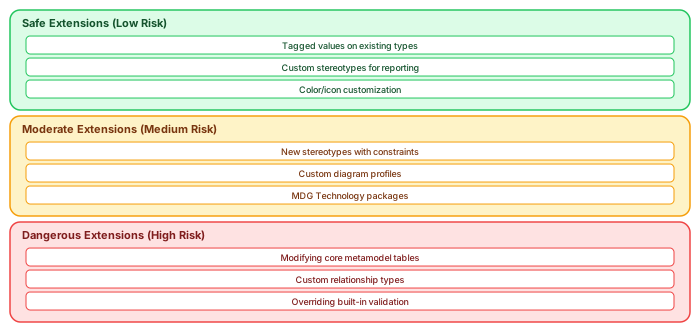
Not all customizations carry the same risk. The safest extensions add information without modifying structure: tagged values on existing element types (adding "Owner" or "Cost Center" to Application Components), custom stereotypes used primarily for filtering and reporting, and visual customizations (colors, icons) that do not change semantic meaning.
Moderate-risk extensions add new structural concepts: stereotypes with custom constraints that enforce domain-specific rules, diagram profiles that restrict which elements can appear on certain diagram types, and MDG Technology packages that bundle stereotypes, tagged values, and toolbox configurations into deployable units. These require careful testing and version management — a broken MDG package can corrupt models.
High-risk extensions modify the core behavior: directly editing metamodel tables in the repository database, creating custom relationship types not supported by the standard metamodel, or overriding built-in validation rules. These modifications may break on EA version upgrades, are impossible for Sparx support to troubleshoot, and create vendor lock-in to a specific configuration. The rule: never modify what you cannot roll back.
MDG Technology development best practices
// MDG Technology package checklist:
// 1. Start with a single stereotype + tagged value set
// 2. Test on a copy of the production repository
// 3. Version your MDG: myProfile_v2.1.xml
// 4. Deploy via Pro Cloud Server for centralized updates
// 5. Document: what each stereotype means, when to use it
// 6. Include validation rules IN the MDG (not separate scripts)
// 7. Plan upgrade path: what happens when EA version changes?
If you’d like hands-on training tailored to your team — Sparx Enterprise Architect, BPMN, SysML, Apache Kafka or the Archi tool — or modelling coaching in ArchiMate and TOGAF-aligned governance, you can reach us via our contact page.
Frequently Asked Questions
What is Sparx Enterprise Architect used for?
Sparx Enterprise Architect (Sparx EA) is a comprehensive UML, ArchiMate, BPMN, and SysML modeling tool used for enterprise architecture, software design, requirements management, and system modeling. It supports the full architecture lifecycle from strategy through implementation.
How does Sparx EA support ArchiMate modeling?
Sparx EA natively supports ArchiMate 3.x notation through built-in MDG Technology. Architects can model all three ArchiMate layers, create viewpoints, add tagged values, trace relationships across elements, and publish HTML reports — making it one of the most popular tools for enterprise ArchiMate modeling.
What are the benefits of a centralised Sparx EA repository?
A centralised SQL Server or PostgreSQL repository enables concurrent multi-user access, package-level security, version baselines, and governance controls. It transforms Sparx EA from an individual diagramming tool into an organisation-wide architecture knowledge base.