⏱ 7 min read
Introduction: why security architecture belongs in your ArchiMate model
As organizations navigate increasing digital risk and regulatory obligations — GDPR, ISO 27001, NIS2, DORA — information security can no longer remain a siloed responsibility. It must be modeled, visualized, and governed as part of the enterprise architecture. Archi, as the most widely used open-source ArchiMate tool, provides the right constructs to model threats, controls, security zones, and compliance mappings within the same repository where business and application architecture lives.
This article goes beyond surface-level guidance. We cover the ArchiMate elements and relationships used for security modeling, practical patterns for threat-control-asset chains, security zone boundaries, compliance traceability (ISO 27001, GDPR, NIS2), jArchi scripts for security auditing, and the limitations you will encounter when modeling security in ArchiMate. ArchiMate tutorial for enterprise architects
Core security concepts mapped to ArchiMate
Security architecture spans all three ArchiMate layers (Business, Application, Technology) and the Motivation extension. The key concepts and their ArchiMate mappings: ArchiMate layers explained
Assets (what we protect): Data Object, Artifact, Application Component, Business Object. These are the elements that carry value and require protection.
Threats (what could go wrong): modeled as Assessment elements (from the Motivation extension) or Business Actor for threat actors. Tag with ThreatType, Likelihood, Impact.
Vulnerabilities (weaknesses that threats exploit): modeled as Assessment elements linked to the vulnerable element via Association.
Controls (defenses in place): modeled as Application Function, Technology Service, or Course of Action depending on the layer. Tag with ControlType (Preventive/Detective/Corrective), ControlID, ControlStatus.
Security Zones (trust boundaries): modeled using Grouping or Location elements. Tag with TrustLevel, ZoneType.
Compliance Requirements: modeled as Requirement or Constraint elements, organized by framework (ISO 27001, GDPR, NIS2).
Pattern 1: Threat-control-asset chain
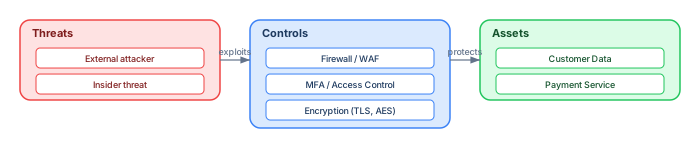
The foundational security modeling pattern links three concepts: a threat that could exploit a vulnerability in an asset, and a control that mitigates the threat. In ArchiMate:
Threat (Assessment) → associated with → Asset (Application Component / Data Object) ← realizes ← Control (Application Function / Technology Service)
Each control should carry tagged values: ControlID (e.g., "AC-2" from NIST), ControlType (Preventive/Detective/Corrective), ControlStatus (Implemented/Planned/Missing), and ControlOwner.
jArchi script: Find assets without controls
// Find Application Components with no protecting control
$("application-component").forEach(function(e) {
    var hasControl = $(e).inRels("realization-relationship").size() > 0 ||
                     $(e).inRels("serving-relationship").size() > 0;
    if (!hasControl) {
        console.log("UNPROTECTED: " + e.name);
    }
});
Pattern 2: Security zones and trust boundaries

Security zones define logical or physical boundaries that separate parts of the IT environment based on trust, access level, and exposure. In ArchiMate, model zones using Grouping elements and assign technology and application elements to zones using Composition or visual nesting.
Typical zone hierarchy: Internet (untrusted) → DMZ (semi-trusted, public-facing) → Internal Zone (trusted, corporate network) → Restricted Zone (highly trusted, sensitive data). Each boundary crossing should have an explicit control element (firewall, API gateway, reverse proxy) modeled between the zones.
Zone tagging scheme
// Auto-tag elements by their parent zone
$("grouping").forEach(function(zone) {
    var trustLevel = zone.prop("TrustLevel");
    if (trustLevel) {
        $(zone).children("element").forEach(function(child) {
            if (child.concept) {
                child.concept.prop("Zone", zone.name);
                child.concept.prop("TrustLevel", trustLevel);
            }
        });
    }
});
Pattern 3: Compliance traceability
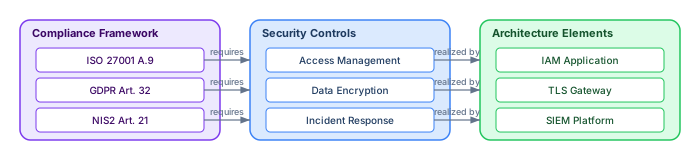
For ISO 27001, GDPR, NIS2, and DORA compliance, you need a traceable chain from regulatory requirements to the controls that satisfy them to the architecture elements that implement those controls. In ArchiMate: ArchiMate relationship types
Compliance Requirement (Requirement) → realized by → Security Control (Course of Action / Application Function) → realized by → Architecture Element (Application Component / Technology Service)
Organize compliance requirements in packages by framework and clause number. This enables traceability matrices and coverage reports that auditors require.
jArchi script: Compliance coverage report
// Generate compliance coverage report
var total = 0, covered = 0;
$("requirement").forEach(function(req) {
    if (req.prop("Framework")) {
        total++;
        var realizations = $(req).outRels("realization-relationship");
        if (realizations.size() > 0) {
            covered++;
        } else {
            console.log("UNCOVERED: " + req.prop("Framework") + " — " + req.name);
        }
    }
});
console.log("Coverage: " + covered + "/" + total + " (" + Math.round(covered/total*100) + "%)");
Tagged values for security modeling
A consistent tagging scheme is essential for querying, reporting, and automation. Recommended tagged values for security elements:
For assets: Sensitivity (High/Medium/Low), Classification (Confidential/Internal/Public), DataOwner, Encryption (AES-256/TLS-1.3/None).
For threats: ThreatType (External/Internal/Systemic), Likelihood (High/Medium/Low), Impact (Critical/Major/Minor), STRIDE (Spoofing/Tampering/Repudiation/Info Disclosure/DoS/Elevation).
For controls: ControlID, ControlType (Preventive/Detective/Corrective), ControlStatus (Implemented/Planned/Missing), ControlOwner, MappedFramework (ISO-27001/GDPR/NIS2).
For zones: TrustLevel (Untrusted/Semi-trusted/Trusted/Highly-trusted), ZoneType (DMZ/Internal/Restricted/Partner), AccessControl (Firewall/VPN/None).
Limitations of security modeling in ArchiMate
ArchiMate is an enterprise architecture language, not a security-specific notation. This creates real limitations: ArchiMate modeling best practices
No native threat modeling constructs: ArchiMate has no built-in concept for "threat," "vulnerability," or "risk." You must use generic elements (Assessment, Course of Action) with tagged values to represent these concepts. This works but requires convention and discipline.
No risk quantification: ArchiMate cannot express risk scores, probability distributions, or financial impact calculations. For quantitative risk analysis, use a dedicated tool (e.g., RiskLens, FAIR) and link results back to ArchiMate elements via tagged values.
Limited data flow detail: ArchiMate's Flow relationship is abstract — it does not specify protocol, port, encryption, or authentication. For detailed network security design, you need supplementary notations (network diagrams, firewall rule tables).
No temporal modeling: ArchiMate does not model time-based concepts like "detection delay" or "response time." Security incident timelines and SLA commitments must be documented outside the model.
Governance and auditing workflow
Security architecture models are only valuable if they are current, complete, and auditable. Establish a governance workflow:
Quarterly security review: Run jArchi validation scripts to check: all assets have Sensitivity and Classification tags, all controls have ControlStatus and ControlOwner, all compliance requirements have at least one realization, and no elements in the Restricted Zone lack encryption tags.
Annual compliance audit: Generate a traceability matrix from compliance requirements to controls to architecture elements. Export as CSV for auditors. Highlight gaps (requirements without controls) and stale controls (status still "Planned" after 12 months).
Conclusion
Information security architecture is not about locking things down — it is about making risk visible, controls traceable, and responsibility actionable. Archi, with ArchiMate and jArchi scripting, gives you a clear, collaborative, and auditable way to model and govern your security landscape within the same repository as your business and application architecture.
Start with the three patterns: threat-control-asset chains, security zones, and compliance traceability. Add consistent tagged values. Automate auditing with jArchi scripts. And be honest about ArchiMate's limitations — use it for what it does well (enterprise-level security visibility) and complement it with specialized tools where needed.
If you’d like hands-on training tailored to your team — Sparx Enterprise Architect, BPMN, SysML or the Archi tool — or modelling coaching in ArchiMate and TOGAF-aligned governance, you can reach us via our contact page.
Frequently Asked Questions
What is enterprise architecture?
Enterprise architecture is a discipline that aligns an organisation's strategy, business operations, information systems, and technology infrastructure. It provides a structured framework for understanding how an enterprise works today, where it needs to go, and how to manage the transition.
How is ArchiMate used in enterprise architecture practice?
ArchiMate is used as the standard modeling language in enterprise architecture practice. It enables architects to create consistent, layered models covering business capabilities, application services, data flows, and technology infrastructure — all traceable from strategic goals to implementation.
What tools are used for enterprise architecture modeling?
Common enterprise architecture modeling tools include Sparx Enterprise Architect (Sparx EA), Archi, BiZZdesign Enterprise Studio, LeanIX, and Orbus iServer. Sparx EA is widely used for its ArchiMate, UML, BPMN and SysML support combined with powerful automation and scripting capabilities.