Introduction: Why Standards Need Modeling
Standards like ISO and NIST are foundational to how organizations structure security, quality, and compliance processes. But standards alone are not enough — they need to be implemented, interpreted, monitored, and governed. Sparx Enterprise Architect (EA) provides a powerful platform to bring these standards to life inside your architecture and operational models.
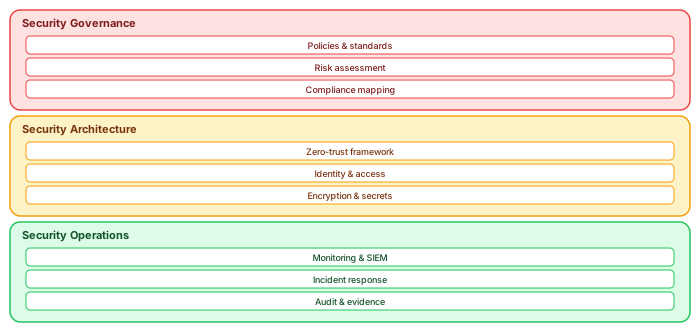
We cover how international standards — from ISO 27001 to NIST Cybersecurity Framework — can be represented, traced, and enforced in Sparx EA using structured modeling techniques, custom stereotypes, tagged values, scripts, and dashboards. Sparx EA training
Why Use Sparx EA for Standards?
- 📚 Model standards as structured elements — not static documents
- 🔗 Trace standards to architecture components , controls, and risks
- 📊 Visualize coverage and gaps with matrices and dashboards
- 🛠️ Automate validation and reporting using scripts and filters
- 📈 Continuously audit and evolve your implementation with lifecycle tagging
ISO Example: ISO 27001 in Sparx EA
Step 1: Model the Standard
ISO 27001 Annex A contains 93 controls under 4 themes (Organizational, People, Physical, Technological). We created a structured package for each theme:
-
ISO27001::Organizational Controls -
ISO27001::People Controls -
ISO27001::Physical Controls -
ISO27001::Technological Controls
Each control is modeled as an element with:
- Stereotype: «ISOControl»
- Tagged Values: ID, Description, ControlType, Applicability, RiskLevel, Owner
- Notes: Full ISO control text
Step 2: Link Controls to Architecture
-
Link «ISOControl» to:
- «ApplicationComponent» – to show supporting apps
- «Process» – to define operational impact
- «Risk» – to identify the threats addressed
Step 3: Visualize and Trace
-
Relationship matrix:
- Rows = ISOControls
- Columns = Application Components
- Show which systems support which controls
-
Traceability diagram:
- Control → Risk → Application
- Impact analysis for gaps
Step 4: Create Dashboards and Checklists
Use Prolaborate to show:
- Number of controls covered by system
- Unimplemented controls by risk rating
- Status pie charts (Planned, In-Progress, Implemented)
Step 5: Automate Compliance Checks
-
Create scripts to list:
- Controls without traceable implementation
- Controls missing mandatory tags
NIST Example: Cybersecurity Framework (CSF)
Step 1: Model the Functions
The NIST CSF has 5 Core Functions:
- Identify
- Protect
- Detect
- Respond
- Recover
Each function has categories and subcategories (e.g., PR.AC-1: Identities and credentials are managed). We created the following hierarchy in Sparx: Sparx EA best practices
- Function = Package
- Category = Class «NISTCategory»
- Subcategory = Requirement «NISTRequirement»
Step 2: Add Metadata
Tagged values per subcategory:
-
ImplementationStatus(e.g., NotStarted, Partial, Implemented) -
ResponsibleRole -
EvidenceLink
Step 3: Link to Operational Assets
-
Link requirements to:
- Security processes
- Infrastructure assets
- Policy documents
Step 4: Dashboards and Reporting
- Heatmap: NIST category vs. implementation status
- Bar charts by function progress
- Matrix showing control-to-system coverage
Extending Standards with Your Own Meta-Model
You can extend Sparx EA to include: free Sparx EA maturity assessment
- «NISTControl», «ISOControl», «GDPRControl» stereotypes
- Tagged value profiles for each compliance framework
- Toolboxes with drag-and-drop compliance views
This ensures your team uses standards consistently — across business units and projects.
Client Example: Financial Institution
One bank we supported had overlapping regulatory needs (ISO 27001, PCI DSS, NIST, GDPR). We:
- Unified all control catalogs into one meta-model
- Modeled each control as a reusable element
- Linked controls to system components, risks, and tests
- Automated gap reports and audit views
This became the client’s governance cockpit — one repository, many frameworks, total traceability. ARB governance with Sparx EA
Best Practices
- 🧩 Use stereotypes and tagged values to differentiate standards
- 📌 Never model standards as static diagrams — use structured elements
- 📈 Connect controls to real systems, processes, risks
- 📊 Use dashboards for status and gaps
- 🔄 Reuse models across programs and audits
Importing a Control Catalogue Without Regretting It
The first practical decision arrives before any modelling: how does the standard's text get into the repository, and at what grain? The catalogues are large — ISO 27001's Annex A controls are manageable, NIST SP 800-53 runs to over a thousand controls with enhancements — and the temptation to import everything as elements produces a repository where the standard outweighs the architecture it governs.
The grain that works: import the control as an element, its identifier and title as the name, its full text as notes, its family and framework version as tagged values — and stop there. Enhancements and implementation guidance stay as text inside the control's notes rather than becoming elements, because nobody traces to an enhancement; they trace to the control. Do the import from the machine-readable catalogue (NIST publishes OSCAL; ISO structures export cleanly from most GRC tools) via a script, and keep the script, because the next framework revision is not an if. Critically, tag every imported control with the catalogue version it came from — when 800-53 revision six lands, the migration is a diff between two imports, with your organisation's mapping links carrying across on control identifiers, not a re-modelling exercise.
The Mapping Layer Is Where the Value Lives
Once the catalogue exists, the work that actually earns the effort is the realization mapping: which architecture elements implement which controls. This layer deserves its own conventions because it will be the most queried set of links in the estate. Map controls to the implementing mechanism, not to everything the control touches — access control maps to the identity platform and the permission model, not to all two hundred applications that benefit from them. Where a control is implemented differently per environment or perimeter, the mapping carries a scope tag rather than duplicated links. And every mapping link gets a one-line rationale in its notes, written at mapping time — because "why does the API gateway realize AC-4?" is a question the auditor will ask in eighteen months, and the person who knew will be on another engagement.
Two derived artefacts then come free, and they are the ones the security function will actually use. The coverage matrix — controls against implementing elements — whose empty rows are the honest gap register, and whose generated form replaces the annually reconstructed spreadsheet every ISO programme otherwise maintains. And the reverse query: for any platform, the list of controls it implements — which turns change management from folklore into a lookup, because "what compliance impact does replacing the API gateway have" is now answered by the model in seconds, with the rationale notes attached.
Evidence: The Third Layer Most Models Skip
Control and implementation are two thirds of the compliance story; the third is evidence that the implementation operates, and this is where a Sparx-based approach can quietly outperform dedicated GRC tooling — or fail entirely, depending on one design choice. The choice: evidence is referenced, never embedded. Audit reports, penetration test results, certificate records live in the systems that own them; the model carries lightweight evidence elements holding the reference, the date and the verdict, linked to the controls they support.
With that in place, the query an ISO surveillance audit or a NIST-based assessment actually runs — show me each control, its implementation, and its most recent operating evidence with a date inside the assessment window — is a three-hop traversal rendered as a generated, dated report. Add one gate rule, "critical control with no evidence newer than N months", and the compliance posture stops degrading silently between audits: the staleness surfaces weekly, routed to the control's owner, while it is a task rather than a finding. Estates that run this loop describe the audit-week difference bluntly — the evidence pack assembles in an afternoon, from the model, with nothing reconstructed — and that afternoon is what all the importing and mapping above was actually buying.
Keeping Two Frameworks From Becoming Two Models
Most regulated estates answer to more than one framework at once — ISO 27001 for certification, NIST CSF because the group security function reports against it, plus the sector regulation of the year. The fatal move is modelling each framework's view of the estate separately; the maintainable move is one implementation layer, multiple catalogue overlays. Your platforms and mechanisms exist once; each framework's controls map onto them independently; and the frameworks' own cross-references (CSF to 800-53, ISO to CSF — all published) can be imported as links between catalogues, so demonstrating ISO coverage largely inherits from work done for NIST.
The payoff compounds with every additional framework: the marginal cost of answering a new questionnaire drops toward the cost of one mapping pass, because the implementation truth — the expensive part — was never framework-specific. That is the strategic argument for doing standards management in the architecture repository rather than in a standalone GRC silo: the repository is the one place where the control catalogues can meet the actual estate, and where "compliant" can be traced, element by element, to the architecture doing the complying.
Generating the Statement of Applicability
For ISO 27001 estates, one deliverable justifies the modelling effort on its own: the Statement of Applicability. The SoA is exactly the kind of document that consumes a security officer's fortnight when maintained by hand — every Annex A control, its applicability, its justification, its implementation status — and exactly the kind of artefact a mapped repository generates in minutes, because every column already exists as model content: applicability and justification as tagged values on the imported control, implementation status derived from whether realization links exist, and the implementing elements themselves as the evidence column no hand-built SoA ever includes.
The generated SoA has a property auditors notice immediately: it cannot disagree with the coverage matrix or the architecture, because all three render from the same links. The hand-maintained version drifts — a control marked "implemented" in the SoA while its implementing platform was decommissioned in March is the classic surveillance-audit finding, and it is structurally impossible when the document is a query. Add the generation date and the repository baseline to the footer, regenerate for each audit cycle and at every scope change, and the ISMS's most bureaucratic artefact becomes its cheapest — a by-product of mappings the practice maintains for better reasons anyway.
The same generation logic extends to the group-structure problem that multi-entity organisations face: where subsidiaries share platforms but hold separate certifications, per-entity applicability lives as a scope tag on the mapping links, and each entity's SoA renders as a filtered query over the shared implementation layer. One model, four certificates, no copied spreadsheets — which, for anyone who has maintained four divergent SoAs by hand through a group reorganisation, is the sentence that sells the entire approach.
Conclusion: From Paper to Practice
Standards don’t implement themselves. Sparx EA turns ISO and NIST guidelines into usable, trackable, operational assets. Instead of managing audits with spreadsheets and SharePoint folders, your architecture team can provide a living, connected view of compliance — directly tied to technology, process, and risk.
Whether you’re starting with ISO 27001, aligning to NIST CSF, or building out data governance (GDPR, HIPAA, etc.), model it. Govern it. And let your architecture speak the language of compliance. ArchiMate modeling standards
If you’d like hands-on training tailored to your team — Sparx Enterprise Architect, BPMN, SysML or the Archi tool — or modelling coaching in ArchiMate and TOGAF-aligned governance, you can reach us via our contact page.
Frequently Asked Questions
What is Sparx Enterprise Architect used for?
Sparx Enterprise Architect (Sparx EA) is a comprehensive UML, ArchiMate, BPMN, and SysML modeling tool used for enterprise architecture, software design, requirements management, and system modeling. It supports the full architecture lifecycle from strategy through implementation.
How does Sparx EA support ArchiMate modeling?
Sparx EA natively supports ArchiMate 3.x notation through built-in MDG Technology. Architects can model all three ArchiMate layers, create viewpoints, add tagged values, trace relationships across elements, and publish HTML reports — making it one of the most popular tools for enterprise ArchiMate modeling.
What are the benefits of a centralised Sparx EA repository?
A centralised SQL Server or PostgreSQL repository enables concurrent multi-user access, package-level security, version baselines, and governance controls. It transforms Sparx EA from an individual diagramming tool into an organisation-wide architecture knowledge base.
What the Assessor Remembers
A closing observation from sitting on both sides of these audits. Assessors see hundreds of compliance postures a year, and they calibrate quickly: the spreadsheet estates, the GRC-tool estates with their beautifully workflow-managed controls floating free of any architecture, and — rarely — the estate where the coverage matrix, the SoA and the evidence trail all generate from the same model that the architects demonstrably use for their daily work. The last category changes the audit's character within the first hour, because the assessor's underlying question was never "do the documents exist"; it was "does this organisation actually know itself". A repository where the compliance view is a projection of the working architecture answers that question structurally, before a single control is sampled — and assessments that begin with that answer end shorter, cheaper and with findings about genuine gaps rather than about documentation hygiene. That, more than any generated artefact, is the return on doing standards management inside the architecture repository: the audit stops being a performance and becomes a read-out.
Start, then, wherever the next audit letter points, with one catalogue and thirty platforms — and let the first generated coverage matrix recruit the allies that every subsequent quarter of this work will need.
From paper to practice, the title said — and practice, it turns out, is just the paper regenerated weekly from links somebody maintains.
One catalogue, one quarter, one honest matrix: begin there.