⏱ 6 min read
This article provides a comprehensive, expert-level analysis of the UML 2.x metamodel, its layered structure following the MOF M3-to-M0 architecture, and all key metaclass packages. We explore UML's extension mechanisms (Profiles, Stereotypes, Tagged Values), illustrate formal constraints using OCL with concrete examples, and provide a detailed technical comparison between UML and ArchiMate. The report then covers practical usage in Sparx Systems Enterprise Architect: how EA implements UML and ArchiMate via MDG technologies, how to create and deploy UML profiles, and how model validation and governance are supported. enterprise architecture guide
UML metamodel layers: MOF M3 to M0

The UML metamodel is defined according to the OMG Meta-Object Facility (MOF) four-layer architecture. At the top, the M3 layer is the meta-metamodel (MOF Core), which defines constructs such as Package, Class, and DataType used to define metamodels themselves. The M2 layer is the UML metamodel (UML Infrastructure and Superstructure packages) — it defines UML metaclasses like Class, Activity, and UseCase. The M1 layer is the user model, where UML models and diagrams are built (for example, a class diagram of a banking system). The M0 layer is the runtime instance layer where instances of the M1 model exist (objects in memory, data in databases).
This strict layering ensures reflexive architecture: a UML model conforms to the UML metamodel (M2), which in turn is specified at the MOF level (M3). In practice, an EA modeler never edits M3 directly. EA provides the UML M2 metamodel (classes like uml::Class, uml::Activity) which are used to create M1 models. The M0 layer is implicit at runtime.
Key UML metamodel packages and metaclasses
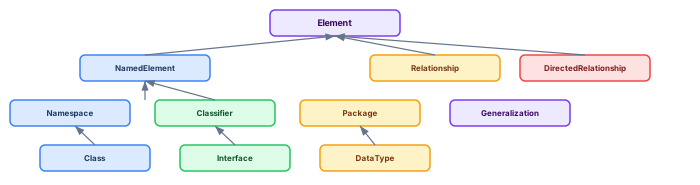
UML's metamodel is organized into packages, each defining a cohort of related metaclasses.
Kernel is the foundational package on which all UML depends. It includes metaclasses like Element, NamedElement (defines the name attribute), Relationship (abstract), DirectedRelationship, Association, and Generalization. NamedElement extends Element and is the superclass of all named UML elements. Namespace and Package (containers) are also in Kernel. Every other UML metaclass inherits from Kernel elements.
CommonStructure adds typing, multiplicity, and namespacing beyond what Kernel defines. It includes TypedElement, MultiplicityElement, and ParameterableElement. SimpleClassifiers defines BehavioredClassifier, InterfaceRealization, and Signal. StructuredClassifiers adds EncapsulatedClassifier, Port, Connector, and CollaborationUse — essential for component-based modeling.
Activities defines the ActivityNode, ActivityEdge, Action, and ControlFlow metaclasses for behavioral modeling. Interactions provides Lifeline, Message, InteractionFragment, and CombinedFragment for sequence diagrams. StateMachines defines State, Transition, Region, and PseudoState. Components adds Component and ComponentRealization. Deployment defines Node, Artifact, DeploymentTarget, and DeploymentSpecification.
UML extension mechanisms
UML provides a powerful extension system through Profiles. A Profile is a specialized Package that groups stereotypes, tagged values, and constraints for a specific domain (banking, pharma, government). A Stereotype extends a metaclass (for example, extending uml::Class with «RegulatoryEntity»). Tagged Values (defined via properties of the stereotype) add custom metadata to model elements. Extension relationships connect stereotypes to the metaclasses they extend.
UML Profile deployment in Sparx EA

Creating and deploying a UML Profile in Sparx EA follows a structured workflow. Define the profile as a package with «profile» stereotype. Add stereotype elements that extend the desired UML metaclasses. Define tagged values as attributes of each stereotype. Publish the profile and compile it into an MDG Technology file. Deploy the MDG technology repository-wide so all architects use consistent stereotypes. Finally, add validation rules that enforce required properties — for instance, no element with the «RegulatoryEntity» stereotype can reach Approved status without a RegulatoryReference tagged value.
OCL constraints with examples
OCL (Object Constraint Language) adds formal precision to UML models. Critical for governance, OCL constraints can prevent invalid model states: architecture decision records
-- Prevent generalization cycles
context Classifier
inv noCycles: not self.allParents()->includes(self)

-- Require all public operations to have return types
context Operation
inv returnTypeRequired:
  self.visibility = VisibilityKind::public implies
    self.type->notEmpty()

-- Abstract classes must have at least one specialization
context Class
inv abstractMustBeSpecialized:
  self.isAbstract implies
    Classifier.allInstances()->exists(c | c.general->includes(self))
UML vs ArchiMate: technical comparison
UML and ArchiMate serve complementary purposes within enterprise architecture. UML excels at detailed system and software design — class structures, behavioral sequences, state machines, component wiring, and deployment topologies. ArchiMate operates at the enterprise level — business motivation, strategy, capability mapping, application landscape, and technology infrastructure across organizational boundaries. ArchiMate best practices
Key differences: UML provides 14 diagram types with fine-grained notation for software engineering. ArchiMate provides 3 core layers (Business, Application, Technology) with 6 extension layers (Strategy, Motivation, Implementation, Physical, plus cross-layer relationships). UML models are typically project-scoped; ArchiMate models are enterprise-scoped. In Sparx EA, both are available simultaneously through separate MDG technologies, enabling architects to use UML for detailed design within the context of ArchiMate enterprise views. ArchiMate layers explained
Sparx EA MDG, scripting, and governance
Sparx EA's MDG Technology framework provides the mechanism for industrialized UML modeling. Built-in MDGs include Basic UML 2.5, ArchiMate 3.2, BPMN 2.0, and SysML. Custom MDGs extend these with enterprise-specific stereotypes, tagged values, and validation rules. EA's built-in Model Validation feature checks UML well-formedness rules (syntax, cardinality, relationship validity). Custom validation scripts (JavaScript or JScript via EA's scripting engine) add domain-specific checks — for example, verifying that every Component has an assigned architect, or that every Interface has at least one operation defined. ArchiMate relationship types
// EA Script: Validate all Components have an OwnerArchitect tag
var elements = Repository.GetElementSet(
    "SELECT Object_ID, Name FROM t_object WHERE Stereotype='Component'", 2);
for (var i = 0; i < elements.Count; i++) {
    var el = elements.GetAt(i);
    var tag = el.TaggedValues.GetByName("OwnerArchitect");
    if (!tag || tag.Value === "") {
        Session.Output("MISSING: " + el.Name + " has no OwnerArchitect");
    }
}Frequently Asked Questions
What is Sparx Enterprise Architect used for?
Sparx Enterprise Architect (Sparx EA) is a comprehensive UML, ArchiMate, BPMN, and SysML modeling tool used for enterprise architecture, software design, requirements management, and system modeling. It supports the full architecture lifecycle from strategy through implementation.
How does Sparx EA support ArchiMate modeling?
Sparx EA natively supports ArchiMate 3.x notation through built-in MDG Technology. Architects can model all three ArchiMate layers, create viewpoints, add tagged values, trace relationships across elements, and publish HTML reports — making it one of the most popular tools for enterprise ArchiMate modeling.
What are the benefits of a centralised Sparx EA repository?
A centralised SQL Server or PostgreSQL repository enables concurrent multi-user access, package-level security, version baselines, and governance controls. It transforms Sparx EA from an individual diagramming tool into an organisation-wide architecture knowledge base.