⏱ 5 min read
Recommended Reading
Executive summary
Model lifecycle management turns architecture modeling from “diagram creation” into a controlled enterprise capability: content moves from draft to review to approved to retired, with unambiguous evidence of what was approved and what changed afterward. Sparx EA provides several mechanisms that map directly to lifecycle control. Baselines create snapshots of a package at a point in time and allow comparison and reversion; baseline comparison shows accumulated changes since the snapshot. Sparx EA training
Auditing records model changes, including who made them and when, across packages, elements, connectors, and diagrams, supporting accountability in lifecycle transitions.
For collaboration and governance, Model Reviews allow stakeholders to collaborate formally in the assessment of model content, and WebEA enables broader consumption and interaction without local EA installation (deployment details are described in the WebEA documentation). EA governance checklist
A lifecycle program is therefore a design exercise: define states, define who can transition states (permissions), define baseline points, define publication outputs, and define how exceptions are handled.
- Lifecycle states and ownership: draft/review/approved/retired
- Implementation in EA: baselines, audits, package boundaries, reviews
- Publication: WebEA and “architecture products”
- Controls: permissions, separation of duties

- Baselines definition and revert.
- Baseline comparison (accumulated change).
- Auditing records changes and attribution.
- Model reviews (formal assessment).
- WebEA installation/config.
- Security overview (permissions).
- Controlled packages (externalization).
- Package VC operations.
The five lifecycle states and their governance rules

Model elements are living artifacts that evolve through a defined lifecycle. Without explicit lifecycle management, repositories accumulate zombie elements — content that is no longer accurate but was never formally retired, misleading anyone who encounters it.
Draft: The element is being created or modified. Only the author and their immediate team can see it. No governance constraints apply beyond basic naming conventions. The element is not visible in published views.
In Review: The element is submitted for peer review. A second architect validates naming, relationships, required properties, and semantic accuracy. The reviewer checks: does this element duplicate an existing one? Are its relationships valid and verifiable? Are all required tagged values populated?
Approved: The element passes review and is approved for inclusion in the architecture model. A baseline is created at this point, capturing the approved state. The element becomes visible in shared views but is not yet published to stakeholders.
Published: The element is promoted to stakeholder-facing views (WebEA, reports, dashboards). This is the "source of truth" state — stakeholders rely on published content for decisions. Changes to published elements require a new review cycle.
Deprecated: The element represents architecture that is being phased out. It remains in the model for traceability (especially regulatory) but is visually flagged and excluded from active views. After the retention period expires, deprecated elements are archived.
Automation: making lifecycle management practical
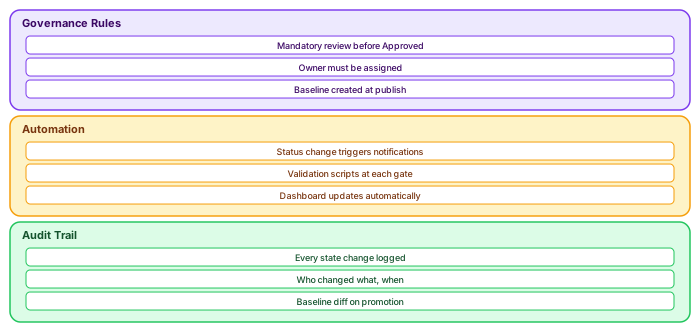
Manual lifecycle management does not scale beyond 20 architects. Automation makes it practical at enterprise scale:
Status change triggers: When an element moves from "Draft" to "In Review," the system notifies the assigned reviewer. When it moves to "Approved," a baseline is automatically created. When it moves to "Published," the element appears in WebEA views. These triggers are implemented as Sparx EA scripts bound to the element's tagged value changes.
Validation gates: Before an element can transition to "Approved," validation scripts check: all required properties are populated, the naming convention is followed, at least one relationship exists (no orphan elements), and the element appears on at least one diagram. If any check fails, the transition is blocked with a specific error message.
Audit trail: Every state change is logged with: who changed the status, when, from which state to which state, and any comments. This audit trail is stored as element history in Sparx EA and can be exported for compliance reporting.
// JavaScript: Lifecycle gate validation
function validateForApproval(elementID) {
    var el = Repository.GetElementByID(elementID);
    var errors = [];

    // Check required properties
    var requiredProps = ["Owner", "Lifecycle_Status", "Business_Criticality"];
    for (var i = 0; i < requiredProps.length; i++) {
        var tv = el.TaggedValues.GetByName(requiredProps[i]);
        if (!tv || tv.Value === "") {
            errors.push("Missing: " + requiredProps[i]);
        }
    }

    // Check naming convention
    if (!/^[A-Z]{3}_/.test(el.Name)) {
        errors.push("Naming violation: must start with 3-letter domain prefix");
    }

    // Check relationships exist
    if (el.Connectors.Count === 0) {
        errors.push("No relationships: element is orphaned");
    }

    if (errors.length > 0) {
        Session.Output("APPROVAL BLOCKED for " + el.Name + ":");
        for (var j = 0; j < errors.length; j++) {
            Session.Output("  - " + errors[j]);
        }
        return false;
    }
    return true;
}
If you’d like hands-on training tailored to your team — Sparx Enterprise Architect, BPMN, SysML, Apache Kafka or the Archi tool — or modelling coaching in ArchiMate and TOGAF-aligned governance, you can reach us via our contact page.
Frequently Asked Questions
What is Sparx Enterprise Architect used for?
Sparx Enterprise Architect (Sparx EA) is a comprehensive UML, ArchiMate, BPMN, and SysML modeling tool used for enterprise architecture, software design, requirements management, and system modeling. It supports the full architecture lifecycle from strategy through implementation.
How does Sparx EA support ArchiMate modeling?
Sparx EA natively supports ArchiMate 3.x notation through built-in MDG Technology. Architects can model all three ArchiMate layers, create viewpoints, add tagged values, trace relationships across elements, and publish HTML reports — making it one of the most popular tools for enterprise ArchiMate modeling.
What are the benefits of a centralised Sparx EA repository?
A centralised SQL Server or PostgreSQL repository enables concurrent multi-user access, package-level security, version baselines, and governance controls. It transforms Sparx EA from an individual diagramming tool into an organisation-wide architecture knowledge base.